 Red Hat Summit
Dieser Inhalt ist in der von Ihnen ausgewählten Sprache nicht verfügbar.
13.2. Rolling Upgrades Using Hot Rod (Remote Client-Server Mode)
The following process is used to perform rolling upgrades on JBoss Data Grid running in Remote Client-Server mode, using Hot Rod. This procedure is designed to upgrade the data grid itself, and does not upgrade the client application.
Prerequisite
This procedure assumes you have a cluster already configured and running, and that it is using an older version of JBoss Data Grid. This cluster is referred to below as the "Source Cluster", where as the "Target Cluster" refers to the new cluster to which data will be migrated.
Begin a new cluster (Target Cluster)
Start the Target Cluster with the new version of JBoss Data Grid.Use either different network settings or JGroups cluster name to avoid overlap with the Source Cluster.Configure the Target Cluster with a
RemoteCacheStoreThe Target Cluster is configured with aRemoteCacheStorewith the following settings for each cache to be migrated:serversmust point to the Source Cluster.cache namemust coincide with the name of the cache on the Source Cluster.hotrod-wrappingmust be enabled ("true").purgemust be disabled ("false").passivationmust be disabled ("false").
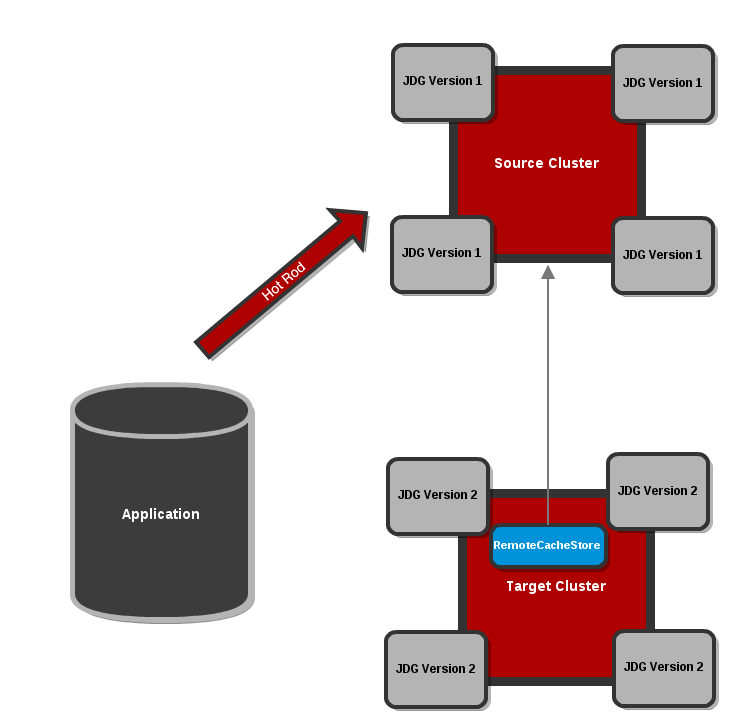
Figure 13.1. Configure the Target Cluster with a RemoteCacheStore
Note
Refer to the$JDG_HOME/server/docs/examples/configs/standalone-hotrod-rolling-upgrade.xmlfile for a full example of the Target Cluster configuration for performing Rolling Upgrades.Target Cluster configuration example assumes the Source Cluster is running withstandalone.xmlconfiguration:<subsystem xmlns="urn:jboss:datagrid:infinispan:6.1" default-cache-container="local"> <cache-container name="local" default-cache="default"> <local-cache name="default" start="EAGER"> <locking isolation="NONE" acquire-timeout="30000" concurrency-level="1000" striping="false"/> <transaction mode="NONE"/> <remote-store cache="default" socket-timeout="60000" tcp-no-delay="true" hotrod-wrapping="true"> <remote-server outbound-socket-binding="remote-store-hotrod-server"/> </remote-store> </local-cache> </cache-container> <cache-container name="security"/> </subsystem>Configure clients to point to the Target Cluster
Configure clients to point to the Target Cluster instead of the Source Cluster, restarting each client node one by one.Eventually all requests will be handled by the Target Cluster, which will lazily load data from the Source Cluster on demand. The Source Cluster is now theRemoteCacheStorefor the Target Cluster.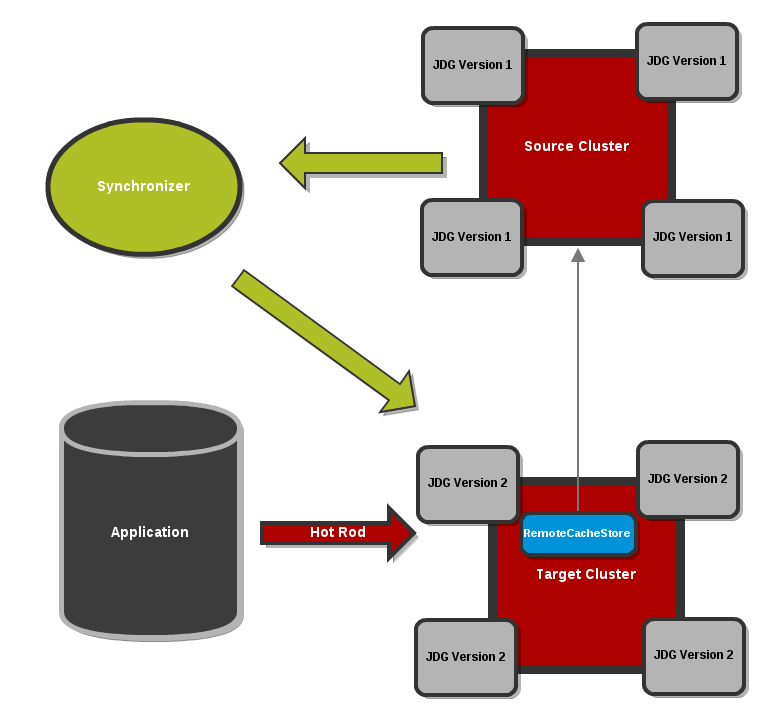
Figure 13.2. Clients point to the Target Cluster with the Source Cluster as
RemoteCacheStorefor the Target Cluster.Dump the Source Cluster keyset
When all connections are using the Target Cluster, the keyset on the Source Cluster must be dumped. This can be done using either JMX or the CLI:JMX
Invoke therecordKnownGlobalKeysetoperation on theRollingUpgradeManagerMBean on the Source Cluster for every cache that needs to be migrated.CLI
Invoke theupgrade --dumpkeyscommand on the Source Cluster for every cache that needs to be migrated, or use the--allswitch to dump all caches in the cluster.
Fetch remaining data from the Source Cluster
The Target Cluster now needs to fetch all remaining data from the Source Cluster. Again, this can be done using either JMX or CLI:JMX
Invoke thesynchronizeDataoperation and specify thehotrodparameter on theRollingUpgradeManagerMBean on the Target Cluster for every cache that needs to be migrated.CLI
Invoke theupgrade --synchronize=hotrodcommand on the Target Cluster for every cache that needs to be migrated, or use the--allswitch to synchronize all caches in the cluster.
Disabling the
RemoteCacheStoreOnce the Target Cluster has obtained all data from the Source Cluster, theRemoteCacheStoreon the Target Cluster must be disabled. This can be done as follows:JMX
Invoke thedisconnectSourceoperation specifying thehotrodparameter on theRollingUpgradeManagerMBean on the Target Cluster.CLI
Invoke theupgrade --disconnectsource=hotrodcommand on the Target Cluster.
- Decommission the Source Cluster.

'%20d='M201.5%20305.5c-13.8%200-24.9-11.1-24.9-24.6%200-13.8%2011.1-24.9%2024.9-24.9%2013.6%200%2024.6%2011.1%2024.6%2024.9%200%2013.6-11.1%2024.6-24.6%2024.6zM504%20256c0%20137-111%20248-248%20248S8%20393%208%20256%20119%208%20256%208s248%20111%20248%20248zm-132.3-41.2c-9.4%200-17.7%203.9-23.8%2010-22.4-15.5-52.6-25.5-86.1-26.6l17.4-78.3%2055.4%2012.5c0%2013.6%2011.1%2024.6%2024.6%2024.6%2013.8%200%2024.9-11.3%2024.9-24.9s-11.1-24.9-24.9-24.9c-9.7%200-18%205.8-22.1%2013.8l-61.2-13.6c-3-.8-6.1%201.4-6.9%204.4l-19.1%2086.4c-33.2%201.4-63.1%2011.3-85.5%2026.8-6.1-6.4-14.7-10.2-24.1-10.2-34.9%200-46.3%2046.9-14.4%2062.8-1.1%205-1.7%2010.2-1.7%2015.5%200%2052.6%2059.2%2095.2%20132%2095.2%2073.1%200%20132.3-42.6%20132.3-95.2%200-5.3-.6-10.8-1.9-15.8%2031.3-16%2019.8-62.5-14.9-62.5zM302.8%20331c-18.2%2018.2-76.1%2017.9-93.6%200-2.2-2.2-6.1-2.2-8.3%200-2.5%202.5-2.5%206.4%200%208.6%2022.8%2022.8%2087.3%2022.8%20110.2%200%202.5-2.2%202.5-6.1%200-8.6-2.2-2.2-6.1-2.2-8.3%200zm7.7-75c-13.6%200-24.6%2011.1-24.6%2024.9%200%2013.6%2011.1%2024.6%2024.6%2024.6%2013.8%200%2024.9-11.1%2024.9-24.6%200-13.8-11-24.9-24.9-24.9z'/%3e%3c/svg%3e)