 Red Hat Summit
Dieser Inhalt ist in der von Ihnen ausgewählten Sprache nicht verfügbar.
Chapter 4. Managing SwitchYard with JBoss EAP Management Console
4.1. JBoss EAP Management Console
Link kopierenLink in die Zwischenablage kopiert!
The JBoss EAP Management Console is a web-based administration tool for JBoss EAP 6.
Use the Management Console to start and stop servers, deploy and undeploy applications, tune system settings, and make persistent modifications to the server configuration. The Management Console also has the ability to perform administrative tasks, with live notifications when any changes require the server instance to be restarted or reloaded.
4.1.1. Log in to the Management Console
Link kopierenLink in die Zwischenablage kopiert!
Prerequisites
- JBoss EAP 6 must be running.
Navigate to the Management Console start page
Launch your web browser and navigate to the Management Console in your web browser at http://localhost:9990/console/App.htmlNote
Port 9990 is predefined as the Management Console socket binding.- Enter the username and password of the account that you created previously to log in to the Management Console login screen.
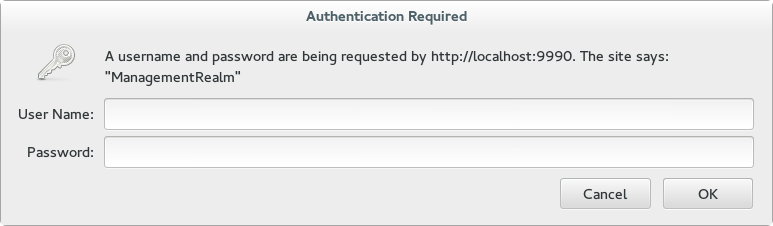
Figure 4.1. Log in screen for the Management Console
Result
Once logged in, you are redirected to the following address and the the Management Console landing page appears: http://localhost:9990/console/App.html#home
4.1.2. Deploy an Application Using the Management Console
Link kopierenLink in die Zwischenablage kopiert!
- Select the Runtime tab at the top of the console.
- Expand the menu and select to go to the Deployments panel.
- Select . A
Create Deploymentdialog box will appear. - In the dialog box, click . Browse to the file you want to deploy and select it for upload. Click to proceed.
- Verify the deployment name and runtime name that appear in the Create Deployments dialog box. Click to upload the file once the names are verified.
To enable the deployed application, select the application name in the Available Deployments table, and click . Confirm the process in the pop-up dialog.
4.1.3. SwitchYard Management Console
Link kopierenLink in die Zwischenablage kopiert!
The SwitchYard management console is integrated with the standard Red Hat JBoss Enterprise Application Platform management console and provides the following:
- A view of the applications and services deployed on the server.
- A view of various execution metrics.
- A view of the SwitchYard subsystem configuration.
SwitchYard contributes views to the standard Red Hat JBoss EAP management console's Runtime and Profile pages.
Note
This chapter contains information for standalone mode only, as JBoss Fuse Service 6.0 works does not support JBoss EAP run in domain mode.
4.2. Metrics Views
Link kopierenLink in die Zwischenablage kopiert!
SwitchYard Message Metrics can be accessed on the JBoss EAP Management Console via Runtime > Status > Subsystems > SwitchYard . This page provides a view of a comprehensive set of metrics aggregated at specific levels within the system.
You can view collected metrics at the following levels:
- System : metrics for the entire SwitchYard runtime (all deployed applications)
- Message Counts: This shows the total number of messages, number of successful messages and number of failed messages.
- Processing time: This shows the total, minimum, average and maximum processing times.
- Service : metrics for a composite service in an application. Additional metric details are provided for the following:
- Gateway: metrics for each binding on the service (For example, FTP metrics for service "ABC")
- Operation: metrics for each operation on the service
- Service Reference : metrics for references invoked by the service
- Reference : metrics for a composite reference in an application. Additional metric details are provided for the following:
- Gateway : metrics for each binding on the reference (For example, FTP metrics for reference "ABC")
- Operation : metrics for each operation on the reference
This page also provides the user with the ability to reset metrics.
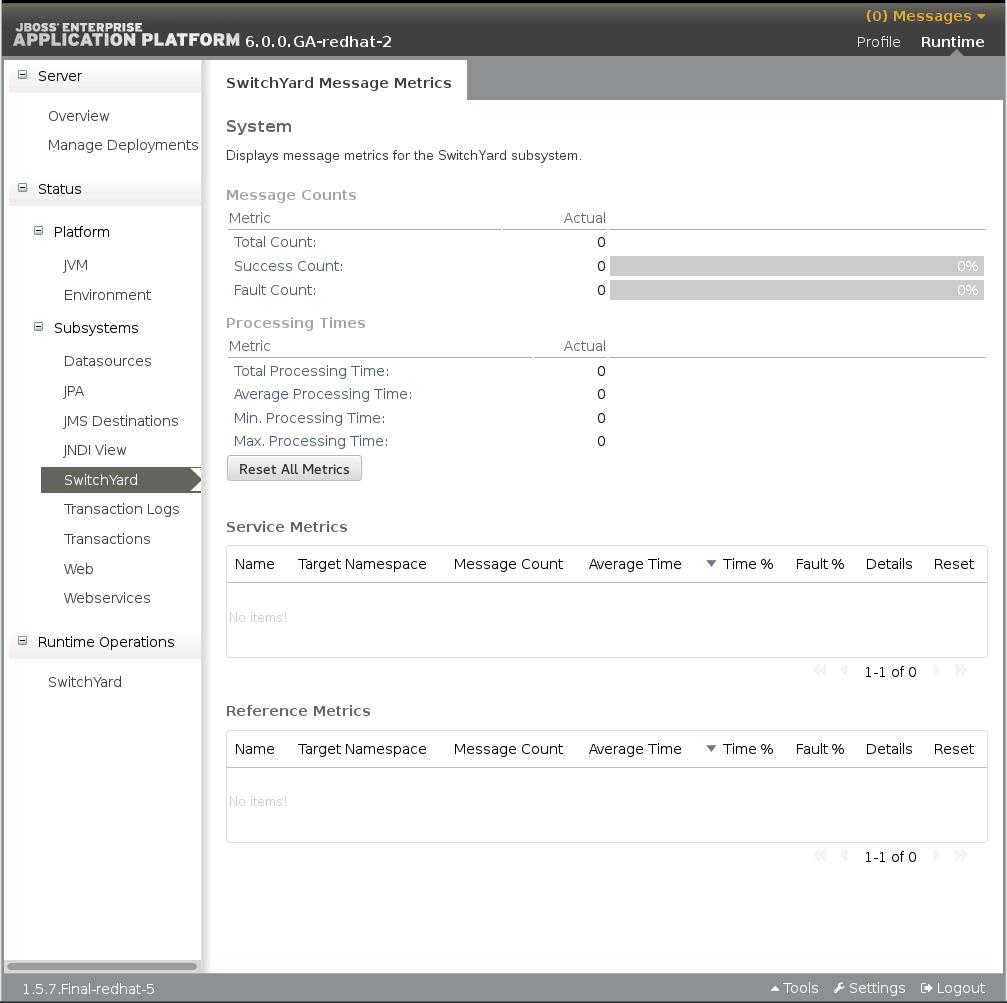
Figure 4.2. JBoss EAP Management Console SwitchYard Metrics Page
4.3. Application Views
Link kopierenLink in die Zwischenablage kopiert!
SwitchYard contributes a page to the Runtime Operations section of the JBoss EAP Management Console, which provides views detailing various aspects of SwitchYard applications running on the system. These views may be accessed by clicking Runtime > Runtime Operations > SwitchYard. The following views are provided:
- Applications: lists all SwitchYard applications deployed on the serverFor each application there is an Application Details panel. This panel contains information for each deployed SwitchYard application, and will show the details when the application is selected in the Applications list.
- Services: lists all Services provided by the applications deployed on the server
- References: lists all service References used by applications deployed on the server
- Artifacts: lists all artifacts referenced by applications deployed on the server
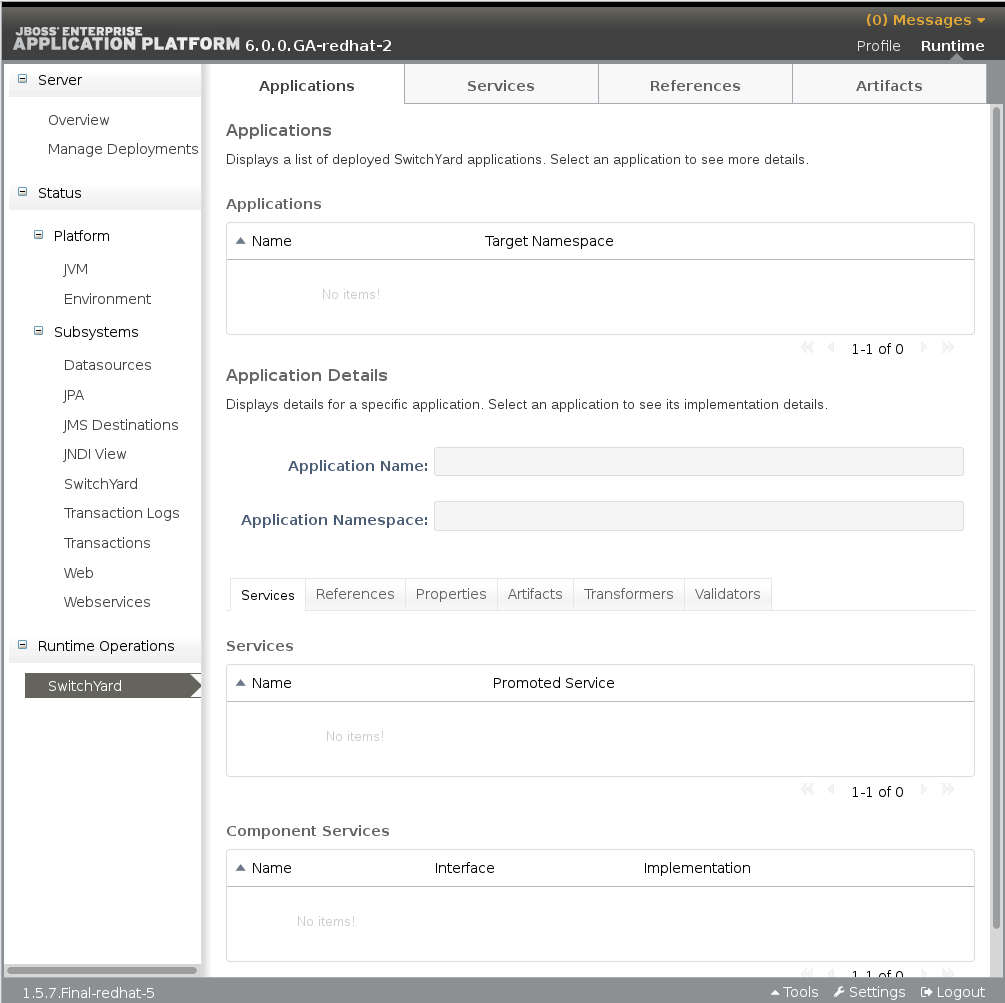
Figure 4.3. JBoss EAP Management Console Runtime Operations page
4.3.1. Applications
Link kopierenLink in die Zwischenablage kopiert!
The main tab displays all the applications deployed on the server. Select an application from the list to populate the Application Details section below. The following details are provided:
| Operation Name | Function |
|---|---|
|
Services
|
Services provided by the application. Select a service to open the tab which will display details for the service.
|
|
References
|
References used by the application. Select a reference to open the tab which will display details for the reference.
|
|
Properties
|
Properties defined in the application. The properties may also be edited within this view.
|
|
Artifacts
|
Artifacts referenced by the application. Select an artifact to open the main tab, which displays details for the artifact
|
|
Transformers
|
Transformers configured in the application.
|
|
Validators
|
Validators configured in the application.
|
The tab displays information about the services provided by the application. This information includes the services provided by the application and the component services used to implement the services.
| Operation Name | Function |
|---|---|
|
Name
|
The name of the component service
|
|
Promoted Service
|
The name of the component service providing the implementation for the service.
|
Select an item in the Name column of the Services table to open the main tab, which displays details for that service.
When you select an item in the Promoted Service column, the corresponding item in the Component Services table is highlighted. The Component Services table displays the component services defined in the application. This table provides the following details:
| Operation Name | Function |
|---|---|
|
Name
|
The name of the component service
|
|
Interface
|
The name of the component service providing the implementation for the service.
|
|
Implementation
|
Provides a link for viewing the implementation details of the component
|
Click on the button in the Implementation column to open a pop-up detailing the component's implementation. The Implementation Details dialog provides the following information:
- The technology used to implement the component (For example, Camel).
- A list of references required by the component.
- The raw configuration for the implementation.
The References tab lists all the composite references used by the application.
The Properties tab provides a list of properties defined in the application. In addition to viewing the properties, use this page to update the values for individual properties.
The Artifacts tab provides information about the artifacts referenced by the application and is comprised of a table providing the following details:
| Operation Name | Function |
|---|---|
|
Name
|
The name of the referenced artifact
|
|
URL
|
The location of the artifact.
|
The Transformers tab provides details about the transformers deployed by the application, providing the following details:
| Operation Name | Function |
|---|---|
|
From
|
The from type supported by the transformer.
|
|
To
|
The to type supported by the transformer.
|
|
Type
|
The implementation technology used by the transformer (For example Java and XSLT).
|
The Validators tab provides details about the validators deployed by the application, providing the following details:
| Operation Name | Function |
|---|---|
|
Name
|
The name of the validator.
|
|
Type
|
The type of the validator.
|
4.3.2. Services
Link kopierenLink in die Zwischenablage kopiert!
The main tab contains the Services table, which displays all services provided by the deployed applications. Select a service to populate the Service Details section below the list. The Services table shows:
| Operation Name | Function |
|---|---|
|
Name
|
The service name
|
|
Target Namespace
|
The namespace that the service is defined in.
|
The Service Details section shows the following details for the service selected in the Services table:
| Operation Name | Function |
|---|---|
|
Name
|
The service name
|
|
Target Namespace
|
The namespace that the service is defined in.
|
|
Application
|
The application providing the service (this links to the main Applications tab)
|
|
Interface
|
The interface provided by the service.
|
|
Promoted Service
|
The component service implementing the service
|
|
Gateways
|
Lists the gateways providing access to the service
|
|
Throttling
|
Throttling configuration for the service
|
The tab in the details section provides the following information for each of the gateways provided for the service:
| Operation Name | Function |
|---|---|
|
Name
|
The name pf the gateway.
|
|
Type
|
The type of the gateway (For example, SOAP and HornetQ)
|
|
Status
|
The status of the gateway (For example, started, stopped)
|
|
Start/Stop
|
Click the button to start or stop the gateway.
|
|
Configuration
|
The component service implementing the service
|
|
Gateways
|
Click the button to open a dialog that displays the raw configuration for the gateway
|
The tab in the details section allows the user to view throttling details for the service.
| Operation Name | Function |
|---|---|
|
Edit
|
Switch to edit mode, allowing the user to change the throttling configuration.
|
|
Enable
|
Enable/disable throttling for the service
|
|
Status
|
The status of the gateway (For example, started, stopped)
|
|
Start/Stop
|
Click the button to start or stop the gateway.
|
|
Maximum Requests
|
The maximum number of requests per period before throttling occurs
|
|
Time Period
|
The time period over which requests are counted (cannot be edited)
|
4.3.3. References
Link kopierenLink in die Zwischenablage kopiert!
The main tab displays all service references used by the deployed applications. Select a reference from the References table to populate the Reference Details section. The References table contains:
| Operation Name | Function |
|---|---|
|
Name
|
The name of the reference
|
|
Namespace
|
The namespace that the reference is defined in.
|
The Reference Details contain:
| Operation Name | Function |
|---|---|
|
Name
|
The name of the reference
|
|
Namespace
|
The namespace that the reference is defined in.
|
|
Application
|
The application containing the reference (this links to the main tab)
|
|
Interface
|
The interface provided by the reference.
|
The section provides the following information for each of the gateways configured for the reference:
| Operation Name | Function |
|---|---|
|
Name
|
The name of the gateway
|
|
Type
|
The type of the gateway (For example, SOAP, HornetQ)
|
|
Status
|
The status of the gateway (For example, started, stopped)
|
|
Start/Stop
|
Click the button to start or stop the gateway
|
|
Configuration
|
Click the button to open a dialog displaying the raw configuration for the gateway
|
4.3.4. Artifacts
Link kopierenLink in die Zwischenablage kopiert!
The main tab displays all artifacts referenced by applications deployed to the system. Selecting a specific artifact reference will populate the Applications Using Artifact table. Selecting an application in the applications table will navigate to the main tab.
4.4. SwitchYard Runtime Details
Link kopierenLink in die Zwischenablage kopiert!
The JBoss EAP management console contains a SwitchYard Runtime Details page, which can be accessed by selecting the > > > node. This page displays details about components in the SwitchYard subsystem configured in JBoss EAP. When a component is selected from the list, the Component Details section is populated. The following details are displayed:
- Name: the component name, for example, SOAP, Camel.
- The Configured Properties section providing component specific details. For most components, this section lists any configurable properties and their current settings.
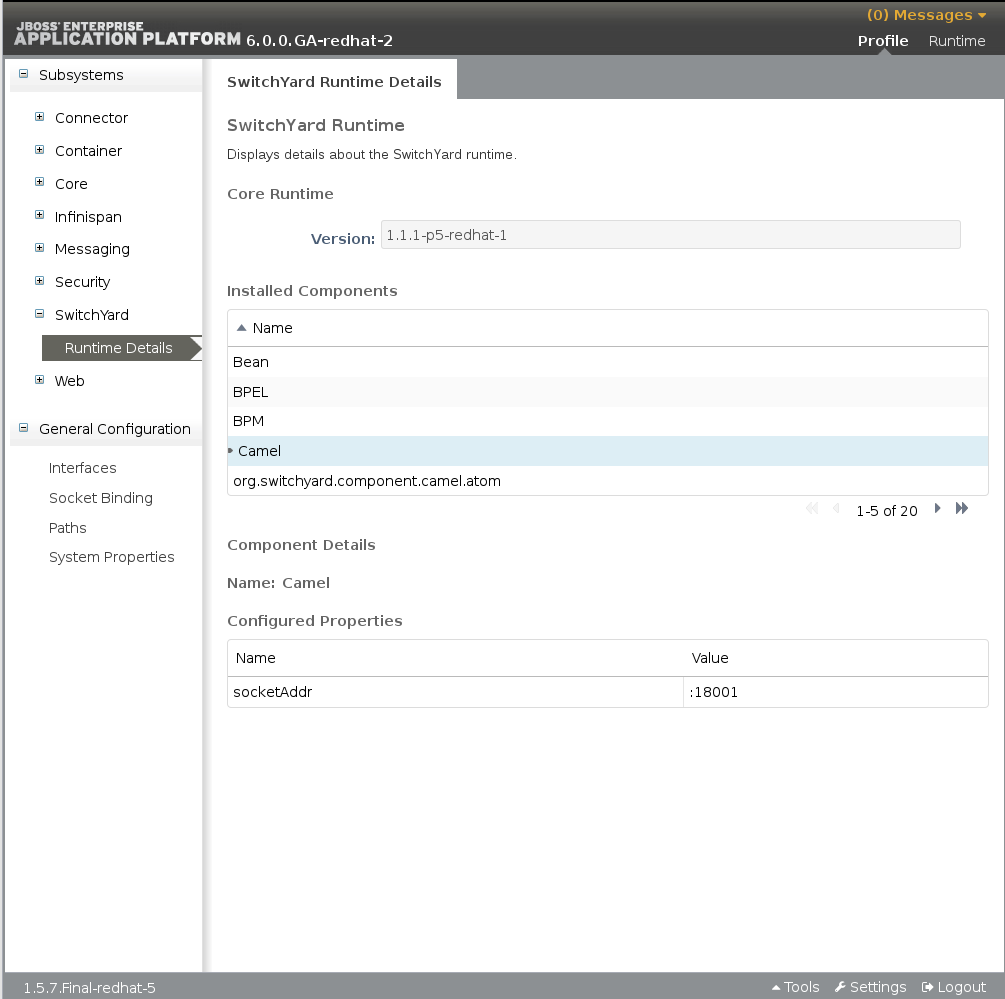
Figure 4.4. JBoss EAP Management Console SwitchYard Runtime Details Page

'%20d='M201.5%20305.5c-13.8%200-24.9-11.1-24.9-24.6%200-13.8%2011.1-24.9%2024.9-24.9%2013.6%200%2024.6%2011.1%2024.6%2024.9%200%2013.6-11.1%2024.6-24.6%2024.6zM504%20256c0%20137-111%20248-248%20248S8%20393%208%20256%20119%208%20256%208s248%20111%20248%20248zm-132.3-41.2c-9.4%200-17.7%203.9-23.8%2010-22.4-15.5-52.6-25.5-86.1-26.6l17.4-78.3%2055.4%2012.5c0%2013.6%2011.1%2024.6%2024.6%2024.6%2013.8%200%2024.9-11.3%2024.9-24.9s-11.1-24.9-24.9-24.9c-9.7%200-18%205.8-22.1%2013.8l-61.2-13.6c-3-.8-6.1%201.4-6.9%204.4l-19.1%2086.4c-33.2%201.4-63.1%2011.3-85.5%2026.8-6.1-6.4-14.7-10.2-24.1-10.2-34.9%200-46.3%2046.9-14.4%2062.8-1.1%205-1.7%2010.2-1.7%2015.5%200%2052.6%2059.2%2095.2%20132%2095.2%2073.1%200%20132.3-42.6%20132.3-95.2%200-5.3-.6-10.8-1.9-15.8%2031.3-16%2019.8-62.5-14.9-62.5zM302.8%20331c-18.2%2018.2-76.1%2017.9-93.6%200-2.2-2.2-6.1-2.2-8.3%200-2.5%202.5-2.5%206.4%200%208.6%2022.8%2022.8%2087.3%2022.8%20110.2%200%202.5-2.2%202.5-6.1%200-8.6-2.2-2.2-6.1-2.2-8.3%200zm7.7-75c-13.6%200-24.6%2011.1-24.6%2024.9%200%2013.6%2011.1%2024.6%2024.6%2024.6%2013.8%200%2024.9-11.1%2024.9-24.6%200-13.8-11-24.9-24.9-24.9z'/%3e%3c/svg%3e)