 Red Hat Summit
Chapter 7. Asset Repository
Business Rules, Process definition files and other assets and resources created in Business Central are stored in Asset repository, which is otherwise known as the Knowledge Store.
Knowledge Store is a centralized repository for your business knowledge. It connects with the Git repository that allows you to store different kinds of knowledge assets and artifacts at a single location. Business Central provides a web front-end that allows you to view and update the stored content. You can access it using the Project Explorer from the unified environment of Red Hat JBoss BPM Suite.
All business assets are stored in repositories. These repositories are then saved in directories called organizational units. By default, the Artifact repository does not contain any organizational unit. Therefore, to be able to create your own business assets, you need to create an organizational unit and a repository first.
7.1. Creating an Organizational Unit
It is possible to create an organizational unit either in the Administration perspective of Business Central, using the kie-config-cli tool or the REST API calls.
Creating an Organizational Unit in Business Central
Note that only users with the admin role in Business Central can create organizational units.
Procedure: Using Business Central to Create an Organizational Unit
-
In Business Central, go to Authoring
Administration. -
On the perspective menu, click Organizational Units
Manage Organizational Units. In the Organization Unit Manager view, click Add.
The Add New Organizational Unit dialog window opens.
Figure 7.1. Add New Organizational Unit_Dialog Window
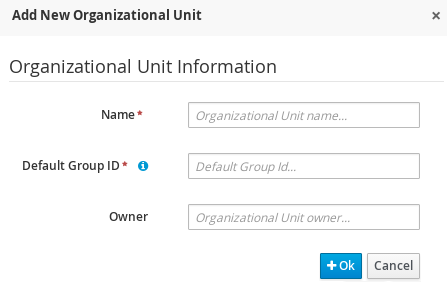
- Enter the two mandatory parameters (name and default group ID) and click Ok.
Creating an Organizational Unit Using the kie-config-cli Tool
Organizational units can be created using the kie-config-cli tool as well. To do so, run the create-org-unit command. The tool then guides you through the entire process of creating an organizational unit by asking for other required parameters. Type help for a list of all commands.
For more information about the kie-config-cli tool, see Chapter 4, Command Line Configuration.
Creating an Organizational Unit Using the REST API
Note that only users with the rest-all role can create organizational units.
To create an organizational unit in Knowledge Store, issue the POST REST API call. Details of the organizational unit are defined by the JSON entity.
Input parameter of the call is a OrganizationalUnit instance. Call returns a CreateOrganizationalUnitRequest instance.
Example 7.1. Creating an Organizational Unit Using the Curl Utility
Example JSON entity containing details of an organizational unit to be created:
{
  "name"         : "helloWorldUnit",
  "owner"        : "tester",
  "description"  :  null,
  "repositories" :  []
}
Execute the following command:
curl -X POST 'localhost:8080/business-central/rest/organizationalunits/' -u USERNAME:PASSWORD -H 'Accept: application/json' -H 'Content-Type: application/json' -d '{"name":"helloWorldUnit","owner":"tester","description":null,"repositories":[]}'For further information, refer to chapter Knowledge Store REST API, section Organizational Unit Calls of Red Hat JBoss BPM Suite Development Guide.

'%20d='M201.5%20305.5c-13.8%200-24.9-11.1-24.9-24.6%200-13.8%2011.1-24.9%2024.9-24.9%2013.6%200%2024.6%2011.1%2024.6%2024.9%200%2013.6-11.1%2024.6-24.6%2024.6zM504%20256c0%20137-111%20248-248%20248S8%20393%208%20256%20119%208%20256%208s248%20111%20248%20248zm-132.3-41.2c-9.4%200-17.7%203.9-23.8%2010-22.4-15.5-52.6-25.5-86.1-26.6l17.4-78.3%2055.4%2012.5c0%2013.6%2011.1%2024.6%2024.6%2024.6%2013.8%200%2024.9-11.3%2024.9-24.9s-11.1-24.9-24.9-24.9c-9.7%200-18%205.8-22.1%2013.8l-61.2-13.6c-3-.8-6.1%201.4-6.9%204.4l-19.1%2086.4c-33.2%201.4-63.1%2011.3-85.5%2026.8-6.1-6.4-14.7-10.2-24.1-10.2-34.9%200-46.3%2046.9-14.4%2062.8-1.1%205-1.7%2010.2-1.7%2015.5%200%2052.6%2059.2%2095.2%20132%2095.2%2073.1%200%20132.3-42.6%20132.3-95.2%200-5.3-.6-10.8-1.9-15.8%2031.3-16%2019.8-62.5-14.9-62.5zM302.8%20331c-18.2%2018.2-76.1%2017.9-93.6%200-2.2-2.2-6.1-2.2-8.3%200-2.5%202.5-2.5%206.4%200%208.6%2022.8%2022.8%2087.3%2022.8%20110.2%200%202.5-2.2%202.5-6.1%200-8.6-2.2-2.2-6.1-2.2-8.3%200zm7.7-75c-13.6%200-24.6%2011.1-24.6%2024.9%200%2013.6%2011.1%2024.6%2024.6%2024.6%2013.8%200%2024.9-11.1%2024.9-24.6%200-13.8-11-24.9-24.9-24.9z'/%3e%3c/svg%3e)