 Red Hat Summit
Part III. User Management
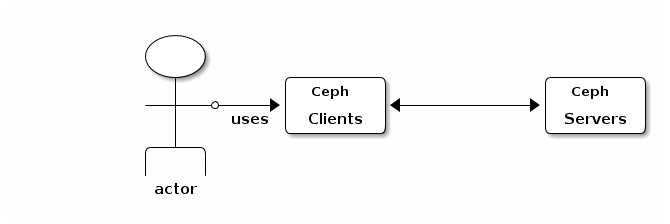
This section describes Ceph client users, and their authentication and authorization with the Red Hat Ceph Storage cluster. Users are either individuals or system actors such as applications, which use Ceph clients to interact with the Red Hat Ceph Storage cluster daemons.
When Ceph runs with authentication and authorization enabled (enabled by default), you must specify a user name and a keyring containing the secret key of the specified user (usually via the command line). If you do not specify a user name, Ceph will use the client.admin administrative user as the default user name. If you do not specify a keyring, Ceph will look for a keyring via the keyring setting in the Ceph configuration. For example, if you execute the ceph health command without specifying a user or keyring:
ceph healthCeph interprets the command like this:
ceph -n client.admin --keyring=/etc/ceph/ceph.client.admin.keyring health
Alternatively, you may use the CEPH_ARGS environment variable to avoid re-entry of the user name and secret.
For details on configuring the Red Hat Ceph Storage cluster to use authentication, see the Red Hat Ceph Configuration Guide.

'%20d='M201.5%20305.5c-13.8%200-24.9-11.1-24.9-24.6%200-13.8%2011.1-24.9%2024.9-24.9%2013.6%200%2024.6%2011.1%2024.6%2024.9%200%2013.6-11.1%2024.6-24.6%2024.6zM504%20256c0%20137-111%20248-248%20248S8%20393%208%20256%20119%208%20256%208s248%20111%20248%20248zm-132.3-41.2c-9.4%200-17.7%203.9-23.8%2010-22.4-15.5-52.6-25.5-86.1-26.6l17.4-78.3%2055.4%2012.5c0%2013.6%2011.1%2024.6%2024.6%2024.6%2013.8%200%2024.9-11.3%2024.9-24.9s-11.1-24.9-24.9-24.9c-9.7%200-18%205.8-22.1%2013.8l-61.2-13.6c-3-.8-6.1%201.4-6.9%204.4l-19.1%2086.4c-33.2%201.4-63.1%2011.3-85.5%2026.8-6.1-6.4-14.7-10.2-24.1-10.2-34.9%200-46.3%2046.9-14.4%2062.8-1.1%205-1.7%2010.2-1.7%2015.5%200%2052.6%2059.2%2095.2%20132%2095.2%2073.1%200%20132.3-42.6%20132.3-95.2%200-5.3-.6-10.8-1.9-15.8%2031.3-16%2019.8-62.5-14.9-62.5zM302.8%20331c-18.2%2018.2-76.1%2017.9-93.6%200-2.2-2.2-6.1-2.2-8.3%200-2.5%202.5-2.5%206.4%200%208.6%2022.8%2022.8%2087.3%2022.8%20110.2%200%202.5-2.2%202.5-6.1%200-8.6-2.2-2.2-6.1-2.2-8.3%200zm7.7-75c-13.6%200-24.6%2011.1-24.6%2024.9%200%2013.6%2011.1%2024.6%2024.6%2024.6%2013.8%200%2024.9-11.1%2024.9-24.6%200-13.8-11-24.9-24.9-24.9z'/%3e%3c/svg%3e)