 Red Hat Summit
Chapter 5. Storage classes
5.1. Storage classes
Storage classes define how object data is placed and managed in the Ceph Object Gateway (RGW). They map objects to specific placement targets and support cost- and performance-optimized tiering, specially when used with the S3 bucket lifecycle transitions.
All placement targets include the STANDARD storage class, which is applied to new objects by default. Users can override this default by setting the default_storage_class value. To store an object in a non-default storage class, specify the storage class name in the request header:
-
S3 protocol:
X-Amz-Storage-Class -
Swift protocol:
X-Object-Storage-Class
S3 Object Lifecycle Management can then automate transitions between storage classes using Transition actions. jjksdfjhsdjf kakhsdkhsa sdasdfas
When using AWS S3 SDKs (for example, boto3), storage class names must match AWS naming conventions. Otherwise, the SDK might drop the request or raise an exception. Some SDKs also expect AWS-specific behavior when names such as GLACIER are used, which can cause failures when accessing Ceph RGW.
To avoid these issues, Ceph recommends using alternative storage class names such as:
-
INTELLIGENT-TIERING -
STANDARD_IA -
REDUCED_REDUNDANCY -
ONEZONE_IA
Custom storage classes, such as CHEAPNDEEP, are accepted by Ceph but might not be recognized by some S3 clients or libraries.
5.1.1. Use cases
Storage classes are commonly used in the following scenarios to optimize data placement, cost, and performance:
- Moving infrequently accessed objects to low-cost pools using automated lifecycle transitions.
- Assigning latency-sensitive or frequently accessed workloads to faster pools, such as NVMe-backed pools.
-
Creating custom storage classes for compliance, isolation, or application-specific data placement (for example,
APP_LOGS,ML_DATA). -
Automating multi-tier transitions, such as
STANDARDSTANDARD_IAarchival pool, based on object age or access patterns. - Applying different durability or resiliency profiles by mapping storage classes to pools with varying replication or erasure coding settings.
- Separating workloads (analytics, logging, or backup) into pools optimized for compression, durability, or cost models.
Add a new storage class to a placement target in the IBM Storage Ceph Object Gateway and map it to a data pool and compression settings.
5.1.1.1. Prerequisites
Before you begin, ensure that the following requirements are met:
-
You have administrator privileges to run
radosgw-admincommands. - The zonegroup and zone are already configured in the Ceph Object Gateway.
-
The required data pool (for example,
default.rgw.glacier.data) exists in the Ceph cluster. -
The
radosgw-admintool is installed and available on the system where you run the commands.
5.1.1.2. Procedure
Add the new storage class to the zonegroup placement target.
Syntax
radosgw-admin zonegroup placement add \
  --rgw-zonegroup default \
  --placement-id default-placement \
  --storage-class STANDARD_IA
Example
radosgw-admin zonegroup placement add \
  --rgw-zonegroup prod-zonegroup \
  --placement-id app-placement \
  --storage-class APP_LOGS
This command updates the zonegroup placement configuration to include the new storage class.
Define the zone-specific placement configuration for the storage class.
Syntax
radosgw-admin zone placement add \
  --rgw-zone default \
  --placement-id default-placement \
  --storage-class STANDARD_IA \
  --data-pool default.rgw.glacier.data \
  --compression lz4
Example
radosgw-admin zone placement add \
  --rgw-zone prod-zone \
  --placement-id app-placement \
  --storage-class APP_LOGS \
  --data-pool prod.rgw.logs.data \
  --compression lz4
This command maps the storage class to the specified data pool with the selected compression algorithm.
5.1.1.3. Result
The new storage class is now available for use in the specified placement target. You can specify it when uploading objects using S3 headers or reference it in S3 Bucket Lifecycle transition rules.
5.2. High availability for the Ceph Object Gateway
As a storage administrator, you can assign many instances of the Ceph Object Gateway to a single zone. This allows you to scale out as the load increases, that is, the same zone group and zone; however, you do not need a federated architecture to use a highly available proxy. Since each Ceph Object Gateway daemon has its own IP address, you can use the ingress service to balance the load across many Ceph Object Gateway daemons or nodes. The ingress service manages HAProxy and keepalived daemons for the Ceph Object Gateway environment. You can also terminate HTTPS traffic at the HAProxy server, and use HTTP between the HAProxy server and the Beast front-end web server instances for the Ceph Object Gateway.
Prerequisites
- At least two Ceph Object Gateway daemons running on different hosts.
-
Capacity for at least two instances of the
ingressservice running on different hosts.
5.2.1. High availability service
The ingress service provides a highly available endpoint for the Ceph Object Gateway. The ingress service can be deployed to any number of hosts as needed. Red Hat recommends having at least two supported Red Hat Enterprise Linux servers, each server configured with the ingress service. You can run a high availability (HA) service with a minimum set of configuration options. The Ceph orchestrator deploys the ingress service, which manages the haproxy and keepalived daemons, by providing load balancing with a floating virtual IP address. The active haproxy distributes all Ceph Object Gateway requests to all the available Ceph Object Gateway daemons.
A virtual IP address is automatically configured on one of the ingress hosts at a time, known as the primary host. The Ceph orchestrator selects the first network interface based on existing IP addresses that are configured as part of the same subnet. In cases where the virtual IP address does not belong to the same subnet, you can define a list of subnets for the Ceph orchestrator to match with existing IP addresses. If the keepalived daemon and the active haproxy are not responding on the primary host, then the virtual IP address moves to a backup host. This backup host becomes the new primary host.
Currently, you can not configure a virtual IP address on a network interface that does not have a configured IP address.
To use the secure socket layer (SSL), SSL must be terminated by the ingress service and not at the Ceph Object Gateway.
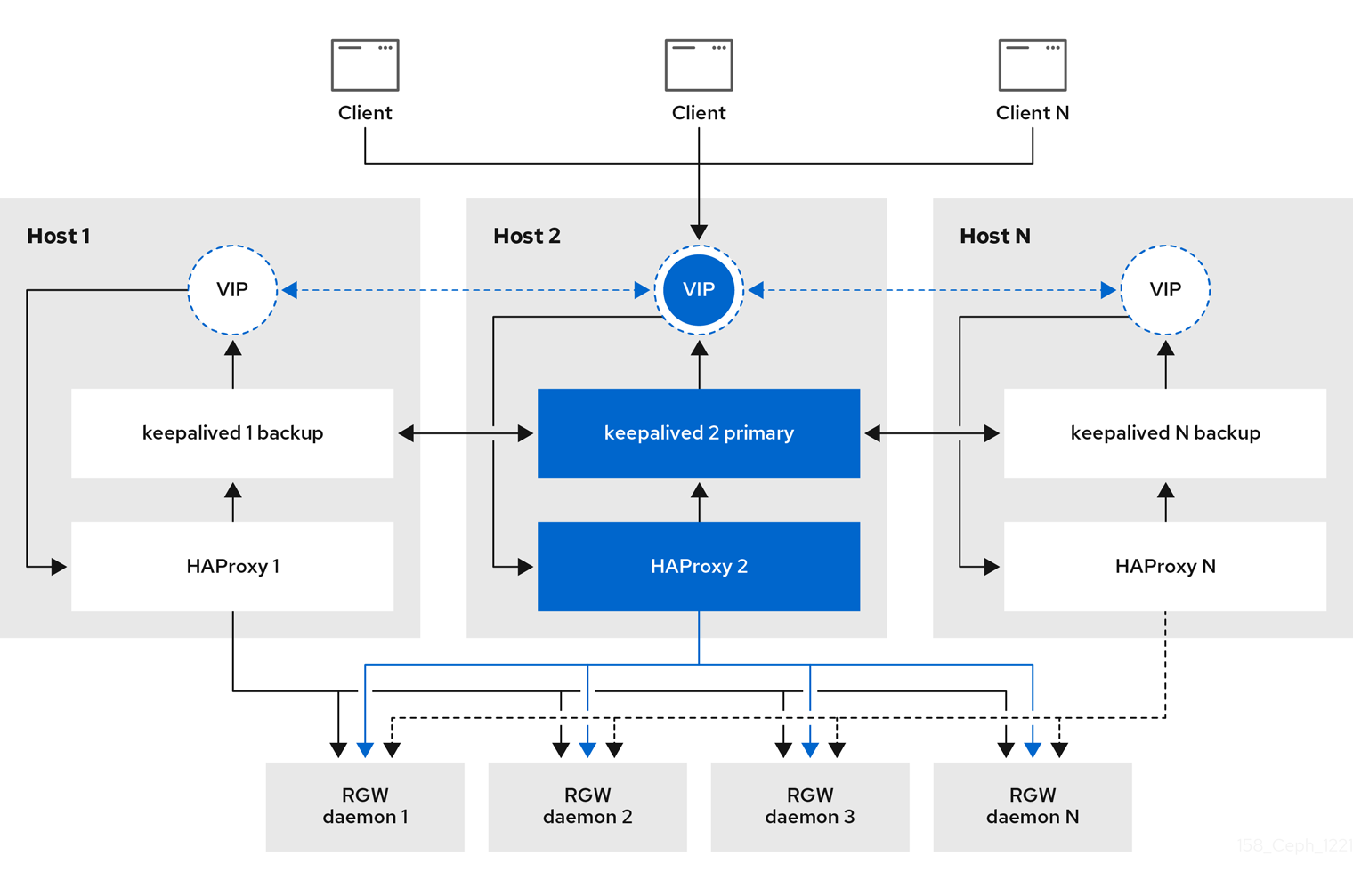
5.2.2. Configuring high availability for the Ceph Object Gateway
To configure high availability (HA) for the Ceph Object Gateway you write a YAML configuation file, and the Ceph orchestrator does the installation, configuraton, and management of the ingress service. The ingress service uses the haproxy and keepalived daemons to provide high availability for the Ceph Object Gateway.
With the Ceph 8.0 release, you can now deploy an ingress service with RGW as the backend, where the "use_tcp_mode_over_rgw" option is set to true in the "spec" section of the ingress specification.
Prerequisites
-
A minimum of two hosts running Red Hat Enterprise Linux 9, or higher, for installing the
ingressservice on. - A healthy running Red Hat Ceph Storage cluster.
- A minimum of two Ceph Object Gateway daemons running on different hosts.
-
Root-level access to the host running the
ingressservice. - If using a firewall, then open port 80 for HTTP and port 443 for HTTPS traffic.
Procedure
Create a new
ingress.yamlfile:Example
[root@host01 ~] touch ingress.yamlOpen the
ingress.yamlfile for editing. Add the following options, and add values applicable to the environment:Syntax
service_type: ingress1 service_id: SERVICE_ID2 placement:3 hosts: - HOST1 - HOST2 - HOST3 spec: backend_service: SERVICE_ID virtual_ip: IP_ADDRESS/CIDR4 frontend_port: INTEGER5 monitor_port: INTEGER6 virtual_interface_networks:7 - IP_ADDRESS/CIDR ssl_cert: |8 - 1
- Must be set to
ingress. - 2
- Must match the existing Ceph Object Gateway service name.
- 3
- Where to deploy the
haproxyandkeepalivedcontainers. - 4
- The virtual IP address where the
ingressservice is available. - 5
- The port to access the
ingressservice. - 6
- The port to access the
haproxyload balancer status. - 7
- Optional list of available subnets.
- 8
- Optional SSL certificate and private key.
Example of providing an SSL cert
service_type: ingress
service_id: rgw.foo
placement:
  hosts:
    - host01.example.com
    - host02.example.com
    - host03.example.com
spec:
  backend_service: rgw.foo
  virtual_ip: 192.168.1.2/24
  frontend_port: 8080
  monitor_port: 1967
  virtual_interface_networks:
    - 10.10.0.0/16
  ssl_cert: |
    -----BEGIN CERTIFICATE-----
    MIIEpAIBAAKCAQEA+Cf4l9OagD6x67HhdCy4Asqw89Zz9ZuGbH50/7ltIMQpJJU0
    gu9ObNtIoC0zabJ7n1jujueYgIpOqGnhRSvsGJiEkgN81NLQ9rqAVaGpadjrNLcM
    bpgqJCZj0vzzmtFBCtenpb5l/EccMFcAydGtGeLP33SaWiZ4Rne56GBInk6SATI/
    JSKweGD1y5GiAWipBR4C74HiAW9q6hCOuSdp/2WQxWT3T1j2sjlqxkHdtInUtwOm
    j5Ism276IndeQ9hR3reFR8PJnKIPx73oTBQ7p9CMR1J4ucq9Ny0J12wQYT00fmJp
    -----END CERTIFICATE-----
    -----BEGIN PRIVATE KEY-----
    MIIEBTCCAu2gAwIBAgIUGfYFsj8HyA9Zv2l600hxzT8+gG4wDQYJKoZIhvcNAQEL
    BQAwgYkxCzAJBgNVBAYTAklOMQwwCgYDVQQIDANLQVIxDDAKBgNVBAcMA0JMUjEM
    MAoGA1UECgwDUkhUMQswCQYDVQQLDAJCVTEkMCIGA1UEAwwbY2VwaC1zc2wtcmhj
    czUtOGRjeHY2LW5vZGU1MR0wGwYJKoZIhvcNAQkBFg5hYmNAcmVkaGF0LmNvbTAe
    -----END PRIVATE KEY-----
Example of not providing an SSL cert
service_type: ingress

service_id: rgw.ssl    # adjust to match your existing RGW service
placement:
  hosts:
    - hostname1
    - hostname2
spec:
  backend_service: rgw.rgw.ssl.ceph13   # adjust to match your existing RGW service
  virtual_ip: IP_ADDRESS/CIDR           # ex: 192.168.20.1/24
  frontend_port: INTEGER                # ex: 443
  monitor_port: INTEGER                 # ex: 1969
  use_tcp_mode_over_rgw: True
Launch the Cephadm shell:
Example
[root@host01 ~]# cephadm shell --mount ingress.yaml:/var/lib/ceph/radosgw/ingress.yamlConfigure the latest
haproxyandkeepalivedimages:Syntax
ceph config set mgr mgr/cephadm/container_image_haproxy HAPROXY_IMAGE_ID
ceph config set mgr mgr/cephadm/container_image_keepalived KEEPALIVED_IMAGE_ID
Red Hat Enterprise Linux 9
[ceph: root@host01 /]# ceph config set mgr mgr/cephadm/container_image_haproxy registry.redhat.io/rhceph/rhceph-haproxy-rhel9:latest
[ceph: root@host01 /]# ceph config set mgr mgr/cephadm/container_image_keepalived registry.redhat.io/rhceph/keepalived-rhel9:latest
Install and configure the new
ingressservice using the Ceph orchestrator:[ceph: root@host01 /]# ceph orch apply -i /var/lib/ceph/radosgw/ingress.yamlAfter the Ceph orchestrator completes, verify the HA configuration.
On the host running the
ingressservice, check that the virtual IP address appears:Example
[root@host01 ~]# ip addr showTry reaching the Ceph Object Gateway from a Ceph client:
Syntax
wget HOST_NAMEExample
[root@client ~]# wget host01.example.comIf this returns an
index.htmlwith similar content as in the example below, then the HA configuration for the Ceph Object Gateway is working properly.Example
<?xml version="1.0" encoding="UTF-8"?>
	<ListAllMyBucketsResult xmlns="http://s3.amazonaws.com/doc/2006-03-01/">
		<Owner>
			<ID>anonymous</ID>
			<DisplayName></DisplayName>
		</Owner>
		<Buckets>
		</Buckets>
	</ListAllMyBucketsResult>

'%20d='M201.5%20305.5c-13.8%200-24.9-11.1-24.9-24.6%200-13.8%2011.1-24.9%2024.9-24.9%2013.6%200%2024.6%2011.1%2024.6%2024.9%200%2013.6-11.1%2024.6-24.6%2024.6zM504%20256c0%20137-111%20248-248%20248S8%20393%208%20256%20119%208%20256%208s248%20111%20248%20248zm-132.3-41.2c-9.4%200-17.7%203.9-23.8%2010-22.4-15.5-52.6-25.5-86.1-26.6l17.4-78.3%2055.4%2012.5c0%2013.6%2011.1%2024.6%2024.6%2024.6%2013.8%200%2024.9-11.3%2024.9-24.9s-11.1-24.9-24.9-24.9c-9.7%200-18%205.8-22.1%2013.8l-61.2-13.6c-3-.8-6.1%201.4-6.9%204.4l-19.1%2086.4c-33.2%201.4-63.1%2011.3-85.5%2026.8-6.1-6.4-14.7-10.2-24.1-10.2-34.9%200-46.3%2046.9-14.4%2062.8-1.1%205-1.7%2010.2-1.7%2015.5%200%2052.6%2059.2%2095.2%20132%2095.2%2073.1%200%20132.3-42.6%20132.3-95.2%200-5.3-.6-10.8-1.9-15.8%2031.3-16%2019.8-62.5-14.9-62.5zM302.8%20331c-18.2%2018.2-76.1%2017.9-93.6%200-2.2-2.2-6.1-2.2-8.3%200-2.5%202.5-2.5%206.4%200%208.6%2022.8%2022.8%2087.3%2022.8%20110.2%200%202.5-2.2%202.5-6.1%200-8.6-2.2-2.2-6.1-2.2-8.3%200zm7.7-75c-13.6%200-24.6%2011.1-24.6%2024.9%200%2013.6%2011.1%2024.6%2024.6%2024.6%2013.8%200%2024.9-11.1%2024.9-24.6%200-13.8-11-24.9-24.9-24.9z'/%3e%3c/svg%3e)