 Red Hat Summit
Chapter 2. Installing Red Hat Developer Hub using Helm Chart
You can use a Helm Chart in Red Hat OpenShift (OpenShift) to install Red Hat Developer Hub, which is a flexible installation method.
Helm is a package manager on OpenShift that provides the following features:
- Applies regular application updates using custom hooks
- Manages the installation of complex applications
- Provides charts that you can host on public and private servers
- Supports rolling back to previous application versions
The Red Hat Developer Hub Helm Chart is available in the Helm catalog in Red Hat OpenShift Dedicated and OpenShift Container Platform (OCP).
Prerequisites
- You are logged in to the OCP using the OpenShift web console.
- You have configured the appropriate roles and permissions within your project to create an application.
Procedure
Create a project in the OpenShift, if not present.
For more information about creating a project in OpenShift, see Red Hat OpenShift documentation.
- Switch to Developer mode on your Red Hat OpenShift web console.
- Click +Add.
- From the Developer Catalog panel, click Helm Chart.
- Search for Developer Hub in the search bar and select the Red Hat Developer Hub card.
- Click Create.
-
Copy the OpenShift router host (for example:
apps.<clusterName>.com) to Root Schemaglobal Shorthand for users who do not want to specify a custom HOSTNAME. Used ONLY with the DEFAULT upstream.backstage.appConfig value and with OCP Route enabled., and adjust the other values if needed. Alternatively, copy the OpenShift router host (for example:
apps.<clusterName>.com) toglobal.clusterRouterBase, and adjust other values if needed, such asglobal.clusterRouterBase: apps.example.com.In the previous steps, the information about the host is copied, which is accessed by the Developer Hub backend.
When an OCP route is generated automatically, the host value for the route is inferred and the same host information is sent to the Developer Hub. Also, if the Developer Hub is present on a custom domain by setting the host manually using values, the custom host takes precedence.
- Click Create and wait for the database and Red Hat Developer Hub to start.
Click the Open URL option to start using the Red Hat Developer Hub platform.
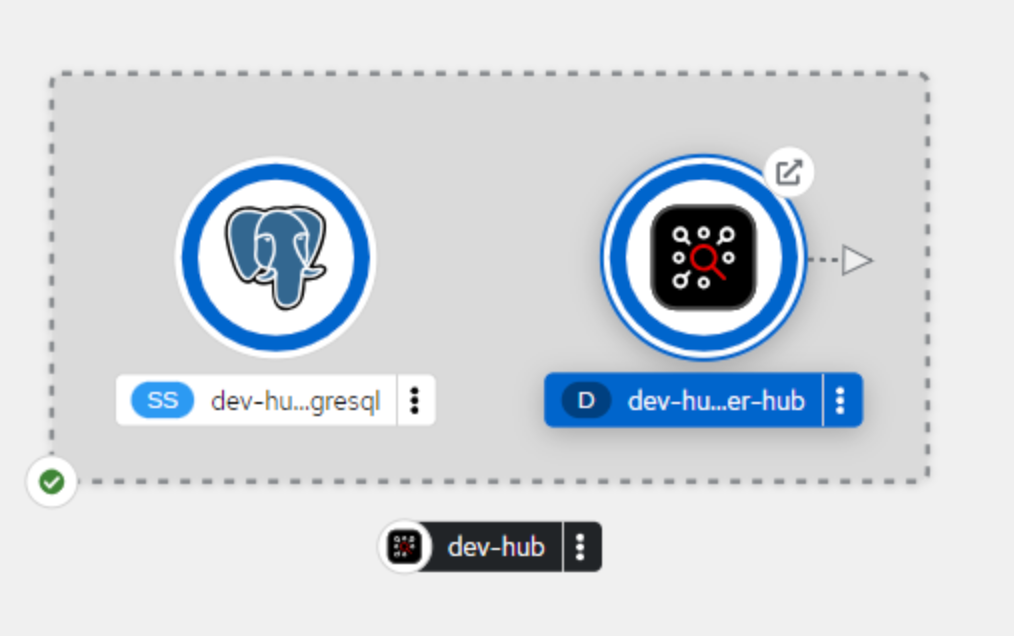
If your developer-hub pod is stuck in a CrashLoopBackOff and you see the following logs:
Loaded config from app-config-from-configmap.yaml, env
...
2023-07-24T19:44:46.223Z auth info Configuring "database" as KeyStore provider type=plugin
Backend failed to start up Error: Missing required config value at 'backend.database.client'
Then, verify the configuration files. This is because the configuration files are not being accessed by the RHDH container.

'%20d='M201.5%20305.5c-13.8%200-24.9-11.1-24.9-24.6%200-13.8%2011.1-24.9%2024.9-24.9%2013.6%200%2024.6%2011.1%2024.6%2024.9%200%2013.6-11.1%2024.6-24.6%2024.6zM504%20256c0%20137-111%20248-248%20248S8%20393%208%20256%20119%208%20256%208s248%20111%20248%20248zm-132.3-41.2c-9.4%200-17.7%203.9-23.8%2010-22.4-15.5-52.6-25.5-86.1-26.6l17.4-78.3%2055.4%2012.5c0%2013.6%2011.1%2024.6%2024.6%2024.6%2013.8%200%2024.9-11.3%2024.9-24.9s-11.1-24.9-24.9-24.9c-9.7%200-18%205.8-22.1%2013.8l-61.2-13.6c-3-.8-6.1%201.4-6.9%204.4l-19.1%2086.4c-33.2%201.4-63.1%2011.3-85.5%2026.8-6.1-6.4-14.7-10.2-24.1-10.2-34.9%200-46.3%2046.9-14.4%2062.8-1.1%205-1.7%2010.2-1.7%2015.5%200%2052.6%2059.2%2095.2%20132%2095.2%2073.1%200%20132.3-42.6%20132.3-95.2%200-5.3-.6-10.8-1.9-15.8%2031.3-16%2019.8-62.5-14.9-62.5zM302.8%20331c-18.2%2018.2-76.1%2017.9-93.6%200-2.2-2.2-6.1-2.2-8.3%200-2.5%202.5-2.5%206.4%200%208.6%2022.8%2022.8%2087.3%2022.8%20110.2%200%202.5-2.2%202.5-6.1%200-8.6-2.2-2.2-6.1-2.2-8.3%200zm7.7-75c-13.6%200-24.6%2011.1-24.6%2024.9%200%2013.6%2011.1%2024.6%2024.6%2024.6%2013.8%200%2024.9-11.1%2024.9-24.6%200-13.8-11-24.9-24.9-24.9z'/%3e%3c/svg%3e)