Chapter 11. Forcing replication updates after an instance in a replication environment was offline
If you stop a Directory Server instance that is involved in replication for regular maintenance, the supplier must update the directory data immediately when it comes back online. You can enforce this update using the command line and the web console.
11.1. Forcing replication updates using the command line
Perform the following steps on the suppliers to enforce replication updates for the dc=example,dc=com suffix in example-agreement.
Prerequisites
- The replication is set up.
- The consumer has been initialized.
Procedure
Check if the replication agreement has an update schedule configured:
#
dsconf -D "cn=Directory Manager" ldap://server.example.com repl-agmt get --suffix "dc=example,dc=com" example-agreementIf the output of the command contains
nsDS5ReplicaUpdateSchedule: *or thensDS5ReplicaUpdateScheduleparameter is not present, no update schedule is configured.If
nsDS5ReplicaUpdateSchedulecontains a schedule, such as shown in the following, note the value:nsDS5ReplicaUpdateSchedule: 0800-2200 0246
If an update schedule is configured, enter the following command to temporary disable it:
#
dsconf -D "cn=Directory Manager" ldap://server.example.com repl-agmt set --schedule \* --suffix "dc=example,dc=com" example-agreementTemporarily disable the replication agreement:
#
dsconf -D "cn=Directory Manager" ldap://server.example.com repl-agmt disable --suffix "dc=example,dc=com" example-agreementRe-enable the replication agreement to force the replication update:
#
dsconf -D "cn=Directory Manager" ldap://server.example.com repl-agmt enable --suffix "dc=example,dc=com" example-agreementIf a replication schedule was configured at the beginning of this procedure, set the schedule to the previous value:
#
dsconf -D "cn=Directory Manager" ldap://server.example.com repl-agmt set --schedule "0800-2200 0246" --suffix "dc=example,dc=com" example-agreement
Verification
Display the replication status:
#
dsconf -D "cn=Directory Manager" ldap://supplier.example.com repl-agmt status --suffix "dc=example,dc=com" example-agreement... Last Update Start: 20210406120631Z Last Update End: 20210406120631Z Last Update Status: Error (0) Replica acquired successfully: Incremental update succeeded ...
11.2. Forcing replication updates using the web console
Perform the following steps on the suppliers to enforce replication updates.
Prerequisites
- The replication is set up.
- The consumer has been initialized
- You are logged in to the instance in the web console.
Procedure
-
Open the
Replicationmenu. -
Select the
dc=example,dc=comsuffix. -
Open the
Agreementstab. Check if the replication agreement has an update schedule configured:
-
Click the overflow menu next to the agreement, and select
Edit Agreement. On the
Schedulingtab, note the values that are currently set.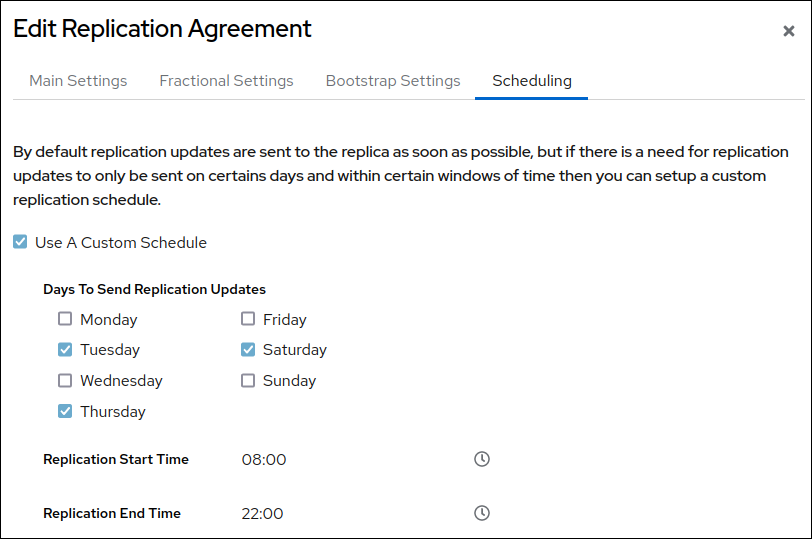
If
Use A Custom Scheduleis not selected, no schedule is configured.
-
Click the overflow menu next to the agreement, and select
Click the overflow menu next to the replication agreement, and select
Disable/Enable Agreementto disable the agreement.The status of the agreement in the
Statecolumn is nowDisabled.Click the overflow menu next to the replication agreement again, and select
Disable/Enable Agreementto re-enable the replication agreement and enforce the replication update.The status of the agreement in the
Statecolumn is nowEnabled.If a replication schedule was configured at the beginning of this procedure, set the schedule to the previous values:
-
Click click the overflow menu, and select
. -
On the
Schedulingtab, set the previous values.
-
Click click the overflow menu, and select
Verification
Display the replication status:
#
dsconf -D "cn=Directory Manager" ldap://supplier.example.com repl-agmt status --suffix "dc=example,dc=com" example-agreement... Last Update Start: 20210406120631Z Last Update End: 20210406120631Z Last Update Status: Error (0) Replica acquired successfully: Incremental update succeeded ...
