 Red Hat Summit
Deploying into Apache Karaf
Deploying application packages into the Apache Karaf container
Copyright © 2011-2020 Red Hat, Inc. and/or its affiliates.
Abstract
Part I. The Red Hat JBoss Fuse Container
Abstract
Chapter 1. Red Hat JBoss Fuse Overview
Abstract
1.1. Red Hat JBoss Fuse Container Architecture
Overview
Figure 1.1. Red Hat JBoss Fuse Container Architecture
Deployment models
- OSGi bundle
- An OSGi bundle is a JAR file augmented with metadata in the JAR's
META-INF/MANIFEST.MFfile. Because the Red Hat JBoss Fuse container is fundamentally an OSGi container, the OSGi bundle is also the native format for the container. Ultimately, after deployment, all of the other deployment unit types are converted into OSGi bundles. - WAR
- A Web application ARchive (WAR) is the standard archive format for applications that run inside a Web server. As originally conceived by the Java servlet specification, a WAR packages Web pages, JSP pages, Java classes, servlet code, and so on, as required for a typical Web application. More generally, however, a WAR can be any deployment unit that obeys the basic WAR packaging rules (which, in particular, require the presence of a Web application deployment descriptor,
web.xml).
Spring framework
Blueprint framework
OSGi core framework
Red Hat JBoss Fuse kernel
1.2. Deployment Models
Overview
| Package | Metadata | Maven Plug-in | URI Scheme | File Suffix |
|---|---|---|---|---|
| Bundle | MANIFEST.MF | maven-bundle-plugin | None | .jar |
| WAR | web.xml | maven-war-plugin | war: | .war |
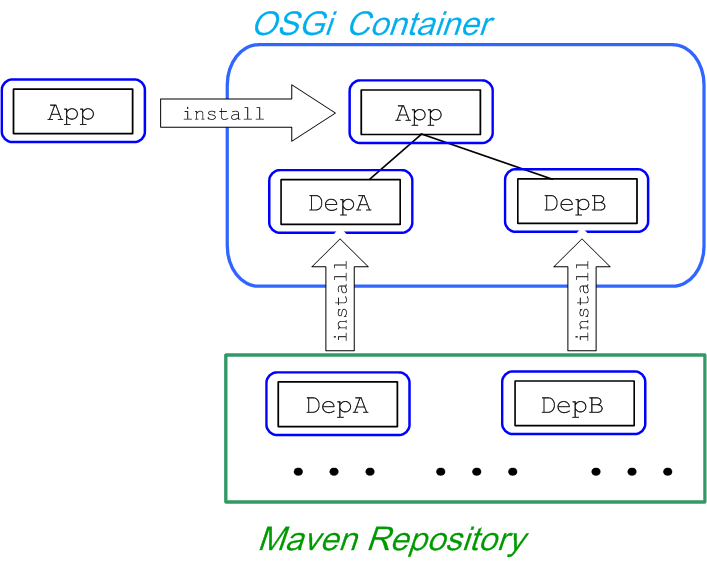
OSGi bundle deployment model
Figure 1.2. Installing an OSGi Bundle
WAR deployment model
Figure 1.3. Installing a WAR

1.3. Dependency Injection Frameworks
Dependency injection
OSGi framework extensions
- Blueprint—the blueprint extensor is based on the blueprint implementation from Apache Karaf.
- Spring—the Spring extensor is based on Spring Dynamic Modules (Spring-DM), which is the OSGi integration component from SpringSource.NoteThe Spring-DM module is now deprecated. If you need an injection framework with OSGi integration, use Blueprint instead.
Activating a framework
osgi:start) or de-activated (using the command, osgi:stop). This gives the extenders a chance to scan the bundle, look for configuration files of the appropriate type and, if necessary, activate the dependency injection framework for that bundle.
Blueprint XML file location
OSGI-INF/blueprint/*.xmlSpring XML file location
META-INF/spring/*.xml1.4. Synchronous Communication
Overview
OSGi services
OSGi registry
service element to register a Java object in the OSGi registry. For example, to create a SavingsAccountImpl object and export it as an OSGi service (exposing it through the org.fusesource.example.Account Java interface)
<blueprint xmlns="http://www.osgi.org/xmlns/blueprint/v1.0.0">

  <bean id="savings" class="org.fusesource.example.SavingsAccountImpl"/>

 <service ref="savings" interface="org.fusesource.example.Account"/>

</blueprint>reference element that searches the OSGi registry for a service that supports the org.fusesource.example.Account interface.
<blueprint xmlns="http://www.osgi.org/xmlns/blueprint/v1.0.0">

  <reference id="savingsRef"
             interface="org.fusesource.example.Account"/>

  <bean id="client" class="org.fusesource.example.client.Client">
    <property name="savingsAccount" ref="savingsRef"/>
  </bean>

</blueprint>Dynamic interaction between bundles
osgi:start), its OSGi services are published to the OSGi registry. And when a bundle is de-activated (for example, using the console command, osgi:stop), its OSGi services are removed from the OSGi registry. Clients of a service can elect to receive notifications whenever a service is published to or removed from the OSGi registry.
1.5. Asynchronous Communication
JMS broker
- VM protocol—the Virtual Machine (VM) transport protocol is ideal for communicating within the container. VM is optimized for sending messages within the same JVM instance.
- Persistent or non-persistent messaging—you can choose whether the broker should persist messages or not, depending on the requirements of your application.
- Ease of use—there is no need to create and configure destinations (that is, queues or topics) before you can use them. After connecting to a broker, you can immediately start sending and receiving messages. If you start sending messages to a queue that does not exist yet, Apache ActiveMQ creates it dynamically.
- External communication—you can also configure a TCP port on the broker, opening it up to external JMS clients or other brokers.
1.6. Fuse Fabric
Overview
Bundle deployment
Things to consider
- Bundles must be accessible through the fabric's Maven proxyWhen a Fabric Agent installs a bundle, it must first copy the bundle to the container's host computer. To do so, the agent uses the fabric's Maven Proxy to locate the bundle in one of the accessible Maven repositories and downloads it. This mechanism ensures that all of the containers in the fabric have access to the same set of bundles.To address this issue, you need to ensure that the fabric's Maven proxy is configured to have access to all of the repositories from which your applications will need to download bundles. For more information see section "Configuring Maven Proxies Directly" in "Fabric Guide".
- Fabric Agents only load the bundles specified in a profileA fabric container's contents is completely controlled by the profiles associated with it. The fabric agent managing the container inspects each of the profiles associated with the container, downloads the listed bundles, and features, and installs them. If one of the bundles in a profile depends on a bundle that is not specified in the profile, or one of the other profiles associated with the container, the bundle will not be able to resolve that dependency.To address this issue you can do one of the following:
- construct your profiles to ensure that it contains all of the required bundles and their dependencies
- deploy the application as a feature that contains all of the required bundles and their dependencies
Chapter 2. Dependency Injection Frameworks
Abstract
2.1. Spring and Blueprint Frameworks
Overview
META-INF/spring/ directory in a JAR, and Spring XML files can also be hot-deployed to the ESBInstallDir/deploy directory. In the case of the blueprint framework, OSGi automatically activates any blueprint XML files under the OSGI-INF/blueprint/ directory in a JAR, and blueprint XML files can also be hot-deployed to the ESBInstallDir/deploy directory.
Prefer Blueprint over Spring-DM
Configuration files
- Spring configuration—in the standard Maven directory layout, Spring XML configuration files are located under
ProjectDir/src/main/resources/META-INF/spring. - Blueprint configuration—in the standard Maven directory layout, blueprint XML configuration files are located under
ProjectDir/src/main/resources/OSGI-INF/blueprint.
camelContext elements in the blueprint file, as described in the section called “Blueprint configuration file”.
Prerequisites for blueprint configuration
camel-blueprint feature is installed. If necessary, install it by entering the following console command:
JBossFuse:karaf@root> features:install camel-blueprintSpring configuration file
camelContext using a Spring configuration file, where the root element is a Spring beans element and the camelContext element is a child of the beans element. In this case, the camelContext namespace must be http://camel.apache.org/schema/spring.
ExampleRouter log (which get incorporated into the console log file, InstallDir/data/log/fuse.log):
<?xml version="1.0" encoding="UTF-8"?>
<beans xmlns="http://www.springframework.org/schema/beans"
xmlns:xsi="http://www.w3.org/2001/XMLSchema-instance"
>
<camelContext xmlns="http://camel.apache.org/schema/spring">
<route>
<from uri="timer://myTimer?fixedRate=true&period=2000"/>
<to uri="log:ExampleRouter"/>
</route>
</camelContext>
</beans><beans xmlns="http://www.springframework.org/schema/beans"
xmlns:xsi="http://www.w3.org/2001/XMLSchema-instance"
xsi:schemaLocation="
http://www.springframework.org/schema/beans http://www.springframework.org/schema/beans/spring-beans-3.0.xsd
http://camel.apache.org/schema/spring http://camel.apache.org/schema/spring/camel-spring.xsd">
...Blueprint configuration file
camelContext using a blueprint configuration file, where the root element is blueprint and the camelContext element is a child of the blueprint element. In this case, the camelContext namespace must be http://camel.apache.org/schema/blueprint.
ExampleRouter log (which get incorporated into the console log file, InstallDir/data/log/fuse.log):
<?xml version="1.0" encoding="UTF-8"?>
<blueprint xmlns="http://www.osgi.org/xmlns/blueprint/v1.0.0"
xmlns:xsi="http://www.w3.org/2001/XMLSchema-instance"
>
<camelContext xmlns="http://camel.apache.org/schema/blueprint">
<route>
<from uri="timer://myTimer?fixedRate=true&period=2000"/>
<to uri="log:ExampleRouter"/>
</route>
</camelContext>
</blueprint>2.2. Hot Deployment
Types of configuration file
- Spring XML file, deployable with the suffix,
.xml. - Blueprint XML file, deployable with the suffix,
.xml.
Hot deploy directory
InstallDir/deployHot undeploying an XML file
InstallDir/deploy directory while the Apache Karaf container is running.
deploy/, and then restart the Karaf container, the automatically generated bundle corresponding to the XML file will not be undeployed after you restart the container (you can, however, undeploy the bundle manually using the osgi:uninstall console command).
Prerequisites
camel-blueprint feature must be installed (which it is by default). If the camel-blueprint feature has been disabled, however, you can re-install it by entering the following console command:
JBossFuse:karaf@root> features:install camel-blueprintDefault bundle version
0.0.0.
Customizing the bundle version
manifest element in the XML file. The manifest element enables you to override any of the headers in the generated bundle's META-INF/MANIFEST.MF file. In particular, you can use it to specify the bundle version.
Specifying the bundle version in a Spring XML file
manifest element as follows:
<?xml version="1.0" encoding="UTF-8"?>
<beans xmlns="http://www.springframework.org/schema/beans"
xmlns:xsi="http://www.w3.org/2001/XMLSchema-instance"
>
<manifest xmlns="http://karaf.apache.org/xmlns/deployer/spring/v1.0.0">
Bundle-Version = 1.2.3.4
</manifest>
<camelContext xmlns="http://camel.apache.org/schema/spring">
<route>
<from uri="timer://myTimer?fixedRate=true&period=2000"/>
<to uri="log:ExampleRouter"/>
</route>
</camelContext>
</beans>manifest element for Spring XML files belongs to the following schema namespace:
http://karaf.apache.org/xmlns/deployer/spring/v1.0.0manifest element are specified using the syntax of a Java properties file.
Specifying the bundle version in a Blueprint XML file
manifest element as follows:
<?xml version="1.0" encoding="UTF-8"?>
<blueprint xmlns="http://www.osgi.org/xmlns/blueprint/v1.0.0"
xmlns:xsi="http://www.w3.org/2001/XMLSchema-instance"
>
<manifest xmlns="http://karaf.apache.org/xmlns/deployer/blueprint/v1.0.0">
Bundle-Version = 1.2.3.4
</manifest>
<camelContext xmlns="http://camel.apache.org/schema/blueprint">
<route>
<from uri="timer://myTimer?fixedRate=true&period=2000"/>
<to uri="log:ExampleRouter"/>
</route>
</camelContext>
</blueprint>manifest element for Blueprint XML files belongs to the following schema namespace:
http://karaf.apache.org/xmlns/deployer/blueprint/v1.0.0manifest element are specified using the syntax of a Java properties file.
2.3. Using OSGi Configuration Properties
Overview
Persistent ID
PersistentID.cfg in the ESBInstallDir/etc/ directory. If the corresponding file exists, it can be used to initialize the values of properties belonging to the PersistentID property group.
etc/org.ops4j.pax.url.mvn.cfg file is used to set the properties associated with the org.ops4j.pax.url.mvn persistent ID (for the PAX Mvn URL handler).
Blueprint example
prefix variable to the constructor of the myTransform bean in blueprint XML, where the value of prefix is set by the OSGi Configuration Admin service.
Example 2.1. Using OSGi Configuration Properties in Blueprint
<blueprint
    xmlns="http://www.osgi.org/xmlns/blueprint/v1.0.0"
 xmlns:cm="http://aries.apache.org/blueprint/xmlns/blueprint-cm/v1.1.0"
    xmlns:xsi="http://www.w3.org/2001/XMLSchema-instance"
    ... >
    ...
    <cm:property-placeholder persistent-id="org.fusesource.example">
        <cm:default-properties>
            <cm:property name="prefix" value="Blueprint-Example"/>
        </cm:default-properties>
    </cm:property-placeholder>

    <bean id="myTransform" class="org.example.camel.MyTransform">
        <property name="prefix" value="${prefix}" />
    </bean>

</blueprint>{{prefix}}, substitutes the value of the prefix variable into the blueprint XML file. The OSGi properties are set up using the following XML elements:
cm:property-placeholder- This element gives you access to the properties associated with the specified persistent ID. After defining this element, you can use the syntax,
{{PropName}}, to substitute variables belonging to the specified persistent ID. cm:property-placeholder/cm:default-properties- You can optionally specify default values for properties by defining
cm:propertyelements inside thecm:default-propertieselement. If the correspondingetc/PersistentID.cfgfile defines property values, however, these will be used instead.
Using multiple property placeholders in Blueprint
cm:property-placeholder elements that reference different persistent IDs). One thing that you need to be aware of, however, is that there can be a clash if two properties from different property placeholders have the same name. In this case, the following rules determine which property takes precedence:
- Explicitly defined property settings (for example, defined in a
etc/PersistentID.cfgfile) take precedence over default property settings (defined in acm:default-propertieselement). - If there is more than one explicit setting for a given property, the setting from the last property placeholder in the Blueprint file takes precedence.
- Default property settings (defined in a
cm:default-propertieselement) have the lowest priority.
Chapter 3. Building with Maven
Abstract
3.1. Maven Directory Structure
Overview
src/main/java and put the results into target/classes.
Standard directory layout
Example 3.1. Standard Maven Directory Layout
ProjectDir/
    pom.xml
    src/
        main/
            java/
                ...
            resources/
                META-INF/
                    spring/
                        *.xml
                OSGI-INF/
                    blueprint/
                        *.xml
        test/
            java/
            resources/
    target/
...pom.xml file
pom.xml file is the Project Object Model (POM) for the current project, which contains a complete description of how to build the current project. A pom.xml file can be completely self-contained, but frequently (particular for more complex Maven projects) it can import settings from a parent POM file.
pom.xml file is automatically embedded at the following location in the generated JAR file:
META-INF/maven/groupId/artifactId/pom.xmlsrc and target directories
src/ directory contains all of the code and resource files that you will work on while developing the project.
target/ directory contains the result of the build (typically a JAR file), as well as all all of the intermediate files generated during the build. For example, after performing a build, the target/classes/ directory will contain a copy of the resource files and the compiled Java classes.
main and test directories
src/main/ directory contains all of the code and resources needed for building the artifact.
src/test/ directory contains all of the code and resources for running unit tests against the compiled artifact.
java directory
java/ sub-directory contains Java source code (*.java files) with the standard Java directory layout (that is, where the directory pathnames mirror the Java package names, with / in place of the . character). The src/main/java/ directory contains the bundle source code and the src/test/java/ directory contains the unit test source code.
resources directory
src/main/resources/ directory. The files and directories under src/main/resources/ will be copied into the root of the JAR file that is generated by the Maven build process.
src/test/resources/ are used only during the testing phase and will not be copied into the generated JAR file.
Spring integration
META-INF/spring/*.xml, in your bundle. One of the key consequences of having Spring DM enabled in the OSGi container is that the lifecycle of the Spring application context is automatically synchronized with the OSGi bundle lifecycle:
- Activation—when a bundle is activated, Spring DM automatically scans the bundle to look for Spring configuration files in the standard location (any
.xmlfiles found under theMETA-INF/spring/directory). If any Spring files are found, Spring DM creates an application context for the bundle and creates the beans defined in the Spring configuration files. - Stopping—when a bundle is stopped, Spring DM automatically shuts down the bundle's Spring application context, causing any Spring beans to be deleted.
Blueprint container
OSGI-INF/blueprint/*.xml, in your project. For more details about the blueprint container, see Chapter 16, OSGi Services.
3.2. Preparing to use Maven
Overview
Prerequisites
- Maven installation—Maven is a free, open source build tool from Apache. You can download the latest version from the Maven download page.
- Network connection—whilst performing a build, Maven dynamically searches external repositories and downloads the required artifacts on the fly. By default, Maven looks for repositories that are accessed over the Internet. You can change this behavior so that Maven will prefer searching repositories that are on a local network.NoteMaven can run in an offline mode. In offline mode Maven will only look for artifacts in its local repository.
Adding the Red Hat JBoss Fuse repository
settings.xml file. Maven looks for your settings.xml file in the .m2 directory of the user's home directory. If there is not a user specified settings.xml file, Maven will use the system-level settings.xml file at M2_HOME/conf/settings.xml.
.m2/settings.xml file or modify the system-level settings. In the settings.xml file, add the repository element for the JBoss Fuse repository as shown in bold text in Example 3.2, “Adding the Red Hat JBoss Fuse Repositories to Maven”.
Example 3.2. Adding the Red Hat JBoss Fuse Repositories to Maven
<?xml version="1.0"?>
<settings>

  <profiles>
    <profile>
      <id>extra-repos</id>
      <activation>
        <activeByDefault>true</activeByDefault>
      </activation>
      <repositories>
       <repository>
            <id>redhat-ga-repository</id>
            <url>https://maven.repository.redhat.com/ga</url>
            <releases>
                <enabled>true</enabled>
            </releases>
            <snapshots>
                <enabled>false</enabled>
            </snapshots>
        </repository>
        <repository>
            <id>redhat-ea-repository</id>
            <url>https://maven.repository.redhat.com/earlyaccess/all</url>
            <releases>
                <enabled>true</enabled>
            </releases>
            <snapshots>
                <enabled>false</enabled>
            </snapshots>
        </repository>
        <repository>
          <id>jboss-public</id>
          <name>JBoss Public Repository Group</name>
          <url>https://repository.jboss.org/nexus/content/groups/public/</url>
        </repository>
      </repositories>
      <pluginRepositories>
        <pluginRepository>
            <id>redhat-ga-repository</id>
            <url>https://maven.repository.redhat.com/ga</url>
            <releases>
                <enabled>true</enabled>
            </releases>
            <snapshots>
                <enabled>false</enabled>
            </snapshots>
        </pluginRepository>
        <pluginRepository>
            <id>redhat-ea-repository</id>
            <url>https://maven.repository.redhat.com/earlyaccess/all</url>
            <releases>
                <enabled>true</enabled>
            </releases>
            <snapshots>
                <enabled>false</enabled>
            </snapshots>
        </pluginRepository>
        <pluginRepository>
          <id>jboss-public</id>
          <name>JBoss Public Repository Group</name>
          <url>https://repository.jboss.org/nexus/content/groups/public</url>
        </pluginRepository>
      </pluginRepositories>
    </profile>
  </profiles>

  <activeProfiles>
    <activeProfile>extra-repos</activeProfile>
  </activeProfiles>

</settings>
Artifacts
Maven coordinates
{groupId, artifactId, version}. Sometimes Maven augments the basic set of coordinates with the additional coordinates, packaging and classifier. A tuple can be written with the basic coordinates, or with the additional packaging coordinate, or with the addition of both the packaging and classifier coordinates, as follows:
groupdId:artifactId:version
groupdId:artifactId:packaging:version
groupdId:artifactId:packaging:classifier:version- groupdId
- Defines a scope for the name of the artifact. You would typically use all or part of a package name as a group ID—for example,
org.fusesource.example. - artifactId
- Defines the artifact name (relative to the group ID).
- version
- Specifies the artifact's version. A version number can have up to four parts:
n.n.n.n, where the last part of the version number can contain non-numeric characters (for example, the last part of1.0-SNAPSHOTis the alphanumeric substring,0-SNAPSHOT). - packaging
- Defines the packaged entity that is produced when you build the project. For OSGi projects, the packaging is
bundle. The default value isjar. - classifier
- Enables you to distinguish between artifacts that were built from the same POM, but have different content.
<project ... >
  ...
  <groupId>org.fusesource.example</groupId>
  <artifactId>bundle-demo</artifactId>
  <packaging>bundle</packaging>
  <version>1.0-SNAPSHOT</version>
  ...
</project>dependency element to a POM:
<project ... >
  ...
  <dependencies>
    <dependency>
      <groupId>org.fusesource.example</groupId>
      <artifactId>bundle-demo</artifactId>
      <version>1.0-SNAPSHOT</version>
    </dependency>
  </dependencies>
  ...
</project>bundle package type in the preceding dependency, because a bundle is just a particular kind of JAR file and jar is the default Maven package type. If you do need to specify the packaging type explicitly in a dependency, however, you can use the type element.
Chapter 4. Locating Artifacts with Maven and HTTP
Abstract
4.1. Locating HTTP Artifacts
Overview
osgi:install command. This approach is perhaps not as common as using Maven URLs, but it means that you have the option of providing OSGi resources through a Web server.
HTTP URL protocol
http[s]:Host[:Port]/[Path][#AnchorName][?Query]- When
osgi:installis invoked on a Maven URL to install an OSGi bundle; - When
features:installis invoked to install a Karaf feature (a Karaf feature typically includes one or more Maven URL references).
HTTP URL handler
Karaf bundle cache
osgi:install command (or embedded in a Karaf feature description), JBoss Fuse downloads the referenced OSGi bundle resource, saves it in the Karaf bundle cache (under the data/cache directory), and loads the bundle into the Karaf container runtime. The Karaf bundle cache is used to persist all of the bundles currently installed in the Karaf runtime.
Configuring a HTTP proxy for HTTP URLs
InstallDir/etc/system.properties file in a text editor and set the http.proxyHost and http.proxyPort system properties with the host and port of the proxy—for example:
http.proxyHost=192.0.2.0
http.proxyPort=8080http.nonProxyHosts property—for example:
http.nonProxyHosts=localhost|*.redhat.com|*.jboss.orgmvn URL protocol handler and by the http URL protocol handler (see the section called “Configuring a HTTP proxy for Maven URLs”).
4.2. Locating Maven Artifacts at Build Time
Overview
Figure 4.1. How Maven Locates Artifacts at Build Time
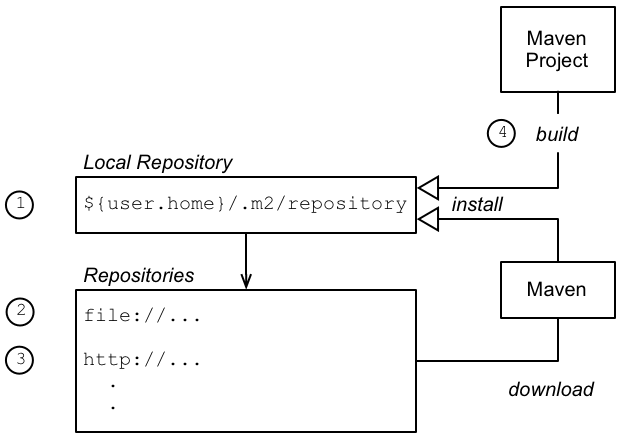
Locating artifacts at build time
- The first place that Maven looks for artifacts is in the local repository,
~/.m2/repository/(which is effectively a cache where Maven stores the artifacts it has already downloaded or found elsewhere). - If an artifact is not available in the local repository, Maven attempts to download the artifact from one of the repositories listed in its configuration. This repository list can include both internal and remote repositories.
- If the artifact is not available from an internal repository, the next repositories to try are the remote repositories (accessible through HTTP or HTTPS).
- When a Maven project is built locally using the
mvn installcommand, the project's Maven artifacts are installed into the local repository.
Adding a remote Maven repository
Adding an internal Maven repository
settings.xml file (which applies to all projects) or in a pom.xml (which applies to that project only). Typically, the location of an internal repository is specified using either a file:// URL or a http:// URL (assuming you have set up a local Web server to serve up the artifacts) and you should generally ensure that internal repositories are listed before remote repositories. Otherwise, there is nothing special about an internal repository: it is just a repository that happens to be located in your internal network.
settings.xml file, see the section called “Adding the Red Hat JBoss Fuse repository”.
Customizing the location of the local repository
- The location specified by the
localRepositoryelement in the~/.m2/settings.xmlfile (UNIX and Linux) orC:\Documents and Settings\UserName\.m2\settings.xml(Windows). - Otherwise, the location specified by the
localRepositoryelement in theM2_HOME/conf/settings.xmlfile. - Otherwise, the default location is in the user's home directory,
~/.m2/repository/(UNIX and Linux) orC:\Documents and Settings\UserName\.m2\repository(Windows).
4.3. Locating Maven Artifacts at Run Time
Abstract
etc/org.ops4j.pax.url.mvn.cfg file. For example, you can customize the list of remote Maven repositories and you can configure a HTTP proxy, if required.
4.3.1. Maven URL Handler Architecture
Overview
osgi:install command. When resolution of a Maven URL is triggered, JBoss Fuse uses a combination of the Pax URL Aether component and the Eclipse Aether component to implement artifact resolution. The basic strategy is to search the system/ directory, then search the local Maven repository, and then search the configured remote Maven repositories.
Maven URL protocol
GroupId:ArtifactId:Version, can be referenced by the following Maven URL:
mvn:GroupId/ArtifactId/Version- When
osgi:installis invoked on a Maven URL to install an OSGi bundle; - When
features:installis invoked to install a Karaf feature (a Karaf feature typically includes one or more Maven URL references).
Pax URL Aether layer
mvn: scheme, Karaf registers the OPS4J Pax URL Aether protocol handler. The Pax URL Aether layer is thus responsible for resolving all mvn URLs in the JVM. This layer can be configured through one or both of the following configuration files:
InstallDir/etc/org.ops4j.pax.url.mvn.cfg- Stores the OSGi Config Admin properties used to configure the Pax URL Aether layer. In particular, it is possible to specify the locations of local and remote Maven repositories through the settings in this file. For details of the available settings, see Section 4.3.5, “Pax URL Aether Reference”.
UserHome/.m2/settings.xml- (Optional) You can optionally configure the Pax URL Aether layer to read its configuration from a standard Maven
settings.xmlfile (by configuring the relevant settings inorg.ops4j.pax.url.mvn.cfg).
org.ops4j.pax.url.mvn.cfg configuration files, you might see the setting disableAether=false. This setting is obsolete, however, and has no effect on the pax-url-aether component. The current implementation of Pax URL Aether (previously called Pax URL Maven) is completely dependent on Eclipse Aether.
Eclipse Aether layer
Locating artifacts at run time
Figure 4.2. How the Container Locates Artifacts at Run Time

- Resolution of a Maven artifact is triggered when a user invokes the
osgi:installcommand on a Maven URL (or if a user invokes thefeatures:installcommand on a feature that references some Maven URLs). - To resolve the Maven URL, the JVM calls back on the protocol handler registered against the
mvnscheme, which happens to be the Pax URL Aether component. - The Pax URL Aether component reads its configuration from the
InstallDir/etc/org.ops4j.pax.url.mvn.cfgfile (and possibly also from a Mavensettings.xmlfile, if so configured). The Pax URL Aether layer parses the requested Maven URL and combines this information with the specified configuration in order to invoke the Eclipse Aether library. - When the Aether library is invoked, the first step is to look up any local Maven repositories to try and find the Maven artifact. The following local repositories are configured by default:
InstallDir/system- The JBoss Fuse system directory, which contains all of the Maven artifacts that are bundled with the JBoss Fuse distribution.
UserHome/.m2/repository- The user's own local Maven repository in the user's home directory,
UserHome.
If you like, you can customize the list of local repositories to add your own custom Maven repository.If the Maven artifact is found locally, skip straight to step 7. - If the Maven artifact cannot be found in one of the local repositories, Aether tries to look up the specified remote repositories (using the list of remote repositories specified in the Pax URL Aether configuration). Because the remote repositories are typically located on the Internet (accessed through the HTTP protocol), it is necessary to have Internet access for this step to succeed.NoteIf your local network requires you to use a HTTP proxy to access the Internet, it is possible to configure Pax URL Aether to use a HTTP proxy. For example, see the section called “Configuring a HTTP proxy for Maven URLs” for details.
- If the Maven artifact is found in a remote repository, Aether automatically installs the artifact into the user's local Maven repository, so that another remote lookup will not be required.
- Finally, assuming that the Maven artifact has been successfully resolved, Karaf installs the artifact in the Karaf bundle cache,
InstallDir/data/cache, and loads the artifact (usually, an OSGi bundle) into the container runtime. At this point, the artifact is effectively installed in the container.
4.3.2. Redeploying Maven Artifacts in a Development Environment
Overview
Immutable artifacts
SNAPSHOT artifacts
-SNAPSHOT to the Maven version specifier. Maven treats these artifacts differently: for example, by periodically checking remote Maven repositories for updates and downloading the changed artifacts to the local repository.
Explicitly redeploying
org.example/myfoobundle/1.0.0-SNAPSHOT Maven artifact into the Karaf container and this bundle has the bundle ID, 751. If you now rebuild this bundle (for example, by executing mvn install in the bundle's Maven project), you can redeploy the changed bundle with the following console commands:
osgi:uninstall 751
osgi:install mvn:org.example/myfoobundle/1.0.0-SNAPSHOT
dev:watch command
dev:watch command. For example, given a particular bundle—with bundle ID, 751—you can enable automatic redeployment by entering the command:
dev:watch 751mvn install in your Maven project), the Karaf container automatically re-installs the changed Maven artifact. For more details, see section "dev:watch, watch" in "Console Reference".
dev:watch command is intended for a development environment only. It is not recommended for use in a production environment.
4.3.3. Configuring Pax URL Aether Directly
Overview
InstallDir/etc/org.ops4j.pax.url.mvn.cfg file directly. This approach is particularly convenient for a production environment, because the Maven configuration is colocated with the rest of the container configuration.
org.ops4j.pax.url.mvn.repositories property. If this property is not set, Pax URL Aether falls back to reading configuration from the Maven settings.xml file.
Adding a remote Maven repository
InstallDir/etc/org.ops4j.pax.url.mvn.cfg configuration file in a text editor and edit the org.ops4j.pax.url.mvn.repositories property setting. The default is as follows:
org.ops4j.pax.url.mvn.repositories= \
    http://repo1.maven.org/maven2@id=maven.central.repo, \
    https://maven.repository.redhat.com/ga@id=redhat.ga.repo, \
    https://maven.repository.redhat.com/earlyaccess/all@id=redhat.ea.repo, \
https://repository.jboss.org/nexus/content/groups/ea@id=fuseearlyaccessorg.ops4j.pax.url.mvn.repositories property is defined as a comma-separated list of Maven repository URLs. The backslash character, \, functions as a (UNIX style) line continuation character and must be followed immediately by the newline character. The Pax URL Aether component supports special repository URL options, defined using the @Option=Value syntax—see the section called “Pax URL Aether repository URL syntax”.
@id option specifies the name of the repository and is required by the Aether layer.
org.ops4j.pax.url.mvn.repositories property setting has an important side effect: it signals that the Pax URL Aether component takes its configuration from the etc/org.ops4j.pax.url.mvn.cfg, not from a settings.xml file (even if the org.ops4j.pax.url.mvn.settings property has been set).
Adding a default Maven repository
InstallDir/etc/org.ops4j.pax.url.mvn.cfg configuration file in a text editor and edit the org.ops4j.pax.url.mvn.defaultRepositories property setting. The default is as follows:
org.ops4j.pax.url.mvn.defaultRepositories=\
    file:${runtime.home}/${karaf.default.repository}@snapshots@id=karaf.${karaf.default.repository},\
    file:${runtime.home}/local-repo@snapshots@id=karaf.local-repo,\
file:${karaf.base}/${karaf.default.repository}@snapshots@id=child.karaf.${karaf.default.repository}org.ops4j.pax.url.mvn.defaultRepositories property is defined as a comma-separated list of Maven repository URLs. The backslash character, \, functions as a (UNIX style) line continuation character and must be followed immediately by the newline character. Local repositories should be defined using a URL with the file: scheme. The Pax URL Aether component supports special repository URL options, defined using the @Option=Value syntax—see the section called “Pax URL Aether repository URL syntax”.
Customizing the location of the local Maven repository
.m2/repository/ under the user's home directory. You can optionally customize the location by setting the org.ops4j.pax.url.mvn.localRepository property in the InstallDir/etc/org.ops4j.pax.url.mvn.cfg configuration file. For example:
org.ops4j.pax.url.mvn.localRepository= /home/jbloggs/path/to/local/repositoryConfiguring a HTTP proxy for Maven URLs
InstallDir/etc/system.properties file in a text editor and set the http.proxyHost and http.proxyPort system properties with the host and port of the proxy—for example:
http.proxyHost=192.0.2.0
http.proxyPort=8080http.nonProxyHosts property—for example:
http.nonProxyHosts=localhost|*.redhat.com|*.jboss.orgmvn URL protocol handler and by the http URL protocol handler (see Section 4.1, “Locating HTTP Artifacts”).
4.3.4. Configuring Pax URL Aether through settings.xml
Overview
settings.xml file. This approach is particularly convenient in a development environment, because it makes it possible to store your build time settings and your run time settings all in one place.
Enabling the settings.xml configuration approach
settings.xml file, you must remove or comment out the org.ops4j.pax.url.mvn.repositories setting in the InstallDir/etc/org.ops4j.pax.url.mvn.cfg file. For example, you can comment out the default repositories setting by inserting a hash, #, at the start of the line, as follows:
#org.ops4j.pax.url.mvn.repositories= \
    http://repo1.maven.org/maven2@id=maven.central.repo, \
    https://maven.repository.redhat.com/ga@id=redhat.ga.repo, \
    https://maven.repository.redhat.com/earlyaccess/all@id=redhat.ea.repo, \
https://repository.jboss.org/nexus/content/groups/ea@id=fuseearlyaccesssettings.xml configuration approach.
Location of the settings.xml file
settings.xml file (usually UserHome/.m2/settings.xml). If you like, you can specify the location explicitly using the org.ops4j.pax.url.mvn.settings property. For example:
org.ops4j.pax.url.mvn.settings= /home/fuse/settings.xmlsettings.xml, see the description of org.ops4j.pax.url.mvn.settings in the section called “Pax URL Aether configuration reference”.
Adding a remote Maven repository
settings.xml file, open the settings.xml file in a text editor and add a new repository XML element. For example, to create an entry for the JBoss Fuse public Maven repository, add a repository element as shown:
<settings xmlns="http://maven.apache.org/SETTINGS/1.0.0"
      xmlns:xsi="http://www.w3.org/2001/XMLSchema-instance"
      xsi:schemaLocation="http://maven.apache.org/SETTINGS/1.0.0 http://maven.apache.org/xsd/settings-1.0.0.xsd">
  ...
  <profiles>
    <profile>
      <id>my-fuse-profile</id>
      <activation>
        <activeByDefault>true</activeByDefault>
      </activation>
      <repositories>
        <!--
         | Add new remote Maven repositories here
          -->
        <repository>
            <id>redhat-ga-repository</id>
            <url>https://maven.repository.redhat.com/ga</url>
            <releases>
                <enabled>true</enabled>
            </releases>
            <snapshots>
                <enabled>false</enabled>
            </snapshots>
        </repository>
        ...
      </repositories>
  </profiles>
  ...
</settings>Customizing the location of the local Maven repository
settings.xml file in a text editor and add (or modify) the localRepository XML element. For example, to select the directory, /home/fuse/.m2/repository, as your local Maven repository:
<settings xmlns="http://maven.apache.org/SETTINGS/1.0.0"
      xmlns:xsi="http://www.w3.org/2001/XMLSchema-instance"
      xsi:schemaLocation="http://maven.apache.org/SETTINGS/1.0.0 http://maven.apache.org/xsd/settings-1.0.0.xsd">
  ...
<!-- localRepository
 | The path to the local repository Maven will use to store artifacts.
 |
 | Default: ~/.m2/repository -->
  <localRepository>/home/fuse/.m2/repository</localRepository>
  ...
</settings>Configuring a HTTP proxy for Maven URLs
settings.xml file in a text editor and add a new proxy XML element as a child of the proxies XML element. The definition of the proxy follows the standard Maven syntax. For example, to create a proxy for the HTTP (insecure) protocol with host, 192.0.2.0, and port, 8080, add a proxy element as follows:
<settings xmlns="http://maven.apache.org/SETTINGS/1.0.0"
      xmlns:xsi="http://www.w3.org/2001/XMLSchema-instance"
      xsi:schemaLocation="http://maven.apache.org/SETTINGS/1.0.0 http://maven.apache.org/xsd/settings-1.0.0.xsd">
  ...
  <proxies>
    <proxy>
      <id>fuse-proxy-1</id>
      <active>true</active>
      <protocol>http</protocol>
      <host>192.0.2.0</host>
      <port>8080</port>
    </proxy>
  </proxies>
  ...
</settings>proxy element configured with the https protocol.
Reference
settings.xml file, see the Maven Settings Reference. But please note that not all of the features documented there are necessarily supported by the Pax URL Aether component.
4.3.5. Pax URL Aether Reference
Overview
org.ops4j.pax.url.mvn.*, reflects the old name of this component, which was previously called Pax URL Mvn.
Local Maven repository search order
- The location specified by the
org.ops4j.pax.url.mvn.localRepositoryproperty in theorg.ops4j.pax.url.mvn.cfgfile. - Otherwise, the location specified by the
localRepositoryelement in thesettings.xmlfile specified by theorg.ops4j.pax.url.mvn.settingsproperty in theorg.ops4j.pax.url.mvn.cfgfile. - Otherwise, the location specified by the
localRepositoryelement in the.m2/settings.xmlfile located under the user's home directory. - Otherwise, the location specified by the
localRepositoryelement in theM2_HOME/conf/settings.xmlfile. - Otherwise, the default location is
.m2/repository/under the user's home directory.
Pax URL Aether Maven URL syntax
mvn:[RepositoryUrl!]GroupId/ArtifactId[/Version[/Type]]RepositoryUrl has the syntax specified by the section called “Pax URL Aether repository URL syntax”; and GroupId, ArtifactId, Version, Type are the standard Maven location coordinates.
Pax URL Aether repository URL syntax
file:, http:, or https: scheme, optionally appending one or more of the following suffixes:
@snapshots- Allow snapshot versions to be read from the repository.
@noreleases- Do not allow release versions to be read from the repository.
@id=RepoName- (Required) Specifies the repository name. This setting is required by the Aether handler.
@multi- Marks the path as a parent directory of multiple repository directories. At run time the parent directory is scanned for subdirectories and each subdirectory is used as a remote repository.
@update=UpdatePolicy- Specifies the Maven
updatePolicy, overriding the value oforg.ops4j.pax.url.mvn.globalUpdatePolicy. @releasesUpdate=UpdatePolicy- Specifies the Maven
updatePolicyspecifically for release artifacts (overriding the value of@update). @snapshotsUpdate=UpdatePolicy- Specifies the Maven
updatePolicyspecifically for snapshot artifacts (overriding the value of@update). @checksum=ChecksumPolicy- Specifies the Maven
checksumPolicy, which specifies how to react if a downloaded Maven artifact has a missing or incorrect checksum. The policy value can be:ignore,fail, orwarn. @releasesChecksum=ChecksumPolicy- Specifies the Maven
checksumPolicyspecifically for release artifacts (overriding the value of@checksum). @snapshotsChecksum=ChecksumPolicy- Specifies the Maven
checksumPolicyspecifically for snapshot artifacts (overriding the value of@checksum).
https://repo.example.org/maven/repository@id=example.repoPax URL Aether configuration reference
etc/org.ops4j.pax.url.mvn.cfg configuration file (uses OSGi Config Admin service). In pax-url-aether version 2.4.2, the following configuration properties are supported:
org.ops4j.pax.url.mvn.certificateCheck- If
true, enable the SSL certificate check when connecting to a remote repository through the HTTPS protocol. Iffalse, skip the SSL certificate check. Default isfalse. org.ops4j.pax.url.mvn.defaultRepositories- Specifies a list of default (local) Maven repositories that are checked before looking up the remote repositories. Specified as a comma-separated list of
file:repository URLs, where each repository URL has the syntax defined in the section called “Pax URL Aether repository URL syntax”. org.ops4j.pax.url.mvn.globalUpdatePolicy- Specifies the Maven
updatePolicy, which determines how often Aether attempts to update local Maven artifacts from remote repositories. Can take the following values:always—always resolve the latest SNAPSHOT from remote Maven repositories.never—never check for newer remote SNAPSHOTS.daily—check on the first run of the day (local time).interval:Mins—check everyMinsminutes.
Default isdaily. org.ops4j.pax.url.mvn.localRepository- Specifies the location of the local Maven repository on the file system, overriding the default value (which is usually
UserHome/.m2/repository). org.ops4j.pax.url.mvn.proxies- Can be used to specify a HTTP proxy, a HTTPS proxy, and non-proxy host lists. The value consists of a semicolon,
;, separated list of entries. You can include the following entries (where each entry is optional):http:host=Host,port=Port[,nonProxyHosts=NonProxyHosts]https:host=Host,port=Port[,nonProxyHosts=NonProxyHosts]
ThenonProxyHostssetting is optional and, if included, specifies a list of hosts that can be reached without going through the proxy. The list of non-proxy hosts has its entries separated by a pipe,|, symbol—for example,nonProxyHosts=localhost|example.org.Here is a sampleorg.ops4j.pax.url.mvn.proxiessetting:org.ops4j.pax.url.mvn.proxies= http:host=gateway,port=8080;https:host=sslgateway,port=8453 org.ops4j.pax.url.mvn.proxySupport- If
true, enable HTTP proxy support through property settings. When this setting is enabled, the HTTP proxy can be configured in either of the following ways:- Through the
org.ops4j.pax.url.mvn.proxiesproperty (takes precedence), or - Through the
http.proxyHost,http.proxyPort, andhttp.nonProxyHostsJava system properties, set in theetc/system.propertiesfile.
Iffalse, the preceding property settings are ignored. Default istrue.NoteThis setting has no effect on proxy support when a Mavensettings.xmlfile is selected to configure Pax URL Aether. org.ops4j.pax.url.mvn.repositories- Specifies a list of remote Maven repositories that can be searched for Maven artifacts. Specified as a comma-separated list of
http:orhttps:repository URLs, where each repository URL has the syntax defined in the section called “Pax URL Aether repository URL syntax”.ImportantIf theorg.ops4j.pax.url.mvn.repositoriesproperty is not set, Pax URL Aether reads its Maven settings from the relevant Mavensettings.xmlfile instead (usually, fromUserHome/.m2/settings.xmlby default). In other words, the absence of theorg.ops4j.pax.url.mvn.repositoriesproperty implicitly enables thesettings.xmlconfiguration approach. org.ops4j.pax.url.mvn.security- Specifies the path to a Maven
settings-security.xmlfile. This can be used to enable server password encryption. Default is${user.home}/.m2/settings-security.xml. org.ops4j.pax.url.mvn.settings- Specifies a path on the file system to override the default location of the Maven
settings.xmlfile. Pax URL Aether resolves the location of the Mavensettings.xmlfile in the following order:- The location specified by
org.ops4j.pax.url.mvn.settings. ${user.home}/.m2/settings.xml${maven.home}/conf/settings.xmlM2_HOME/conf/settings.xml
NoteAllsettings.xmlfiles are ignored, if theorg.ops4j.pax.url.mvn.repositoriesproperty is set. org.ops4j.pax.url.mvn.timeout- Specifies the timeout to use while downloading artifacts, in units of milliseconds. Default is
5000(five seconds).
Part II. OSGi Bundle Deployment Model
Abstract
Chapter 5. Introduction to OSGi
Abstract
5.1. Red Hat JBoss Fuse
Overview
- Technology layer—includes technologies such as JAX-WS, JAX-RS, JMS, Spring, and JEE
- the section called “Red Hat JBoss Fuse” —a wrapper layer around the OSGi container implementation, which provides support for deploying the OSGi container as a runtime server. Runtime features provided by the JBoss Fuse include hot deployment, management, and administration features.
- OSGi framework —implements OSGi functionality, including managing dependencies and bundle lifecycles
Red Hat JBoss Fuse
Figure 5.1. Red Hat JBoss Fuse Architecture
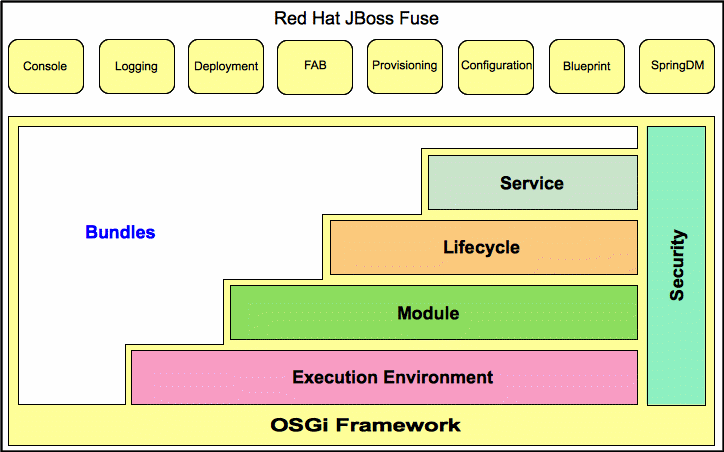
- Console— an extensible Gogo console manages services, installs and manages applications and libraries, and interacts with the JBoss Fuse runtime. It provides console commands to administer instances of JBoss Fuse. See the "Console Reference".
- Logging—a powerful, unified logging subsystem provides console commands to display, view and change log levels. See "Configuring and Running JBoss Fuse".
- Deployment—supports both manual deployment of OSGi bundles using the
osgi:installandosgi:startcommands and hot deployment of applications. When a JAR file, WAR file, or OSGi bundle is copied into the hot deployment folder InstallDir/deploy, it's automatically installed on-the-fly inside the Red Hat JBoss Fuse runtime. When you update or delete these files or bundles, the changes are made automatically (but only while the container is running!). See Section 7.1, “Hot Deployment”. - Provisioning—provides multiple mechanisms for installing applications and libraries. See Chapter 8, Deploying Features.
- Configuration—the properties files stored in the InstallDir
/etcfolder are continuously monitored, and changes to them are automatically propagated to the relevant services at configurable intervals. - Spring DM—simplifies building Spring applications that run in an OSGi framework. When a Spring configuration file is copied to the hot deployment folder, Red Hat JBoss Fuse generates an OSGi bundle on-the-fly and instantiates the Spring application context.
- Blueprint—is essentially a standardized version of Spring DM. It is a dependency injection framework that simplifies interaction with the OSGi container—for example, providing standard XML elements to import and export OSGi services. When a Blueprint configuration file is copied to the hot deployment folder, Red Hat JBoss Fuse generates an OSGi bundle on-the-fly and instantiates the Blueprint context.
5.2. OSGi Framework
Overview
OSGi architecture
- Bundles — Logical modules that make up an application. See Section 5.4, “OSGi Bundles”.
- Service layer — Provides communication among modules and their contained components. This layer is tightly integrated with the lifecycle layer. See Section 5.3, “OSGi Services”.
- Lifecycle layer — Provides access to the underlying OSGi framework. This layer handles the lifecycle of individual bundles so you can manage your application dynamically, including starting and stopping bundles.
- Module layer — Provides an API to manage bundle packaging, dependency resolution, and class loading.
- Execution environment — A configuration of a JVM. This environment uses profiles that define the environment in which bundles can work.
- Security layer — Optional layer based on Java 2 security, with additional constraints and enhancements.
5.3. OSGi Services
Overview
OSGi service registry
- Service providers register services with the framework to be used by other bundles
- Service requesters find services and bind to service providers
Event notification
- Register services
- Search for services
- Receive notifications when their registration state changes
Service invocation model
OSGi framework services
- Package Admin service—allows a management agent to define the policy for managing Java package sharing by examining the status of the shared packages. It also allows the management agent to refresh packages and to stop and restart bundles as required. This service enables the management agent to make decisions regarding any shared packages when an exporting bundle is uninstalled or updated.The service also provides methods to refresh exported packages that were removed or updated since the last refresh, and to explicitly resolve specific bundles. This service can also trace dependencies between bundles at runtime, allowing you to see what bundles might be affected by upgrading.
- Start Level service—enables a management agent to control the starting and stopping order of bundles. The service assigns each bundle a start level. The management agent can modify the start level of bundles and set the active start level of the framework, which starts and stops the appropriate bundles. Only bundles that have a start level less than, or equal to, this active start level can be active.
- URL Handlers service—dynamically extends the Java runtime with URL schemes and content handlers enabling any component to provide additional URL handlers.
- Permission Admin service—enables the OSGi framework management agent to administer the permissions of a specific bundle and to provide defaults for all bundles. A bundle can have a single set of permissions that are used to verify that it is authorized to execute privileged code. You can dynamically manipulate permissions by changing policies on the fly and by adding new policies for newly installed components. Policy files are used to control what bundles can do.
- Conditional Permission Admin service—extends the Permission Admin service with permissions that can apply when certain conditions are either true or false at the time the permission is checked. These conditions determine the selection of the bundles to which the permissions apply. Permissions are activated immediately after they are set.
OSGi Compendium services
5.4. OSGi Bundles
Overview
Class Loading in OSGi
- Sharing classes directly between bundles. There is no requirement to promote JARs to a parent class-loader.
- You can deploy different versions of the same class at the same time, with no conflict.
Chapter 6. Building an OSGi Bundle
Abstract
6.1. Generating a Bundle Project
Generating bundle projects with Maven archetypes
Apache CXF karaf-soap-archetype archetype
:ArtifactId:Version, enter the following command:
mvn archetype:generate \
  -DarchetypeGroupId=io.fabric8.archetypes \
  -DarchetypeArtifactId=karaf-soap-archetype \
  -DarchetypeVersion=1.2.0.redhat-630xxx \
  -DgroupId=GroupId \
  -DartifactId=ArtifactId \
  -Dversion=Version \
-Dfabric8-profile=ProfileName\, indicates line continuation on Linux and UNIX operating systems. On Windows platforms, you must omit the backslash character and put all of the arguments on a single line.
Apache Camel archetype
:ArtifactId:Version, enter the following command:
mvn archetype:generate \
  -DarchetypeGroupId=org.apache.camel.archetypes \
  -DarchetypeArtifactId=camel-archetype-blueprint \
  -DarchetypeVersion=2.17.0.redhat-630xxx \
  -DgroupId=GroupId \
  -DartifactId=ArtifactId \
  -Dversion=Version
Building the bundle
pom.xml file), and enter the following Maven command:
mvn install/target directory, and then to install the generated JAR in the local Maven repository.
6.2. Modifying an Existing Maven Project
Overview
Change the package type to bundle
bundle in your project's pom.xml file. Change the contents of the packaging element to bundle, as shown in the following example:
<project ... >
  ...
  <packaging>bundle</packaging>
  ...
</project>maven-bundle-plugin, to perform packaging for this project. This setting on its own, however, has no effect until you explicitly add the bundle plug-in to your POM.
Add the bundle plug-in to your POM
plugin element into the project/build/plugins section of your project's pom.xml file:
<project ... >
  ...
  <build>
    <defaultGoal>install</defaultGoal>
    <plugins>
      ...
      <plugin>
        <groupId>org.apache.felix</groupId>
        <artifactId>maven-bundle-plugin</artifactId>
        <version>2.3.7</version>
        <extensions>true</extensions>
        <configuration>
          <instructions>
            <Bundle-SymbolicName>${project.groupId}.${project.artifactId}</Bundle-SymbolicName>
            <Import-Package>*</Import-Package>
          </instructions>
        </configuration>
      </plugin>
    </plugins>
  </build>
  ...
</project>instructions element.
Customize the bundle plug-in
Customize the JDK compiler version
JAVA_HOME and the PATH environment variables to the correct values for your JDK, you must also modify the POM file.
maven-compiler-plugin plug-in settings to your POM (if they are not already present):
<project ... >
  ...
  <build>
    <defaultGoal>install</defaultGoal>
    <plugins>
      ...
      <plugin>
        <groupId>org.apache.maven.plugins</groupId>
        <artifactId>maven-compiler-plugin</artifactId>
        <configuration>
          <source>1.7</source>
          <target>1.7</target>
        </configuration>
      </plugin>
    </plugins>
  </build>
  ...
</project>
6.3. Packaging a Web Service in a Bundle
Overview
META-INF/spring).
Modifying the POM file to generate a bundle
bundle; and add the Maven bundle plug-in to your POM. For details, see Section 6.1, “Generating a Bundle Project”.
Mandatory import packages
javax.jws
javax.wsdl
javax.xml.bind
javax.xml.bind.annotation
javax.xml.namespace
javax.xml.ws
org.apache.cxf.bus
org.apache.cxf.bus.spring
org.apache.cxf.bus.resource
org.apache.cxf.configuration.spring
org.apache.cxf.resource
org.apache.cxf.jaxws
org.springframework.beans.factory.config
Sample Maven bundle plug-in instructions
Import-Package element. Note the appearance of the wildcard, *, as the last element of the list. The wildcard ensures that the Java source files from the current bundle are scanned to discover what additional packages need to be imported.
Example 6.1. Configuration of Mandatory Import Packages
<project ... >
    ...
    <build>
        <plugins>
            <plugin>
                <groupId>org.apache.felix</groupId>
                <artifactId>maven-bundle-plugin</artifactId>
                <extensions>true</extensions>
                <configuration>
                    <instructions>
                        ...
                        <Import-Package>
                            javax.jws,
                            javax.wsdl,
                            javax.xml.bind,
                            javax.xml.bind.annotation,
                            javax.xml.namespace,
                            javax.xml.ws,
                            org.apache.cxf.bus,
                            org.apache.cxf.bus.spring,
                            org.apache.cxf.bus.resource,
                            org.apache.cxf.configuration.spring,
                            org.apache.cxf.resource,
                            org.apache.cxf.jaxws,
                            org.springframework.beans.factory.config,
                            *
                        </Import-Package>
                        ...
                    </instructions>
                </configuration>
            </plugin>
        </plugins>
    </build>
    ...
</project>
Add a code generation plug-in
- Java-first approach—use the
cxf-java2ws-pluginplug-in. - WSDL-first approach—use the
cxf-codegen-pluginplug-in.
OSGi configuration properties
6.4. Configuring the Bundle Plug-In
Overview
instructions element.
Configuration properties
Setting a bundle's symbolic name
+ "." + artifactId, with the following exceptions:
- If groupId has only one section (no dots), the first package name with classes is returned.For example, if the group Id is
commons-logging:commons-logging, the bundle's symbolic name isorg.apache.commons.logging. - If artifactId is equal to the last section of groupId, then groupId is used.For example, if the POM specifies the group ID and artifact ID as
org.apache.maven:maven, the bundle's symbolic name isorg.apache.maven. - If artifactId starts with the last section of groupId, that portion is removed.For example, if the POM specifies the group ID and artifact ID as
org.apache.maven:maven-core, the bundle's symbolic name isorg.apache.maven.core.
Bundle-SymbolicName child in the plug-in's instructions element, as shown in Example 6.2.
Example 6.2. Setting a bundle's symbolic name
<plugin>
  <groupId>org.apache.felix</groupId>
  <artifactId>maven-bundle-plugin</artifactId>
  <configuration>
   <instructions>
     <Bundle-SymbolicName>${project.artifactId}</Bundle-SymbolicName>
     ...
    </instructions>
  </configuration>
</plugin>
Setting a bundle's name
${project.name}.
Bundle-Name child to the plug-in's instructions element, as shown in Example 6.3.
Example 6.3. Setting a bundle's name
<plugin>
  <groupId>org.apache.felix</groupId>
  <artifactId>maven-bundle-plugin</artifactId>
  <configuration>
   <instructions>
     <Bundle-Name>JoeFred</Bundle-Name>
     ...
    </instructions>
  </configuration>
</plugin>
Setting a bundle's version
${project.version}. Any dashes (-) are replaced with dots (.) and the number is padded up to four digits. For example, 4.2-SNAPSHOT becomes 4.2.0.SNAPSHOT.
Bundle-Version child to the plug-in's instructions element, as shown in Example 6.4.
Example 6.4. Setting a bundle's version
<plugin>
  <groupId>org.apache.felix</groupId>
  <artifactId>maven-bundle-plugin</artifactId>
  <configuration>
   <instructions>
     <Bundle-Version>1.0.3.1</Bundle-Version>
     ...
    </instructions>
  </configuration>
</plugin>
Specifying exported packages
Export-Package list is populated by all of the packages in your local Java source code (under src/main/java), except for the deault package, ., and any packages containing .impl or .internal.
Private-Package element in your plug-in configuration and you do not specify a list of packages to export, the default behavior includes only the packages listed in the Private-Package element in the bundle. No packages are exported.
Export-Package child to the plug-in's instructions element.
Export-Package element specifies a list of packages that are to be included in the bundle and that are to be exported. The package names can be specified using the * wildcard symbol. For example, the entry com.fuse.demo.* includes all packages on the project's classpath that start with com.fuse.demo.
!. For example, the entry !com.fuse.demo.private excludes the package com.fuse.demo.private.
!com.fuse.demo.private,com.fuse.demo.*Specifying private packages
Private-Package instruction to the bundle plug-in configuration. By default, if you do not specify a Private-Package instruction, all packages in your local Java source are included in the bundle.
Private-Package element and the Export-Package element, the Export-Package element takes precedence. The package is added to the bundle and exported.
Private-Package element works similarly to the Export-Package element in that you specify a list of packages to be included in the bundle. The bundle plug-in uses the list to find all classes on the project's classpath that are to be included in the bundle. These packages are packaged in the bundle, but not exported (unless they are also selected by the Export-Package instruction).
Example 6.5. Including a private package in a bundle
<plugin>
  <groupId>org.apache.felix</groupId>
  <artifactId>maven-bundle-plugin</artifactId>
  <configuration>
   <instructions>
     <Private-Package>org.apache.cxf.wsdlFirst.impl</Private-Package>
     ...
    </instructions>
  </configuration>
</plugin>
Specifying imported packages
Import-Package property with a list of all the packages referred to by the contents of the bundle.
Import-Package child to the plug-in's instructions element. The syntax for the package list is the same as for the Export-Package element and the Private-Package element.
Import-Package element, the plug-in does not automatically scan the bundle's contents to determine if there are any required imports. To ensure that the contents of the bundle are scanned, you must place an * as the last entry in the package list.
Example 6.6. Specifying the packages imported by a bundle
<plugin>
  <groupId>org.apache.felix</groupId>
  <artifactId>maven-bundle-plugin</artifactId>
  <configuration>
   <instructions>
     <Import-Package>javax.jws,
         javax.wsdl,
         org.apache.cxf.bus,
         org.apache.cxf.bus.spring,
         org.apache.cxf.bus.resource,
         org.apache.cxf.configuration.spring,
         org.apache.cxf.resource,
         org.springframework.beans.factory.config,
         *
     </Import-Package>
     ...
   </instructions>
  </configuration>
</plugin>
More information
Chapter 7. Deploying an OSGi Bundle
Abstract
7.1. Hot Deployment
Hot deploy directory
InstallDir/deploy directory and hot deploys everything in this directory. Each time a JAR file is copied to this directory, it is installed in the runtime and also started. You can subsequently update or delete the JARs, and the changes are handled automatically.
/target/foo-1.0-SNAPSHOT.jar, you can deploy this bundle by copying it to the InstallDir/deploy directory as follows (assuming you are working on a UNIX platform):
% cp ProjectDir/target/foo-1.0-SNAPSHOT.jar InstallDir/deployHot undeploying a bundle
InstallDir/deploy directory while the Apache Karaf container is running.
deploy/, and then restart the Karaf container, the bundle will not be undeployed after you restart the container (you can, however, undeploy the bundle manually using the osgi:uninstall console command).
7.2. Manual Deployment
Overview
Installing a bundle
osgi:install command to install one or more bundles in the OSGi container. This command has the following syntax:
osgi:install [-s] [--start] [--help] UrlList-s- Start the bundle after installing.
--start- Same as
-s. --help- Show and explain the command syntax.
/target/foo-1.0-SNAPSHOT.jar, enter the following command at the Karaf console prompt:
osgi:install -s file:ProjectDir/target/foo-1.0-SNAPSHOT.jarfile URL in this command. See Section A.1, “File URL Handler” for details.
Uninstalling a bundle
osgi:list command. You can then uninstall the bundle using the osgi:uninstall command (which takes the bundle ID as its argument).
A Camel OSGi Service Unit, entering osgi:list at the console prompt might produce output like the following:
...
[ 181] [Resolved ] [ ] [ ] [ 60] A Camel OSGi Service Unit (1.0.0.SNAPSHOT)181, by entering the following console command:
osgi:uninstall 181URL schemes for locating bundles
osgi:install command, you can use any of the URL schemes supported by Red Hat JBoss Fuse, which includes the following scheme types:
Redeploying bundles automatically using dev:watch
dev:watch command, you can instruct Karaf to monitor your local Maven repository and re-install a particular bundle automatically, as soon as it changes in your local Maven repository.
751—you can enable automatic redeployment by entering the command:
dev:watch 751mvn install in your Maven project), the Karaf container automatically re-installs the changed Maven artifact. For more details, see section "dev:watch, watch" in "Console Reference".
dev:watch command is intended for a development environment only. It is not recommended for use in a production environment.
7.3. Lifecycle Management
Bundle lifecycle states
- Installed — All bundles start in the installed state. Bundles in the installed state are waiting for all of their dependencies to be resolved, and once they are resolved, bundles move to the resolved state.
- Resolved — Bundles are moved to the resolved state when the following conditions are met:
- The runtime environment meets or exceeds the environment specified by the bundle.
- All of the packages imported by the bundle are exposed by bundles that are either in the resolved state or that can be moved into the resolved state at the same time as the current bundle.
- All of the required bundles are either in the resolved state or they can be resolved at the same time as the current bundle.
ImportantAll of an application's bundles must be in the resolved state before the application can be started.If any of the above conditions ceases to be satisfied, the bundle is moved back into the installed state. For example, this can happen when a bundle that contains an imported package is removed from the container. - Starting — The starting state is a transitory state between the resolved state and the active state. When a bundle is started, the container must create the resources for the bundle. The container also calls the
start()method of the bundle's bundle activator when one is provided. - Active — Bundles in the active state are available to do work. What a bundle does in the active state depends on the contents of the bundle. For example, a bundle containing a JAX-WS service provider indicates that the service is available to accept requests.
- Stopping — The stopping state is a transitory state between the active state and the resolved state. When a bundle is stopped, the container must clean up the resources for the bundle. The container also calls the
stop()method of the bundle's bundle activator when one is provided. - Uninstalled — When a bundle is uninstalled it is moved from the resolved state to the uninstalled state. A bundle in this state cannot be transitioned back into the resolved state or any other state. It must be explicitly re-installed.
Installing and resolving bundles
osgi:install command (without the -s flag), the kernel installs the specified bundle and attempts to put it into the resolved state. If the resolution of the bundle fails for some reason (for example, if one of its dependencies is unsatisfied), the kernel leaves the bundle in the installed state.
osgi:resolve command, as follows:
osgi:resolve 181181, in this example) is the ID of the bundle you want to resolve.
Starting and stopping bundles
osgi:start command. For example, to start the bundles with IDs, 181, 185, and 186, enter the following console command:
osgi:start 181 185 186osgi:stop command. For example, to stop the bundles with IDs, 181, 185, and 186, enter the following console command:
osgi:stop 181 185 186osgi:restart command. For example, to restart the bundles with IDs, 181, 185, and 186, enter the following console command:
osgi:restart 181 185 186Bundle start level
1, are started first and bundles belonging to the kernel tend to have lower start levels, because they provide the prerequisites for running most other bundles.
Specifying a bundle's start level
osgi:bundle-level command to set the start level of a particular bundle. For example, to configure the bundle with ID, 181, to have a start level of 70, enter the following console command:
osgi:bundle-level 181 70System start level
osgi:start-level in the console, as follows:
JBossFuse:karaf@root> osgi:start-level
Level 100osgi:start-level command, as follows:
osgi:start-level 2007.4. Troubleshooting Dependencies
Missing dependencies
ClassNotFound error is logged (to view the log, use the log:display console command or look at the log file in the InstallDir/data/log directory).
Import-Package header is incomplete.
Required features or bundles are not installed
Import-Package header is incomplete
ClassNotFound error, this means that the Import-Package header in your bundle's MANIFEST.MF file is incomplete. The maven-bundle-plugin (see Section 6.2, “Modifying an Existing Maven Project”) is a great help when it comes to generating your bundle's Import-Package header, but you should note the following points:
- Make sure that you include the wildcard,
*, in theImport-Packageelement of the Maven bundle plug-in configuration. The wildcard directs the plug-in to scan your Java source code and automatically generates a list of package dependencies. - The Maven bundle plug-in is not able to figure out dynamic dependencies. For example, if your Java code explicitly calls a class loader to load a class dynamically, the bundle plug-in does not take this into account and the required Java package will not be listed in the generated
Import-Packageheader. - If you define a Spring XML file (for example, in the
META-INF/springdirectory), the Maven bundle plug-in is not able to figure out dependencies arising from the Spring XML configuration. Any dependencies arising from Spring XML must be added manually to the bundle plug-in'sImport-Packageelement. - If you define a blueprint XML file (for example, in the
OSGI-INF/blueprintdirectory), any dependencies arising from the blueprint XML file are automatically resolved at run time. This is an important advantage of blueprint over Spring.
How to track down missing dependencies
- Perform a quick check to ensure that all of the required bundles and features are actually installed in the OSGi container. You can use
osgi:listto check which bundles are installed andfeatures:listto check which features are installed. - Install (but do not start) your bundle, using the
osgi:installconsole command. For example:JBossFuse:karaf@root> osgi:install MyBundleURL - Use the
dev:dynamic-importconsole command to enable dynamic imports on the bundle you just installed. For example, if the bundle ID of your bundle is 218, you would enable dynamic imports on this bundle by entering the following command:JBossFuse:karaf@root> dev:dynamic-import 218This setting allows OSGi to resolve dependencies using any of the bundles already installed in the container, effectively bypassing the usual dependency resolution mechanism (based on theImport-Packageheader). This is not recommemded for normal deployment, because it bypasses version checks: you could easily pick up the wrong version of a package, causing your application to malfunction. - You should now be able to resolve your bundle. For example, if your bundle ID is 218, enter the followng console command:
JBossFuse:karaf@root> osgi:resolve 218 - Assuming your bundle is now resolved (check the bundle status using
osgi:list), you can get a complete list of all the packages wired to your bundle using thepackage:importscommand. For example, if your bundle ID is 218, enter the following console command:JBossFuse:karaf@root> package:imports 218You should see a list of dependent packages in the console window (where the package names are highlighted in this example):Spring Beans (67): org.springframework.beans.factory.xml; version=3.0.5.RELEASE Web Services Metadata 2.0 (104): javax.jws; version=2.0.0 Apache CXF Bundle Jar (125): org.apache.cxf.helpers; version=2.4.2.fuse-00-08 Apache CXF Bundle Jar (125): org.apache.cxf.transport.jms.wsdl11; version=2.4.2.fuse-00-08 ... - Unpack your bundle JAR file and look at the packages listed under the
Import-Packageheader in theMETA-INF/MANIFEST.MFfile. Compare this list with the list of packages found in the previous step. Now, compile a list of the packages that are missing from the manifest'sImport-Packageheader and add these package names to theImport-Packageelement of the Maven bundle plug-in configuration in your project's POM file. - To cancel the dynamic import option, you must uninstall the old bundle from the OSGi container. For example, if your bundle ID is 218, enter the following command:
JBossFuse:karaf@root> osgi:uninstall 218 - You can now rebuild your bundle with the updated list of imported packages and test it in the OSGi container.
Chapter 8. Deploying Features
Abstract
8.1. Creating a Feature
Overview
feature element to a special kind of XML file, known as a feature repository. To create a feature, perform the following steps:
Create a custom feature repository
C:\Projects\features.xml—and use your favorite text editor to add the following lines to it:
<?xml version="1.0" encoding="UTF-8"?>
<features name="CustomRepository">
</features>name attribute.
Add a feature to the custom feature repository
feature element as a child of the root features element. You must give the feature a name and you can list any number of bundles belonging to the feature, by inserting bundle child elements. For example, to add a feature named example-camel-bundle containing the single bundle, C:\Projects\camel-bundle\target\camel-bundle-1.0-SNAPSHOT.jar, add a feature element as follows:
<?xml version="1.0" encoding="UTF-8"?>
<features name="MyFeaturesRepo">
  <feature name="example-camel-bundle">
    <bundle>file:C:/Projects/camel-bundle/target/camel-bundle-1.0-SNAPSHOT.jar</bundle>
  </feature>
</features>bundle element can be any valid URL, giving the location of a bundle (see Appendix A, URL Handlers). You can optionally specify a version attribute on the feature element, to assign a non-zero version to the feature (you can then specify the version as an optional argument to the features:install command).
JBossFuse:karaf@root> features:refreshUrl
JBossFuse:karaf@root> features:list
...
[uninstalled] [0.0.0                 ] example-camel-bundle                 MyFeaturesRepo
...features:list command typically produces a rather long listing of features, but you should be able to find the entry for your new feature (in this case, example-camel-bundle) by scrolling back through the listing. The features:refreshUrl command forces the kernel to reread all the feature repositories: if you did not issue this command, the kernel would not be aware of any recent changes that you made to any of the repositories (in particular, the new feature would not appear in the listing).
grep for the example-camel-bundle feature as follows:
JBossFuse:karaf@root> features:list | grep example-camel-bundle
[uninstalled] [0.0.0 ] example-camel-bundle MyFeaturesRepogrep command (a standard UNIX pattern matching utility) is built into the shell, so this command also works on Windows platforms.
Add the local repository URL to the features service
features:addUrl console command. For example, to make the contents of the repository, C:\Projects\features.xml, available to the kernel, you would enter the following console command:
features:addUrl file:C:/Projects/features.xmlfeatures:addUrl can be specified using any of the supported URL formats (see Appendix A, URL Handlers).
features:listUrl console command, to get a complete listing of all registered feature repository URLs, as follows:
JBossFuse:karaf@root> features:listUrl
file:C:/Projects/features.xml
mvn:org.apache.ode/ode-jbi-karaf/1.3.3-fuse-01-00/xml/features
mvn:org.apache.felix.karaf/apache-felix-karaf/1.2.0-fuse-01-00/xml/features
Add dependent features to the feature
feature elements as children of the original feature element. Each child feature element contains the name of a feature on which the current feature depends. When you deploy a feature with dependent features, the dependency mechanism checks whether or not the dependent features are installed in the container. If not, the dependency mechanism automatically installs the missing dependencies (and any recursive dependencies).
example-camel-bundle, you can specify explicitly which standard Apache Camel features it depends on. This has the advantage that the application could now be successfully deployed and run, even if the OSGi container does not have the required features pre-deployed. For example, you can define the example-camel-bundle feature with Apache Camel dependencies as follows:
<?xml version="1.0" encoding="UTF-8"?>
<features name="MyFeaturesRepo">
  <feature name="example-camel-bundle">
    <bundle>file:C:/Projects/camel-bundle/target/camel-bundle-1.0-SNAPSHOT.jar</bundle>
    <feature version="6.3.0.redhat-xxx">camel-core</feature>
    <feature version="6.3.0.redhat-xxx">camel-spring-osgi</feature>
  </feature>
</features>version attribute is optional. When present, it enables you to select the specified version of the feature.
Add OSGi configurations to the feature
config child element of your feature definition. For example, to specify that the prefix property has the value, MyTransform, add the following config child element to your feature's configuration:
<?xml version="1.0" encoding="UTF-8"?>
<features name="MyFeaturesRepo">
  <feature name="example-camel-bundle">
    <config name="org.fusesource.fuseesb.example">
      prefix=MyTransform
    </config>
  </feature>
</features>name attribute of the config element specifies the persistent ID of the property settings (where the persistent ID acts effectively as a name scope for the property names). The content of the config element is parsed in the same way as a Java properties file.
config element can optionally be overridden by the settings in the Java properties file located in the InstallDir/etc directory, which is named after the persistent ID, as follows:
InstallDir/etc/org.fusesource.fuseesb.example.cfg<?xml version="1.0" encoding="UTF-8"?>
<blueprint xmlns="http://www.osgi.org/xmlns/blueprint/v1.0.0"
xmlns:xsi="http://www.w3.org/2001/XMLSchema-instance"
xmlns:cm="http://aries.apache.org/blueprint/xmlns/blueprint-cm/v1.1.0">
<!-- osgi blueprint property placeholder -->
<cm:property-placeholder id="placeholder"
persistent-id="org.fusesource.fuseesb.example">
<cm:default-properties>
<cm:property name="prefix" value="DefaultValue"/>
</cm:default-properties>
</cm:property-placeholder>
<bean id="myTransform" class="org.fusesource.fuseesb.example.MyTransform">
<property name="prefix" value="${prefix}"/>
</bean>
</blueprint>example-camel-bundle bundle, the property reference, ${prefix}, is replaced by the value, MyTransform, which is specified by the config element in the feature repository.
Automatically deploy an OSGi configuration
configfile element to a feature, you can ensure that an OSGi configuration file gets added to the InstallDir/etc directory at the same time that the feature is installed. This means that you can conveniently install a feature and its associated configuration at the same time.
org.fusesource.fuseesb.example.cfg configuration file is archived in a Maven repository at mvn:org.fusesource.fuseesb.example/configadmin/1.0/cfg, you could deploy the configuration file by adding the following element to the feature:
<configfile finalname="etc/org.fusesource.fuseesb.example.cfg">
  mvn:org.fusesource.fuseesb.example/configadmin/1.0/cfg
</configfile>
8.2. Deploying a Feature
Overview
- Install at the console, using
features:install. - Use hot deployment.
- Modify the boot configuration (first boot only!).
Installing at the console
features:install console command. For example, to deploy the example-camel-bundle feature, enter the following pair of console commands:
JBossFuse:karaf@root> features:refreshUrl
JBossFuse:karaf@root> features:install example-camel-bundlefeatures:refreshUrl command before calling features:install, in case any recent changes were made to the features in the feature repository which the kernel has not picked up yet. The features:install command takes the feature name as its argument (and, optionally, the feature version as its second argument).
Uninstalling at the console
features:uninstall command as follows:
JBossFuse:karaf@root> features:uninstall example-camel-bundlefeatures:list, but its status will now be flagged as [uninstalled].
Hot deployment
InstallDir/deploy directory.
example-camel-bundle feature as follows:
<?xml version="1.0" encoding="UTF-8"?>
<features name="CustomDescriptor">
  <repository>RepositoryURL</repository>
  <feature name="hot-example-camel-bundle">
    <feature>example-camel-bundle</feature>
  </feature>
</features>hot-example-camel-bundle, is just a reference to the existing feature, example-camel-bundle.
Hot undeploying a features file
InstallDir/deploy directory while the Apache Karaf container is running.
deploy/, and then restart the Karaf container, the features will not be undeployed after you restart the container (you can, however, undeploy the features manually using the features:uninstall console command).
Adding a feature to the boot configuration
/etc/org.apache.karaf.features.cfg, in your install directory contains the following settings:
...
#
# Comma separated list of features repositories to register by default
#
featuresRepositories=\
        mvn:org.apache.karaf.assemblies.features/standard/2.4.0.redhat-630187/xml/features,\
        mvn:org.apache.karaf.assemblies.features/spring/2.4.0.redhat-630187/xml/features,\
        mvn:org.apache.karaf.assemblies.features/enterprise/2.4.0.redhat-630187/xml/features,\
        mvn:org.apache.cxf.karaf/apache-cxf/3.1.5.redhat-630187/xml/features,\
        mvn:org.apache.camel.karaf/apache-camel/2.17.0.redhat-630187/xml/features,\
        mvn:org.apache.activemq/activemq-karaf/5.11.0.redhat-630187/xml/features-core,\
        mvn:io.fabric8/fabric8-karaf/1.2.0.redhat-630187/xml/features,\
        mvn:org.jboss.fuse/jboss-fuse/6.3.0.redhat-187/xml/features,\
        mvn:io.fabric8.patch/patch-features/1.2.0.redhat-630187/xml/features,\
        mvn:io.hawt/hawtio-karaf/1.4.0.redhat-630187/xml/features,\
        mvn:io.fabric8.support/support-features/1.2.0.redhat-630187/xml/features,\
        mvn:org.fusesource/camel-sap/6.3.0.redhat-187/xml/features,\
        mvn:org.switchyard.karaf/switchyard/2.1.0.redhat-630187/xml/core-features

#
# Comma separated list of features to install at startup
#
featuresBoot=\
        jasypt-encryption,\
        pax-url-classpath,\
        deployer,\
        config,\
        management,\
        fabric-cxf,\
        fabric,\
        fabric-maven-proxy,\
        patch,\
        transaction,\
        jms-spec;version=2.0,\
        mq-fabric,\
        swagger,\
        camel,\
        camel-cxf,\
        camel-jms,\
        camel-amq,\
        camel-blueprint,\
        camel-csv,\
        camel-ftp,\
        camel-bindy,\
        camel-jdbc,\
        camel-exec,\
        camel-jasypt,\
        camel-saxon,\
        camel-snmp,\
        camel-ognl,\
        camel-routebox,\
        camel-script,\
        camel-spring-javaconfig,\
        camel-jaxb,\
        camel-jmx,\
        camel-mail,\
        camel-paxlogging,\
        camel-rmi,\
        war,\
        fabric-redirect,\
        hawtio-offline,\
        support,\
        hawtio-redhat-fuse-branding,\
        jsr-311

featuresBlackList=\
        pax-cdi-openwebbeans,\
        pax-cdi-web-openwebbeans,\
        spring-struts,\
        cxf-bean-validation-java6,\
        pax-cdi-1.2-web,\
        pax-jsf-support,\
        camel-ignite,\
        camel-jetty8,\
        camel-ironmq,\
camel-gaefeaturesRepositories—comma separated list of feature repositories to load at startup.featuresBoot—comma separated list of features to install at startup.featuresBlackList—comma separated list of features that are prevented from being installed (to protect against unsupported or buggy features).
featuresRepositories setting and the featuresBoot setting are ignored, even if you restart the container.
InstallDir/data/cache (thereby losing all of the container's custom settings).
Chapter 9. Deploying a Plain JAR
Abstract
9.1. Converting a JAR Using the wrap Scheme
Overview
wrap scheme, which can be prefixed to any existing URL format. The wrap scheme is also based on the Bnd utility.
Syntax
wrap scheme has the following basic syntax:
wrap:LocationURLwrap scheme can prefix any URL that locates a JAR. The locating part of the URL, LocationURL, is used to obtain the (non-bundlized) JAR and the URL handler for the wrap scheme then converts the JAR automatically into a bundle.
wrap scheme also supports a more elaborate syntax, which enables you to customize the conversion by specifying a Bnd properties file or by specifying individual Bnd properties in the URL. Typically, however, the wrap scheme is used just with its default settings.
Default properties
wrap scheme is based on the Bnd utility, it uses exactly the same default properties to generate the bundle as Bnd does—see ???.
Wrap and install
commons-logging JAR from a remote Maven repository, convert it into an OSGi bundle on the fly, and then install it and start it in the OSGi container:
JBossFuse:karaf@root> osgi:install -s wrap:mvn:commons-logging/commons-logging/1.1.1Reference
wrap scheme is provided by the Pax project, which is the umbrella project for a variety of open source OSGi utilities. For full documentation on the wrap scheme, see the Wrap Protocol reference page.
Chapter 10. OSGi Bundle Tutorials
Abstract
10.1. Generating and Running an EIP Bundle
Overview
Prerequisites
- Maven installation—Maven is a free, open source build tool from Apache. You can download the latest version from http://maven.apache.org/download.html (minimum is 3.x).
- Internet connection—whilst performing a build, Maven dynamically searches external repositories and downloads the required artifacts on the fly. In order for this to work, your build machine must be connected to the Internet.
- fusesource Maven repository is configured—in order to locate the archetypes, Maven's
settings.xmlfile must be configured with the location of thefusesourceMaven repository. For details of how to set this up, see the section called “Adding the Red Hat JBoss Fuse repository”.
Generating an EIP bundle
karaf-camel-cbr-archetype archetype creates a router project, which is configured to deploy as a bundle. To generate a Maven project with the coordinates, org.fusesource.example:camel-bundle, enter the following command:
mvn archetype:generate \
  -DarchetypeGroupId=io.fabric8.archetypes \
  -DarchetypeArtifactId=karaf-camel-cbr-archetype \
  -DarchetypeVersion=1.2.0.redhat-630xxx \
  -DgroupId=org.fusesource.example \
  -DartifactId=camel-bundle \
  -Dversion=1.0-SNAPSHOT \
-Dfabric8-profile=camel-bundle-profile\, indicates line continuation on Linux and UNIX operating systems. On Windows platforms, you must omit the backslash character and put all of the arguments on a single line.
ProjectDir/camel-bundle, containing the files for the generated bundle project.
Running the EIP bundle
camel-bundle project, perform the following steps:
- Build the project—open a command prompt and change directory to
ProjectDir/camel-bundle. Use Maven to build the demonstration by entering the following command:mvn installIf this command runs successfully, theProjectDir/camel-bundle/targetdirectory should contain the bundle file,camel-bundle.jarand the bundle will also be installed in the local Maven repository. - Install prerequisite features (optional)—by default, the
camel-corefeature and some related features are pre-installed in the OSGi container. But many of the Apache Camel components are not installed by default. To check which features are available and whether or not they are installed, enter the following console command:JBossFuse:karaf@root> features:listApache Camel features are identifiable by thecamel-prefix. For example, if one of your routes requires the HTTP component, you can make sure that it is installed in the OSGi container by issuing the following console command:JBossFuse:karaf@root> features:install camel-http - Install and start the camel-bundle bundle—at the Red Hat JBoss Fuse console, enter the following command to install the bundle from the local Maven repository (see Section A.3, “Mvn URL Handler”):
JBossFuse:karaf@root> osgi:install -s mvn:org.fusesource.example/camel-bundle/1.0-SNAPSHOT - Provide the route with file data to process—after the route has started, you should find the following directory under your JBoss Fuse installation:
InstallDir/work/cbr/inputTo initiate content routing in this example, copy the provided data files from theProjectDir/camel-bundle/src/main/fabric8/datadirectory into theInstallDir/work/cbr/inputdirectory. - View the output—after a second or two, the data files disappear from the
work/cbr/inputdirectory, as the route moves the data files into various sub-directories of thework/cbr/outputdirectory. - Stop the camel-bundle bundle—to stop the
camel-bundlebundle, you first need to discover the relevant bundle number. To find the bundle number, enter the following console command:JBossFuse:karaf@root> osgi:listAt the end of the listing, you should see an entry like the following:[ 265] [Active ] [Created ] [ ] [ 80] JBoss Fuse Quickstart: camel-cbr (1.0.0.SNAPSHOT)Where, in this example, the bundle number is 265. To stop this bundle, enter the following console command:JBossFuse:karaf@root> osgi:stop 265
10.2. Generating and Running a Web Services Bundle
Overview
Prerequisites
- Maven installation—Maven is an open source build tool from Apache. You can download the latest version from http://maven.apache.org/download.html (minimum is 3.x).
- Internet connection—whilst performing a build, Maven dynamically searches external repositories and downloads the required artifacts on the fly. In order for this to work, your build machine must be connected to the Internet.
- fusesource Maven repository is configured—in order to locate the archetypes, Maven's
settings.xmlfile must be configured with the location of thefusesourceMaven repository. For details of how to set this up, see the section called “Adding the Red Hat JBoss Fuse repository”.
Generating a Web services bundle
karaf-soap-archetype archetype creates a project for building a Java-first JAX-WS application that can be deployed into the OSGi container. To generate a Maven project with the coordinates, org.fusesource.example:cxf-code-first-bundle, enter the following command:
mvn archetype:generate \
  -DarchetypeGroupId=io.fabric8.archetypes \
  -DarchetypeArtifactId=karaf-soap-archetype \
  -DarchetypeVersion=1.2.0.redhat-630xxx \
  -DgroupId=org.fusesource.example \
  -DartifactId=cxf-code-first-bundle \
  -Dversion=1.0-SNAPSHOT \
-Dfabric8-profile=cxf-code-first-bundle-profile\, indicates line continuation on Linux and UNIX operating systems. On Windows platforms, you must omit the backslash character and put all of the arguments on a single line.
ProjectDir/cxf-code-first-bundle, containing the files for the generated bundle project.
Modifying the bundle instructions
Import-Package element generated by the karaf-soap-archetype archetype is not configured to scan the project's Java source files. In most cases, however, you would want the Maven bundle plug-in to perform this automatic scanning in order to ensure that the bundle imports all of the packages needed by your code.
Import-Package scanning feature, simply add the wildcard, *, as the last item in the comma-separated list inside the Import-Package element, as shown in the following example:
Example 10.1. Import-Package Instruction with Wildcard
<project ... >
    ...
    <build>
        <plugins>
          <plugin>
            <groupId>org.apache.felix</groupId>
            <artifactId>maven-bundle-plugin</artifactId>
            <version>${version.maven-bundle-plugin}</version>
            <extensions>true</extensions>
            <configuration>
              <instructions>
                <Import-Package>javax.jws;version="[0,3)",
                  javax.wsdl,
                  javax.xml.namespace,
                  org.apache.cxf.helpers,
                  org.osgi.service.blueprint,
                  io.fabric8.cxf.endpoint,
                  org.apache.cxf.transport.http,
                  *
                </Import-Package>
                <Import-Service>org.apache.aries.blueprint.NamespaceHandler;
                    osgi.service.blueprint.namespace=http://cxf.apache.org/transports/http/configuration</Import-Service>
                <Export-Package>org.fusesource.example</Export-Package>
              </instructions>
            </configuration>
          </plugin>
        </plugins>
    </build>
    ...
</project>
Running the Web services bundle
cxf-code-first-bundle project, perform the following steps:
- Build the project—open a command prompt and change directory to
ProjectDir/cxf-code-first-bundle. Use Maven to build the demonstration by entering the following command:mvn installIf this command runs successfully, theProjectDir/cxf-code-first-bundle/targetdirectory should contain the bundle file,cxf-code-first-bundle.jar. - Install and start the cxf-code-first-bundle bundle—at the Red Hat JBoss Fuse console, enter the following command to install the bundle from your local Maven repository:
JBossFuse:karaf@root> osgi:install -s mvn:org.fusesource.example/cxf-code-first-bundle/1.0-SNAPSHOT - Test the Web serivce—to test the Web service deployed in the previous step, you can use a web browser to query the service's WSDL. Open your favourite web browser and navigate to the following URL:
http://localhost:8181/cxf/HelloWorld?wsdlWhen the web service receives the query,?wsdl, it returns a WSDL description of the running service. - Stop the cxf-code-first-bundle bundle—to stop the
cxf-code-first-bundlebundle, you first need to discover the relevant bundle number. To find the bundle number, enter the following console command:JBossFuse:karaf@root> osgi:listAt the end of the listing, you should see an entry like the following:[ 266] [Active ] [Created ] [ ] [ 80] JBoss Fuse Quickstart: soap (1.0.0.SNAPSHOT)Where, in this example, the bundle number is 266. To stop this bundle, enter the following console command:JBossFuse:karaf@root> osgi:stop 266
Part III. WAR Deployment Model
Abstract
Chapter 11. Building a WAR
Abstract
11.1. Modifying an Existing Maven Project
Overview
Change the package type to WAR
war in your project's pom.xml file. Change the contents of the packaging element to war, as shown in the following example:
<project ... >
  ...
  <packaging>war</packaging>
  ...
</project>maven-war-plugin, to perform packaging for this project.
Customize the JDK compiler version
JAVA_HOME and the PATH environment variables to the correct values for your JDK, you must also modify the POM file.
maven-compiler-plugin plug-in settings to your POM (if they are not already present):
<project ... >
  ...
  <build>
    <defaultGoal>install</defaultGoal>
    <plugins>
      ...
      <plugin>
        <groupId>org.apache.maven.plugins</groupId>
        <artifactId>maven-compiler-plugin</artifactId>
        <configuration>
          <source>1.7</source>
          <target>1.7</target>
        </configuration>
      </plugin>
    </plugins>
  </build>
  ...
</project>
Store resources under webapp/WEB-INF
/WEB-INF directory in the standard WAR directory layout. In order to ensure that these resources are copied into the root of the generated WAR package, store the WEB-INF directory under ProjectDir/src/main/webapp in the Maven directory tree, as follows:
ProjectDir/
    pom.xml
    src/
        main/
            webapp/
                WEB-INF/
 web.xml
                    classes/
lib/web.xml file is stored at ProjectDir/src/main/webapp/WEB-INF/web.xml.
Customize the Maven WAR plug-in
plugins section of the pom.xml file. Most of the configuration options are concerned with adding additonal resources to the WAR package. For example, to include all of the resources under the src/main/resources directory (specified relative to the location of pom.xml) in the WAR package, you could add the following WAR plug-in configuration to your POM:
<project ...>
  ...
  <build>
    ...
    <plugins>
      <plugin>
        <artifactId>maven-war-plugin</artifactId>
    	<version>2.1.1</version>
        <configuration>
          <!-- Optionally specify where the web.xml file comes from -->
          <webXml>src/main/webapp/WEB-INF/web.xml</webXml>
          <!-- Optionally specify extra resources to include -->
          <webResources>
            <resource>
              <directory>src/main/resources</directory>
              <targetPath>WEB-INF</targetPath>
              <includes>
                <include>**/*</include>
              </includes>
            </resource>
          </webResources>
        </configuration>
      </plugin>
      ...
    </plugins>
  </build>
</project>webXml- Specifies where to find the
web.xmlfile in the current Maven project, relative to the location ofpom.xml. The default issrc/main/webapp/WEB-INF/web.xml. webResources- Specifies additional resource files that are to be included in the generated WAR package. It can contain the following sub-elements:
webResources/resource—each resource elements specifies a set of resource files to include in the WAR.webResources/resource/directory—specifies the base directory from which to copy resource files, where this directory is specified relative to the location ofpom.xml.webResources/resource/targetPath—specifies where to put the resource files in the generated WAR package.webResources/resource/includes—uses an Ant-style wildcard pattern to specify explicitly which resources should be included in the WAR.webResources/resource/excludes—uses an Ant-style wildcard pattern to specify explicitly which resources should be excluded from the WAR (exclusions have priority over inclusions).
maven-war-plugin plug-in, which has a bug that causes two copies of the web.xml file to be inserted into the generated .war file.
Building the WAR
pom.xml file), and enter the following Maven command:
mvn installProjectDir/target directory, and then to install the generated WAR in the local Maven repository.
11.2. Bootstrapping a CXF Servlet in a WAR
Overview
web.xml to use the standard CXF servlet, org.apache.cxf.transport.servlet.CXFServlet.
Example
web.xml file shows how to configure the CXF servlet, where all Web service addresses accessed through this servlet would be prefixed by /services/ (as specified by the value of servlet-mapping/url-pattern):
<?xml version="1.0" encoding="UTF-8"?>
<!DOCTYPE web-app PUBLIC
  "-//Sun Microsystems, Inc.//DTD Web Application 2.3//EN"
  "http://java.sun.com/dtd/web-app_2_3.dtd">

<web-app>
  <display-name>cxf</display-name>
  <description>cxf</description>

  <servlet>
    <servlet-name>cxf</servlet-name>
    <display-name>cxf</display-name>
    <description>Apache CXF Endpoint</description>
    <servlet-class>org.apache.cxf.transport.servlet.CXFServlet</servlet-class>
    <load-on-startup>1</load-on-startup>
  </servlet>

  <servlet-mapping>
    <servlet-name>cxf</servlet-name>
    <url-pattern>/services/*</url-pattern>
  </servlet-mapping>

  <session-config>
    <session-timeout>60</session-timeout>
  </session-config>

</web-app>
cxf-servlet.xml file
web.xml file, it is also necessary to configure your Web services by defining a cxf-servlet.xml file, which must be copied into the root of the generated WAR.
cxf-servlet.xml in the default location, you can customize its name and location, by setting the contextConfigLocation context parameter in the web.xml file. For example, to specify that Apache CXF configuration is located in WEB-INF/cxf-servlet.xml, set the following context parameter in web.xml:
<?xml version="1.0" encoding="UTF-8"?>
<!DOCTYPE web-app PUBLIC
  "-//Sun Microsystems, Inc.//DTD Web Application 2.3//EN"
  "http://java.sun.com/dtd/web-app_2_3.dtd">

<web-app>
    ...
 <context-param>
  <param-name>contextConfigLocation</param-name>
  <param-value>WEB-INF/cxf-servlet.xml</param-value>
 </context-param>
    ...
</web-app>
11.3. Bootstrapping a Spring Context in a WAR
Overview
Bootstrapping a Spring context in a WAR
web.xml file shows how to boot up a Spring application context that is initialized by the XML file, /WEB-INF/applicationContext.xml (which is the location of the context file in the generated WAR package):
<?xml version="1.0" encoding="ISO-8859-1"?>
<web-app version="2.4" xmlns="http://java.sun.com/xml/ns/j2ee"
         xmlns:xsi="http://www.w3.org/2001/XMLSchema-instance"
         xsi:schemaLocation="http://java.sun.com/xml/ns/j2ee http://java.sun.com/xml/ns/j2ee/web-app_2_4.xsd">

    <display-name>Camel Routes</display-name>

    <!-- location of spring xml files -->
    <context-param>
        <param-name>contextConfigLocation</param-name>
        <param-value>/WEB-INF/applicationContext.xml</param-value>
    </context-param>

    <!-- the listener that kick-starts Spring -->
    <listener>
        <listener-class>org.springframework.web.context.ContextLoaderListener</listener-class>
    </listener>

</web-app>
Maven dependency
ContextLoaderListener class from the Spring framework, you must add the following dependency to your project's pom.xml file:
        <dependency>
            <groupId>org.springframework</groupId>
            <artifactId>spring-web</artifactId>
            <version>${spring-version}</version>
</dependency>spring-version property specifies the version of the Spring framework you are using.
Chapter 12. Deploying a WAR
Abstract
web.xml file in the bundle signals to the container that the bundle should be deployed as a Web application.
12.1. Converting the WAR Using the war Scheme
Overview
Syntax
war scheme has the following basic syntax:
war:LocationURL[?Options]mvn: or a file: URL). Options can be appended to the URL in the following format:
?Option=Value&Option=Value&...war URL appears in an XML file:
?Option=Value&Option=Value&...Prerequisite
war feature is required to convert and deploy WARs using the war: scheme. It can be installed from the container's command console using features:install war.
Deploying a WAR file
osgi:install command, taking a war:mvn: URL as its argument. For example, to deploy the wicket-example WAR file from a Maven repository, where the application should be accessible from the wicket Web application context, enter the following console command:
JBossFuse:karaf@root> install war:mvn:org.apache.wicket/wicket-examples/1.4.7/war?Web-ContextPath=wicketwar:file: URL. For example, to deploy the WAR file, wicket-example-1.4.6.war, enter the following console command:
JBossFuse:karaf@root> install war:file://wicket-examples-1.4.7.war?Web-ContextPath=wicketAccessing the Web application
Web-ContextPath option. For example, the wicket-example WAR deployed in the preceding examples, would be accessible from the following URL:
http://localhost:8181/wicketDefault conversion parameters
Web-ContextPath Manifest header). By default, the deployed WAR is configured as an isolated bundle (neither importing nor exporting any packages). This mimics the deployment model of a WAR inside a J2EE container, where the WAR is completely self-contained, including all of the JAR files it needs.
Customizing the conversion parameters
Bundle-ClassPath, because the default value of Bundle-ClassPath does not include all of the resources in the WAR file (see Table A.2, “Default Instructions for Wrapping a WAR File”).
References
web.xml file, automatically deploys the WAR in a Web container. The War Protocol page has the original reference documentation for the War URL handler.
12.2. Configuring the Web Container
Overview
Configuration file
EsbInstallDir/etc/org.ops4j.pax.web.cfgEsbInstallDir/etc/ directory.
Customizing the HTTP port
etc/org.ops4j.pax.web.cfg file and setting the value of the org.osgi.service.http.port property, as follows:
# Configure the Web container
org.osgi.service.http.port=8181
Enabling SSL/TLS security
Reference
Part IV. CDI Deployment Model
Abstract
Chapter 13. Contexts and Dependency Injection (CDI)
13.1. Introduction to CDI
13.1.1. About Contexts and Dependency Injection (CDI)
Contexts and Dependency Injection (CDI) 1.2 is a JSR specification, which defines a general-purpose dependency injection framework in the Java language. Although originally conceived for the Java EE platform, CDI can also be used in the context of an OSGi container, provided the requisite adapter layer (a combination of Pax CDI and JBoss Weld) is installed and enabled.
CDI 1.2 release is treated as a maintenance release of 1.1. Details about CDI 1.1 can be found in JSR 346: Contexts and Dependency Injection for Java™ EE 1.1.
JBoss Fuse includes Weld, which is the reference implementation of JSR-346:Contexts and Dependency Injection for Java™ EE 1.1.
Benefits of CDI
The benefits of CDI include:
- Simplifying and shrinking your code base by replacing big chunks of code with annotations.
- Flexibility, allowing you to disable and enable injections and events, use alternative beans, and inject non-CDI objects easily.
-
Optionally, allowing you to include
beans.xmlin yourMETA-INF/orWEB-INF/directory if you need to customize the configuration to differ from the default. The file can be empty. - Simplifying packaging and deployments and reducing the amount of XML you need to add to your deployments.
- Providing lifecycle management via contexts. You can tie injections to requests, sessions, conversations, or custom contexts.
- Providing type-safe dependency injection, which is safer and easier to debug than string-based injection.
- Decoupling interceptors from beans.
- Providing complex event notification.
13.1.2. JBoss Weld CDI Implementation
Weld is the reference implementation of CDI, which is defined in JSR 346: Contexts and Dependency Injection for Java™ EE 1.1. Weld was inspired by Seam 2 and other dependency injection frameworks, and is included in JBoss Fuse.
13.2. Use CDI
13.2.1. Enable CDI in the Apache Karaf Container
CDI is not enabled by default in the Apache Karaf container. To enable CDI in Karaf, follow the instructions in Section 14.2, “Enabling Pax CDI”.
13.2.2. Use CDI to Develop an Application
Contexts and Dependency Injection (CDI) gives you tremendous flexibility in developing applications, reusing code, adapting your code at deployment or run-time, and unit testing. JBoss Fuse includes Weld, the reference implementation of CDI. These tasks show you how to use CDI in your enterprise applications.
13.2.2.1. Exclude Beans From the Scanning Process
One of the features of Weld, the JBoss Fuse implementation of CDI, is the ability to exclude classes in your archive from scanning, having container lifecycle events fired, and being deployed as beans. This is not part of the JSR-346 specification.
The following example has several <weld:exclude> tags:
<?xml version="1.0" encoding="UTF-8"?>
<beans xmlns="http://java.sun.com/xml/ns/javaee"
       xmlns:xsi="http://www.w3.org/2001/XMLSchema-instance"
       xmlns:weld="http://jboss.org/schema/weld/beans"
       xsi:schemaLocation="
          http://java.sun.com/xml/ns/javaee http://docs.jboss.org/cdi/beans_1_0.xsd
          http://jboss.org/schema/weld/beans http://jboss.org/schema/weld/beans_1_1.xsd">

    <weld:scan>

        <!-- Don't deploy the classes for the swing app! -->
        <weld:exclude name="com.acme.swing.**" />
        <!-- Don't include GWT support if GWT is not installed -->
        <weld:exclude name="com.acme.gwt.**">
            <weld:if-class-available name="!com.google.GWT"/>
        </weld:exclude>

        <!--
            Exclude classes which end in Blether if the system property verbosity is set to low
            i.e.
              java ... -Dverbosity=low
        -->
        <weld:exclude pattern="^(.*)Blether$">
            <weld:if-system-property name="verbosity" value="low"/>
        </weld:exclude>

       <!--
             Don't include JSF support if Wicket classes are present, and the viewlayer system
             property is not set
        -->
        <weld:exclude name="com.acme.jsf.**">
            <weld:if-class-available name="org.apache.wicket.Wicket"/>
            <weld:if-system-property name="!viewlayer"/>
        </weld:exclude>
    </weld:scan>
</beans>- 1
- The first one excludes all Swing classes.
- 2
- The second excludes Google Web Toolkit classes if Google Web Toolkit is not installed.
- 3
- The third excludes classes which end in the string
Blether(using a regular expression), if the system property verbosity is set tolow. - 4
- The fourth excludes Java Server Faces (JSF) classes if Wicket classes are present and the viewlayer system property is not set.
The formal specification of Weld-specific configuration options can be found at http://jboss.org/schema/weld/beans_1_1.xsd.
13.2.2.2. Use an Injection to Extend an Implementation
You can use an injection to add or change a feature of your existing code.
The following example adds a translation ability to an existing class, and assumes you already have a Welcome class, which has a method buildPhrase. The buildPhrase method takes as an argument the name of a city, and outputs a phrase like "Welcome to Boston!".
Example: Inject a Translator Bean Into the Welcome Class
The following injects a hypothetical Translator object into the Welcome class. The Translator object can be an EJB stateless bean or another type of bean, which can translate sentences from one language to another. In this instance, the Translator is used to translate the entire greeting, without modifying the original Welcome class. The Translator is injected before the buildPhrase method is called.
public class TranslatingWelcome extends Welcome {

    @Inject Translator translator;

    public String buildPhrase(String city) {
        return translator.translate("Welcome to " + city + "!");
    }
    ...
}
13.2.3. Ambiguous or Unsatisfied Dependencies
Ambiguous dependencies exist when the container is unable to resolve an injection to exactly one bean.
Unsatisfied dependencies exist when the container is unable to resolve an injection to any bean at all.
The container takes the following steps to try to resolve dependencies:
- It resolves the qualifier annotations on all beans that implement the bean type of an injection point.
- It filters out disabled beans. Disabled beans are @Alternative beans which are not explicitly enabled.
In the event of an ambiguous or unsatisfied dependency, the container aborts deployment and throws an exception.
To fix an ambiguous dependency, see Use a Qualifier to Resolve an Ambiguous Injection.
13.2.3.1. Qualifiers
Qualifiers are annotations used to avoid ambiguous dependencies when the container can resolve multiple beans, which fit into an injection point. A qualifier declared at an injection point provides the set of eligible beans, which declare the same Qualifier.
Qualifiers have to be declared with a retention and target as shown in the example below.
Example: Define the @Synchronous and @Asynchronous Qualifiers
@Qualifier
@Retention(RUNTIME)
@Target({TYPE, METHOD, FIELD, PARAMETER})
public @interface Synchronous {}
@Qualifier
@Retention(RUNTIME)
@Target({TYPE, METHOD, FIELD, PARAMETER})
public @interface Asynchronous {}Example: Use the @Synchronous and @Asynchronous Qualifiers
@Synchronous
public class SynchronousPaymentProcessor implements PaymentProcessor {
   public void process(Payment payment) { ... }
}
@Asynchronous
public class AsynchronousPaymentProcessor implements PaymentProcessor {
public void process(Payment payment) { ... }
}13.2.3.2. Use a Qualifier to Resolve an Ambiguous Injection
You can resolve an ambiguous injection using a qualifier. Read more about ambiguous injections at Ambiguous or Unsatisfied Dependencies.
The following example is ambiguous and features two implementations of Welcome, one which translates and one which does not. The injection needs to be specified to use the translating Welcome.
Example: Ambiguous injection
public class Greeter {
  private Welcome welcome;

  @Inject
  void init(Welcome welcome) {
    this.welcome = welcome;
  }
  ...
}
Resolve an Ambiguous Injection with a Qualifier
To resolve the ambiguous injection, create a qualifier annotation called @Translating:
@Qualifier
@Retention(RUNTIME)
@Target({TYPE,METHOD,FIELD,PARAMETERS})
public @interface Translating{}
Annotate your translating Welcome with the @Translating annotation:
@Translating
public class TranslatingWelcome extends Welcome {
    @Inject Translator translator;
    public String buildPhrase(String city) {
        return translator.translate("Welcome to " + city + "!");
    }
    ...
}
Request the translating Welcome in your injection. You must request a qualified implementation explicitly, similar to the factory method pattern. The ambiguity is resolved at the injection point.
public class Greeter {
  private Welcome welcome;
  @Inject
  void init(@Translating Welcome welcome) {
    this.welcome = welcome;
  }
  public void welcomeVisitors() {
    System.out.println(welcome.buildPhrase("San Francisco"));
  }
}
13.2.4. Managed Beans
Managed Beans are defined as container-managed objects with minimal programming restrictions, otherwise known by the acronym POJO (Plain Old Java Object). They support a small set of basic services, such as resource injection, lifecycle callbacks, and interceptors. Companion specifications, such as EJB and CDI, build on this basic model.
With very few exceptions, almost every concrete Java class that has a constructor with no parameters (or a constructor designated with the annotation @Inject) is a bean.
13.2.4.1. Types of Classes That are Beans
A managed bean is a Java class. The basic lifecycle and semantics of a managed bean are defined by the Managed Beans specification. You can explicitly declare a managed bean by annotating the bean class @ManagedBean, but in CDI you do not need to. According to the specification, the CDI container treats any class that satisfies the following conditions as a managed bean:
- It is not a non-static inner class.
-
It is a concrete class, or is annotated
@Decorator. -
It is not annotated with an EJB component-defining annotation or declared as an EJB bean class in
ejb-jar.xml. -
It does not implement interface
javax.enterprise.inject.spi.Extension. -
It has either a constructor with no parameters, or a constructor annotated with
@Inject.
The unrestricted set of bean types for a managed bean contains the bean class, every superclass and all interfaces it implements directly or indirectly.
If a managed bean has a public field, it must have the default scope @Dependent.
13.2.4.2. Use CDI to Inject an Object Into a Bean
CDI is activated automatically if CDI components are detected in an application. If you wish to customize your configuration to differ from the default, you can include META-INF/beans.xml or WEB-INF/beans.xml to your deployment archive.
Inject Objects into Other Objects
To obtain an instance of a class, annotate the field with
@Injectwithin your bean:public class TranslateController { @Inject TextTranslator textTranslator; ...Use your injected object’s methods directly. Assume that TextTranslator has a method
translate:// in TranslateController class public void translate() { translation = textTranslator.translate(inputText); }Use an injection in the constructor of a bean. You can inject objects into the constructor of a bean as an alternative to using a factory or service locator to create them:
public class TextTranslator {

   private SentenceParser sentenceParser;
   private Translator sentenceTranslator;

   @Inject
   TextTranslator(SentenceParser sentenceParser, Translator sentenceTranslator) {
      this.sentenceParser = sentenceParser;
      this.sentenceTranslator = sentenceTranslator;
   }

   // Methods of the TextTranslator class
   ...
}
Use the
Instance(<T>)interface to get instances programatically. TheInstanceinterface can return an instance of TextTranslator when parameterized with the bean type.@Inject Instance<TextTranslator> textTranslatorInstance; ... public void translate() { textTranslatorInstance.get().translate(inputText); }
When you inject an object into a bean, all of the object’s methods and properties are available to your bean. If you inject into your bean’s constructor, instances of the injected objects are created when your bean’s constructor is called, unless the injection refers to an instance that already exists. For instance, a new instance would not be created if you inject a session-scoped bean during the lifetime of the session.
13.2.5. Contexts and Scopes
A context, in terms of CDI, is a storage area that holds instances of beans associated with a specific scope.
A scope is the link between a bean and a context. A scope/context combination may have a specific lifecycle. Several pre-defined scopes exist, and you can create your own. Examples of pre-defined scopes are @RequestScoped, @SessionScoped, and @ConversationScope.
13.2.5.1. Available Contexts
| Context | Description |
|---|---|
| @Dependent | The bean is bound to the lifecycle of the bean holding the reference. |
| @ApplicationScoped | The bean is bound to the lifecycle of the application. |
| @RequestScoped | The bean is bound to the lifecycle of the request. |
| @SessionScoped | The bean is bound to the lifecycle of the session. |
| @ConversationScoped | The bean is bound to the lifecycle of the conversation. The conversation scope is between the lengths of the request and the session, and is controlled by the application. |
| Custom scopes | If the above contexts do not meet your needs, you can define custom scopes. |
13.2.6. Bean Lifecycle
This task shows you how to save a bean for the life of a request.
The default scope for an injected bean is @Dependent. This means that the bean’s lifecycle is dependent upon the lifecycle of the bean that holds the reference. Several other scopes exist, and you can define your own scopes. For more information, see “Contexts and Scopes”.
Manage Bean Lifecycles
Annotate the bean with the desired scope:
@RequestScoped
@Named("greeter")
public class GreeterBean {
  private Welcome welcome;
  private String city; // getter & setter not shown
  @Inject   void init(Welcome welcome) {
    this.welcome = welcome;
  }
  public void welcomeVisitors() {
    System.out.println(welcome.buildPhrase(city));
  }
}
Your bean is saved in the context relating to the scope that you specify, and lasts as long as the scope applies.
13.2.6.1. Use a Producer Method
This task shows how to use producer methods to produce a variety of different objects that are not beans for injection.
Example: Use a producer method instead of an alternative, to allow polymorphism after deployment
The @Preferred annotation in the example is a qualifier annotation. For more information about qualifiers, see Qualifiers.
@SessionScoped
public class Preferences implements Serializable {
   private PaymentStrategyType paymentStrategy;
   ...
   @Produces @Preferred
   public PaymentStrategy getPaymentStrategy() {
       switch (paymentStrategy) {
           case CREDIT_CARD: return new CreditCardPaymentStrategy();
           case CHECK: return new CheckPaymentStrategy();
           default: return null;
       }
   }
}
The following injection point has the same type and qualifier annotations as the producer method, so it resolves to the producer method using the usual CDI injection rules. The producer method is called by the container to obtain an instance to service this injection point.
@Inject @Preferred PaymentStrategy paymentStrategy;Example: Assign a scope to a producer method
The default scope of a producer method is @Dependent. If you assign a scope to a bean, it is bound to the appropriate context. The producer method in this example is only called once per session.
@Produces @Preferred @SessionScoped
public PaymentStrategy getPaymentStrategy() {
   ...
}
Example: Use an injection inside a producer method
Objects instantiated directly by an application cannot take advantage of dependency injection and do not have interceptors. However, you can use dependency injection into the producer method to obtain bean instances.
@Produces @Preferred @SessionScoped
public PaymentStrategy getPaymentStrategy(CreditCardPaymentStrategy ccps,
                                          CheckPaymentStrategy cps ) {
   switch (paymentStrategy) {
      case CREDIT_CARD: return ccps;
      case CHEQUE: return cps;
      default: return null;
   }
}
If you inject a request-scoped bean into a session-scoped producer, the producer method promotes the current request-scoped instance into session scope. This is almost certainly not the desired behavior, so use caution when you use a producer method in this way.
The scope of the producer method is not inherited from the bean that declares the producer method.
Producer methods allow you to inject non-bean objects and change your code dynamically.
13.2.7. Named Beans
You can name a bean by using the @Named annotation. Naming a bean allows you to use it directly in Java Server Faces (JSF) and Expression Language (EL).
The @Named annotation takes an optional parameter, which is the bean name. If this parameter is omitted, the bean name defaults to the class name of the bean with its first letter converted to lower-case.
13.2.7.1. Use Named Beans
Configure Bean Names Using the @Named Annotation
Use the
@Namedannotation to assign a name to a bean.@Named("greeter") public class GreeterBean { private Welcome welcome; @Inject void init (Welcome welcome) { this.welcome = welcome; } public void welcomeVisitors() { System.out.println(welcome.buildPhrase("San Francisco")); } }In the example above, the default name would be
greeterBeanif no name had been specified.- In the context of Camel CDI, the named bean is automatically added to the registry and can be accessed from a Camel route, as follows:
from("direct:inbound").bean("greeter");
13.2.8. Alternative Beans
Alternatives are beans whose implementation is specific to a particular client module or deployment scenario.
By default, @Alternative beans are disabled. They are enabled for a specific bean archive by editing its beans.xml file.
Example: Defining Alternatives
This alternative defines a implementation of both @Synchronous PaymentProcessor and @Asynchronous PaymentProcessor, all in one:
@Alternative @Synchronous @Asynchronous

public class MockPaymentProcessor implements PaymentProcessor {

   public void process(Payment payment) { ... }

}
13.2.8.1. Override an Injection with an Alternative
You can use alternative beans to override existing beans. They can be thought of as a way to plug in a class which fills the same role, but functions differently. They are disabled by default.
This task shows you how to specify and enable an alternative.
Override an Injection
This task assumes that you already have a TranslatingWelcome class in your project, but you want to override it with a "mock" TranslatingWelcome class. This would be the case for a test deployment, where the true Translator bean cannot be used.
Define the alternative.
@Alternative
@Translating
public class MockTranslatingWelcome extends Welcome {
  public String buildPhrase(string city) {
    return "Bienvenue à " + city + "!");
  }
}
Activate the substitute implementation by adding the fully-qualified class name to your
META-INF/beans.xmlorWEB-INF/beans.xmlfile.<beans> <alternatives> <class>com.acme.MockTranslatingWelcome</class> </alternatives> </beans>
The alternative implementation is now used instead of the original one.
13.2.9. Stereotypes
In many systems, use of architectural patterns produces a set of recurring bean roles. A stereotype allows you to identify such a role and declare some common metadata for beans with that role in a central place.
A stereotype encapsulates any combination of:
- Default scope
- A set of interceptor bindings
A stereotype can also specify either:
- All beans where the stereotypes are defaulted bean EL names
- All beans where the stereotypes are alternatives
A bean may declare zero, one, or multiple stereotypes. A stereotype is an @Stereotype annotation that packages several other annotations. Stereotype annotations may be applied to a bean class, producer method, or field.
A class that inherits a scope from a stereotype may override that stereotype and specify a scope directly on the bean.
In addition, if a stereotype has a @Named annotation, any bean it is placed on has a default bean name. The bean may override this name if the @Named annotation is specified directly on the bean. For more information about named beans, see Named Beans.
13.2.9.1. Use Stereotypes
Without stereotypes, annotations can become cluttered. This task shows you how to use stereotypes to reduce the clutter and streamline your code.
Example: Annotation clutter
@Secure
@Transactional
@RequestScoped
@Named
public class AccountManager {
  public boolean transfer(Account a, Account b) {
    ...
  }
}
Define and Use Stereotypes
Define the stereotype.
@Secure
@Transactional
@RequestScoped
@Named
@Stereotype
@Retention(RUNTIME)
@Target(TYPE)
public @interface BusinessComponent {
 ...
}
Use the stereotype.
@BusinessComponent
public class AccountManager {
  public boolean transfer(Account a, Account b) {
    ...
  }
}
13.2.10. Observer Methods
Observer methods receive notifications when events occur.
CDI also provides transactional observer methods, which receive event notifications during the before completion or after completion phase of the transaction in which the event was fired.
13.2.10.1. Transactional Observers
Transactional observers receive the event notifications before or after the completion phase of the transaction in which the event was raised. Transactional observers are important in a stateful object model because state is often held for longer than a single atomic transaction.
There are five kinds of transactional observers:
- IN_PROGRESS: By default, observers are invoked immediately.
- AFTER_SUCCESS: Observers are invoked after the completion phase of the transaction, but only if the transaction completes successfully.
- AFTER_FAILURE: Observers are invoked after the completion phase of the transaction, but only if the transaction fails to complete successfully.
- AFTER_COMPLETION: Observers are invoked after the completion phase of the transaction.
- BEFORE_COMPLETION: Observers are invoked before the completion phase of the transaction.
The following observer method refreshes a query result set cached in the application context, but only when transactions that update the Category tree are successful:
public void refreshCategoryTree(@Observes(during = AFTER_SUCCESS) CategoryUpdateEvent event) { ... }Assume we have cached a JPA query result set in the application scope:
import javax.ejb.Singleton;
import javax.enterprise.inject.Produces;

@ApplicationScoped @Singleton

public class Catalog {
   @PersistenceContext EntityManager em;
   List<Product> products;
   @Produces @Catalog
   List<Product> getCatalog() {
      if (products==null) {
         products = em.createQuery("select p from Product p where p.deleted = false")
            .getResultList();
      }
      return products;
   }
}
Occasionally a Product is created or deleted. When this occurs, we need to refresh the Product catalog. But we have to wait for the transaction to complete successfully before performing this refresh.
The bean that creates and deletes Products triggers events, for example:
import javax.enterprise.event.Event;

@Stateless

public class ProductManager {
   @PersistenceContext EntityManager em;
   @Inject @Any Event<Product> productEvent;
   public void delete(Product product) {
      em.delete(product);
      productEvent.select(new AnnotationLiteral<Deleted>(){}).fire(product);
   }

   public void persist(Product product) {
      em.persist(product);
      productEvent.select(new AnnotationLiteral<Created>(){}).fire(product);
   }
   ...
}
The Catalog can now observe the events after successful completion of the transaction:
import javax.ejb.Singleton;

@ApplicationScoped @Singleton
public class Catalog {
   ...
   void addProduct(@Observes(during = AFTER_SUCCESS) @Created Product product) {
      products.add(product);
   }

   void removeProduct(@Observes(during = AFTER_SUCCESS) @Deleted Product product) {
      products.remove(product);
   }

}
13.2.10.2. Fire and Observe Events
Example: Fire an event
The following code shows an event being injected and used in a method.
public class AccountManager {
  @Inject Event<Withdrawal> event;

  public boolean transfer(Account a, Account b) {
    ...
    event.fire(new Withdrawal(a));
  }
}
Example: Fire an event with a qualifier
You can annotate your event injection with a qualifier, to make it more specific. For more information about qualifiers, see Qualifiers.
public class AccountManager {
  @Inject @Suspicious Event <Withdrawal> event;

  public boolean transfer(Account a, Account b) {
    ...
    event.fire(new Withdrawal(a));
  }
}
Example: Observe an event
To observe an event, use the @Observes annotation.
public class AccountObserver {
  void checkTran(@Observes Withdrawal w) {
    ...
  }
}
You can use qualifiers to observe only specific types of events.
public class AccountObserver {
  void checkTran(@Observes @Suspicious Withdrawal w) {
    ...
  }
}
13.2.11. Interceptors
Interceptors allow you to add functionality to the business methods of a bean without modifying the bean’s method directly. The interceptor is executed before any of the business methods of the bean. Interceptors are defined as part of the Enterprise JavaBeans specification, which can be found at https://jcp.org/aboutJava/communityprocess/final/jsr318/index.html.
CDI enhances this functionality by allowing you to use annotations to bind interceptors to beans.
Interception points
- Business method interception: A business method interceptor applies to invocations of methods of the bean by clients of the bean.
- Lifecycle callback interception: A lifecycle callback interceptor applies to invocations of lifecycle callbacks by the container.
- Timeout method interception: A timeout method interceptor applies to invocations of the EJB timeout methods by the container.
13.2.11.1. Use Interceptors with CDI
CDI can simplify your interceptor code and make it easier to apply to your business code.
Without CDI, interceptors have two problems:
- The bean must specify the interceptor implementation directly.
- Every bean in the application must specify the full set of interceptors in the correct order. This makes adding or removing interceptors on an application-wide basis time-consuming and error-prone.
Example: Interceptors without CDI
@Interceptors({
  SecurityInterceptor.class,
  TransactionInterceptor.class,
  LoggingInterceptor.class
})
@Stateful public class BusinessComponent {
  ...
}
Use interceptors with CDI
Define the interceptor binding type:
@InterceptorBinding
@Retention(RUNTIME)
@Target({TYPE, METHOD})
public @interface Secure {}
Mark the interceptor implementation:
@Secure
@Interceptor
public class SecurityInterceptor {
  @AroundInvoke
  public Object aroundInvoke(InvocationContext ctx) throws Exception {
    // enforce security ...
    return ctx.proceed();
    }
}
Use the interceptor in your business code:
@Secure
public class AccountManager {
  public boolean transfer(Account a, Account b) {
    ...
  }
}
Enable the interceptor in your deployment, by adding it to
META-INF/beans.xmlorWEB-INF/beans.xml:<beans> <interceptors> <class>com.acme.SecurityInterceptor</class> <class>com.acme.TransactionInterceptor</class> </interceptors> </beans>
The interceptors are applied in the order listed.
13.2.12. Decorators
A decorator intercepts invocations from a specific Java interface, and is aware of all the semantics attached to that interface. Decorators are useful for modeling some kinds of business concerns, but do not have the generality of interceptors. A decorator is a bean, or even an abstract class, that implements the type it decorates, and is annotated with @Decorator. To invoke a decorator in a CDI application, it must be specified in the beans.xml file.
A decorator must have exactly one @Delegate injection point to obtain a reference to the decorated object.
Example: Example Decorator
@Decorator
public abstract class LargeTransactionDecorator implements Account {

   @Inject @Delegate @Any Account account;
   @PersistenceContext EntityManager em;

   public void withdraw(BigDecimal amount) {
      ...
   }

   public void deposit(BigDecimal amount);
      ...
   }
}
13.2.13. Portable Extensions
CDI is intended to be a foundation for frameworks, extensions, and for integration with other technologies. Therefore, CDI exposes a set of SPIs for the use of developers of portable extensions to CDI.
Extensions can provide the following types of functionality:
- Integration with Business Process Management engines
- Integration with third-party frameworks, such as Spring, Seam, GWT, or Wicket
- New technology based upon the CDI programming model
According to the JSR-346 specification, a portable extension can integrate with the container in the following ways:
- Providing its own beans, interceptors, and decorators to the container
- Injecting dependencies into its own objects using the dependency injection service
- Providing a context implementation for a custom scope
- Augmenting or overriding the annotation-based metadata with metadata from another source
13.2.14. Bean Proxies
Clients of an injected bean do not usually hold a direct reference to a bean instance. Unless the bean is a dependent object (scope @Dependent), the container must redirect all injected references to the bean using a proxy object.
A bean proxy, which can be referred to as client proxy, is responsible for ensuring the bean instance that receives a method invocation is the instance associated with the current context. The client proxy also allows beans bound to contexts, such as the session context, to be serialized to disk without recursively serializing other injected beans.
Due to Java limitations, some Java types cannot be proxied by the container. If an injection point declared with one of these types resolves to a bean with a scope other than @Dependent, the container aborts the deployment.
Certain Java types cannot be proxied by the container. These include:
- Classes that do not have a non-private constructor with no parameters
-
Classes that are declared
finalor have afinalmethod - Arrays and primitive types
13.2.15. Use a Proxy in an Injection
A proxy is used for injection when the lifecycles of the beans are different from each other. The proxy is a subclass of the bean that is created at run-time, and overrides all the non-private methods of the bean class. The proxy forwards the invocation onto the actual bean instance.
In this example, the PaymentProcessor instance is not injected directly into Shop. Instead, a proxy is injected, and when the processPayment() method is called, the proxy looks up the current PaymentProcessor bean instance and calls the processPayment() method on it.
Example: Proxy Injection
@ConversationScoped
class PaymentProcessor
{
  public void processPayment(int amount)
  {
    System.out.println("I'm taking $" + amount);
  }
}

@ApplicationScoped
public class Shop
{

  @Inject
  PaymentProcessor paymentProcessor;

  public void buyStuff()
  {
    paymentProcessor.processPayment(100);
  }
}
Chapter 14. Pax CDI and OSGi Services
14.1. Pax CDI Architecture
Overview
Figure 14.1. Pax CDI Architecture
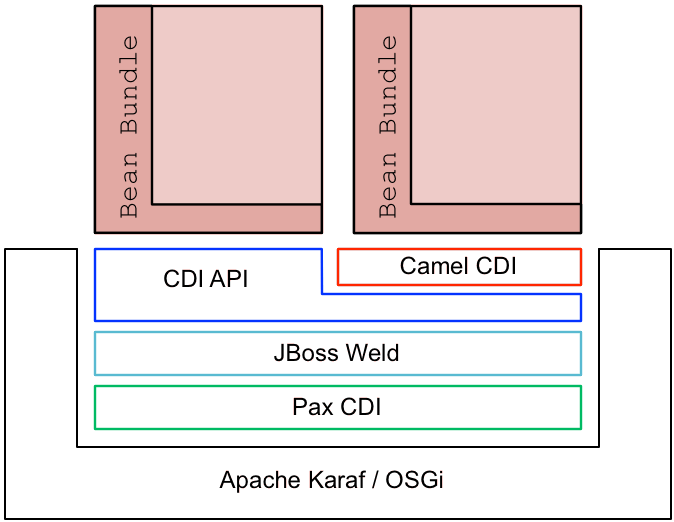
Pax CDI
JBoss Weld
Bean bundle
CDI container
Camel CDI and other customizations
camel-cdi- Provides custom annotations for defining and injecting Camel contexts and routes. See Chapter 15, Camel CDI.
switchyard-cdi- Provides custom annotations for use with SwitchYard. For example, see the quickstart example under the following directory of your JBoss Fuse installation:
quickstarts/switchyard/camel-bus-cdiFor more information, see chapter "Service Implementations" in "SwitchYard Development Guide". cxf-jaxrs-cdi- Provides support for CDI in JAX-RS, as defined in the JAX-RS 2.0 Specification (see section 10.2.3).
deltaspike- Apache Deltaspike is a general-purpose collection of CDI customizations.
14.2. Enabling Pax CDI
Overview
Require-Capability header to the bundle's manifest (turning the bundle into a bean bundle).
Pax CDI features
pax-cdi- Deploys the core components of Pax CDI. This feature must be combined with the
pax-cdi-weldCDI implementation. pax-cdi-weld- Deploys the JBoss Weld CDI implementation (which is the only CDI implementation supported on JBoss Fuse)
pax-cdi-web- Adds support for deploying a CDI application as a Web application (that is, deploying the CDI application into the Pax Web Jetty container). This enables support for the CDI features associated with servlet deployment, such as session-scoped beans, request-scoped beans, injection into servlets, and so on. This feature must be combined with the
pax-cdi-web-weldfeature (CDI implementation). pax-cdi-web-weld- Deploys the JBoss Weld CDI implementation for Web applications.
Requirements and capabilities
Require-Capability bundle header to the bundle's manifest file. For example, to enable the base Pax CDI functionality, you would add the following Require-Capability header to the bundle's manifest file:
Require-Capability : osgi.extender; filter:="(osgi.extender=pax.cdi)"Require-Capability bundle header effectively becomes a bean bundle (a CDI enabled bundle).
How to enable Pax CDI in Apache Karaf
- Add the required
pax-cdiandpax-cdi-weldfeatures to the Karaf container, as follows:JBossFuse:karaf@root> features:install pax-cdi pax-cdi-weld - When the Pax CDI features are installed in the Karaf container, this is not sufficient to enable CDI. You must also explicitly enable Pax CDI in each bundle that uses CDI (so that it becomes a bean bundle). To enable Pax CDI in a bundle, open the
pom.xmlfile in your bundle's Maven project and add the followingRequire-Capabilityelement to the configuration of the Maven bundle plug-in:<project ...> ... <build> <plugins> ... <plugin> <groupId>org.apache.felix</groupId> <artifactId>maven-bundle-plugin</artifactId> <extensions>true</extensions> <configuration> <instructions> <Bundle-SymbolicName>${project.groupId}.${project.artifactId}</Bundle-SymbolicName> <Import-Package>*</Import-Package> <Require-Capability> osgi.extender; filter:="(osgi.extender=pax.cdi)" </Require-Capability> </instructions> </configuration> </plugin> ... </plugins> </build> ... </project> - To access the CDI annotations in Java, you must add a dependency on the CDI API package. Edit your bundle's POM file,
pom.xml, to add the CDI API package as a Maven dependency:<project ...> ... <dependencies> ... <!-- CDI API --> <dependency> <groupId>javax.enterprise</groupId> <artifactId>cdi-api</artifactId> <version>${cdi-api-1.2-version}</version> <scope>provided</scope> </dependency> ... </dependencies> ... </project> - Rebuild your bundle in the usual way for your Maven project. For example, using the command:
mvn clean install - Deploy the bundle to the Karaf container in the usual way (for example, using the
osgi:installconsole command).
14.3. OSGi Services Extension
Overview
Enabling the OSGi Services Extension
Require-Capability : org.ops4j.pax.cdi.extension; filter:="(extension=pax-cdi-extension)"Require-Capability element to the configuration of the Maven bundle plug-in. For example, to add both the Pax CDI Extender and the Pax CDI OSGi Services Extension to the bundle, configure your project's POM file, pom.xml, as follows:
<project ...>
  ...
  <build>
    <plugins>
      ...
      <plugin>
        <groupId>org.apache.felix</groupId>
        <artifactId>maven-bundle-plugin</artifactId>
        <extensions>true</extensions>
        <configuration>
          <instructions>
            <Bundle-SymbolicName>${project.groupId}.${project.artifactId}</Bundle-SymbolicName>
            <Import-Package>*</Import-Package>
            <Require-Capability>
              osgi.extender; filter:="(osgi.extender=pax.cdi)",
              org.ops4j.pax.cdi.extension; filter:="(extension=pax-cdi-extension)"
            </Require-Capability>
          </instructions>
        </configuration>
      </plugin>
      ...
    </plugins>
  </build>
  ...
</project>
Maven dependency for the OSGi Services extensions API
pax-cdi-api package. Edit your bundle's POM file, pom.xml, to add the Pax CDI API package as a Maven dependency:
<project ...>
  ...
  <dependencies>
    ...
    <!-- CDI API -->
    <dependency>
        <groupId>org.ops4j.pax.cdi</groupId>
        <artifactId>pax-cdi-api</artifactId>
        <version>1.0.0.RC1</version>
    </dependency>
    ...
  </dependencies>
  ...
</project>
Injecting an OSGi Service
@Inject @OsgiService
private IceCreamService iceCream;Disambiguating OSGi Services
@Inject @OsgiService(filter = "(&(flavour=chocolate)(lactose=false))")
private IceCreamService iceCream;Selecting OSGi Services at run time
@Inject
@OsgiService(dynamic = true)
private Instance<IceCreamService> iceCreamServices;iceCreamServices.get() will return an instance of the IceCreamService service at run time. With this approach, it is possible to reference an OSGi service that is created after your bean is created.
Publishing a bean as OSGi Service with singleton scope
@OsgiServiceProvider
public class ChocolateService implements IceCreamService {
    ...
}Publishing a bean as OSGi Service with prototype scope
@OsgiServiceProvider
@PrototypeScoped
public class ChocolateService implements IceCreamService {
    ...
}Publishing a bean as OSGi Service with bundle scope
@OsgiServiceProvider
@BundleScoped
public class ChocolateService implements IceCreamService {
    ...
}@BundleScoped beans are registered with an org.osgi.framework.ServiceFactory.
Setting OSGi Service properties
@OsgiServiceProvider
@Properties({
    @Property(name = "flavour", value = "chocolate"),
    @Property(name = "lactose", value = "false")
})
public class ChocolateService implements IceCreamService {
    ...
}
Publishing an OSGi Service with explicit interfaces
@OsgiServiceProvider(classes = {ChocolateService.class, IceCreamService.class})
public class ChocolateService implements IceCreamService {
    ...
}
Chapter 15. Camel CDI
15.1. Basic Features
Overview
Endpoint, ProducerTemplate or TypeConverter. It implements standard Camel bean integration so that Camel annotations like @Consume, @Produce and @PropertyInject can be used seamlessly in CDI beans. Besides, it bridges Camel events (for example RouteAddedEvent, CamelContextStartedEvent, ExchangeCompletedEvent, ...) as CDI events and provides a CDI events endpoint that can be used to consume / produce CDI events from / to Camel routes.
How to enable Camel CDI in Apache Karaf
- Add the required
pax-cdi,pax-cdi-weld, andcamel-cdifeatures to the Karaf container, as follows:JBossFuse:karaf@root> features:install pax-cdi pax-cdi-weld camel-cdi - To enable Camel CDI in a bundle, open the
pom.xmlfile in your bundle's Maven project and add the followingRequire-Capabilityelement to the configuration of the Maven bundle plug-in:<project ...> ... <build> <plugins> ... <plugin> <groupId>org.apache.felix</groupId> <artifactId>maven-bundle-plugin</artifactId> <extensions>true</extensions> <configuration> <instructions> <Bundle-SymbolicName>${project.groupId}.${project.artifactId}</Bundle-SymbolicName> <Import-Package>*</Import-Package> <Require-Capability> osgi.extender; filter:="(osgi.extender=pax.cdi)", org.ops4j.pax.cdi.extension; filter:="(extension=camel-cdi-extension)" </Require-Capability> </instructions> </configuration> </plugin> ... </plugins> </build> ... </project> - To access the CDI annotations in Java, you must add a dependency on the CDI API package and on the Camel CDI package. Edit your bundle's POM file,
pom.xml, to add the CDI API package as a Maven dependency:<project ...> ... <dependencies> ... <!-- CDI API --> <dependency> <groupId>javax.enterprise</groupId> <artifactId>cdi-api</artifactId> <version>${cdi-api-1.2-version}</version> <scope>provided</scope> </dependency> <!-- Camel CDI API --> <dependency> <groupId>org.apache.camel</groupId> <artifactId>camel-cdi</artifactId> <version>2.17.0.redhat-630xxx</version> </dependency> ... </dependencies> ... </project> - Rebuild your bundle in the usual way for your Maven project. For example, using the command:
mvn clean install - Deploy the bundle to the Karaf container in the usual way (for example, using the
osgi:installconsole command).
Auto-configured Camel context
CamelContext bean. That CamelContext bean is automatically instantiated, configured and started (resp. stopped) when the CDI container initialises (resp. shuts down). It can be injected in the application, for example:
@Inject
CamelContext context;CamelContext bean is qualified with the built-in @Default qualifier, is scoped @ApplicationScoped and is of type DefaultCamelContext.
Auto-detecting Camel routes
RoutesBuilder beans in the application, instantiates and add them to the CamelContext bean instance when the CDI container initialises. For example, adding a Camel route is as simple as declaring a class, for example:
class MyRouteBean extends RouteBuilder {

	@Override
    public void configure() {
        from("jms:invoices").to("file:/invoices");
    }
}RoutesBuilder beans as you want. Besides, RouteContainer beans are also automatically collected, instantiated and added to the CamelContext bean instance managed by Camel CDI when the container initialises.
Auto-configured Camel primitives
@Inject
@Uri("direct:inbound")
ProducerTemplate producerTemplate;

@Inject
MockEndpoint outbound; // URI defaults to the member name, i.e. mock:outbound

@Inject
@Uri("direct:inbound")
Endpoint endpoint;

@Inject
TypeConverter converter;
Camel context configuration
CamelContext bean, you can used the @ContextName qualifier provided by Camel CDI, for example:
@ContextName("camel-context")
class MyRouteBean extends RouteBuilder {

	@Override
    public void configure() {
        from("jms:invoices").to("file:/invoices");
    }
}CamelContext class can be used to declare a custom Camel context bean. Then, the @PostConstruct and @PreDestroy lifecycle callbacks can be done to do the customisation, for example:
@ApplicationScoped
class CustomCamelContext extends DefaultCamelContext {

    @PostConstruct
    void customize() {
        // Set the Camel context name
        setName("custom");
        // Disable JMX
        disableJMX();
    }

    @PreDestroy
    void cleanUp() {
        // ...
    }
}class CamelContextFactory {
@Produces
@ApplicationScoped
CamelContext customize() {
DefaultCamelContext context = new DefaultCamelContext();
context.setName("custom");
return context;
}
void cleanUp(@Disposes CamelContext context) {
// ...
}
}@Produces
@ApplicationScoped
CamelContext context = new CustomCamelContext();
class CustomCamelContext extends DefaultCamelContext {
CustomCamelContext() {
setName("custom");
}
}setAutoStartup method, for example:
@ApplicationScoped
class ManualStartupCamelContext extends DefaultCamelContext {

    @PostConstruct
    void manual() {
        setAutoStartup(false);
    }
}
Multiple Camel contexts
CamelContext beans can actually be declared in the application as documented above. In that case, the CDI qualifiers declared on these CamelContext beans are used to bind the Camel routes and other Camel primitives to the corresponding Camel contexts. From example, if the following beans get declared:
@ApplicationScoped
@ContextName("foo")
class FooCamelContext extends DefaultCamelContext {
}

@ApplicationScoped
@BarContextQualifier
class BarCamelContext extends DefaultCamelContext {
}

@ContextName("foo")
class RouteAdddedToFooCamelContext extends RouteBuilder {

	@Override
    public void configure() {
        // ...
    }
}

@BarContextQualifier
class RouteAdddedToBarCamelContext extends RouteBuilder {

	@Override
    public void configure() {
        // ...
    }
}

@ContextName("baz")
class RouteAdddedToBazCamelContext extends RouteBuilder {

	@Override
    public void configure() {
        // ...
    }
}

@MyOtherQualifier
class RouteNotAddedToAnyCamelContext extends RouteBuilder {

	@Override
    public void configure() {
        // ...
    }
}RoutesBuilder beans qualified with @ContextName are automatically added to the corresponding CamelContext beans by Camel CDI. If no such CamelContext bean exists, it gets automatically created, as for the RouteAddedToBazCamelContext bean. Note this only happens for the @ContextName qualifier provided by Camel CDI. Hence the RouteNotAddedToAnyCamelContext bean qualified with the user-defined @MyOtherQualifier qualifier does not get added to any Camel contexts. That may be useful, for example, for Camel routes that may be required to be added later during the application execution.
CamelContext beans. In previous versions, it is only capable of managing beans of type CdiCamelContext so it is required to extend it.
CamelContext beans are also used to bind the corresponding Camel primitives, for example:
@Inject
@ContextName("foo")
@Uri("direct:inbound")
ProducerTemplate producerTemplate;

@Inject
@BarContextQualifier
MockEndpoint outbound; // URI defaults to the member name, i.e. mock:outbound

@Inject
@ContextName("baz")
@Uri("direct:inbound")
Endpoint endpoint;
Configuration properties
PropertiesComponent bean qualified with @Named("properties"), for example:
@Produces
@ApplicationScoped
@Named("properties")
PropertiesComponent propertiesComponent() {
    Properties properties = new Properties();
    properties.put("property", "value");
    PropertiesComponent component = new PropertiesComponent();
    component.setInitialProperties(properties);
    component.setLocation("classpath:placeholder.properties");
    return component;
}PropertiesComponent bean:
@Produces
@ApplicationScoped
@Named("properties")
PropertiesComponent properties(PropertiesParser parser) {
    PropertiesComponent component = new PropertiesComponent();
    component.setPropertiesParser(parser);
    return component;
}

// PropertiesParser bean that uses DeltaSpike to resolve properties
static class DeltaSpikeParser extends DefaultPropertiesParser {
    @Override
    public String parseProperty(String key, String value, Properties properties) {
        return ConfigResolver.getPropertyValue(key);
    }
}camel-example-cdi-properties example for a working example of a Camel CDI application using DeltaSpike configuration mechanism.
Auto-configured type converters
@Converter annotation are automatically registered into the deployed Camel contexts, for example:
@Converter
public class MyTypeConverter {

    @Converter
    public Output convert(Input input) {
        //...
    }
}Lazy Injection / Programmatic Lookup
javax.enterprise.inject.Instance interface which is the CDI entry point to perform lazy injection / programmatic lookup.
@Uriqualifier to lazily lookup for Camel primitives, for example for ProducerTemplatebeans:
@Any
@Inject
Instance<ProducerTemplate> producers;

ProducerTemplate inbound = producers
    .select(Uri.Literal.of("direct:inbound"))
.get();Endpoint beans, for example:
@Any
@Inject
Instance<Endpoint> endpoints;

MockEndpoint outbound = endpoints
    .select(MockEndpoint.class, Uri.Literal.of("mock:outbound"))
.get();@ContextName qualifier to lazily lookup for CamelContext beans, for example:
@Any
@Inject
Instance<CamelContext> contexts;

CamelContext context = contexts
    .select(ContextName.Literal.of("foo"))
.get();@Any
@Inject
Instance<CamelContext> contexts;
// Refine the selection by type
Instance<DefaultCamelContext> context = contexts.select(DefaultCamelContext.class);
// Check if such a bean exists then retrieve a reference
if (!context.isUnsatisfied())
context.get();@Any
@Inject
Instance<CamelContext> contexts;
for (CamelContext context : contexts)
context.setUseBreadcrumb(true);Injecting a Camel context from Spring XML
@Resource annotation, instead of the @Inject @ContextName annotations in the Camel CDI extension. For example,
...
public class RouteCaller {
    ...
    @Resource(name = "java:jboss/camel/context/simple-context")
    private CamelContext context;
...java:jboss/camel/context/simple-context is the name of the deployed context registered in the JNDI registry. simple-context is the xml:id of the camelContext element in the Spring XML file.
@Inject @ContextName annotations can result in the creation of a new camelContext instead of injecting the named context, which later causes endpoint lookups to fail.
15.2. Camel Bean Integration
Camel annotations
| Camel annotation | CDI equivalent | |
|---|---|---|
| Configuration property |
|
If using DeltaSpike configuration mechanism:
See configuration properties for more details.
|
| Producer template injection (default Camel context) |
|
|
| Endpoint injection (default Camel context) |
|
|
| Endpoint injection (Camel context by name) |
|
|
| Bean injection (by type) |
|
|
| Bean injection (by name) |
|
|
| POJO consuming |
|
Bean component
class MyBean {
	//...
}

from("direct:inbound").bean(MyBean.class);@Named("foo")
class MyNamedBean {
//...
}
from("direct:inbound").bean("foo");Referring beans from Endpoint URIs
# notation. If the URI parameter value starts with a # sign then Camel CDI will lookup for a bean of the given type by name, for example:
from("jms:queue:{{destination}}?transacted=true&transactionManager=#jtaTransactionManager").to("...");@Named("jtaTransactionManager"):
@Produces
@Named("jtaTransactionManager")
PlatformTransactionManager createTransactionManager(TransactionManager transactionManager, UserTransaction userTransaction) {
    JtaTransactionManager jtaTransactionManager = new JtaTransactionManager();
    jtaTransactionManager.setUserTransaction(userTransaction);
    jtaTransactionManager.setTransactionManager(transactionManager);
    jtaTransactionManager.afterPropertiesSet();
    return jtaTransactionManager;
}
15.3. CDI Events in Camel
Camel events to CDI events
void onContextStarting(@Observes CamelContextStartingEvent event) {
    // Called before the default Camel context is about to start
}@ContextName, can be used to refine the observer method resolution to a particular Camel context as specified in observer resolution, for example:
void onRouteStarted(@Observes @ContextName("foo") RouteStartedEvent event) {
    // Called after the route 'event.getRoute()' for the Camel context 'foo' has started
}

void onContextStarted(@Observes @Manual CamelContextStartedEvent event) {
    // Called after the the Camel context qualified with '@Manual' has started
}@Default qualifier can be used to observe Camel events for the default Camel context if multiples contexts exist, for example:
void onExchangeCompleted(@Observes @Default ExchangeCompletedEvent event) {
    // Called after the exchange 'event.getExchange()' processing has completed
}@Any qualifier is implicitly assumed, so that corresponding events for all the Camel contexts get received.
CDI events endpoint
CdiEventEndpoint<T> bean provided by Camel CDI can be used to observe / consume CDI events whose event type is T, for example:
@Inject
CdiEventEndpoint<String> cdiEventEndpoint;

from(cdiEventEndpoint).log("CDI event received: ${body}");@Inject
@Uri("direct:event")
ProducerTemplate producer;
void observeCdiEvents(@Observes String event) {
producer.sendBody(event);
}
from("direct:event").log("CDI event received: ${body}");CdiEventEndpoint<T> bean can be used to produce / fire CDI events whose event type is T, for example:
@Inject
CdiEventEndpoint<String> cdiEventEndpoint;

from("direct:event").to(cdiEventEndpoint).log("CDI event sent: ${body}");@Inject
Event<String> event;
from("direct:event").process(new Processor() {
@Override
public void process(Exchange exchange) {
event.fire(exchange.getBody(String.class));
}
}).log("CDI event sent: ${body}");@Inject
Event<String> event;
from("direct:event")
.process(exchange -> event.fire(exchange.getIn().getBody(String.class)))
.log("CDI event sent: ${body}");T (resp. the qualifiers) of a particular CdiEventEndpoint<T> injection point are automatically translated into the parameterized event type (resp. into the event qualifiers) for example:
@Inject
@FooQualifier
CdiEventEndpoint<List<String>> cdiEventEndpoint;

from("direct:event").to(cdiEventEndpoint);

void observeCdiEvents(@Observes @FooQualifier List<String> event) {
    logger.info("CDI event: {}", event);
}@ContextName, can be used to qualify the CdiEventEndpoint<T> injection points, for example:
@Inject
@ContextName("foo")
CdiEventEndpoint<List<String>> cdiEventEndpoint;
// Only observes / consumes events having the @ContextName("foo") qualifier
from(cdiEventEndpoint).log("Camel context (foo) > CDI event received: ${body}");
// Produces / fires events with the @ContextName("foo") qualifier
from("...").to(cdiEventEndpoint);

void observeCdiEvents(@Observes @ContextName("foo") List<String> event) {
    logger.info("Camel context (foo) > CDI event: {}", event);
}cdi-event://PayloadType<T1,...,Tn>[?qualifiers=QualifierType1[,...[,QualifierTypeN]...]]PayloadType (resp. the QualifierType) being the URI escaped fully qualified name of the payload (resp. qualifier) raw type followed by the type parameters section delimited by angle brackets for payload parameterized type. Which leads to unfriendly URIs, for example:
cdi-event://org.apache.camel.cdi.example.EventPayload%3Cjava.lang.Integer%3E?qualifiers=org.apache.camel.cdi.example.FooQualifier%2Corg.apache.camel.cdi.example.BarQualifier15.4. OSGi Integration
Auto-configured OSGi integration
ComponentResolver and DataFormatResolver) integrate with the OSGi registry. That means that the Karaf Camel commands can be used to operate the Camel contexts auto-configured by Camel CDI, for example:
karaf@root()> camel:context-list
 Context        Status              Total #       Failed #     Inflight #   Uptime
 -------        ------              -------       --------     ----------   ------
camel-cdi Started 1 0 0 1 minutecamel-example-cdi-osgi example, available in the list of camel examples for a working example of the Camel CDI OSGi integration.
Part V. OSGi Service Layer
Abstract
Chapter 16. OSGi Services
Abstract
16.1. The Blueprint Container
Abstract
16.1.1. Blueprint Configuration
Location of blueprint files in a JAR file
OSGI-INF/blueprint.xml, under this directory are interpreted as blueprint configuration files; in other words, any files that match the pattern, OSGI-INF/blueprint/*.xml.
Location of blueprint files in a Maven project
ProjectDir/src/main/resources/OSGI-INF/blueprintBlueprint namespace and root element
http://www.osgi.org/xmlns/blueprint/v1.0.0blueprint, so a blueprint XML configuration file normally has the following outline form:
<?xml version="1.0" encoding="UTF-8"?>
<blueprint xmlns="http://www.osgi.org/xmlns/blueprint/v1.0.0">
  ...
</blueprint>
blueprint root element, there is no need to specify the location of the blueprint schema using an xsi:schemaLocation attribute, because the schema location is already known to the blueprint framework.
Blueprint Manifest configuration
META-INF/MANIFEST.MF, as follows:
Custom Blueprint file locations
OSGI-INF/blueprint/*.xml), you can specify a comma-separated list of alternative locations in the Bundle-Blueprint header in the manifest file—for example:
Bundle-Blueprint: lib/account.xml, security.bp, cnf/*.xmlMandatory dependencies
availability attribute to optional on a reference element or a reference-list element). Declaring a dependency to be mandatory means that the bundle cannot function properly without that dependency and the dependency must be available at all times.
Bundle-SymbolicName manifest header to configure the grace period:
blueprint.graceperiod- If
true(the default), the grace period is enabled and the blueprint container waits for mandatory dependencies to be resolved during initialization; iffalse, the grace period is skipped and the container does not check whether the mandatory dependencies are resolved. blueprint.timeout- Specifies the grace period timeout in milliseconds. The default is 300000 (5 minutes).
Bundle-SymbolicName header in the manifest file:
Bundle-SymbolicName: org.fusesource.example.osgi-client;
 blueprint.graceperiod:=true;
blueprint.timeout:= 10000Bundle-SymbolicName header is a semi-colon separated list, where the first item is the actual bundle symbolic name, the second item, blueprint.graceperiod:=true, enables the grace period and the third item, blueprint.timeout:= 10000, specifies a 10 second timeout.
16.1.2. Defining a Service Bean
Overview
bean element. You can create all of your main application objects this way. In particular, you can use the bean element to create a Java object that represents an OSGi service instance.
Blueprint bean element
bean element is defined in the blueprint schema namespace, http://www.osgi.org/xmlns/blueprint/v1.0.0. The blueprint {http://www.osgi.org/xmlns/blueprint/v1.0.0}bean element should not be confused with the Spring {http://www.springframework.org/schema/beans}bean element, which has a similar syntax but is defined in a different namespace.
bean element under the beans root element, (as long as you define each bean elements using the appropriate namespace prefix).
Sample beans
bean element enables you to create objects using a similar syntax to the conventional Spring bean element. One significant difference, however, is that blueprint constructor arguments are specified using the argument child element, in contrast to Spring's constructor-arg child element. The following example shows how to create a few different types of bean using blueprint's bean element:
<blueprint xmlns="http://www.osgi.org/xmlns/blueprint/v1.0.0">

  <bean id="label" class="java.lang.String">
    <argument value="LABEL_VALUE"/>
  </bean>

  <bean id="myList" class="java.util.ArrayList">
    <argument type="int" value="10"/>
  </bean>

  <bean id="account" class="org.fusesource.example.Account">
    <property name="accountName" value="john.doe"/>
    <property name="balance" value="10000"/>
  </bean>

</blueprint>Account class referenced by the last bean example could be defined as follows:
package org.fusesource.example;

public class Account
{
    private String accountName;
    private int balance;

    public Account () { }

    public void setAccountName(String name) {
        this.accountName = name;
    }

    public void setBalance(int bal) {
        this.balance = bal;
    }
    ...
}
Differences between Blueprint and Spring
bean element and the Spring bean element are similar, there are a few differences, as you can see from Table 16.1, “Comparison of Spring bean with Blueprint bean”. In this table, the XML tags (identifiers enclosed in angle brackets) refer to child elements of bean and the plain identifiers refer to attributes.
| Spring DM Attributes/Tags | Blueprint Attributes/Tags |
|---|---|
id | id |
name/<alias> | N/A |
class | class |
scope | scope=("singleton"|"prototype") |
lazy-init=("true"|"false") | activation=("eager"|"lazy") |
depends-on | depends-on |
init-method | init-method |
destroy-method | destroy-method |
factory-method | factory-bean |
factory-bean | factory-ref |
<constructor-arg> | <argument> |
<property> | <property> |
scope attribute is singleton and the default value of the blueprint activation attribute is eager.
References
- Spring Dynamic Modules Reference Guide v2.0 (see the blueprint chapters).
- Section 121 Blueprint Container Specification, from the OSGi Compendium Services R4.2 specification.
16.1.3. Exporting a Service
Overview
Exporting with a single interface
service element that references the relevant service bean, using the ref attribute, and specifies the published interface, using the interface attribute.
SavingsAccountImpl class under the org.fusesource.example.Account interface name using the blueprint configuration code shown in Example 16.1, “Sample Service Export with a Single Interface”.
Example 16.1. Sample Service Export with a Single Interface
<blueprint xmlns="http://www.osgi.org/xmlns/blueprint/v1.0.0">

  <bean id="savings" class="org.fusesource.example.SavingsAccountImpl"/>

 <service ref="savings" interface="org.fusesource.example.Account"/>

</blueprint>ref attribute specifies the ID of the corresponding bean instance and the interface attribute specifies the name of the public Java interface under which the service is registered in the OSGi service registry. The classes and interfaces used in this example are shown in Example 16.2, “Sample Account Classes and Interfaces”
Example 16.2. Sample Account Classes and Interfaces
package org.fusesource.example

public interface Account { ... }

public interface SavingsAccount { ... }

public interface CheckingAccount { ... }

public class SavingsAccountImpl implements SavingsAccount
{
    ...
}

public class CheckingAccountImpl implements CheckingAccount
{
    ...
}
Exporting with multiple interfaces
service element that references the relevant service bean, using the ref attribute, and specifies the published interfaces, using the interfaces child element.
SavingsAccountImpl class under the list of public Java interfaces, org.fusesource.example.Account and org.fusesource.example.SavingsAccount, using the following blueprint configuration code:
<blueprint xmlns="http://www.osgi.org/xmlns/blueprint/v1.0.0">
  <bean id="savings" class="org.fusesource.example.SavingsAccountImpl"/>
  <service ref="savings">
    <interfaces>
      <value>org.fusesource.example.Account</value>
      <value>org.fusesource.example.SavingsAccount</value>
    </interfaces>
  </service>
  ...
</blueprint>interface attribute and the interfaces element cannot be used simultaneously in the same service element. You must use either one or the other.
Exporting with auto-export
auto-export attribute.
SavingsAccountImpl class under all of its implemented public interfaces, use the following blueprint configuration code:
<blueprint xmlns="http://www.osgi.org/xmlns/blueprint/v1.0.0">
  <bean id="savings" class="org.fusesource.example.SavingsAccountImpl"/>
  <service ref="savings" auto-export="interfaces"/>
  ...
</blueprint>interfaces value of the auto-export attribute indicates that blueprint should register all of the public interfaces implemented by SavingsAccountImpl. The auto-export attribute can have the following valid values:
disabled- Disables auto-export. This is the default.
interfaces- Registers the service under all of its implemented public Java interfaces.
class-hierarchy- Registers the service under its own type (class) and under all super-types (super-classes), except for the
Objectclass. all-classes- Like the
class-hierarchyoption, but including all of the implemented public Java interfaces as well.
Setting service properties
service-properties child element that contains one or more beans:entry elements (one beans:entry element for each service property).
bank.name string property with a savings account service, you could use the following blueprint configuration:
<blueprint xmlns="http://www.osgi.org/xmlns/blueprint/v1.0.0"
           xmlns:beans="http://www.springframework.org/schema/beans"
           ...>
  ...
  <service ref="savings" auto-export="interfaces">
    <service-properties>
      <beans:entry key="bank.name" value="HighStreetBank"/>
    </service-properties>
  </service>
  ...
</blueprint>bank.name string property has the value, HighStreetBank. It is possible to define service properties of type other than string: that is, primitive types, arrays, and collections are also supported. For details of how to define these types, see Controlling the Set of Advertised Properties. in the Spring Reference Guide.
entry element ought to belong to the blueprint namespace. The use of the beans:entry element in Spring's implementation of blueprint is non-standard.
Default service properties
service element, as follows:
osgi.service.blueprint.compname—is always set to theidof the service'sbeanelement, unless the bean is inlined (that is, the bean is defined as a child element of theserviceelement). Inlined beans are always anonymous.service.ranking—is automatically set, if the ranking attribute is non-zero.
Specifying a ranking attribute
0 being the default. You can specify the service ranking by setting the ranking attribute on the service element—for example:
<service ref="savings" interface="org.fusesource.example.Account" ranking="10"/>Specifying a registration listener
registration-listener child element to a service element.
listenerBean, which is referenced by a registration-listener element, so that the listener bean receives callbacks whenever an Account service is registered or unregistered:
<blueprint xmlns="http://www.osgi.org/xmlns/blueprint/v1.0.0" ...>
  ...
  <bean id="listenerBean" class="org.fusesource.example.Listener"/>

  <service ref="savings" auto-export="interfaces">
    <registration-listener
        ref="listenerBean"
        registration-method="register"
        unregistration-method="unregister"/>
  </service>
  ...
</blueprint>registration-listener element's ref attribute references the id of the listener bean, the registration-method attribute specifies the name of the listener method that receives the registration callback, and unregistration-method attribute specifies the name of the listener method that receives the unregistration callback.
Listener class that receives notifications of registration and unregistration events:
package org.fusesource.example;

public class Listener
{
    public void register(Account service, java.util.Map serviceProperties) {
        ...
    }

    public void unregister(Account service, java.util.Map serviceProperties) {
        ...
    }
}register and unregister, are specified by the registration-method and unregistration-method attributes respectively. The signatures of these methods must conform to the following syntax:
- First method argument—any type T that is assignable from the service object's type. In other words, any supertype class of the service class or any interface implemented by the service class. This argument contains the service instance, unless the service bean declares the
scopeto beprototype, in which case this argument isnull(when the scope isprototype, no service instance is available at registration time). - Second method argument—must be of either
java.util.Maptype orjava.util.Dictionarytype. This map contains the service properties associated with this service registration.
16.1.4. Importing a Service
Overview
reference element or the reference-list element to import an OSGi service. The key difference between these elements is not (as you might at first be tempted to think) that reference returns a single service reference, while reference-list returns a list of service references. Rather, the real difference is that the reference element is suitable for accessing stateless services, while the reference-list element is suitable for accessing stateful services.
Managing service references
Reference manager
reference element. This element returns a single service reference and is the preferred approach for accessing stateless services. Figure 16.1, “Reference to Stateless Service” shows an overview of the model for accessing a stateless service using the reference manager.
Figure 16.1. Reference to Stateless Service
- If multiple services instances are found that match the criteria in the
referenceelement, the reference manager can arbitrarily choose one of them as the backing instance (because they are interchangeable). - If the backing service disappears, the reference manager can immediately switch to using one of the other available services of the same type. Hence, there is no guarantee, from one method invocation to the next, that the proxy remains connected to the same backing service.
ServiceUnavailable exception. The length of the timeout is configurable by setting the timeout attribute on the reference element.
Reference list manager
reference-list element. This element returns a list of service references and is the preferred approach for accessing stateful services. Figure 16.2, “List of References to Stateful Services” shows an overview of the model for accessing a stateful service using the reference list manager.
Figure 16.2. List of References to Stateful Services
java.util.List object (the provided object), which contains a list of proxy objects. Each proxy is backed by a unique service instance in the OSGi service registry. Unlike the stateless model, backing services are not considered to be interchangeable here. In fact, the lifecycle of each proxy in the list is tightly linked to the lifecycle of the corresponding backing service: when a service gets registered in the OSGi registry, a corresponding proxy is synchronously created and added to the proxy list; and when a service gets unregistered from the OSGi registry, the corresponding proxy is synchronously removed from the proxy list.
ServiceUnavailable exception.
Matching by interface (stateless)
interface attribute on the reference element. The service is deemed to match, if the interface attribute value is a super-type of the service or if the attribute value is a Java interface implemented by the service (the interface attribute can specify either a Java class or a Java interface).
SavingsAccount service (see Example 16.1, “Sample Service Export with a Single Interface”), define a reference element as follows:
<blueprint xmlns="http://www.osgi.org/xmlns/blueprint/v1.0.0">

  <reference id="savingsRef"
             interface="org.fusesource.example.SavingsAccount"/>

  <bean id="client" class="org.fusesource.example.client.Client">
    <property name="savingsAccount" ref="savingsRef"/>
  </bean>

</blueprint>reference element creates a reference manager bean with the ID, savingsRef. To use the referenced service, inject the savingsRef bean into one of your client classes, as shown.
SavingsAccount. For example, you could define the Client class as follows:
package org.fusesource.example.client;

import org.fusesource.example.SavingsAccount;

public class Client {
    SavingsAccount savingsAccount;

    // Bean properties
    public SavingsAccount getSavingsAccount() {
        return savingsAccount;
    }

    public void setSavingsAccount(SavingsAccount savingsAccount) {
        this.savingsAccount = savingsAccount;
    }
    ...
}
Matching by interface (stateful)
interface attribute on the reference-list element. The reference list manager then obtains a list of all the services, whose interface attribute value is either a super-type of the service or a Java interface implemented by the service (the interface attribute can specify either a Java class or a Java interface).
SavingsAccount service (see Example 16.1, “Sample Service Export with a Single Interface”), define a reference-list element as follows:
<blueprint xmlns="http://www.osgi.org/xmlns/blueprint/v1.0.0">

  <reference-list id="savingsListRef"
                  interface="org.fusesource.example.SavingsAccount"/>

  <bean id="client" class="org.fusesource.example.client.Client">
    <property name="savingsAccountList" ref="savingsListRef"/>
  </bean>

</blueprint>reference-list element creates a reference list manager bean with the ID, savingsListRef. To use the referenced service list, inject the savingsListRef bean reference into one of your client classes, as shown.
savingsAccountList bean property is a list of service objects (for example, java.util.List<SavingsAccount>). You could define the client class as follows:
package org.fusesource.example.client;

import org.fusesource.example.SavingsAccount;

public class Client {
    java.util.List<SavingsAccount> accountList;

    // Bean properties
    public java.util.List<SavingsAccount> getSavingsAccountList() {
        return accountList;
    }

    public void setSavingsAccountList(
                    java.util.List<SavingsAccount> accountList
    ) {
        this.accountList = accountList;
    }
    ...
}
Matching by interface and component name
interface attribute and the component-name attribute on the reference element, as follows:
<reference id="savingsRef"
           interface="org.fusesource.example.SavingsAccount"
component-name="savings"/>interface attribute and the component-name attribute on the reference-list element, as follows:
<reference-list id="savingsRef"
           interface="org.fusesource.example.SavingsAccount"
           component-name="savings"/>
Matching service properties with a filter
filter attribute on the reference element or on the reference-list element. The value of the filter attribute must be an LDAP filter expression. For example, to define a filter that matches when the bank.name service property equals HighStreetBank, you could use the following LDAP filter expression:
(bank.name=HighStreetBank)& conjunction, which combines expressions with a logical and.For example, to require that the foo property is equal to FooValue and the bar property is equal to BarValue, you could use the following LDAP filter expression:
(&(foo=FooValue)(bar=BarValue))interface and component-name settings, in which case all of the specified conditions are required to match.
SavingsAccount type, with a bank.name service property equal to HighStreetBank, you could define a reference element as follows:
<reference id="savingsRef"
           interface="org.fusesource.example.SavingsAccount"
filter="(bank.name=HighStreetBank)"/>SavingsAccount type, with a bank.name service property equal to HighStreetBank, you could define a reference-list element as follows:
<reference-list id="savingsRef"
           interface="org.fusesource.example.SavingsAccount"
           filter="(bank.name=HighStreetBank)"/>
Specifying whether mandatory or optional
reference element or a reference-list element by setting the availability attribute on the element. There are two possible values of the availability attribute: mandatory (the default), means that the dependency must be resolved during a normal blueprint container initialization; and optional, means that the dependency need not be resolved during initialization.
reference element shows how to declare explicitly that the reference is a mandatory dependency:
<reference id="savingsRef"
           interface="org.fusesource.example.SavingsAccount"
           availability="mandatory"/>
Specifying a reference listener
optional availability—it is often useful to track when a backing service gets bound to the registry and when it gets unbound from the registry. To receive notifications of service binding and unbinding events, you can define a reference-listener element as the child of either the reference element or the reference-list element.
savingsRef:
<blueprint xmlns="http://www.osgi.org/xmlns/blueprint/v1.0.0">

  <reference id="savingsRef"
             interface="org.fusesource.example.SavingsAccount"
             >
    <reference-listener bind-method="onBind" unbind-method="onUnbind">
      <bean class="org.fusesource.example.client.Listener"/>
    </reference-listener>
  </reference>

  <bean id="client" class="org.fusesource.example.client.Client">
    <property name="savingsAcc" ref="savingsRef"/>
  </bean>

</blueprint>org.fusesource.example.client.Listener type as a callback that listens for bind and unbind events. Events are generated whenever the savingsRef reference manager's backing service binds or unbinds.
Listener class:
package org.fusesource.example.client;

import org.osgi.framework.ServiceReference;

public class Listener {

    public void onBind(ServiceReference ref) {
        System.out.println("Bound service: " + ref);
    }

    public void onUnbind(ServiceReference ref) {
        System.out.println("Unbound service: " + ref);
    }

}onBind and onUnbind, are specified by the bind-method and unbind-method attributes respectively. Both of these callback methods take an org.osgi.framework.ServiceReference argument.
16.2. Publishing an OSGi Service
Overview
Prerequisites
- Maven installation—Maven is a free, open source build tool from Apache. You can download the latest version from http://maven.apache.org/download.html (minimum is 2.0.9).
- Internet connection—whilst performing a build, Maven dynamically searches external repositories and downloads the required artifacts on the fly. In order for this to work, your build machine must be connected to the Internet.
Generating a Maven project
maven-archetype-quickstart archetype creates a generic Maven project, which you can then customize for whatever purpose you like. To generate a Maven project with the coordinates, org.fusesource.example:osgi-service, enter the following command:
mvn archetype:create
-DarchetypeArtifactId=maven-archetype-quickstart
-DgroupId=org.fusesource.example
-DartifactId=osgi-serviceProjectDir/osgi-service, containing the files for the generated project.
Customizing the POM file
- Follow the POM customization steps described in Section 6.1, “Generating a Bundle Project”.
- In the configuration of the Maven bundle plug-in, modify the bundle instructions to export the
org.fusesource.example.servicepackage, as follows:<project ... > ... <build> ... <plugins> ... <plugin> <groupId>org.apache.felix</groupId> <artifactId>maven-bundle-plugin</artifactId> <extensions>true</extensions> <configuration> <instructions> <Bundle-SymbolicName>${pom.groupId}.${pom.artifactId}</Bundle-SymbolicName> <Export-Package>org.fusesource.example.service</Export-Package> </instructions> </configuration> </plugin> </plugins> </build> ... </project>
Writing the service interface
ProjectDir/osgi-service/src/main/java/org/fusesource/example/service sub-directory. In this directory, use your favorite text editor to create the file, HelloWorldSvc.java, and add the code from Example 16.3, “The HelloWorldSvc Interface” to it.
Example 16.3. The HelloWorldSvc Interface
package org.fusesource.example.service;

public interface HelloWorldSvc
{
    public void sayHello();
}
Writing the service class
ProjectDir/osgi-service/src/main/java/org/fusesource/example/service/impl sub-directory. In this directory, use your favorite text editor to create the file, HelloWorldSvcImpl.java, and add the code from Example 16.4, “The HelloWorldSvcImpl Class” to it.
Example 16.4. The HelloWorldSvcImpl Class
package org.fusesource.example.service.impl;

import org.fusesource.example.service.HelloWorldSvc;


public class HelloWorldSvcImpl implements HelloWorldSvc {

    public void sayHello()
    {
        System.out.println( "Hello World!" );
    }

}
Writing the blueprint file
OSGI-INF/blueprint directory on the class path. To add a blueprint file to your project, first create the following sub-directories:
ProjectDir/osgi-service/src/main/resources
ProjectDir/osgi-service/src/main/resources/OSGI-INF
ProjectDir/osgi-service/src/main/resources/OSGI-INF/blueprintsrc/main/resources is the standard Maven location for all JAR resources. Resource files under this directory will automatically be packaged in the root scope of the generated bundle JAR.
HelloWorldSvc bean, using the bean element, and then exports the bean as an OSGi service, using the service element.
ProjectDir/osgi-service/src/main/resources/OSGI-INF/blueprint directory, use your favorite text editor to create the file, config.xml, and add the XML code from Example 16.5, “Blueprint File for Exporting a Service”.
Example 16.5. Blueprint File for Exporting a Service
<?xml version="1.0" encoding="UTF-8"?>
<blueprint xmlns="http://www.osgi.org/xmlns/blueprint/v1.0.0">

  <bean id="hello" class="org.fusesource.example.service.impl.HelloWorldSvcImpl"/>

  <service ref="hello" interface="org.fusesource.example.service.HelloWorldSvc"/>

</blueprint>
Running the service bundle
osgi-service project, perform the following steps:
- Build the project—open a command prompt and change directory to
ProjectDir/osgi-service. Use Maven to build the demonstration by entering the following command:mvn installIf this command runs successfully, theProjectDir/osgi-service/targetdirectory should contain the bundle file,osgi-service-1.0-SNAPSHOT.jar. - Install and start the osgi-service bundle—at the Red Hat JBoss Fuse console, enter the following command:
JBossFuse:karaf@root> osgi:install -s file:ProjectDir/osgi-service/target/osgi-service-1.0-SNAPSHOT.jarWhere ProjectDir is the directory containing your Maven projects and the-sflag directs the container to start the bundle right away. For example, if your project directory isC:\Projectson a Windows machine, you would enter the following command:JBossFuse:karaf@root> osgi:install -s file:C:/Projects/osgi-service/target/osgi-service-1.0-SNAPSHOT.jarNoteOn Windows machines, be careful how you format thefileURL—for details of the syntax understood by thefileURL handler, see Section A.1, “File URL Handler”. - Check that the service has been created—to check that the bundle has started successfully, enter the following Red Hat JBoss Fuse console command:
JBossFuse:karaf@root> osgi:listSomewhere in this listing, you should see a line for theosgi-servicebundle, for example:[ 236] [Active ] [Created ] [ ] [ 60] osgi-service (1.0.0.SNAPSHOT)To check that the service is registered in the OSGi service registry, enter a console command like the following:JBossFuse:karaf@root> osgi:ls 236Where the argument to the preceding command is theosgi-servicebundle ID. You should see some output like the following at the console:osgi-service (236) provides: ---------------------------- osgi.service.blueprint.compname = hello objectClass = org.fusesource.example.service.HelloWorldSvc service.id = 272 ---- osgi.blueprint.container.version = 1.0.0.SNAPSHOT osgi.blueprint.container.symbolicname = org.fusesource.example.osgi-service objectClass = org.osgi.service.blueprint.container.BlueprintContainer service.id = 273
16.3. Accessing an OSGi Service
Overview
sayHello() method on it.
Prerequisites
- Maven installation—Maven is a free, open source build tool from Apache. You can download the latest version from http://maven.apache.org/download.html (minimum is 2.0.9).
- Internet connection—whilst performing a build, Maven dynamically searches external repositories and downloads the required artifacts on the fly. In order for this to work, your build machine must be connected to the Internet.
Generating a Maven project
maven-archetype-quickstart archetype creates a generic Maven project, which you can then customize for whatever purpose you like. To generate a Maven project with the coordinates, org.fusesource.example:osgi-client, enter the following command:
mvn archetype:create
-DarchetypeArtifactId=maven-archetype-quickstart
-DgroupId=org.fusesource.example
-DartifactId=osgi-clientProjectDir/osgi-client, containing the files for the generated project.
Customizing the POM file
- Follow the POM customization steps described in Section 6.1, “Generating a Bundle Project”.
- Because the client uses the
HelloWorldSvcJava interface, which is defined in theosgi-servicebundle, it is necessary to add a Maven dependency on theosgi-servicebundle. Assuming that the Maven coordinates of theosgi-servicebundle areorg.fusesource.example:osgi-service:1.0-SNAPSHOT, you should add the following dependency to the client's POM file:<project ... > ... <dependencies> ... <dependency> <groupId>org.fusesource.example</groupId> <artifactId>osgi-service</artifactId> <version>1.0-SNAPSHOT</version> </dependency> </dependencies> ... </project>
Writing the Blueprint file
ProjectDir/osgi-client/src/main/resources
ProjectDir/osgi-client/src/main/resources/OSGI-INF
ProjectDir/osgi-client/src/main/resources/OSGI-INF/blueprintProjectDir/osgi-client/src/main/resources/OSGI-INF/blueprint directory, use your favorite text editor to create the file, config.xml, and add the XML code from Example 16.6, “Blueprint File for Importing a Service”.
Example 16.6. Blueprint File for Importing a Service
<?xml version="1.0" encoding="UTF-8"?>
<blueprint xmlns="http://www.osgi.org/xmlns/blueprint/v1.0.0">

  <reference id="helloWorld"
        interface="org.fusesource.example.service.HelloWorldSvc"/>

  <bean id="client"
        class="org.fusesource.example.client.Client"
        init-method="init">
    <property name="helloWorldSvc" ref="helloWorld"/>
  </bean>

</blueprint>reference element creates a reference manager that finds a service of HelloWorldSvc type in the OSGi registry. The bean element creates an instance of the Client class and injects the service reference as the bean property, helloWorldSvc. In addition, the init-method attribute specifies that the Client.init() method is called during the bean initialization phase (that is, after the service reference has been injected into the client bean).
Writing the client class
ProjectDir/osgi-client/src/main/java/org/fusesource/example/client directory, use your favorite text editor to create the file, Client.java, and add the Java code from Example 16.7, “The Client Class”.
Example 16.7. The Client Class
package org.fusesource.example.client;

import org.fusesource.example.service.HelloWorldSvc;

public class Client {
    HelloWorldSvc helloWorldSvc;

    // Bean properties
    public HelloWorldSvc getHelloWorldSvc() {
        return helloWorldSvc;
    }

    public void setHelloWorldSvc(HelloWorldSvc helloWorldSvc) {
        this.helloWorldSvc = helloWorldSvc;
    }

    public void init() {
        System.out.println("OSGi client started.");
        if (helloWorldSvc != null) {
            System.out.println("Calling sayHello()");
            helloWorldSvc.sayHello();  // Invoke the OSGi service!
        }
    }

}Client class defines a getter and a setter method for the helloWorldSvc bean property, which enables it to receive the reference to the Hello World service by injection. The init() method is called during the bean initialization phase, after property injection, which means that it is normally possible to invoke the Hello World service within the scope of this method.
Running the client bundle
osgi-client project, perform the following steps:
- Build the project—open a command prompt and change directory to
ProjectDir/osgi-client. Use Maven to build the demonstration by entering the following command:mvn installIf this command runs successfully, theProjectDir/osgi-client/targetdirectory should contain the bundle file,osgi-client-1.0-SNAPSHOT.jar. - Install and start the osgi-service bundle—at the Red Hat JBoss Fuse console, enter the following command:
JBossFuse:karaf@root> osgi:install -s file:ProjectDir/osgi-client/target/osgi-client-1.0-SNAPSHOT.jarWhere ProjectDir is the directory containing your Maven projects and the-sflag directs the container to start the bundle right away. For example, if your project directory isC:\Projectson a Windows machine, you would enter the following command:JBossFuse:karaf@root> osgi:install -s file:C:/Projects/osgi-client/target/osgi-client-1.0-SNAPSHOT.jarNoteOn Windows machines, be careful how you format thefileURL—for details of the syntax understood by thefileURL handler, see Section A.1, “File URL Handler”. - Client output—f the client bundle is started successfully, you should immediately see output like the following in the console:
Bundle ID: 239
OSGi client started.
Calling sayHello()
Hello World!
16.4. Integration with Apache Camel
Overview
Registry chaining
CamelContext automatically sets up a registry chain for resolving bean instances: the registry chain consists of the OSGi registry, followed by the blueprint (or Spring) registry. Now, if you try to reference a particular bean class or bean instance, the registry resolves the bean as follows:
- Look up the bean in the OSGi registry first. If a class name is specified, try to match this with the interface or class of an OSGi service.
- If no match is found in the OSGi registry, fall back on the blueprint registry (or the Spring registry, if you are using the Spring container).
Sample OSGi service interface
getGreeting():
package org.fusesource.example.hello.boston;

public interface HelloBoston {
    public String getGreeting();
}
Sample service export
HelloBoston OSGi service, you could use the following blueprint configuration to export the service:
<?xml version="1.0" encoding="UTF-8"?>
<blueprint xmlns="http://www.osgi.org/xmlns/blueprint/v1.0.0">
<bean id="hello" class="org.fusesource.example.hello.boston.HelloBostonImpl"/>
<service ref="hello" interface="org.fusesource.example.hello.boston.HelloBoston"/>
</blueprint>HelloBoston interface is implemented by the HelloBostonImpl class (not shown).
Invoking the OSGi service from Java DSL
HelloBoston OSGi service, you can invoke the service from a Apache Camel application using the Java DSL. In the Java DSL, you invoke the OSGi service through the Bean language, as follows:
from("timer:foo?period=5000")
.bean(org.fusesource.example.hello.boston.HelloBoston.class, "getGreeting")
.log("The message contains: ${body}")bean command, the first argument is the OSGi interface or class, which must match the interface exported from the OSGi service bundle. The second argument is the name of the bean method you want to invoke. For full details of the bean command syntax, see section "Bean Integration" in "Apache Camel Development Guide".
Invoking the OSGi service from XML DSL
HelloBoston OSGi service, but the syntax is slightly different. In the XML DSL, you invoke the OSGi service through the Bean language, using the method element, as follows:
<beans ...>
<camelContext xmlns="http://camel.apache.org/schema/spring">
<route>
<from uri="timer:foo?period=5000"/>
<setBody>
<method ref="org.fusesource.example.hello.boston.HelloBoston"
method="getGreeting"/>
</setBody>
<log message="The message contains: ${body}"/>
</route>
</camelContext>
</beans>Chapter 17. JMS Broker
Abstract
17.1. Working with the Default Broker
Abstract
Overview
61616. The broker remains installed in the container and activates whenever you restart the container.
Broker configuration
etc/activemq.xml—a standard Apache ActiveMQ configuration file that serves as a template for the default broker's configuration. It contains property place holders, specified using the syntax${propName}, that allow you to set the values of the actual property using the OSGi Admin service.etc/io.fabric8.mq.fabric.server-broker.cfg—the OSGi configuration file that specifies the values for the properties in the broker's template configuration file.
Broker data
data/activemq. You can change this location using the config command to change the broker's data property as shown in Example 17.1, “Configuring the Default Broker's Data Directory”.
Example 17.1. Configuring the Default Broker's Data Directory
JBossFuse:karaf@root> config:edit io.fabric8.mq.fabric.server.3e3d0055-1c5f-40e3-987e-024c1fac1c3f
JBossFuse:karaf@root> config:propset data dataStore
JBossFuse:karaf@root> config:updateDisabling the default broker
- Delete
FUSE_HOME/etc/io.fabric8.mq.fabric.server-broker.cfg.
- From the JBoss Fuse command console, list the JBoss Fuse brokers:
activemq:listThe result should look like this:brokerName = amq - List the configuration PID files:
config:list | grep io.fabric8.mq.fabricThe result will look like this:Pid: io.fabric8.mq.fabric.server.cd4295e7-1db9-44b6-9118-69011a0f09a3 FactoryPid: io.fabric8.mq.fabric.server fabric.zookeeper.pid = io.fabric8.mq.fabric.server felix.fileinstall.filename = file:/home/username/product/fuse-630/jboss-fuse-6.3.0.redhat-187/etc/io.fabric8.mq.fabric.server-broker.cfg service.factoryPid = io.fabric8.mq.fabric.server service.pid = io.fabric8.mq.fabric.server.cd4295e7-1db9-44b6-9118-69011a0f09a3 Pid: io.fabric8.mq.fabric.standalone.server.4de976b1-2fae-4391-97d9-3a08876e39ab FactoryPid: io.fabric8.mq.fabric.standalone.server felix.fileinstall.filename = file:/home/username/product/fuse-630/jboss-fuse-6.3.0.redhat-187/etc/io.fabric8.mq.fabric.server-broker.cfg mq.fabric.server.pid = io.fabric8.mq.fabric.server.cd4295e7-1db9-44b6-9118-69011a0f09a3 service.factoryPid = io.fabric8.mq.fabric.standalone.server service.pid = io.fabric8.mq.fabric.standalone.server.4de976b1-2fae-4391-97d9-3a08876e39ab - Delete the configuration PID files labeled
Pid:in the example above.config:delete io.fabric8.mq.fabric.server.cd4295e7-1db9-44b6-9118-69011a0f09a3 config:delete io.fabric8.mq.fabric.standalone.server.4de976b1-2fae-4391-97d9-3a08876e39abNote that your files will have the same names as those shown above until the last numeric portion of the the file name, which is a system generated ID for the broker. Replace the filenames in the instructions with your actual filename. - List the JBoss Fuse brokers again:
activemq:listThe deleted broker will not appear. - To permanently delete the default broker:Stop the JBoss Fuse instance.Delete file
FUSE_HOME/etc/io.fabric8.mq.fabric.server-broker.cfg.Restart the JBoss Fuse instance and run theactivemq:listcommand. The deleted broker will not appear.
17.2. JMS Endpoints in a Router Application
Overview
camel.timer queue in the JMS broker; and then writes the messages to a specific directory in the file system.
Prerequisites
activemq-camel feature installed in the OSGi container. The activemq-camel component is needed for defining Apache ActiveMQ-based JMS endpoints in Apache Camel. This feature is not installed by default, so you must install it using the following console command:
JBossFuse:karaf@root> features:install activemq-camelactivemq feature, but this feature is normally available, because Red Hat JBoss Fuse installs it by default.
camel-ComponentName.
Router configuration
Example 17.2. Sample Route with JMS Endpoints
<?xml version="1.0"?>
<beans xmlns="http://www.springframework.org/schema/beans"
xmlns:xsi="http://www.w3.org/2001/XMLSchema-instance"
xmlns:camel="http://camel.apache.org/schema/spring">
<bean id="activemq" class="org.apache.activemq.camel.component.ActiveMQComponent">
<property name="brokerURL" value="tcp://localhost:61616"/>
</bean>
<camelContext xmlns="http://camel.apache.org/schema/spring">
<route>
<from uri="timer://MyTimer?fixedRate=true&period=4000"/>
<setBody><constant>Hello World!</constant></setBody>
<to uri="activemq:camel.timer"/>
</route>
<route>
<from uri="activemq:camel.timer"/>
<to uri="file:C:/temp/sandpit/timer"/>
</route>
</camelContext>
</beans>Camel activemq component
activemq component, because you need to specify the connection details for connecting to the broker. The preceding example uses Spring syntax to instantiate the activemq bean which connects to the broker URL, tcp://localhost:61616. The broker URL must correspond to one of the transport connectors defined in the broker configuration file, deploy/test-broker.xml.
Sample routes
- The first route uses a
timerendpoint to generate messages at four-second intervals. ThesetBodyelement places a dummy string in the body of the message (which would otherwise benull). The messages are then sent to thecamel.timerqueue on the broker (theactivemq:camel.timerendpoint).NoteTheactivemqscheme inactivemq:camel.timeris resolved by looking upactivemqin the bean registry, which resolves to the locally instantiated bean with ID,activemq. - The second route pulls messages off the
camel.timerqueue and then writes the messages to the specified directory,C:\temp\sandpit\timer, in the file system.
Steps to run the example
- Using your favorite text editor, copy and paste the router configuration from Example 17.2, “Sample Route with JMS Endpoints” into a file called
camel-timer.xml.Edit the file endpoint in the second route, in order to change the target directory to a suitable location on your file system:<route> <from uri="activemq:camel.timer"/> <to uri="file:YourDirectoryHere!"/> </route> - Start up a local instance of the Red Hat JBoss Fuse runtime by entering the following at a command prompt:
./bin/fuse - Make sure the requisite features are installed in the OSGi container. To install the
activemq-camelfeature, enter the following command at the console:JBossFuse:karaf@root> features:install activemq-camelTo ensure that theactivemq-brokerfeature is not installed, enter the following command at the console:JBossFuse:karaf@root> features:uninstall activemq-broker - Use one of the following alternatives to obtain a broker instance for this demonstration:
- Use the default broker—assuming you have not disabled the default broker, you can use it for this demonstration, because it is listening on the correct port, 61616.
- Create a new broker instance using the console—if you prefer not to use the default broker, you can disable it (as described in Section 17.1, “Working with the Default Broker”) and then create a new JMS broker instance by entering the following command at the console:
JBossFuse:karaf@root> activemq:create-broker --name testAfter executing this command, you should see the broker configuration file,test-broker.xml, in theInstallDir/deploydirectory.
- Hot deploy the router configuration you created in step 1. Copy the
camel-timer.xmlfile into theInstallDir/deploydirectory. - Within a few seconds, you should start to see files appearing in the target directory (which is
C:\temp\sandpit\timer, by default). The file component automatically generates a unique filename for each message that it writes.It is also possible to monitor activity in the JMS broker by connecting to the Red Hat JBoss Fuse runtime's JMX port. To monitor the broker using JMX, perform the following steps:- To monitor the JBoss Fuse runtime, start a JConsole instance (a standard Java utility) by entering the following command:
jconsole - Initially, a JConsole: Connect to Agent dialog prompts you to connect to a JMX port. From the Local tab, select the
org.apache.felix.karaf.main.Bootstrapentry and click Connect. - In the main JConsole window, click on the MBeans tab and then drill down to
org.apache.activemq|test|Queuein the MBean tree (assuming thattestis the name of your broker). - Under the
Queuefolder, you should see thecamel.timerqueue. Click on thecamel.timerqueue to view statistics on the message throughput of this queue.
- To shut down the router application, delete the
camel-timer.xmlfile from theInstallDir/deploydirectory while the Karaf container is running.
Appendix A. URL Handlers
Abstract
A.1. File URL Handler
Syntax
file:PathName, where PathName is the relative or absolute pathname of a file that is available on the Classpath. The provided PathName is parsed by Java's built-in file URL handler. Hence, the PathName syntax is subject to the usual conventions of a Java pathname: in particular, on Windows, each backslash must either be escaped by another backslash or replaced by a forward slash.
Examples
C:\Projects\camel-bundle\target\foo-1.0-SNAPSHOT.jar, on Windows. The following example shows the correct alternatives for the file URL on Windows:
file:C:/Projects/camel-bundle/target/foo-1.0-SNAPSHOT.jar
file:C:\\Projects\\camel-bundle\\target\\foo-1.0-SNAPSHOT.jarfile:C:\Projects\camel-bundle\target\foo-1.0-SNAPSHOT.jar // WRONG!
file://C:/Projects/camel-bundle/target/foo-1.0-SNAPSHOT.jar // WRONG!
file://C:\\Projects\\camel-bundle\\target\\foo-1.0-SNAPSHOT.jar // WRONG!A.2. HTTP URL Handler
Syntax
http:Host[:Port]/[Path][#AnchorName][?Query]. You can also specify a secure HTTP URL using the https scheme. The provided HTTP URL is parsed by Java's built-in HTTP URL handler, so the HTTP URL behaves in the normal way for a Java application.
A.3. Mvn URL Handler
Overview
Syntax
mvn:[repositoryUrl!]groupId/artifactId[/[version][/[packaging][/[classifier]]]]Omitting coordinates
org.fusesource.example, and with the artifactId, bundle-demo:
mvn:org.fusesource.example/bundle-demo
mvn:org.fusesource.example/bundle-demo/1.1LATEST, which resolves to the latest version based on the available Maven metadata.
mvn:groupId/artifactId///classifier
mvn:groupId/artifactId/version//classifier
mvn:groupId/artifactId//packaging/classifier
mvn:groupId/artifactId//packagingSpecifying a version range
[ and ]—to denote inclusive ranges and parentheses—( and )—to denote exclusive ranges. For example, the range, [1.0.4,2.0), matches any version, v, that satisfies 1.0.4 <= v < 2.0. You can use this version range in an Mvn URL as follows:
mvn:org.fusesource.example/bundle-demo/[1.0.4,2.0)Configuring the Mvn URL handler
Check the Mvn URL settings
JBossFuse:karaf@root> config:edit org.ops4j.pax.url.mvn
JBossFuse:karaf@root> config:proplistconfig:edit command switches the focus of the config utility to the properties belonging to the org.ops4j.pax.url.mvn persistent ID. The config:proplist command outputs all of the property settings for the current persistent ID. With the focus on org.ops4j.pax.url.mvn, you should see a listing similar to the following:
org.ops4j.pax.url.mvn.defaultRepositories = file:/path/to/JBossFuse/jboss-fuse-6.3.0.redhat-xxx/system@snapshots@id=karaf.system,file:/home/userid/.m2/repository@snapshots@id=local,file:/path/to/JBossFuse/jboss-fuse-6.3.0.redhat-xxx/local-repo@snapshots@id=karaf.local-repo,file:/path/to/JBossFuse/jboss-fuse-6.3.0.redhat-xxx/system@snapshots@id=child.karaf.system
org.ops4j.pax.url.mvn.globalChecksumPolicy = warn
org.ops4j.pax.url.mvn.globalUpdatePolicy = daily
org.ops4j.pax.url.mvn.localRepository = /path/to/JBossFuse/jboss-fuse-6.3.0.redhat-xxx/data/repository
org.ops4j.pax.url.mvn.repositories = http://repo1.maven.org/maven2@id=maven.central.repo, https://maven.repository.redhat.com/ga@id=redhat.ga.repo, https://maven.repository.redhat.com/earlyaccess/all@id=redhat.ea.repo, https://repository.jboss.org/nexus/content/groups/ea@id=fuseearlyaccess
org.ops4j.pax.url.mvn.settings = /home/fbolton/Programs/JBossFuse/jboss-fuse-6.3.0.redhat-xxx/etc/maven-settings.xml
org.ops4j.pax.url.mvn.useFallbackRepositories = false
service.pid = org.ops4j.pax.url.mvnlocalRepository setting shows the local repository location currently used by the handler and the repositories setting shows the remote repository list currently used by the handler.
Edit the configuration file
InstallDir/etc/org.ops4j.pax.url.mvn.cfgCustomize the location of the local repository
org.ops4j.pax.url.mvn.cfg configuration file, uncomment the org.ops4j.pax.url.mvn.localRepository property and set it to the location of your local Maven repository. For example:
# Path to the local maven repository which is used to avoid downloading
# artifacts when they already exist locally.
# The value of this property will be extracted from the settings.xml file
# above, or defaulted to:
# System.getProperty( "user.home" ) + "/.m2/repository"
#
org.ops4j.pax.url.mvn.localRepository=file:E:/Data/.m2/repositoryReference
mvn URL syntax, see the original Pax URL Mvn Protocol documentation.
A.4. Wrap URL Handler
Overview
Syntax
wrap:locationURL[,instructionsURL][$instructions]&, delimited list of Bnd properties that specify how the bundle conversion is performed.
Default instructions
META-INF/Manifest.mf file as shown in Table A.1, “Default Instructions for Wrapping a JAR”.
| Manifest Header | Default Value |
|---|---|
Import-Package | *;resolution:=optional |
Export-Package | All packages from the wrapped JAR. |
Bundle-SymbolicName | The name of the JAR file, where any characters not in the set [a-zA-Z0-9_-] are replaced by underscore, _. |
Examples
commons-logging JAR in a Maven repository and converts it to an OSGi bundle using the default Bnd properties:
wrap:mvn:commons-logging/commons-logging/1.1E:\Data\Examples\commons-logging-1.1.bnd:
wrap:mvn:commons-logging/commons-logging/1.1,file:E:/Data/Examples/commons-logging-1.1.bndBundle-SymbolicName property and the Bundle-Version property explicitly:
wrap:mvn:commons-logging/commons-logging/1.1$Bundle-SymbolicName=apache-comm-log&Bundle-Version=1.1\$, to prevent it from being processed by the command line, as follows:
wrap:mvn:commons-logging/commons-logging/1.1\$Bundle-SymbolicName=apache-comm-log&Bundle-Version=1.1Reference
wrap URL handler, see the following references:
- The Bnd tool documentation, for more details about Bnd properties and Bnd instruction files.
- The original Pax URL Wrap Protocol documentation.
A.5. War URL Handler
Overview
war:, as described here.
Syntax
war:warURL
warref:instructionsURLwar scheme, specifies a WAR file that is converted into a bundle using the default instructions. The warURL can be any URL that locates a WAR file.
warref scheme, specifies a Bnd properties file, instructionsURL, that contains the conversion instructions (including some instructions that are specific to this handler). In this syntax, the location of the referenced WAR file does not appear explicitly in the URL. The WAR file is specified instead by the (mandatory) WAR-URL property in the properties file.
WAR-specific properties/instructions
.bnd instructions file are specific to the War URL handler, as follows:
WAR-URL- (Mandatory) Specifies the location of the War file that is to be converted into a bundle.
Web-ContextPath- Specifies the piece of the URL path that is used to access this Web application, after it has been deployed inside the Web container.NoteEarlier versions of PAX Web used the property,
Webapp-Context, which is now deprecated.
Default instructions
META-INF/Manifest.mf file as shown in Table A.2, “Default Instructions for Wrapping a WAR File”.
| Manifest Header | Default Value |
|---|---|
Import-Package | javax.*,org.xml.*,org.w3c.* |
Export-Package | No packages are exported. |
Bundle-SymbolicName | The name of the WAR file, where any characters not in the set [a-zA-Z0-9_-\.] are replaced by period, .. |
Web-ContextPath | No default value. But the WAR extender will use the value of Bundle-SymbolicName by default. |
Bundle-ClassPath |
In addition to any class path entries specified explicitly, the following entries are added automatically:
|
Examples
wicket-examples WAR in a Maven repository and converts it to an OSGi bundle using the default instructions:
war:mvn:org.apache.wicket/wicket-examples/1.4.7/warWeb-ContextPath explicitly:
war:mvn:org.apache.wicket/wicket-examples/1.4.7/war?Web-ContextPath=wicketWAR-URL property in the wicket-examples-1.4.7.bnd file and then converts the WAR into an OSGi bundle using the other instructions in the .bnd file:
warref:file:E:/Data/Examples/wicket-examples-1.4.7.bndReference
war URL syntax, see the original Pax URL War Protocol documentation.
Appendix B. OSGi Best Practices
Abstract
B.1. OSGi Tooling
Overview
Use the Maven bundle plug-in to generate the Manifest
Avoid using the OSGi API directly
Prefer Blueprint over Spring-DM
Use Apache Karaf features to group bundles together
Use the OSGi Configuration Admin service
- Properties integrated with Spring XML files.
- Properties automatically read from configuration files,
etc/persistendId.cfg - Properties can be set in feature repositories.
Use PAX-Exam for testing
B.2. Building OSGi Bundles
Overview
Use package prefix as the bundle symbolic name
org.fusesource.fooProject, use org.fusesource.fooProject as the bundle symbolic name.
Artifact ID should be derived from the bundle symbolic name
- The artifact ID is identical to the bundle symbolic name—this enables you to define the bundle symbolic name in terms of the artifact ID, using the following Maven bundle instruction:
<Bundle-SymbolicName>${project.artifactId}</Bundle-SymbolicName> - The bundle symbolic name is composed of the group ID and the artifact ID, joined by a dot—this enables you to define the bundle symbolic name in terms of the group ID and the artifact ID, using the following Maven bundle instruction:
<Bundle-SymbolicName>${project.groupId}.${project.artifactId}</Bundle-SymbolicName>
project.* can be used to reference the value of any element in the current POM. To construct the name of a POM property, take the XPath name of any POM element (for example, project/artifactId) and replace occurrences of / with the . character. Hence, ${project.artifactId} references the artifactId element from the current POM.
Always export packages with a version
maven-bundle-plugin plug-in to export packages with the current artifact version (given by the project.version property) as follows:
<Export-Package>
${project.artifactId}*;version=${project.version}
</Export-Package>project.artifactId, as their package prefix. The combination of package prefix and wildcard, ${project.artifactId}*, enables you to reference all of the source code in your bundle.
Use naming convention for private packages
${project.artifactId}.impl or ${project.artifactId}.internal.
Export-Package instruction, the default behavior of the Maven bundle plug-in is to exclude any packages that contain a path segment equal to impl or internal.
!PackagePattern to the Maven bundle plug-in's export instructions. The effect of this entry is to exclude any matching packages. For example, to exclude any packages prefixed by ${project.artifactId}.impl, you could add the following instruction to the Maven bundle plug-in configuration:
<Export-Package>
!${project.artifactId}.impl.*,
${project.artifactId}*;version=${project.version}
</Export-Package>Export-Package element is significant. The first match in the list determines whether a package is included or excluded. Hence, in order for exclusions to be effective, they should appear at the start of the list.
Import packages with version ranges
- Manual version ranges—you can manually specify the version range for an imported package using the
versionqualifier, as shown in the following example:<Import-Package> org.springframework.*;version="[2.5,4)", org.apache.commons.logging.*;version="[1.1,2)", * </Import-Package>Version ranges are specified using the standard OSGi version range syntax, where square brackets—that is,[and]—denote inclusive ranges and parentheses—that is,(and)—denote exclusive ranges. Hence the range,[2.5,4), means that the version,v, is restricted to the range,2.5 <= v < 4. Note the special case of a range written as a simple number—for example,version="2.5", which is equivalent to the range,[2.5,infinity). - Automatic version ranges—if packages are imported from a Maven dependency and if the dependency is packaged as an OSGi bundle, the Maven bundle plug-in automatically adds the version range to the import instructions.The default behavior is as follows. If your POM depends on a bundle that is identified as version 1.2.4.8, the generated manifest will import version 1.2 of the bundle's exported packages (that is, the imported version number is truncated to the first two parts, major and minor).It is also possible to customize how imported version ranges are generated from the bundle dependency. When setting the
versionproperty, you can use the${@}macro (which returns the original export version) and the${version}macro (which modifies a version number) to generate a version range. For example, consider the followingversionsettings:*;version="${@}"- If a particular package has export version
1.2.4.8, the generated import version resolves to1.2.4.8. *;version="${version;==;${@}}"- If a particular package has export version
1.2.4.8, the generated import version resolves to1.2. *;version="[${version;==;${@}},${version;=+;${@}})"- If a particular package has export version
1.2.4.8, the generated import version range resolves to[1.2,1.3). *;version="[${version;==;${@}},${version;+;${@}})"- If a particular package has export version
1.2.4.8, the generated import version range resolves to[1.2,2).
The middle part of the version macro—for example,==or=+—formats the returned version number. The equals sign,=, returns the corresponding version part unchanged; the plus sign,+, returns the corresponding version part plus one; and the minus sign,-, returns the corresponding version part minus one. For more details, consult the Bnd documentation for the version macro and the -versionpolicy option.
Avoid importing packages that you export
- If the bundle is a pure library (providing interfaces and classes, but not instantiating any classes or OSGi services), do not import the packages that you export.
- If the bundle is a pure API (providing interfaces and abstract classes, but no implementation classes), do not import the packages that you export.
- If the bundle is a pure implementation (implementing and registering an OSGi service, but not providing any API), you do not need to export any packages at all.NoteThe registered OSGi service must be accessible through an API interface or class, but it is presumed that this API is provided in a separate API bundle. The implementation bundle therefore needs to import the corresponding API packages.
- A special case arises, if an implementation and its corresponding API are combined into the same bundle. In this case, the API packages must be listed amongst the export packages and amongst the import packages. This configuration is interpreted in a special way by the OSGi framework: it actually means that the API packages will either be exported or imported at run time (but not both).The reason for this special configuration is that, in a complex OSGi application, it is possible that an API package might be provided by more than one bundle. But you do not want multiple copies of an API to be exported into OSGi, because that can lead to technical problems like class cast exceptions. When a package is listed both in the exports and in the imports, the OSGi resolver proceeds as follows:
- First of all, the resolver checks whether the package has already been exported from another bundle. If so, the resolver imports the package, but does not export it.
- Otherwise, the resolver uses the local API package and exports this package, but it does not import the package.
- (Recommended) The most effective way of suppressing the import of exported packages is to append the
-noimport:=truesetting to package patterns in theExport-Packageinstruction. For example:<Export-Package> ${project.artifactId}*;version=${project.version};-noimport:=true </Export-Package>The marked packages are now not imported, irrespective of what is contained in theImport-Packageinstruction. - An alternative way of avoiding the import is to add one or more package exclusions to the Maven bundle plug-in's
Import-Packageelement (this was the only possibility in earlier versions of the Maven bundle plug-in). For example, the followingImport-Packageelement instructs the Maven bundle plug-in to exclude all packages prefixed by the artifact ID,${project.artifactId}:<Import-Package> !${project.artifactId}*, org.springframework.*;version="[2.5,4)", org.apache.commons.logging.*;version="[1.1,2)", * </Import-Package>
Use optional imports with caution
Import-Package manifest header with the resolution:="optional" setting appended to it. For example, the following example shows an Import-Package instruction for the Maven bundle plug-in that specifies an optional import:
<Import-Package>
org.springframework.*;version="[2.5,4)",
org.apache.commons.logging.*;version="[1.1,2)";resolution:="optional",
*
</Import-Package>Avoid using the Require-Bundle header
Require-Bundle header, if possible. The trouble with using the Require-Bundle header is that it forces the OSGi resolver to use packages from the specified bundle. Importing at the granularity of packages, on the other hand, allows the resolver to be more flexible, because there are fewer constraints: if a package is already available and resolved from another bundle, the resolver could use that package instead.
B.3. Sample POM File
POM file
Example B.1. Sample POM File Illustrating Best Practices
<?xml version="1.0" encoding="UTF-8"?>
<project xmlns="http://maven.apache.org/POM/4.0.0"
xmlns:xsi="http://www.w3.org/2001/XMLSchema-instance"
xsi:schemaLocation="http://maven.apache.org/POM/4.0.0 http://maven.apache.org/maven-v4_0_0.xsd">
<modelVersion>4.0.0</modelVersion>
<groupId>org.fusesource</groupId>
<artifactId>org.fusesource.fooProject</artifactId>
<packaging>bundle</packaging>
<version>1.0-SNAPSHOT</version>
<name>A fooProject OSGi Bundle</name>
<url>http://www.myorganization.org</url>
<dependencies>...</dependencies>
<build>
<plugins>
<plugin>
<groupId>org.apache.felix</groupId>
<artifactId>maven-bundle-plugin</artifactId>
<configuration>
<instructions>
<Bundle-SymbolicName>${project.artifactId}</Bundle-SymbolicName>
<Export-Package>
!${project.artifactId}.impl.*,
${project.artifactId}*;version=${project.version};-noimport:=true
</Export-Package>
<Import-Package>
org.springframework.*;version="[2.5,4)",
org.apache.commons.logging.*;version="[1.1,2)",
*
</Import-Package>
</instructions>
</configuration>
</plugin>
</plugins>
</build>
</project>Index
B
- broker.xml, Broker configuration
- Bundle-Name, Setting a bundle's name
- Bundle-SymbolicName, Setting a bundle's symbolic name
- Bundle-Version, Setting a bundle's version
- bundles, OSGi Bundles
- exporting packages, Specifying exported packages
- importing packages, Specifying imported packages
- lifecycle states, Bundle lifecycle states
- name, Setting a bundle's name
- private packages, Specifying private packages
- symbolic name, Setting a bundle's symbolic name
- version, Setting a bundle's version
C
- class loading, Class Loading in OSGi
- Conditional Permission Admin service, OSGi framework services
- Configuration Admin service, OSGi Compendium services
- console, Red Hat JBoss Fuse
D
- default broker
- configuration, Broker configuration
- data directory, Broker data
- disabling, Disabling the default broker
- default repositories, Adding a default Maven repository
E
- execution environment, OSGi architecture
- Export-Package, Specifying exported packages
I
- Import-Package, Specifying imported packages
- io.fabric8.mq.fabric.server-default.cfg, Broker configuration
J
- JBoss Fuse, Red Hat JBoss Fuse
- console, Red Hat JBoss Fuse
L
- lifecycle layer, OSGi architecture
- lifecycle states, Bundle lifecycle states
M
- Maven
- local repository, Customizing the location of the local Maven repository
- remote repositories, Adding a remote Maven repository
- module layer, OSGi architecture
O
- org.ops4j.pax.url.mvn.localRepository.localRepository, Customizing the location of the local Maven repository
- org.ops4j.pax.url.mvn.localRepository.settings, Customizing the location of the local Maven repository
- org.ops4j.pax.url.mvn.repositories, Adding a remote Maven repository, Adding a default Maven repository
- OSGi Compendium services, OSGi Compendium services
- Configuration Admin service, OSGi Compendium services
- OSGi framework, OSGi Framework
- bundles, OSGi architecture
- execution environment, OSGi architecture
- lifecycle layer, OSGi architecture
- module layer, OSGi architecture
- security layer, OSGi architecture
- service layer, OSGi architecture
- OSGi framework services, OSGi framework services
- Conditional Permission Admin service, OSGi framework services
- Package Admin service, OSGi framework services
- Permission Admin service, OSGi framework services
- Start Level service, OSGi framework services
- URL Handlers service, OSGi framework services
- OSGi service registry, OSGi service registry
- OSGi services, OSGi Services
- service invocation model, Service invocation model
- service registry, OSGi service registry
P
- Package Admin service, OSGi framework services
- Permission Admin service, OSGi framework services
- Private-Package, Specifying private packages
R
- remote repositories, Adding a remote Maven repository
- repositories
- default, Adding a default Maven repository
- remote, Adding a remote Maven repository
S
- security layer, OSGi architecture
- service layer, OSGi architecture
- Start Level service, OSGi framework services
U
- URL Handlers service, OSGi framework services
Legal Notice
Trademark Disclaimer

'%20d='M201.5%20305.5c-13.8%200-24.9-11.1-24.9-24.6%200-13.8%2011.1-24.9%2024.9-24.9%2013.6%200%2024.6%2011.1%2024.6%2024.9%200%2013.6-11.1%2024.6-24.6%2024.6zM504%20256c0%20137-111%20248-248%20248S8%20393%208%20256%20119%208%20256%208s248%20111%20248%20248zm-132.3-41.2c-9.4%200-17.7%203.9-23.8%2010-22.4-15.5-52.6-25.5-86.1-26.6l17.4-78.3%2055.4%2012.5c0%2013.6%2011.1%2024.6%2024.6%2024.6%2013.8%200%2024.9-11.3%2024.9-24.9s-11.1-24.9-24.9-24.9c-9.7%200-18%205.8-22.1%2013.8l-61.2-13.6c-3-.8-6.1%201.4-6.9%204.4l-19.1%2086.4c-33.2%201.4-63.1%2011.3-85.5%2026.8-6.1-6.4-14.7-10.2-24.1-10.2-34.9%200-46.3%2046.9-14.4%2062.8-1.1%205-1.7%2010.2-1.7%2015.5%200%2052.6%2059.2%2095.2%20132%2095.2%2073.1%200%20132.3-42.6%20132.3-95.2%200-5.3-.6-10.8-1.9-15.8%2031.3-16%2019.8-62.5-14.9-62.5zM302.8%20331c-18.2%2018.2-76.1%2017.9-93.6%200-2.2-2.2-6.1-2.2-8.3%200-2.5%202.5-2.5%206.4%200%208.6%2022.8%2022.8%2087.3%2022.8%20110.2%200%202.5-2.2%202.5-6.1%200-8.6-2.2-2.2-6.1-2.2-8.3%200zm7.7-75c-13.6%200-24.6%2011.1-24.6%2024.9%200%2013.6%2011.1%2024.6%2024.6%2024.6%2013.8%200%2024.9-11.1%2024.9-24.6%200-13.8-11-24.9-24.9-24.9z'/%3e%3c/svg%3e)