 Red Hat Summit
Chapter 6. Clustering
When clustering Red Hat JBoss BPM Suite, consider which components need to be clustered. You can cluster the following:
- GIT repository: virtual-file-system (VFS) repository that holds the business assets so that all cluster nodes use the same repository
- Execution Server and Web applications: the runtime server that resides in the container (such as, Red Hat JBoss EAP) along with BRMS and BPM Suite web applications so that nodes share the same runtime data.For instructions on clustering the application, refer to the container clustering documentation.
- Back-end database: database with the state data, such as, process instances, KIE sessions, history log, etc., for fail-over purposes
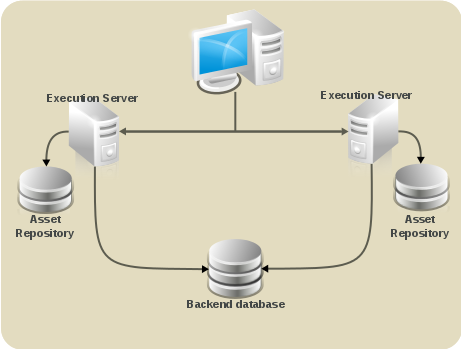
Figure 6.1. Schema of Red Hat JBoss BPM Suite system with individual system components
GIT repository clustering mechanism
To cluster the GIT repository the following is used:
- Apache Zookeeper brings all parts together.
- Apache Helix is the cluster management component that registers all cluster details (the cluster itself, nodes, resources).
The runtime environment, that is the Execution Server, utilizes the following to provide the clustering capabilities:
- uberfire framework which provides the backbone of the web applications
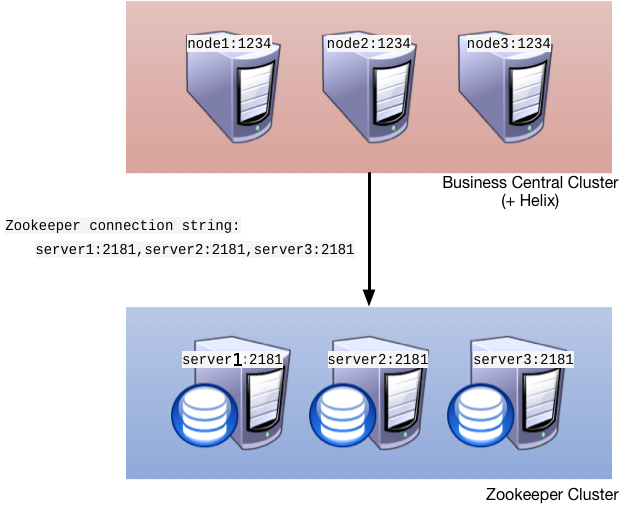
Figure 6.2. Clustering schema with Helix and Zookeeper
A typical clustering setup involves the following:
- Setting up the cluster itself using Zookeeper and Helix
- Setting up the back-end database with Quartz tables and configuration
- Configuring clustering on your container (this documentation provides only clustering instructions for Red Hat JBoss EAP 6)
Clustering Maven Repositories
Various operations within the Business Central publish JARs to the Business Central's internal Maven Repository.
This repository exists on the application server's file-system as regular files and is not cluster aware. This folder is not synchronized across the various nodes in the cluster and must be synchronized using external tools like
rsync.
An alternate to the use of an external synchronization tool is to set the system property org.guvnor.m2repo.dir on each cluster node to point to a SAN or NAS. In this case clustering of the Maven repository folder is not needed.
6.1. Setting up a Cluster
Copy linkLink copied to clipboard!
To cluster your GIT (VFS) repository in Business Central, do the following (If you don't use Business Central, you may skip this section):
- Download the
jboss-bpmsuite-brms-VERSION-supplementary-tools.zip, which contains Apache Zookeeper, Apache Helix, and quartz DDL scripts. After downloading, unzip the archive: theZookeeperdirectory ($ZOOKEEPER_HOME) and theHelixdirectory ($HELIX_HOME) are created. - Now Configure ZooKeeper:
- In the ZooKeeper directory, go to
confdirectory and do the following:cp zoo_sample.cfg zoo.cfg - Open
zoo.cfgfor editing and adjust the settings including the following:# the directory where the snapshot is stored. dataDir=$ZOOKEEPER_HOME/data/ # the port at which the clients connects clientPort=2181 server.1=server1:2888:3888 server.2=server2:2888:3888 server.3=server3:2888:3888Make sure the dataDir location exists and is accessible. - Assign a node ID to each member that will run ZooKeeper. For example, use "1", "2" and "3" respectively for node 1, node 2 and node 3 respectively. ZooKeeper should have an odd number of instances, at least 3 in order to recover from failure.The node ID is specified in a field called
myidunder the data directory of ZooKeeper on each node. For example, on node 1, run:$ echo "1" > /zookeeper/data/myid
- Set up ZooKeeper, so you can use it when creating the cluster with Helix:
- Go to the
$ZOOKEEPER_HOME/bin/directory and start ZooKeeper:./zkServer.sh startYou can check the ZooKeeper log in the$ZOOKEEPER_HOME/bin/zookeeper.outfile. Check this log to ensure that the 'ensemble' (cluster) is formed successfully. One of the nodes should be elected as leader with the other two nodes following it.
- Once the ZooKeeper ensemble is started, the next step is to configure and start Helix. Helix only needs to be configured once and from a single node. The configuration is then stored by the ZooKeeper ensemble and shared as appropriate.Set up the cluster with the ZooKeeper server as the master of the configuration:
- Create the cluster by providing the ZooKeeper Host and port as a comma separated list:
$HELIX_HOME/bin/helix-admin.sh --zkSvr ZOOKEEPER_HOST:ZOOKEEPER_PORT --addCluster CLUSTER_NAME - Add your nodes to the cluster:
$HELIX_HOME/bin/helix-admin.sh --zkSvr ZOOKEEPER_HOST:ZOOKEEPER_PORT --addNode CLUSTER_NAME NODE_NAMEUNIQUE_IDExample 6.1. Adding three cluster nodes
./helix-admin.sh --zkSvr server1:2181,server2:2181,server3:2181 --addNode bpms-cluster nodeOne:12345
./helix-admin.sh --zkSvr server1:2181,server2:2181,server3:2181 --addNode bpms-cluster nodeTwo:12346
./helix-admin.sh --zkSvr server1:2181,server2:2181,server3:2181 --addNode bpms-cluster nodeThree:12347
- Add resources to the cluster.
Example 6.2. Adding vfs-repo as resource
./helix-admin.sh --zkSvr server1:2181,server2:2181,server3:2181 --addResource bpms-cluster vfs-repo 1 LeaderStandby AUTO_REBALANCE - Rebalance the cluster with the three nodes.
Example 6.3. Rebalancing the bpms-cluster
./helix-admin.sh --zkSvr server1:2181,server2:2181,server3:2181 --rebalance bpms-cluster vfs-repo 3In the above command,3stands for three zookeeper nodes. - Start the Helix controller in all the nodes in the cluster.
Example 6.4. Starting the Helix controller
./run-helix-controller.sh --zkSvr server1:2181,server2:2181,server3:2181 --cluster bpms-cluster 2>&1 > /tmp/controller.log &
Note
Zookeeper should an odd number of instances, at least 3 in order to recover from failure. After a failure, the remaining number of nodes still need to be able to form a majority. For example a cluster of five Zookeeper nodes can withstand loss of two nodes in order to fully recover. One Zookeeper instance is still possible, replication will work, however no recover possibilities are available if it fails.
Stopping Helix and Zookeeper
To stop Helix processes and the Zookeeper server, use the following procedure.
Procedure 6.1. Stopping Helix and Zookeeper
- Stop JBoss EAP server processes.
- Stop the Helix process that has been created by
run-helix-controller.sh, for example,kill -15 <pid of HelixControllerMain>. - Stop ZooKeeper server using the
zkServer.sh stopcommand.

'%20d='M201.5%20305.5c-13.8%200-24.9-11.1-24.9-24.6%200-13.8%2011.1-24.9%2024.9-24.9%2013.6%200%2024.6%2011.1%2024.6%2024.9%200%2013.6-11.1%2024.6-24.6%2024.6zM504%20256c0%20137-111%20248-248%20248S8%20393%208%20256%20119%208%20256%208s248%20111%20248%20248zm-132.3-41.2c-9.4%200-17.7%203.9-23.8%2010-22.4-15.5-52.6-25.5-86.1-26.6l17.4-78.3%2055.4%2012.5c0%2013.6%2011.1%2024.6%2024.6%2024.6%2013.8%200%2024.9-11.3%2024.9-24.9s-11.1-24.9-24.9-24.9c-9.7%200-18%205.8-22.1%2013.8l-61.2-13.6c-3-.8-6.1%201.4-6.9%204.4l-19.1%2086.4c-33.2%201.4-63.1%2011.3-85.5%2026.8-6.1-6.4-14.7-10.2-24.1-10.2-34.9%200-46.3%2046.9-14.4%2062.8-1.1%205-1.7%2010.2-1.7%2015.5%200%2052.6%2059.2%2095.2%20132%2095.2%2073.1%200%20132.3-42.6%20132.3-95.2%200-5.3-.6-10.8-1.9-15.8%2031.3-16%2019.8-62.5-14.9-62.5zM302.8%20331c-18.2%2018.2-76.1%2017.9-93.6%200-2.2-2.2-6.1-2.2-8.3%200-2.5%202.5-2.5%206.4%200%208.6%2022.8%2022.8%2087.3%2022.8%20110.2%200%202.5-2.2%202.5-6.1%200-8.6-2.2-2.2-6.1-2.2-8.3%200zm7.7-75c-13.6%200-24.6%2011.1-24.6%2024.9%200%2013.6%2011.1%2024.6%2024.6%2024.6%2013.8%200%2024.9-11.1%2024.9-24.6%200-13.8-11-24.9-24.9-24.9z'/%3e%3c/svg%3e)