 Red Hat Summit
Chapter 16. OSGi Services
Abstract
The OSGi core framework defines the OSGi Service Layer, which provides a simple mechanism for bundles to interact by registering Java objects as services in the OSGi service registry. One of the strengths of the OSGi service model is that any Java object can be offered as a service: there are no particular constraints, inheritance rules, or annotations that must be applied to the service class. This chapter describes how to deploy an OSGi service using the OSGi blueprint container.
16.1. The Blueprint Container
Copy linkLink copied to clipboard!
Abstract
The blueprint container is a dependency injection framework that simplifies interaction with the OSGi container. In particular, the blueprint container supports a configuration-based approach to using the OSGi service registry—for example, providing standard XML elements to import and export OSGi services.
16.1.1. Blueprint Configuration
Copy linkLink copied to clipboard!
Location of blueprint files in a JAR file
Copy linkLink copied to clipboard!
Relative to the root of the bundle JAR file, the standard location for blueprint configuration files is the following directory:
OSGI-INF/blueprint
Any files with the suffix,
.xml, under this directory are interpreted as blueprint configuration files; in other words, any files that match the pattern, OSGI-INF/blueprint/*.xml.
Location of blueprint files in a Maven project
Copy linkLink copied to clipboard!
In the context of a Maven project, ProjectDir, the standard location for blueprint configuration files is the following directory:
ProjectDir/src/main/resources/OSGI-INF/blueprintBlueprint namespace and root element
Copy linkLink copied to clipboard!
Blueprint configuration elements are associated with the following XML namespace:
http://www.osgi.org/xmlns/blueprint/v1.0.0
The root element for blueprint configuration is
blueprint, so a blueprint XML configuration file normally has the following outline form:
<?xml version="1.0" encoding="UTF-8"?>
<blueprint xmlns="http://www.osgi.org/xmlns/blueprint/v1.0.0">
  ...
</blueprint>
Note
In the
blueprint root element, there is no need to specify the location of the blueprint schema using an xsi:schemaLocation attribute, because the schema location is already known to the blueprint framework.
Blueprint Manifest configuration
Copy linkLink copied to clipboard!
There are a few aspects of blueprint configuration that are controlled by headers in the JAR's manifest file,
META-INF/MANIFEST.MF, as follows:
Custom Blueprint file locations
Copy linkLink copied to clipboard!
If you need to place your blueprint configuration files in a non-standard location (that is, somewhere other than
OSGI-INF/blueprint/*.xml), you can specify a comma-separated list of alternative locations in the Bundle-Blueprint header in the manifest file—for example:
Bundle-Blueprint: lib/account.xml, security.bp, cnf/*.xmlMandatory dependencies
Copy linkLink copied to clipboard!
Dependencies on an OSGi service are mandatory by default (although this can be changed by setting the
availability attribute to optional on a reference element or a reference-list element). Declaring a dependency to be mandatory means that the bundle cannot function properly without that dependency and the dependency must be available at all times.
Normally, while a blueprint container is initializing, it passes through a grace period, during which time it attempts to resolve all mandatory dependencies. If the mandatory dependencies cannot be resolved in this time (the default timeout is 5 minutes), container initialization is aborted and the bundle is not started. The following settings can be appended to the
Bundle-SymbolicName manifest header to configure the grace period:
blueprint.graceperiod- If
true(the default), the grace period is enabled and the blueprint container waits for mandatory dependencies to be resolved during initialization; iffalse, the grace period is skipped and the container does not check whether the mandatory dependencies are resolved. blueprint.timeout- Specifies the grace period timeout in milliseconds. The default is 300000 (5 minutes).
For example, to enable a grace period of 10 seconds, you could define the following
Bundle-SymbolicName header in the manifest file:
Bundle-SymbolicName: org.fusesource.example.osgi-client;
 blueprint.graceperiod:=true;
 blueprint.timeout:= 10000
The value of the
Bundle-SymbolicName header is a semi-colon separated list, where the first item is the actual bundle symbolic name, the second item, blueprint.graceperiod:=true, enables the grace period and the third item, blueprint.timeout:= 10000, specifies a 10 second timeout.
16.1.2. Defining a Service Bean
Copy linkLink copied to clipboard!
Overview
Copy linkLink copied to clipboard!
Similarly to the Spring container, the blueprint container enables you to instantiate Java classes using a
bean element. You can create all of your main application objects this way. In particular, you can use the bean element to create a Java object that represents an OSGi service instance.
Blueprint bean element
Copy linkLink copied to clipboard!
The blueprint
bean element is defined in the blueprint schema namespace, http://www.osgi.org/xmlns/blueprint/v1.0.0. The blueprint {http://www.osgi.org/xmlns/blueprint/v1.0.0}bean element should not be confused with the Spring {http://www.springframework.org/schema/beans}bean selement, which has a similar syntax but is defined in a different namespace.
Note
The Spring DM specification version 2.0 or later, allows you to mix both kinds of
bean element under the beans root element, (as long as you define each bean elements using the appropriate namespace prefix).
Sample beans
Copy linkLink copied to clipboard!
The blueprint
bean element enables you to create objects using a similar syntax to the conventional Spring bean element. One significant difference, however, is that blueprint constructor arguments are specified using the argument child element, in contrast to Spring's constructor-arg child element. The following example shows how to create a few different types of bean using blueprint's bean element:
<blueprint xmlns="http://www.osgi.org/xmlns/blueprint/v1.0.0">

  <bean id="label" class="java.lang.String">
    <argument value="LABEL_VALUE"/>
  </bean>

  <bean id="myList" class="java.util.ArrayList">
    <argument type="int" value="10"/>
  </bean>

  <bean id="account" class="org.fusesource.example.Account">
    <property name="accountName" value="john.doe"/>
    <property name="balance" value="10000"/>
  </bean>

</blueprint>
Where the
Account class referenced by the last bean example could be defined as follows:
// Java
package org.fusesource.example;

public class Account
{
    private String accountName;
    private int balance;

    public Account () { }

    public void setAccountName(String name) {
        this.accountName = name;
    }

    public void setBalance(int bal) {
        this.balance = bal;
    }
    ...
}
Differences between Blueprint and Spring
Copy linkLink copied to clipboard!
Althought the syntax of the blueprint
bean element and the Spring bean element are similar, there are a few differences, as you can see from Table 16.1, “Comparison of Spring bean with Blueprint bean”. In this table, the XML tags (identifiers enclosed in angle brackets) refer to child elements of bean and the plain identifiers refer to attributes.
| Spring DM Attributes/Tags | Blueprint Attributes/Tags |
|---|---|
id | id |
name/<alias> | N/A |
class | class |
scope | scope=("singleton"|"prototype") |
lazy-init=("true"|"false") | activation=("eager"|"lazy") |
depends-on | depends-on |
init-method | init-method |
destroy-method | destroy-method |
factory-method | factory-bean |
factory-bean | factory-ref |
<constructor-arg> | <argument> |
<property> | <property> |
Where the default value of the blueprint
scope attribute is singleton and the default value of the blueprint activation attribute is eager.
References
Copy linkLink copied to clipboard!
For more details on defining blueprint beans, consult the following references:
- Spring Dynamic Modules Reference Guide v2.0 (see the blueprint chapters).
- Section 121 Blueprint Container Specification, from the OSGi Compendium Services R4.2 specification.
16.1.3. Exporting a Service
Copy linkLink copied to clipboard!
Overview
Copy linkLink copied to clipboard!
This section describes how to export a Java object to the OSGi service registry, thus making it accessible as a service to other bundles in the OSGi container.
Exporting with a single interface
Copy linkLink copied to clipboard!
To export a service to the OSGi service registry under a single interface name, define a
service element that references the relevant service bean, using the ref attribute, and specifies the published interface, using the interface attribute.
For example, you could export an instance of the
SavingsAccountImpl class under the org.fusesource.example.Account interface name using the blueprint configuration code shown in Example 16.1, “Sample Service Export with a Single Interface”.
Example 16.1. Sample Service Export with a Single Interface
<blueprint xmlns="http://www.osgi.org/xmlns/blueprint/v1.0.0">

  <bean id="savings" class="org.fusesource.example.SavingsAccountImpl"/>

 <service ref="savings" interface="org.fusesource.example.Account"/>

</blueprint>
Where the
ref attribute specifies the ID of the corresponding bean instance and the interface attribute specifies the name of the public Java interface under which the service is registered in the OSGi service registry. The classes and interfaces used in this example are shown in Example 16.2, “Sample Account Classes and Interfaces”
Example 16.2. Sample Account Classes and Interfaces
// Java
package org.fusesource.example

public interface Account { ... }

public interface SavingsAccount { ... }

public interface CheckingAccount { ... }

public class SavingsAccountImpl implements SavingsAccount
{
    ...
}

public class CheckingAccountImpl implements CheckingAccount
{
    ...
}
Exporting with multiple interfaces
Copy linkLink copied to clipboard!
To export a service to the OSGi service registry under multiple interface names, define a
service element that references the relevant service bean, using the ref attribute, and specifies the published interfaces, using the interfaces child element.
For example, you could export an instance of the
SavingsAccountImpl class under the list of public Java interfaces, org.fusesource.example.Account and org.fusesource.example.SavingsAccount, using the following blueprint configuration code:
<blueprint xmlns="http://www.osgi.org/xmlns/blueprint/v1.0.0">
  <bean id="savings" class="org.fusesource.example.SavingsAccountImpl"/>
  <service ref="savings">
    <interfaces>
      <value>org.fusesource.example.Account</value>
      <value>org.fusesource.example.SavingsAccount</value>
    </interfaces>
  </service>
  ...
</blueprint>
Note
The
interface attribute and the interfaces element cannot be used simultaneously in the same service element. You must use either one or the other.
Exporting with auto-export
Copy linkLink copied to clipboard!
If you want to export a service to the OSGi service registry under all of its implemented public Java interfaces, there is an easy way of accomplishing this using the
auto-export attribute.
For example, to export an instance of the
SavingsAccountImpl class under all of its implemented public interfaces, use the following blueprint configuration code:
<blueprint xmlns="http://www.osgi.org/xmlns/blueprint/v1.0.0">
  <bean id="savings" class="org.fusesource.example.SavingsAccountImpl"/>
  <service ref="savings" auto-export="interfaces"/>
  ...
</blueprint>
Where the
interfaces value of the auto-export attribute indicates that blueprint should register all of the public interfaces implemented by SavingsAccountImpl. The auto-export attribute can have the following valid values:
disabled- Disables auto-export. This is the default.
interfaces- Registers the service under all of its implemented public Java interfaces.
class-hierarchy- Registers the service under its own type (class) and under all super-types (super-classes), except for the
Objectclass. all-classes- Like the
class-hierarchyoption, but including all of the implemented public Java interfaces as well.
Setting service properties
Copy linkLink copied to clipboard!
The OSGi service registry also allows you to associate service properties with a registered service. Clients of the service can then use the service properties to search for or filter services. To associate service properties with an exported service, add a
service-properties child element that contains one or more beans:entry elements (one beans:entry element for each service property).
For example, to associate the
bank.name string property with a savings account service, you could use the following blueprint configuration:
<blueprint xmlns="http://www.osgi.org/xmlns/blueprint/v1.0.0"
           xmlns:beans="http://www.springframework.org/schema/beans"
           ...>
  ...
  <service ref="savings" auto-export="interfaces">
    <service-properties>
      <beans:entry key="bank.name" value="HighStreetBank"/>
    </service-properties>
  </service>
  ...
</blueprint>
Where the
bank.name string property has the value, HighStreetBank. It is possible to define service properties of type other than string: that is, primitive types, arrays, and collections are also supported. For details of how to define these types, see Controlling the Set of Advertised Properties. in the Spring Reference Guide.
Note
Strictly speaking, the
entry element ought to belong to the blueprint namespace. The use of the beans:entry element in Spring's implementation of blueprint is non-standard.
Default service properties
Copy linkLink copied to clipboard!
There are two service properties that might be set automatically when you export a service using the
service element, as follows:
osgi.service.blueprint.compname—is always set to theidof the service'sbeanelement, unless the bean is inlined (that is, the bean is defined as a child element of theserviceelement). Inlined beans are always anonymous.service.ranking—is automatically set, if the ranking attribute is non-zero.
Specifying a ranking attribute
Copy linkLink copied to clipboard!
If a bundle looks up a service in the service registry and finds more than one matching service, you can use ranking to determine which of the services is returned. The rule is that, whenever a lookup matches multiple services, the service with the highest rank is returned. The service rank can be any non-negative integer, with
0 being the default. You can specify the service ranking by setting the ranking attribute on the service element—for example:
<service ref="savings" interface="org.fusesource.example.Account" ranking="10"/>Specifying a registration listener
Copy linkLink copied to clipboard!
If you want to keep track of service registration and unregistration events, you can define a registration listener callback bean that receives registration and unregistration event notifications. To define a registration listener, add a
registration-listener child element to a service element.
For example, the following blueprint configuration defines a listener bean,
listenerBean, which is referenced by a registration-listener element, so that the listener bean receives callbacks whenever an Account service is registered or unregistered:
<blueprint xmlns="http://www.osgi.org/xmlns/blueprint/v1.0.0" ...>
  ...
  <bean id="listenerBean" class="org.fusesource.example.Listener"/>

  <service ref="savings" auto-export="interfaces">
    <registration-listener
        ref="listenerBean"
        registration-method="register"
        unregistration-method="unregister"/>
  </service>
  ...
</blueprint>
Where the
registration-listener element's ref attribute references the id of the listener bean, the registration-method attribute specifies the name of the listener method that receives the registration callback, and unregistration-method attribute specifies the name of the listener method that receives the unregistration callback.
The following Java code shows a sample definition of the
Listener class that receives notifications of registration and unregistration events:
// Java
package org.fusesource.example;

public class Listener
{
    public void register(Account service, java.util.Map serviceProperties) {
        ...
    }

    public void unregister(Account service, java.util.Map serviceProperties) {
        ...
    }
}
The method names,
register and unregister, are specified by the registration-method and unregistration-method attributes respectively. The signatures of these methods must conform to the following syntax:
- First method argument—any type T that is assignable from the service object's type. In other words, any supertype class of the service class or any interface implemented by the service class. This argument contains the service instance, unless the service bean declares the
scopeto beprototype, in which case this argument isnull(when the scope isprototype, no service instance is available at registration time). - Second method argument—must be of either
java.util.Maptype orjava.util.Dictionarytype. This map contains the service properties associated with this service registration.
16.1.4. Importing a Service
Copy linkLink copied to clipboard!
Overview
Copy linkLink copied to clipboard!
This section describes how to obtain and use references to OSGi services that have been exported to the OSGi service registry. Essentially, you can use either the
reference element or the reference-list element to import an OSGi service. The key difference between these elements is not (as you might at first be tempted to think) that reference returns a single service reference, while reference-list returns a list of service references. Rather, the real difference is that the reference element is suitable for accessing stateless services, while the reference-list element is suitable for accessing stateful services.
Managing service references
Copy linkLink copied to clipboard!
The following models for obtaining OSGi services references are supported:
Reference manager
Copy linkLink copied to clipboard!
A reference manager instance is created by the blueprint
reference element. This element returns a single service reference and is the preferred approach for accessing stateless services. Figure 16.1, “Reference to Stateless Service” shows an overview of the model for accessing a stateless service using the reference manager.
Figure 16.1. Reference to Stateless Service
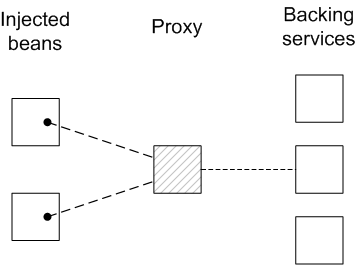
Beans in the client blueprint container get injected with a proxy object (the provided object), which is backed by a service object (the backing service) from the OSGi service registry. This model explicitly takes advantage of the fact that stateless services are interchangeable, in the following ways:
- If multiple services instances are found that match the criteria in the
referenceelement, the reference manager can arbitrarily choose one of them as the backing instance (because they are interchangeable). - If the backing service disappears, the reference manager can immediately switch to using one of the other available services of the same type. Hence, there is no guarantee, from one method invocation to the next, that the proxy remains connected to the same backing service.
The contract between the client and the backing service is thus stateless, and the client must not assume that it is always talking to the same service instance. If no matching service instances are available, the proxy will wait for a certain length of time before throwing the
ServiceUnavailable exception. The length of the timeout is configurable by setting the timeout attribute on the reference element.
Reference list manager
Copy linkLink copied to clipboard!
A reference list manager instance is created by the blueprint
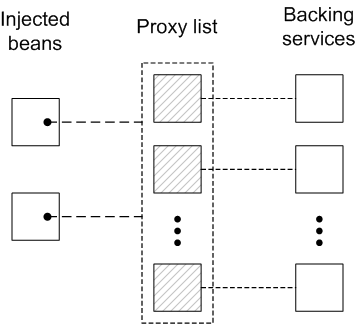
reference-list element. This element returns a list of service references and is the preferred approach for accessing stateful services. Figure 16.2, “List of References to Stateful Services” shows an overview of the model for accessing a stateful service using the reference list manager.
Figure 16.2. List of References to Stateful Services
Beans in the client blueprint container get injected with a
java.util.List object (the provided object), which contains a list of proxy objects. Each proxy is backed by a unique service instance in the OSGi service registry. Unlike the stateless model, backing services are not considered to be interchangeable here. In fact, the lifecycle of each proxy in the list is tightly linked to the lifecycle of the corresponding backing service: when a service gets registered in the OSGi registry, a corresponding proxy is synchronously created and added to the proxy list; and when a service gets unregistered from the OSGi registry, the corresponding proxy is synchronously removed from the proxy list.
The contract between a proxy and its backing service is thus stateful, and the client may assume when it invokes methods on a particular proxy, that it is always communicating with the same backing service. It could happen, however, that the backing service becomes unavailable, in which case the proxy becomes stale. Any attempt to invoke a method on a stale proxy will generate the
ServiceUnavailable exception.
Matching by interface (stateless)
Copy linkLink copied to clipboard!
The simplest way to obtain a stateles service reference is by specifying the interface to match, using the
interface attribute on the reference element. The service is deemed to match, if the interface attribute value is a super-type of the service or if the attribute value is a Java interface implemented by the service (the interface attribute can specify either a Java class or a Java interface).
For example, to reference a stateless
SavingsAccount service (see Example 16.1, “Sample Service Export with a Single Interface”), define a reference element as follows:
<blueprint xmlns="http://www.osgi.org/xmlns/blueprint/v1.0.0">

  <reference id="savingsRef"
             interface="org.fusesource.example.SavingsAccount"/>

  <bean id="client" class="org.fusesource.example.client.Client">
    <property name="savingsAccount" ref="savingsRef"/>
  </bean>

</blueprint>
Where the
reference element creates a reference manager bean with the ID, savingsRef. To use the referenced service, inject the savingsRef bean into one of your client classes, as shown.
The bean property injected into the client class can be any type that is assignable from
SavingsAccount. For example, you could define the Client class as follows:
package org.fusesource.example.client;

import org.fusesource.example.SavingsAccount;

public class Client {
    SavingsAccount savingsAccount;

    // Bean properties
    public SavingsAccount getSavingsAccount() {
        return savingsAccount;
    }

    public void setSavingsAccount(SavingsAccount savingsAccount) {
        this.savingsAccount = savingsAccount;
    }
    ...
}
Matching by interface (stateful)
Copy linkLink copied to clipboard!
The simplest way to obtain a stateful service reference is by specifying the interface to match, using the
interface attribute on the reference-list element. The reference list manager then obtains a list of all the services, whose interface attribute value is either a super-type of the service or a Java interface implemented by the service (the interface attribute can specify either a Java class or a Java interface).
For example, to reference a stateful
SavingsAccount service (see Example 16.1, “Sample Service Export with a Single Interface”), define a reference-list element as follows:
<blueprint xmlns="http://www.osgi.org/xmlns/blueprint/v1.0.0">

  <reference-list id="savingsListRef"
                  interface="org.fusesource.example.SavingsAccount"/>

  <bean id="client" class="org.fusesource.example.client.Client">
    <property name="savingsAccountList" ref="savingsListRef"/>
  </bean>

</blueprint>
Where the
reference-list element creates a reference list manager bean with the ID, savingsListRef. To use the referenced service list, inject the savingsListRef bean reference into one of your client classes, as shown.
By default, the
savingsAccountList bean property is a list of service objects (for example, java.util.List<SavingsAccount>). You could define the client class as follows:
package org.fusesource.example.client;

import org.fusesource.example.SavingsAccount;

public class Client {
    java.util.List<SavingsAccount> accountList;

    // Bean properties
    public java.util.List<SavingsAccount> getSavingsAccountList() {
        return accountList;
    }

    public void setSavingsAccountList(
                    java.util.List<SavingsAccount> accountList
    ) {
        this.accountList = accountList;
    }
    ...
}
Matching by interface and component name
Copy linkLink copied to clipboard!
To match both the interface and the component name (bean ID) of a stateless service, specify both the
interface attribute and the component-name attribute on the reference element, as follows:
<reference id="savingsRef"
           interface="org.fusesource.example.SavingsAccount"
           component-name="savings"/>
To match both the interface and the component name (bean ID) of a stateful service, specify both the
interface attribute and the component-name attribute on the reference-list element, as follows:
<reference-list id="savingsRef"
           interface="org.fusesource.example.SavingsAccount"
           component-name="savings"/>
Matching service properties with a filter
Copy linkLink copied to clipboard!
You can select services by matching service properties against a filter. The filter is specified using the
filter attribute on the reference element or on the reference-list element. The value of the filter attribute must be an LDAP filter expression. For example, to define a filter that matches when the bank.name service property equals HighStreetBank, you could use the following LDAP filter expression:
(bank.name=HighStreetBank)
To match two service property values, you can use
& conjunction, which combines expressions with a logical and.For example, to require that the foo property is equal to FooValue and the bar property is equal to BarValue, you could use the following LDAP filter expression:
(&(foo=FooValue)(bar=BarValue))
For the complete syntax of LDAP filter expressions, see section 3.2.7 of the OSGi Core Specification.
Filters can also be combined with the
interface and component-name settings, in which case all of the specified conditions are required to match.
For example, to match a stateless service of
SavingsAccount type, with a bank.name service property equal to HighStreetBank, you could define a reference element as follows:
<reference id="savingsRef"
           interface="org.fusesource.example.SavingsAccount"
           filter="(bank.name=HighStreetBank)"/>
To match a stateful service of
SavingsAccount type, with a bank.name service property equal to HighStreetBank, you could define a reference-list element as follows:
<reference-list id="savingsRef"
           interface="org.fusesource.example.SavingsAccount"
           filter="(bank.name=HighStreetBank)"/>
Specifying whether mandatory or optional
Copy linkLink copied to clipboard!
By default, a reference to an OSGi service is assumed to be mandatory (see the section called “Mandatory dependencies”). It is possible, however, to customize the dependency behavior of a
reference element or a reference-list element by setting the availability attribute on the element. There are two possible values of the availability attribute: mandatory (the default), means that the dependency must be resolved during a normal blueprint container initialization; and optional, means that the dependency need not be resolved during initialization.
The following example of a
reference element shows how to declare explicitly that the reference is a mandatory dependency:
<reference id="savingsRef"
           interface="org.fusesource.example.SavingsAccount"
           availability="mandatory"/>
Specifying a reference listener
Copy linkLink copied to clipboard!
To cope with the dynamic nature of the OSGi environment—for example, if you have declared some of your service references to have
optional availability—it is often useful to track when a backing service gets bound to the registry and when it gets unbound from the registry. To receive notifications of service binding and unbinding events, you can define a reference-listener element as the child of either the reference element or the reference-list element.
For example, the following blueprint configuration shows how to define a reference listener as a child of the reference manager with the ID,
savingsRef:
<blueprint xmlns="http://www.osgi.org/xmlns/blueprint/v1.0.0">

  <reference id="savingsRef"
             interface="org.fusesource.example.SavingsAccount"
             >
    <reference-listener bind-method="onBind" unbind-method="onUnbind">
      <bean class="org.fusesource.example.client.Listener"/>
    </reference-listener>
  </reference>

  <bean id="client" class="org.fusesource.example.client.Client">
    <property name="savingsAcc" ref="savingsRef"/>
  </bean>

</blueprint>
The preceding configuration registers an instance of
org.fusesource.example.client.Listener type as a callback that listens for bind and unbind events. Events are generated whenever the savingsRef reference manager's backing service binds or unbinds.
The following example shows a sample implementation of the
Listener class:
package org.fusesource.example.client;

import org.osgi.framework.ServiceReference;

public class Listener {

    public void onBind(ServiceReference ref) {
        System.out.println("Bound service: " + ref);
    }

    public void onUnbind(ServiceReference ref) {
        System.out.println("Unbound service: " + ref);
    }

}
The method names,
onBind and onUnbind, are specified by the bind-method and unbind-method attributes respectively. Both of these callback methods take an org.osgi.framework.ServiceReference argument.

'%20d='M201.5%20305.5c-13.8%200-24.9-11.1-24.9-24.6%200-13.8%2011.1-24.9%2024.9-24.9%2013.6%200%2024.6%2011.1%2024.6%2024.9%200%2013.6-11.1%2024.6-24.6%2024.6zM504%20256c0%20137-111%20248-248%20248S8%20393%208%20256%20119%208%20256%208s248%20111%20248%20248zm-132.3-41.2c-9.4%200-17.7%203.9-23.8%2010-22.4-15.5-52.6-25.5-86.1-26.6l17.4-78.3%2055.4%2012.5c0%2013.6%2011.1%2024.6%2024.6%2024.6%2013.8%200%2024.9-11.3%2024.9-24.9s-11.1-24.9-24.9-24.9c-9.7%200-18%205.8-22.1%2013.8l-61.2-13.6c-3-.8-6.1%201.4-6.9%204.4l-19.1%2086.4c-33.2%201.4-63.1%2011.3-85.5%2026.8-6.1-6.4-14.7-10.2-24.1-10.2-34.9%200-46.3%2046.9-14.4%2062.8-1.1%205-1.7%2010.2-1.7%2015.5%200%2052.6%2059.2%2095.2%20132%2095.2%2073.1%200%20132.3-42.6%20132.3-95.2%200-5.3-.6-10.8-1.9-15.8%2031.3-16%2019.8-62.5-14.9-62.5zM302.8%20331c-18.2%2018.2-76.1%2017.9-93.6%200-2.2-2.2-6.1-2.2-8.3%200-2.5%202.5-2.5%206.4%200%208.6%2022.8%2022.8%2087.3%2022.8%20110.2%200%202.5-2.2%202.5-6.1%200-8.6-2.2-2.2-6.1-2.2-8.3%200zm7.7-75c-13.6%200-24.6%2011.1-24.6%2024.9%200%2013.6%2011.1%2024.6%2024.6%2024.6%2013.8%200%2024.9-11.1%2024.9-24.6%200-13.8-11-24.9-24.9-24.9z'/%3e%3c/svg%3e)