 Red Hat Summit
Deploying into Apache Karaf
Deploying application packages into the Apache Karaf container
Abstract
Part I. Developer Guide
This part contains information for developers.
Chapter 1. Deploying using an OSGi bundle
Abstract
The usual and most common method of deploying into Apache Karaf is using an OSGi bundle.
1.1. OSGi overview
Apache Karaf is structured to use OSGi functionality. For more information about the structure of Apache Karaf see Chapter 2, Introduction to OSGi.
An OSGi bundle is a collection of JAR files with configuration files, bundled up into a JAR. For more information about creating OSGi bundles see Chapter 3, Building an OSGi Bundle.
1.2. Prerequisites
Before following the instructions make sure that you have completed the following prerequisites:
- Install Apache Karaf, following the instructions in the https://access.redhat.com/documentation/en-us/red_hat_jboss_fuse/7.0-TP/single/installing_on_apache_karaf/index JBoss FuseInstalling on Apache Karaf Guide
- Make sure you have installed and configured Maven as shown in Chapter 34, Building with Maven
1.3. Preparing the OSGi bundle
For this example we will use a quickstart, which is a ready-prepared bundle. Quickstarts can be found in FUSE_HOME/quickstarts
To find out more about how to build your own OSGi bundle, see Section 3.1, “Generating a Bundle Project” .
1.4. Deploying the OSGi bundle
The OSGi bundle is deployed into a running Apache Karaf instance.
Start Apache Karaf from the bin direction by executing the
./karafscript in theFUSE_HOME/bin/directory.You will see the prompt:
karaf@root()>-
On a separate terminal, navigate to the
FUSE_HOME/quickstarts/beginner/camel-logdirectory.camel-logis the name of the quickstart we will use to create a bundle. Compile the
camel-logquickstart using Maven:$ mvn clean installReturn to the Karaf terminal and install the project:
karaf@root()> osgi:install -s mvn:org.jboss.fuse.quickstarts/beginner-camel-log/7.0.0.fuse-000145-redhat-1You will see a bundle ID returned:
Bundle ID: 228This is a unique identifier for this bundle on this instance of Apache Karaf
-
To see the output of project, look in the log file at
FUSE_HOME/data/log/fuse.logThe output will look like this:
12:07:34.542 INFO [Camel (log-example-context) thread #1 - timer://foo] >>> Hello from Fuse based Camel route! :
12:07:39.530 INFO [Camel (log-example-context) thread #1 - timer://foo] >>> Hello from Fuse based Camel route! :
12:07:44.530 INFO [Camel (log-example-context) thread #1 - timer://foo] >>> Hello from Fuse based Camel route! :
For more information about deploying OSGi bundles, see Chapter 5, Hot deployment vs manual deployment.
Chapter 2. Introduction to OSGi
Abstract
The OSGi specification supports modular application development by defining a runtime framework that simplifies building, deploying, and managing complex applications.
2.1. Overview
Apache Karaf is an OSGi-based runtime container for deploying and managing bundles. Apache Karaf also provides native operating system integration, and can be integrated into the operating system as a service so that the lifecycle is bound to the operating system.
Apache Karaf has the following structure:
- Apache Karaf - a wrapper layer around the OSGi container implementation, which provides support for deploying the OSGi container as a runtime server. Runtime features provided by the JBoss Fuse include hot deployment, management, and administration features.
- OSGi Framework - implements OSGi functionality, including managing dependencies and bundle lifecycles
2.2. Architecture of Apache Karaf
Figure 2.1, “Apache Karaf Architecture” shows the architecture of Apache Karaf.
Figure 2.1. Apache Karaf Architecture
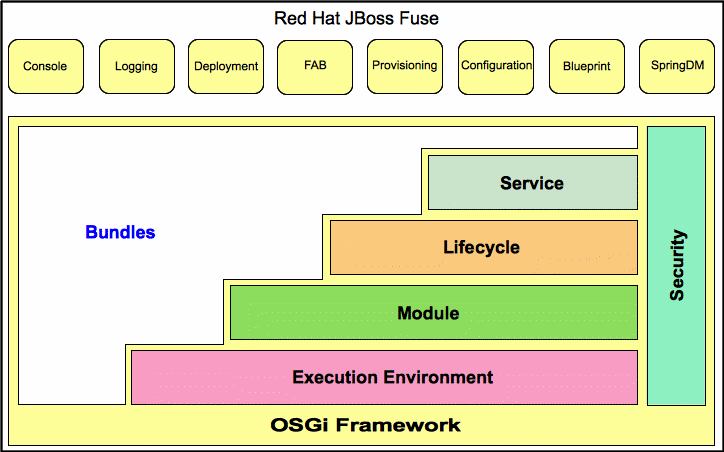
Apache Karaf extends the OSGi layers with the following functionality:
- Console - the console manages services, installs and manages applications and libraries, and interacts with the JBoss Fuse runtime. It provides console commands to administer instances of JBoss Fuse. See the olink:FMQCommandRef/FMQCommandRef.
- Logging - the logging subsystem provides console commands to display, view and change log levels.
-
Deployment - supports both manual deployment of OSGi bundles using the
osgi:installandosgi:startcommands and hot deployment of applications. See Section 5.1, “Hot Deployment”. - Provisioning - provides multiple mechanisms for installing applications and libraries. See Chapter 8, Deploying Features.
-
*Configuration - the properties files stored in the InstallDir
/etcfolder are continuously monitored, and changes to them are automatically propagated to the relevant services at configurable intervals. - Blueprint - is a dependency injection framework that simplifies interaction with the OSGi container. For example, providing standard XML elements to import and export OSGi services. When a Blueprint configuration file is copied to the hot deployment folder, Red Hat JBoss Fuse generates an OSGi bundle on-the-fly and instantiates the Blueprint context.
2.3. OSGi Framework
2.3.1. Overview
The OSGi Alliance is an independent organization responsible for defining the features and capabilities of the OSGi Service Platform Release 4. The OSGi Service Platform is a set of open specifications that simplify building, deploying, and managing complex software applications.
OSGi technology is often referred to as the dynamic module system for Java. OSGi is a framework for Java that uses bundles to modularly deploy Java components and handle dependencies, versioning, classpath control, and class loading. OSGi’s lifecycle management allows you to load, start, and stop bundles without shutting down the JVM.
OSGi provides the best runtime platform for Java, a superior class loading architecture, and a registry for services. Bundles can export services, run processes, and have their dependencies managed. Each bundle can have its requirements managed by the OSGi container.
JBoss Fuse uses Apache Felix as its default OSGi implementation. The framework layers form the container where you install bundles. The framework manages the installation and updating of bundles in a dynamic, scalable manner, and manages the dependencies between bundles and services.
2.3.2. OSGi architecture
As shown in Figure 2.1, “Apache Karaf Architecture”, the OSGi framework contains the following:
- Bundles — Logical modules that make up an application. See Section 2.5, “OSGi Bundles”.
- Service layer — Provides communication among modules and their contained components. This layer is tightly integrated with the lifecycle layer. See Section 2.4, “OSGi Services”.
- Lifecycle layer — Provides access to the underlying OSGi framework. This layer handles the lifecycle of individual bundles so you can manage your application dynamically, including starting and stopping bundles.
- Module layer — Provides an API to manage bundle packaging, dependency resolution, and class loading.
- Execution environment — A configuration of a JVM. This environment uses profiles that define the environment in which bundles can work.
- Security layer — Optional layer based on Java 2 security, with additional constraints and enhancements.
Each layer in the framework depends on the layer beneath it. For example, the lifecycle layer requires the module layer. The module layer can be used without the lifecycle and service layers.
2.4. OSGi Services
2.4.1. Overview
An OSGi service is a Java class or service interface with service properties defined as name/value pairs. The service properties differentiate among service providers that provide services with the same service interface.
An OSGi service is defined semantically by its service interface, and it is implemented as a service object. A service’s functionality is defined by the interfaces it implements. Thus, different applications can implement the same service.
Service interfaces allow bundles to interact by binding interfaces, not implementations. A service interface should be specified with as few implementation details as possible.
2.4.2. OSGi service registry
In the OSGi framework, the service layer provides communication between Section 2.5, “OSGi Bundles” and their contained components using the publish, find, and bind service model. The service layer contains a service registry where:
- Service providers register services with the framework to be used by other bundles
- Service requesters find services and bind to service providers
Services are owned by, and run within, a bundle. The bundle registers an implementation of a service with the framework service registry under one or more Java interfaces. Thus, the service’s functionality is available to other bundles under the control of the framework, and other bundles can look up and use the service. Lookup is performed using the Java interface and service properties.
Each bundle can register multiple services in the service registry using the fully qualified name of its interface and its properties. Bundles use names and properties with LDAP syntax to query the service registry for services.
A bundle is responsible for runtime service dependency management activities including publication, discovery, and binding. Bundles can also adapt to changes resulting from the dynamic availability (arrival or departure) of the services that are bound to the bundle.
Event notification
Service interfaces are implemented by objects created by a bundle. Bundles can:
- Register services
- Search for services
- Receive notifications when their registration state changes
The OSGi framework provides an event notification mechanism so service requesters can receive notification events when changes in the service registry occur. These changes include the publication or retrieval of a particular service and when services are registered, modified, or unregistered.
Service invocation model
When a bundle wants to use a service, it looks up the service and invokes the Java object as a normal Java call. Therefore, invocations on services are synchronous and occur in the same thread. You can use callbacks for more asynchronous processing. Parameters are passed as Java object references. No marshalling or intermediary canonical formats are required as with XML. OSGi provides solutions for the problem of services being unavailable.
OSGi framework services
In addition to your own services, the OSGi framework provides the following optional services to manage the operation of the framework:
Package Admin service—allows a management agent to define the policy for managing Java package sharing by examining the status of the shared packages. It also allows the management agent to refresh packages and to stop and restart bundles as required. This service enables the management agent to make decisions regarding any shared packages when an exporting bundle is uninstalled or updated.
The service also provides methods to refresh exported packages that were removed or updated since the last refresh, and to explicitly resolve specific bundles. This service can also trace dependencies between bundles at runtime, allowing you to see what bundles might be affected by upgrading.
- Start Level service—enables a management agent to control the starting and stopping order of bundles. The service assigns each bundle a start level. The management agent can modify the start level of bundles and set the active start level of the framework, which starts and stops the appropriate bundles. Only bundles that have a start level less than, or equal to, this active start level can be active.
- URL Handlers service—dynamically extends the Java runtime with URL schemes and content handlers enabling any component to provide additional URL handlers.
- Permission Admin service—enables the OSGi framework management agent to administer the permissions of a specific bundle and to provide defaults for all bundles. A bundle can have a single set of permissions that are used to verify that it is authorized to execute privileged code. You can dynamically manipulate permissions by changing policies on the fly and by adding new policies for newly installed components. Policy files are used to control what bundles can do.
- Conditional Permission Admin service—extends the Permission Admin service with permissions that can apply when certain conditions are either true or false at the time the permission is checked. These conditions determine the selection of the bundles to which the permissions apply. Permissions are activated immediately after they are set.
The OSGi framework services are described in detail in separate chapters in the OSGi Service Platform Release 4 specification available from the release 4 download page on the OSGi Alliance web site.
OSGi Compendium services
In addition to the OSGi framework services, the OSGi Alliance defines a set of optional, standardized compendium services. The OSGi compendium services provide APIs for tasks such as logging and preferences. These services are described in the OSGi Service Platform, Service Compendium available from the release 4 download page on the OSGi Alliance Web site.
The Configuration Admin compendium service is like a central hub that persists configuration information and distributes it to interested parties. The Configuration Admin service specifies the configuration information for deployed bundles and ensures that the bundles receive that data when they are active. The configuration data for a bundle is a list of name-value pairs. See Section 2.2, “Architecture of Apache Karaf”.
2.5. OSGi Bundles
Overview
With OSGi, you modularize applications into bundles. Each bundle is a tightly coupled, dynamically loadable collection of classes, JARs, and configuration files that explicitly declare any external dependencies. In OSGi, a bundle is the primary deployment format. Bundles are applications that are packaged in JARs, and can be installed, started, stopped, updated, and removed.
OSGi provides a dynamic, concise, and consistent programming model for developing bundles. Development and deployment are simplified by decoupling the service’s specification (Java interface) from its implementation.
The OSGi bundle abstraction allows modules to share Java classes. This is a static form of reuse. The shared classes must be available when the dependent bundle is started.
A bundle is a JAR file with metadata in its OSGi manifest file. A bundle contains class files and, optionally, other resources and native libraries. You can explicitly declare which packages in the bundle are visible externally (exported packages) and which external packages a bundle requires (imported packages).
The module layer handles the packaging and sharing of Java packages between bundles and the hiding of packages from other bundles. The OSGi framework dynamically resolves dependencies among bundles. The framework performs bundle resolution to match imported and exported packages. It can also manage multiple versions of a deployed bundle.
Class Loading in OSGi
OSGi uses a graph model for class loading rather than a tree model (as used by the JVM). Bundles can share and re-use classes in a standardized way, with no runtime class-loading conflicts.
Each bundle has its own internal classpath so that it can serve as an independent unit if required.
The benefits of class loading in OSGi include:
- Sharing classes directly between bundles. There is no requirement to promote JARs to a parent class-loader.
- You can deploy different versions of the same class at the same time, with no conflict.
Chapter 3. Building an OSGi Bundle
Abstract
This chapter describes how to build an OSGi bundle using Maven. For building bundles, the Maven bundle plug-in plays a key role, because it enables you to automate the generation of OSGi bundle headers (which would otherwise be a tedious task). Maven archetypes, which generate a complete sample project, can also provide a starting point for your bundle projects.
3.1. Generating a Bundle Project
3.1.1. Generating bundle projects with Maven archetypes
To help you get started quickly, you can invoke a Maven archetype to generate the initial outline of a Maven project (a Maven archetype is analogous to a project wizard). The following Maven archetypes can generate projects for building OSGi bundles:
3.1.2. Apache CXF karaf-soap-archetype archetype
The Apache CXF karaf-soap-archetype archetype creates a project for building a service from Java. To generate a Maven project with the coordinates, GroupId:ArtifactId:Version, enter the following command:
mvn archetype:generate \
  -DarchetypeGroupId=io.fabric8.archetypes \
  -DarchetypeArtifactId=karaf-soap-archetype \
  -DarchetypeVersion={fabricVersion} \
  -DgroupId=GroupId \
  -DartifactId=ArtifactId \
  -Dversion=Version \
  -Dfabric8-profile=ProfileName
The backslash character, \, indicates line continuation on Linux and UNIX operating systems. On Windows platforms, you must omit the backslash character and put all of the arguments on a single line.
3.1.3. Apache Camel archetype
The Apache Camel OSGi archetype creates a project for building a route that can be deployed into the OSGi container. To generate a Maven project with the coordinates, GroupId:ArtifactId:Version, enter the following command:
mvn archetype:generate \
  -DarchetypeGroupId=org.apache.camel.archetypes \
  -DarchetypeArtifactId=camel-archetype-blueprint \
  -DarchetypeVersion=2.21.0.fuse-000055-redhat-2 \
  -DgroupId=GroupId \
  -DartifactId=ArtifactId \
  -Dversion=Version
3.1.4. Building the bundle
By default, the preceding archetypes create a project in a new directory, whose names is the same as the specified artifact ID, ArtifactId. To build the bundle defined by the new project, open a command prompt, go to the project directory (that is, the directory containing the pom.xml file), and enter the following Maven command:
mvn install
The effect of this command is to compile all of the Java source files, to generate a bundle JAR under the ArtifactId/target directory, and then to install the generated JAR in the local Maven repository.
3.2. Modifying an Existing Maven Project
3.2.1. Overview
If you already have a Maven project and you want to modify it so that it generates an OSGi bundle, perform the following steps:
3.2.2. Change the package type to bundle
Configure Maven to generate an OSGi bundle by changing the package type to bundle in your project’s pom.xml file. Change the contents of the packaging element to bundle, as shown in the following example:
<project ... >
  ...
  <packaging>bundle</packaging>
  ...
</project>
The effect of this setting is to select the Maven bundle plug-in, maven-bundle-plugin, to perform packaging for this project. This setting on its own, however, has no effect until you explicitly add the bundle plug-in to your POM.
3.2.3. Add the bundle plug-in to your POM
To add the Maven bundle plug-in, copy and paste the following sample plugin element into the project/build/plugins section of your project’s pom.xml file:
<project ... >
  ...
  <build>
    <defaultGoal>install</defaultGoal>
    <plugins>
      ...
      <plugin> <groupId>org.apache.felix</groupId> <artifactId>maven-bundle-plugin</artifactId> <version>2.3.7</version> <extensions>true</extensions> <configuration> <instructions> <Bundle-SymbolicName>${project.groupId}.${project.artifactId}</Bundle-SymbolicName> <Import-Package></Import-Package>
          </instructions>
        </configuration>
      </plugin>*
    </plugins>
  </build>
  ...
</project>
Where the bundle plug-in is configured by the settings in the instructions element.
3.2.4. Customize the bundle plug-in
For some specific recommendations on configuring the bundle plug-in for Apache CXF, see Section 3.3, “Packaging a Web Service in a Bundle”.
For an in-depth discussion of bundle plug-in configuration, in the context of the OSGi framework and versioning policy, see olink:OsgiDependencies/OsgiDependencies.
3.2.5. Customize the JDK compiler version
It is almost always necessary to specify the JDK version in your POM file. If your code uses any modern features of the Java language—such as generics, static imports, and so on—and you have not customized the JDK version in the POM, Maven will fail to compile your source code. It is not sufficient to set the JAVA_HOME and the PATH environment variables to the correct values for your JDK, you must also modify the POM file.
To configure your POM file, so that it accepts the Java language features introduced in JDK 1.7, add the following maven-compiler-plugin plug-in settings to your POM (if they are not already present):
<project ... >
  ...
  <build>
    <defaultGoal>install</defaultGoal>
    <plugins>
      ...
      <plugin> <groupId>org.apache.maven.plugins</groupId> <artifactId>maven-compiler-plugin</artifactId> <configuration> <source>1.7</source> <target>1.7</target> </configuration> </plugin>
    </plugins>
  </build>
  ...
</project>
3.3. Packaging a Web Service in a Bundle
3.3.1. Overview
This section explains how to modify an existing Maven project for a Apache CXF application, so that the project generates an OSGi bundle suitable for deployment in the Red Hat JBoss Fuse OSGi container. To convert the Maven project, you need to modify the project’s POM file and the project’s Blueprint file(s) (located in META-INF/spring).
3.3.2. Modifying the POM file to generate a bundle
To configure a Maven POM file to generate a bundle, there are essentially two changes you need to make: change the POM’s package type to bundle; and add the Maven bundle plug-in to your POM. For details, see Section 3.1, “Generating a Bundle Project”.
3.3.3. Mandatory import packages
In order for your application to use the Apache CXF components, you need to import their packages into the application’s bundle. Because of the complex nature of the dependencies in Apache CXF, you cannot rely on the Maven bundle plug-in, or the bnd tool, to automatically determine the needed imports. You will need to explicitly declare them.
You need to import the following packages into your bundle:
javax.jws
javax.wsdl
javax.xml.bind
javax.xml.bind.annotation
javax.xml.namespace
javax.xml.ws
org.apache.cxf.bus
org.apache.cxf.bus.spring
org.apache.cxf.bus.resource
org.apache.cxf.configuration.spring
org.apache.cxf.resource
org.apache.cxf.jaxws
org.springframework.beans.factory.config
3.3.4. Sample Maven bundle plug-in instructions
Example 3.1, “Configuration of Mandatory Import Packages” shows how to configure the Maven bundle plug-in in your POM to import the mandatory packages. The mandatory import packages appear as a comma-separated list inside the Import-Package element. Note the appearance of the wildcard, *, as the last element of the list. The wildcard ensures that the Java source files from the current bundle are scanned to discover what additional packages need to be imported.
Example 3.1. Configuration of Mandatory Import Packages
<project ... >
    ...
    <build>
        <plugins>
            <plugin>
                <groupId>org.apache.felix</groupId>
                <artifactId>maven-bundle-plugin</artifactId>
                <extensions>true</extensions>
                <configuration>
                    <instructions>
                        ...
                        <Import-Package>
                            javax.jws,
                            javax.wsdl,
                            javax.xml.bind,
                            javax.xml.bind.annotation,
                            javax.xml.namespace,
                            javax.xml.ws,
                            org.apache.cxf.bus,
                            org.apache.cxf.bus.spring,
                            org.apache.cxf.bus.resource,
                            org.apache.cxf.configuration.spring,
                            org.apache.cxf.resource,
                            org.apache.cxf.jaxws,
                            org.springframework.beans.factory.config,
                            *
                        </Import-Package>
                        ...
                    </instructions>
                </configuration>
            </plugin>
        </plugins>
    </build>
    ...
</project>
3.3.5. Add a code generation plug-in
A Web services project typically requires code to be generated. Apache CXF provides two Maven plug-ins for the JAX-WS front-end, which enable tyou to integrate the code generation step into your build. The choice of plug-in depends on whether you develop your service using the Java-first approach or the WSDL-first approach, as follows:
-
Java-first approach—use the
cxf-java2ws-pluginplug-in. -
WSDL-first approach—use the
cxf-codegen-pluginplug-in.
3.3.6. OSGi configuration properties
The OSGi Configuration Admin service defines a mechanism for passing configuration settings to an OSGi bundle. You do not have to use this service for configuration, but it is typically the most convenient way of configuring bundle applications. Both Spring DM and Blueprint provide support for OSGi configuration, enabling you to substitute variables in a Blueprint file using values obtained from the OSGi Configuration Admin service.
For details of how to use OSGi configuration properties, see Chapter 4, Configuring the Bundle Plug-In and Section 8.6, “Add OSGi configurations to the feature”.
Chapter 4. Configuring the Bundle Plug-In
Overview
A bundle plug-in requires very little information to function. All of the required properties use default settings to generate a valid OSGi bundle.
While you can create a valid bundle using just the default values, you will probably want to modify some of the values. You can specify most of the properties inside the plug-in’s instructions element.
Configuration properties
Some of the commonly used configuration properties are:
Setting a bundle’s symbolic name
By default, the bundle plug-in sets the value for the Bundle-SymbolicName property to groupId + "." + artifactId, with the following exceptions:
If groupId has only one section (no dots), the first package name with classes is returned.
For example, if the group Id is
commons-logging:commons-logging, the bundle’s symbolic name isorg.apache.commons.logging.If artifactId is equal to the last section of groupId, then groupId is used.
For example, if the POM specifies the group ID and artifact ID as
org.apache.maven:maven, the bundle’s symbolic name isorg.apache.maven.If artifactId starts with the last section of groupId, that portion is removed.
For example, if the POM specifies the group ID and artifact ID as
org.apache.maven:maven-core, the bundle’s symbolic name isorg.apache.maven.core.
To specify your own value for the bundle’s symbolic name, add a Bundle-SymbolicName child in the plug-in’s instructions element, as shown in Example 4.1, “Setting a bundle’s symbolic name”.
Example 4.1. Setting a bundle’s symbolic name
<plugin>
  <groupId>org.apache.felix</groupId>
  <artifactId>maven-bundle-plugin</artifactId>
  <configuration>
   <instructions>
     <Bundle-SymbolicName>${project.artifactId}</Bundle-SymbolicName>
     ...
    </instructions>
  </configuration>
</plugin>
Setting a bundle’s name
By default, a bundle’s name is set to ${project.name}.
To specify your own value for the bundle’s name, add a Bundle-Name child to the plug-in’s instructions element, as shown in Example 4.2, “Setting a bundle’s name”.
Example 4.2. Setting a bundle’s name
<plugin>
  <groupId>org.apache.felix</groupId>
  <artifactId>maven-bundle-plugin</artifactId>
  <configuration>
   <instructions>
     <Bundle-Name>JoeFred</Bundle-Name>
     ...
    </instructions>
  </configuration>
</plugin>
Setting a bundle’s version
By default, a bundle’s version is set to ${project.version}. Any dashes (-) are replaced with dots (.) and the number is padded up to four digits. For example, 4.2-SNAPSHOT becomes 4.2.0.SNAPSHOT.
To specify your own value for the bundle’s version, add a Bundle-Version child to the plug-in’s instructions element, as shown in Example 4.3, “Setting a bundle’s version”.
Example 4.3. Setting a bundle’s version
<plugin>
  <groupId>org.apache.felix</groupId>
  <artifactId>maven-bundle-plugin</artifactId>
  <configuration>
   <instructions>
     <Bundle-Version>1.0.3.1</Bundle-Version>
     ...
    </instructions>
  </configuration>
</plugin>
Specifying exported packages
By default, the OSGi manifest’s Export-Package list is populated by all of the packages in your local Java source code (under src/main/java), except for the deault package, ., and any packages containing .impl or .internal.
If you use a Private-Package element in your plug-in configuration and you do not specify a list of packages to export, the default behavior includes only the packages listed in the Private-Package element in the bundle. No packages are exported.
The default behavior can result in very large packages and in exporting packages that should be kept private. To change the list of exported packages you can add an Export-Package child to the plug-in’s instructions element.
The Export-Package element specifies a list of packages that are to be included in the bundle and that are to be exported. The package names can be specified using the * wildcard symbol. For example, the entry com.fuse.demo.* includes all packages on the project’s classpath that start with com.fuse.demo.
You can specify packages to be excluded be prefixing the entry with !. For example, the entry !com.fuse.demo.private excludes the package com.fuse.demo.private.
When excluding packages, the order of entries in the list is important. The list is processed in order from the beginning and any subsequent contradicting entries are ignored.
For example, to include all packages starting with com.fuse.demo except the package com.fuse.demo.private, list the packages using:
!com.fuse.demo.private,com.fuse.demo.*
However, if you list the packages using com.fuse.demo.*,!com.fuse.demo.private, then com.fuse.demo.private is included in the bundle because it matches the first pattern.
Specifying private packages
If you want to specify a list of packages to include in a bundle without exporting them, you can add a Private-Package instruction to the bundle plug-in configuration. By default, if you do not specify a Private-Package instruction, all packages in your local Java source are included in the bundle.
If a package matches an entry in both the Private-Package element and the Export-Package element, the Export-Package element takes precedence. The package is added to the bundle and exported.
The Private-Package element works similarly to the Export-Package element in that you specify a list of packages to be included in the bundle. The bundle plug-in uses the list to find all classes on the project’s classpath that are to be included in the bundle. These packages are packaged in the bundle, but not exported (unless they are also selected by the Export-Package instruction).
Example 4.4, “Including a private package in a bundle” shows the configuration for including a private package in a bundle
Example 4.4. Including a private package in a bundle
<plugin>
  <groupId>org.apache.felix</groupId>
  <artifactId>maven-bundle-plugin</artifactId>
  <configuration>
   <instructions>
     <Private-Package>org.apache.cxf.wsdlFirst.impl</Private-Package>
     ...
    </instructions>
  </configuration>
</plugin>
Specifying imported packages
By default, the bundle plug-in populates the OSGi manifest’s Import-Package property with a list of all the packages referred to by the contents of the bundle.
While the default behavior is typically sufficient for most projects, you might find instances where you want to import packages that are not automatically added to the list. The default behavior can also result in unwanted packages being imported.
To specify a list of packages to be imported by the bundle, add an Import-Package child to the plug-in’s instructions element. The syntax for the package list is the same as for the Export-Package element and the Private-Package element.
When you use the Import-Package element, the plug-in does not automatically scan the bundle’s contents to determine if there are any required imports. To ensure that the contents of the bundle are scanned, you must place an * as the last entry in the package list.
Example 4.5, “Specifying the packages imported by a bundle” shows the configuration for specifying the packages imported by a bundle
Example 4.5. Specifying the packages imported by a bundle
<plugin>
  <groupId>org.apache.felix</groupId>
  <artifactId>maven-bundle-plugin</artifactId>
  <configuration>
   <instructions>
     <Import-Package>javax.jws, javax.wsdl, org.apache.cxf.bus, org.apache.cxf.bus.spring, org.apache.cxf.bus.resource, org.apache.cxf.configuration.spring, org.apache.cxf.resource, org.springframework.beans.factory.config, * </Import-Package>
     ...
   </instructions>
  </configuration>
</plugin>
More information
For more information on configuring a bundle plug-in, see:
Chapter 5. Hot deployment vs manual deployment
Abstract
Apache Karaf provides two different approaches for deploying a single OSGi bundle: hot deployment or manual deployment. If you need to deploy a collection of related bundles, on the other hand, it is recommended that you deploy them together as a feature, rather than singly (see Chapter 8, Deploying Features).
5.1. Hot Deployment
5.1.1. Hot deploy directory
JBoss Fuse monitors JAR files in the FUSE_HOME/deploy directory and hot deploys everything in this directory. Each time a JAR file is copied to this directory, it is installed in the runtime and also started. You can subsequently update or delete the JARs, and the changes are handled automatically.
For example, if you have just built the bundle, ProjectDir/target/foo-1.0-SNAPSHOT.jar, you can deploy this bundle by copying it to the FUSE_HOME/deploy directory as follows (assuming you are working on a UNIX platform):
% cp ProjectDir/target/foo-1.0-SNAPSHOT.jar FUSE_HOME/deploy5.2. Hot undeploying a bundle
To undeploy a bundle from the hot deploy directory, simply delete the bundle file from the FUSE_HOME/deploy directory while the Apache Karaf container is running.
The hot undeploy mechanism does not work while the container is shut down. If you shut down the Karaf container, delete the bundle file from deploy/, and then restart the Karaf container, the bundle will not be undeployed after you restart the container (you can, however, undeploy the bundle manually using the osgi:uninstall console command).
5.3. Manual Deployment
5.3.1. Overview
You can manually deploy and undeploy bundles by issuing commands at the Red Hat JBoss Fuse console.
5.3.2. Installing a bundle
Use the osgi:install command to install one or more bundles in the OSGi container. This command has the following syntax:
osgi:install [-s] [--start] [--help] UrlListWhere UrlList is a whitespace-separated list of URLs that specify the location of each bundle to deploy. The following command arguments are supported:
-s- Start the bundle after installing.
--start-
Same as
-s. --help- Show and explain the command syntax.
For example, to install and start the bundle, ProjectDir/target/foo-1.0-SNAPSHOT.jar, enter the following command at the Karaf console prompt:
osgi:install -s file:ProjectDir/target/foo-1.0-SNAPSHOT.jar
On Windows platforms, you must be careful to use the correct syntax for the file URL in this command. See Section A.1, “File URL Handler” for details.
5.3.3. Uninstalling a bundle
To uninstall a bundle, you must first obtain its bundle ID using the osgi:list command. You can then uninstall the bundle using the osgi:uninstall command (which takes the bundle ID as its argument).
For example, if you have already installed the bundle named A Camel OSGi Service Unit, entering osgi:list at the console prompt might produce output like the following:
...
[ 181] [Resolved   ] [            ] [       ] [   60] A Camel OSGi Service Unit (1.0.0.SNAPSHOT)
You can now uninstall the bundle with the ID, 181, by entering the following console command:
osgi:uninstall 1815.3.4. URL schemes for locating bundles
When specifying the location URL to the osgi:install command, you can use any of the URL schemes supported by Red Hat JBoss Fuse, which includes the following scheme types:
- Section A.1, “File URL Handler”.
=== Redeploying bundles automatically using dev:watch
In a development environment—where a developer is constantly changing and rebuilding a bundle—it is typically necessary to re-install the bundle multiple times. Using the dev:watch command, you can instruct Karaf to monitor your local Maven repository and re-install a particular bundle automatically, as soon as it changes in your local Maven repository.
For example, given a particular bundle—with bundle ID, 751—you can enable automatic redeployment by entering the command:
dev:watch 751
Now, whenever you rebuild and install the Maven artifact into your local Maven repository (for example, by executing mvn install in your Maven project), the Karaf container automatically re-installs the changed Maven artifact. For more details, see olink:FMQCommandRef/ConsoleDevWatch.
Using the dev:watch command is intended for a development environment only. It is not recommended for use in a production environment.
Chapter 6. Lifecycle Management
6.1. Bundle lifecycle states
Applications in an OSGi environment are subject to the lifecycle of its bundles. Bundles have six lifecycle states:
- Installed — All bundles start in the installed state. Bundles in the installed state are waiting for all of their dependencies to be resolved, and once they are resolved, bundles move to the resolved state.
Resolved — Bundles are moved to the resolved state when the following conditions are met:
- The runtime environment meets or exceeds the environment specified by the bundle.
- All of the packages imported by the bundle are exposed by bundles that are either in the resolved state or that can be moved into the resolved state at the same time as the current bundle.
All of the required bundles are either in the resolved state or they can be resolved at the same time as the current bundle.
ImportantAll of an application’s bundles must be in the resolved state before the application can be started.
If any of the above conditions ceases to be satisfied, the bundle is moved back into the installed state. For example, this can happen when a bundle that contains an imported package is removed from the container.
-
Starting — The starting state is a transitory state between the resolved state and the active state. When a bundle is started, the container must create the resources for the bundle. The container also calls the
start()method of the bundle’s bundle activator when one is provided. - Active — Bundles in the active state are available to do work. What a bundle does in the active state depends on the contents of the bundle. For example, a bundle containing a JAX-WS service provider indicates that the service is available to accept requests.
-
Stopping — The stopping state is a transitory state between the active state and the resolved state. When a bundle is stopped, the container must clean up the resources for the bundle. The container also calls the
stop()method of the bundle’s bundle activator when one is provided. - Uninstalled — When a bundle is uninstalled it is moved from the resolved state to the uninstalled state. A bundle in this state cannot be transitioned back into the resolved state or any other state. It must be explicitly re-installed.
The most important lifecycle states for application developers are the starting state and the stopping state. The endpoints exposed by an application are published during the starting state. The published endpoints are stopped during the stopping state.
6.2. Installing and resolving bundles
When you install a bundle using the osgi:install command (without the -s flag), the kernel installs the specified bundle and attempts to put it into the resolved state. If the resolution of the bundle fails for some reason (for example, if one of its dependencies is unsatisfied), the kernel leaves the bundle in the installed state.
At a later time (for example, after you have installed missing dependencies) you can attempt to move the bundle into the resolved state by invoking the osgi:resolve command, as follows:
osgi:resolve 181
Where the argument (181, in this example) is the ID of the bundle you want to resolve.
6.3. Starting and stopping bundles
You can start one or more bundles (from either the installed or the resolved state) using the osgi:start command. For example, to start the bundles with IDs, 181, 185, and 186, enter the following console command:
osgi:start 181 185 186
You can stop one or more bundles using the osgi:stop command. For example, to stop the bundles with IDs, 181, 185, and 186, enter the following console command:
osgi:stop 181 185 186
You can restart one or more bundles (that is, moving from the started state to the resolved state, and then back again to the started state) using the osgi:restart command. For example, to restart the bundles with IDs, 181, 185, and 186, enter the following console command:
osgi:restart 181 185 1866.4. Bundle start level
A start level is associated with every bundle. The start level is a positive integer value that controls the order in which bundles are activated/started. Bundles with a low start level are started before bundles with a high start level. Hence, bundles with the start level, 1, are started first and bundles belonging to the kernel tend to have lower start levels, because they provide the prerequisites for running most other bundles.
Typically, the start level of user bundles is 60 or higher.
6.5. Specifying a bundle’s start level
Use the osgi:bundle-level command to set the start level of a particular bundle. For example, to configure the bundle with ID, 181, to have a start level of 70, enter the following console command:
osgi:bundle-level 181 706.6. System start level
The OSGi container itself has a start level associated with it and this system start level determines which bundles can be active and which cannot: only those bundles whose start level is less than or equal to the system start level can be active.
To discover the current system start level, enter osgi:start-level in the console, as follows:
JBossFuse:karaf@root> osgi:start-level
Level 100
If you want to change the system start level, provide the new start level as an argument to the osgi:start-level command, as follows:
osgi:start-level 200Chapter 7. Troubleshooting Dependencies
7.1. Missing dependencies
The most common issue that can arise when you deploy an OSGi bundle into the Red Hat JBoss Fuse container is that one or more dependencies are missing. This problem shows itself when you try to resolve the bundle in the OSGi container, usually as a side effect of starting the bundle. The bundle fails to resolve (or start) and a ClassNotFound error is logged (to view the log, use the log:display console command or look at the log file in the FUSE_HOME/data/log directory).
There are two basic causes of a missing dependency: either a required feature or bundle is not installed in the container; or your bundle’s Import-Package header is incomplete.
7.2. Required features or bundles are not installed
Evidently, all features and bundles required by your bundle must already be installed in the OSGi container, before you attempt to resolve your bundle. In particular, because Apache Camel has a modular architecture, where each component is installed as a separate feature, it is easy to forget to install one of the required components.
Consider packaging your bundle as a feature. Using a feature, you can package your bundle together with all of its dependencies and thus ensure that they are all installed simultaneously. For details, see Chapter 8, Deploying Features.
7.3. Import-Package header is incomplete
If all of the required features and bundles are already installed and you are still getting a ClassNotFound error, this means that the Import-Package header in your bundle’s MANIFEST.MF file is incomplete. The maven-bundle-plugin (see Section 3.2, “Modifying an Existing Maven Project”) is a great help when it comes to generating your bundle’s Import-Package header, but you should note the following points:
-
Make sure that you include the wildcard,
*, in theImport-Packageelement of the Maven bundle plug-in configuration. The wildcard directs the plug-in to scan your Java source code and automatically generates a list of package dependencies. -
The Maven bundle plug-in is not able to figure out dynamic dependencies. For example, if your Java code explicitly calls a class loader to load a class dynamically, the bundle plug-in does not take this into account and the required Java package will not be listed in the generated
Import-Packageheader. -
If you define a Blueprint XML file (for example, in the
OSGI-INF/blueprintdirectory), any dependencies arising from the Blueprint XML file are automatically resolved at run time.
7.4. How to track down missing dependencies
To track down missing dependencies, perform the following steps:
-
Perform a quick check to ensure that all of the required bundles and features are actually installed in the OSGi container. You can use
osgi:listto check which bundles are installed andfeatures:listto check which features are installed. Install (but do not start) your bundle, using the
osgi:installconsole command. For example:JBossFuse:karaf@root> osgi:install MyBundleURLUse the
dev:dynamic-importconsole command to enable dynamic imports on the bundle you just installed. For example, if the bundle ID of your bundle is 218, you would enable dynamic imports on this bundle by entering the following command:JBossFuse:karaf@root> dev:dynamic-import 218This setting allows OSGi to resolve dependencies using any of the bundles already installed in the container, effectively bypassing the usual dependency resolution mechanism (based on the
Import-Packageheader). This is not recommemded for normal deployment, because it bypasses version checks: you could easily pick up the wrong version of a package, causing your application to malfunction.You should now be able to resolve your bundle. For example, if your bundle ID is 218, enter the followng console command:
JBossFuse:karaf@root> osgi:resolve 218Assuming your bundle is now resolved (check the bundle status using
osgi:list), you can get a complete list of all the packages wired to your bundle using thepackage:importscommand. For example, if your bundle ID is 218, enter the following console command:JBossFuse:karaf@root> package:imports 218You should see a list of dependent packages in the console window (where the package names are highlighted in this example):
Spring Beans (67): org.springframework.beans.factory.xml; version=3.0.5.RELEASE Web Services Metadata 2.0 (104): javax.jws; version=2.0.0 Apache CXF Bundle Jar (125): org.apache.cxf.helpers; version=2.4.2.fuse-00-08 Apache CXF Bundle Jar (125): org.apache.cxf.transport.jms.wsdl11; version=2.4.2.fuse-00-08 ...-
Unpack your bundle JAR file and look at the packages listed under the
Import-Packageheader in theMETA-INF/MANIFEST.MFfile. Compare this list with the list of packages found in the previous step. Now, compile a list of the packages that are missing from the manifest’sImport-Packageheader and add these package names to theImport-Packageelement of the Maven bundle plug-in configuration in your project’s POM file. To cancel the dynamic import option, you must uninstall the old bundle from the OSGi container. For example, if your bundle ID is 218, enter the following command:
JBossFuse:karaf@root> osgi:uninstall 218- You can now rebuild your bundle with the updated list of imported packages and test it in the OSGi container.
Chapter 8. Deploying Features
Abstract
Because applications and other tools typically consist of multiple OSGi bundles, it is often convenient to aggregate inter-dependent or related bundles into a larger unit of deployment. Red Hat JBoss Fuse therefore provides a scalable unit of deployment, the feature, which enables you to deploy multiple bundles (and, optionally, dependencies on other features) in a single step.
8.1. Creating a Feature
8.1.1. Overview
Essentially, a feature is created by adding a new feature element to a special kind of XML file, known as a feature repository. To create a feature, perform the following steps:
8.2. Create a custom feature repository
If you have not already defined a custom feature repository, you can create one as follows. Choose a convenient location for the feature repository on your file system—for example, C:\Projects\features.xml—and use your favorite text editor to add the following lines to it:
<?xml version="1.0" encoding="UTF-8"?>
<features name="CustomRepository">
</features>
Where you must specify a name for the repository, CustomRepository, by setting the name attribute.
In contrast to a Maven repository or an OBR, a feature repository does not provide a storage location for bundles. A feature repository merely stores an aggregate of references to bundles. The bundles themselves are stored elsewhere (for example, in the file system or in a Maven repository).
8.3. Add a feature to the custom feature repository
To add a feature to the custom feature repository, insert a new feature element as a child of the root features element. You must give the feature a name and you can list any number of bundles belonging to the feature, by inserting bundle child elements. For example, to add a feature named example-camel-bundle containing the single bundle, C:\Projects\camel-bundle\target\camel-bundle-1.0-SNAPSHOT.jar, add a feature element as follows:
<?xml version="1.0" encoding="UTF-8"?>
<features name="MyFeaturesRepo">
  <feature name="example-camel-bundle">
    <bundle>file:C:/Projects/camel-bundle/target/camel-bundle-1.0-SNAPSHOT.jar</bundle>
  </feature>
</features>
The contents of the bundle element can be any valid URL, giving the location of a bundle (see Appendix A, URL Handlers). You can optionally specify a version attribute on the feature element, to assign a non-zero version to the feature (you can then specify the version as an optional argument to the features:install command).
To check whether the features service successfully parses the new feature entry, enter the following pair of console commands:
JBossFuse:karaf@root> features:refreshUrl
JBossFuse:karaf@root> features:list
...
[uninstalled] [0.0.0                 ] example-camel-bundle                 MyFeaturesRepo
...
The features:list command typically produces a rather long listing of features, but you should be able to find the entry for your new feature (in this case, example-camel-bundle) by scrolling back through the listing. The features:refreshUrl command forces the kernel to reread all the feature repositories: if you did not issue this command, the kernel would not be aware of any recent changes that you made to any of the repositories (in particular, the new feature would not appear in the listing).
To avoid scrolling through the long list of features, you can grep for the example-camel-bundle feature as follows:
JBossFuse:karaf@root> features:list | grep example-camel-bundle
[uninstalled] [0.0.0                 ] example-camel-bundle                 MyFeaturesRepo
Where the grep command (a standard UNIX pattern matching utility) is built into the shell, so this command also works on Windows platforms.
8.4. Add the local repository URL to the features service
In order to make the new feature repository available to Apache Karaf, you must add the feature repository using the features:addUrl console command. For example, to make the contents of the repository, C:\Projects\features.xml, available to the kernel, you would enter the following console command:
features:addUrl file:C:/Projects/features.xml
Where the argument to features:addUrl can be specified using any of the supported URL formats (see Appendix A, URL Handlers).
You can check that the repository’s URL is registered correctly by entering the features:listUrl console command, to get a complete listing of all registered feature repository URLs, as follows:
JBossFuse:karaf@root> features:listUrl
file:C:/Projects/features.xml
mvn:org.apache.ode/ode-jbi-karaf/1.3.3-fuse-01-00/xml/features
mvn:org.apache.felix.karaf/apache-felix-karaf/1.2.0-fuse-01-00/xml/features
8.5. Add dependent features to the feature
If your feature depends on other features, you can specify these dependencies by adding feature elements as children of the original feature element. Each child feature element contains the name of a feature on which the current feature depends. When you deploy a feature with dependent features, the dependency mechanism checks whether or not the dependent features are installed in the container. If not, the dependency mechanism automatically installs the missing dependencies (and any recursive dependencies).
For example, for the custom Apache Camel feature, example-camel-bundle, you can specify explicitly which standard Apache Camel features it depends on. This has the advantage that the application could now be successfully deployed and run, even if the OSGi container does not have the required features pre-deployed. For example, you can define the example-camel-bundle feature with Apache Camel dependencies as follows:
<?xml version="1.0" encoding="UTF-8"?>
<features name="MyFeaturesRepo">
  <feature name="example-camel-bundle">
    <bundle>file:C:/Projects/camel-bundle/target/camel-bundle-1.0-SNAPSHOT.jar</bundle>
    <feature version="7.0.0.fuse-000163-redhat-2">camel-core</feature>
    <feature version="7.0.0.fuse-000163-redhat-2">camel-spring-osgi</feature>
  </feature>
</features>
Specifying the version attribute is optional. When present, it enables you to select the specified version of the feature.
8.6. Add OSGi configurations to the feature
If your application uses the OSGi Configuration Admin service, you can specify configuration settings for this service using the config child element of your feature definition. For example, to specify that the prefix property has the value, MyTransform, add the following config child element to your feature’s configuration:
<?xml version="1.0" encoding="UTF-8"?>
<features name="MyFeaturesRepo">
  <feature name="example-camel-bundle">
    <config name="org.fusesource.fuseesb.example">
      prefix=MyTransform
    </config>
  </feature>
</features>
Where the name attribute of the config element specifies the persistent ID of the property settings (where the persistent ID acts effectively as a name scope for the property names). The content of the config element is parsed in the same way as a Java properties file.
The settings in the config element can optionally be overridden by the settings in the Java properties file located in the InstallDir/etc directory, which is named after the persistent ID, as follows:
InstallDir/etc/org.fusesource.fuseesb.example.cfgAs an example of how the preceding configuration properties can be used in practice, consider the following Blueprint XML file that accesses the OSGi configuration properties:
<?xml version="1.0" encoding="UTF-8"?>
<blueprint xmlns="http://www.osgi.org/xmlns/blueprint/v1.0.0"
           xmlns:xsi="http://www.w3.org/2001/XMLSchema-instance"
           xmlns:cm="http://aries.apache.org/blueprint/xmlns/blueprint-cm/v1.1.0">

    <!-- osgi blueprint property placeholder -->
    <cm:property-placeholder id="placeholder"
                             persistent-id="org.fusesource.fuseesb.example">
        <cm:default-properties>
            <cm:property name="prefix" value="DefaultValue"/>
        </cm:default-properties>
    </cm:property-placeholder>

    <bean id="myTransform" class="org.fusesource.fuseesb.example.MyTransform">
      <property name="prefix" value="${prefix}"/>
    </bean>

</blueprint>
When this Blueprint XML file is deployed in the example-camel-bundle bundle, the property reference, ${prefix}, is replaced by the value, MyTransform, which is specified by the config element in the feature repository.
8.7. Automatically deploy an OSGi configuration
By adding a configfile element to a feature, you can ensure that an OSGi configuration file gets added to the InstallDir/etc directory at the same time that the feature is installed. This means that you can conveniently install a feature and its associated configuration at the same time.
For example, given that the org.fusesource.fuseesb.example.cfg configuration file is archived in a Maven repository at mvn:org.fusesource.fuseesb.example/configadmin/1.0/cfg, you could deploy the configuration file by adding the following element to the feature:
<configfile finalname="etc/org.fusesource.fuseesb.example.cfg">
  mvn:org.fusesource.fuseesb.example/configadmin/1.0/cfg
</configfile>
Chapter 9. Deploying a Feature
9.1. Overview
You can deploy a feature in one of the following ways:
-
Install at the console, using
features:install. - Use hot deployment.
- Modify the boot configuration (first boot only!).
9.2. Installing at the console
After you have created a feature (by adding an entry for it in a feature repository and registering the feature repository), it is relatively easy to deploy the feature using the features:install console command. For example, to deploy the example-camel-bundle feature, enter the following pair of console commands:
JBossFuse:karaf@root> features:refreshUrl
JBossFuse:karaf@root> features:install example-camel-bundle
It is recommended that you invoke the features:refreshUrl command before calling features:install, in case any recent changes were made to the features in the feature repository which the kernel has not picked up yet. The features:install command takes the feature name as its argument (and, optionally, the feature version as its second argument).
Features use a flat namespace. So when naming your features, be careful to avoid name clashes with existing features.
9.3. Uninstalling at the console
To uninstall a feature, invoke the features:uninstall command as follows:
JBossFuse:karaf@root> features:uninstall example-camel-bundle
After uninstalling, the feature will still be visible when you invoke features:list, but its status will now be flagged as [uninstalled].
9.4. Hot deployment
You can hot deploy all of the features in a feature repository simply by copying the feature repository file into the InstallDir/deploy directory.
As it is unlikely that you would want to hot deploy an entire feature repository at once, it is often more convenient to define a reduced feature repository or feature descriptor, which references only those features you want to deploy. The feature descriptor has exactly the same syntax as a feature repository, but it is written in a different style. The difference is that a feature descriptor consists only of references to existing features from a feature repository.
For example, you could define a feature descriptor to load the example-camel-bundle feature as follows:
<?xml version="1.0" encoding="UTF-8"?>
<features name="CustomDescriptor">
  <repository>RepositoryURL</repository>
  <feature name="hot-example-camel-bundle">
    <feature>example-camel-bundle</feature>
  </feature>
</features>
The repository element specifies the location of the custom feature repository, RepositoryURL (where you can use any of the URL formats described in Appendix A, URL Handlers). The feature, hot-example-camel-bundle, is just a reference to the existing feature, example-camel-bundle.
Hot undeploying a features file
To undeploy a features file from the hot deploy directory, simply delete the features file from the InstallDir/deploy directory while the Apache Karaf container is running.
The hot undeploy mechanism does not work while the container is shut down. If you shut down the Karaf container, delete the features file from deploy/, and then restart the Karaf container, the features will not be undeployed after you restart the container (you can, however, undeploy the features manually using the features:uninstall console command).
9.5. Adding a feature to the boot configuration
If you want to provision copies of Apache Karaf for deployment on multiple hosts, you might be interested in adding a feature to the boot configuration, which determines the collection of features that are installed when Apache Karaf boots up for the very first time.
The configuration file, /etc/org.apache.karaf.features.cfg, in your install directory contains the following settings:
...
#
# Comma separated list of features repositories to register by default
#
featuresRepositories=\
        mvn:org.apache.karaf.assemblies.features/standard/2.4.0.redhat-630187/xml/features,\
        mvn:org.apache.karaf.assemblies.features/spring/2.4.0.redhat-630187/xml/features,\
        mvn:org.apache.karaf.assemblies.features/enterprise/2.4.0.redhat-630187/xml/features,\
        mvn:org.apache.cxf.karaf/apache-cxf/3.1.5.redhat-630187/xml/features,\
        mvn:org.apache.camel.karaf/apache-camel/2.17.0.redhat-630187/xml/features,\
        mvn:org.apache.activemq/activemq-karaf/5.11.0.redhat-630187/xml/features-core,\
        mvn:io.fabric8/fabric8-karaf/1.2.0.redhat-630187/xml/features,\
        mvn:org.jboss.fuse/jboss-fuse/6.3.0.redhat-187/xml/features,\
        mvn:io.fabric8.patch/patch-features/1.2.0.redhat-630187/xml/features,\
        mvn:io.hawt/hawtio-karaf/1.4.0.redhat-630187/xml/features,\
        mvn:io.fabric8.support/support-features/1.2.0.redhat-630187/xml/features,\
        mvn:org.fusesource/camel-sap/6.3.0.redhat-187/xml/features,\
        mvn:org.switchyard.karaf/switchyard/2.1.0.redhat-630187/xml/core-features

#
# Comma separated list of features to install at startup
#
featuresBoot=\
        jasypt-encryption,\
        pax-url-classpath,\
        deployer,\
        config,\
        management,\
        fabric-cxf,\
        fabric,\
        fabric-maven-proxy,\
        patch,\
        transaction,\
        jms-spec;version=2.0,\
        mq-fabric,\
        swagger,\
        camel,\
        camel-cxf,\
        camel-jms,\
        camel-amq,\
        camel-blueprint,\
        camel-csv,\
        camel-ftp,\
        camel-bindy,\
        camel-jdbc,\
        camel-exec,\
        camel-jasypt,\
        camel-saxon,\
        camel-snmp,\
        camel-ognl,\
        camel-routebox,\
        camel-script,\
        camel-spring-javaconfig,\
        camel-jaxb,\
        camel-jmx,\
        camel-mail,\
        camel-paxlogging,\
        camel-rmi,\
        war,\
        fabric-redirect,\
        hawtio-offline,\
        support,\
        hawtio-redhat-fuse-branding,\
        jsr-311

featuresBlackList=\
        pax-cdi-openwebbeans,\
        pax-cdi-web-openwebbeans,\
        spring-struts,\
        cxf-bean-validation-java6,\
        pax-cdi-1.2-web,\
        pax-jsf-support,\
        camel-ignite,\
        camel-jetty8,\
        camel-ironmq,\
        camel-gae
This configuration file has two properties:
-
featuresRepositories—comma separated list of feature repositories to load at startup. -
featuresBoot—comma separated list of features to install at startup. -
featuresBlackList—comma separated list of features that are prevented from being installed (to protect against unsupported or buggy features).
You can modify the configuration to customize the features that are installed as JBoss Fuse starts up. You can also modify this configuration file, if you plan to distribute JBoss Fuse with pre-installed features.
This method of adding a feature is only effective the first time a particular Apache Karaf instance boots up. Any changes made subsequently to the featuresRepositories setting and the featuresBoot setting are ignored, even if you restart the container.
You could force the container to revert back to its initial state, however, by deleting the complete contents of the InstallDir/data/cache (thereby losing all of the container’s custom settings).
Chapter 10. Deploying a Plain JAR
Abstract
An alternative method of deploying applications into Apache Karaf is to use plain JAR files. These are usually libraries that contain no deployment metadata. A plain JAR is neither a WAR, nor an OSGi bundle.
If the plain JAR occurs as a dependency of a bundle, you must add bundle headers to the JAR. If the JAR exposes a public API, typically the best solution is to convert the existing JAR into a bundle, enabling the JAR to be shared with other bundles. Use the instructions in this chapter to perform the conversion process automatically, using the open source Bnd tool.
For more information on the Bnd tool, see Bnd tools website.
10.1. Converting a JAR Using the wrap Scheme
Overview
You have the option of converting a JAR into a bundle using the wrap: protocol, which can be used with any existing URL format. The wrap: protocol is based on the Bnd utility.
Syntax
The wrap: protocol has the following basic syntax:
wrap:LocationURL
The wrap: protocol can prefix any URL that locates a JAR. The locating part of the URL, LocationURL, is used to obtain the plain JAR and the URL handler for the wrap: protocol then converts the JAR automatically into a bundle.
The wrap: protocol also supports a more elaborate syntax, which enables you to customize the conversion by specifying a Bnd properties file or by specifying individual Bnd properties in the URL. Typically, however, the wrap: protocol is used just with the default settings.
Default properties
The wrap: protocol is based on the Bnd utility, so it uses exactly the same default properties to generate the bundle as Bnd does.
Wrap and install
The following example shows how you can use a single console command to download the plain commons-logging JAR from a remote Maven repository, dynamically convert it into an OSGi bundle, and then install it and start it in the OSGi container:
karaf@root> osgi:install -s wrap:mvn:commons-logging/commons-logging/1.1.1Reference
The wrap: protocol is provided by the Pax project, which is the umbrella project for a variety of open source OSGi utilities. For full documentation on the wrap: protocol, see the Wrap Protocol reference page.
Chapter 11. Contexts and Dependency Injection (CDI)
Chapter 12. Introduction to CDI
Contexts and Dependency Injection (CDI) 1.2 is a JSR specification, which defines a general-purpose dependency injection framework in the Java language. Originally conceived for the Java EE platform, CDI can also be used in the context of an OSGi container. An adapter layer, which is a combination of Pax CDI and JBoss Weld, must be installed and enabled.
CDI 1.2 is treated as a maintenance release of 1.1. Details about CDI 1.1 can be found in JSR 346: Contexts and Dependency Injection for Java™ EE 1.1.
JBoss Fuse includes Weld, which is the reference implementation of JSR-346:Contexts and Dependency Injection for Java™ EE 1.1.
Benefits of CDI
The benefits of CDI include:
- Simplifying and shrinking your code base by replacing big chunks of code with annotations.
- Flexibility, allowing you to disable and enable injections and events, use alternative beans, and inject non-CDI objects easily.
-
Optionally, allowing you to include
beans.xmlin yourMETA-INF/orWEB-INF/directory if you need to customize the configuration to differ from the default. The file can be empty. - Simplifying packaging and deployments and reducing the amount of XML you need to add to your deployments.
- Providing lifecycle management via contexts. You can tie injections to requests, sessions, conversations, or custom contexts.
- Providing type-safe dependency injection, which is safer and easier to debug than string-based injection.
- Decoupling interceptors from beans.
- Providing complex event notification.
12.1. JBoss Weld CDI Implementation
Weld is the reference implementation of CDI, which is defined in JSR 346: Contexts and Dependency Injection for Java™ EE 1.1. Weld was inspired by Seam 2 and other dependency injection frameworks, and is included in JBoss Fuse.
Chapter 13. Use CDI to Develop an Application
CDI is not enabled by default in the Apache Karaf container. To enable CDI in Karaf, follow the instructions in Section 17.3, “Enabling Pax CDI”.
These tasks show you how to use CDI in your enterprise applications.
Exclude Beans From the Scanning Process
One of the features of Weld is the ability to exclude classes in your archive from scanning, having container lifecycle events fired, and being deployed as beans. This is not part of the JSR-346 specification.
The following example has several <weld:exclude> tags:
<?xml version="1.0" encoding="UTF-8"?>
<beans xmlns="http://java.sun.com/xml/ns/javaee"
       xmlns:xsi="http://www.w3.org/2001/XMLSchema-instance"
       xmlns:weld="http://jboss.org/schema/weld/beans"
       xsi:schemaLocation="
          http://java.sun.com/xml/ns/javaee http://docs.jboss.org/cdi/beans_1_0.xsd
          http://jboss.org/schema/weld/beans http://jboss.org/schema/weld/beans_1_1.xsd">

    <weld:scan>

        <!-- Don't deploy the classes for the swing app! -->
        <weld:exclude name="com.acme.swing.**" />

        <!-- Don't include GWT support if GWT is not installed -->
        <weld:exclude name="com.acme.gwt.**">
            <weld:if-class-available name="!com.google.GWT"/>
        </weld:exclude>

        <!--
            Exclude classes which end in Blether if the system property verbosity is set to low
            i.e.
              java ... -Dverbosity=low
        -->
        <weld:exclude pattern="^(.*)Blether$">
            <weld:if-system-property name="verbosity" value="low"/>
        </weld:exclude>

       <!--
             Don't include JSF support if Wicket classes are present, and the viewlayer system
             property is not set
        -->
        <weld:exclude name="com.acme.jsf.**">
            <weld:if-class-available name="org.apache.wicket.Wicket"/>
            <weld:if-system-property name="!viewlayer"/>
        </weld:exclude>
    </weld:scan>
</beans>
The four Weld exclude statements in the code above perform the following functions:
<weld:exclude name="com.acme.swing.**" /> excludes all Swing classes.
<weld:exclude name="com.acme.gwt.**">
    <weld:if-class-available name="!com.google.GWT"/>
</weld:exclude>
excludes Google Web Toolkit classes if Google Web Toolkit is not installed.
<weld:exclude pattern="^(.*)Blether$">
    <weld:if-system-property name="verbosity" value="low"/>
</weld:exclude>
excludes classes which end in the string Blether (using a regular expression), if the system property verbosity is set to low.
<weld:exclude name="com.acme.jsf.**">
    <weld:if-class-available name="org.apache.wicket.Wicket"/>
    <weld:if-system-property name="!viewlayer"/>
</weld:exclude>
excludes Java Server Faces (JSF) classes if Wicket classes are present and the viewlayer system property is not set.
The formal specification of Weld-specific configuration options can be found at http://jboss.org/schema/weld/beans_1_1.xsd.
Use an Injection to Extend an Implementation
You can use an injection to add or change a feature of your existing code.
The following example adds a translation ability to an existing class, and assumes you already have a Welcome class, which has a method buildPhrase. The buildPhrase method takes as an argument the name of a city, and outputs a phrase like "Welcome to Boston!".
Example: Inject a Translator Bean Into the Welcome Class
The following injects a hypothetical Translator object into the Welcome class. The Translator object can be an EJB stateless bean or another type of bean, which can translate sentences from one language to another. In this instance, the Translator is used to translate the entire greeting, without modifying the original Welcome class. The Translator is injected before the buildPhrase method is called.
public class TranslatingWelcome extends Welcome {

    @Inject Translator translator;

    public String buildPhrase(String city) {
        return translator.translate("Welcome to " + city + "!");
    }
    ...
}
13.1. Ambiguous or Unsatisfied Dependencies
Ambiguous dependencies exist when the container is unable to resolve an injection to exactly one bean.
Unsatisfied dependencies exist when the container is unable to resolve an injection to any bean at all.
The container takes the following steps to try to resolve dependencies:
- It resolves the qualifier annotations on all beans that implement the bean type of an injection point.
- It filters out disabled beans. Disabled beans are @Alternative beans which are not explicitly enabled.
In the event of an ambiguous or unsatisfied dependency, the container aborts deployment and throws an exception.
To fix an ambiguous dependency, see Use a Qualifier to Resolve an Ambiguous Injection.
Qualifiers
Qualifiers are annotations used to avoid ambiguous dependencies when the container can resolve multiple beans, which fit into an injection point. A qualifier declared at an injection point provides the set of eligible beans, which declare the same Qualifier.
Qualifiers have to be declared with a retention and target as shown in the example below.
Example: Define the @Synchronous and @Asynchronous Qualifiers
@Qualifier
@Retention(RUNTIME)
@Target({TYPE, METHOD, FIELD, PARAMETER})
public @interface Synchronous {}
@Qualifier
@Retention(RUNTIME)
@Target({TYPE, METHOD, FIELD, PARAMETER})
public @interface Asynchronous {}Example: Use the @Synchronous and @Asynchronous Qualifiers
@Synchronous
public class SynchronousPaymentProcessor implements PaymentProcessor {
   public void process(Payment payment) { ... }
}
@Asynchronous
public class AsynchronousPaymentProcessor implements PaymentProcessor {
public void process(Payment payment) { ... }
}Use a Qualifier to Resolve an Ambiguous Injection
You can resolve an ambiguous injection using a qualifier. Read more about ambiguous injections at Ambiguous or Unsatisfied Dependencies.
The following example is ambiguous and features two implementations of Welcome, one which translates and one which does not. The injection needs to be specified to use the translating Welcome.
Example: Ambiguous injection
public class Greeter {
  private Welcome welcome;

  @Inject
  void init(Welcome welcome) {
    this.welcome = welcome;
  }
  ...
}
Resolve an Ambiguous Injection with a Qualifier
To resolve the ambiguous injection, create a qualifier annotation called @Translating:
@Qualifier
@Retention(RUNTIME)
@Target({TYPE,METHOD,FIELD,PARAMETERS})
public @interface Translating{}
Annotate your translating Welcome with the @Translating annotation:
@Translating
public class TranslatingWelcome extends Welcome {
    @Inject Translator translator;
    public String buildPhrase(String city) {
        return translator.translate("Welcome to " + city + "!");
    }
    ...
}
Request the translating Welcome in your injection. You must request a qualified implementation explicitly, similar to the factory method pattern. The ambiguity is resolved at the injection point.
public class Greeter {
  private Welcome welcome;
  @Inject
  void init(@Translating Welcome welcome) {
    this.welcome = welcome;
  }
  public void welcomeVisitors() {
    System.out.println(welcome.buildPhrase("San Francisco"));
  }
}
13.2. Managed Beans
Managed Beans are defined as container-managed objects with minimal programming restrictions, otherwise known by the acronym POJO (Plain Old Java Object). They support a small set of basic services, such as resource injection, lifecycle callbacks, and interceptors. Companion specifications, such as EJB and CDI, build on this basic model.
With very few exceptions, almost every concrete Java class that has a constructor with no parameters (or a constructor designated with the annotation @Inject) is a bean.
Types of Classes That are Beans
A managed bean is a Java class. The basic lifecycle and semantics of a managed bean are defined by the Managed Beans specification. You can explicitly declare a managed bean by annotating the bean class @ManagedBean, but in CDI you do not need to. According to the specification, the CDI container treats any class that satisfies the following conditions as a managed bean:
- It is not a non-static inner class.
-
It is a concrete class, or is annotated
@Decorator. -
It is not annotated with an EJB component-defining annotation or declared as an EJB bean class in
ejb-jar.xml. -
It does not implement interface
javax.enterprise.inject.spi.Extension. -
It has either a constructor with no parameters, or a constructor annotated with
@Inject.
The unrestricted set of bean types for a managed bean contains the bean class, every superclass and all interfaces it implements directly or indirectly.
If a managed bean has a public field, it must have the default scope @Dependent.
Use CDI to Inject an Object Into a Bean
CDI is activated automatically if CDI components are detected in an application. If you wish to customize your configuration to differ from the default, you can include META-INF/beans.xml or WEB-INF/beans.xml to your deployment archive.
Inject Objects into Other Objects
To obtain an instance of a class, annotate the field with
@Injectwithin your bean:public class TranslateController { @Inject TextTranslator textTranslator; ...Use your injected object’s methods directly. Assume that TextTranslator has a method
translate:// in TranslateController class public void translate() { translation = textTranslator.translate(inputText); }Use an injection in the constructor of a bean. You can inject objects into the constructor of a bean as an alternative to using a factory or service locator to create them:
public class TextTranslator {

   private SentenceParser sentenceParser;
   private Translator sentenceTranslator;

   @Inject
   TextTranslator(SentenceParser sentenceParser, Translator sentenceTranslator) {
      this.sentenceParser = sentenceParser;
      this.sentenceTranslator = sentenceTranslator;
   }

   // Methods of the TextTranslator class
   ...
}
Use the
Instance(<T>)interface to get instances programatically. TheInstanceinterface can return an instance of TextTranslator when parameterized with the bean type.@Inject Instance<TextTranslator> textTranslatorInstance; ... public void translate() { textTranslatorInstance.get().translate(inputText); }
When you inject an object into a bean, all of the object’s methods and properties are available to your bean. If you inject into your bean’s constructor, instances of the injected objects are created when your bean’s constructor is called, unless the injection refers to an instance that already exists. For instance, a new instance would not be created if you inject a session-scoped bean during the lifetime of the session.
13.3. Contexts and Scopes
A context, in terms of CDI, is a storage area that holds instances of beans associated with a specific scope.
A scope is the link between a bean and a context. A scope/context combination may have a specific lifecycle. Several pre-defined scopes exist, and you can create your own. Examples of pre-defined scopes are @RequestScoped, @SessionScoped, and @ConversationScope.
| Context | Description |
|---|---|
| @Dependent | The bean is bound to the lifecycle of the bean holding the reference. |
| @ApplicationScoped | The bean is bound to the lifecycle of the application. |
| @RequestScoped | The bean is bound to the lifecycle of the request. |
| @SessionScoped | The bean is bound to the lifecycle of the session. |
| @ConversationScoped | The bean is bound to the lifecycle of the conversation. The conversation scope is between the lengths of the request and the session, and is controlled by the application. |
| Custom scopes | If the above contexts do not meet your needs, you can define custom scopes. |
13.4. Bean Lifecycle
This task shows you how to save a bean for the life of a request.
The default scope for an injected bean is @Dependent. This means that the bean’s lifecycle is dependent upon the lifecycle of the bean that holds the reference. Several other scopes exist, and you can define your own scopes. For more information, see “Contexts and Scopes”.
Manage Bean
                Lifecycles
Annotate the bean with the desired scope:
@RequestScoped
@Named("greeter")
public class GreeterBean {
private Welcome welcome;
private String city; // getter & setter not shown
@Inject void init(Welcome welcome) {
this.welcome = welcome;
}
public void welcomeVisitors() {
System.out.println(welcome.buildPhrase(city));
}
}Your bean is saved in the context relating to the scope that you specify, and lasts as long as the scope applies.
Use a Producer Method
This task shows how to use producer methods to produce a variety of different objects that are not beans for injection.
Example: Use a producer method instead of an alternative, to allow
                        polymorphism after deployment
The `@Preferred` annotation in the example is a qualifier
annotation. For more information about qualifiers, see <<about_qualifiers,Qualifiers>>.
@SessionScoped
public class Preferences implements Serializable {
private PaymentStrategyType paymentStrategy;
...
@Produces @Preferred
public PaymentStrategy getPaymentStrategy() {
switch (paymentStrategy) {
case CREDIT_CARD: return new CreditCardPaymentStrategy();
case CHECK: return new CheckPaymentStrategy();
default: return null;
}
}
}The following injection point has the same type and qualifier annotations as the producer method, so it resolves to the producer method using the usual CDI injection rules. The producer method is called by the container to obtain an instance to service this injection point.
@Inject @Preferred PaymentStrategy paymentStrategy;Example: Assign a scope to a producer method
The default scope of a producer method is @Dependent. If you assign a scope to a bean, it is bound to the appropriate context. The producer method in this example is only called once per session.
@Produces @Preferred @SessionScoped
public PaymentStrategy getPaymentStrategy() {
   ...
}
Example: Use an injection inside a producer method
Objects instantiated directly by an application cannot take advantage of dependency injection and do not have interceptors. However, you can use dependency injection into the producer method to obtain bean instances.
@Produces @Preferred @SessionScoped
public PaymentStrategy getPaymentStrategy(CreditCardPaymentStrategy ccps,
                                          CheckPaymentStrategy cps ) {
   switch (paymentStrategy) {
      case CREDIT_CARD: return ccps;
      case CHEQUE: return cps;
      default: return null;
   }
}
If you inject a request-scoped bean into a session-scoped producer, the producer method promotes the current request-scoped instance into session scope. This is almost certainly not the desired behavior, so use caution when you use a producer method in this way.
The scope of the producer method is not inherited from the bean that declares the producer method.
Producer methods allow you to inject non-bean objects and change your code dynamically.
13.5. Named Beans
You can name a bean by using the @Named annotation. Naming a bean allows you to use it directly in Java Server Faces (JSF) and Expression Language (EL).
The @Named annotation takes an optional parameter, which is the bean name. If this parameter is omitted, the bean name defaults to the class name of the bean with its first letter converted to lower-case.
Configure Bean Names Using the @Named Annotation
Use the
@Namedannotation to assign a name to a bean.@Named("greeter") public class GreeterBean { private Welcome welcome; @Inject void init (Welcome welcome) { this.welcome = welcome; } public void welcomeVisitors() { System.out.println(welcome.buildPhrase("San Francisco")); } }In the example above, the default name would be
greeterBeanif no name had been specified.In the context of Camel CDI, the named bean is automatically added to the registry and can be accessed from a Camel route, as follows:
from("direct:inbound").bean("greeter");
13.6. Alternative Beans
Alternatives are beans whose implementation is specific to a particular client module or deployment scenario.
By default, @Alternative beans are disabled. They are enabled for a specific bean archive by editing its beans.xml file.
Example: Defining Alternatives
This alternative defines a implementation of both @Synchronous PaymentProcessor and @Asynchronous PaymentProcessor, all in one:
@Alternative @Synchronous @Asynchronous

public class MockPaymentProcessor implements PaymentProcessor {

   public void process(Payment payment) { ... }

}
Override an Injection with an Alternative
You can use alternative beans to override existing beans. They can be thought of as a way to plug in a class which fills the same role, but functions differently. They are disabled by default.
This task shows you how to specify and enable an alternative.
Override an Injection
This task assumes that you already have a TranslatingWelcome class in your project, but you want to override it with a "mock" TranslatingWelcome class. This would be the case for a test deployment, where the true Translator bean cannot be used.
Define the alternative.
@Alternative
@Translating
public class MockTranslatingWelcome extends Welcome {
  public String buildPhrase(string city) {
    return "Bienvenue à " + city + "!");
  }
}
Activate the substitute implementation by adding the fully-qualified class name to your
META-INF/beans.xmlorWEB-INF/beans.xmlfile.<beans> <alternatives> <class>com.acme.MockTranslatingWelcome</class> </alternatives> </beans>
The alternative implementation is now used instead of the original one.
13.6.1. Stereotypes
In many systems, use of architectural patterns produces a set of recurring bean roles. A stereotype allows you to identify such a role and declare some common metadata for beans with that role in a central place.
A stereotype encapsulates any combination of:
- Default scope
- A set of interceptor bindings
A stereotype can also specify either:
- All beans where the stereotypes are defaulted bean EL names
- All beans where the stereotypes are alternatives
A bean may declare zero, one, or multiple stereotypes. A stereotype is an @Stereotype annotation that packages several other annotations. Stereotype annotations may be applied to a bean class, producer method, or field.
A class that inherits a scope from a stereotype may override that stereotype and specify a scope directly on the bean.
In addition, if a stereotype has a @Named annotation, any bean it is placed on has a default bean name. The bean may override this name if the @Named annotation is specified directly on the bean. For more information about named beans, see Named Beans.
Use Stereotypes
Without stereotypes, annotations can become cluttered. This task shows you how to use stereotypes to reduce the clutter and streamline your code.
Example: Annotation clutter
@Secure
@Transactional
@RequestScoped
@Named
public class AccountManager {
  public boolean transfer(Account a, Account b) {
    ...
  }
}
Define and Use
                    Stereotypes
. Define the stereotype.
+
@Secure
@Transactional
@RequestScoped
@Named
@Stereotype
@Retention(RUNTIME)
@Target(TYPE)
public @interface BusinessComponent {
 ...
}
Use the stereotype.
@BusinessComponent
public class AccountManager {
  public boolean transfer(Account a, Account b) {
    ...
  }
}
13.7. Observer Methods
Observer methods receive notifications when events occur.
CDI also provides transactional observer methods, which receive event notifications during the before completion or after completion phase of the transaction in which the event was fired.
Transactional Observers
Transactional observers receive the event notifications before or after the completion phase of the transaction in which the event was raised. Transactional observers are important in a stateful object model because state is often held for longer than a single atomic transaction.
There are five kinds of transactional observers:
- IN_PROGRESS: By default, observers are invoked immediately.
- AFTER_SUCCESS: Observers are invoked after the completion phase of the transaction, but only if the transaction completes successfully.
- AFTER_FAILURE: Observers are invoked after the completion phase of the transaction, but only if the transaction fails to complete successfully.
- AFTER_COMPLETION: Observers are invoked after the completion phase of the transaction.
- BEFORE_COMPLETION: Observers are invoked before the completion phase of the transaction.
The following observer method refreshes a query result set cached in the application context, but only when transactions that update the Category tree are successful:
public void refreshCategoryTree(@Observes(during = AFTER_SUCCESS) CategoryUpdateEvent event) { ... }Assume we have cached a JPA query result set in the application scope:
import javax.ejb.Singleton;
import javax.enterprise.inject.Produces;

@ApplicationScoped @Singleton

public class Catalog {
   @PersistenceContext EntityManager em;
   List<Product> products;
   @Produces @Catalog
   List<Product> getCatalog() {
      if (products==null) {
         products = em.createQuery("select p from Product p where p.deleted = false")
            .getResultList();
      }
      return products;
   }
}
Occasionally a Product is created or deleted. When this occurs, we need to refresh the Product catalog. But we have to wait for the transaction to complete successfully before performing this refresh.
The bean that creates and deletes Products triggers events, for example:
import javax.enterprise.event.Event;

@Stateless

public class ProductManager {
   @PersistenceContext EntityManager em;
   @Inject @Any Event<Product> productEvent;
   public void delete(Product product) {
      em.delete(product);
      productEvent.select(new AnnotationLiteral<Deleted>(){}).fire(product);
   }

   public void persist(Product product) {
      em.persist(product);
      productEvent.select(new AnnotationLiteral<Created>(){}).fire(product);
   }
   ...
}
The Catalog can now observe the events after successful completion of the transaction:
import javax.ejb.Singleton;

@ApplicationScoped @Singleton
public class Catalog {
   ...
   void addProduct(@Observes(during = AFTER_SUCCESS) @Created Product product) {
      products.add(product);
   }

   void removeProduct(@Observes(during = AFTER_SUCCESS) @Deleted Product product) {
      products.remove(product);
   }

}
Example: Fire an event
The following code shows an event being injected and used in a method.
public class AccountManager {
  @Inject Event<Withdrawal> event;

  public boolean transfer(Account a, Account b) {
    ...
    event.fire(new Withdrawal(a));
  }
}
Example: Fire an event with a qualifier
You can annotate your event injection with a qualifier, to make it more specific. For more information about qualifiers, see Qualifiers.
public class AccountManager {
  @Inject @Suspicious Event <Withdrawal> event;

  public boolean transfer(Account a, Account b) {
    ...
    event.fire(new Withdrawal(a));
  }
}
Example: Observe an event
To observe an event, use the @Observes annotation.
public class AccountObserver {
  void checkTran(@Observes Withdrawal w) {
    ...
  }
}
You can use qualifiers to observe only specific types of events.
public class AccountObserver {
  void checkTran(@Observes @Suspicious Withdrawal w) {
    ...
  }
}
13.8. Interceptors
Interceptors allow you to add functionality to the business methods of a bean without modifying the bean’s method directly. The interceptor is executed before any of the business methods of the bean. Interceptors are defined as part of the Enterprise JavaBeans specification, which can be found at https://jcp.org/aboutJava/communityprocess/final/jsr318/index.html.
CDI enhances this functionality by allowing you to use annotations to bind interceptors to beans.
Interception points
- Business method interception: A business method interceptor applies to invocations of methods of the bean by clients of the bean.
- Lifecycle callback interception: A lifecycle callback interceptor applies to invocations of lifecycle callbacks by the container.
- Timeout method interception: A timeout method interceptor applies to invocations of the EJB timeout methods by the container.
Use Interceptors with CDI
CDI can simplify your interceptor code and make it easier to apply to your business code.
Without CDI, interceptors have two problems:
- The bean must specify the interceptor implementation directly.
- Every bean in the application must specify the full set of interceptors in the correct order. This makes adding or removing interceptors on an application-wide basis time-consuming and error-prone.
Example: Interceptors without CDI
@Interceptors({
  SecurityInterceptor.class,
  TransactionInterceptor.class,
  LoggingInterceptor.class
})
@Stateful public class BusinessComponent {
  ...
}
Use interceptors
                    with CDI
. Define the interceptor binding type:
+
@InterceptorBinding
@Retention(RUNTIME)
@Target({TYPE, METHOD})
public @interface Secure {}
Mark the interceptor implementation:
@Secure
@Interceptor
public class SecurityInterceptor {
  @AroundInvoke
  public Object aroundInvoke(InvocationContext ctx) throws Exception {
    // enforce security ...
    return ctx.proceed();
    }
}
Use the interceptor in your business code:
@Secure
public class AccountManager {
  public boolean transfer(Account a, Account b) {
    ...
  }
}
Enable the interceptor in your deployment, by adding it to
META-INF/beans.xmlorWEB-INF/beans.xml:<beans> <interceptors> <class>com.acme.SecurityInterceptor</class> <class>com.acme.TransactionInterceptor</class> </interceptors> </beans>
The interceptors are applied in the order listed.
13.9. Decorators
A decorator intercepts invocations from a specific Java interface, and is aware of all the semantics attached to that interface. Decorators are useful for modeling some kinds of business concerns, but do not have the generality of interceptors. A decorator is a bean, or even an abstract class, that implements the type it decorates, and is annotated with @Decorator. To invoke a decorator in a CDI application, it must be specified in the beans.xml file.
A decorator must have exactly one @Delegate injection point to obtain a reference to the decorated object.
Example: Example Decorator
@Decorator
public abstract class LargeTransactionDecorator implements Account {

   @Inject @Delegate @Any Account account;
   @PersistenceContext EntityManager em;

   public void withdraw(BigDecimal amount) {
      ...
   }

   public void deposit(BigDecimal amount);
      ...
   }
}
13.10. Portable Extensions
CDI is intended to be a foundation for frameworks, extensions, and for integration with other technologies. Therefore, CDI exposes a set of SPIs for the use of developers of portable extensions to CDI.
Extensions can provide the following types of functionality:
- Integration with Business Process Management engines
- Integration with third-party frameworks, such as Spring, Seam, GWT, or Wicket
- New technology based upon the CDI programming model
According to the JSR-346 specification, a portable extension can integrate with the container in the following ways:
- Providing its own beans, interceptors, and decorators to the container
- Injecting dependencies into its own objects using the dependency injection service
- Providing a context implementation for a custom scope
- Augmenting or overriding the annotation-based metadata with metadata from another source
13.11. Bean Proxies
Clients of an injected bean do not usually hold a direct reference to a bean instance. Unless the bean is a dependent object (scope @Dependent), the container must redirect all injected references to the bean using a proxy object.
A bean proxy, which can be referred to as client proxy, is responsible for ensuring the bean instance that receives a method invocation is the instance associated with the current context. The client proxy also allows beans bound to contexts, such as the session context, to be serialized to disk without recursively serializing other injected beans.
Due to Java limitations, some Java types cannot be proxied by the container. If an injection point declared with one of these types resolves to a bean with a scope other than @Dependent, the container aborts the deployment.
Certain Java types cannot be proxied by the container. These include:
- Classes that do not have a non-private constructor with no parameters
-
Classes that are declared
finalor have afinalmethod - Arrays and primitive types
13.11.1. Use a Proxy in an Injection
A proxy is used for injection when the lifecycles of the beans are different from each other. The proxy is a subclass of the bean that is created at run-time, and overrides all the non-private methods of the bean class. The proxy forwards the invocation onto the actual bean instance.
In this example, the PaymentProcessor instance is not injected directly into Shop. Instead, a proxy is injected, and when the processPayment() method is called, the proxy looks up the current PaymentProcessor bean instance and calls the processPayment() method on it.
Example: Proxy Injection
@ConversationScoped
class PaymentProcessor
{
  public void processPayment(int amount)
  {
    System.out.println("I'm taking $" + amount);
  }
}

@ApplicationScoped
public class Shop
{

  @Inject
  PaymentProcessor paymentProcessor;

  public void buyStuff()
  {
    paymentProcessor.processPayment(100);
  }
}
Chapter 14. Camel CDI
14.1. Basic Features
Overview
The Camel CDI component provides auto-configuration for Apache Camel using CDI as the dependency injection framework, based on convention-over-configuration. It auto-detects Camel routes available in the application and provides beans for common Camel primitives like Endpoint, ProducerTemplate or TypeConverter. It implements standard Camel bean integration so that Camel annotations like @Consume, @Produce and @PropertyInject can be used seamlessly in CDI beans. Besides, it bridges Camel events (for example RouteAddedEvent, CamelContextStartedEvent, ExchangeCompletedEvent, …) as CDI events and provides a CDI events endpoint that can be used to consume / produce CDI events from / to Camel routes.
How to enable Camel CDI in Apache Karaf
To enable Camel CDI in Apache Karaf, perform the following steps:
Add the required
pax-cdi,pax-cdi-weld, andcamel-cdifeatures to the Karaf container, as follows:JBossFuse:karaf@root> features:install pax-cdi pax-cdi-weld camel-cdiTo enable Camel CDI in a bundle, open the
pom.xmlfile in your bundle’s Maven project and add the followingRequire-Capabilityelement to the configuration of the Maven bundle plug-in:<project ...> ... <build> <plugins> ... <plugin> <groupId>org.apache.felix</groupId> <artifactId>maven-bundle-plugin</artifactId> <extensions>true</extensions> <configuration> <instructions> <Bundle-SymbolicName>${project.groupId}.${project.artifactId}</Bundle-SymbolicName> <Import-Package>*</Import-Package> <Require-Capability> osgi.extender; filter:="(osgi.extender=pax.cdi)", org.ops4j.pax.cdi.extension; filter:="(extension=camel-cdi-extension)" </Require-Capability> </instructions> </configuration> </plugin> ... </plugins> </build> ... </project>To access the CDI annotations in Java, you must add a dependency on the CDI API package and on the Camel CDI package. Edit your bundle’s POM file,
pom.xml, to add the CDI API package as a Maven dependency:<project ...> ... <dependencies> ... <!-- CDI API --> <dependency> <groupId>javax.enterprise</groupId> <artifactId>cdi-api</artifactId> <version>${cdi-api-1.2-version}</version> <scope>provided</scope> </dependency> <!-- Camel CDI API --> <dependency> <groupId>org.apache.camel</groupId> <artifactId>camel-cdi</artifactId> <version>2.21.0.fuse-000055-redhat-2</version> </dependency> ... </dependencies> ... </project>Rebuild your bundle in the usual way for your Maven project. For example, using the command:
mvn clean install-
Deploy the bundle to the Karaf container in the usual way (for example, using the
osgi:installconsole command).
Auto-configured Camel context
Camel CDI automatically deploys and configures a CamelContext bean. That CamelContext bean is automatically instantiated, configured and started (resp. stopped) when the CDI container initialises (resp. shuts down). It can be injected in the application, for example:
@Inject
CamelContext context;
The default CamelContext bean is qualified with the built-in @Default qualifier, is scoped @ApplicationScoped and is of type DefaultCamelContext.
Note that this bean can be customised programmatically and other Camel context beans can be deployed in the application as well.
Auto-detecting Camel routes
Camel CDI automatically collects all the RoutesBuilder beans in the application, instantiates and add them to the CamelContext bean instance when the CDI container initialises. For example, adding a Camel route is as simple as declaring a class, for example:
class MyRouteBean extends RouteBuilder {

	@Override
    public void configure() {
        from("jms:invoices").to("file:/invoices");
    }
}
Note that you can declare as many RoutesBuilder beans as you want. Besides, RouteContainer beans are also automatically collected, instantiated and added to the CamelContext bean instance managed by Camel CDI when the container initialises.
Auto-configured Camel primitives
Camel CDI provides beans for common Camel primitives that can be injected in any CDI beans, for example:
@Inject
@Uri("direct:inbound")
ProducerTemplate producerTemplate;

@Inject
MockEndpoint outbound; // URI defaults to the member name, i.e. mock:outbound

@Inject
@Uri("direct:inbound")
Endpoint endpoint;

@Inject
TypeConverter converter;
Camel context configuration
If you just want to change the name of the default CamelContext bean, you can used the @ContextName qualifier provided by Camel CDI, for example:
@ContextName("camel-context")
class MyRouteBean extends RouteBuilder {

	@Override
    public void configure() {
        from("jms:invoices").to("file:/invoices");
    }
}
Else, if more customisation is needed, any CamelContext class can be used to declare a custom Camel context bean. Then, the @PostConstruct and @PreDestroy lifecycle callbacks can be done to do the customisation, for example:
@ApplicationScoped
class CustomCamelContext extends DefaultCamelContext {

    @PostConstruct
    void customize() {
        // Set the Camel context name
        setName("custom");
        // Disable JMX
        disableJMX();
    }

    @PreDestroy
    void cleanUp() {
        // ...
    }
}
Producer and disposer methods can also be used as well to customize the Camel context bean, for example:
class CamelContextFactory {

    @Produces
    @ApplicationScoped
    CamelContext customize() {
        DefaultCamelContext context = new DefaultCamelContext();
        context.setName("custom");
        return context;
    }

    void cleanUp(@Disposes CamelContext context) {
        // ...
    }
}
Similarly, producer fields can be used, for example:
@Produces
@ApplicationScoped
CamelContext context = new CustomCamelContext();

class CustomCamelContext extends DefaultCamelContext {

    CustomCamelContext() {
        setName("custom");
    }
}
This pattern can be used for example to avoid having the Camel context routes started automatically when the container initialises by calling the setAutoStartup method, for example:
@ApplicationScoped
class ManualStartupCamelContext extends DefaultCamelContext {

    @PostConstruct
    void manual() {
        setAutoStartup(false);
    }
}
Multiple Camel contexts
Any number of CamelContext beans can actually be declared in the application as documented above. In that case, the CDI qualifiers declared on these CamelContext beans are used to bind the Camel routes and other Camel primitives to the corresponding Camel contexts. From example, if the following beans get declared:
@ApplicationScoped
@ContextName("foo")
class FooCamelContext extends DefaultCamelContext {
}

@ApplicationScoped
@BarContextQualifier
class BarCamelContext extends DefaultCamelContext {
}

@ContextName("foo")
class RouteAdddedToFooCamelContext extends RouteBuilder {

	@Override
    public void configure() {
        // ...
    }
}

@BarContextQualifier
class RouteAdddedToBarCamelContext extends RouteBuilder {

	@Override
    public void configure() {
        // ...
    }
}

@ContextName("baz")
class RouteAdddedToBazCamelContext extends RouteBuilder {

	@Override
    public void configure() {
        // ...
    }
}

@MyOtherQualifier
class RouteNotAddedToAnyCamelContext extends RouteBuilder {

	@Override
    public void configure() {
        // ...
    }
}
The RoutesBuilder beans qualified with @ContextName are automatically added to the corresponding CamelContext beans by Camel CDI. If no such CamelContext bean exists, it gets automatically created, as for the RouteAddedToBazCamelContext bean. Note this only happens for the @ContextName qualifier provided by Camel CDI. Hence the RouteNotAddedToAnyCamelContext bean qualified with the user-defined @MyOtherQualifier qualifier does not get added to any Camel contexts. That may be useful, for example, for Camel routes that may be required to be added later during the application execution.
Since Camel version 2.17.0, Camel CDI is capable of managing any kind of CamelContext beans. In previous versions, it is only capable of managing beans of type CdiCamelContext so it is required to extend it.
The CDI qualifiers declared on the CamelContext beans are also used to bind the corresponding Camel primitives, for example:
@Inject
@ContextName("foo")
@Uri("direct:inbound")
ProducerTemplate producerTemplate;

@Inject
@BarContextQualifier
MockEndpoint outbound; // URI defaults to the member name, i.e. mock:outbound

@Inject
@ContextName("baz")
@Uri("direct:inbound")
Endpoint endpoint;
Configuration properties
To configure the sourcing of the configuration properties used by Camel to resolve properties placeholders, you can declare a PropertiesComponent bean qualified with @Named("properties"), for example:
@Produces
@ApplicationScoped
@Named("properties")
PropertiesComponent propertiesComponent() {
    Properties properties = new Properties();
    properties.put("property", "value");
    PropertiesComponent component = new PropertiesComponent();
    component.setInitialProperties(properties);
    component.setLocation("classpath:placeholder.properties");
    return component;
}
If you want to use DeltaSpike configuration mechanism you can declare the following PropertiesComponent bean:
@Produces
@ApplicationScoped
@Named("properties")
PropertiesComponent properties(PropertiesParser parser) {
    PropertiesComponent component = new PropertiesComponent();
    component.setPropertiesParser(parser);
    return component;
}

// PropertiesParser bean that uses DeltaSpike to resolve properties
static class DeltaSpikeParser extends DefaultPropertiesParser {
    @Override
    public String parseProperty(String key, String value, Properties properties) {
        return ConfigResolver.getPropertyValue(key);
    }
}
You can see the camel-example-cdi-properties example for a working example of a Camel CDI application using DeltaSpike configuration mechanism.
Auto-configured type converters
CDI beans annotated with the @Converter annotation are automatically registered into the deployed Camel contexts, for example:
@Converter
public class MyTypeConverter {

    @Converter
    public Output convert(Input input) {
        //...
    }
}
Note that CDI injection is supported within the type converters.
Lazy Injection / Programmatic Lookup
Available as of Camel 2.17
While the CDI programmatic model favors a type-safe resolution mechanism that occurs at application initialization time, it is possible to perform dynamic / lazy injection later during the application execution using the programmatic lookup mechanism.
Camel CDI provides for convenience the annotation literals corresponding to the CDI qualifiers that you can use for standard injection of Camel primitives. These annotation literals can be used in conjunction with thejavax.enterprise.inject.Instance interface which is the CDI entry point to perform lazy injection / programmatic lookup.
For example, you can use the provided annotation literal for the @Uriqualifier to lazily lookup for Camel primitives, for example for ProducerTemplatebeans:
@Any
@Inject
Instance<ProducerTemplate> producers;

ProducerTemplate inbound = producers
    .select(Uri.Literal.of("direct:inbound"))
    .get();
Or for Endpoint beans, for example:
@Any
@Inject
Instance<Endpoint> endpoints;

MockEndpoint outbound = endpoints
    .select(MockEndpoint.class, Uri.Literal.of("mock:outbound"))
    .get();
Similarly, you can use the provided annotation literal for the@ContextName qualifier to lazily lookup for CamelContext beans, for example:
@Any
@Inject
Instance<CamelContext> contexts;

CamelContext context = contexts
    .select(ContextName.Literal.of("foo"))
    .get();
You can also refined the selection based on the Camel context type, for example:
@Any
@Inject
Instance<CamelContext> contexts;

// Refine the selection by type
Instance<DefaultCamelContext> context = contexts.select(DefaultCamelContext.class);

// Check if such a bean exists then retrieve a reference
if (!context.isUnsatisfied())
    context.get();
Or even iterate over a selection of Camel contexts, for example:
@Any
@Inject
Instance<CamelContext> contexts;

for (CamelContext context : contexts)
    context.setUseBreadcrumb(true);
Injecting a Camel context from Spring XML
While CDI favors a type safe dependency injection mechanism, it may be useful to reuse existing Camel XML configurations by injecting them into a Camel CDI application. In other use cases, it might be handy to rely on the Camel XML DSL to configure its Camel context(s).
To inject by CDI a camelContext defined in Spring XML, you need to use the Java @Resource annotation, instead of the @Inject @ContextName annotations in the Camel CDI extension. For example,
...
public class RouteCaller {
    ...
    @Resource(name = "java:jboss/camel/context/simple-context")
    private CamelContext context;
    ...
The string java:jboss/camel/context/simple-context is the name of the deployed context registered in the JNDI registry. simple-context is the xml:id of the camelContext element in the Spring XML file.
Using the @Inject @ContextName annotations can result in the creation of a new camelContext instead of injecting the named context, which later causes endpoint lookups to fail.
Chapter 15. Camel Bean Integration
Camel annotations
As part of the Camel bean integration, Camel comes with a set of annotations that are seamlessly supported by Camel CDI. So you can use any of these annotations in your CDI beans, for example:
| Camel annotation | CDI equivalent | |
| Configuration property |
| If using DeltaSpike configuration mechanism: See configuration properties for more details. |
| Producer template injection (default Camel context) |
|
|
| Endpoint injection (default Camel context) |
|
|
| Endpoint injection (Camel context by name) |
|
|
| Bean injection (by type) |
|
|
| Bean injection (by name) |
|
|
| POJO consuming |
|
Bean component
You can refer to CDI beans, either by type or name, From the Camel DSL, for example with the Java Camel DSL:
class MyBean {
	//...
}

from("direct:inbound").bean(MyBean.class);
Or to lookup a CDI bean by name from the Java DSL:
@Named("foo")
class MyNamedBean {
	//...
}

from("direct:inbound").bean("foo");
Referring beans from Endpoint URIs
When configuring endpoints using the URI syntax you can refer to beans in the Registry using the # notation. If the URI parameter value starts with a # sign then Camel CDI will lookup for a bean of the given type by name, for example:
from("jms:queue:{{destination}}?transacted=true&transactionManager=#jtaTransactionManager").to("...");
Having the following CDI bean qualified with @Named("jtaTransactionManager"):
@Produces
@Named("jtaTransactionManager")
PlatformTransactionManager createTransactionManager(TransactionManager transactionManager, UserTransaction userTransaction) {
    JtaTransactionManager jtaTransactionManager = new JtaTransactionManager();
    jtaTransactionManager.setUserTransaction(userTransaction);
    jtaTransactionManager.setTransactionManager(transactionManager);
    jtaTransactionManager.afterPropertiesSet();
    return jtaTransactionManager;
}
Chapter 16. CDI Events in Camel
Camel events to CDI events
Camel provides a set of management events that can be subscribed to for listening to Camel context, service, route and exchange events. Camel CDI seamlessly translates these Camel events into CDI events that can be observed using CDI observer methods, for example:
void onContextStarting(@Observes CamelContextStartingEvent event) {
    // Called before the default Camel context is about to start
}
When multiple Camel contexts exist in the CDI container, the Camel context bean qualifiers, like @ContextName, can be used to refine the observer method resolution to a particular Camel context as specified in observer resolution, for example:
void onRouteStarted(@Observes @ContextName("foo") RouteStartedEvent event) {
    // Called after the route 'event.getRoute()' for the Camel context 'foo' has started
}

void onContextStarted(@Observes @Manual CamelContextStartedEvent event) {
    // Called after the the Camel context qualified with '@Manual' has started
}
Similarly, the @Default qualifier can be used to observe Camel events for the default Camel context if multiples contexts exist, for example:
void onExchangeCompleted(@Observes @Default ExchangeCompletedEvent event) {
    // Called after the exchange 'event.getExchange()' processing has completed
}
In that example, if no qualifier is specified, the @Any qualifier is implicitly assumed, so that corresponding events for all the Camel contexts get received.
Note that the support for Camel events translation into CDI events is only activated if observer methods listening for Camel events are detected in the deployment, and that per Camel context.
CDI events endpoint
The CDI event endpoint bridges the CDI events with the Camel routes so that CDI events can be seamlessly observed / consumed (resp. produced / fired) from Camel consumers (resp. by Camel producers).
The CdiEventEndpoint<T> bean provided by Camel CDI can be used to observe / consume CDI events whose event type is T, for example:
@Inject
CdiEventEndpoint<String> cdiEventEndpoint;

from(cdiEventEndpoint).log("CDI event received: ${body}");
This is equivalent to writing:
@Inject
@Uri("direct:event")
ProducerTemplate producer;

void observeCdiEvents(@Observes String event) {
    producer.sendBody(event);
}

from("direct:event").log("CDI event received: ${body}");
Conversely, the CdiEventEndpoint<T> bean can be used to produce / fire CDI events whose event type is T, for example:
@Inject
CdiEventEndpoint<String> cdiEventEndpoint;

from("direct:event").to(cdiEventEndpoint).log("CDI event sent: ${body}");
This is equivalent to writing:
@Inject
Event<String> event;

from("direct:event").process(new Processor() {
    @Override
    public void process(Exchange exchange) {
        event.fire(exchange.getBody(String.class));
    }
}).log("CDI event sent: ${body}");
Or using a Java 8 lambda expression:
@Inject
Event<String> event;

from("direct:event")
    .process(exchange -> event.fire(exchange.getIn().getBody(String.class)))
    .log("CDI event sent: ${body}");
The type variable T (resp. the qualifiers) of a particular CdiEventEndpoint<T> injection point are automatically translated into the parameterized event type (resp. into the event qualifiers) for example:
@Inject
@FooQualifier
CdiEventEndpoint<List<String>> cdiEventEndpoint;

from("direct:event").to(cdiEventEndpoint);

void observeCdiEvents(@Observes @FooQualifier List<String> event) {
    logger.info("CDI event: {}", event);
}
When multiple Camel contexts exist in the CDI container, the Camel context bean qualifiers, like @ContextName, can be used to qualify the CdiEventEndpoint<T> injection points, for example:
@Inject
@ContextName("foo")
CdiEventEndpoint<List<String>> cdiEventEndpoint;
// Only observes / consumes events having the @ContextName("foo") qualifier
from(cdiEventEndpoint).log("Camel context (foo) > CDI event received: ${body}");
// Produces / fires events with the @ContextName("foo") qualifier
from("...").to(cdiEventEndpoint);

void observeCdiEvents(@Observes @ContextName("foo") List<String> event) {
    logger.info("Camel context (foo) > CDI event: {}", event);
}
Note that the CDI event Camel endpoint dynamically adds an observer method for each unique combination of event type and event qualifiers and solely relies on the container typesafe observer resolution, which leads to an implementation as efficient as possible.
Besides, as the impedance between the typesafe nature of CDI and the dynamic nature of the Camel component model is quite high, it is not possible to create an instance of the CDI event Camel endpoint via URIs. Indeed, the URI format for the CDI event component is:
cdi-event://PayloadType<T1,...,Tn>[?qualifiers=QualifierType1[,...[,QualifierTypeN]...]]
With the authority PayloadType (resp. the QualifierType) being the URI escaped fully qualified name of the payload (resp. qualifier) raw type followed by the type parameters section delimited by angle brackets for payload parameterized type. Which leads to unfriendly URIs, for example:
cdi-event://org.apache.camel.cdi.example.EventPayload%3Cjava.lang.Integer%3E?qualifiers=org.apache.camel.cdi.example.FooQualifier%2Corg.apache.camel.cdi.example.BarQualifierBut more fundamentally, that would prevent efficient binding between the endpoint instances and the observer methods as the CDI container doesn’t have any ways of discovering the Camel context model during the deployment phase.
Part II. OSGi Integration
Auto-configured OSGi integration
The Camel context beans are automatically adapted by Camel CDI so that they are registered as OSGi services and the various resolvers (like ComponentResolver and DataFormatResolver) integrate with the OSGi registry. That means that the Karaf Camel commands can be used to operate the Camel contexts auto-configured by Camel CDI, for example:
karaf@root()> camel:context-list
 Context        Status              Total #       Failed #     Inflight #   Uptime
 -------        ------              -------       --------     ----------   ------
 camel-cdi      Started                   1              0              0   1 minute
See the camel-example-cdi-osgi example, available in the list of camel examples for a working example of the Camel CDI OSGi integration.
Chapter 17. Pax CDI and OSGi Services
17.1. Pax CDI Architecture
17.1.1. Overview
Figure 17.1, “Pax CDI Architecture” gives an overview of the technology stack underlying Pax CDI.
Figure 17.1. Pax CDI Architecture
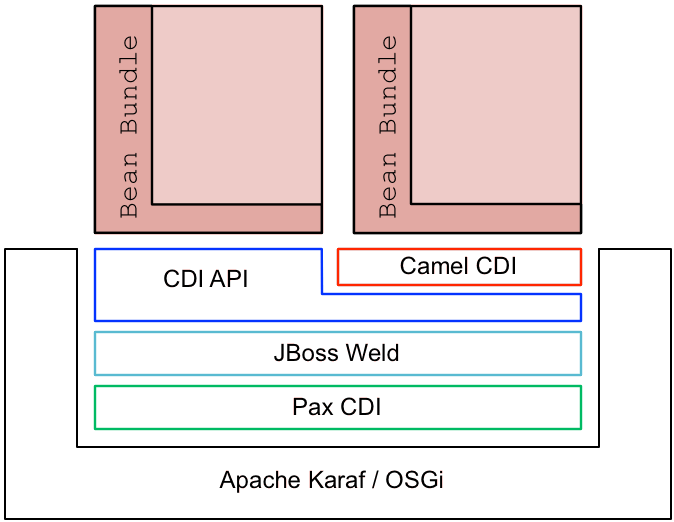
17.2. Pax CDI
Pax CDI is the integration layer that makes it possible to deploy a CDI container within the Apache Karaf OSGi container.
JBoss Weld
JBoss Weld provides the CDI implementation for the Pax CDI integration. JBoss Weld is the reference implementation for CDI and comes with its own extensive documentation, CDI Reference Implementation.
Bean bundle
A bean bundle is an OSGi bundle that has been enabled to use Pax CDI. A bundle cannot use CDI by default, it must be explicitly enabled to do so (see the section called “Requirements and capabilities”).
CDI container
A CDI container effectively defines the scope for a collection of managed beans under CDI, which are capable of being published and injected within this scope. In the context of OSGi, a CDI container maps to a single bundle. That is, each bean bundle gets its own CDI container.
Camel CDI and other customizations
JBoss Fuse provides additional features that define CDI customizations (that is, non-standard CDI annotations) targeted at different aspects of middleware development. For example:
camel-cdi- Provides custom annotations for defining and injecting Camel contexts and routes. See Chapter 14, Camel CDI.
switchyard-cdiProvides custom annotations for use with SwitchYard. For example, see the quickstart example under the following directory of your JBoss Fuse installation:
quickstarts/switchyard/camel-bus-cdiFor more information, see olink:SYDev/chap-Service_Implementations.
cxf-jaxrs-cdi- Provides support for CDI in JAX-RS, as defined in the JAX-RS 2.0 Specification (see section 10.2.3).
deltaspike- Apache Deltaspike is a general-purpose collection of CDI customizations.
17.3. Enabling Pax CDI
Overview
Pax CDI is not enabled by default in the Karaf container in JBoss Fuse, so you must enable it explicitly. There are two aspects of enabling Pax CDI in the Karaf container: first, installing the requisite Karaf features in the container; second, enabling CDI for a particular bundle, by adding the Require-Capability header to the bundle’s manifest (turning the bundle into a bean bundle).
Pax CDI features
To make Pax CDI functionality available in the Karaf container, install the requisite Karaf features into your container. JBoss Fuse provides the following Karaf features for Pax CDI:
pax-cdi-
Deploys the core components of Pax CDI. This feature must be combined with the
pax-cdi-weldCDI implementation. pax-cdi-weld- Deploys the JBoss Weld CDI implementation (which is the only CDI implementation supported on JBoss Fuse)
pax-cdi-web-
Adds support for deploying a CDI application as a Web application (that is, deploying the CDI application into the Pax Web Undertow container). This enables support for the CDI features associated with servlet deployment, such as session-scoped beans, request-scoped beans, injection into servlets, and so on. This feature must be combined with the
pax-cdi-web-weldfeature (CDI implementation). pax-cdi-web-weld- Deploys the JBoss Weld CDI implementation for Web applications.
Requirements and capabilities
CDI requires you to organize your Java code in a very specific way, so it cannot be enabled arbitrarily for any bundle. It only makes sense to enable CDI for each bundle that needs it, not for the entire container. Hence, it is necessary to use an OSGi extension mechanism that switches on the CDI capability on a bundle-by-bundle basis. The relevant OSGi mechanism is known as the requirements and capabilities mechanism.
The CDI capability is provided by the relevant Pax CDI packages (installed as Karaf features); and the CDI requirement is specified for each bundle by adding a Require-Capability bundle header to the bundle’s manifest file. For example, to enable the base Pax CDI functionality, you would add the following Require-Capability header to the bundle’s manifest file:
Require-Capability : osgi.extender; filter:="(osgi.extender=pax.cdi)"
A bundle that includes the preceding Require-Capability bundle header effectively becomes a bean bundle (a CDI enabled bundle).
How to enable Pax CDI in Apache Karaf
To enable Pax CDI in Apache Karaf, perform the following steps:
Add the required
pax-cdiandpax-cdi-weldfeatures to the Karaf container, as follows:JBossFuse:karaf@root> features:install pax-cdi pax-cdi-weldWhen the Pax CDI features are installed in the Karaf container, this is not sufficient to enable CDI. You must also explicitly enable Pax CDI in each bundle that uses CDI (so that it becomes a bean bundle). To enable Pax CDI in a bundle, open the
pom.xmlfile in your bundle’s Maven project and add the followingRequire-Capabilityelement to the configuration of the Maven bundle plug-in:<project ...> ... <build> <plugins> ... <plugin> <groupId>org.apache.felix</groupId> <artifactId>maven-bundle-plugin</artifactId> <extensions>true</extensions> <configuration> <instructions> <Bundle-SymbolicName>${project.groupId}.${project.artifactId}</Bundle-SymbolicName> <Import-Package>*</Import-Package> <Require-Capability> osgi.extender; filter:="(osgi.extender=pax.cdi)" </Require-Capability> </instructions> </configuration> </plugin> ... </plugins> </build> ... </project>To access the CDI annotations in Java, you must add a dependency on the CDI API package. Edit your bundle’s POM file,
pom.xml, to add the CDI API package as a Maven dependency:<project ...> ... <dependencies> ... <!-- CDI API --> <dependency> <groupId>javax.enterprise</groupId> <artifactId>cdi-api</artifactId> <version>${cdi-api-1.2-version}</version> <scope>provided</scope> </dependency> ... </dependencies> ... </project>Rebuild your bundle in the usual way for your Maven project. For example, using the command:
mvn clean install-
Deploy the bundle to the Karaf container in the usual way (for example, using the
osgi:installconsole command).
17.4. OSGi Services Extension
Overview
Pax CDI also provides an integration with OSGi services, enabling you to reference an OSGi service or to publish an OSGi service using CDI annotations. This capability is provided by the Pax CDI OSGi Services Extension, which is not enabled by default.
Enabling the OSGi Services Extension
To enable the Pax CDI OSGi Services Extension, you must include the following bundle header in the manifest file:
Require-Capability : org.ops4j.pax.cdi.extension; filter:="(extension=pax-cdi-extension)"
In a Maven project, you would normally add a Require-Capability element to the configuration of the Maven bundle plug-in. For example, to add both the Pax CDI Extender and the Pax CDI OSGi Services Extension to the bundle, configure your project’s POM file, pom.xml, as follows:
<project ...>
  ...
  <build>
    <plugins>
      ...
      <plugin>
        <groupId>org.apache.felix</groupId>
        <artifactId>maven-bundle-plugin</artifactId>
        <extensions>true</extensions>
        <configuration>
          <instructions>
            <Bundle-SymbolicName>${project.groupId}.${project.artifactId}</Bundle-SymbolicName>
            <Import-Package>*</Import-Package>
            <Require-Capability>
              osgi.extender; filter:="(osgi.extender=pax.cdi)",
              org.ops4j.pax.cdi.extension; filter:="(extension=pax-cdi-extension)"
            </Require-Capability>
          </instructions>
        </configuration>
      </plugin>
      ...
    </plugins>
  </build>
  ...
</project>
Maven dependency for the OSGi Services extensions API
To access the OSGi Services annotations in your Java code, you need to add a dependency on the pax-cdi-api package. Edit your bundle’s POM file, pom.xml, to add the Pax CDI API package as a Maven dependency:
<project ...>
  ...
  <dependencies>
    ...
    <!-- CDI API -->
    <dependency>
        <groupId>org.ops4j.pax.cdi</groupId>
        <artifactId>pax-cdi-api</artifactId>
        <version>1.0.0.RC1</version>
    </dependency>
    ...
  </dependencies>
  ...
</project>
Injecting an OSGi Service
You can inject an OSGi service into a field using the following annotation:
@Inject @OsgiService
private IceCreamService iceCream;
Pax CDI finds the OSGi service to inject by matching the type of the OSGi service to the type of the field.
Disambiguating OSGi Services
If more than one OSGi service of a particular type exists, you can disambiguate the match by filtering on the OSGi service properties—for example:
@Inject @OsgiService(filter = "(&(flavour=chocolate)(lactose=false))")
private IceCreamService iceCream;
As usual for OSGi services, the properties filter is defined using LDAP filter syntax (see Matching service properties with a filter for more details). For an example of how to set properties on an OSGi service, see the section called “Setting OSGi Service properties”.
Selecting OSGi Services at run time
You can reference an OSGi service dynamically by injecting it as follows:
@Inject
@OsgiService(dynamic = true)
private Instance<IceCreamService> iceCreamServices;
Calling iceCreamServices.get() will return an instance of the IceCreamService service at run time. With this approach, it is possible to reference an OSGi service that is created after your bean is created.
Publishing a bean as OSGi Service with singleton scope
You can publish an OSGi service with OSGi singleton scope (which is the default), as follows:
@OsgiServiceProvider
public class ChocolateService implements IceCreamService {
    ...
}
OSGi singleton scope means that the bean manager creates a single instance of the bean and returns that instance every time a bean instance is requested.
Publishing a bean as OSGi Service with prototype scope
You can publish an OSGi service with OSGi prototype scope, as follows:
@OsgiServiceProvider
@PrototypeScoped
public class ChocolateService implements IceCreamService {
    ...
}
OSGi prototype scope means that the bean manager creates a new bean instance every time a bean instance is requested.
Publishing a bean as OSGi Service with bundle scope
You can publish an OSGi service with bundle scope, as follows:
@OsgiServiceProvider
@BundleScoped
public class ChocolateService implements IceCreamService {
    ...
}
Bundle scope means that the bean manger creates a new bean instance for every client bundle. That is, the @BundleScoped beans are registered with an org.osgi.framework.ServiceFactory.
Setting OSGi Service properties
You can set properties on an OSGi service by annotating the service bean as follows:
@OsgiServiceProvider
@Properties({
    @Property(name = "flavour", value = "chocolate"),
    @Property(name = "lactose", value = "false")
})
public class ChocolateService implements IceCreamService {
    ...
}
Publishing an OSGi Service with explicit interfaces
You can explicitly specify the Java interfaces supported by an OSGi Service bean, as follows:
@OsgiServiceProvider(classes = {ChocolateService.class, IceCreamService.class})
public class ChocolateService implements IceCreamService {
    ...
}
Chapter 18. Deploying using a WAR package
Abstract
The OSGi specification supports modular application development by defining a runtime framework that simplifies building, deploying, and managing complex applications.
Chapter 19. Deploying using the OSGi service layer
Abstract
The OSGi specification supports modular application development by defining a runtime framework that simplifies building, deploying, and managing complex applications.
Chapter 20. OSGi Services
Abstract
The OSGi core framework defines the OSGi Service Layer, which provides a simple mechanism for bundles to interact by registering Java objects as services in the OSGi service registry. One of the strengths of the OSGi service model is that any Java object can be offered as a service: there are no particular constraints, inheritance rules, or annotations that must be applied to the service class. This chapter describes how to deploy an OSGi service using the OSGi Blueprint container.
Chapter 21. The Blueprint Container
Abstract
The Blueprint container is a dependency injection framework that simplifies interaction with the OSGi container. The Blueprint container supports a configuration-based approach to using the OSGi service registry—for example, providing standard XML elements to import and export OSGi services.
21.1. Blueprint Configuration
Location of Blueprint files in a JAR file
Relative to the root of the bundle JAR file, the standard location for Blueprint configuration files is the following directory:
OSGI-INF/blueprint
Any files with the suffix, .xml, under this directory are interpreted as Blueprint configuration files; in other words, any files that match the pattern, OSGI-INF/blueprint/*.xml.
Location of Blueprint files in a Maven project
In the context of a Maven project, ProjectDir, the standard location for Blueprint configuration files is the following directory:
ProjectDir/src/main/resources/OSGI-INF/blueprintBlueprint namespace and root element
Blueprint configuration elements are associated with the following XML namespace:
http://www.osgi.org/xmlns/blueprint/v1.0.0
The root element for Blueprint configuration is blueprint, so a Blueprint XML configuration file normally has the following outline form:
<?xml version="1.0" encoding="UTF-8"?>
<blueprint xmlns="http://www.osgi.org/xmlns/blueprint/v1.0.0">
  ...
</blueprint>
In the blueprint root element, there is no need to specify the location of the Blueprint schema using an xsi:schemaLocation attribute, because the schema location is already known to the Blueprint framework.
Blueprint Manifest configuration
Some aspects of Blueprint configuration are controlled by headers in the JAR’s manifest file, META-INF/MANIFEST.MF, as follows:
Custom Blueprint file locations
If you need to place your Blueprint configuration files in a non-standard location (that is, somewhere other than OSGI-INF/blueprint/*.xml), you can specify a comma-separated list of alternative locations in the Bundle-Blueprint header in the manifest file—for example:
Bundle-Blueprint: lib/account.xml, security.bp, cnf/*.xmlMandatory dependencies
Dependencies on an OSGi service are mandatory by default (although this can be changed by setting the availability attribute to optional on a reference element or a reference-list element). Declaring a dependency to be mandatory means that the bundle cannot function properly without that dependency and the dependency must be available at all times.
Normally, while a Blueprint container is initializing, it passes through a grace period, during which time it attempts to resolve all mandatory dependencies. If the mandatory dependencies cannot be resolved in this time (the default timeout is 5 minutes), container initialization is aborted and the bundle is not started. The following settings can be appended to the Bundle-SymbolicName manifest header to configure the grace period:
blueprint.graceperiod-
If
true(the default), the grace period is enabled and the Blueprint container waits for mandatory dependencies to be resolved during initialization; iffalse, the grace period is skipped and the container does not check whether the mandatory dependencies are resolved. blueprint.timeout- Specifies the grace period timeout in milliseconds. The default is 300000 (5 minutes).
For example, to enable a grace period of 10 seconds, you could define the following Bundle-SymbolicName header in the manifest file:
Bundle-SymbolicName: org.fusesource.example.osgi-client;
 blueprint.graceperiod:=true;
 blueprint.timeout:= 10000
The value of the Bundle-SymbolicName header is a semi-colon separated list, where the first item is the actual bundle symbolic name, the second item, blueprint.graceperiod:=true, enables the grace period and the third item, blueprint.timeout:= 10000, specifies a 10 second timeout.
21.2. Defining a Service Bean
Overview
The Blueprint container enables you to instantiate Java classes using a bean element. You can create all of your main application objects this way. In particular, you can use the bean element to create a Java object that represents an OSGi service instance.
Blueprint bean element
The Blueprint bean element is defined in the Blueprint schema namespace, http://www.osgi.org/xmlns/blueprint/v1.0.0.
Sample beans
The following example shows how to create a few different types of bean using Blueprint’s bean element:
<blueprint xmlns="http://www.osgi.org/xmlns/blueprint/v1.0.0">

  <bean id="label" class="java.lang.String">
    <argument value="LABEL_VALUE"/>
  </bean>

  <bean id="myList" class="java.util.ArrayList">
    <argument type="int" value="10"/>
  </bean>

  <bean id="account" class="org.fusesource.example.Account">
    <property name="accountName" value="john.doe"/>
    <property name="balance" value="10000"/>
  </bean>

</blueprint>
Where the Account class referenced by the last bean example could be defined as follows:
package org.fusesource.example;

public class Account
{
    private String accountName;
    private int balance;

    public Account () { }

    public void setAccountName(String name) {
        this.accountName = name;
    }

    public void setBalance(int bal) {
        this.balance = bal;
    }
    ...
}
References
For more details on defining Blueprint beans, consult the following references:
- Spring Dynamic Modules Reference Guide v2.0, Blueprint chapter.
- Section 121 Blueprint Container Specification, from the OSGi Compendium Services R4.2 specification.
21.3. Exporting a Service
Overview
This section describes how to export a Java object to the OSGi service registry, thus making it accessible as a service to other bundles in the OSGi container.
Exporting with a single interface
To export a service to the OSGi service registry under a single interface name, define a service element that references the relevant service bean, using the ref attribute, and specifies the published interface, using the interface attribute.
For example, you could export an instance of the SavingsAccountImpl class under the org.fusesource.example.Account interface name using the Blueprint configuration code shown in Example 21.1, “Sample Service Export with a Single Interface”.
Example 21.1. Sample Service Export with a Single Interface
<blueprint xmlns="http://www.osgi.org/xmlns/blueprint/v1.0.0">

  <bean id="savings" class="org.fusesource.example.SavingsAccountImpl"/>

  <service ref="savings" interface="org.fusesource.example.Account"/>

</blueprint>
Where the ref attribute specifies the ID of the corresponding bean instance and the interface attribute specifies the name of the public Java interface under which the service is registered in the OSGi service registry. The classes and interfaces used in this example are shown in Example 21.2, “Sample Account Classes and Interfaces”
Example 21.2. Sample Account Classes and Interfaces
package org.fusesource.example

public interface Account { ... }

public interface SavingsAccount { ... }

public interface CheckingAccount { ... }

public class SavingsAccountImpl implements SavingsAccount
{
    ...
}

public class CheckingAccountImpl implements CheckingAccount
{
    ...
}
Exporting with multiple interfaces
To export a service to the OSGi service registry under multiple interface names, define a service element that references the relevant service bean, using the ref attribute, and specifies the published interfaces, using the interfaces child element.
For example, you could export an instance of the SavingsAccountImpl class under the list of public Java interfaces, org.fusesource.example.Account and org.fusesource.example.SavingsAccount, using the following Blueprint configuration code:
<blueprint xmlns="http://www.osgi.org/xmlns/blueprint/v1.0.0">
  <bean id="savings" class="org.fusesource.example.SavingsAccountImpl"/>
  <service ref="savings">
    <interfaces>
      <value>org.fusesource.example.Account</value>
      <value>org.fusesource.example.SavingsAccount</value>
    </interfaces>
  </service>
  ...
</blueprint>
The interface attribute and the interfaces element cannot be used simultaneously in the same service element. You must use either one or the other.
Exporting with auto-export
If you want to export a service to the OSGi service registry under all of its implemented public Java interfaces, there is an easy way of accomplishing this using the auto-export attribute.
For example, to export an instance of the SavingsAccountImpl class under all of its implemented public interfaces, use the following Blueprint configuration code:
<blueprint xmlns="http://www.osgi.org/xmlns/blueprint/v1.0.0">
  <bean id="savings" class="org.fusesource.example.SavingsAccountImpl"/>
  <service ref="savings" auto-export="interfaces"/>
  ...
</blueprint>
Where the interfaces value of the auto-export attribute indicates that Blueprint should register all of the public interfaces implemented by SavingsAccountImpl. The auto-export attribute can have the following valid values:
disabled- Disables auto-export. This is the default.
interfaces- Registers the service under all of its implemented public Java interfaces.
class-hierarchy-
Registers the service under its own type (class) and under all super-types (super-classes), except for the
Objectclass. all-classes-
Like the
class-hierarchyoption, but including all of the implemented public Java interfaces as well.
Setting service properties
The OSGi service registry also allows you to associate service properties with a registered service. Clients of the service can then use the service properties to search for or filter services. To associate service properties with an exported service, add a service-properties child element that contains one or more beans:entry elements (one beans:entry element for each service property).
For example, to associate the bank.name string property with a savings account service, you could use the following Blueprint configuration:
<blueprint xmlns="http://www.osgi.org/xmlns/blueprint/v1.0.0"
           xmlns:beans="http://www.springframework.org/schema/beans"
           ...>
  ...
  <service ref="savings" auto-export="interfaces">
    <service-properties>
      <beans:entry key="bank.name" value="HighStreetBank"/>
    </service-properties>
  </service>
  ...
</blueprint>
Where the bank.name string property has the value, HighStreetBank. It is possible to define service properties of type other than string: that is, primitive types, arrays, and collections are also supported. For details of how to define these types, see Controlling the Set of Advertised Properties. in the Spring Reference Guide.
The entry element ought to belong to the Blueprint namespace. The use of the beans:entry element in Spring’s implementation of Blueprint is non-standard.
Default service properties
There are two service properties that might be set automatically when you export a service using the service element, as follows:
-
osgi.service.blueprint.compname—is always set to theidof the service’sbeanelement, unless the bean is inlined (that is, the bean is defined as a child element of theserviceelement). Inlined beans are always anonymous. -
service.ranking—is automatically set, if the ranking attribute is non-zero.
Specifying a ranking attribute
If a bundle looks up a service in the service registry and finds more than one matching service, you can use ranking to determine which of the services is returned. The rule is that, whenever a lookup matches multiple services, the service with the highest rank is returned. The service rank can be any non-negative integer, with 0 being the default. You can specify the service ranking by setting the ranking attribute on the service element—for example:
<service ref="savings" interface="org.fusesource.example.Account" ranking="10"/>Specifying a registration listener
If you want to keep track of service registration and unregistration events, you can define a registration listener callback bean that receives registration and unregistration event notifications. To define a registration listener, add a registration-listener child element to a service element.
For example, the following Blueprint configuration defines a listener bean, listenerBean, which is referenced by a registration-listener element, so that the listener bean receives callbacks whenever an Account service is registered or unregistered:
<blueprint xmlns="http://www.osgi.org/xmlns/blueprint/v1.0.0" ...>
  ...
  <bean id="listenerBean" class="org.fusesource.example.Listener"/>

  <service ref="savings" auto-export="interfaces">
    <registration-listener
        ref="listenerBean"
        registration-method="register"
        unregistration-method="unregister"/>
  </service>
  ...
</blueprint>
Where the registration-listener element’s ref attribute references the id of the listener bean, the registration-method attribute specifies the name of the listener method that receives the registration callback, and unregistration-method attribute specifies the name of the listener method that receives the unregistration callback.
The following Java code shows a sample definition of the Listener class that receives notifications of registration and unregistration events:
package org.fusesource.example;

public class Listener
{
    public void register(Account service, java.util.Map serviceProperties) {
        ...
    }

    public void unregister(Account service, java.util.Map serviceProperties) {
        ...
    }
}
The method names, register and unregister, are specified by the registration-method and unregistration-method attributes respectively. The signatures of these methods must conform to the following syntax:
-
First method argument—any type T that is assignable from the service object’s type. In other words, any supertype class of the service class or any interface implemented by the service class. This argument contains the service instance, unless the service bean declares the
scopeto beprototype, in which case this argument isnull(when the scope isprototype, no service instance is available at registration time). -
Second method argument—must be of either
java.util.Maptype orjava.util.Dictionarytype. This map contains the service properties associated with this service registration.
21.4. Importing a Service
Overview
This section describes how to obtain and use references to OSGi services that have been exported to the OSGi service registry. You can use either the reference element or the reference-list element to import an OSGi service. The reference element is suitable for accessing stateless services, while the reference-list element is suitable for accessing stateful services.
Managing service references
The following models for obtaining OSGi services references are supported:
Reference manager
A reference manager instance is created by the Blueprint reference element. This element returns a single service reference and is the preferred approach for accessing stateless services. Figure 21.1, “Reference to Stateless Service” shows an overview of the model for accessing a stateless service using the reference manager.
Figure 21.1. Reference to Stateless Service
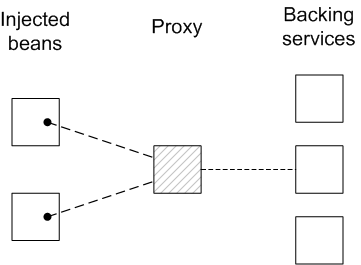
Beans in the client Blueprint container get injected with a proxy object (the provided object), which is backed by a service object (the backing service) from the OSGi service registry. This model explicitly takes advantage of the fact that stateless services are interchangeable, in the following ways:
-
If multiple services instances are found that match the criteria in the
referenceelement, the reference manager can arbitrarily choose one of them as the backing instance (because they are interchangeable). - If the backing service disappears, the reference manager can immediately switch to using one of the other available services of the same type. Hence, there is no guarantee, from one method invocation to the next, that the proxy remains connected to the same backing service.
The contract between the client and the backing service is thus stateless, and the client must not assume that it is always talking to the same service instance. If no matching service instances are available, the proxy will wait for a certain length of time before throwing the ServiceUnavailable exception. The length of the timeout is configurable by setting the timeout attribute on the reference element.
Reference list manager
A reference list manager instance is created by the Blueprint reference-list element. This element returns a list of service references and is the preferred approach for accessing stateful services. Figure 21.2, “List of References to Stateful Services” shows an overview of the model for accessing a stateful service using the reference list manager.
Figure 21.2. List of References to Stateful Services

Beans in the client Blueprint container get injected with a java.util.List object (the provided object), which contains a list of proxy objects. Each proxy is backed by a unique service instance in the OSGi service registry. Unlike the stateless model, backing services are not considered to be interchangeable here. In fact, the lifecycle of each proxy in the list is tightly linked to the lifecycle of the corresponding backing service: when a service gets registered in the OSGi registry, a corresponding proxy is synchronously created and added to the proxy list; and when a service gets unregistered from the OSGi registry, the corresponding proxy is synchronously removed from the proxy list.
The contract between a proxy and its backing service is thus stateful, and the client may assume when it invokes methods on a particular proxy, that it is always communicating with the same backing service. It could happen, however, that the backing service becomes unavailable, in which case the proxy becomes stale. Any attempt to invoke a method on a stale proxy will generate the ServiceUnavailable exception.
Matching by interface (stateless)
The simplest way to obtain a stateles service reference is by specifying the interface to match, using the interface attribute on the reference element. The service is deemed to match, if the interface attribute value is a super-type of the service or if the attribute value is a Java interface implemented by the service (the interface attribute can specify either a Java class or a Java interface).
For example, to reference a stateless SavingsAccount service (see Example 21.1, “Sample Service Export with a Single Interface”), define a reference element as follows:
<blueprint xmlns="http://www.osgi.org/xmlns/blueprint/v1.0.0">

  <reference id="savingsRef"
             interface="org.fusesource.example.SavingsAccount"/>

  <bean id="client" class="org.fusesource.example.client.Client">
    <property name="savingsAccount" ref="savingsRef"/>
  </bean>

</blueprint>
Where the reference element creates a reference manager bean with the ID, savingsRef. To use the referenced service, inject the savingsRef bean into one of your client classes, as shown.
The bean property injected into the client class can be any type that is assignable from SavingsAccount. For example, you could define the Client class as follows:
package org.fusesource.example.client;

import org.fusesource.example.SavingsAccount;

public class Client {
    SavingsAccount savingsAccount;

    // Bean properties
    public SavingsAccount getSavingsAccount() {
        return savingsAccount;
    }

    public void setSavingsAccount(SavingsAccount savingsAccount) {
        this.savingsAccount = savingsAccount;
    }
    ...
}
Matching by interface (stateful)
The simplest way to obtain a stateful service reference is by specifying the interface to match, using the interface attribute on the reference-list element. The reference list manager then obtains a list of all the services, whose interface attribute value is either a super-type of the service or a Java interface implemented by the service (the interface attribute can specify either a Java class or a Java interface).
For example, to reference a stateful SavingsAccount service (see Example 21.1, “Sample Service Export with a Single Interface”), define a reference-list element as follows:
<blueprint xmlns="http://www.osgi.org/xmlns/blueprint/v1.0.0">

  <reference-list id="savingsListRef"
                  interface="org.fusesource.example.SavingsAccount"/>

  <bean id="client" class="org.fusesource.example.client.Client">
    <property name="savingsAccountList" ref="savingsListRef"/>
  </bean>

</blueprint>
Where the reference-list element creates a reference list manager bean with the ID, savingsListRef. To use the referenced service list, inject the savingsListRef bean reference into one of your client classes, as shown.
By default, the savingsAccountList bean property is a list of service objects (for example, java.util.List<SavingsAccount>). You could define the client class as follows:
package org.fusesource.example.client;

import org.fusesource.example.SavingsAccount;

public class Client {
    java.util.List<SavingsAccount> accountList;

    // Bean properties
    public java.util.List<SavingsAccount> getSavingsAccountList() {
        return accountList;
    }

    public void setSavingsAccountList(
                    java.util.List<SavingsAccount> accountList
    ) {
        this.accountList = accountList;
    }
    ...
}
Matching by interface and component name
To match both the interface and the component name (bean ID) of a stateless service, specify both the interface attribute and the component-name attribute on the reference element, as follows:
<reference id="savingsRef"
           interface="org.fusesource.example.SavingsAccount"
           component-name="savings"/>
To match both the interface and the component name (bean ID) of a stateful service, specify both the interface attribute and the component-name attribute on the reference-list element, as follows:
<reference-list id="savingsRef"
           interface="org.fusesource.example.SavingsAccount"
           component-name="savings"/>
Matching service properties with a filter
You can select services by matching service properties against a filter. The filter is specified using the filter attribute on the reference element or on the reference-list element. The value of the filter attribute must be an LDAP filter expression. For example, to define a filter that matches when the bank.name service property equals HighStreetBank, you could use the following LDAP filter expression:
(bank.name=HighStreetBank)
To match two service property values, you can use & conjunction, which combines expressions with a logical and.For example, to require that the foo property is equal to FooValue and the bar property is equal to BarValue, you could use the following LDAP filter expression:
(&(foo=FooValue)(bar=BarValue))For the complete syntax of LDAP filter expressions, see section 3.2.7 of the OSGi Core Specification.
Filters can also be combined with the interface and component-name settings, in which case all of the specified conditions are required to match.
For example, to match a stateless service of SavingsAccount type, with a bank.name service property equal to HighStreetBank, you could define a reference element as follows:
<reference id="savingsRef"
           interface="org.fusesource.example.SavingsAccount"
           filter="(bank.name=HighStreetBank)"/>
To match a stateful service of SavingsAccount type, with a bank.name service property equal to HighStreetBank, you could define a reference-list element as follows:
<reference-list id="savingsRef"
           interface="org.fusesource.example.SavingsAccount"
           filter="(bank.name=HighStreetBank)"/>
Specifying whether mandatory or optional
By default, a reference to an OSGi service is assumed to be mandatory (see Mandatory dependencies). It is possible to customize the dependency behavior of a reference element or a reference-list element by setting the availability attribute on the element.
There are two possible values of the availability attribute:
-
mandatory(the default), means that the dependency must be resolved during a normal Blueprint container initialization -
optional, means that the dependency need not be resolved during initialization.
The following example of a reference element shows how to declare explicitly that the reference is a mandatory dependency:
<reference id="savingsRef"
           interface="org.fusesource.example.SavingsAccount"
           availability="mandatory"/>
Specifying a reference listener
To cope with the dynamic nature of the OSGi environment—for example, if you have declared some of your service references to have optional availability—it is often useful to track when a backing service gets bound to the registry and when it gets unbound from the registry. To receive notifications of service binding and unbinding events, you can define a reference-listener element as the child of either the reference element or the reference-list element.
For example, the following Blueprint configuration shows how to define a reference listener as a child of the reference manager with the ID, savingsRef:
<blueprint xmlns="http://www.osgi.org/xmlns/blueprint/v1.0.0">

  <reference id="savingsRef"
             interface="org.fusesource.example.SavingsAccount"
             >
    <reference-listener bind-method="onBind" unbind-method="onUnbind">
      <bean class="org.fusesource.example.client.Listener"/>
    </reference-listener>
  </reference>

  <bean id="client" class="org.fusesource.example.client.Client">
    <property name="savingsAcc" ref="savingsRef"/>
  </bean>

</blueprint>
The preceding configuration registers an instance of org.fusesource.example.client.Listener type as a callback that listens for bind and unbind events. Events are generated whenever the savingsRef reference manager’s backing service binds or unbinds.
The following example shows a sample implementation of the Listener class:
package org.fusesource.example.client;

import org.osgi.framework.ServiceReference;

public class Listener {

    public void onBind(ServiceReference ref) {
        System.out.println("Bound service: " + ref);
    }

    public void onUnbind(ServiceReference ref) {
        System.out.println("Unbound service: " + ref);
    }

}
The method names, onBind and onUnbind, are specified by the bind-method and unbind-method attributes respectively. Both of these callback methods take an org.osgi.framework.ServiceReference argument.
Chapter 22. Publishing an OSGi Service
22.1. Overview
This section explains how to generate, build, and deploy a simple OSGi service in the OSGi container. The service is a simple Hello World Java class and the OSGi configuration is defined using a Blueprint configuration file.
22.2. Prerequisites
In order to generate a project using the Maven Quickstart archetype, you must have the following prerequisites:
- Maven installation—Maven is a free, open source build tool from Apache. You can download the latest version from http://maven.apache.org/download.html (minimum is 2.0.9).
- Internet connection—whilst performing a build, Maven dynamically searches external repositories and downloads the required artifacts on the fly. In order for this to work, your build machine must be connected to the Internet.
22.3. Generating a Maven project
The maven-archetype-quickstart archetype creates a generic Maven project, which you can then customize for whatever purpose you like. To generate a Maven project with the coordinates, org.fusesource.example:osgi-service, enter the following command:
mvn archetype:create
-DarchetypeArtifactId=maven-archetype-quickstart
-DgroupId=org.fusesource.example
-DartifactId=osgi-service
The result of this command is a directory, ProjectDir/osgi-service, containing the files for the generated project.
Be careful not to choose a group ID for your artifact that clashes with the group ID of an existing product! This could lead to clashes between your project’s packages and the packages from the existing product (because the group ID is typically used as the root of a project’s Java package names).
22.4. Customizing the POM file
You must customize the POM file in order to generate an OSGi bundle, as follows:
- Follow the POM customization steps described in Section 3.1, “Generating a Bundle Project”.
In the configuration of the Maven bundle plug-in, modify the bundle instructions to export the
org.fusesource.example.servicepackage, as follows:<project ... > ... <build> ... <plugins> ... <plugin> <groupId>org.apache.felix</groupId> <artifactId>maven-bundle-plugin</artifactId> <extensions>true</extensions> <configuration> <instructions> <Bundle-SymbolicName>${pom.groupId}.${pom.artifactId}</Bundle-SymbolicName> <Export-Package>org.fusesource.example.service</Export-Package> </instructions> </configuration> </plugin> </plugins> </build> ... </project>
22.5. Writing the service interface
Create the ProjectDir/osgi-service/src/main/java/org/fusesource/example/service sub-directory. In this directory, use your favorite text editor to create the file, HelloWorldSvc.java, and add the code from Example 22.1, “The HelloWorldSvc Interface” to it.
Example 22.1. The HelloWorldSvc Interface
package org.fusesource.example.service;

public interface HelloWorldSvc
{
    public void sayHello();
}
22.6. Writing the service class
Create the ProjectDir/osgi-service/src/main/java/org/fusesource/example/service/impl sub-directory. In this directory, use your favorite text editor to create the file, HelloWorldSvcImpl.java, and add the code from Example 22.2, “The HelloWorldSvcImpl Class” to it.
Example 22.2. The HelloWorldSvcImpl Class
package org.fusesource.example.service.impl;

import org.fusesource.example.service.HelloWorldSvc;

public class HelloWorldSvcImpl implements HelloWorldSvc {

    public void sayHello()
    {
        System.out.println( "Hello World!" );
    }

}
22.7. Writing the Blueprint file
The Blueprint configuration file is an XML file stored under the OSGI-INF/blueprint directory on the class path. To add a Blueprint file to your project, first create the following sub-directories:
ProjectDir/osgi-service/src/main/resources
ProjectDir/osgi-service/src/main/resources/OSGI-INF
ProjectDir/osgi-service/src/main/resources/OSGI-INF/blueprint
Where the src/main/resources is the standard Maven location for all JAR resources. Resource files under this directory will automatically be packaged in the root scope of the generated bundle JAR.
Example 22.3, “Blueprint File for Exporting a Service” shows a sample Blueprint file that creates a HelloWorldSvc bean, using the bean element, and then exports the bean as an OSGi service, using the service element.
Under the ProjectDir/osgi-service/src/main/resources/OSGI-INF/blueprint directory, use your favorite text editor to create the file, config.xml, and add the XML code from Example 22.3, “Blueprint File for Exporting a Service”.
Example 22.3. Blueprint File for Exporting a Service
<?xml version="1.0" encoding="UTF-8"?>
<blueprint xmlns="http://www.osgi.org/xmlns/blueprint/v1.0.0">

  <bean id="hello" class="org.fusesource.example.service.impl.HelloWorldSvcImpl"/>

  <service ref="hello" interface="org.fusesource.example.service.HelloWorldSvc"/>

</blueprint>
22.8. Running the service bundle
To install and run the osgi-service project, perform the following steps:
Build the project—open a command prompt and change directory to
ProjectDir/osgi-service. Use Maven to build the demonstration by entering the following command:mvn installIf this command runs successfully, the
ProjectDir/osgi-service/targetdirectory should contain the bundle file,osgi-service-1.0-SNAPSHOT.jar.Install and start the osgi-service bundle—at the Red Hat JBoss Fuse console, enter the following command:
JBossFuse:karaf@root> osgi:install -s file:ProjectDir/osgi-service/target/osgi-service-1.0-SNAPSHOT.jarWhere ProjectDir is the directory containing your Maven projects and the
-sflag directs the container to start the bundle right away. For example, if your project directory isC:\Projectson a Windows machine, you would enter the following command:JBossFuse:karaf@root> osgi:install -s file:C:/Projects/osgi-service/target/osgi-service-1.0-SNAPSHOT.jarNoteOn Windows machines, be careful how you format the
fileURL—for details of the syntax understood by thefileURL handler, see Section A.1, “File URL Handler”.Check that the service has been created—to check that the bundle has started successfully, enter the following Red Hat JBoss Fuse console command:
JBossFuse:karaf@root> osgi:listSomewhere in this listing, you should see a line for the
osgi-servicebundle, for example:[ 236] [Active ] [Created ] [ ] [ 60] osgi-service (1.0.0.SNAPSHOT)To check that the service is registered in the OSGi service registry, enter a console command like the following:
JBossFuse:karaf@root> osgi:ls 236Where the argument to the preceding command is the
osgi-servicebundle ID. You should see some output like the following at the console:osgi-service (236) provides: ---------------------------- osgi.service.blueprint.compname = hello objectClass = org.fusesource.example.service.HelloWorldSvc service.id = 272 osgi.blueprint.container.version = 1.0.0.SNAPSHOT osgi.blueprint.container.symbolicname = org.fusesource.example.osgi-service objectClass = org.osgi.service.blueprint.container.BlueprintContainer service.id = 273
Chapter 23. Accessing an OSGi Service
23.1. Overview
This section explains how to generate, build, and deploy a simple OSGi client in the OSGi container. The client finds the simple Hello World service in the OSGi registry and invokes the sayHello() method on it.
23.2. Prerequisites
In order to generate a project using the Maven Quickstart archetype, you must have the following prerequisites:
- Maven installation—Maven is a free, open source build tool from Apache. You can download the latest version from http://maven.apache.org/download.html (minimum is 2.0.9).
- Internet connection—whilst performing a build, Maven dynamically searches external repositories and downloads the required artifacts on the fly. In order for this to work, your build machine must be connected to the Internet.
23.3. Generating a Maven project
The maven-archetype-quickstart archetype creates a generic Maven project, which you can then customize for whatever purpose you like. To generate a Maven project with the coordinates, org.fusesource.example:osgi-client, enter the following command:
mvn archetype:create
-DarchetypeArtifactId=maven-archetype-quickstart
-DgroupId=org.fusesource.example
-DartifactId=osgi-client
The result of this command is a directory, ProjectDir/osgi-client, containing the files for the generated project.
Be careful not to choose a group ID for your artifact that clashes with the group ID of an existing product! This could lead to clashes between your project’s packages and the packages from the existing product (because the group ID is typically used as the root of a project’s Java package names).
23.4. Customizing the POM file
You must customize the POM file in order to generate an OSGi bundle, as follows:
- Follow the POM customization steps described in Section 3.1, “Generating a Bundle Project”.
Because the client uses the
HelloWorldSvcJava interface, which is defined in theosgi-servicebundle, it is necessary to add a Maven dependency on theosgi-servicebundle. Assuming that the Maven coordinates of theosgi-servicebundle areorg.fusesource.example:osgi-service:1.0-SNAPSHOT, you should add the following dependency to the client’s POM file:<project ... > ... <dependencies> ... <dependency> <groupId>org.fusesource.example</groupId> <artifactId>osgi-service</artifactId> <version>1.0-SNAPSHOT</version> </dependency> </dependencies> ... </project>
23.5. Writing the Blueprint file
To add a Blueprint file to your client project, first create the following sub-directories:
ProjectDir/osgi-client/src/main/resources
ProjectDir/osgi-client/src/main/resources/OSGI-INF
ProjectDir/osgi-client/src/main/resources/OSGI-INF/blueprint
Under the ProjectDir/osgi-client/src/main/resources/OSGI-INF/blueprint directory, use your favorite text editor to create the file, config.xml, and add the XML code from Example 23.1, “Blueprint File for Importing a Service”.
Example 23.1. Blueprint File for Importing a Service
<?xml version="1.0" encoding="UTF-8"?>
<blueprint xmlns="http://www.osgi.org/xmlns/blueprint/v1.0.0">

  <reference id="helloWorld"
        interface="org.fusesource.example.service.HelloWorldSvc"/>

  <bean id="client"
        class="org.fusesource.example.client.Client"
        init-method="init">
    <property name="helloWorldSvc" ref="helloWorld"/>
  </bean>

</blueprint>
Where the reference element creates a reference manager that finds a service of HelloWorldSvc type in the OSGi registry. The bean element creates an instance of the Client class and injects the service reference as the bean property, helloWorldSvc. In addition, the init-method attribute specifies that the Client.init() method is called during the bean initialization phase (that is, after the service reference has been injected into the client bean).
23.6. Writing the client class
Under the ProjectDir/osgi-client/src/main/java/org/fusesource/example/client directory, use your favorite text editor to create the file, Client.java, and add the Java code from Example 23.2, “The Client Class”.
Example 23.2. The Client Class
package org.fusesource.example.client;

import org.fusesource.example.service.HelloWorldSvc;

public class Client {
    HelloWorldSvc helloWorldSvc;

    // Bean properties
    public HelloWorldSvc getHelloWorldSvc() {
        return helloWorldSvc;
    }

    public void setHelloWorldSvc(HelloWorldSvc helloWorldSvc) {
        this.helloWorldSvc = helloWorldSvc;
    }

    public void init() {
        System.out.println("OSGi client started.");
        if (helloWorldSvc != null) {
            System.out.println("Calling sayHello()");
            helloWorldSvc.sayHello();  // Invoke the OSGi service!
        }
    }

}
The Client class defines a getter and a setter method for the helloWorldSvc bean property, which enables it to receive the reference to the Hello World service by injection. The init() method is called during the bean initialization phase, after property injection, which means that it is normally possible to invoke the Hello World service within the scope of this method.
23.7. Running the client bundle
To install and run the osgi-client project, perform the following steps:
Build the project—open a command prompt and change directory to
ProjectDir/osgi-client. Use Maven to build the demonstration by entering the following command:mvn installIf this command runs successfully, the
ProjectDir/osgi-client/targetdirectory should contain the bundle file,osgi-client-1.0-SNAPSHOT.jar.Install and start the osgi-service bundle—at the Red Hat JBoss Fuse console, enter the following command:
JBossFuse:karaf@root> osgi:install -s file:ProjectDir/osgi-client/target/osgi-client-1.0-SNAPSHOT.jarWhere ProjectDir is the directory containing your Maven projects and the
-sflag directs the container to start the bundle right away. For example, if your project directory isC:\Projectson a Windows machine, you would enter the following command:JBossFuse:karaf@root> osgi:install -s file:C:/Projects/osgi-client/target/osgi-client-1.0-SNAPSHOT.jarNoteOn Windows machines, be careful how you format the
fileURL—for details of the syntax understood by thefileURL handler, see Section A.1, “File URL Handler”.Client output—f the client bundle is started successfully, you should immediately see output like the following in the console:
Bundle ID: 239
OSGi client started.
Calling sayHello()
Hello World!
Chapter 24. Integration with Apache Camel
24.1. Overview
Apache Camel provides a simple way to invoke OSGi services using the Bean language. This feature is automatically available whenever a Apache Camel application is deployed into an OSGi container and requires no special configuration.
24.2. Registry chaining
When a Apache Camel route is deployed into the OSGi container, the CamelContext automatically sets up a registry chain for resolving bean instances: the registry chain consists of the OSGi registry, followed by the Blueprint registry. Now, if you try to reference a particular bean class or bean instance, the registry resolves the bean as follows:
- Look up the bean in the OSGi registry first. If a class name is specified, try to match this with the interface or class of an OSGi service.
- If no match is found in the OSGi registry, fall back on the Blueprint registry.
24.3. Sample OSGi service interface
Consider the OSGi service defined by the following Java interface, which defines the single method, getGreeting():
package org.fusesource.example.hello.boston;

public interface HelloBoston {
    public String getGreeting();
}
24.4. Sample service export
When defining the bundle that implements the HelloBoston OSGi service, you could use the following Blueprint configuration to export the service:
<?xml version="1.0" encoding="UTF-8"?>
<blueprint xmlns="http://www.osgi.org/xmlns/blueprint/v1.0.0">

  <bean id="hello" class="org.fusesource.example.hello.boston.HelloBostonImpl"/>

  <service ref="hello" interface="org.fusesource.example.hello.boston.HelloBoston"/>

</blueprint>
Where it is assumed that the HelloBoston interface is implemented by the HelloBostonImpl class (not shown).
24.5. Invoking the OSGi service from Java DSL
After you have deployed the bundle containing the HelloBoston OSGi service, you can invoke the service from a Apache Camel application using the Java DSL. In the Java DSL, you invoke the OSGi service through the Bean language, as follows:
from("timer:foo?period=5000")
  .bean(org.fusesource.example.hello.boston.HelloBoston.class, "getGreeting")
  .log("The message contains: ${body}")
In the bean command, the first argument is the OSGi interface or class, which must match the interface exported from the OSGi service bundle. The second argument is the name of the bean method you want to invoke. For full details of the bean command syntax, see olink:CamelDev/BasicPrinciples-BeanIntegration.
When you use this approach, the OSGi service is implicitly imported. It is not necessary to import the OSGi service explicitly in this case.
24.6. Invoking the OSGi service from XML DSL
In the XML DSL, you can also use the Bean language to invoke the HelloBoston OSGi service, but the syntax is slightly different. In the XML DSL, you invoke the OSGi service through the Bean language, using the method element, as follows:
<beans ...>
  <camelContext xmlns="http://camel.apache.org/schema/spring">
    <route>
      <from uri="timer:foo?period=5000"/>
      <setBody>
          <method ref="org.fusesource.example.hello.boston.HelloBoston" method="getGreeting"/>
      </setBody>
      <log message="The message contains: ${body}"/>
    </route>
  </camelContext>
</beans>When you use this approach, the OSGi service is implicitly imported. It is not necessary to import the OSGi service explicitly in this case.
Chapter 25. Deploying using a JMS broker
Abstract
The OSGi specification supports modular application development by defining a runtime framework that simplifies building, deploying, and managing complex applications.
Appendix A. URL Handlers
Abstract
There are many contexts in Red Hat JBoss Fuse where you need to provide a URL to specify the location of a resource (for example, as the argument to a console command). In general, when specifying a URL, you can use any of the schemes supported by JBoss Fuse’s built-in URL handlers. This appendix describes the syntax for all of the available URL handlers.
A.1. File URL Handler
Syntax
A file URL has the syntax, file:PathName, where PathName is the relative or absolute pathname of a file that is available on the Classpath. The provided PathName is parsed by Java’s built-in file URL handler. Hence, the PathName syntax is subject to the usual conventions of a Java pathname: in particular, on Windows, each backslash must either be escaped by another backslash or replaced by a forward slash.
Examples
For example, consider the pathname, C:\Projects\camel-bundle\target\foo-1.0-SNAPSHOT.jar, on Windows. The following example shows the correct alternatives for the file URL on Windows:
file:C:/Projects/camel-bundle/target/foo-1.0-SNAPSHOT.jar
file:C:\\Projects\\camel-bundle\\target\\foo-1.0-SNAPSHOT.jar
The following example shows some incorrect alternatives for the file URL on Windows:
file:C:\Projects\camel-bundle\target\foo-1.0-SNAPSHOT.jar        // WRONG!
file://C:/Projects/camel-bundle/target/foo-1.0-SNAPSHOT.jar      // WRONG!
file://C:\\Projects\\camel-bundle\\target\\foo-1.0-SNAPSHOT.jar  // WRONG!
Chapter 26. HTTP URL Handler
Syntax
A HTTP URL has the standard syntax, http:Host[:Port]/[Path][#AnchorName][?Query]. You can also specify a secure HTTP URL using the https scheme. The provided HTTP URL is parsed by Java’s built-in HTTP URL handler, so the HTTP URL behaves in the normal way for a Java application.
Chapter 27. Mvn URL Handler
Overview
If you use Maven to build your bundles or if you know that a particular bundle is available from a Maven repository, you can use the Mvn handler scheme to locate the bundle.
To ensure that the Mvn URL handler can find local and remote Maven artifacts, you might find it necessary to customize the Mvn URL handler configuration. For details, see the section called “Configuring the Mvn URL handler”.
Syntax
An Mvn URL has the following syntax:
mvn:[repositoryUrl!]groupId/artifactId[/[version][/[packaging][/[classifier]]]]Where repositoryUrl optionally specifies the URL of a Maven repository. The groupId, artifactId, version, packaging, and classifier are the standard Maven coordinates for locating Maven artifacts.
Omitting coordinates
When specifying an Mvn URL, only the groupId and the artifactId coordinates are required. The following examples reference a Maven bundle with the groupId, org.fusesource.example, and with the artifactId, bundle-demo:
mvn:org.fusesource.example/bundle-demo
mvn:org.fusesource.example/bundle-demo/1.1
When the version is omitted, as in the first example, it defaults to LATEST, which resolves to the latest version based on the available Maven metadata.
In order to specify a classifier value without specifying a packaging or a version value, it is permissible to leave gaps in the Mvn URL. Likewise, if you want to specify a packaging value without a version value. For example:
mvn:groupId/artifactId///classifier
mvn:groupId/artifactId/version//classifier
mvn:groupId/artifactId//packaging/classifier
mvn:groupId/artifactId//packaging
Specifying a version range
When specifying the version value in an Mvn URL, you can specify a version range (using standard Maven version range syntax) in place of a simple version number. You use square brackets—[ and ]—to denote inclusive ranges and parentheses—( and )—to denote exclusive ranges. For example, the range, [1.0.4,2.0), matches any version, v, that satisfies 1.0.4 ⇐ v < 2.0. You can use this version range in an Mvn URL as follows:
mvn:org.fusesource.example/bundle-demo/[1.0.4,2.0)Configuring the Mvn URL handler
Before using Mvn URLs for the first time, you might need to customize the Mvn URL handler settings, as follows:
Check the Mvn URL settings
The Mvn URL handler resolves a reference to a local Maven repository and maintains a list of remote Maven repositories. When resolving an Mvn URL, the handler searches first the local repository and then the remote repositories in order to locate the specified Maven artifiact. If there is a problem with resolving an Mvn URL, the first thing you should do is to check the handler settings to see which local repository and remote repositories it is using to resolve URLs.
To check the Mvn URL settings, enter the following commands at the console:
JBossFuse:karaf@root> config:edit org.ops4j.pax.url.mvn
JBossFuse:karaf@root> config:proplist
The config:edit command switches the focus of the config utility to the properties belonging to the org.ops4j.pax.url.mvn persistent ID. The config:proplist command outputs all of the property settings for the current persistent ID. With the focus on org.ops4j.pax.url.mvn, you should see a listing similar to the following:
   org.ops4j.pax.url.mvn.defaultRepositories = file:/path/to/JBossFuse/jboss-fuse-7.0.0.fuse-000163-redhat-2/system@snapshots@id=karaf.system,file:/home/userid/.m2/repository@snapshots@id=local,file:/path/to/JBossFuse/jboss-fuse-7.0.0.fuse-000163-redhat-2/local-repo@snapshots@id=karaf.local-repo,file:/path/to/JBossFuse/jboss-fuse-7.0.0.fuse-000163-redhat-2/system@snapshots@id=child.karaf.system
   org.ops4j.pax.url.mvn.globalChecksumPolicy = warn
   org.ops4j.pax.url.mvn.globalUpdatePolicy = daily
   org.ops4j.pax.url.mvn.localRepository = /path/to/JBossFuse/jboss-fuse-7.0.0.fuse-000163-redhat-2/data/repository
   org.ops4j.pax.url.mvn.repositories = http://repo1.maven.org/maven2@id=maven.central.repo, https://maven.repository.redhat.com/ga@id=redhat.ga.repo, https://maven.repository.redhat.com/earlyaccess/all@id=redhat.ea.repo, https://repository.jboss.org/nexus/content/groups/ea@id=fuseearlyaccess
   org.ops4j.pax.url.mvn.settings = /home/fbolton/Programs/JBossFuse/jboss-fuse-7.0.0.fuse-000163-redhat-2/etc/maven-settings.xml
   org.ops4j.pax.url.mvn.useFallbackRepositories = false
   service.pid = org.ops4j.pax.url.mvn
Where the localRepository setting shows the local repository location currently used by the handler and the repositories setting shows the remote repository list currently used by the handler.
Edit the configuration file
To customize the property settings for the Mvn URL handler, edit the following configuration file:
InstallDir/etc/org.ops4j.pax.url.mvn.cfgThe settings in this file enable you to specify explicitly the location of the local Maven repository, remove Maven repositories, Maven proxy server settings, and more. Please see the comments in the configuration file for more details about these settings.
Customize the location of the local repository
In particular, if your local Maven repository is in a non-default location, you might find it necessary to configure it explicitly in order to access Maven artifacts that you build locally. In your org.ops4j.pax.url.mvn.cfg configuration file, uncomment the org.ops4j.pax.url.mvn.localRepository property and set it to the location of your local Maven repository. For example:
# Path to the local maven repository which is used to avoid downloading
# artifacts when they already exist locally.
# The value of this property will be extracted from the settings.xml file
# above, or defaulted to:
#     System.getProperty( "user.home" ) + "/.m2/repository"
#
org.ops4j.pax.url.mvn.localRepository=file:E:/Data/.m2/repository
Reference
For more details about the mvn URL syntax, see the original Pax URL Mvn Protocol documentation.
Chapter 28. Wrap URL Handler
Overview
If you need to reference a JAR file that is not already packaged as a bundle, you can use the Wrap URL handler to convert it dynamically. The implementation of the Wrap URL handler is based on Peter Krien’s open source Bnd utility.
Syntax
A Wrap URL has the following syntax:
wrap:locationURL[,instructionsURL][$instructions]
The locationURL can be any URL that locates a JAR (where the referenced JAR is not formatted as a bundle). The optional instructionsURL references a Bnd properties file that specifies how the bundle conversion is performed. The optional instructions is an ampersand, &, delimited list of Bnd properties that specify how the bundle conversion is performed.
Default instructions
In most cases, the default Bnd instructions are adequate for wrapping an API JAR file. By default, Wrap adds manifest headers to the JAR’s META-INF/Manifest.mf file as shown in Table 28.1, “Default Instructions for Wrapping a JAR”.
| Manifest Header | Default Value |
|---|---|
|
|
|
|
| All packages from the wrapped JAR. |
|
|
The name of the JAR file, where any characters not in the set |
Examples
The following Wrap URL locates version 1.1 of the commons-logging JAR in a Maven repository and converts it to an OSGi bundle using the default Bnd properties:
wrap:mvn:commons-logging/commons-logging/1.1
The following Wrap URL uses the Bnd properties from the file, E:\Data\Examples\commons-logging-1.1.bnd:
wrap:mvn:commons-logging/commons-logging/1.1,file:E:/Data/Examples/commons-logging-1.1.bnd
The following Wrap URL specifies the Bundle-SymbolicName property and the Bundle-Version property explicitly:
wrap:mvn:commons-logging/commons-logging/1.1$Bundle-SymbolicName=apache-comm-log&Bundle-Version=1.1
If the preceding URL is used as a command-line argument, it might be necessary to escape the dollar sign, \$, to prevent it from being processed by the command line, as follows:
wrap:mvn:commons-logging/commons-logging/1.1\$Bundle-SymbolicName=apache-comm-log&Bundle-Version=1.1Reference
For more details about the wrap URL handler, see the following references:
- The Bnd tool documentation, for more details about Bnd properties and Bnd instruction files.
- The original Pax URL Wrap Protocol documentation.
Chapter 29. War URL Handler
Overview
If you need to deploy a WAR file in an OSGi container, you can automatically add the requisite manifest headers to the WAR file by prefixing the WAR URL with war:, as described here.
Syntax
A War URL is specified using either of the following syntaxes:
war:warURL
warref:instructionsURL
The first syntax, using the war scheme, specifies a WAR file that is converted into a bundle using the default instructions. The warURL can be any URL that locates a WAR file.
The second syntax, using the warref scheme, specifies a Bnd properties file, instructionsURL, that contains the conversion instructions (including some instructions that are specific to this handler). In this syntax, the location of the referenced WAR file does not appear explicitly in the URL. The WAR file is specified instead by the (mandatory) WAR-URL property in the properties file.
WAR-specific properties/instructions
Some of the properties in the .bnd instructions file are specific to the War URL handler, as follows:
WAR-URL- (Mandatory) Specifies the location of the War file that is to be converted into a bundle.
Web-ContextPathSpecifies the piece of the URL path that is used to access this Web application, after it has been deployed inside the Web container.
NoteEarlier versions of PAX Web used the property,
Webapp-Context, which is now deprecated.
Default instructions
By default, the War URL handler adds manifest headers to the WAR’s META-INF/Manifest.mf file as shown in Table 29.1, “Default Instructions for Wrapping a WAR File”.
| Manifest Header | Default Value |
|---|---|
|
|
|
|
| No packages are exported. |
|
|
The name of the WAR file, where any characters not in the set |
|
|
No default value. But the WAR extender will use the value of |
|
| In addition to any class path entries specified explicitly, the following entries are added automatically:
|
Examples
The following War URL locates version 1.4.7 of the wicket-examples WAR in a Maven repository and converts it to an OSGi bundle using the default instructions:
war:mvn:org.apache.wicket/wicket-examples/1.4.7/war
The following Wrap URL specifies the Web-ContextPath explicitly:
war:mvn:org.apache.wicket/wicket-examples/1.4.7/war?Web-ContextPath=wicket
The following War URL converts the WAR file referenced by the WAR-URL property in the wicket-examples-1.4.7.bnd file and then converts the WAR into an OSGi bundle using the other instructions in the .bnd file:
warref:file:E:/Data/Examples/wicket-examples-1.4.7.bndReference
For more details about the war URL syntax, see the original Pax URL War Protocol documentation.
Part III. User Guide
This part contains configuration and preparation information for Apache Karaf on Red Hat JBoss Fuse.
Chapter 30. Introduction to the Deploying into Apache Karaf user guide part
Abstract
Before you use this User Guide part of the Deploying into Apache Karaf guide, you must have installed the latest version of Red Hat JBoss Fuse, following the instructions in Installing on Apache Karaf.
30.1. Directory structure
The directory layout of a Karaf installation is as follows:
-
/bin: control scripts to start, stop, login, … -
/demos: contains some simple Karaf samples -
/etc: configuration files /data: working directory-
/data/cache: OSGi framework bundle cache -
/data/generated-bundles: temporary folder used by the deployers -
/data/log: log files
-
-
/deploy: hot deploy directory -
/instances: directory containing [instances|instances] /lib: contains libraries-
/lib/boot: contains the systeù libraries used at Karaf bootstrap -
/lib/endorsed: directory for endorsed libraries -
/lib/ext: directory for JRE extensions
-
-
/system: OSGi bundles repository, laid out as a Maven 2 repository
The data folder contains all the working and temporary files for Karaf. If you want to restart from a clean state, you can wipe out this directory, which has the same effect as using the clean option to the Karaf start.
Chapter 31. Configuration
31.1. Files
Apache Karaf stores and loads all configuration in files located in the etc folder.
By default, the etc folder is located relatively to the KARAF_BASE folder. You can define another location using the KARAF_ETC variable.
Each configuration is identified by a ID (the ConfigAdmin PID). The configuration files name follows the pid.cfg name convention.
For instance, etc/org.apache.karaf.shell.cfg means that this file is the file used by the configuration with org.apache.karaf.shell as PID.
A configuration file is a properties file containing key/value pairs:
property=value
Properties can be referenced inside configuration files using the syntax ${<name>}. Default and alternate values can be specified using ${<name>:-<default_value>} and ${<name>:+<alternate_value>} syntaxes respectively.
existing_property=baz
property1=${missing_property:-foo}   # "foo"
property2=${missing_property:+foo}   # empty string
property3=${existing_property:-bar}  # "baz"
property4=${existing_property:+bar}  # "bar"
Environment variables can be referenced inside configuration files using the syntax ${env:<name>} (e.g. property=${env:FOO} will set "property" to the value of the enviroment variable "FOO"). Default and alternate values can be defined for them as well using the same syntax as above.
In Apache Karaf, a configuration is PID with a set of properties attached.
Apache Karaf automatically loads all *.cfg files from the etc folder.
You can configure the behaviour of the configuration files using some dedicated properties in the etc/config.properties configuration file:
...
#
# Configuration FileMonitor properties
#
felix.fileinstall.enableConfigSave = true
felix.fileinstall.dir    = ${karaf.etc}
felix.fileinstall.filter = .*\\.(cfg|config)
felix.fileinstall.poll   = 1000
felix.fileinstall.noInitialDelay = true
felix.fileinstall.log.level = 3
felix.fileinstall.log.default = jul
...-
felix.fileinstall.enableConfigSaveflush back in the configuration file the changes performed directly on the configuration service (ConfigAdmin). Iftrue, any change (usingconfig:*commands, MBeans, OSGi service) is persisted back in the configuration false. Default istrue. -
felix.fileinstall.diris the directory where Apache Karaf is looking for configuration files. Default is${karaf.etc} meaning the value of theKARAF_ETCvariable. -
felix.fileinstall.filteris the file name pattern used to load only some configuration files. Only files matching the pattern will be loaded. Default value is.*\\.(cfg|config)meaning *.cfg and *.config files. -
felix.fileinstall.pollis the polling interval (in milliseconds). Default value is1000meaning that Apache Karaf "re-loads" the configuration files every second. -
felix.fileinstall.noInitialDelayis a flag indicating if the configuration file polling starts as soon as Apache Karaf starts or wait for a certain time. Iftrue, Apache Karaf polls the configuration files as soon as the configuration service starts. -
felix.fileinstall.log.levelis the log message verbosity level of the configuration polling service. More this value is high, more verbose the configuration service is. -
felix.fileinstall.log.defaultis the logging framework to use,julmeaning Java Util Logging.
You can change the configuration at runtime by directly editing the configuration file.
You can also do the same using the config:* commands or the ConfigMBean.
31.1.1. config:* commands
Apache Karaf provides a set of commands to manage the configuration.
31.1.1.1. config:list
config:list displays the list of all configurations available, or the properties in a given configuration (PID).
Without the query argument, the config:list command display all configurations, with PID, attached bundle and properties defined in the configuration:
karaf@root()> config:list
----------------------------------------------------------------
Pid:            org.apache.karaf.service.acl.command.system.start-level
BundleLocation: mvn:org.apache.karaf.shell/org.apache.karaf.shell.console/4.0.0
Properties:
   service.guard = (&(osgi.command.scope=system)(osgi.command.function=start-level))
   * = *
   start-level = admin                           # admin can set any start level, including < 100
   start-level[/[^0-9]*/] = viewer               # viewer can obtain the current start level
   execute[/.*/,/[^0-9]*/] = viewer               # viewer can obtain the current start level
   execute = admin                           # admin can set any start level, including < 100
   service.pid = org.apache.karaf.service.acl.command.system.start-level
   start-level[/.*[0-9][0-9][0-9]+.*/] = manager # manager can set startlevels above 100
   execute[/.*/,/.*[0-9][0-9][0-9]+.*/] = manager # manager can set startlevels above 100
----------------------------------------------------------------
Pid:            org.apache.karaf.log
BundleLocation: mvn:org.apache.karaf.log/org.apache.karaf.log.core/4.0.0
Properties:
   service.pid = org.apache.karaf.log
   size = 500
   pattern = %d{ISO8601} | %-5.5p | %-16.16t | %-32.32c{1} | %X{bundle.id} - %X{bundle.name} - %X{bundle.version} | %m%n
   felix.fileinstall.filename = file:/opt/apache-karaf-4.0.0/etc/org.apache.karaf.log.cfg
...
The query argument accepts a query using a LDAP syntax.
For instance, you can display details on one specific configuration using the following filter:
karaf@root()> config:list "(service.pid=org.apache.karaf.log)"
----------------------------------------------------------------
Pid:            org.apache.karaf.log
BundleLocation: mvn:org.apache.karaf.log/org.apache.karaf.log.core/4.0.0
Properties:
   felix.fileinstall.filename = file:/opt/apache-karaf-4.0.0/etc/org.apache.karaf.log.cfg
   pattern = %d{ISO8601} | %-5.5p | %-16.16t | %-32.32c{1} | %X{bundle.id} - %X{bundle.name} - %X{bundle.version} | %m%n
   service.pid = org.apache.karaf.log
   size = 500
31.1.1.2. config:edit
config:edit is the first command to do when you want to change a configuration. config:edit command put you in edition mode for a given configuration.
For instance, you can edit the org.apache.karaf.log configuration:
karaf@root()> config:edit org.apache.karaf.log
The config:edit command doesn’t display anything, it just puts you in configuration edit mode. You are now ready to use other config commands (like config:property-append, config:property-delete, config:property-set, …).
If you provide a configuration PID that doesn’t exist yet, Apache Karaf will create a new configuration (and so a new configuration file) automatically.
All changes that you do in configuration edit mode are store in your console session: the changes are not directly applied in the configuration. It allows you to "commit" the changes (see config:update command) or "rollback" and cancel your changes (see config:cancel command).
31.1.1.3. config:property-list
The config:property-list lists the properties for the currently edited configuration.
Assuming that you edited the org.apache.karaf.log configuration, you can do:
karaf@root()> config:property-list
   felix.fileinstall.filename = file:/opt/apache-karaf-4.0.0/etc/org.apache.karaf.log.cfg
   pattern = %d{ISO8601} | %-5.5p | %-16.16t | %-32.32c{1} | %X{bundle.id} - %X{bundle.name} - %X{bundle.version} | %m%n
   service.pid = org.apache.karaf.log
   size = 500
31.1.1.4. config:property-set
The config:property-set command update the value of a given property in the currently edited configuration.
For instance, to change the value of the size property of previously edited org.apache.karaf.log configuration, you can do:
karaf@root()> config:property-set size 1000
karaf@root()> config:property-list
   felix.fileinstall.filename = file:/opt/apache-karaf-4.0.0/etc/org.apache.karaf.log.cfg
   pattern = %d{ISO8601} | %-5.5p | %-16.16t | %-32.32c{1} | %X{bundle.id} - %X{bundle.name} - %X{bundle.version} | %m%n
   service.pid = org.apache.karaf.log
   size = 1000
If the property doesn’t exist, the config:property-set command creates the property.
You can use config:property-set command outside the configuration edit mode, by specifying the -p (for configuration pid) option:
karaf@root()> config:property-set -p org.apache.karaf.log size 1000
karaf@root()> config:list "(service.pid=org.apache.karaf.log)"
----------------------------------------------------------------
Pid:            org.apache.karaf.log
BundleLocation: mvn:org.apache.karaf.log/org.apache.karaf.log.core/4.0.0
Properties:
   service.pid = org.apache.karaf.log
   size = 1000
   pattern = %d{ISO8601} | %-5.5p | %-16.16t | %-32.32c{1} | %X{bundle.id} - %X{bundle.name} - %X{bundle.version} | %m%n
   felix.fileinstall.filename = file:/opt/apache-karaf-4.0.0/etc/org.apache.karaf.log.cfg
Using the pid option, you bypass the configuration commit and rollback mechanism.
31.1.1.5. config:property-append
The config:property-append is similar to config:property-set command, but instead of completely replacing the property value, it appends a string at the end of the property value.
For instance, to add 1 at the end of the value of the size property in org.apache.karaf.log configuration (and so have 5001 for the value instead of 500), you can do:
karaf@root()> config:property-append size 1
karaf@root()> config:property-list
   service.pid = org.apache.karaf.log
   size = 5001
   pattern = %d{ISO8601} | %-5.5p | %-16.16t | %-32.32c{1} | %X{bundle.id} - %X{bundle.name} - %X{bundle.version} | %m%n
   felix.fileinstall.filename = file:/opt/apache-karaf-4.0.0/etc/org.apache.karaf.log.cfg
Like the config:property-set command, if the property doesn’t exist, the config:property-set command creates the property.
You can use the config:property-append command outside the configuration edit mode, by specifying the -p (for configuration pid) option:
karaf@root()> config:property-append -p org.apache.karaf.log size 1
karaf@root()> config:list "(service.pid=org.apache.karaf.log)"
----------------------------------------------------------------
Pid:            org.apache.karaf.log
BundleLocation: mvn:org.apache.karaf.log/org.apache.karaf.log.core/4.0.0
Properties:
   service.pid = org.apache.karaf.log
   size = 5001
   pattern = %d{ISO8601} | %-5.5p | %-16.16t | %-32.32c{1} | %X{bundle.id} - %X{bundle.name} - %X{bundle.version} | %m%n
   felix.fileinstall.filename = file:/opt/apache-karaf-4.0.0/etc/org.apache.karaf.log.cfg
Using the pid option, you bypass the configuration commit and rollback mechanism.
31.1.1.6. config:property-delete
The config:property-delete command delete a property in the currently edited configuration.
For instance, you previously added a test property in org.apache.karaf.log configuration. To delete this test property, you do:
karaf@root()> config:property-set test test
karaf@root()> config:property-list
   service.pid = org.apache.karaf.log
   size = 500
   pattern = %d{ISO8601} | %-5.5p | %-16.16t | %-32.32c{1} | %X{bundle.id} - %X{bundle.name} - %X{bundle.version} | %m%n
   felix.fileinstall.filename = file:/opt/apache-karaf-4.0.0/etc/org.apache.karaf.log.cfg
   test = test
karaf@root()> config:property-delete test
karaf@root()> config:property-list
   service.pid = org.apache.karaf.log
   size = 500
   pattern = %d{ISO8601} | %-5.5p | %-16.16t | %-32.32c{1} | %X{bundle.id} - %X{bundle.name} - %X{bundle.version} | %m%n
   felix.fileinstall.filename = file:/opt/apache-karaf-4.0.0/etc/org.apache.karaf.log.cfg
You can use the config:property-delete command outside the configuration edit mode, by specifying the -p (for configuration pid) option:
karaf@root()> config:property-delete -p org.apache.karaf.log test31.1.1.7. config:update and config:cancel
When you are in the configuration edit mode, all changes that you do using config:property* commands are stored in "memory" (actually in the console session).
Thanks to that, you can "commit" your changes using the config:update command. The config:update command will commit your changes, update the configuration, and (if possible) update the configuration files.
For instance, after changing org.apache.karaf.log configuration with some config:property* commands, you have to commit your change like this:
karaf@root()> config:edit org.apache.karaf.log
karaf@root()> config:property-set test test
karaf@root()> config:update
karaf@root()> config:list "(service.pid=org.apache.karaf.log)"
----------------------------------------------------------------
Pid:            org.apache.karaf.log
BundleLocation: mvn:org.apache.karaf.log/org.apache.karaf.log.core/4.0.0
Properties:
   service.pid = org.apache.karaf.log
   size = 500
   pattern = %d{ISO8601} | %-5.5p | %-16.16t | %-32.32c{1} | %X{bundle.id} - %X{bundle.name} - %X{bundle.version} | %m%n
   felix.fileinstall.filename = file:/opt/apache-karaf-4.0.0/etc/org.apache.karaf.log.cfg
   test = test
On the other hand, if you want to "rollback" your changes, you can use the config:cancel command. It will cancel all changes that you did, and return of the configuration state just before the config:edit command. The config:cancel exits from the edit mode.
For instance, you added the test property in the org.apache.karaf.log configuration, but it was a mistake:
karaf@root()> config:edit org.apache.karaf.log
karaf@root()> config:property-set test test
karaf@root()> config:cancel
karaf@root()> config:list "(service.pid=org.apache.karaf.log)"
----------------------------------------------------------------
Pid:            org.apache.karaf.log
BundleLocation: mvn:org.apache.karaf.log/org.apache.karaf.log.core/4.0.0
Properties:
   service.pid = org.apache.karaf.log
   size = 500
   pattern = %d{ISO8601} | %-5.5p | %-16.16t | %-32.32c{1} | %X{bundle.id} - %X{bundle.name} - %X{bundle.version} | %m%n
   felix.fileinstall.filename = file:/opt/apache-karaf-4.0.0/etc/org.apache.karaf.log.cfg
31.1.1.8. config:delete
The config:delete command completely delete an existing configuration. You don’t have to be in edit mode to delete a configuration.
For instance, you added my.config configuration:
karaf@root()> config:edit my.config
karaf@root()> config:property-set test test
karaf@root()> config:update
karaf@root()> config:list "(service.pid=my.config)"
----------------------------------------------------------------
Pid:            my.config
BundleLocation: null
Properties:
   service.pid = my.config
   test = test
You can delete the my.config configuration (including all properties in the configuration) using the config:delete command:
karaf@root()> config:delete my.config
karaf@root()> config:list "(service.pid=my.config)"
karaf@root()>
31.1.1.9. config:meta
The config:meta command lists the meta type information related to a given configuration.
It allows you to get details about the configuration properties: key, name, type, default value, and description:
karaf@root()> config:meta -p org.apache.karaf.log
Meta type informations for pid: org.apache.karaf.log
key     | name    | type   | default                                                              | description
---------------------------------------------------------------------------------------------------------------------------------------
size    | Size    | int    | 500                                                                  | size of the log to keep in memory
pattern | Pattern | String | %d{ABSOLUTE} | %-5.5p | %-16.16t | %-32.32c{1} | %-32.32C %4L | %m%n | Pattern used to display log entries
31.1.2. JMX ConfigMBean
On the JMX layer, you have a MBean dedicated to the management of the configurations: the ConfigMBean.
The ConfigMBean object name is: org.apache.karaf:type=config,name=*.
31.1.2.1. Attributes
The Configs attribute is a list of all configuration PIDs.
31.1.2.2. Operations
-
listProperties(pid)returns the list of properties (property=value formatted) for the configurationpid. -
deleteProperty(pid, property)deletes thepropertyfrom the configurationpid. -
appendProperty(pid, property, value)appendsvalueat the end of the value of thepropertyof the configurationpid. -
setProperty(pid, property, value)setsvaluefor the value of thepropertyof the configurationpid. -
delete(pid)deletes the configuration identified by thepid. -
create(pid)creates an empty (without any property) configuration withpid. -
update(pid, properties)updates a configuration identified withpidwith the providedpropertiesmap.
31.2. Using the console
31.2.1. Available commands
To see a list of the available commands in the console, you can use the help:
karaf@root()> help
bundle                            Enter the subshell
bundle:capabilities               Displays OSGi capabilities of a given bundles.
bundle:classes                    Displays a list of classes/resources contained in the bundle
bundle:diag                       Displays diagnostic information why a bundle is not Active
bundle:dynamic-import             Enables/disables dynamic-import for a given bundle.
bundle:find-class                 Locates a specified class in any deployed bundle
bundle:headers                    Displays OSGi headers of a given bundles.
bundle:id                         Gets the bundle ID.
...
You have the list of all commands with a short description.
You can use the tab key to get a quick list of all commands:
karaf@root()> Display all 294 possibilities? (y or n)
...
31.2.2. Subshell and completion mode
The commands have a scope and a name. For instance, the command feature:list has feature as scope, and list as name.
Karaf "groups" the commands by scope. Each scope form a subshell.
You can directly execute a command with its full qualified name (scope:name):
karaf@root()> feature:list
...
or enter in a subshell and type the command contextual to the subshell:
karaf@root()> feature
karaf@root(feature)> list
You can note that you enter in a subshell directly by typing the subshell name (here feature). You can "switch" directly from a subshell to another:
karaf@root()> feature
karaf@root(feature)> bundle
karaf@root(bundle)>The prompt displays the current subshell between ().
The exit command goes to the parent subshell:
karaf@root()> feature
karaf@root(feature)> exit
karaf@root()>The completion mode defines the behaviour of the tab key and the help command.
You have three different modes available:
- GLOBAL
- FIRST
- SUBSHELL
You can define your default completion mode using the completionMode property in etc/org.apache.karaf.shell.cfg file. By default, you have:
completionMode = GLOBAL
You can also change the completion mode “on the fly” (while using the Karaf shell console) using the shell:completion command:
karaf@root()> shell:completion
GLOBAL
karaf@root()> shell:completion FIRST
karaf@root()> shell:completion
FIRST
shell:completion can inform you about the current completion mode used. You can also provide the new completion mode that you want.
GLOBAL completion mode is the default one in Karaf 4.0.0 (mostly for transition purpose).
GLOBAL mode doesn’t really use subshell: it’s the same behavior as in previous Karaf versions.
When you type the tab key, whatever in which subshell you are, the completion will display all commands and all aliases:
karaf@root()> <TAB>
karaf@root()> Display all 273 possibilities? (y or n)
...
karaf@root()> feature
karaf@root(feature)> <TAB>
karaf@root(feature)> Display all 273 possibilities? (y or n)FIRST completion mode is an alternative to the GLOBAL completion mode.
If you type the tab key on the root level subshell, the completion will display the commands and the aliases from all subshells (as in GLOBAL mode). However, if you type the tab key when you are in a subshell, the completion will display only the commands of the current subshell:
karaf@root()> shell:completion FIRST
karaf@root()> <TAB>
karaf@root()> Display all 273 possibilities? (y or n)
...
karaf@root()> feature
karaf@root(feature)> <TAB>
karaf@root(feature)>
info install list repo-add repo-list repo-remove uninstall version-list
karaf@root(feature)> exit
karaf@root()> log
karaf@root(log)> <TAB>
karaf@root(log)>
clear display exception-display get log set tailSUBSHELL completion mode is the real subshell mode.
If you type the tab key on the root level, the completion displays the subshell commands (to go into a subshell), and the global aliases. Once you are in a subshell, if you type the TAB key, the completion displays the commands of the current subshell:
karaf@root()> shell:completion SUBSHELL
karaf@root()> <TAB>
karaf@root()>
* bundle cl config dev feature help instance jaas kar la ld lde log log:list man package region service shell ssh system
karaf@root()> bundle
karaf@root(bundle)> <TAB>
karaf@root(bundle)>
capabilities classes diag dynamic-import find-class headers info install list refresh requirements resolve restart services start start-level stop
uninstall update watch
karaf@root(bundle)> exit
karaf@root()> camel
karaf@root(camel)> <TAB>
karaf@root(camel)>
backlog-tracer-dump backlog-tracer-info backlog-tracer-start backlog-tracer-stop context-info context-list context-start context-stop endpoint-list route-info route-list route-profile route-reset-stats
route-resume route-show route-start route-stop route-suspend31.2.3. Unix like environment
Karaf console provides a full Unix like environment.
31.2.3.1. Help or man
We already saw the usage of the help command to display all commands available.
But you can also use the help command to get details about a command or the man command which is an alias to the help command. You can also use another form to get the command help, by using the --help option to the command.
So these commands
karaf@root()> help feature:list
karaf@root()> man feature:list
karaf@root()> feature:list --helpAll produce the same help output:
DESCRIPTION
feature:list
Lists all existing features available from the defined repositories.
SYNTAX
feature:list [options]
OPTIONS
--help
Display this help message
-o, --ordered
Display a list using alphabetical order
-i, --installed
Display a list of all installed features only
--no-format
Disable table rendered output31.2.3.2. Completion
When you type the tab key, Karaf tries to complete:
- subshell
- commands
- aliases
- command arguments
- command options
31.2.3.3. Alias
An alias is another name associated to a given command.
The shell:alias command creates a new alias. For instance, to create the list-installed-features alias to the actual feature:list -i command, you can do:
karaf@root()> alias "list-features-installed = { feature:list -i }"
karaf@root()> list-features-installed
Name | Version | Required | State | Repository | Description
------------------------------------------------------------------------------------------------------------------------------
feature | 4.0.0 | x | Started | standard-4.0.0 | Features Support
shell | 4.0.0 | x | Started | standard-4.0.0 | Karaf Shell
deployer | 4.0.0 | x | Started | standard-4.0.0 | Karaf Deployer
bundle | 4.0.0 | x | Started | standard-4.0.0 | Provide Bundle support
config | 4.0.0 | x | Started | standard-4.0.0 | Provide OSGi ConfigAdmin support
diagnostic | 4.0.0 | x | Started | standard-4.0.0 | Provide Diagnostic support
instance | 4.0.0 | x | Started | standard-4.0.0 | Provide Instance support
jaas | 4.0.0 | x | Started | standard-4.0.0 | Provide JAAS support
log | 4.0.0 | x | Started | standard-4.0.0 | Provide Log support
package | 4.0.0 | x | Started | standard-4.0.0 | Package commands and mbeans
service | 4.0.0 | x | Started | standard-4.0.0 | Provide Service support
system | 4.0.0 | x | Started | standard-4.0.0 | Provide System support
kar | 4.0.0 | x | Started | standard-4.0.0 | Provide KAR (KARaf archive) support
ssh | 4.0.0 | x | Started | standard-4.0.0 | Provide a SSHd server on Karaf
management | 4.0.0 | x | Started | standard-4.0.0 | Provide a JMX MBeanServer and a set of MBeans in
At login, the Apache Karaf console reads the etc/shell.init.script file where you can create your aliases. It’s similar to a bashrc or profile file on Unix.
ld = { log:display $args } ;
lde = { log:exception-display $args } ;
la = { bundle:list -t 0 $args } ;
ls = { service:list $args } ;
cl = { config:list "(service.pid=$args)" } ;
halt = { system:shutdown -h -f $args } ;
help = { *:help $args | more } ;
man = { help $args } ;
log:list = { log:get ALL } ;You can see here the aliases available by default:
-
ldis a short form to display log (alias tolog:displaycommand) -
ldeis a short form to display exceptions (alias tolog:exception-displaycommand) -
lais a short form to list all bundles (alias tobundle:list -t 0command) -
lsis a short form to list all services (alias toservice:listcommand) -
clis a short form to list all configurations (alias toconfig:listcommand) -
haltis a short form to shutdown Apache Karaf (alias tosystem:shutdown -h -fcommand) -
helpis a short form to display help (alias to*:helpcommand) -
manis the same as help (alias tohelpcommand) -
log:listdisplays all loggers and level (alias tolog:get ALLcommand)
You can create your own aliases in the etc/shell.init.script file.
31.2.3.4. Key binding
Like on most Unix environment, Karaf console support some key bindings:
- the arrows key to navigate in the commands history
- CTRL-D to logout/shutdown Karaf
- CTRL-R to search previously executed command
- CTRL-U to remove the current line
31.2.3.5. Pipe
You can pipe the output of one command as input to another one. It’s a pipe, using the | character:
karaf@root()> feature:list |grep -i war
pax-war | 4.1.4 | | Uninstalled | org.ops4j.pax.web-4.1.4 | Provide support of a full WebContainer
pax-war-tomcat | 4.1.4 | | Uninstalled | org.ops4j.pax.web-4.1.4 |
war | 4.0.0 | | Uninstalled | standard-4.0.0 | Turn Karaf as a full WebContainer
blueprint-web | 4.0.0 | | Uninstalled | standard-4.0.0 | Provides an OSGI-aware Servlet ContextListener fo31.2.3.6. Grep, more, find, …
Karaf console provides some core commands similar to Unix environment:
-
shell:aliascreates an alias to an existing command -
shell:catdisplays the content of a file or URL -
shell:clearclears the current console display -
shell:completiondisplays or change the current completion mode -
shell:datedisplays the current date (optionally using a format) -
shell:eachexecutes a closure on a list of arguments -
shell:echoechoes and prints arguments to stdout -
shell:editcalls a text editor on the current file or URL -
shell:envdisplays or sets the value of a shell session variable -
shell:execexecutes a system command -
shell:grepprints lines matching the given pattern -
shell:headdisplays the first line of the input -
shell:historyprints the commands history -
shell:ifallows you to use conditions (if, then, else blocks) in script -
shell:infoprints various information about the current Karaf instance -
shell:javaexecutes a Java application -
shell:lessfile pager -
shell:logoutdisconnects shell from current session -
shell:moreis a file pager -
shell:newcreates a new Java object -
shell:printfformats and prints arguments -
shell:sleepsleeps for a bit then wakes up -
shell:sortwrites sorted concatenation of all files to stdout -
shell:sourceexecutes commands contained in a script -
shell:stack-traces-printprints the full stack trace in the console when the execution of a command throws an exception -
shell:taccaptures the STDIN and returns it as a string -
shell:taildisplays the last lines of the input -
shell:threadsprints the current thread -
shell:watchperiodically executes a command and refresh the output -
shell:wcprints newline, words, and byte counts for each file -
shell:whileloop while the condition is true
You don’t have to use the fully qualified name of the command, you can directly use the command name as long as it is unique. So you can use 'head' instead of 'shell:head'
Again, you can find details and all options of these commands using help command or --help option.
31.2.3.7. Scripting
The Apache Karaf Console supports a complete scripting language, similar to bash or csh on Unix.
The each (shell:each) command can iterate in a list:
karaf@root()> list = [1 2 3]; each ($list) { echo $it }
1
2
3
The same loop could be written with the shell:while command:
karaf@root()> a = 0 ; while { %((a+=1) <= 3) } { echo $a }
1
2
3You can create the list yourself (as in the previous example), or some commands can return a list too.
We can note that the console created a "session" variable with the name list that you can access with $list.
The $it variable is an implicit one corresponding to the current object (here the current iterated value from the list).
When you create a list with [], Apache Karaf console creates a Java ArrayList. It means that you can use methods available in the ArrayList objects (like get or size for instance):
karaf@root()> list = ["Hello" world]; echo ($list get 0) ($list get 1)
Hello world
We can note here that calling a method on an object is directly using (object method argument). Here ($list get 0) means $list.get(0) where $list is the ArrayList.
The class notation will display details about the object:
karaf@root()> $list class
...
ProtectionDomain ProtectionDomain null
null
<no principals>
java.security.Permissions@6521c24e (
("java.security.AllPermission" "<all permissions>" "<all actions>")
)
Signers null
SimpleName ArrayList
TypeParameters [E]You can "cast" a variable to a given type.
karaf@root()> ("hello world" toCharArray)
[h, e, l, l, o, , w, o, r, l, d]If it fails, you will see the casting exception:
karaf@root()> ("hello world" toCharArray)[0]
Error executing command: [C cannot be cast to [Ljava.lang.Object;
You can "call" a script using the shell:source command:
karaf@root> shell:source script.txt
True!
where script.txt contains:
foo = "foo"
if { $foo equals "foo" } {
echo "True!"
}The spaces are important when writing script. For instance, the following script is not correct:
if{ $foo equals "foo" } ...and will fail with:
karaf@root> shell:source script.txt
Error executing command: Cannot coerce echo "true!"() to any of []
because a space is missing after the if statement.
As for the aliases, you can create init scripts in the etc/shell.init.script file. You can also named you script with an alias. Actually, the aliases are just scripts.
See the Scripting section of the developers guide for details.
31.2.4. Security
The Apache Karaf console supports a Role Based Access Control (RBAC) security mechanism. It means that depending of the user connected to the console, you can define, depending of the user’s groups and roles, the permission to execute some commands, or limit the values allowed for the arguments.
Console security is detailed in the Security section of this user guide.
Chapter 32. Provisioning
Apache Karaf supports the provisioning of applications and modules using the concept of Karaf Features.
32.1. Application
An application consists of all modules, configuration, and transitive applications required for a feature.
32.2. OSGi
Apache Karaf natively supports the deployment of OSGi applications.
An OSGi application is a set of OSGi bundles. An OSGi bundles is a regular jar file, with additional metadata in the jar MANIFEST.
In OSGi, a bundle can depend to other bundles. So, it means that to deploy an OSGi application, most of the time, you have to firstly deploy a lot of other bundles required by the application.
So, you have to find these bundles first, install the bundles. Again, these "dependency" bundles may require other bundles to satisfy their own dependencies.
More over, typically, an application requires configuration (see the [Configuration section|configuration] of the user guide). So, before being able to start your application, in addition of the dependency bundles, you have to create or deploy the configuration.
As we can see, the provisioning of an application can be very long and fastidious.
32.3. Feature and resolver
Apache Karaf provides a simple and flexible way to provision applications.
In Apache Karaf, the application provisioning is an Apache Karaf "feature".
A feature describes an application as:
- a name
- a version
- a optional description (eventually with a long description)
- a set of bundles
- optionally a set configurations or configuration files
- optionally a set of dependency features
When you install a feature, Apache Karaf installs all resources described in the feature. It means that it will automatically resolves and installs all bundles, configurations, and dependency features described in the feature.
The feature resolver checks the service requirements, and install the bundles providing the services matching the requirements. The default mode enables this behavior only for "new style" features repositories (basically, the features repositories XML with schema equal or greater to 1.3.0). It doesn’t apply for "old style" features repositories (coming from Karaf 2 or 3).
You can change the service requirements enforcement mode in etc/org.apache.karaf.features.cfg file, using the serviceRequirements property.
serviceRequirements=defaultThe possible values are:
- disable: service requirements are completely ignored, for both "old style" and "new style" features repositories
- default: service requirements are ignored for "old style" features repositories, and enabled for "new style" features repositories.
- enforce: service requirements are always verified, for "old style" and "new style" features repositories.
Additionally, a feature can also define requirements. In that case, Karaf can automatically additional bundles or features providing the capabilities to satisfy the requirements.
A feature has a complete lifecycle: install, start, stop, update, uninstall.
32.4. Features repositories
The features are described in a features XML descriptor. This XML file contains the description of a set of features.
A features XML descriptor is named a "features repository". Before being able to install a feature, you have to register the features repository that provides the feature (using feature:repo-add command or FeatureMBean as described later).
For instance, the following XML file (or "features repository") describes the feature1 and feature2 features:
<features xmlns="http://karaf.apache.org/xmlns/features/v1.3.0">
<feature name="feature1" version="1.0.0">
<bundle>...</bundle>
<bundle>...</bundle>
</feature>
<feature name="feature2" version="1.1.0">
<feature>feature1</feature>
<bundle>...</bundle>
</feature>
</features>
We can note that the features XML has a schema. Take a look on [Features XML Schema section|provisioning-schema] of the user guide for details. The feature1 feature is available in version 1.0.0, and contains two bundles. The <bundle/> element contains a URL to the bundle artifact (see [Artifacts repositories and URLs section|urls] for details). If you install the feature1 feature (using feature:install or the FeatureMBean as described later), Apache Karaf will automatically installs the two bundles described. The feature2 feature is available in version 1.1.0, and contains a reference to the feature1 feature and a bundle. The <feature/> element contains the name of a feature. A specific feature version can be defined using the version attribute to the <feature/> element (<feature version="1.0.0">feature1</feature>). If the version attribute is not specified, Apache Karaf will install the latest version available. If you install the feature2 feature (using feature:install or the FeatureMBean as described later), Apache Karaf will automatically installs feature1 (if it’s not already installed) and the bundle.
A feature repository is registered using the URL to the features XML file.
The features state is stored in the Apache Karaf cache (in the KARAF_DATA folder). You can restart Apache Karaf, the previously installed features remain installed and available after restart. If you do a clean restart or you delete the Apache Karaf cache (delete the KARAF_DATA folder), all previously features repositories registered and features installed will be lost: you will have to register the features repositories and install features by hand again. To prevent this behaviour, you can specify features as boot features.
32.5. Boot features
You can describe some features as boot features. A boot feature will be automatically install by Apache Karaf, even if it has not been previously installed using feature:install or FeatureMBean.
Apache Karaf features configuration is located in the etc/org.apache.karaf.features.cfg configuration file.
This configuration file contains the two properties to use to define boot features:
-
featuresRepositoriescontains a list (comma-separated) of features repositories (features XML) URLs. -
featuresBootcontains a list (comma-separated) of features to install at boot.
32.6. Features upgrade
You can update a release by installing the same feature (with the same SNAPSHOT version or a different version).
Thanks to the features lifecycle, you can control the status of the feature (started, stopped, etc).
You can also use a simulation to see what the update will do.
32.7. Overrides
Bundles defined in features can be overridden by using a file etc/overrides.properties. Each line in the file defines one override. The syntax is: <bundle-uri>[;range="[min,max)"] The given bundle will override all bundles in feature definitions with the same symbolic name if the version of the override is greater than the version of the overridden bundle and the range matches. If no range is given then compatibility on the micro version level is assumed.
So for example the override mvn:org.ops4j.pax.logging/pax-logging-service/1.8.5 would overide pax-logging-service 1.8.3 but not 1.8.6 or 1.7.0.
32.8. Feature bundles
32.8.1. Start Level
By default, the bundles deployed by a feature will have a start-level equals to the value defined in the etc/config.properties configuration file, in the karaf.startlevel.bundle property.
This value can be "overrided" by the start-level attribute of the <bundle/> element, in the features XML.
<feature name="my-project" version="1.0.0">
<bundle start-level="80">mvn:com.mycompany.myproject/myproject-dao</bundle>
<bundle start-level="85">mvn:com.mycompany.myproject/myproject-service</bundle>
</feature>
The start-level attribute insure that the myproject-dao bundle is started before the bundles that use it.
Instead of using start-level, a better solution is to simply let the OSGi framework know what your dependencies are by defining the packages or services you need. It is more robust than setting start levels.
32.8.2. Simulate, Start and stop
You can simulate the installation of a feature using the -t option to feature:install command.
You can install a bundle without starting it. By default, the bundles in a feature are automatically started.
A feature can specify that a bundle should not be started automatically (the bundle stays in resolved state). To do so, a feature can specify the start attribute to false in the <bundle/> element:
<feature name="my-project" version="1.0.0">
<bundle start-level="80" start="false">mvn:com.mycompany.myproject/myproject-dao</bundle>
<bundle start-level="85" start="false">mvn:com.mycompany.myproject/myproject-service</bundle>
</feature>32.8.3. Dependency
A bundle can be flagged as being a dependency, using the dependency attribute set to true on the <bundle/> element.
This information can be used by resolvers to compute the full list of bundles to be installed.
32.9. Dependent features
A feature can depend to a set of other features:
<feature name="my-project" version="1.0.0">
<feature>other</feature>
<bundle start-level="80" start="false">mvn:com.mycompany.myproject/myproject-dao</bundle>
<bundle start-level="85" start="false">mvn:com.mycompany.myproject/myproject-service</bundle>
</feature>
When the my-project feature will be installed, the other feature will be automatically installed as well.
It’s possible to define a version range for a dependent feature:
<feature name="spring-dm">
<feature version="[2.5.6,4)">spring</feature>
...
</feature>The feature with the highest version available in the range will be installed.
If a single version is specified, the range will be considered open-ended.
If nothing is specified, the highest available will be installed.
To specify an exact version, use a closed range such as [3.1,3.1].
32.9.1. Feature prerequisites
Prerequisite feature is special kind of dependency. If you will add prerequisite attribute to dependant feature tag then it will force installation and also activation of bundles in dependant feature before installation of actual feature. This may be handy in case if bundles enlisted in given feature are not using pre installed URL such wrap or war.
32.10. Feature configurations
The <config/> element in a feature XML allows a feature to create and/or populate a configuration (identified by a configuration PID).
<config name="com.foo.bar">
myProperty = myValue
</config>
The name attribute of the <config/> element corresponds to the configuration PID (see the [Configuration section|configuration] for details).
The installation of the feature will have the same effect as dropping a file named com.foo.bar.cfg in the etc folder.
The content of the <config/> element is a set of properties, following the key=value standard.
32.11. Feature configuration files
Instead of using the <config/> element, a feature can specify <configfile/> elements.
<configfile finalname="/etc/myfile.cfg" override="false">URL</configfile>
Instead of directly manipulating the Apache Karaf configuration layer (as when using the <config/> element), the <configfile/> element takes directly a file specified by a URL, and copy the file in the location specified by the finalname attribute.
If not specified, the location is relative from the KARAF_BASE variable. It’s also possible to use variable like ${karaf.home}, ${karaf.base}, ${karaf.etc}, or even system properties.
For instance:
<configfile finalname="${karaf.etc}/myfile.cfg" override="false">URL</configfile>
If the file is already present at the desired location it is kept and the deployment of the configuration file is skipped, as a already existing file might contain customization. This behaviour can be overriden by override set to true.
The file URL is any URL supported by Apache Karaf (see the [Artifacts repositories and URLs|urls] of the user guide for details).
32.11.1. Requirements
A feature can also specify expected requirements. The feature resolver will try to satisfy the requirements. For that, it checks the features and bundles capabilities and will automatically install the bundles to satisfy the requirements.
For instance, a feature can contain:
<requirement>osgi.ee;filter:="(&(osgi.ee=JavaSE)(!(version>=1.8)))"</requirement>The requirement specifies that the feature will work by only if the JDK version is not 1.8 (so basically 1.7).
The features resolver is also able to refresh the bundles when an optional dependency is satisfy, rewiring the optional import.
32.12. Commands
32.12.1. feature:repo-list
The feature:repo-list command lists all registered features repository:
karaf@root()> feature:repo-list
Repository | URL
--------------------------------------------------------------------------------------
org.ops4j.pax.cdi-0.12.0 | mvn:org.ops4j.pax.cdi/pax-cdi-features/0.12.0/xml/features
org.ops4j.pax.web-4.1.4 | mvn:org.ops4j.pax.web/pax-web-features/4.1.4/xml/features
standard-4.0.0 | mvn:org.apache.karaf.features/standard/4.0.0/xml/features
enterprise-4.0.0 | mvn:org.apache.karaf.features/enterprise/4.0.0/xml/features
spring-4.0.0 | mvn:org.apache.karaf.features/spring/4.0.0/xml/featuresEach repository has a name and the URL to the features XML.
Apache Karaf parses the features XML when you register the features repository URL (using feature:repo-add command or the FeatureMBean as described later). If you want to force Apache Karaf to reload the features repository URL (and so update the features definition), you can use the -r option:
karaf@root()> feature:repo-list -r
Reloading all repositories from their urls
Repository | URL
--------------------------------------------------------------------------------------
org.ops4j.pax.cdi-0.12.0 | mvn:org.ops4j.pax.cdi/pax-cdi-features/0.12.0/xml/features
org.ops4j.pax.web-4.1.4 | mvn:org.ops4j.pax.web/pax-web-features/4.1.4/xml/features
standard-4.0.0 | mvn:org.apache.karaf.features/standard/4.0.0/xml/features
enterprise-4.0.0 | mvn:org.apache.karaf.features/enterprise/4.0.0/xml/features
spring-4.0.0 | mvn:org.apache.karaf.features/spring/4.0.0/xml/features32.12.2. feature:repo-add
To register a features repository (and so having new features available in Apache Karaf), you have to use the feature:repo-add command.
The feature:repo-add command requires the name/url argument. This argument accepts:
- a feature repository URL. It’s an URL directly to the features XML file. Any URL described in the [Artifacts repositories and URLs section|urls] of the user guide is supported.
-
a feature repository name defined in the
etc/org.apache.karaf.features.repos.cfgconfiguration file.
The etc/org.apache.karaf.features.repos.cfg defines a list of "pre-installed/available" features repositories:
################################################################################
#
# Licensed to the Apache Software Foundation (ASF) under one or more
# contributor license agreements. See the NOTICE file distributed with
# this work for additional information regarding copyright ownership.
# The ASF licenses this file to You under the Apache License, Version 2.0
# (the "License"); you may not use this file except in compliance with
# the License. You may obtain a copy of the License at
#
# http://www.apache.org/licenses/LICENSE-2.0
#
# Unless required by applicable law or agreed to in writing, software
# distributed under the License is distributed on an "AS IS" BASIS,
# WITHOUT WARRANTIES OR CONDITIONS OF ANY KIND, either express or implied.
# See the License for the specific language governing permissions and
# limitations under the License.
#
################################################################################
#
# This file describes the features repository URL
# It could be directly installed using feature:repo-add command
#
enterprise=mvn:org.apache.karaf.features/enterprise/LATEST/xml/features
spring=mvn:org.apache.karaf.features/spring/LATEST/xml/features
cellar=mvn:org.apache.karaf.cellar/apache-karaf-cellar/LATEST/xml/features
cave=mvn:org.apache.karaf.cave/apache-karaf-cave/LATEST/xml/features
camel=mvn:org.apache.camel.karaf/apache-camel/LATEST/xml/features
camel-extras=mvn:org.apache-extras.camel-extra.karaf/camel-extra/LATEST/xml/features
cxf=mvn:org.apache.cxf.karaf/apache-cxf/LATEST/xml/features
cxf-dosgi=mvn:org.apache.cxf.dosgi/cxf-dosgi/LATEST/xml/features
cxf-xkms=mvn:org.apache.cxf.services.xkms/cxf-services-xkms-features/LATEST/xml
activemq=mvn:org.apache.activemq/activemq-karaf/LATEST/xml/features
jclouds=mvn:org.apache.jclouds.karaf/jclouds-karaf/LATEST/xml/features
openejb=mvn:org.apache.openejb/openejb-feature/LATEST/xml/features
wicket=mvn:org.ops4j.pax.wicket/features/LATEST/xml/features
hawtio=mvn:io.hawt/hawtio-karaf/LATEST/xml/features
pax-cdi=mvn:org.ops4j.pax.cdi/pax-cdi-features/LATEST/xml/features
pax-jdbc=mvn:org.ops4j.pax.jdbc/pax-jdbc-features/LATEST/xml/features
pax-jpa=mvn:org.ops4j.pax.jpa/pax-jpa-features/LATEST/xml/features
pax-web=mvn:org.ops4j.pax.web/pax-web-features/LATEST/xml/features
pax-wicket=mvn:org.ops4j.pax.wicket/pax-wicket-features/LATEST/xml/features
ecf=http://download.eclipse.org/rt/ecf/latest/site.p2/karaf-features.xml
decanter=mvn:org.apache.karaf.decanter/apache-karaf-decanter/LATEST/xml/features
You can directly provide a features repository name to the feature:repo-add command. For install, to install Apache Karaf Cellar, you can do:
karaf@root()> feature:repo-add cellar
Adding feature url mvn:org.apache.karaf.cellar/apache-karaf-cellar/LATEST/xml/features
When you don’t provide the optional version argument, Apache Karaf installs the latest version of the features repository available. You can specify a target version with the version argument:
karaf@root()> feature:repo-add cellar 4.0.0.RC1
Adding feature url mvn:org.apache.karaf.cellar/apache-karaf-cellar/4.0.0.RC1/xml/features
Instead of providing a features repository name defined in the etc/org.apache.karaf.features.repos.cfg configuration file, you can directly provide the features repository URL to the feature:repo-add command:
karaf@root()> feature:repo-add mvn:org.apache.karaf.cellar/apache-karaf-cellar/4.0.0.RC1/xml/features
Adding feature url mvn:org.apache.karaf.cellar/apache-karaf-cellar/4.0.0.RC1/xml/features
By default, the feature:repo-add command just registers the features repository, it doesn’t install any feature. If you specify the -i option, the feature:repo-add command registers the features repository and installs all features described in this features repository:
karaf@root()> feature:repo-add -i cellar32.12.3. feature:repo-refresh
Apache Karaf parses the features repository XML when you register it (using feature:repo-add command or the FeatureMBean). If the features repository XML changes, you have to indicate to Apache Karaf to refresh the features repository to load the changes.
The feature:repo-refresh command refreshes the features repository.
Without argument, the command refreshes all features repository:
karaf@root()> feature:repo-refresh
Refreshing feature url mvn:org.ops4j.pax.cdi/pax-cdi-features/0.12.0/xml/features
Refreshing feature url mvn:org.ops4j.pax.web/pax-web-features/4.1.4/xml/features
Refreshing feature url mvn:org.apache.karaf.features/standard/4.0.0/xml/features
Refreshing feature url mvn:org.apache.karaf.features/enterprise/4.0.0/xml/features
Refreshing feature url mvn:org.apache.karaf.features/spring/4.0.0/xml/featuresInstead of refreshing all features repositories, you can specify the features repository to refresh, by providing the URL or the features repository name (and optionally version):
karaf@root()> feature:repo-refresh mvn:org.apache.karaf.features/standard/4.0.0/xml/features
Refreshing feature url mvn:org.apache.karaf.features/standard/4.0.0/xml/featureskaraf@root()> feature:repo-refresh cellar
Refreshing feature url mvn:org.apache.karaf.cellar/apache-karaf-cellar/LATEST/xml/features32.12.4. feature:repo-remove
The feature:repo-remove command removes a features repository from the registered ones.
The feature:repo-remove command requires a argument:
-
the features repository name (as displayed in the repository column of the
feature:repo-listcommand output) -
the features repository URL (as displayed in the URL column of the
feature:repo-listcommand output)
karaf@root()> feature:repo-remove karaf-cellar-4.0.0.RC1karaf@root()> feature:repo-remove mvn:org.apache.karaf.cellar/apache-karaf-cellar/LATEST/xml/features
By default, the feature:repo-remove command just removes the features repository from the registered ones: it doesn’t uninstall the features provided by the features repository.
If you use -u option, the feature:repo-remove command uninstalls all features described by the features repository:
karaf@root()> feature:repo-remove -u karaf-cellar-4.0.0.RC132.12.5. feature:list
The feature:list command lists all available features (provided by the different registered features repositories):
Name | Version | Required | State | Repository | Description
-------------------------------------------------------------------------------------------------------------------------------------------------------------------------
pax-cdi | 0.12.0 | | Uninstalled | org.ops4j.pax.cdi-0.12.0 | Provide CDI support
pax-cdi-1.1 | 0.12.0 | | Uninstalled | org.ops4j.pax.cdi-0.12.0 | Provide CDI 1.1 support
pax-cdi-1.2 | 0.12.0 | | Uninstalled | org.ops4j.pax.cdi-0.12.0 | Provide CDI 1.2 support
pax-cdi-weld | 0.12.0 | | Uninstalled | org.ops4j.pax.cdi-0.12.0 | Weld CDI support
pax-cdi-1.1-weld | 0.12.0 | | Uninstalled | org.ops4j.pax.cdi-0.12.0 | Weld CDI 1.1 support
pax-cdi-1.2-weld | 0.12.0 | | Uninstalled | org.ops4j.pax.cdi-0.12.0 | Weld CDI 1.2 support
pax-cdi-openwebbeans | 0.12.0 | | Uninstalled | org.ops4j.pax.cdi-0.12.0 | OpenWebBeans CDI support
pax-cdi-web | 0.12.0 | | Uninstalled | org.ops4j.pax.cdi-0.12.0 | Web CDI support
pax-cdi-1.1-web | 0.12.0 | | Uninstalled | org.ops4j.pax.cdi-0.12.0 | Web CDI 1.1 support
...
If you want to order the features by alphabetical name, you can use the -o option:
karaf@root()> feature:list -o
Name | Version | Required | State | Repository | Description
-------------------------------------------------------------------------------------------------------------------------------------------------------------------------
deltaspike-core | 1.2.1 | | Uninstalled | org.ops4j.pax.cdi-0.12.0 | Apache Deltaspike core support
deltaspike-data | 1.2.1 | | Uninstalled | org.ops4j.pax.cdi-0.12.0 | Apache Deltaspike data support
deltaspike-jpa | 1.2.1 | | Uninstalled | org.ops4j.pax.cdi-0.12.0 | Apache Deltaspike jpa support
deltaspike-partial-bean | 1.2.1 | | Uninstalled | org.ops4j.pax.cdi-0.12.0 | Apache Deltaspike partial bean support
pax-cdi | 0.12.0 | | Uninstalled | org.ops4j.pax.cdi-0.12.0 | Provide CDI support
pax-cdi-1.1 | 0.12.0 | | Uninstalled | org.ops4j.pax.cdi-0.12.0 | Provide CDI 1.1 support
pax-cdi-1.1-web | 0.12.0 | | Uninstalled | org.ops4j.pax.cdi-0.12.0 | Web CDI 1.1 support
pax-cdi-1.1-web-weld | 0.12.0 | | Uninstalled | org.ops4j.pax.cdi-0.12.0 | Weld Web CDI 1.1 support
pax-cdi-1.1-weld | 0.12.0 | | Uninstalled | org.ops4j.pax.cdi-0.12.0 | Weld CDI 1.1 support
pax-cdi-1.2 | 0.12.0 | | Uninstalled | org.ops4j.pax.cdi-0.12.0 | Provide CDI 1.2 support
...
By default, the feature:list command displays all features, whatever their current state (installed or not installed).
Using the -i option displays only installed features:
karaf@root()> feature:list -i
Name | Version | Required | State | Repository | Description
-------------------------------------------------------------------------------------------------------------------
aries-proxy | 4.0.0 | | Started | standard-4.0.0 | Aries Proxy
aries-blueprint | 4.0.0 | x | Started | standard-4.0.0 | Aries Blueprint
feature | 4.0.0 | x | Started | standard-4.0.0 | Features Support
shell | 4.0.0 | x | Started | standard-4.0.0 | Karaf Shell
shell-compat | 4.0.0 | x | Started | standard-4.0.0 | Karaf Shell Compatibility
deployer | 4.0.0 | x | Started | standard-4.0.0 | Karaf Deployer
bundle | 4.0.0 | x | Started | standard-4.0.0 | Provide Bundle support
config | 4.0.0 | x | Started | standard-4.0.0 | Provide OSGi ConfigAdmin support
diagnostic | 4.0.0 | x | Started | standard-4.0.0 | Provide Diagnostic support
instance | 4.0.0 | x | Started | standard-4.0.0 | Provide Instance support
jaas | 4.0.0 | x | Started | standard-4.0.0 | Provide JAAS support
log | 4.0.0 | x | Started | standard-4.0.0 | Provide Log support
package | 4.0.0 | x | Started | standard-4.0.0 | Package commands and mbeans
service | 4.0.0 | x | Started | standard-4.0.0 | Provide Service support
system | 4.0.0 | x | Started | standard-4.0.0 | Provide System support
kar | 4.0.0 | x | Started | standard-4.0.0 | Provide KAR (KARaf archive) support
ssh | 4.0.0 | x | Started | standard-4.0.0 | Provide a SSHd server on Karaf
management | 4.0.0 | x | Started | standard-4.0.0 | Provide a JMX MBeanServer and a set of MBeans in
wrap | 0.0.0 | x | Started | standard-4.0.0 | Wrap URL handler32.12.6. feature:install
The feature:install command installs a feature.
It requires the feature argument. The feature argument is the name of the feature, or the name/version of the feature. If only the name of the feature is provided (not the version), the latest version available will be installed.
karaf@root()> feature:install eventadmin
We can simulate an installation using -t or --simulate option: it just displays what it would do, but it doesn’t do it:
karaf@root()> feature:install -t -v eventadmin
Adding features: eventadmin/[4.0.0,4.0.0]
No deployment change.
Managing bundle:
org.apache.felix.metatype / 1.0.12You can specify a feature version to install:
karaf@root()> feature:install eventadmin/4.0.0
By default, the feature:install command is not verbose. If you want to have some details about actions performed by the feature:install command, you can use the -v option:
karaf@root()> feature:install -v eventadmin
Adding features: eventadmin/[4.0.0,4.0.0]
No deployment change.
Done.
If a feature contains a bundle which is already installed, by default, Apache Karaf will refresh this bundle. Sometime, this refresh can cause issue to other running applications. If you want to disable the auto-refresh of installed bundles, you can use the -r option:
karaf@root()> feature:install -v -r eventadmin
Adding features: eventadmin/[4.0.0,4.0.0]
No deployment change.
Done.
You can decide to not start the bundles installed by a feature using the -s or --no-auto-start option:
karaf@root()> feature:install -s eventadmin32.12.7. feature:start
By default, when you install a feature, it’s automatically installed. However, you can specify the -s option to the feature:install command.
As soon as you install a feature (started or not), all packages provided by the bundles defined in the feature will be available, and can be used for the wiring in other bundles.
When starting a feature, all bundles are started, and so, the feature also exposes the services.
32.12.8. feature:stop
You can also stop a feature: it means that all services provided by the feature will be stop and removed from the service registry. However, the packages are still available for the wiring (the bundles are in resolved state).
32.12.9. feature:uninstall
The feature:uninstall command uninstalls a feature. As the feature:install command, the feature:uninstall command requires the feature argument. The feature argument is the name of the feature, or the name/version of the feature. If only the name of the feature is provided (not the version), the latest version available will be installed.
karaf@root()> feature:uninstall eventadminThe features resolver is involved during feature uninstallation: transitive features installed by the uninstalled feature can be uninstalled themselves if not used by other feature.
32.13. Deployer
You can "hot deploy" a features XML by dropping the file directly in the deploy folder.
Apache Karaf provides a features deployer.
When you drop a features XML in the deploy folder, the features deployer does: * register the features XML as a features repository * the features with install attribute set to "auto" will be automatically installed by the features deployer.
For instance, dropping the following XML in the deploy folder will automatically install feature1 and feature2, whereas feature3 won’t be installed:
<?xml version="1.0" encoding="UTF-8"?>
<features name="my-features" xmlns="http://karaf.apache.org/xmlns/features/v1.3.0" xmlns:xsi="http://www.w3.org/2001/XMLSchema-instance"
xsi:schemaLocation="http://karaf.apache.org/xmlns/features/v1.3.0 http://karaf.apache.org/xmlns/features/v1.3.0">
<feature name="feature1" version="1.0" install="auto">
...
</feature>
<feature name="feature2" version="1.0" install="auto">
...
</feature>
<feature name="feature3" version="1.0">
...
</feature>
</features>32.14. JMX FeatureMBean
On the JMX layer, you have a MBean dedicated to the management of the features and features repositories: the FeatureMBean.
The FeatureMBean object name is: org.apache.karaf:type=feature,name=*.
32.14.1. Attributes
The FeatureMBean provides two attributes:
-
Featuresis a tabular data set of all features available. -
Repositoriesis a tabular data set of all registered features repositories.
The Repositories attribute provides the following information:
-
Nameis the name of the features repository. -
Uriis the URI to the features XML for this repository. -
Featuresis a tabular data set of all features (name and version) provided by this features repository. -
Repositoriesis a tabular data set of features repositories "imported" in this features repository.
The Features attribute provides the following information:
-
Nameis the name of the feature. -
Versionis the version of the feature. -
Installedis a boolean. If true, it means that the feature is currently installed. -
Bundlesis a tabular data set of all bundles (bundles URL) described in the feature. -
Configurationsis a tabular data set of all configurations described in the feature. -
Configuration Filesis a tabular data set of all configuration files described in the feature. -
Dependenciesis a tabular data set of all dependent features described in the feature.
32.14.2. Operations
-
addRepository(url)adds the features repository with theurl. Theurlcan be anameas in thefeature:repo-addcommand. -
addRepository(url, install)adds the features repository with theurland automatically installs all bundles ifinstallis true. Theurlcan be anamelike in thefeature:repo-addcommand. -
removeRepository(url)removes the features repository with theurl. Theurlcan be anameas in thefeature:repo-removecommand. -
installFeature(name)installs the feature with thename. -
installFeature(name, version)installs the feature with thenameandversion. -
installFeature(name, noClean, noRefresh)installs the feature with thenamewithout cleaning the bundles in case of failure, and without refreshing already installed bundles. -
installFeature(name, version, noClean, noRefresh) ` installs the feature with the `nameandversionwithout cleaning the bundles in case of failure, and without refreshing already installed bundles. -
uninstallFeature(name)uninstalls the feature with thename. -
uninstallFeature(name, version)uninstalls the feature with thenameandversion.
32.14.3. Notifications
The FeatureMBean sends two kind of notifications (on which you can subscribe and react):
- When a feature repository changes (added or removed).
- When a feature changes (installed or uninstalled).
Chapter 33. Remote
Apache Karaf supports a complete remote mechanism allowing you to remotely connect to a running Apache Karaf instance. More over, you can also browse, download, and upload files remotely to a running Apache Karaf instance.
Apache Karaf embeds a complete SSHd server.
33.1. SSHd server
When you start Apache Karaf, it enables a remote console that can be accessed over SSH.
This remote console provides all the features of the "local" console, and gives a remote user complete control over the container and services running inside of it. As the "local" console, the remote console is secured by a RBAC mechanism (see the Security section of the user guide for details).
In addition of the remote console, Apache Karaf also provides a remote filesystem. This remote filesystem can be accessed using a SCP/SFTP client.
33.1.1. Configuration
The configuration of the SSHd server is stored in the etc/org.apache.karaf.shell.cfg file:
################################################################################
#
# Licensed to the Apache Software Foundation (ASF) under one or more
# contributor license agreements. See the NOTICE file distributed with
# this work for additional information regarding copyright ownership.
# The ASF licenses this file to You under the Apache License, Version 2.0
# (the "License"); you may not use this file except in compliance with
# the License. You may obtain a copy of the License at
#
# http://www.apache.org/licenses/LICENSE-2.0
#
# Unless required by applicable law or agreed to in writing, software
# distributed under the License is distributed on an "AS IS" BASIS,
# WITHOUT WARRANTIES OR CONDITIONS OF ANY KIND, either express or implied.
# See the License for the specific language governing permissions and
# limitations under the License.
#
################################################################################
#
# These properties are used to configure Karaf's ssh shell.
#
#
# Via sshPort and sshHost you define the address you can login into Karaf.
#
sshPort = 8101
sshHost = 0.0.0.0
#
# The sshIdleTimeout defines the inactivity timeout to logout the SSH session.
# The sshIdleTimeout is in milliseconds, and the default is set to 30 minutes.
#
sshIdleTimeout = 1800000
#
# sshRealm defines which JAAS domain to use for password authentication.
#
sshRealm = karaf
#
# The location of the hostKey file defines where the private/public key of the server
# is located. If no file is at the defined location it will be ignored.
#
hostKey = ${karaf.etc}/host.key
#
# Role name used for SSH access authorization
# If not set, this defaults to the ${karaf.admin.role} configured in etc/system.properties
#
# sshRole = admin
#
# Self defined key size in 1024, 2048, 3072, or 4096
# If not set, this defaults to 4096.
#
# keySize = 4096
#
# Specify host key algorithm, defaults to RSA
#
# algorithm = RSA
#
# Defines the completion mode on the Karaf shell console. The possible values are:
# - GLOBAL: it's the same behavior as in previous Karaf releases. The completion displays all commands and all aliases
# ignoring if you are in a subshell or not.
# - FIRST: the completion displays all commands and all aliases only when you are not in a subshell. When you are
# in a subshell, the completion displays only the commands local to the subshell.
# - SUBSHELL: the completion displays only the subshells on the root level. When you are in a subshell, the completion
# displays only the commands local to the subshell.
# This property define the default value when you use the Karaf shell console.
# You can change the completion mode directly in the shell console, using shell:completion command.
#
completionMode = GLOBAL
The etc/org.apache.karaf.shell.cfg configuration file contains different properties to configure the SSHd server:
-
sshPortis the port number where the SSHd server is bound (by default, it’s 8101). -
sshHostis the address of the network interface where the SSHd server is bound. The default value is 0.0.0.0, meaning that the SSHd server is bound on all network interfaces. You can bind on a target interface providing the IP address of the network interface. -
hostKeyis the location of thehost.keyfile. By defaut, it usesetc/host.key. This file stores the public and private key pair of the SSHd server. -
sshRoleis the default role used for SSH access. The default value is the value ofkaraf.admin.roleproperty defined inetc/system.properties. See the [Security section|security] of this user guide for details. -
keySizeis the key size used by the SSHd server. The possible values are 1024, 2048, 3072, or 4096. The default value is 1024. -
algorithmis the host key algorithm used by the SSHd server. The possible values are DSA or RSA. The default value is DSA.
The SSHd server configuration can be changed at runtime:
-
by editing the
etc/org.apache.karaf.shell.cfgconfiguration file -
by using the
config:*commands
At runtime, when you change the SSHd server configuration, you have to restart the SSHd server to load the changes. You can do it with:
karaf@root()> bundle:restart -f org.apache.karaf.shell.sshThe Apache Karaf SSHd server supports key/agent authentication and password authentication.
33.1.2. Console clients
33.1.2.1. System native clients
The Apache Karaf SSHd server is a pure SSHd server, similar to OpenSSH daemon.
It means that you can use directly a SSH client from your system.
For instance, on Unix, you can directly use OpenSSH:
~$ ssh -p 8101 karaf@localhost
Authenticated with partial success.
Authenticated with partial success.
Authenticated with partial success.
Password authentication
Password:
__ __ ____
/ //_/____ __________ _/ __/
/ ,< / __ `/ ___/ __ `/ /_
/ /| |/ /_/ / / / /_/ / __/
/_/ |_|\__,_/_/ \__,_/_/
Apache Karaf (4.0.0)
Hit '<tab>' for a list of available commands
and '[cmd] --help' for help on a specific command.
Hit 'system:shutdown' to shutdown Karaf.
Hit '<ctrl-d>' or type 'logout' to disconnect shell from current session.
karaf@root()>On Windows, you can use Putty, Kitty, etc.
If you don’t have SSH client installed on your machine, you can use Apache Karaf client.
33.1.2.2. ssh:ssh command
Apache Karaf itself provides a SSH client. When you are on the Apache Karaf console, you have the ssh:ssh command:
karaf@root()> ssh:ssh --help
DESCRIPTION
ssh:ssh
Connects to a remote SSH server
SYNTAX
ssh:ssh [options] hostname [command]
ARGUMENTS
hostname
The host name to connect to via SSH
command
Optional command to execute
OPTIONS
--help
Display this help message
-p, --port
The port to use for SSH connection
(defaults to 22)
-P, --password
The password for remote login
-q
Quiet Mode. Do not ask for confirmations
-l, --username
The user name for remote login
Thanks to the ssh:ssh command, you can connect to another running Apache Karaf instance:
karaf@root()> ssh:ssh -p 8101 karaf@192.168.134.2
Connecting to host 192.168.134.2 on port 8101
Connecting to unknown server. Add this server to known hosts ? (y/n)
Storing the server key in known_hosts.
Connected
__ __ ____
/ //_/____ __________ _/ __/
/ ,< / __ `/ ___/ __ `/ /_
/ /| |/ /_/ / / / /_/ / __/
/_/ |_|\__,_/_/ \__,_/_/
Apache Karaf (4.0.0)
Hit '<tab>' for a list of available commands
and '[cmd] --help' for help on a specific command.
Hit 'system:shutdown' to shutdown Karaf.
Hit '<ctrl-d>' or type 'logout' to disconnect shell from current session.
karaf@root()>
When you don’t provide the command argument to the ssh:ssh command, you are in the interactive mode: you have a complete remote console available, where you can type commands, etc.
You can also provide directly a command to execute using the command argument. For instance, to remotely shutdown a Apache Karaf instance:
karaf@root()> ssh:ssh -p 8101 karaf@localhost system:shutdown -f
Connecting to host localhost on port 8101
Connected
As the ssh:ssh command is a pure SSH client, so it means that you can connect to a Unix OpenSSH daemon:
karaf@root()> ssh:ssh user@localhost
Connecting to host localhost on port 22
Connecting to unknown server. Add this server to known hosts ? (y/n)
Storing the server key in known_hosts.
Agent authentication failed, falling back to password authentication.
Password: Connected
Last login: Sun Sep 8 19:21:12 2013
user@server:~$33.1.2.3. Apache Karaf client
The ssh:ssh command requires to be run into a running Apache Karaf console.
For commodity, the ssh:ssh command is "wrapped" as a standalone client: the bin/client Unix script (bin\client.bat on Windows).
bin/client --help
Apache Karaf client
-a [port] specify the port to connect to
-h [host] specify the host to connect to
-u [user] specify the user name
--help shows this help message
-v raise verbosity
-r [attempts] retry connection establishment (up to attempts times)
-d [delay] intra-retry delay (defaults to 2 seconds)
-b batch mode, specify multiple commands via standard input
-f [file] read commands from the specified file
[commands] commands to run
If no commands are specified, the client will be put in an interactive mode
For instance, to connect to local Apache Karaf instance (on the default SSHd server 8101 port), you can directly use bin/client Unix script (bin\client.bat on Windows) without any argument or option:
bin/client
Logging in as karaf
343 [pool-2-thread-4] WARN org.apache.sshd.client.keyverifier.AcceptAllServerKeyVerifier - Server at /0.0.0.0:8101 presented unverified key:
__ __ ____
/ //_/____ __________ _/ __/
/ ,< / __ `/ ___/ __ `/ /_
/ /| |/ /_/ / / / /_/ / __/
/_/ |_|\__,_/_/ \__,_/_/
Apache Karaf (4.0.0)
Hit '<tab>' for a list of available commands
and '[cmd] --help' for help on a specific command.
Hit 'system:shutdown' to shutdown Karaf.
Hit '<ctrl-d>' or type 'logout' to disconnect shell from current session.
karaf@root()>
When you don’t provide the command argument to the bin/client Unix script (bin\client.bat on Windows), you are in the interactive mode: you have a complete remote console available, where you can type commands, etc.
You can also provide directly a command to execute using the command argument. For instance, to remotely shutdown a Apache Karaf instance:
bin/client "system:shutdown -f"
Logging in as karaf
330 [pool-2-thread-3] WARN org.apache.sshd.client.keyverifier.AcceptAllServerKeyVerifier - Server at /0.0.0.0:8101 presented unverified key:As the Apache Karaf client is a pure SSH client, you can use to connect to any SSHd daemon (like Unix OpenSSH daemon):
bin/client -a 22 -h localhost -u user
Logging in as user
353 [pool-2-thread-2] WARN org.apache.sshd.client.keyverifier.AcceptAllServerKeyVerifier - Server at localhost/127.0.0.1:22 presented unverified key:
Password:
Welcome to Ubuntu 13.10 (GNU/Linux 3.11.0-13-generic x86_64)
* Documentation: https://help.ubuntu.com/
Last login: Tue Dec 3 18:18:31 2013 from localhost33.1.2.4. Logout
When you are connected to a remote Apache Karaf console, you can logout using:
- using CTRL-D key binding. Note that CTRL-D just logout from the remote console in this case, it doesn’t shutdown the Apache Karaf instance (as CTRL-D does when used on a local console).
-
using
shell:logoutcommand (or simplylogout)
33.1.3. Filsystem clients
Apache Karaf SSHd server also provides complete fileystem access via SSH. For security reason, the available filesystem is limited to KARAF_BASE directory.
You can use this remote filesystem with any SCP/SFTP compliant clients.
33.1.3.1. Native SCP/SFTP clients
On Unix, you can directly use scp command to download/upload files to the Apache Karaf filesystem. For instance, to retrieve the karaf.log file remotely:
~$ scp -P 8101 karaf@localhost:/data/log/karaf.log .
Authenticated with partial success.
Authenticated with partial success.
Authenticated with partial success.
Password authentication
Password:
karaf.log
As you have access to the complete KARAF_BASE directory, you can remotely change the configuration file in the etc folder, retrieve log files, populate the system folder.
On Windows, you can use WinSCP to access the Apache Karaf filesystem.
It’s probably easier to use a SFTP complient client.
For instance, on Unix system, you can use lftp or ncftp:
$ lftp
lftp :~> open -u karaf sftp://localhost:8101
Password:
lftp karaf@localhost:~> ls
-rw-r--r-- 1 jbonofre jbonofre 27754 Oct 26 10:50 LICENSE
-rw-r--r-- 1 jbonofre jbonofre 1919 Dec 3 05:34 NOTICE
-rw-r--r-- 1 jbonofre jbonofre 3933 Aug 18 2012 README
-rw-r--r-- 1 jbonofre jbonofre 101041 Dec 3 05:34 RELEASE-NOTES
drwxr-xr-x 1 jbonofre jbonofre 4096 Dec 3 12:51 bin
drwxr-xr-x 1 jbonofre jbonofre 4096 Dec 3 18:57 data
drwxr-xr-x 1 jbonofre jbonofre 4096 Dec 3 12:51 demos
drwxr-xr-x 1 jbonofre jbonofre 4096 Dec 3 13:02 deploy
drwxr-xr-x 1 jbonofre jbonofre 4096 Dec 3 17:59 etc
drwxr-xr-x 1 jbonofre jbonofre 4096 Dec 3 13:02 instances
drwxr-xr-x 1 jbonofre jbonofre 4096 Dec 3 13:02 lib
-rw-r--r-- 1 jbonofre jbonofre 0 Dec 3 13:02 lock
drwxr-xr-x 1 jbonofre jbonofre 4096 Dec 3 12:51 system
lftp karaf@localhost:/>
You can also use graphic client like filezilla, gftp, nautilus, etc.
On Windows, you can use filezilla, WinSCP, etc.
33.1.3.2. Apache Maven
Apache Karaf system folder is the Karaf repository, that use a Maven directory structure. It’s where Apache Karaf looks for the artifacts (bundles, features, kars, etc).
Using Apache Maven, you can populate the system folder using the deploy:deploy-file goal.
For instance, you want to add the Apache ServiceMix facebook4j OSGi bundle, you can do:
mvn deploy:deploy-file -Dfile=org.apache.servicemix.bundles.facebook4j-2.0.2_1.jar -DgroupId=org.apache.servicemix.bundles -DartifactId=org.apache.servicemix.bundles.facebook4j -Dversion=2.0.2_1 -Dpackaging=jar -Durl=scp://localhost:8101/systemIf you want to turn Apache Karaf as a simple Maven repository, you can use Apache Karaf Cave.
33.2. JMX MBeanServer
Apache Karaf provides a JMX MBeanServer.
This MBeanServer is available remotely, using any JMX client like jconsole.
You can find details on the [Monitoring section|monitoring] of the user guide.
Chapter 34. Building with Maven
Abstract
Maven is an open source build system which is available from the Apache Maven project. This chapter explains some of the basic Maven concepts and describes how to set up Maven to work with Red Hat JBoss Fuse. In principle, you could use any build system to build an OSGi bundle. But Maven is strongly recommended, because it is well supported by Red Hat JBoss Fuse.
Chapter 35. Maven Directory Structure
35.1. Overview
One of the most important principles of the Maven build system is that there are standard locations for all of the files in the Maven project. There are several advantages to this principle. One advantage is that Maven projects normally have an identical directory layout, making it easy to find files in a project. Another advantage is that the various tools integrated with Maven need almost no initial configuration. For example, the Java compiler knows that it should compile all of the source files under src/main/java and put the results into target/classes.
35.2. Standard directory layout
Example 35.1, “Standard Maven Directory Layout” shows the elements of the standard Maven directory layout that are relevant to building OSGi bundle projects. In addition, the standard locations for Blueprint configuration files (which are not defined by Maven) are also shown.
Example 35.1. Standard Maven Directory Layout
ProjectDir/
pom.xml
src/
main/
java/
...
resources/
META-INF/
OSGI-INF/
blueprint/
*.xml
test/
java/
resources/
target/
...It is possible to override the standard directory layout, but this is not a recommended practice in Maven.
35.3. pom.xml file
The pom.xml file is the Project Object Model (POM) for the current project, which contains a complete description of how to build the current project. A pom.xml file can be completely self-contained, but frequently (particular for more complex Maven projects) it can import settings from a parent POM file.
After building the project, a copy of the pom.xml file is automatically embedded at the following location in the generated JAR file:
META-INF/maven/groupId/artifactId/pom.xml35.4. src and target directories
The src/ directory contains all of the code and resource files that you will work on while developing the project.
The target/ directory contains the result of the build (typically a JAR file), as well as all all of the intermediate files generated during the build. For example, after performing a build, the target/classes/ directory will contain a copy of the resource files and the compiled Java classes.
35.5. main and test directories
The src/main/ directory contains all of the code and resources needed for building the artifact.
The src/test/ directory contains all of the code and resources for running unit tests against the compiled artifact.
35.6. java directory
Each java/ sub-directory contains Java source code (*.java files) with the standard Java directory layout (that is, where the directory pathnames mirror the Java package names, with / in place of the . character). The src/main/java/ directory contains the bundle source code and the src/test/java/ directory contains the unit test source code.
35.7. resources directory
If you have any configuration files, data files, or Java properties to include in the bundle, these should be placed under the src/main/resources/ directory. The files and directories under src/main/resources/ will be copied into the root of the JAR file that is generated by the Maven build process.
The files under src/test/resources/ are used only during the testing phase and will not be copied into the generated JAR file.
35.8. Blueprint container
OSGi R4.2 defines a Blueprint container. Red Hat JBoss Fuse has built-in support for the Blueprint container, which you can enable simply by including Blueprint configuration files, OSGI-INF/blueprint/*.xml, in your project. For more details about the Blueprint container, see Chapter 20, OSGi Services.
Chapter 36. Preparing to use Maven
36.1. Overview
This section gives a brief overview of how to prepare Maven for building Red Hat JBoss Fuse projects and introduces the concept of Maven coordinates, which are used to locate Maven artifacts.
36.2. Prerequisites
In order to build a project using Maven, you must have the following prerequisites:
- Maven installation — Maven is a free, open source build tool from Apache. You can download the latest version from the Maven download page.
Network connection — whilst performing a build, Maven dynamically searches external repositories and downloads the required artifacts on the fly. By default, Maven looks for repositories that are accessed over the Internet. You can change this behavior so that Maven will prefer searching repositories that are on a local network.
NoteMaven can run in an offline mode. In offline mode Maven only looks for artifacts in its local repository.
36.3. Adding the Red Hat Maven repositories
In order to access artifacts from the Red Hat Maven repositories, you need to add them to Maven’s settings.xml file. Maven looks for your settings.xml file in the .m2 directory of the user’s home directory. If there is not a user specified settings.xml file, Maven will use the system-level settings.xml file at M2_HOME/conf/settings.xml.
To add the Red Hat repositories to Maven’s list of repositories, you can either create a new .m2/settings.xml file or modify the system-level settings. In the settings.xml file, add repository elements for the Red Hat repositories as shown in Adding the Red Hat JBoss Fuse Repositories to Maven.
Adding the Red Hat JBoss Fuse Repositories to Maven
<?xml version="1.0"?>
<settings>
<profiles>
<profile>
<id>extra-repos</id>
<activation>
<activeByDefault>true</activeByDefault>
</activation>
<repositories>
<repository>
<id>redhat-ga-repository</id>
<url>https://maven.repository.redhat.com/ga</url>
<releases>
<enabled>true</enabled>
</releases>
<snapshots>
<enabled>false</enabled>
</snapshots>
</repository>
<repository>
<id>redhat-ea-repository</id>
<url>https://maven.repository.redhat.com/earlyaccess/all</url>
<releases>
<enabled>true</enabled>
</releases>
<snapshots>
<enabled>false</enabled>
</snapshots>
</repository>
<repository>
<id>jboss-public</id>
<name>JBoss Public Repository Group</name>
<url>https://repository.jboss.org/nexus/content/groups/public/</url>
</repository>
</repositories>
<pluginRepositories>
<pluginRepository>
<id>redhat-ga-repository</id>
<url>https://maven.repository.redhat.com/ga</url>
<releases>
<enabled>true</enabled>
</releases>
<snapshots>
<enabled>false</enabled>
</snapshots>
</pluginRepository>
<pluginRepository>
<id>redhat-ea-repository</id>
<url>https://maven.repository.redhat.com/earlyaccess/all</url>
<releases>
<enabled>true</enabled>
</releases>
<snapshots>
<enabled>false</enabled>
</snapshots>
</pluginRepository>
<pluginRepository>
<id>jboss-public</id>
<name>JBoss Public Repository Group</name>
<url>https://repository.jboss.org/nexus/content/groups/public</url>
</pluginRepository>
</pluginRepositories>
</profile>
</profiles>
<activeProfiles>
<activeProfile>extra-repos</activeProfile>
</activeProfiles>
</settings>36.4. Artifacts
The basic building block in the Maven build system is an artifact. The output of an artifact, after performing a Maven build, is typically an archive, such as a JAR or a WAR.
36.5. Maven coordinates
A key aspect of Maven functionality is the ability to locate artifacts and manage the dependencies between them. Maven defines the location of an artifact using the system of Maven coordinates, which uniquely define the location of a particular artifact. A basic coordinate tuple has the form, {groupId, artifactId, version}. Sometimes Maven augments the basic set of coordinates with the additional coordinates, packaging and classifier. A tuple can be written with the basic coordinates, or with the additional packaging coordinate, or with the addition of both the packaging and classifier coordinates, as follows:
groupdId:artifactId:version
groupdId:artifactId:packaging:version
groupdId:artifactId:packaging:classifier:versionEach coordinate can be explained as follows:
- groupdId
-
Defines a scope for the name of the artifact. You would typically use all or part of a package name as a group ID — for example,
org.fusesource.example. - artifactId
- Defines the artifact name (relative to the group ID).
- version
-
Specifies the artifact’s version. A version number can have up to four parts:
n.n.n.n, where the last part of the version number can contain non-numeric characters (for example, the last part of1.0-SNAPSHOTis the alphanumeric substring,0-SNAPSHOT). - packaging
-
Defines the packaged entity that is produced when you build the project. For OSGi projects, the packaging is
bundle. The default value isjar. - classifier
- Enables you to distinguish between artifacts that were built from the same POM, but have different content.
The group ID, artifact ID, packaging, and version are defined by the corresponding elements in an artifact’s POM file. For example:
<project ... >
...
<groupId>org.fusesource.example</groupId>
<artifactId>bundle-demo</artifactId>
<packaging>bundle</packaging>
<version>1.0-SNAPSHOT</version>
...
</project>
For example, to define a dependency on the preceding artifact, you could add the following dependency element to a POM:
<project ... >
...
<dependencies>
<dependency>
<groupId>org.fusesource.example</groupId>
<artifactId>bundle-demo</artifactId>
<version>1.0-SNAPSHOT</version>
</dependency>
</dependencies>
...
</project>
It is not necessary to specify the bundle package type in the preceding dependency, because a bundle is just a particular kind of JAR file and jar is the default Maven package type. If you do need to specify the packaging type explicitly in a dependency, however, you can use the type element.
Chapter 37. Maven Indexer Plugin
The Maven Indexer Plugin is required for the Maven plugin to enable it to quickly search Maven Central for artifacts.
To Deploy the Maven Indexer plugin use the following commands:
Deploy the Maven Indexer Plugin
In the Container perspective go to the Karaf console and enter the following command to install the Maven Indexer plugin:
features:install hawtio-maven-indexerIn the Fabric perspective go to the Karaf console and add the feature to a profile:
fabric:profile-edit --features hawtio-maven-indexer jboss-fuse-fullFor both perspectives, the rest of the commands are the same. Enter the following commands to configure the Maven Indexer plugin:
config:edit io.hawt.maven.indexer config:proplist config:propset repositories 'https://maven.oracle.com' config:proplist config:updateWait for the Maven Indexer plugin to be deployed. This may take a few minutes. Look out for messages like those shown below to appear on the log tab.

When the Maven Indexer plugin has been deployed, use the following commands to add further external Maven repositories to the Maven Indexer plugin configuration:
config:edit io.hawt.maven.indexer
config:proplist
config:propset repositories external repository
config:proplist
config:updateChapter 38. Security
Apache Karaf provides an advanced and flexible security system, powered by JAAS (Java Authentication and Authorization Service) in an OSGi compliant way.
It provides a dynamic security system.
The Apache Karaf security framework is used internally to control the access to:
- the OSGi services (described in the developer guide)
- the console commands
- the JMX layer
- the WebConsole
Your applications can also use the security framework (see the developer guide for details).
38.1. Realms
Apache Karaf is able to manage multiple realms. A realm contains the definition of the login modules to use for the authentication and/or authorization on this realm. The login modules define the authentication and authorization for the realm.
The jaas:realm-list command list the current defined realms:
karaf@root()> jaas:realm-list
Index | Realm Name | Login Module Class Name
-----------------------------------------------------------------------------------
1 | karaf | org.apache.karaf.jaas.modules.properties.PropertiesLoginModule
2 | karaf | org.apache.karaf.jaas.modules.publickey.PublickeyLoginModule
You can see that the Apache Karaf provides a default realm named karaf.
This realm has two login modules:
-
the
PropertiesLoginModuleuses theetc/users.propertiesfile as backend for users, groups, roles and password. This login module authenticates the users and returns the users' roles. -
the
PublickeyLoginModuleis especially used by the SSHd. It uses theetc/keys.propertiesfile. This file contains the users and a public key associated to each user.
Apache Karaf provides additional login modules (see the developer guide for details):
- JDBCLoginModule uses a database as backend
- LDAPLoginModule uses a LDAP server as backend
- SyncopeLoginModule uses Apache Syncope as backend
- OsgiConfigLoginModule uses a configuration as backend
- Krb5LoginModule uses a Kerberos Server as backend
- GSSAPILdapLoginModule uses a LDAP server as backend but delegate LDAP server authentication to an other backend (typically Krb5LoginModule)
You can manage an existing realm, login module, or create your own realm using the jaas:realm-manage command.
38.1.1. Users, groups, roles, and passwords
As we saw, by default, Apache Karaf uses a PropertiesLoginModule.
This login module uses the etc/users.properties file as storage for the users, groups, roles and passwords.
The initial etc/users.properties file contains:
################################################################################
#
# Licensed to the Apache Software Foundation (ASF) under one or more
# contributor license agreements. See the NOTICE file distributed with
# this work for additional information regarding copyright ownership.
# The ASF licenses this file to You under the Apache License, Version 2.0
# (the "License"); you may not use this file except in compliance with
# the License. You may obtain a copy of the License at
#
# http://www.apache.org/licenses/LICENSE-2.0
#
# Unless required by applicable law or agreed to in writing, software
# distributed under the License is distributed on an "AS IS" BASIS,
# WITHOUT WARRANTIES OR CONDITIONS OF ANY KIND, either express or implied.
# See the License for the specific language governing permissions and
# limitations under the License.
#
################################################################################
#
# This file contains the users, groups, and roles.
# Each line has to be of the format:
#
# USER=PASSWORD,ROLE1,ROLE2,...
# USER=PASSWORD,_g_:GROUP,...
# _g_\:GROUP=ROLE1,ROLE2,...
#
# All users, grousp, and roles entered in this file are available after Karaf startup
# and modifiable via the JAAS command group. These users reside in a JAAS domain
# with the name "karaf".
#
karaf = karaf,_g_:admingroup
_g_\:admingroup = group,admin,manager,viewer
We can see in this file, that we have one user by default: karaf. The default password is karaf.
The karaf user is member of one group: the admingroup.
A group is always prefixed by g:. An entry without this prefix is an user.
A group defines a set of roles. By default, the admingroup defines group, admin, manager, and viewer roles.
It means that the karaf user will have the roles defined by the admingroup.
38.1.1.1. Commands
The jaas:* commands manage the realms, users, groups, roles in the console.
38.1.1.1.1. jaas:realm-list
We already used the jaas:realm-list previously in this section.
The jaas:realm-list command list the realm and the login modules for each realm:
karaf@root()> jaas:realm-list
Index | Realm Name | Login Module Class Name
-----------------------------------------------------------------------------------
1 | karaf | org.apache.karaf.jaas.modules.properties.PropertiesLoginModule
2 | karaf | org.apache.karaf.jaas.modules.publickey.PublickeyLoginModule
We have here one realm (karaf) containing two login modules (PropertiesLoginModule and PublickeyLoginModule).
The index is used by the jaas:realm-manage command to easily identify the realm/login module that we want to manage.
38.1.1.1.2. jaas:realm-manage
The jaas:realm-manage command switch in realm/login module edit mode, where you can manage the users, groups, and roles in the login module.
To identify the realm and login module that you want to manage, you can use the --index option. The indexes are displayed by the jaas:realm-list command:
karaf@root()> jaas:realm-manage --index 1
Another way is to use the --realm and --module options. The --realm option expects the realm name, and the --module option expects the login module class name:
karaf@root()> jaas:realm-manage --realm karaf --module org.apache.karaf.jaas.modules.properties.PropertiesLoginModule38.1.1.1.3. jaas:user-list
When you are in edit mode, you can list the users in the login module using the jaas:user-list:
karaf@root()> jaas:user-list
User Name | Group | Role
--------------------------------
karaf | admingroup | admin
karaf | admingroup | manager
karaf | admingroup | viewerYou can see the user name and the group by role.
38.1.1.1.4. jaas:user-add
The jaas:user-add command adds a new user (and the password) in the currently edited login module:
karaf@root()> jaas:user-add foo bar
To "commit" your change (here the user addition), you have to execute the jaas:update command:
karaf@root()> jaas:update
karaf@root()> jaas:realm-manage --index 1
karaf@root()> jaas:user-list
User Name | Group | Role
--------------------------------
karaf | admingroup | admin
karaf | admingroup | manager
karaf | admingroup | viewer
foo | |
On the other hand, if you want to rollback the user addition, you can use the jaas:cancel command.
38.1.1.1.5. jaas:user-delete
The jaas:user-delete command deletes an user from the currently edited login module:
karaf@root()> jaas:user-delete foo
Like for the jaas:user-add command, you have to use the jaas:update to commit your change (or jaas:cancel to rollback):
karaf@root()> jaas:update
karaf@root()> jaas:realm-manage --index 1
karaf@root()> jaas:user-list
User Name | Group | Role
--------------------------------
karaf | admingroup | admin
karaf | admingroup | manager
karaf | admingroup | viewer38.1.1.1.6. jaas:group-add
The jaas:group-add command assigns a group (and eventually creates the group) to an user in the currently edited login module:
karaf@root()> jaas:group-add karaf mygroup38.1.1.1.7. jaas:group-delete
The jaas:group-delete command removes an user from a group in the currently edited login module:
karaf@root()> jaas:group-delete karaf mygroup38.1.1.1.8. jaas:group-role-add
The jaas:group-role-add command adds a role in a group in the currently edited login module:
karaf@root()> jaas:group-role-add mygroup myrole38.1.1.1.9. jaas:group-role-delete
The jaas:group-role-delete command removes a role from a group in the currently edited login module:
karaf@root()> jaas:group-role-delete mygroup myrole38.1.1.1.10. jaas:update
The jaas:update command commits your changes in the login module backend. For instance, in the case of the PropertiesLoginModule, the etc/users.properties will be updated only after the execution of the jaas:update command.
38.1.1.1.11. jaas:cancel
The jaas:cancel command rollback your changes and doesn’t update the login module backend.
38.1.2. Passwords encryption
By default, the passwords are stored in clear form in the etc/users.properties file.
It’s possible to enable encryption in the etc/org.apache.karaf.jaas.cfg configuration file:
################################################################################
#
# Licensed to the Apache Software Foundation (ASF) under one or more
# contributor license agreements. See the NOTICE file distributed with
# this work for additional information regarding copyright ownership.
# The ASF licenses this file to You under the Apache License, Version 2.0
# (the "License"); you may not use this file except in compliance with
# the License. You may obtain a copy of the License at
#
# http://www.apache.org/licenses/LICENSE-2.0
#
# Unless required by applicable law or agreed to in writing, software
# distributed under the License is distributed on an "AS IS" BASIS,
# WITHOUT WARRANTIES OR CONDITIONS OF ANY KIND, either express or implied.
# See the License for the specific language governing permissions and
# limitations under the License.
#
################################################################################
#
# Boolean enabling / disabling encrypted passwords
#
encryption.enabled = false
#
# Encryption Service name
# the default one is 'basic'
# a more powerful one named 'jasypt' is available
# when installing the encryption feature
#
encryption.name =
#
# Encryption prefix
#
encryption.prefix = {CRYPT}
#
# Encryption suffix
#
encryption.suffix = {CRYPT}
#
# Set the encryption algorithm to use in Karaf JAAS login module
# Supported encryption algorithms follow:
# MD2
# MD5
# SHA-1
# SHA-256
# SHA-384
# SHA-512
#
encryption.algorithm = MD5
#
# Encoding of the encrypted password.
# Can be:
# hexadecimal
# base64
#
encryption.encoding = hexadecimal
If the encryption.enabled property is set to true, the password encryption is enabled.
With encryption enabled, the password are encrypted at the first time an user logs in. The encrypted passwords are prefixed and suffixed with \{CRYPT\}. To re-encrypt the password, you can reset the password in clear (in etc/users.properties file), without the \{CRYPT\} prefix and suffix. Apache Karaf will detect that this password is in clear (because it’s not prefixed and suffixed with \{CRYPT\}) and encrypt it again.
The etc/org.apache.karaf.jaas.cfg configuration file allows you to define advanced encryption behaviours:
-
the
encryption.prefixproperty defines the prefix to "flag" a password as encrypted. The default is\{CRYPT\}. -
the
encryption.suffixproperty defines the suffix to "flag" a password as encrypted. The default is\{CRYPT\}. -
the
encryption.algorithmproperty defines the algorithm to use for encryption (digest). The possible values areMD2,MD5,SHA-1,SHA-256,SHA-384,SHA-512. The default isMD5. -
the
encryption.encodingproperty defines the encoding of the encrypted password. The possible values arehexadecimalorbase64. The default value ishexadecimal.
38.1.3. Managing authentication by key
For the SSH layer, Karaf supports the authentication by key, allowing to login without providing the password.
The SSH client (so bin/client provided by Karaf itself, or any ssh client like OpenSSH) uses a public/private keys pair that will identify himself on Karaf SSHD (server side).
The keys allowed to connect are stored in etc/keys.properties file, following the format:
user=key,roleBy default, Karaf allows a key for the karaf user:
# karaf=AAAAB3NzaC1kc3MAAACBAP1/U4EddRIpUt9KnC7s5Of2EbdSPO9EAMMeP4C2USZpRV1AIlH7WT2NWPq/xfW6MPbLm1Vs14E7gB00b/JmYLdrmVClpJ+f6AR7ECLCT7up1/63xhv4O1fnxqimFQ8E+4P208UewwI1VBNaFpEy9nXzrith1yrv8iIDGZ3RSAHHAAAAFQCXYFCPFSMLzLKSuYKi64QL8Fgc9QAAAIEA9+GghdabPd7LvKtcNrhXuXmUr7v6OuqC+VdMCz0HgmdRWVeOutRZT+ZxBxCBgLRJFnEj6EwoFhO3zwkyjMim4TwWeotUfI0o4KOuHiuzpnWRbqN/C/ohNWLx+2J6ASQ7zKTxvqhRkImog9/hWuWfBpKLZl6Ae1UlZAFMO/7PSSoAAACBAKKSU2PFl/qOLxIwmBZPPIcJshVe7bVUpFvyl3BbJDow8rXfskl8wO63OzP/qLmcJM0+JbcRU/53JjTuyk31drV2qxhIOsLDC9dGCWj47Y7TyhPdXh/0dthTRBy6bqGtRPxGa7gJov1xm/UuYYXPIUR/3x9MAZvZ5xvE0kYXO+rx,admin
For security reason, this key is disabled. We encourage to create the keys pair per client and update the etc/keys.properties file.
The easiest way to create key pair is to use OpenSSH.
You can create a key pair using:
ssh-keygen -t dsa -f karaf.id_dsa -N karafYou have now the public and private keys:
-rw------- 1 jbonofre jbonofre 771 Jul 25 22:05 karaf.id_dsa
-rw-r--r-- 1 jbonofre jbonofre 607 Jul 25 22:05 karaf.id_dsa.pub
You can copy in the content of the karaf.id_dsa.pub file in the etc/keys.properties:
karaf=AAAAB3NzaC1kc3MAAACBAJLj9vnEhu3/Q9Cvym2jRDaNWkATgQiHZxmErCmiLRuD5Klfv+HT/+8WoYdnvj0YaXFP80phYhzZ7fbIO2LRFhYhPmGLa9nSeOsQlFuX5A9kY1120yB2kxSIZI0fU2hy1UCgmTxdTQPSYtdWBJyvO/vczoX/8I3FziEfss07Hj1NAAAAFQD1dKEzkt4e7rBPDokPOMZigBh4kwAAAIEAiLnpbGNbKm8SNLUEc/fJFswg4G4VjjngjbPZAjhkYe4+H2uYmynry6V+GOTS2kaFQGZRf9XhSpSwfdxKtx7vCCaoH9bZ6S5Pe0voWmeBhJXi/Sww8f2stpitW2Oq7V7lDdDG81+N/D7/rKDD5PjUyMsVqc1n9wCTmfqmi6XPEw8AAACAHAGwPn/Mv7P9Q9+JZRWtGq+i4pL1zs1OluiStCN9e/Ok96t3gRVKPheQ6IwLacNjC9KkSKrLtsVyepGA+V5j/N+Cmsl6csZilnLvMUTvL/cmHDEEhTIQnPNrDDv+tED2BFqkajQqYLgMWeGVqXsBU6IT66itZlYtrq4v6uDQG/o=,admin
and specify to the client to use the karaf.id_dsa private key:
bin/client -k ~/karaf.id_dsaor to ssh
ssh -p 8101 -i ~/karaf.id_dsa karaf@localhost38.1.4. RBAC
Apache Karaf uses the roles to control the access to the resources: it’s a RBAC (Role Based Access Control) system.
The roles are used to control:
- access to OSGi services
- access to the console (control the execution of the commands)
- access to JMX (MBeans and/or operations)
- access to the WebConsole
38.1.4.1. OSGi services
The details about OSGi services RBAC support is explained in the developer guide.
38.1.4.2. Console
Console RBAC supports is a specialization of the OSGi service RBAC. Actually, in Apache Karaf, all console commands are defined as OSGi services.
The console command name follows the scope:name format.
The ACL (Access Lists) are defined in etc/org.apache.karaf.command.acl.<scope>.cfg configuration files, where <scope> is the commands scope.
For instance, we can define the ACL to the feature:* commands by creating a etc/org.apache.karaf.command.acl.feature.cfg configuration file. In this etc/org.apache.karaf.command.acl.feature.cfg configuration file, we can set:
list = viewer
info = viewer
install = admin
uninstall = admin
Here, we define that feature:list and feature:info commands can be executed by users with viewer role, whereas the feature:install and feature:uninstall commands can only be executed by users with admin role. Note that users in the admin group will also have viewer role, so will be able to do everything.
Apache Karaf command ACLs can control access using (inside a given command scope):
-
the command name regex (e.g.
name = role) -
the command name and options or arguments values regex (e.g.
name[/.[0-9][0-9][0-9]+./] = roleto execute name only with argument value above 100)
Both command name and options/arguments support exact matching or regex matching.
By default, Apache Karaf defines the following commands ACLs:
-
etc/org.apache.karaf.command.acl.bundle.cfgconfiguration file defines the ACL forbundle:*commands. This ACL limits the execution ofbundle:*commands for system bundles only to the users withadminrole, whereasbundle:*commands for non-system bundles can be executed by the users withmanagerrole. -
etc/org.apache.karaf.command.acl.config.cfgconfiguration file defines the ACL forconfig:*commands. This ACL limits the execution ofconfig:*commands withjmx.acl.*,org.apache.karaf.command.acl.*, andorg.apache.karaf.service.acl.*configuration PID to the users withadminrole. For the other configuration PID, the users with themanagerrole can executeconfig:*commands. -
etc/org.apache.karaf.command.acl.feature.cfgconfiguration file defines the ACL forfeature:*commands. Only the users withadminrole can executefeature:installandfeature:uninstallcommands. The otherfeature:*commands can be executed by any user. -
etc/org.apache.karaf.command.acl.jaas.cfgconfiguration file defines the ACL forjaas:*commands. Only the users withadminrole can executejaas:updatecommand. The otherjaas:*commands can be executed by any user. -
etc/org.apache.karaf.command.acl.kar.cfgconfiguration file defines the ACL forkar:*commands. Only the users withadminrole can executekar:installandkar:uninstallcommands. The otherkar:*commands can be executed by any user. -
etc/org.apache.karaf.command.acl.shell.cfgconfiguration file defines the ACL forshell:*and "direct" commands. Only the users withadminrole can executeshell:edit,shell:exec,shell:new, andshell:javacommands. The othershell:*commands can be executed by any user.
You can change these default ACLs, and add your own ACLs for additional command scopes (for instance etc/org.apache.karaf.command.acl.cluster.cfg for Apache Karaf Cellar, etc/org.apache.karaf.command.acl.camel.cfg from Apache Camel, …).
You can fine tuned the command RBAC support by editing the karaf.secured.services property in etc/system.properties:
#
# By default, only Karaf shell commands are secured, but additional services can be
# secured by expanding this filter
#
karaf.secured.services = (&(osgi.command.scope=*)(osgi.command.function=*))38.1.4.3. JMX
Like for the console commands, you can define ACL (AccessLists) to the JMX layer.
The JMX ACL are defined in etc/jmx.acl<ObjectName>.cfg configuration file, where <ObjectName> is a MBean object name (for instance org.apache.karaf.bundle represents org.apache.karaf;type=Bundle MBean).
The etc/jmx.acl.cfg is the most generic configuration file and is used when no specific ones are found. It contains the "global" ACL definition.
JMX ACLs can control access using (inside a JMX MBean):
-
the operation name regex (e.g.
operation* = role) -
the operation arguments value regex (e.g.
operation(java.lang.String, int)[/([1-4])?[0-9]/,/.*/] = role)
By default, Apache Karaf defines the following JMX ACLs:
-
etc/jmx.acl.org.apache.karaf.bundle.cfgconfiguration file defines the ACL for theorg.apache.karaf:type=bundleMBean. This ACL limits thesetStartLevel(),start(),stop(), andupdate()operations for system bundles for only users withadminrole. The other operations can be performed by users with themanagerrole. -
etc/jmx.acl.org.apache.karaf.config.cfgconfiguration file defines the ACL for theorg.apache.karaf:type=configMBean. This ACL limits the change onjmx.acl*,org.apache.karaf.command.acl*, andorg.apache.karaf.service.acl*configuration PIDs for only users withadminrole. The other operations can be performed by users with themanagerrole. -
etc/jmx.acl.org.apache.karaf.security.jmx.cfgconfiguration file defines the ACL for theorg.apache.karaf:type=security,area=jmxMBean. This ACL limits the invocation of thecanInvoke()operation for the users withviewerrole. -
etc/jmx.acl.osgi.compendium.cm.cfgconfiguration file defines the ACL for theosgi.compendium:type=cmMBean. This ACL limits the changes onjmx.acl*,org.apache.karaf.command.acl*, andorg.apache.karaf.service.acl*configuration PIDs for only users withadminrole. The other operations can be performed by users with themanagerrole. -
etc/jmx.acl.java.lang.Memory.cfgconfiguration file defines the ACL for the core JVM Memory MBean. This ACL limits the invocation of thegcoperation for only users with themanagerrole. -
etc/jmx.acl.cfgconfiguration file is the most generic file. The ACLs defined here are used when no other specific ACLs match (by specific ACL, it’s an ACL defined in another MBean specificetc/jmx.acl.*.cfgconfiguration file). Thelist*(),get*(),is*()operations can be performed by users with theviewerrole. Theset*()and all other*()operations can be performed by users with theadminrole.
38.1.4.4. WebConsole
The Apache Karaf WebConsole is not available by default. To enable it, you have to install the webconsole feature:
karaf@root()> feature:install webconsoleThe WebConsole doesn’t support fine grained RBAC like console or JMX for now.
All users with the admin role can logon the WebConsole and perform any operations.
38.1.5. SecurityMBean
Apache Karaf provides a JMX MBean to check if the current user can invoke a given MBean and/or operation.
The canInvoke() operation gets the roles of the current user, and check if one the roles can invoke the MBean and/or the operation, eventually with a given argument value.
38.1.5.1. Operations
-
canInvoke(objectName)returnstrueif the current user can invoke the MBean with theobjectName,falseelse. -
canInvoke(objectName, methodName)returnstrueif the current user can invoke the operationmethodNameon the MBean with theobjectName,falseelse. -
canInvoke(objectName, methodName, argumentTypes)returnstrueif the current user can invoke the operationmethodNamewith the array of arguments typesargumentTypeson the MBean withobjectName,falseelse. -
canInvoke(bulkQuery)returns a tabular data containing for each operation in thebulkQuerytabular data ifcanInvokeistrueorfalse.
38.1.6. Security providers
Some applications require specific security providers to be available, such as [BouncyCastle|http://www.bouncycastle.org].
The JVM imposes some restrictions about the use of such jars: they have to be signed and be available on the boot classpath.
One way to deploy those providers is to put them in the JRE folder at $JAVA_HOME/jre/lib/ext and modify the security policy configuration ($JAVA_HOME/jre/lib/security/java.security) in order to register such providers.
While this approach works fine, it has a global effect and requires you to configure all your servers accordingly.
Apache Karaf offers a simple way to configure additional security providers: * put your provider jar in lib/ext * modify the etc/config.properties configuration file to add the following property
org.apache.karaf.security.providers = xxx,yyyThe value of this property is a comma separated list of the provider class names to register.
For instance, to add the bouncycastle security provider, you define:
org.apache.karaf.security.providers = org.bouncycastle.jce.provider.BouncyCastleProviderIn addition, you may want to provide access to the classes from those providers from the system bundle so that all bundles can access those.
It can be done by modifying the org.osgi.framework.bootdelegation property in the same configuration file:
org.osgi.framework.bootdelegation = ...,org.bouncycastle*
'%20d='M201.5%20305.5c-13.8%200-24.9-11.1-24.9-24.6%200-13.8%2011.1-24.9%2024.9-24.9%2013.6%200%2024.6%2011.1%2024.6%2024.9%200%2013.6-11.1%2024.6-24.6%2024.6zM504%20256c0%20137-111%20248-248%20248S8%20393%208%20256%20119%208%20256%208s248%20111%20248%20248zm-132.3-41.2c-9.4%200-17.7%203.9-23.8%2010-22.4-15.5-52.6-25.5-86.1-26.6l17.4-78.3%2055.4%2012.5c0%2013.6%2011.1%2024.6%2024.6%2024.6%2013.8%200%2024.9-11.3%2024.9-24.9s-11.1-24.9-24.9-24.9c-9.7%200-18%205.8-22.1%2013.8l-61.2-13.6c-3-.8-6.1%201.4-6.9%204.4l-19.1%2086.4c-33.2%201.4-63.1%2011.3-85.5%2026.8-6.1-6.4-14.7-10.2-24.1-10.2-34.9%200-46.3%2046.9-14.4%2062.8-1.1%205-1.7%2010.2-1.7%2015.5%200%2052.6%2059.2%2095.2%20132%2095.2%2073.1%200%20132.3-42.6%20132.3-95.2%200-5.3-.6-10.8-1.9-15.8%2031.3-16%2019.8-62.5-14.9-62.5zM302.8%20331c-18.2%2018.2-76.1%2017.9-93.6%200-2.2-2.2-6.1-2.2-8.3%200-2.5%202.5-2.5%206.4%200%208.6%2022.8%2022.8%2087.3%2022.8%20110.2%200%202.5-2.2%202.5-6.1%200-8.6-2.2-2.2-6.1-2.2-8.3%200zm7.7-75c-13.6%200-24.6%2011.1-24.6%2024.9%200%2013.6%2011.1%2024.6%2024.6%2024.6%2013.8%200%2024.9-11.1%2024.9-24.6%200-13.8-11-24.9-24.9-24.9z'/%3e%3c/svg%3e)