 Red Hat Summit
Chapter 10. Application failover between managed clusters
This section provides instructions on how to failover the busybox sample application. The failover method for Regional-DR is application based. Each application that is to be protected in this manner must have a corresponding DRPlacementControl resource and a PlacementRule resource created in the application namespace as shown in the Create Sample Application for DR testing section.
Procedure
- On the Hub cluster navigate to Installed Operators and then click Openshift DR Hub Operator.
- Click DRPlacementControl tab.
-
Click DRPC
busybox-drpcand then the YAML view. Add the
actionandfailoverClusterdetails as shown in below screenshot. ThefailoverClustershould be the ACM cluster name for the Secondary managed cluster.DRPlacementControl add action Failover
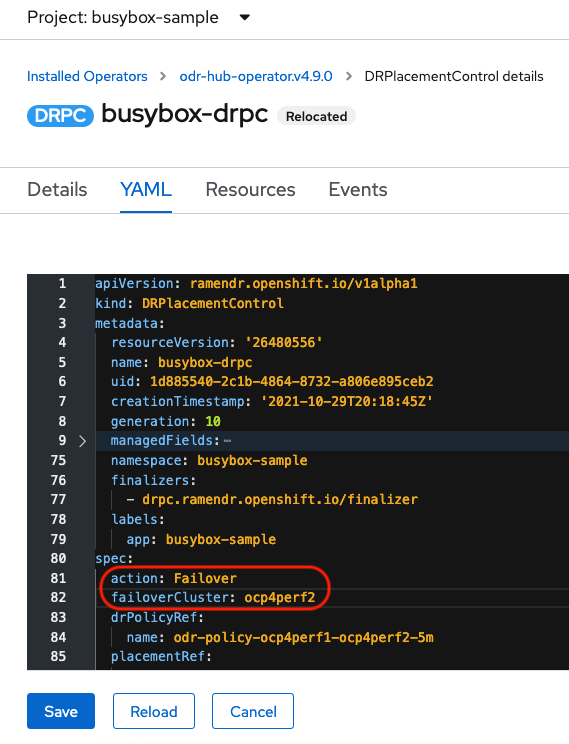
- Click Save.
Verify that the application
busyboxis now running in the Secondary managed cluster, the failover clusterocp4perf2specified in the YAML file.$ oc get pods,pvc -n busybox-sampleExample output:
NAME          READY   STATUS    RESTARTS   AGE
pod/busybox   1/1     Running   0          35s

NAME                                STATUS   VOLUME                                     CAPACITY   ACCESS MODES   STORAGECLASS                  AGE
persistentvolumeclaim/busybox-pvc   Bound    pvc-79f2a74d-6e2c-48fb-9ed9-666b74cfa1bb   5Gi        RWO            ocs-storagecluster-ceph-rbd   35s
Verify that
busyboxis no longer running on the Primary managed cluster.$ oc get pods,pvc -n busybox-sampleExample output:
No resources found in busybox-sample namespace.
Be aware of known Regional-DR issues as documented in Known Issues section of Release Notes.
If you need assistance with developer preview features, reach out to the ocs-devpreview@redhat.com mailing list and a member of the Red Hat Development Team will assist you as quickly as possible based on availability and work schedules.

'%20d='M201.5%20305.5c-13.8%200-24.9-11.1-24.9-24.6%200-13.8%2011.1-24.9%2024.9-24.9%2013.6%200%2024.6%2011.1%2024.6%2024.9%200%2013.6-11.1%2024.6-24.6%2024.6zM504%20256c0%20137-111%20248-248%20248S8%20393%208%20256%20119%208%20256%208s248%20111%20248%20248zm-132.3-41.2c-9.4%200-17.7%203.9-23.8%2010-22.4-15.5-52.6-25.5-86.1-26.6l17.4-78.3%2055.4%2012.5c0%2013.6%2011.1%2024.6%2024.6%2024.6%2013.8%200%2024.9-11.3%2024.9-24.9s-11.1-24.9-24.9-24.9c-9.7%200-18%205.8-22.1%2013.8l-61.2-13.6c-3-.8-6.1%201.4-6.9%204.4l-19.1%2086.4c-33.2%201.4-63.1%2011.3-85.5%2026.8-6.1-6.4-14.7-10.2-24.1-10.2-34.9%200-46.3%2046.9-14.4%2062.8-1.1%205-1.7%2010.2-1.7%2015.5%200%2052.6%2059.2%2095.2%20132%2095.2%2073.1%200%20132.3-42.6%20132.3-95.2%200-5.3-.6-10.8-1.9-15.8%2031.3-16%2019.8-62.5-14.9-62.5zM302.8%20331c-18.2%2018.2-76.1%2017.9-93.6%200-2.2-2.2-6.1-2.2-8.3%200-2.5%202.5-2.5%206.4%200%208.6%2022.8%2022.8%2087.3%2022.8%20110.2%200%202.5-2.2%202.5-6.1%200-8.6-2.2-2.2-6.1-2.2-8.3%200zm7.7-75c-13.6%200-24.6%2011.1-24.6%2024.9%200%2013.6%2011.1%2024.6%2024.6%2024.6%2013.8%200%2024.9-11.1%2024.9-24.6%200-13.8-11-24.9-24.9-24.9z'/%3e%3c/svg%3e)