 Red Hat Summit
Chapter 5. Deploying the HCI nodes
For DCN sites, you can deploy a hyper-converged infrastructure (HCI) stack that uses Compute and Ceph Storage on a single node. For example, the following diagram shows two DCN stacks named dcn0 and dcn1, each in their own availability zone (AZ). Each DCN stack has its own Ceph cluster and Compute services:
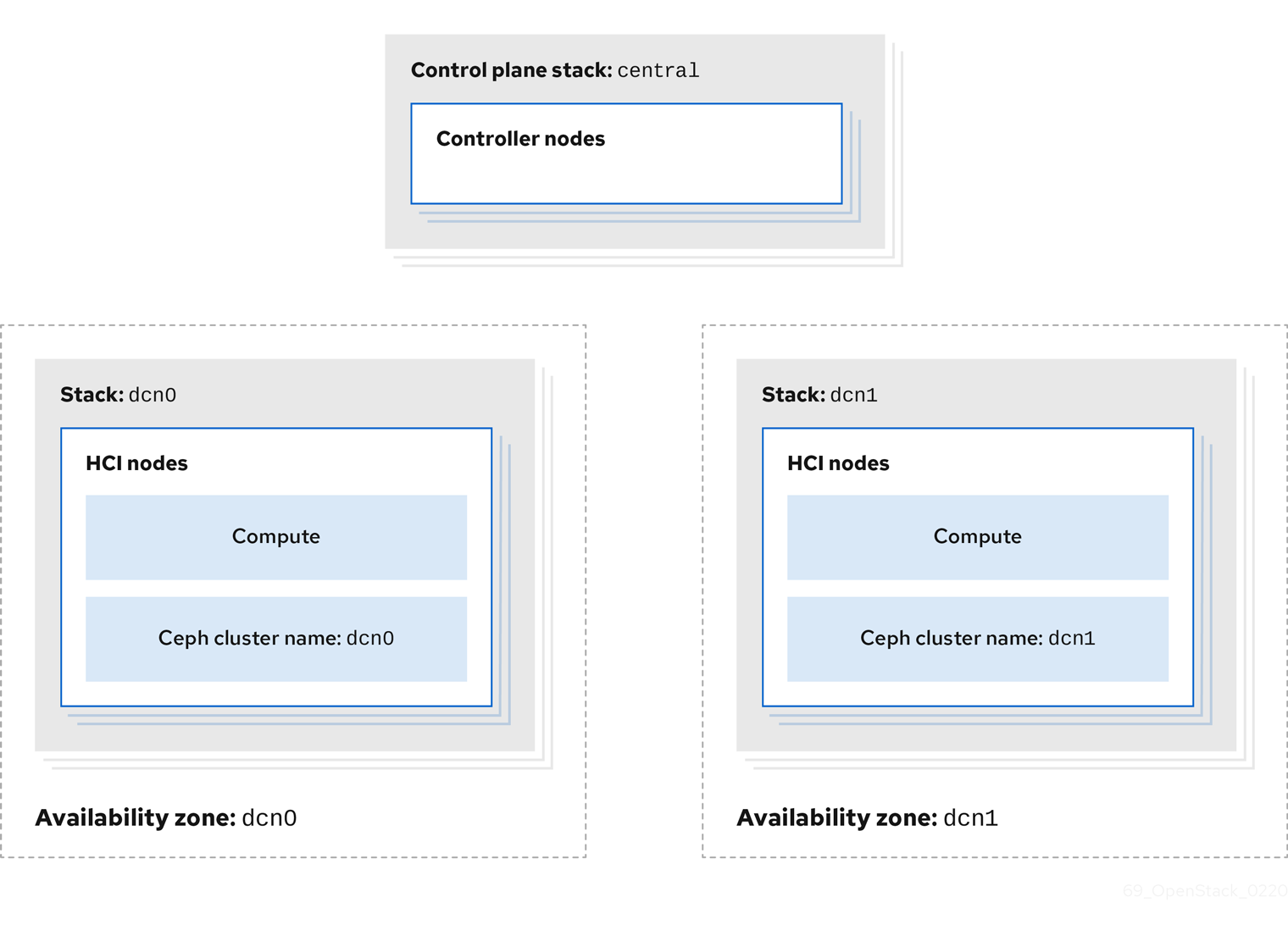
The procedures in Configuring the distributed compute node (DCN) environment files and Deploying HCI nodes to the distributed compute node (DCN) site describe this deployment method. These procedures demonstrate how to add a new DCN stack to your deployment and reuse the configuration from the existing heat stack to create new environment files. In the example procedures, the first heat stack deploys an overcloud within a centralized data center. Another heat stack is then created to deploy a batch of Compute nodes to a remote physical location.
5.1. Configuring the distributed compute node environment files
This procedure retrieves the metadata of your central site and then generates the configuration files that the distributed compute node (DCN) sites require:
Procedure
Export stack information from the
centralstack. You must deploy thecontrol-planestack before running this command:openstack overcloud export \ --config-download-dir /var/lib/mistral/central \ --stack central \ --output-file ~/dcn-common/control-plane-export.yaml \
This procedure creates a new control-plane-export.yaml environment file and uses the passwords in the plan-environment.yaml from the overcloud. The control-plane-export.yaml file contains sensitive security data. You can remove the file when you no longer require it to improve security.
5.2. Deploying HCI nodes to the distributed compute node site
This procedure uses the DistributedComputeHCI role to deploy HCI nodes to an availability zone (AZ) named dcn0. This role is used specifically for distributed compute HCI nodes.
CephMon runs on the HCI nodes and cannot run on the central Controller node. Additionally, the central Controller node is deployed without Ceph.
Procedure
Review the overrides for the distributed compute node (DCN) site in
dcn0/overrides.yaml:parameter_defaults: DistributedComputeHCICount: 3 DistributedComputeHCIFlavor: baremetal DistributedComputeHCISchedulerHints: 'capabilities:node': '0-ceph-%index%' CinderStorageAvailabilityZone: dcn0 NovaAZAttach: falseReview the proposed Ceph configuration in
dcn0/ceph.yaml.parameter_defaults: CephClusterName: dcn0 NovaEnableRbdBackend: false CephAnsiblePlaybookVerbosity: 3 CephPoolDefaultPgNum: 256 CephPoolDefaultSize: 3 CephAnsibleDisksConfig: osd_scenario: lvm osd_objectstore: bluestore devices: - /dev/sda - /dev/sdb - /dev/sdc - /dev/sdd - /dev/sde - /dev/sdf - /dev/sdg - /dev/sdh - /dev/sdi - /dev/sdj - /dev/sdk - /dev/sdl ## Everything below this line is for HCI Tuning CephAnsibleExtraConfig: ceph_osd_docker_cpu_limit: 1 is_hci: true CephConfigOverrides: osd_recovery_op_priority: 3 osd_recovery_max_active: 3 osd_max_backfills: 1 ## Set relative to your hardware: # DistributedComputeHCIParameters: # NovaReservedHostMemory: 181000 # DistributedComputeHCIExtraConfig: # nova::cpu_allocation_ratio: 8.2Replace the values for the following parameters with values that suit your environment. For more information, see the Deploying an overcloud with containerized Red Hat Ceph and Hyperconverged Infrastructure guides.
-
CephAnsibleExtraConfig -
DistributedComputeHCIParameters -
CephPoolDefaultPgNum -
CephPoolDefaultSize -
DistributedComputeHCIExtraConfig
-
Create a new file called
nova-az.yamlwith the following contents:resource_registry: OS::TripleO::Services::NovaAZConfig: /usr/share/openstack-tripleo-heat-templates/deployment/nova/nova-az-config.yaml parameter_defaults: NovaComputeAvailabilityZone: dcn0 RootStackName: centralProvided that the overcloud can access the endpoints that are listed in the
centralrcfile created by the central deployment, this command creates an AZ calleddcn0, with the new HCI Compute nodes added to that AZ during deployment.Run the
deploy.shdeployment script fordcn0:#!/bin/bash STACK=dcn0 source ~/stackrc if [[ ! -e distributed_compute_hci.yaml ]]; then openstack overcloud roles generate DistributedComputeHCI -o distributed_compute_hci.yaml fi time openstack overcloud deploy \ --stack $STACK \ --templates /usr/share/openstack-tripleo-heat-templates/ \ -r distributed_compute_hci.yaml \ -e /usr/share/openstack-tripleo-heat-templates/environments/disable-telemetry.yaml \ -e /usr/share/openstack-tripleo-heat-templates/environments/podman.yaml \ -e /usr/share/openstack-tripleo-heat-templates/environments/ceph-ansible/ceph-ansible.yaml \ -e /usr/share/openstack-tripleo-heat-templates/environments/cinder-volume-active-active.yaml \ -e ~/dcn-common/control-plane-export.yaml \ -e ~/containers-env-file.yaml \ -e ceph.yaml \ -e nova-az.yaml \ -e overrides.yamlWhen the overcloud deployment finishes, see the post-deployment configuration steps and checks in Chapter 6, Post-deployment configuration.

'%20d='M201.5%20305.5c-13.8%200-24.9-11.1-24.9-24.6%200-13.8%2011.1-24.9%2024.9-24.9%2013.6%200%2024.6%2011.1%2024.6%2024.9%200%2013.6-11.1%2024.6-24.6%2024.6zM504%20256c0%20137-111%20248-248%20248S8%20393%208%20256%20119%208%20256%208s248%20111%20248%20248zm-132.3-41.2c-9.4%200-17.7%203.9-23.8%2010-22.4-15.5-52.6-25.5-86.1-26.6l17.4-78.3%2055.4%2012.5c0%2013.6%2011.1%2024.6%2024.6%2024.6%2013.8%200%2024.9-11.3%2024.9-24.9s-11.1-24.9-24.9-24.9c-9.7%200-18%205.8-22.1%2013.8l-61.2-13.6c-3-.8-6.1%201.4-6.9%204.4l-19.1%2086.4c-33.2%201.4-63.1%2011.3-85.5%2026.8-6.1-6.4-14.7-10.2-24.1-10.2-34.9%200-46.3%2046.9-14.4%2062.8-1.1%205-1.7%2010.2-1.7%2015.5%200%2052.6%2059.2%2095.2%20132%2095.2%2073.1%200%20132.3-42.6%20132.3-95.2%200-5.3-.6-10.8-1.9-15.8%2031.3-16%2019.8-62.5-14.9-62.5zM302.8%20331c-18.2%2018.2-76.1%2017.9-93.6%200-2.2-2.2-6.1-2.2-8.3%200-2.5%202.5-2.5%206.4%200%208.6%2022.8%2022.8%2087.3%2022.8%20110.2%200%202.5-2.2%202.5-6.1%200-8.6-2.2-2.2-6.1-2.2-8.3%200zm7.7-75c-13.6%200-24.6%2011.1-24.6%2024.9%200%2013.6%2011.1%2024.6%2024.6%2024.6%2013.8%200%2024.9-11.1%2024.9-24.6%200-13.8-11-24.9-24.9-24.9z'/%3e%3c/svg%3e)