 Red Hat Summit
Chapter 2. Creating the first administrator
After installing Red Hat Single Sign-On, you need an administrator account that can act as a super admin with full permissions to manage all parts of Red Hat Single Sign-On. With this account, you can log into the Red Hat Single Sign-On Admin Console where you create realms and users and register applications that are secured by Red Hat Single Sign-On.
Prerequisites
- Perform the installation and configuration tasks defined in the Server Installation and Configuration Guide to the point that the Red Hat Single Sign-On server is running.
2.1. Creating the account on the local host
If your server is accessible from localhost, perform these steps.
Procedure
- In a web browser, go to the http://localhost:8080/auth URL.
Supply a username and password that you can recall.
Welcome page

2.2. Creating the account remotely
If you cannot access the server from a localhost address, or just want to start Red Hat Single Sign-On from the command line, use the …/bin/add-user-keycloak script.
Add-user-keycloak script
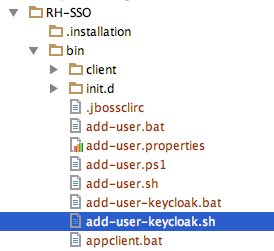
The parameters are a little different depending if you are using the standalone operation mode or domain operation mode. For standalone mode, here is how you use the script.
Linux/Unix
$ .../bin/add-user-keycloak.sh -r master -u <username> -p <password>Windows
> ...\bin\add-user-keycloak.bat -r master -u <username> -p <password>The generated file is owned by a different user than the Red Hat Single Sign-On running user. Use this command to set the permissions so the Red Hat Single Sign-On user can read the file upon restarting the server.
chgrp jboss /opt/rh/rh-sso7/root/usr/share/keycloak/standalone/configuration/keycloak-add-user.json
For domain mode, you have to point the script to one of your server hosts using the -sc switch.
Linux/Unix
$ .../bin/add-user-keycloak.sh --sc domain/servers/server-one/configuration -r master -u <username> -p <password>Windows
> ...\bin\add-user-keycloak.bat --sc domain/servers/server-one/configuration -r master -u <username> -p <password>
'%20d='M201.5%20305.5c-13.8%200-24.9-11.1-24.9-24.6%200-13.8%2011.1-24.9%2024.9-24.9%2013.6%200%2024.6%2011.1%2024.6%2024.9%200%2013.6-11.1%2024.6-24.6%2024.6zM504%20256c0%20137-111%20248-248%20248S8%20393%208%20256%20119%208%20256%208s248%20111%20248%20248zm-132.3-41.2c-9.4%200-17.7%203.9-23.8%2010-22.4-15.5-52.6-25.5-86.1-26.6l17.4-78.3%2055.4%2012.5c0%2013.6%2011.1%2024.6%2024.6%2024.6%2013.8%200%2024.9-11.3%2024.9-24.9s-11.1-24.9-24.9-24.9c-9.7%200-18%205.8-22.1%2013.8l-61.2-13.6c-3-.8-6.1%201.4-6.9%204.4l-19.1%2086.4c-33.2%201.4-63.1%2011.3-85.5%2026.8-6.1-6.4-14.7-10.2-24.1-10.2-34.9%200-46.3%2046.9-14.4%2062.8-1.1%205-1.7%2010.2-1.7%2015.5%200%2052.6%2059.2%2095.2%20132%2095.2%2073.1%200%20132.3-42.6%20132.3-95.2%200-5.3-.6-10.8-1.9-15.8%2031.3-16%2019.8-62.5-14.9-62.5zM302.8%20331c-18.2%2018.2-76.1%2017.9-93.6%200-2.2-2.2-6.1-2.2-8.3%200-2.5%202.5-2.5%206.4%200%208.6%2022.8%2022.8%2087.3%2022.8%20110.2%200%202.5-2.2%202.5-6.1%200-8.6-2.2-2.2-6.1-2.2-8.3%200zm7.7-75c-13.6%200-24.6%2011.1-24.6%2024.9%200%2013.6%2011.1%2024.6%2024.6%2024.6%2013.8%200%2024.9-11.1%2024.9-24.6%200-13.8-11-24.9-24.9-24.9z'/%3e%3c/svg%3e)