 Red Hat Summit
Chapter 8. Using AMQ Streams with MirrorMaker 2.0
MirrorMaker 2.0 is used to replicate data between two or more active Kafka clusters, within or across data centers.
Data replication across clusters supports scenarios that require:
- Recovery of data in the event of a system failure
- Aggregation of data for analysis
- Restriction of data access to a specific cluster
- Provision of data at a specific location to improve latency
MirrorMaker 2.0 has features not supported by the previous version of MirrorMaker. However, you can configure MirrorMaker 2.0 to be used in legacy mode.
8.1. MirrorMaker 2.0 data replication
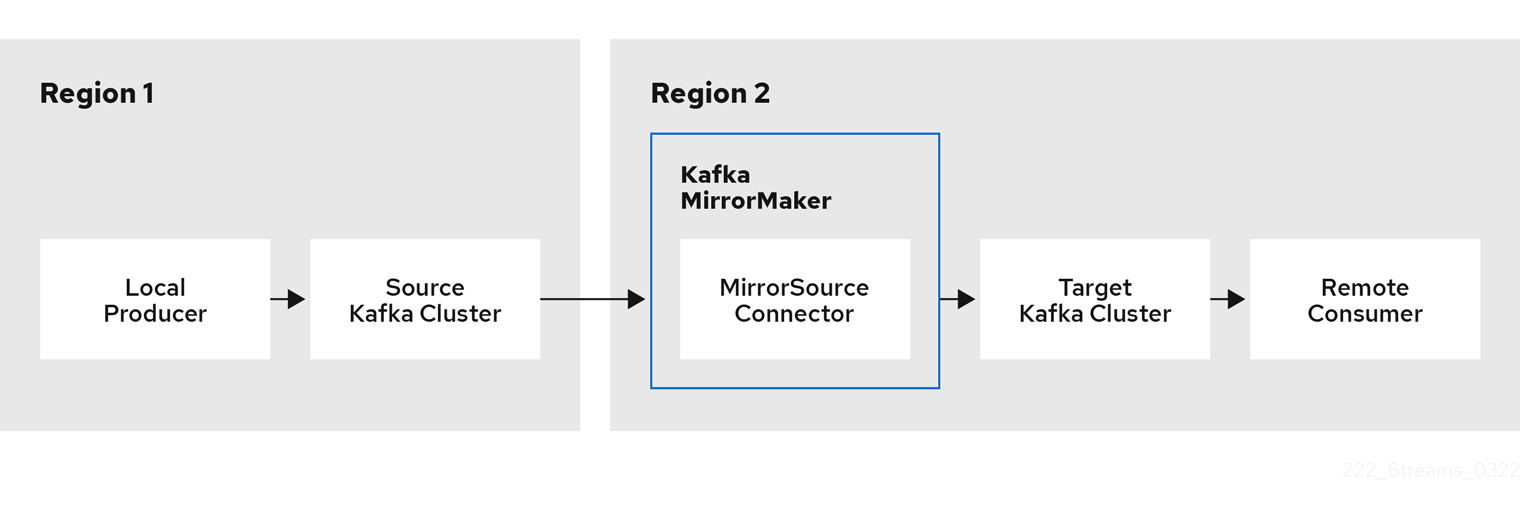
MirrorMaker 2.0 consumes messages from a source Kafka cluster and writes them to a target Kafka cluster.
MirrorMaker 2.0 uses:
- Source cluster configuration to consume data from the source cluster
- Target cluster configuration to output data to the target cluster
MirrorMaker 2.0 is based on the Kafka Connect framework, connectors managing the transfer of data between clusters. A MirrorMaker 2.0 MirrorSourceConnector replicates topics from a source cluster to a target cluster.
The process of mirroring data from one cluster to another cluster is asynchronous. The recommended pattern is for messages to be produced locally alongside the source Kafka cluster, then consumed remotely close to the target Kafka cluster.
MirrorMaker 2.0 can be used with more than one source cluster.
Figure 8.1. Replication across two clusters
By default, a check for new topics in the source cluster is made every 10 minutes. You can change the frequency by adding refresh.topics.interval.seconds to the source connector configuration. However, increasing the frequency of the operation might affect overall performance.
8.2. Cluster configuration
You can use MirrorMaker 2.0 in active/passive or active/active cluster configurations.
- In an active/active configuration, both clusters are active and provide the same data simultaneously, which is useful if you want to make the same data available locally in different geographical locations.
- In an active/passive configuration, the data from an active cluster is replicated in a passive cluster, which remains on standby, for example, for data recovery in the event of system failure.
The expectation is that producers and consumers connect to active clusters only.
A MirrorMaker 2.0 cluster is required at each target destination.
8.2.1. Bidirectional replication (active/active)
The MirrorMaker 2.0 architecture supports bidirectional replication in an active/active cluster configuration.
Each cluster replicates the data of the other cluster using the concept of source and remote topics. As the same topics are stored in each cluster, remote topics are automatically renamed by MirrorMaker 2.0 to represent the source cluster. The name of the originating cluster is prepended to the name of the topic.
Figure 8.2. Topic renaming
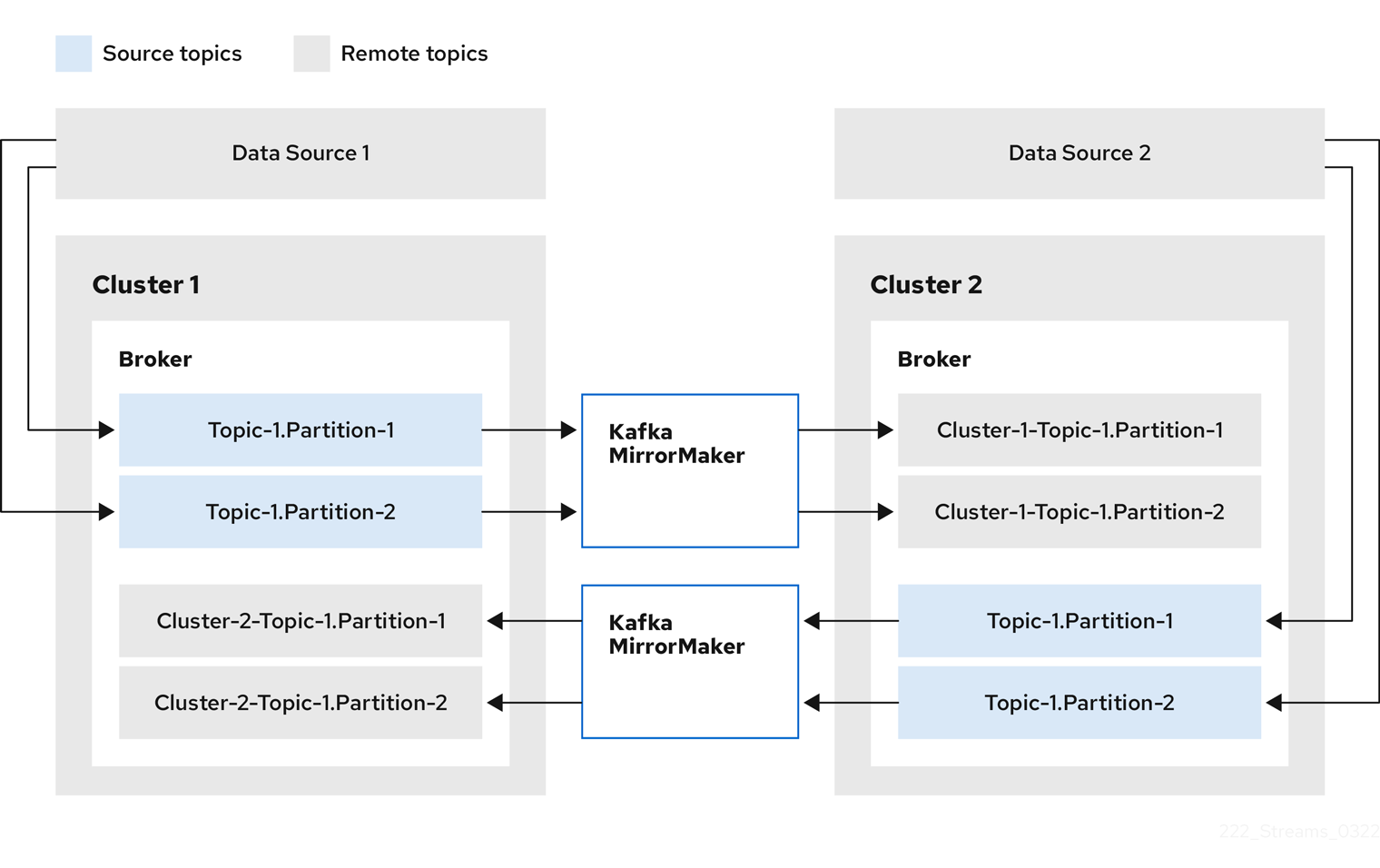
By flagging the originating cluster, topics are not replicated back to that cluster.
The concept of replication through remote topics is useful when configuring an architecture that requires data aggregation. Consumers can subscribe to source and remote topics within the same cluster, without the need for a separate aggregation cluster.
8.2.2. Unidirectional replication (active/passive)
The MirrorMaker 2.0 architecture supports unidirectional replication in an active/passive cluster configuration.
You can use an active/passive cluster configuration to make backups or migrate data to another cluster. In this situation, you might not want automatic renaming of remote topics.
You can override automatic renaming by adding IdentityReplicationPolicy to the source connector configuration. With this configuration applied, topics retain their original names.
8.2.3. Topic configuration synchronization
Topic configuration is automatically synchronized between source and target clusters. By synchronizing configuration properties, the need for rebalancing is reduced.
8.2.4. Data integrity
MirrorMaker 2.0 monitors source topics and propagates any configuration changes to remote topics, checking for and creating missing partitions. Only MirrorMaker 2.0 can write to remote topics.
8.2.5. Offset tracking
MirrorMaker 2.0 tracks offsets for consumer groups using internal topics.
- The offset-syncs topic maps the source and target offsets for replicated topic partitions from record metadata
- The checkpoints topic maps the last committed offset in the source and target cluster for replicated topic partitions in each consumer group
Offsets for the checkpoints topic are tracked at predetermined intervals through configuration. Both topics enable replication to be fully restored from the correct offset position on failover.
MirrorMaker 2.0 uses its MirrorCheckpointConnector to emit checkpoints for offset tracking.
The location of the offset-syncs topic is the source cluster by default. You can use the offset-syncs.topic.location connector configuration to change this to the target cluster. You need read/write access to the cluster that contains the topic. Using the target cluster as the location of the offset-syncs topic allows you to use MirrorMaker 2.0 even if you have only read access to the source cluster.
8.2.6. Synchronizing consumer group offsets
The __consumer_offsets topic stores information on committed offsets, for each consumer group. Offset synchronization periodically transfers the consumer offsets for the consumer groups of a source cluster into the consumer offsets topic of a target cluster.
Offset synchronization is particularly useful in an active/passive configuration. If the active cluster goes down, consumer applications can switch to the passive (standby) cluster and pick up from the last transferred offset position.
To use topic offset synchronization, enable the synchronization by adding sync.group.offsets.enabled to the checkpoint connector configuration, and setting the property to true. Synchronization is disabled by default.
When using the IdentityReplicationPolicy in the source connector, it also has to be configured in the checkpoint connector configuration. This ensures that the mirrored consumer offsets will be applied for the correct topics.
The consumer offsets are only synchronized for consumer groups that are not active in the target cluster.
If enabled, the synchronization of offsets from the source cluster is made periodically. You can change the frequency by adding sync.group.offsets.interval.seconds and emit.checkpoints.interval.seconds to the checkpoint connector configuration. The properties specify the frequency in seconds that the consumer group offsets are synchronized, and the frequency of checkpoints emitted for offset tracking. The default for both properties is 60 seconds. You can also change the frequency of checks for new consumer groups using the refresh.groups.interval.seconds property, which is performed every 10 minutes by default.
Because the synchronization is time-based, any switchover by consumers to a passive cluster will likely result in some duplication of messages.
8.2.7. Connectivity checks
A heartbeat internal topic checks connectivity between clusters.
The heartbeat topic is replicated from the source cluster.
Target clusters use the topic to check:
- The connector managing connectivity between clusters is running
- The source cluster is available
MirrorMaker 2.0 uses its MirrorHeartbeatConnector to emit heartbeats that perform these checks.
8.3. Connector configuration
Use Mirrormaker 2.0 connector configuration for the internal connectors that orchestrate the synchronization of data between Kafka clusters.
The following table describes connector properties and the connectors you configure to use them.
| Property | sourceConnector | checkpointConnector | heartbeatConnector |
|---|---|---|---|
| ✓ | ✓ | ✓ |
| ✓ | ✓ | ✓ |
| ✓ | ✓ | ✓ |
| ✓ | ✓ | |
| ✓ | ✓ | |
| ✓ | ✓ | |
| ✓ | ||
| ✓ | ||
| ✓ | ||
| ✓ | ||
| ✓ | ||
| ✓ | ||
| ✓ | ||
| ✓ | ||
| ✓ | ||
| ✓ | ||
| ✓ | ||
| ✓ | ||
| ✓ | ||
| ✓ | ||
| ✓ | ||
| ✓ | ||
| ✓ | ||
| ✓ | ||
| ✓ | ||
| ✓ | ||
| ✓ | ||
| ✓ |
8.4. Specifying a maximum number of tasks
Connectors create the tasks that are responsible for moving data in and out of Kafka. Each connector comprises one or more tasks that are distributed across a group of workers that run the tasks.
Tasks run in parallel. Workers are assigned one or more tasks. A single task is handled by one worker, so you don’t need more workers than tasks. If there are more tasks than workers, workers handle multiple tasks.
You can specify the maximum number of connector tasks in your MirrorMaker configuration using the tasks.max property. Without specifying a maximum number of tasks, the default setting is a single task. If the infrastructure supports the processing overhead, increasing the number of tasks can improve throughput.
tasks.max configuration for a MirrorMaker connector
clusters=cluster-1,cluster-2
# ...
tasks.max = 10
For the source connector, the maximum number of tasks possible is one for each partition being replicated from the source cluster. For the checkpoint connector, the maximum number of tasks possible is one for each group being replicated from the source cluster. The number of tasks that are started for these connectors is the lower value between the maximum number of possible tasks and the value for tasks.max.
The heartbeat connector always uses a single task.
8.5. Handling high volumes of messages
If your MirrorMaker 2.0 deployment is going to be handling a high volume of messages, you might need to adjust its configuration to support it.
The flush pipeline for data replication is source topic offset.flush.timeout.ms) is the time to wait for the producer buffer (producer.buffer.memory) to flush and offset data to be committed. Try to avoid a situation where a large producer buffer and an insufficient offset flush timeout period causes a failed to flush or failed to commit offsets type of error.
This type of error means that there are too many messages in the producer buffer, so they can’t all be flushed before the offset flush timeout is reached.
If you are getting this type of error, try the following configuration changes:
-
Decreasing the default value in bytes of the
producer.buffer.memory -
Increasing the default value in milliseconds of the
offset.flush.timeout.ms
The changes should help to keep the underlying Kafka Connect queue of outstanding messages at a manageable size. You might need to adjust the values to have the desired effect.
If these configuration changes don’t resolve the error, you can try increasing the number of tasks that run in parallel by doing the following.
-
Increasing the number of tasks using the
tasks.maxproperty in your MirrorMaker 2.0 configuration (connect-mirror-maker.properties) - Increasing the number of nodes for the workers that run tasks
Example MirrorMaker 2.0 configuration for handling high volumes of messages
clusters=cluster-1,cluster-2
# ...
cluster-2.offset.flush.timeout.ms = 30000
cluster-2.producer.buffer.memory = 8388608
# ...
tasks.max = 10
8.6. ACL rules synchronization
If AclAuthorizer is being used, ACL rules that manage access to brokers also apply to remote topics. Users that can read a source topic can read its remote equivalent.
OAuth 2.0 authorization does not support access to remote topics in this way.
8.7. Synchronizing data between Kafka clusters using MirrorMaker 2.0
Use MirrorMaker 2.0 to synchronize data between Kafka clusters through configuration.
The previous version of MirrorMaker continues to be supported, by running MirrorMaker 2.0 in legacy mode.
The configuration must specify:
- Each Kafka cluster
- Connection information for each cluster, including TLS authentication
The replication flow and direction
- Cluster to cluster
- Topic to topic
- Replication rules
- Committed offset tracking intervals
This procedure describes how to implement MirrorMaker 2.0 by creating the configuration in a properties file, then passing the properties when using the MirrorMaker script file to set up the connections.
MirrorMaker 2.0 uses Kafka Connect to make the connections to transfer data between clusters. Kafka provides MirrorMaker sink and source connectors for data replication. If you wish to use the connectors instead of the MirrorMaker script, the connectors must be configured in the Kafka Connect cluster. For more information, refer to the Apache Kafka documentation.
Before you begin
A sample configuration properties file is provided in ./config/connect-mirror-maker.properties.
Prerequisites
- You need AMQ Streams installed on the hosts of each Kafka cluster node you are replicating.
Procedure
Open the sample properties file in a text editor, or create a new one, and edit the file to include connection information and the replication flows for each Kafka cluster.
The following example shows a configuration to connect two clusters, cluster-1 and cluster-2, bidirectionally. Cluster names are configurable through the
clustersproperty.clusters=cluster-1,cluster-21 cluster-1.bootstrap.servers=<cluster_name>-kafka-bootstrap-<project_name_one>:4432 cluster-1.security.protocol=SSL3 cluster-1.ssl.truststore.password=<truststore_name> cluster-1.ssl.truststore.location=<path_to_truststore>/truststore.cluster-1.jks_ cluster-1.ssl.keystore.password=<keystore_name> cluster-1.ssl.keystore.location=<path_to_keystore>/user.cluster-1.p12_ cluster-2.bootstrap.servers=CLUSTER-NAME-kafka-bootstrap-<project_name_two>:4434 cluster-2.security.protocol=SSL5 cluster-2.ssl.truststore.password=<truststore_name> cluster-2.ssl.truststore.location=<path_to_truststore>/truststore.cluster-2.jks_ cluster-2.ssl.keystore.password=<keystore_name> cluster-2.ssl.keystore.location=<path_to_keystore>/user.cluster-2.p12_ cluster-1->cluster-2.enabled=true6 cluster-1->cluster-2.topics=.*7 cluster-2->cluster-1.enabled=true8 cluster-2->cluster-1B->C.topics=.*9 replication.policy.separator=-10 sync.topic.acls.enabled=false11 refresh.topics.interval.seconds=6012 refresh.groups.interval.seconds=6013 - 1
- Each Kafka cluster is identified with its alias.
- 2
- Connection information for cluster-1, using the bootstrap address and port 443. Both clusters use port 443 to connect to Kafka using OpenShift Routes.
- 3
- The
ssl.properties define TLS configuration for cluster-1. - 4
- Connection information for cluster-2.
- 5
- The
ssl.properties define the TLS configuration for cluster-2. - 6
- Replication flow enabled from the cluster-1 cluster to the cluster-2 cluster.
- 7
- Replicates all topics from the cluster-1 cluster to the cluster-2 cluster.
- 8
- Replication flow enabled from the cluster-2 cluster to the cluster-1 cluster.
- 9
- Replicates specific topics from the cluster-2 cluster to the cluster-1 cluster.
- 10
- Defines the separator used for the renaming of remote topics.
- 11
- When enabled, ACLs are applied to synchronized topics. The default is
false. - 12
- The period between checks for new topics to synchronize.
- 13
- The period between checks for new consumer groups to synchronize.
OPTION: If required, add a policy that overrides the automatic renaming of remote topics. Instead of prepending the name with the name of the source cluster, the topic retains its original name.
This optional setting is used for active/passive backups and data migration.
replication.policy.class=org.apache.kafka.connect.mirror.IdentityReplicationPolicyOPTION: If you want to synchronize consumer group offsets, add configuration to enable and manage the synchronization:
refresh.groups.interval.seconds=60
sync.group.offsets.enabled=true
1 sync.group.offsets.interval.seconds=602 emit.checkpoints.interval.seconds=603 - 1
- Optional setting to synchronize consumer group offsets, which is useful for recovery in an active/passive configuration. Synchronization is not enabled by default.
- 2
- If the synchronization of consumer group offsets is enabled, you can adjust the frequency of the synchronization.
- 3
- Adjusts the frequency of checks for offset tracking. If you change the frequency of offset synchronization, you might also need to adjust the frequency of these checks.
Start ZooKeeper and Kafka in the target clusters:
su - kafka
/opt/kafka/bin/zookeeper-server-start.sh -daemon /opt/kafka/config/zookeeper.properties
/opt/kafka/bin/kafka-server-start.sh -daemon /opt/kafka/config/server.propertiesStart MirrorMaker with the cluster connection configuration and replication policies you defined in your properties file:
/opt/kafka/bin/connect-mirror-maker.sh /config/connect-mirror-maker.propertiesMirrorMaker sets up connections between the clusters.
For each target cluster, verify that the topics are being replicated:
/bin/kafka-topics.sh --bootstrap-server <broker_address> --list
8.8. Using MirrorMaker 2.0 in legacy mode
This procedure describes how to configure MirrorMaker 2.0 to use it in legacy mode. Legacy mode supports the previous version of MirrorMaker.
The MirrorMaker script /opt/kafka/bin/kafka-mirror-maker.sh can run MirrorMaker 2.0 in legacy mode.
Kafka MirrorMaker 1 (referred to as just MirrorMaker in the documentation) has been deprecated in Apache Kafka 3.0.0 and will be removed in Apache Kafka 4.0.0. As a result, Kafka MirrorMaker 1 has been deprecated in AMQ Streams as well. Kafka MirrorMaker 1 will be removed from AMQ Streams when we adopt Apache Kafka 4.0.0. As a replacement, use MirrorMaker 2.0 with the IdentityReplicationPolicy.
Prerequisites
You need the properties files you currently use with the legacy version of MirrorMaker.
-
/opt/kafka/config/consumer.properties -
/opt/kafka/config/producer.properties
Procedure
Edit the MirrorMaker
consumer.propertiesandproducer.propertiesfiles to turn off MirrorMaker 2.0 features.For example:
replication.policy.class=org.apache.kafka.mirror.LegacyReplicationPolicy1 refresh.topics.enabled=false2 refresh.groups.enabled=false emit.checkpoints.enabled=false emit.heartbeats.enabled=false sync.topic.configs.enabled=false sync.topic.acls.enabled=falseSave the changes and restart MirrorMaker with the properties files you used with the previous version of MirrorMaker:
su - kafka /opt/kafka/bin/kafka-mirror-maker.sh \
--consumer.config /opt/kafka/config/consumer.properties \
--producer.config /opt/kafka/config/producer.properties \
--num.streams=2
The
consumerproperties provide the configuration for the source cluster and theproducerproperties provide the target cluster configuration.MirrorMaker sets up connections between the clusters.
Start ZooKeeper and Kafka in the target cluster:
su - kafka
/opt/kafka/bin/zookeeper-server-start.sh -daemon /opt/kafka/config/zookeeper.properties
su - kafka /opt/kafka/bin/kafka-server-start.sh -daemon /opt/kafka/config/server.propertiesFor the target cluster, verify that the topics are being replicated:
/bin/kafka-topics.sh --bootstrap-server <BrokerAddress> --list

'%20d='M201.5%20305.5c-13.8%200-24.9-11.1-24.9-24.6%200-13.8%2011.1-24.9%2024.9-24.9%2013.6%200%2024.6%2011.1%2024.6%2024.9%200%2013.6-11.1%2024.6-24.6%2024.6zM504%20256c0%20137-111%20248-248%20248S8%20393%208%20256%20119%208%20256%208s248%20111%20248%20248zm-132.3-41.2c-9.4%200-17.7%203.9-23.8%2010-22.4-15.5-52.6-25.5-86.1-26.6l17.4-78.3%2055.4%2012.5c0%2013.6%2011.1%2024.6%2024.6%2024.6%2013.8%200%2024.9-11.3%2024.9-24.9s-11.1-24.9-24.9-24.9c-9.7%200-18%205.8-22.1%2013.8l-61.2-13.6c-3-.8-6.1%201.4-6.9%204.4l-19.1%2086.4c-33.2%201.4-63.1%2011.3-85.5%2026.8-6.1-6.4-14.7-10.2-24.1-10.2-34.9%200-46.3%2046.9-14.4%2062.8-1.1%205-1.7%2010.2-1.7%2015.5%200%2052.6%2059.2%2095.2%20132%2095.2%2073.1%200%20132.3-42.6%20132.3-95.2%200-5.3-.6-10.8-1.9-15.8%2031.3-16%2019.8-62.5-14.9-62.5zM302.8%20331c-18.2%2018.2-76.1%2017.9-93.6%200-2.2-2.2-6.1-2.2-8.3%200-2.5%202.5-2.5%206.4%200%208.6%2022.8%2022.8%2087.3%2022.8%20110.2%200%202.5-2.2%202.5-6.1%200-8.6-2.2-2.2-6.1-2.2-8.3%200zm7.7-75c-13.6%200-24.6%2011.1-24.6%2024.9%200%2013.6%2011.1%2024.6%2024.6%2024.6%2013.8%200%2024.9-11.1%2024.9-24.6%200-13.8-11-24.9-24.9-24.9z'/%3e%3c/svg%3e)