 Red Hat Summit
5.6. Uploading VMDK images to vSphere
Image Builder can generate images suitable for uploading to a VMware ESXi or vSphere system. This describes steps to upload an VMDK image to VMware vSphere.
Because VMWare deployments typically does not have cloud-init configured to inject user credentials to virtual machines, we must perform that task ourselves on the blueprint.
Prerequisites
-
You must have an VMDK image created by Image Builder. Use the
vmdkoutput type in CLI or VMware Virtual Machine Disk (.vmdk) in GUI when creating the image.
Procedure
Upload the image into vSphere via HTTP. Click on
Upload Filesin the vCenter:
When you create a VM, on the
Device Configuration, delete the defaultNew Hard Diskand use the drop-down to select anExisting Hard Diskdisk image: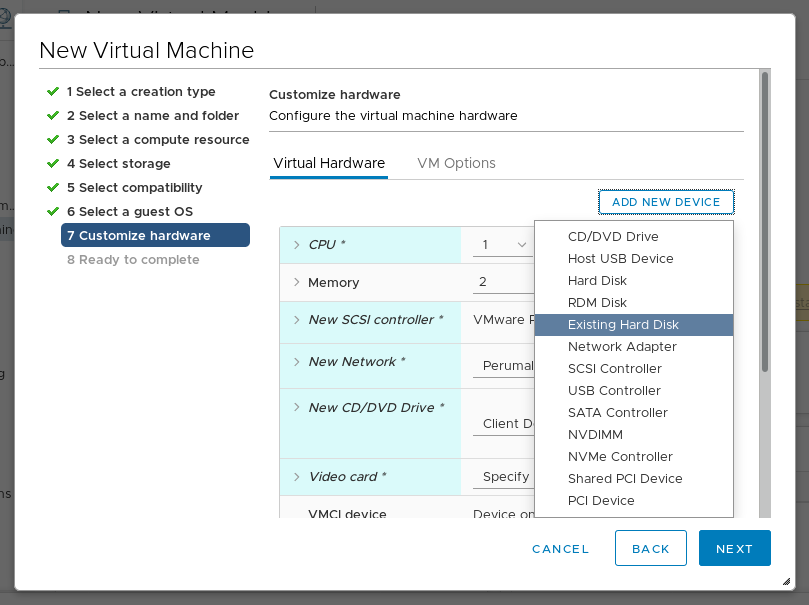
Make sure you use an
IDEdevice as theVirtual Device Nodefor the disk you create. The default valueSCSIresults in an unbootable virtual machine.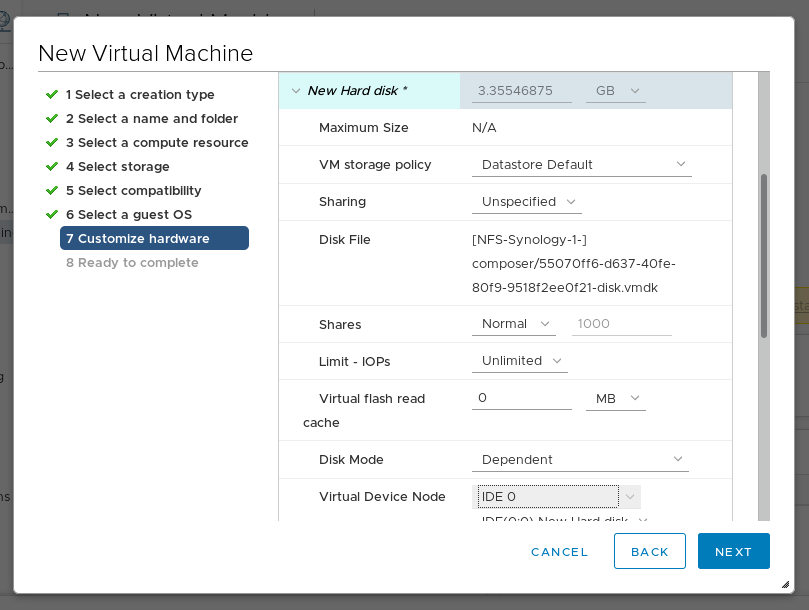

'%20d='M201.5%20305.5c-13.8%200-24.9-11.1-24.9-24.6%200-13.8%2011.1-24.9%2024.9-24.9%2013.6%200%2024.6%2011.1%2024.6%2024.9%200%2013.6-11.1%2024.6-24.6%2024.6zM504%20256c0%20137-111%20248-248%20248S8%20393%208%20256%20119%208%20256%208s248%20111%20248%20248zm-132.3-41.2c-9.4%200-17.7%203.9-23.8%2010-22.4-15.5-52.6-25.5-86.1-26.6l17.4-78.3%2055.4%2012.5c0%2013.6%2011.1%2024.6%2024.6%2024.6%2013.8%200%2024.9-11.3%2024.9-24.9s-11.1-24.9-24.9-24.9c-9.7%200-18%205.8-22.1%2013.8l-61.2-13.6c-3-.8-6.1%201.4-6.9%204.4l-19.1%2086.4c-33.2%201.4-63.1%2011.3-85.5%2026.8-6.1-6.4-14.7-10.2-24.1-10.2-34.9%200-46.3%2046.9-14.4%2062.8-1.1%205-1.7%2010.2-1.7%2015.5%200%2052.6%2059.2%2095.2%20132%2095.2%2073.1%200%20132.3-42.6%20132.3-95.2%200-5.3-.6-10.8-1.9-15.8%2031.3-16%2019.8-62.5-14.9-62.5zM302.8%20331c-18.2%2018.2-76.1%2017.9-93.6%200-2.2-2.2-6.1-2.2-8.3%200-2.5%202.5-2.5%206.4%200%208.6%2022.8%2022.8%2087.3%2022.8%20110.2%200%202.5-2.2%202.5-6.1%200-8.6-2.2-2.2-6.1-2.2-8.3%200zm7.7-75c-13.6%200-24.6%2011.1-24.6%2024.9%200%2013.6%2011.1%2024.6%2024.6%2024.6%2013.8%200%2024.9-11.1%2024.9-24.6%200-13.8-11-24.9-24.9-24.9z'/%3e%3c/svg%3e)