 Red Hat Summit
Este contenido no está disponible en el idioma seleccionado.
Chapter 18. Configuring Firewall-as-a-Service (FWaaS)
18.1. Overview of firewall-as-a-service (FWaaS)
The Firewall-as-a-Service (FWaaS) plug-in adds perimeter firewall management to OpenStack Networking (neutron). FWaaS uses iptables to apply firewall policy to all virtual routers within a project, and supports one firewall policy and logical firewall instance for each project.
FWaaS operates at the perimeter by filtering traffic at the OpenStack Networking (neutron) router. This distinguishes FWaaS from security groups, which operate at the instance level.
FWaaS is currently in Technology Preview; untested operation is not recommended. FWaaS is not available in future releases.
The following example diagram illustrates the flow of ingress and egress traffic for the VM2 instance:
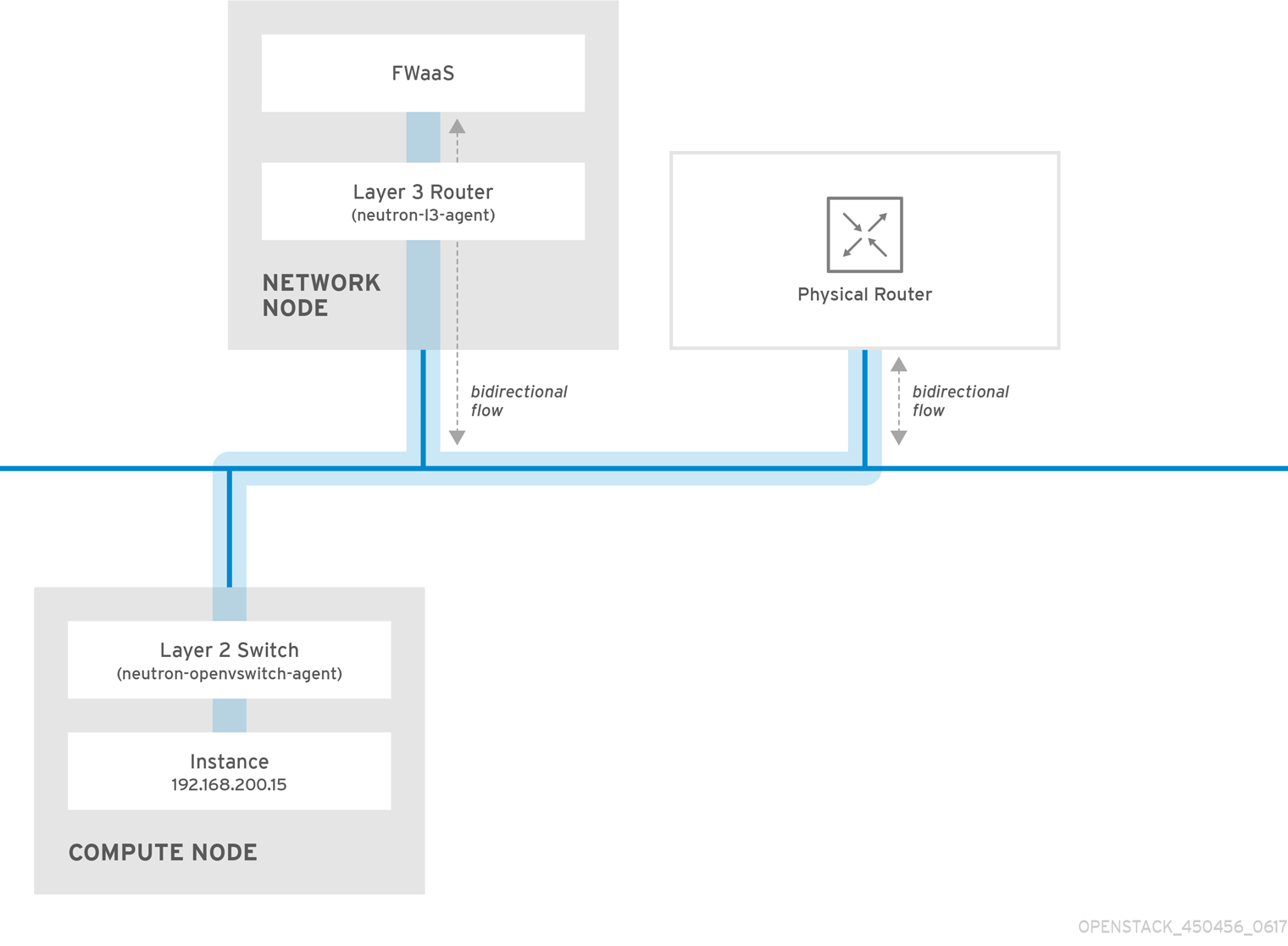
Figure 1. FWaaS architecture
18.2. Enabling firewall-as-a-service (FWaaS)
Install the FWaaS packages:
# dnf install openstack-neutron-fwaas python-neutron-fwaasEnable the FWaaS plugin in the
/var/lib/config-data/neutron/etc/neutron/neutron.conffile:service_plugins = neutron.services.firewall.fwaas_plugin.FirewallPluginConfigure FWaaS in the
fwaas_driver.inifile:[fwaas] driver = neutron.services.firewall.drivers.linux.iptables_fwaas.IptablesFwaasDriver enabled = True [service_providers] service_provider = LOADBALANCER:Haproxy:neutron_lbaas.services.loadbalancer.drivers.haproxy.plugin_driver.HaproxyOnHostPluginDriver:defaultEnable the FWaaS dashboard management option in the local_settings.py file, usually located on the Controller node:
/usr/share/openstack-dashboard/openstack_dashboard/local/local_settings.py
'enable_firewall' = True
Restart
neutron-serverto apply the changes.# systemctl restart neutron-server
18.3. Configuring firewall-as-a-service (FWaaS)
First, create the firewall rules and create a policy to contain them, then create a firewall and apply the policy:
Create a firewall rule:
$ neutron firewall-rule-create --protocol <tcp|udp|icmp|any> --destination-port <port-range> --action <allow|deny>The CLI requires a protocol value. If the rule is protocol agnostic, you can use the value
any.Create a firewall policy:
$ neutron firewall-policy-create --firewall-rules "<firewall-rule IDs or names separated by space>" myfirewallpolicyThe order of the rules that you specify in the
neutron firewall-policy-createcommand is important. You can create an empty firewall policy and add rules later, either with the update operation (when adding multiple rules) or with the insert-rule operations (when adding a single rule).
FWaaS always adds a default deny all rule at the lowest precedence of each policy. Consequently, a firewall policy with no rules blocks all traffic by default.
18.4. Creating firewalls
Use the
openstack security group createcommand, to create a firewall:$ openstack security group create <firewall-policy-uuid>
The firewall remains in PENDING_CREATE state until you create an OpenStack Networking router and attach an interface.

'%20d='M201.5%20305.5c-13.8%200-24.9-11.1-24.9-24.6%200-13.8%2011.1-24.9%2024.9-24.9%2013.6%200%2024.6%2011.1%2024.6%2024.9%200%2013.6-11.1%2024.6-24.6%2024.6zM504%20256c0%20137-111%20248-248%20248S8%20393%208%20256%20119%208%20256%208s248%20111%20248%20248zm-132.3-41.2c-9.4%200-17.7%203.9-23.8%2010-22.4-15.5-52.6-25.5-86.1-26.6l17.4-78.3%2055.4%2012.5c0%2013.6%2011.1%2024.6%2024.6%2024.6%2013.8%200%2024.9-11.3%2024.9-24.9s-11.1-24.9-24.9-24.9c-9.7%200-18%205.8-22.1%2013.8l-61.2-13.6c-3-.8-6.1%201.4-6.9%204.4l-19.1%2086.4c-33.2%201.4-63.1%2011.3-85.5%2026.8-6.1-6.4-14.7-10.2-24.1-10.2-34.9%200-46.3%2046.9-14.4%2062.8-1.1%205-1.7%2010.2-1.7%2015.5%200%2052.6%2059.2%2095.2%20132%2095.2%2073.1%200%20132.3-42.6%20132.3-95.2%200-5.3-.6-10.8-1.9-15.8%2031.3-16%2019.8-62.5-14.9-62.5zM302.8%20331c-18.2%2018.2-76.1%2017.9-93.6%200-2.2-2.2-6.1-2.2-8.3%200-2.5%202.5-2.5%206.4%200%208.6%2022.8%2022.8%2087.3%2022.8%20110.2%200%202.5-2.2%202.5-6.1%200-8.6-2.2-2.2-6.1-2.2-8.3%200zm7.7-75c-13.6%200-24.6%2011.1-24.6%2024.9%200%2013.6%2011.1%2024.6%2024.6%2024.6%2013.8%200%2024.9-11.1%2024.9-24.6%200-13.8-11-24.9-24.9-24.9z'/%3e%3c/svg%3e)