 Red Hat Summit
Este contenido no está disponible en el idioma seleccionado.
Chapter 5. Using Container Development Kit with Docker Tooling in Eclipse
You can access the Docker service runnning on the CDK Red Hat Enterprise Linux VM from an Eclipse IDE running on your local system.
Install Eclipse on the system where you are running Container Development Kit and start Eclipse. For example, to install and start Eclipse on Red Hat Enterprise Linux, do the following:
# yum install devtoolset-4-eclipse devtoolset-4-eclipse-linuxtools \
  devtoolset-4-eclipse-linuxtools-docker.noarch
Enable the Eclipse software collection from Red Hat Developer Toolset:
$ cd ~/cdk/components/rhel/rhel-ose/ $ eval "$(vagrant service-manager env docker)" $ scl enable devtoolset-4 'eclipse' &-
Select a workspace. Choose a directory to store our Eclipse work on your local desktop (such as
/home/joe/workspace). The Eclipse Platform screen appears. -
Open the Docker perspective. Select Window
Perspective Open Perspective Other Docker Tooling OK. Then select the Workbench icon. The Docker Tooling - Eclipse Platform screen should appear as shown in Figure 5-2
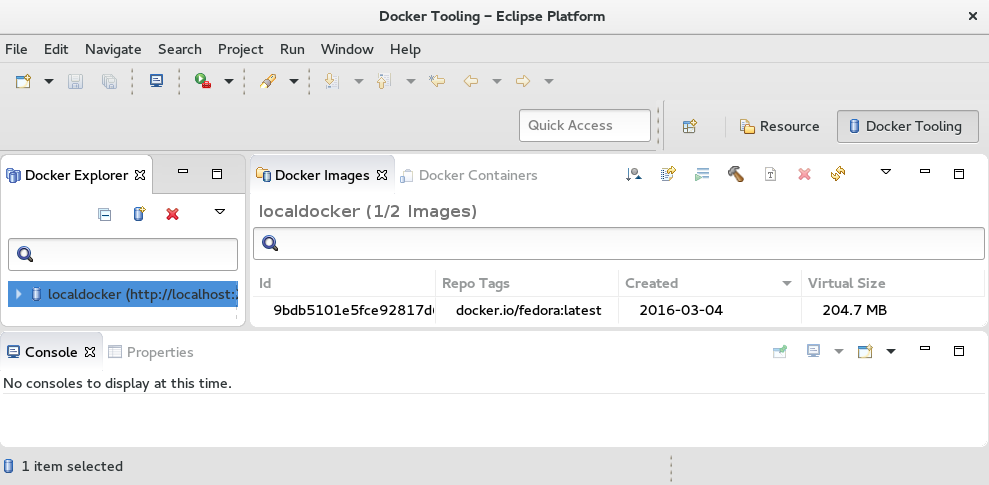
You can now begin using the Eclipse Docker Tooling screen to work with Docker-formatted container images from inside the Container Development Kit virtual machine.

'%20d='M201.5%20305.5c-13.8%200-24.9-11.1-24.9-24.6%200-13.8%2011.1-24.9%2024.9-24.9%2013.6%200%2024.6%2011.1%2024.6%2024.9%200%2013.6-11.1%2024.6-24.6%2024.6zM504%20256c0%20137-111%20248-248%20248S8%20393%208%20256%20119%208%20256%208s248%20111%20248%20248zm-132.3-41.2c-9.4%200-17.7%203.9-23.8%2010-22.4-15.5-52.6-25.5-86.1-26.6l17.4-78.3%2055.4%2012.5c0%2013.6%2011.1%2024.6%2024.6%2024.6%2013.8%200%2024.9-11.3%2024.9-24.9s-11.1-24.9-24.9-24.9c-9.7%200-18%205.8-22.1%2013.8l-61.2-13.6c-3-.8-6.1%201.4-6.9%204.4l-19.1%2086.4c-33.2%201.4-63.1%2011.3-85.5%2026.8-6.1-6.4-14.7-10.2-24.1-10.2-34.9%200-46.3%2046.9-14.4%2062.8-1.1%205-1.7%2010.2-1.7%2015.5%200%2052.6%2059.2%2095.2%20132%2095.2%2073.1%200%20132.3-42.6%20132.3-95.2%200-5.3-.6-10.8-1.9-15.8%2031.3-16%2019.8-62.5-14.9-62.5zM302.8%20331c-18.2%2018.2-76.1%2017.9-93.6%200-2.2-2.2-6.1-2.2-8.3%200-2.5%202.5-2.5%206.4%200%208.6%2022.8%2022.8%2087.3%2022.8%20110.2%200%202.5-2.2%202.5-6.1%200-8.6-2.2-2.2-6.1-2.2-8.3%200zm7.7-75c-13.6%200-24.6%2011.1-24.6%2024.9%200%2013.6%2011.1%2024.6%2024.6%2024.6%2013.8%200%2024.9-11.1%2024.9-24.6%200-13.8-11-24.9-24.9-24.9z'/%3e%3c/svg%3e)