 Red Hat Summit
7.7. Añadir PCP Vector como fuente de datos
La fuente de datos PCP Vector muestra las métricas en vivo y utiliza las métricas de pcp. Analiza los datos de hosts individuales. Este procedimiento describe cómo añadir un PCP Vector como fuente de datos y cómo ver el panel de control con una visión general de cualquier métrica útil.
Requisitos previos
-
El sitio
grafana-serveres accesible. Para más información, consulte Sección 7.3, “Acceso a la interfaz web de Grafana”.
Procedimiento
Instale el paquete
pcp-pmda-bcc:# yum install pcp-pmda-bccInstale el
bccPMDA:# cd /var/lib/pcp/pmdas/bcc # ./Install [Wed Apr 1 00:27:48] pmdabcc(22341) Info: Initializing, currently in 'notready' state. [Wed Apr 1 00:27:48] pmdabcc(22341) Info: Enabled modules: [Wed Apr 1 00:27:48] pmdabcc(22341) Info: ['biolatency', 'sysfork', [...] Updating the Performance Metrics Name Space (PMNS) ... Terminate PMDA if already installed ... Updating the PMCD control file, and notifying PMCD ... Check bcc metrics have appeared ... 1 warnings, 1 metrics and 0 values- Inicie sesión en la interfaz web de Grafana. Para obtener más información, consulte Sección 7.3, “Acceso a la interfaz web de Grafana”.
Click the
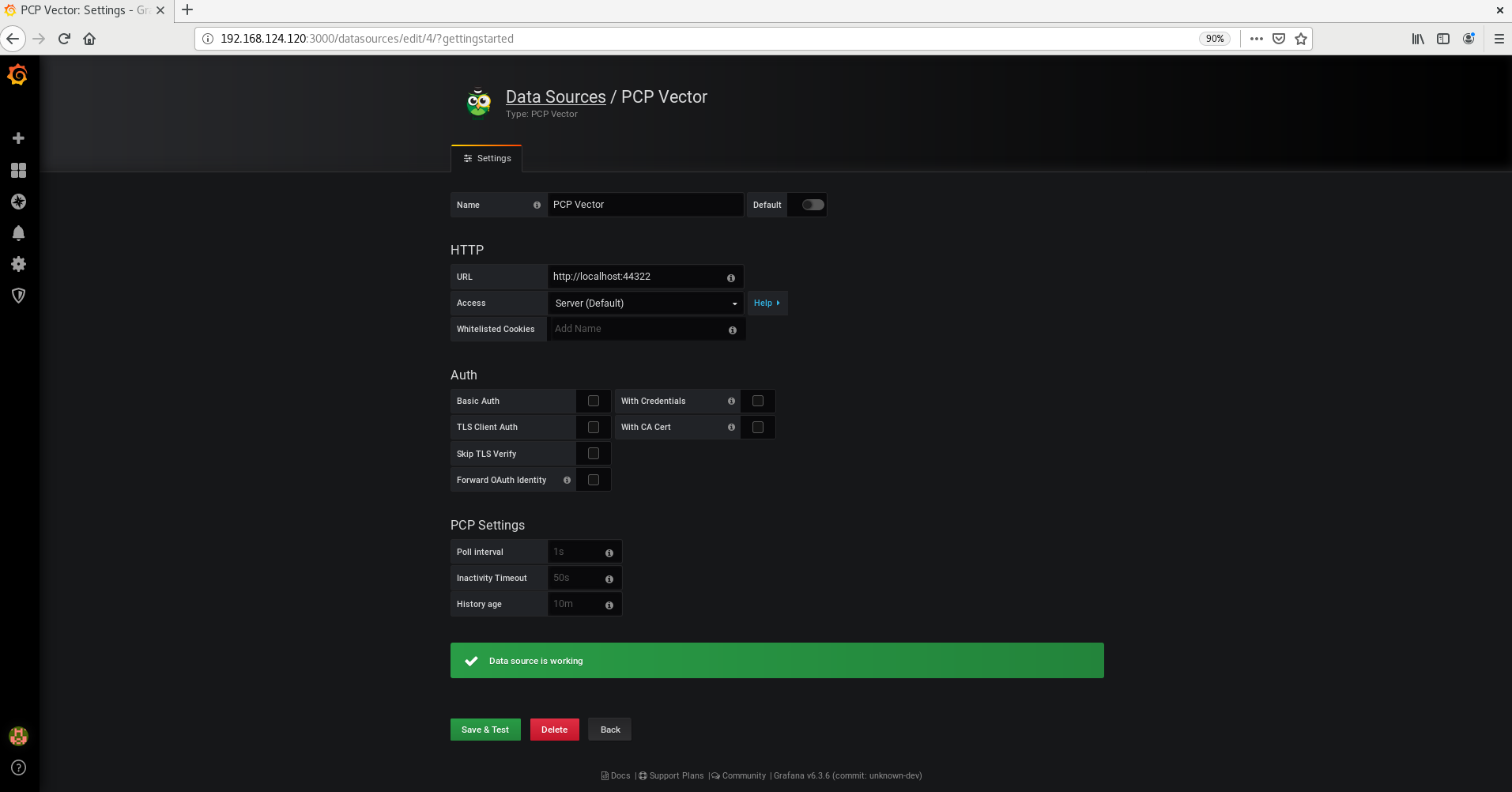
 icon > click Add data source > in the Filter by name or type, type vector > and click PCP Vector > in the URL field, accept the given suggestion http://localhost:44322 and > click Save & Test.
Figura 7.8. Añadir el vector PCP en la fuente de datos
In the pane, hover on the
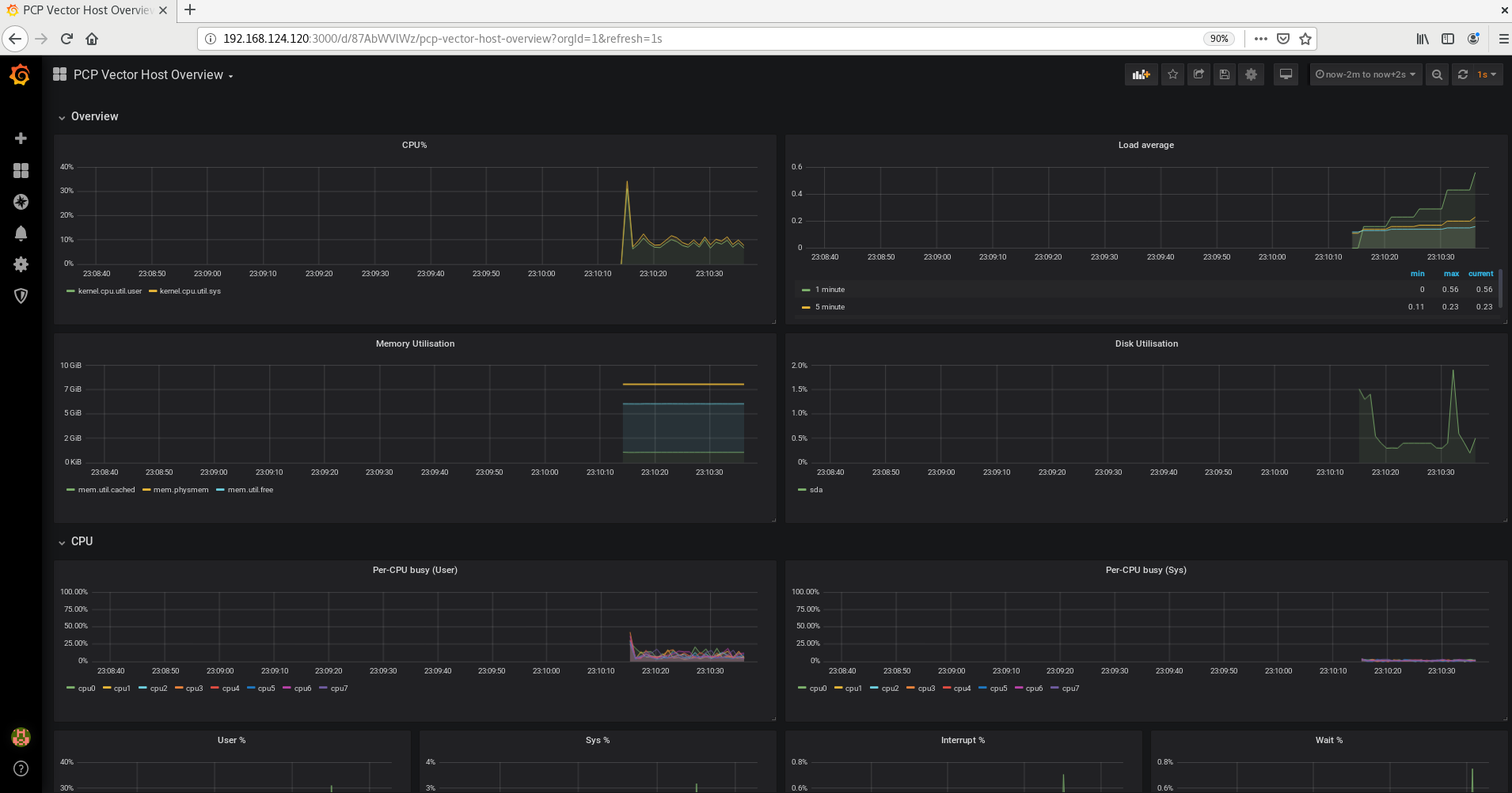
 icon > click Manage > in the Filter Dashboard by name, type pcp vector > select PCP Vector Host Overview to see a dashboard with an overview of useful metrics.
Figura 7.9. Visión general del anfitrión vectorial PCP
Recursos adicionales
-
La página de manual
pmdabcc.

'%20d='M201.5%20305.5c-13.8%200-24.9-11.1-24.9-24.6%200-13.8%2011.1-24.9%2024.9-24.9%2013.6%200%2024.6%2011.1%2024.6%2024.9%200%2013.6-11.1%2024.6-24.6%2024.6zM504%20256c0%20137-111%20248-248%20248S8%20393%208%20256%20119%208%20256%208s248%20111%20248%20248zm-132.3-41.2c-9.4%200-17.7%203.9-23.8%2010-22.4-15.5-52.6-25.5-86.1-26.6l17.4-78.3%2055.4%2012.5c0%2013.6%2011.1%2024.6%2024.6%2024.6%2013.8%200%2024.9-11.3%2024.9-24.9s-11.1-24.9-24.9-24.9c-9.7%200-18%205.8-22.1%2013.8l-61.2-13.6c-3-.8-6.1%201.4-6.9%204.4l-19.1%2086.4c-33.2%201.4-63.1%2011.3-85.5%2026.8-6.1-6.4-14.7-10.2-24.1-10.2-34.9%200-46.3%2046.9-14.4%2062.8-1.1%205-1.7%2010.2-1.7%2015.5%200%2052.6%2059.2%2095.2%20132%2095.2%2073.1%200%20132.3-42.6%20132.3-95.2%200-5.3-.6-10.8-1.9-15.8%2031.3-16%2019.8-62.5-14.9-62.5zM302.8%20331c-18.2%2018.2-76.1%2017.9-93.6%200-2.2-2.2-6.1-2.2-8.3%200-2.5%202.5-2.5%206.4%200%208.6%2022.8%2022.8%2087.3%2022.8%20110.2%200%202.5-2.2%202.5-6.1%200-8.6-2.2-2.2-6.1-2.2-8.3%200zm7.7-75c-13.6%200-24.6%2011.1-24.6%2024.9%200%2013.6%2011.1%2024.6%2024.6%2024.6%2013.8%200%2024.9-11.1%2024.9-24.6%200-13.8-11-24.9-24.9-24.9z'/%3e%3c/svg%3e)