 Red Hat Summit
Este contenido no está disponible en el idioma seleccionado.
2.2. Installing Red Hat JBoss Fuse as a Service in Fabric Mode
Abstract
In fabric mode, you can install Red Hat JBoss Fuse as a system service in either a fabric ensemble container or in a child container. To do so, you must be logged into a running Fuse Fabric. If you have not created a fabric, see chapter "Creating a New Fabric" in "Fabric Guide" for instructions.
2.2.1. Installing JBoss Fuse as a System Service in a Fabric Ensemble Container
Copiar enlaceEnlace copiado en el portapapeles!
Installing JBoss Fuse as a system service in a fabric ensemble container involves performing these tasks in fabric mode:
- Creating a profile and adding the
wrapperfeature to it - Deploying the wrapper-containing profile to an ensemble container
- Installing the wrapper
- Starting/stopping the service
Procedure
Copiar enlaceEnlace copiado en el portapapeles!
Follow this procedure if you are installing JBoss Fuse on the default ensemble container
root.
- Create a new profile (for example,
myWrapper) that will contain thewrapperfeature:JBossFuse:karaf@root> fabric:profile-create myWrapper
JBossFuse:karaf@root> fabric:profile-create myWrapperCopy to Clipboard Copied! Toggle word wrap Toggle overflow - Add the
wrapperfeature to the newmyWrapperprofile:JBossFuse:karaf@root> fabric:profile-edit --features wrapper/0.0.0 myWrapper
JBossFuse:karaf@root> fabric:profile-edit --features wrapper/0.0.0 myWrapperCopy to Clipboard Copied! Toggle word wrap Toggle overflow - Add the
myWrapperprofile to therootcontainer:JBossFuse:karaf@root> fabric:container-add-profile root myWrapper
JBossFuse:karaf@root> fabric:container-add-profile root myWrapperCopy to Clipboard Copied! Toggle word wrap Toggle overflow - Install the wrapper:
JBossFuse:karaf@root> wrapper:install
JBossFuse:karaf@root> wrapper:installCopy to Clipboard Copied! Toggle word wrap Toggle overflow Thewrapper:installcommand generates the following wrapper files:$JBOSS_FUSE/bin/karaf-wrapper[.exe]—executable file for the wrapper$JBOSS_FUSE/bin/karaf-service[.bat]—script for installing/uninstalling the wrapper$JBOSS_FUSE/etc/karaf-wrapper.conf—wrapper's configuration file
The command also creates the following Libraries that the service wrapper requires:$JBOSS_FUSE/lib/libwrapper.jnilib$JBOSS_FUSE/lib/karaf-wrapper.jar$JBOSS_FUSE/lib/karaf-wrapper-main.jar
- Follow the instructions provided by the
wrapper:installcommand to start or stop the service:$JBOSS_FUSE/bin/karaf-service start $JBOSS_FUSE/bin/karaf-service stop$JBOSS_FUSE/bin/karaf-service start $JBOSS_FUSE/bin/karaf-service stopCopy to Clipboard Copied! Toggle word wrap Toggle overflow
2.2.2. Installing JBoss Fuse as a System Service in a Child Container
Copiar enlaceEnlace copiado en el portapapeles!
Installing JBoss Fuse as a system service in a child container involves performing these tasks in fabric mode:
- Creating a profile and adding the
wrapperfeature to it - Creating a child container and deploying the wrapper-containing profile to it
- Connecting to the child container and installing the wrapper
- Adding the child container's JVM options to its wrapper configuration file
- Starting/stopping the service
Procedure
Copiar enlaceEnlace copiado en el portapapeles!
- Create a new profile (for example,
myWrapper) that will contain thewrapperfeature:JBossFuse:karaf@root> fabric:profile-create myWrapper
JBossFuse:karaf@root> fabric:profile-create myWrapperCopy to Clipboard Copied! Toggle word wrap Toggle overflow - Add the
wrapperfeature to the newmyWrapperprofile:JBossFuse:karaf@root> fabric:profile-edit --features wrapper/0.0.0 myWrapper
JBossFuse:karaf@root> fabric:profile-edit --features wrapper/0.0.0 myWrapperCopy to Clipboard Copied! Toggle word wrap Toggle overflow - Create a new child container (for example,
child1):JBossFuse:karaf@root> fabric:container-create-child root child1
JBossFuse:karaf@root> fabric:container-create-child root child1Copy to Clipboard Copied! Toggle word wrap Toggle overflow - Add the
myWrapperprofile to the new child container:JBossFuse:karaf@root> fabric:container-add-profile child1 myWrapper
JBossFuse:karaf@root> fabric:container-add-profile child1 myWrapperCopy to Clipboard Copied! Toggle word wrap Toggle overflow - Connect to the child container:
JBossFuse:karaf@root> fabric:container-connect child1
JBossFuse:karaf@root> fabric:container-connect child1Copy to Clipboard Copied! Toggle word wrap Toggle overflow The child container's splash screen opens, giving you administrative access to it: Note that the console prompt has changed to
JBossFuse:admin@child1>. - Install the wrapper:
JBossFuse:admin@child1> wrapper:install
JBossFuse:admin@child1> wrapper:installCopy to Clipboard Copied! Toggle word wrap Toggle overflow Thewrapper:installcommand generates the following wrapper files:$JBOSS_FUSE/instances/<child1>/bin/karaf-wrapper[.exe]—executable file for the wrapper$JBOSS_FUSE/instances/<child1>/bin/karaf-service[.bat]—script for installing/uninstalling the wrapper$JBOSS_FUSE/instances/<child1>/etc/karaf-wrapper.conf—wrapper's configuration file
The command also creates the following Libraries that the service wrapper requires:$JBOSS_FUSE/instances/<child1>/lib/libwrapper.jnilib$JBOSS_FUSE/instances/<child1>/lib/karaf-wrapper.jar$JBOSS_FUSE/instances/<child1>/lib/karaf-wrapper-main.jar
The command also records each child container's JVM and fabric-related options and values in the$JBOSS_FUSE/instances/instance.propertiesfile, in an entryitem.#.opts, where#corresponds to a specific child instance (in this example,item.1.optsforchild1):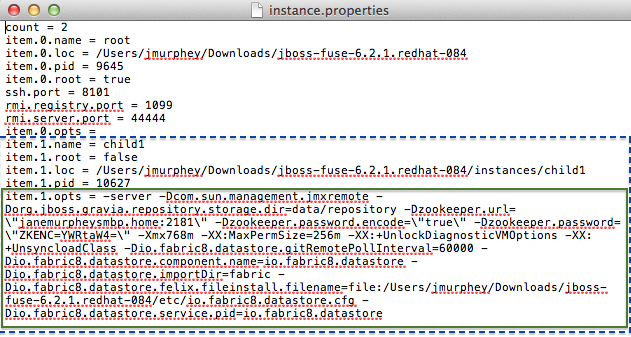 NoteThe JVM options listed can vary depending on the command used to create the child instance.
 - Compare the child container's JVM and fabric-related options listed in its
item.#.optsentry in the$JBOSS_FUSE/instances/instance.propertiesfile with the JVM and fabric-related options contained in its$JBOSS_FUSE/instances/<child1>/etc/karaf-wrapper.conffile. - Copy to the child container's
$JBOSS_FUSE/instances/<child1>/etc/karaf-wrapper.confconfiguration file, any missing JVM and fabric-related options listed in itsitem.#.optsentry in the$JBOSS_FUSE/instances/instance.propertiesfile.Make sure your entries conform to the configuration file format; for example:Copy to Clipboard Copied! Toggle word wrap Toggle overflow - Follow the instructions provided by the
wrapper:installcommand to start or stop the service:$JBOSS_FUSE/instances/<child1>/bin/karaf-service start $JBOSS_FUSE/instances/<child1>/bin/karaf-service stop$JBOSS_FUSE/instances/<child1>/bin/karaf-service start $JBOSS_FUSE/instances/<child1>/bin/karaf-service stopCopy to Clipboard Copied! Toggle word wrap Toggle overflow

'%20d='M201.5%20305.5c-13.8%200-24.9-11.1-24.9-24.6%200-13.8%2011.1-24.9%2024.9-24.9%2013.6%200%2024.6%2011.1%2024.6%2024.9%200%2013.6-11.1%2024.6-24.6%2024.6zM504%20256c0%20137-111%20248-248%20248S8%20393%208%20256%20119%208%20256%208s248%20111%20248%20248zm-132.3-41.2c-9.4%200-17.7%203.9-23.8%2010-22.4-15.5-52.6-25.5-86.1-26.6l17.4-78.3%2055.4%2012.5c0%2013.6%2011.1%2024.6%2024.6%2024.6%2013.8%200%2024.9-11.3%2024.9-24.9s-11.1-24.9-24.9-24.9c-9.7%200-18%205.8-22.1%2013.8l-61.2-13.6c-3-.8-6.1%201.4-6.9%204.4l-19.1%2086.4c-33.2%201.4-63.1%2011.3-85.5%2026.8-6.1-6.4-14.7-10.2-24.1-10.2-34.9%200-46.3%2046.9-14.4%2062.8-1.1%205-1.7%2010.2-1.7%2015.5%200%2052.6%2059.2%2095.2%20132%2095.2%2073.1%200%20132.3-42.6%20132.3-95.2%200-5.3-.6-10.8-1.9-15.8%2031.3-16%2019.8-62.5-14.9-62.5zM302.8%20331c-18.2%2018.2-76.1%2017.9-93.6%200-2.2-2.2-6.1-2.2-8.3%200-2.5%202.5-2.5%206.4%200%208.6%2022.8%2022.8%2087.3%2022.8%20110.2%200%202.5-2.2%202.5-6.1%200-8.6-2.2-2.2-6.1-2.2-8.3%200zm7.7-75c-13.6%200-24.6%2011.1-24.6%2024.9%200%2013.6%2011.1%2024.6%2024.6%2024.6%2013.8%200%2024.9-11.1%2024.9-24.6%200-13.8-11-24.9-24.9-24.9z'/%3e%3c/svg%3e)