 Red Hat Summit
Este contenido no está disponible en el idioma seleccionado.
Chapter 12. Upgrade to Quay 2.0.0
All Quay instances being upgraded from versions < 2.0.0 must upgrade to Quay 2.0.0 first before continuing to upgrade. This upgrade has an extra step, documented here.
We highly recommend performing this upgrade during a scheduled maintenance window, as it will require taking the existing cluster down temporarily.
12.1. Download Quay License
To begin, download your Quay License from your Tectonic Account. Please download or copy this license in Raw Format as a file named license:
12.2. Shutdown all Quay instances
Shutdown all running instances of Quay, across all clusters.
12.3. Run a single instance of Quay 2
Run a single instance of Quay 2.0.0 by replacing quay.io/coreos/registry:{currentVersion} with quay.io/coreos/quay:v2.0.0 in your run command, startup script, config or systemd unit.
12.3.1. Add your license to the Quay
Quay setup as a container or under Kubernetes
-
Visit the management panel:
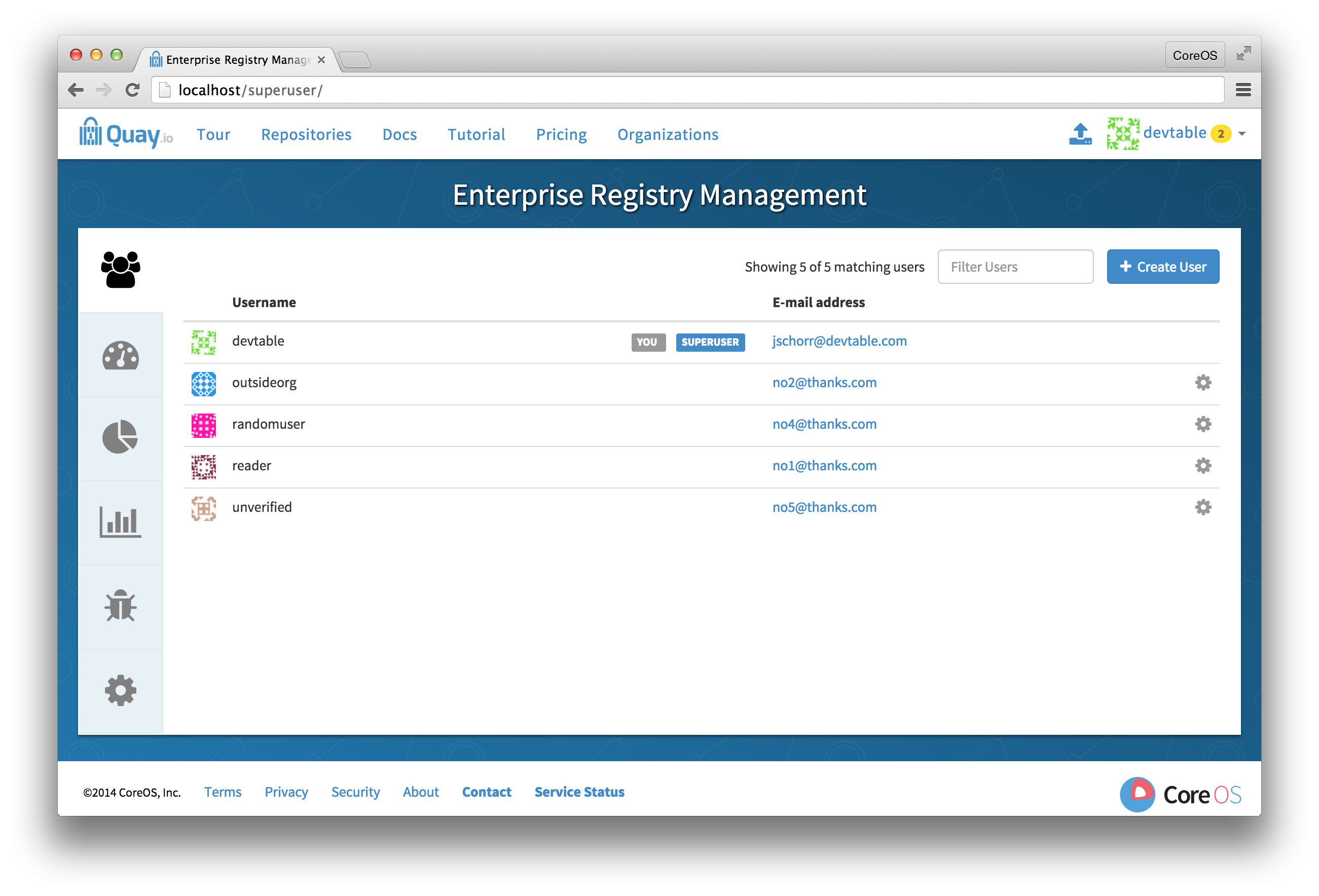
Sign in to a super user account from the Red Hat Quay login screen. For example, if the host were reg.example.com, you would go to http://reg.example.com/superuser to view the management panel:
- Click the configuration tab
-
In the section entitled
License, paste in the contents of the license downloaded above -
Click
Save Configuration Changes - Restart the container (you will be prompted)
12.3.2. Add license via the filesystem
Ensure the Red Hat Quay instance has been shutdown and add the raw format license in license file to the directory mapped to conf/stack, next to the existing config.yaml.
Example:
The conf/stack directory is mapped to quay2/config in docker run command used to bring up Quay:
docker run --restart=always -p 443:443 -p 80:80 --privileged=true -v /quay2/config:/conf/stack -v /quay2/storage:/datastorage -d quay.io/coreos/quay:v2.0.0
docker run --restart=always -p 443:443 -p 80:80 --privileged=true -v /quay2/config:/conf/stack -v /quay2/storage:/datastorage -d quay.io/coreos/quay:v2.0.0
The license file resides in the quay2/config directory:
12.4. Update cluster
Update all remaining Quay instances to refer to the new image (quay.io/coreos/quay:v2.0.0).
12.5. Verify cluster
Verify that your cluster and its license are valid by performing a push or pull. If you receive an HTTP 402, please make sure your license is properly installed and valid by checking in the management panel (see above for instructions).
If you encounter unusual problems, please contact support.

'%20d='M201.5%20305.5c-13.8%200-24.9-11.1-24.9-24.6%200-13.8%2011.1-24.9%2024.9-24.9%2013.6%200%2024.6%2011.1%2024.6%2024.9%200%2013.6-11.1%2024.6-24.6%2024.6zM504%20256c0%20137-111%20248-248%20248S8%20393%208%20256%20119%208%20256%208s248%20111%20248%20248zm-132.3-41.2c-9.4%200-17.7%203.9-23.8%2010-22.4-15.5-52.6-25.5-86.1-26.6l17.4-78.3%2055.4%2012.5c0%2013.6%2011.1%2024.6%2024.6%2024.6%2013.8%200%2024.9-11.3%2024.9-24.9s-11.1-24.9-24.9-24.9c-9.7%200-18%205.8-22.1%2013.8l-61.2-13.6c-3-.8-6.1%201.4-6.9%204.4l-19.1%2086.4c-33.2%201.4-63.1%2011.3-85.5%2026.8-6.1-6.4-14.7-10.2-24.1-10.2-34.9%200-46.3%2046.9-14.4%2062.8-1.1%205-1.7%2010.2-1.7%2015.5%200%2052.6%2059.2%2095.2%20132%2095.2%2073.1%200%20132.3-42.6%20132.3-95.2%200-5.3-.6-10.8-1.9-15.8%2031.3-16%2019.8-62.5-14.9-62.5zM302.8%20331c-18.2%2018.2-76.1%2017.9-93.6%200-2.2-2.2-6.1-2.2-8.3%200-2.5%202.5-2.5%206.4%200%208.6%2022.8%2022.8%2087.3%2022.8%20110.2%200%202.5-2.2%202.5-6.1%200-8.6-2.2-2.2-6.1-2.2-8.3%200zm7.7-75c-13.6%200-24.6%2011.1-24.6%2024.9%200%2013.6%2011.1%2024.6%2024.6%2024.6%2013.8%200%2024.9-11.1%2024.9-24.6%200-13.8-11-24.9-24.9-24.9z'/%3e%3c/svg%3e)