 Red Hat Summit
Este contenido no está disponible en el idioma seleccionado.
Chapter 7. Creating an OAuth application in GitHub
To enable GitHub integration for automated builds in {product-title}, you can create an OAuth application in GitHub. This allows {product-title} to access GitHub repositories and trigger container image builds when commits or pull requests are made.
Procedure
- Log into GitHub Enterprise.
-
In the navigation pane, select your username
Your organizations. -
In the navigation pane, select Applications
Developer Settings. In the navigation pane, click OAuth Apps
New OAuth App. You are navigated to the following page: 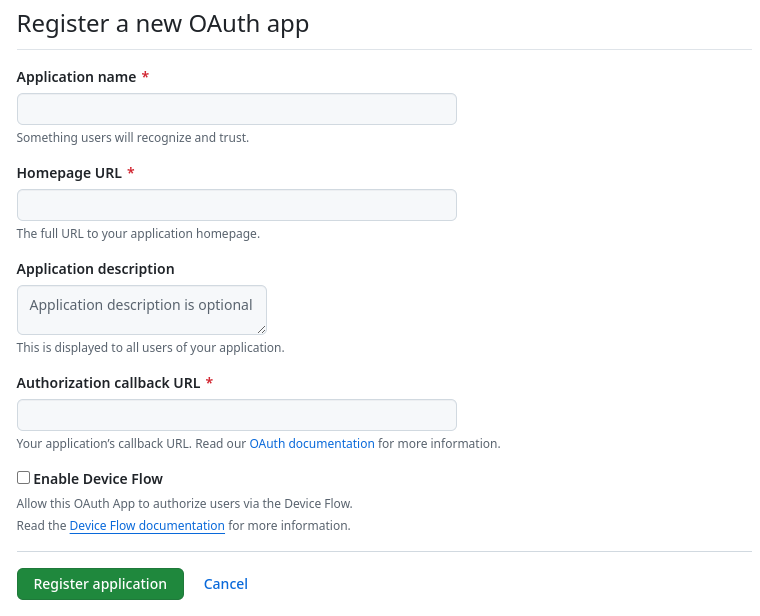
- Enter a name for the application in the Application name textbox.
In the Homepage URL textbox, enter your Red Hat Quay URL.
NoteIf you are using public GitHub, the Homepage URL entered must be accessible by your users. It can still be an internal URL.
- In the Authorization callback URL, enter https://<RED_HAT_QUAY_URL>/oauth2/github/callback.
- Click Register application to save your settings.
- When the new application’s summary is shown, record the Client ID and the Client Secret shown for the new application.

'%20d='M201.5%20305.5c-13.8%200-24.9-11.1-24.9-24.6%200-13.8%2011.1-24.9%2024.9-24.9%2013.6%200%2024.6%2011.1%2024.6%2024.9%200%2013.6-11.1%2024.6-24.6%2024.6zM504%20256c0%20137-111%20248-248%20248S8%20393%208%20256%20119%208%20256%208s248%20111%20248%20248zm-132.3-41.2c-9.4%200-17.7%203.9-23.8%2010-22.4-15.5-52.6-25.5-86.1-26.6l17.4-78.3%2055.4%2012.5c0%2013.6%2011.1%2024.6%2024.6%2024.6%2013.8%200%2024.9-11.3%2024.9-24.9s-11.1-24.9-24.9-24.9c-9.7%200-18%205.8-22.1%2013.8l-61.2-13.6c-3-.8-6.1%201.4-6.9%204.4l-19.1%2086.4c-33.2%201.4-63.1%2011.3-85.5%2026.8-6.1-6.4-14.7-10.2-24.1-10.2-34.9%200-46.3%2046.9-14.4%2062.8-1.1%205-1.7%2010.2-1.7%2015.5%200%2052.6%2059.2%2095.2%20132%2095.2%2073.1%200%20132.3-42.6%20132.3-95.2%200-5.3-.6-10.8-1.9-15.8%2031.3-16%2019.8-62.5-14.9-62.5zM302.8%20331c-18.2%2018.2-76.1%2017.9-93.6%200-2.2-2.2-6.1-2.2-8.3%200-2.5%202.5-2.5%206.4%200%208.6%2022.8%2022.8%2087.3%2022.8%20110.2%200%202.5-2.2%202.5-6.1%200-8.6-2.2-2.2-6.1-2.2-8.3%200zm7.7-75c-13.6%200-24.6%2011.1-24.6%2024.9%200%2013.6%2011.1%2024.6%2024.6%2024.6%2013.8%200%2024.9-11.1%2024.9-24.6%200-13.8-11-24.9-24.9-24.9z'/%3e%3c/svg%3e)