 Red Hat Summit
Este contenido no está disponible en el idioma seleccionado.
Chapter 6. Troubleshoot and common questions
When you review the subscriptions service data for your account, you might have additional questions about how those calculations are made or whether the calculations are accurate. Answers for some of the most commonly asked questions might help you understand more about the data that appears in the subscriptions service. Other information can help you troubleshoot some common problems that are experienced by subscriptions service users. In some cases, completing the suggested steps in the troubleshooting information can help you improve the accuracy of the reported data in the subscriptions service.
6.1. Troubleshoot: Correct over-reporting of virtualized RHEL
So that the subscriptions service can accurately report Red Hat Enterprise Linux in virtualized environments such as virtual data center (VDC) subscriptions, host-guest mappings must be present in the data that the subscriptions service analyzes. For Red Hat Satellite, the Satellite inventory upload plugin and the virt-who tool gather these mappings for the subscriptions service. For Red Hat Subscription Management, the virt-who tool gathers these mappings. For each of these subscription management options, all necessary tools must be both installed and properly configured to accurately report virtual RHEL usage.
If these tools are not used, virtual usage data cannot be correctly calculated. In that type of scenario, guests are counted, not ignored. Each guest is counted as an individual virtual machine, leading to a rapid escalation of virtualized socket count and unusual deployment over capacity. When multiplied over numerous VDC subscriptions, all running multiple guests, the subscriptions service could easily show RHEL overdeployment that significantly exceeds your subscription threshold.
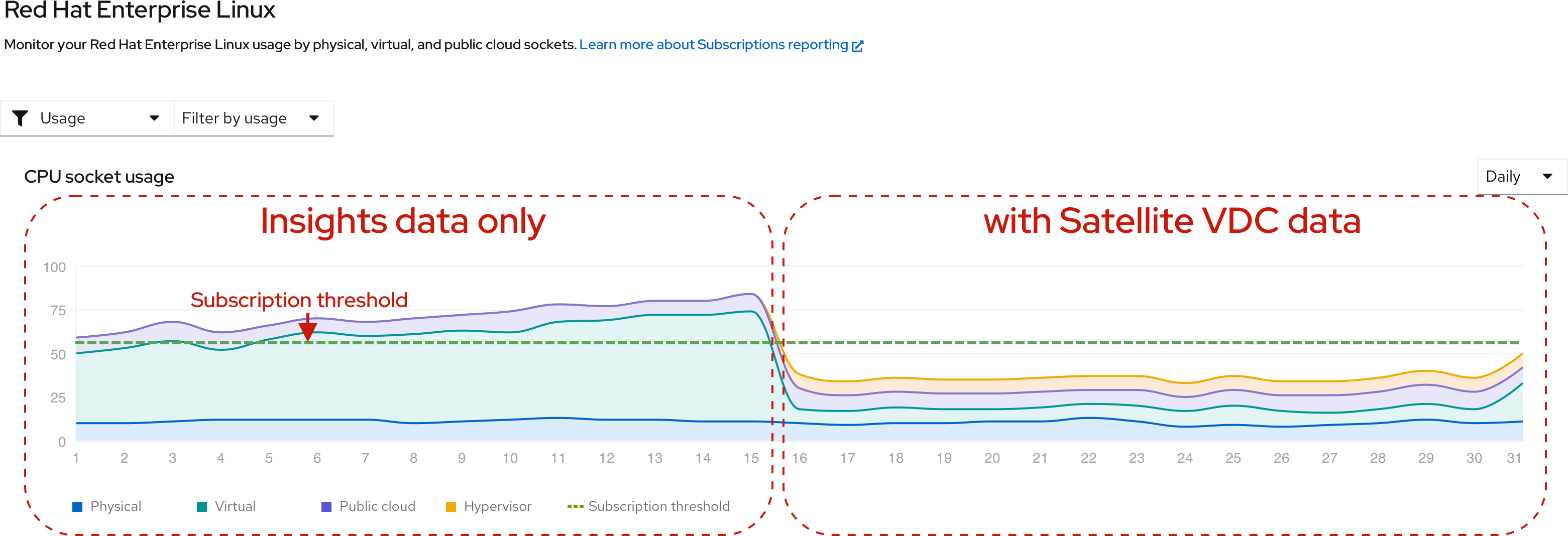
The following example contains an isolated RHEL usage and utilization graph view from the subscriptions service interface. For the first part of the time period, the graph displays physical, virtual, and public cloud usage, but no hypervisor usage is found. For the second part of the time period, where the Satellite inventory upload plugin and virt-who are correctly configured to find and report host-guest mappings, the graph displays new reporting of hypervisor usage and a substantial drop in the reporting of virtual usage. Throughout the time period displayed, the subscription threshold remains constant. Before correction, total RHEL usage exceeds the subscription threshold. After correction, hypervisor usage can be counted and virtual usage is considerably reduced. The total RHEL usage now falls below the subscription threshold.
Figure 6.1. Corrected RHEL virtual usage and newly displayed RHEL hypervisor usage with virt-who and Satellite data
Procedure
Review your RHEL subscription profile in Red Hat Satellite or Red Hat Subscription Management and determine which subscriptions require virt-who.
- In the Satellite Web UI, click Content > Subscriptions. If needed, use the Search field to narrow the list of results. Review the values in the Requires Virt-Who column. If any check box is selected, you must configure virt-who.
-
In the Overview page of the Red Hat Subscription Management Customer Portal interface, click View All Subscriptions. If needed, use filtering to narrow the list of results. Select a subscription name to view the details. If
Virt-Who: Requiredappears in the SKU Details, you must configure virt-who.
Confirm that the virt-who tool is deployed on your hypervisors so that host-guest mappings can be communicated. For more information, see the virtualization documentation that is appropriate for your subscription management tool.
- For Satellite, see the following information as appropriate for your version: Configuring Virtual Machine Subscriptions in Red Hat Satellite
For Red Hat Subscription Management, see the following information: Configuring Virtual Machine Subscriptions in Red Hat Subscription Management
NoteIf you are also using simple content access, the workflows for some of the subscription management tools such as virt-who are altered.
- For Satellite, make sure that the Satellite inventory upload plugin is installed and configured to supply data to the subscriptions service.
Additional resources
6.2. Troubleshoot: Correct problems with filtering
The subscriptions service includes several filters that you can use to sort data by different characteristics. These characteristics include subscription attributes, also known as system purpose or subscription settings, depending on the product. Types of subscription attributes include service level agreement (SLA), usage, and others.
Subscription attributes values must be set on systems to enable filtering by those values on the product-level pages in the the subscriptions service interface. There are different methods to set these values, such as directly in the product or in one of the subscription management tools. Subscription attributes values should be set by only one method to avoid the potential for mismatched values.
In the older entitlement-based subscription model, the system purpose values are used by the subscription management tools such as Red Hat Satellite or Red Hat Subscription Management to help match subscriptions with systems. If a system is correctly matched with a subscription, the system status value (System Status Details or System Purpose Status in the various tools) shows as Matched. However, if you are using simple content access with the subscriptions service, that usage of system purpose is obsolete, because subscriptions are not attached to systems. After you enable simple content access, the system status shows as Disabled.
The Disabled state for the system status means that per-system subscription attachment is not being enforced. It does not mean that system purpose values themselves are unimportant. The subscriptions service filters related to system purpose values will not show reliable data if these values are not set for all systems.
Procedure
If the filters that relate to subscription attributes (system purpose values) are showing unexpected results, you might be able to improve the accuracy of that data by ensuring that the subscription attributes are set correctly:
- Review system information in your preferred subscription management tool to detect whether there are systems where the subscription attributes are missing.
- If there are missing values for subscription attributes, set those values. You might be able to use options to set these values in bulk, depending on the type and version of subscription management tool that you are using.
6.3. Troubleshoot: Correct problems with RHEL metering configuration
The proper configuration of data collection for a metered Red Hat Enterprise Linux software-as-a-service subscription from a cloud marketplace requires steps that must be done in the cloud provider environment and the Red Hat environment. Recent analysis of customer feedback about this process has resulted in the creation of Knowledgebase solution content on the Red Hat Customer Portal to troubleshoot problems with this configuration.
A problem with the RHEL metering configuration can most likely be traced to one or more of the following three issues:
- A problem with the configuration of the data collection by either the host-metering agent or with the cost management service in the Hybrid Cloud Console.
- A problem with the association of the Red Hat metered RHEL subscription to the correct cloud provider account.
- A problem with the integration (linkage) between the Red Hat Organization and the cloud provider account.
Procedure
- Review the information and complete the troubleshooting steps in the Troubleshooting Metered RHEL Configurations Knowledgebase solution.
6.4. How the subscription threshold calculated
In the subscriptions service, the usage and utilization graph for most product pages contains a subscription threshold. This line shows the maximum capacity of similar subscriptions across all of your contracts.
Some product pages do not show a subscription threshold on the graph.
- For a product page that includes pay-as-you-go On-Demand subscriptions, that graph does not display a subscription threshold because of the characteristics of that subscription type.
- For an account that includes any subscription with a unit of measurement (UoM) of "Unlimited" as part of the terms, the graph for any product page that includes this subscription does not display a subscription threshold. If filtering is used to exclude this subscription from the views, the graph will display a subscription threshold for the filtered data.
To measure the maximum capacity of an organization’s account and plot the subscription threshold line in the graph, the subscriptions service does the following steps:
- Accesses the Red Hat internal subscription services to gather subscription-related contract data for the account.
- Analyzes every subscription in the account, including each SKU (stock-keeping unit) that was purchased and the amount of each SKU that was purchased.
- Determines which products are provided in each SKU that is found.
- Calculates the maximum amount of technology that is provided by a subscription by multiplying the amount of technology that a SKU allows by the number of that SKU that was purchased in the subscription. The amount of technology that a SKU allows is the unit of measurement for the SKU multiplied by the number of these units (the limit) that the SKU provides.
- Adds the maximum amount of technology for every subscription to determine the subscription threshold that appears on the graph for every product or product portfolio.
- Analyzes the available subscription attributes data (also known as system purpose data or subscription settings) to enable filtering of that data with the filters in the subscriptions service.
6.5. How core hour usage data is calculated
The introduction of the new pay-as-you-go On-Demand subscription type in 2021 resulted in new types of units of measurement in the subscriptions service, in addition to the units of measurement for sockets or cores. These new units of measurement are compound units that function as derived units, where the unit of measurement is calculated from other base units.
At this time, the newer derived units for the subscriptions service add a base unit of time, so these new units are measuring consumption over a period of time. Time base units can be combined with base units that are appropriate for specific products, resulting in derived units that meter a product according to the types of resources that it consumes.
In addition, for a subset of those time-based units, usage data is derived from frequent, time-based sampling of data instead of direct counting. In part, the sampling method might be used for a particular product or service because of the required unit of measurement and the capabilities of the Red Hat OpenShift monitoring stack tools to gather usage data for that unit of measurement.
When the subscriptions service tracks subscription usage with time-based metrics that also use sampling, the metrics used and the units of measurement applied to those metrics are based upon the terms for the subscriptions for these products. The following list shows examples of time-based metrics that also use sampling to gather usage data:
- Red Hat OpenShift Container Platform On-Demand usage is measured with a single derived unit of measurement of core hours. A core hour is a unit of measurement for computational activity on one core (as defined by the subscription terms), for a total of one hour, measured to the granularity of the meter that is used.
- Red Hat OpenShift Dedicated On-Demand is measured with two units of measurement, both derived units of measurement. It is measured in core hours to track the workload usage on the compute machines, and in instance hours to track instance availability as the control plane usage on the control plane machines (formerly the master machines in older versions of Red Hat OpenShift). An instance hour is the availability of a Red Hat service instance, during which it can accept and execute customer workloads. For Red Hat OpenShift Dedicated On-Demand, instance hours are measured by summing the availability of all active clusters, in hours.
- Red Hat OpenShift AI (RHOAI) On-Demand usage and Red Hat Advanced Cluster Security for Kubernetes (RHACS) On-Demand usage are measured with a single derived unit of measurement of vCPU hours. A vCPU hour is a unit of measurement for cluster size on one virtual core (as defined by the subscription terms), for a total of one hour, measured to the granularity of the meter that is used.
6.5.1. An example for Red Hat OpenShift On-Demand subscriptions
The following information for Red Hat OpenShift On-Demand subscriptions includes an explanation of the applicable units of measurement, a detailed scenario that shows the steps that the subscriptions service and the other Hybrid Cloud Console and monitoring stack tools use to calculate core hour usage, and additional information that can help you understand how core hour usage is reported in the subscriptions service. You can use this information to help you understand the basic principles of how the subscriptions service calculates usage for the time-based units of measurement that also use sampling.
Units of measurement for Red Hat OpenShift On-Demand subscriptions
The following table provides additional details about the derived units of measurement that are used for the Red Hat OpenShift On-Demand products. These details include the name and definition of the unit of measurement along with examples of usage that would equal one of that unit of measurement. In addition, a sample Prometheus query language (PromQL) query is provided for each unit. This example query is not the complete set of processes by which the subscriptions service calculates usage, but it is a query that you can run locally in a cluster to help you understand some of those processes.
| Unit of measurement | Definition | Examples |
|---|---|---|
| core hour | Computational activity on one core (as defined by the subscription terms), for a total of one hour, measured to the granularity of the meter that is used. | For Red Hat OpenShift Container Platform On-Demand and Red Hat OpenShift Dedicated On-Demand workload usage:
|
| Core hour base PromQL query that you can run locally on your cluster: | ||
| instance hours, in cluster hours | The availability of a Red Hat service instance, during which it can accept and execute customer workloads. | In a cluster hour context, for Red Hat OpenShift Dedicated On-Demand control plane usage:
|
| Instance hour base PromQL query that you can run locally on your cluster: | ||
Example core hour usage calculation
The following example describes the process for calculating core hour usage for a Red Hat OpenShift On-Demand subscription. You can use this example to help you understand other derived units of measurement where time is one of the base units of the usage calculation and sampling is used as part of the measurement. For example, the vCPU hour calculation for Red Hat OpenShift AI On-Demand is done in the same way, except that the measurement is for virtual cores.
To obtain usage in core hours, the subscriptions service uses numerical integration. Numerical integration is also commonly known as an "area under the curve" calculation, where the area of a complex shape is calculated by using the area of a series of rectangles.
The tools in the Red Hat OpenShift monitoring stack contain the Prometheus query language (PromQL) function sum_over_time, a function that aggregates data for a time interval. This function is the foundation of the core hours calculation in the subscriptions service.
sum_over_time((max by (_id) (cluster:usage:workload:capacity_physical_cpu_cores:min:5m))[1h:1s])You can run this PromQL query locally in a cluster to show results that include the cluster size and a snapshot of usage.
Every 2 minutes, a cluster reports its size in cores to the monitoring stack tools, including Telemetry. One of the Hybrid Cloud Console tools, the Tally engine, reviews this information every hour in 5 minute intervals. Because the cluster reports to the monitoring stack tools every 2 minutes, each 5 minute interval might contain up to three values for cluster size. The Tally engine selects the smallest cluster size value to represent the full 5 minute interval.
The following example shows how a sample cluster size is collected every 2 minutes and how the smallest size is selected for the 5 minute interval.
Figure 6.2. Calculating the cluster size

Then, for each cluster, the Tally engine uses the selected value and creates a box of usage for each 5 minute interval. The area of the 5-minute box is 300 seconds times the height in cores. For every 5 minute box, this core seconds value is stored and eventually used to calculate the daily, account-wide aggregation of core hour usage.
The following example shows a graphical representation of how an area under the curve is calculated, with cluster size and time used to create usage boxes, and the area of each box used as building blocks to create daily core hour usage totals.
Figure 6.3. Calculating the core hours

Every day, each 5 minute usage value is added to create the total usage of a cluster on that day. Then the totals for each cluster are combined to create daily usage information for all clusters in the account. In addition, the core seconds are converted to core hours.
During the regular 24-hour update of the subscriptions service with the previous day’s data, the core hour usage information for pay-as-you-go subscriptions is updated. In the subscriptions service, the daily core hour usage for the account is plotted on the usage and utilization graph, and additional core hours used information shows the accumulated total for the account. The current instances table also lists each cluster in the account and shows the cumulative number of core hours used in that cluster.
The core hour usage data for the account and for individual clusters that is shown in the subscriptions service interface is rounded to 2 decimal places for display purposes. However, the data that is used for the subscriptions service calculations and that is provided to the relevant billing service is at the millicore level, rounded to 6 decimal places. This rounding also applies to similar units of measurement such as vCPU hours or instance hours.
Every month, the monthly core hour usage total for your account is supplied to Red Hat Marketplace for invoice preparation and billing. For subscription types that are offered with a four-to-one relationship of core hour to vCPU hour, the core hour total from the subscriptions service is divided by 4 for the Red Hat Marketplace billing activities. For subscription types that are offered with a one-to-one relationship of core hour to vCPU hour, no conversion in the total is made.
After the monthly total is sent to Red Hat Marketplace and the new month begins, the usage values for the subscriptions service display reset to 0 for the new current month. You can use filtering to view usage data for previous months for the span of one year.
Resolving questions about core hour usage
If you have questions about core hour usage, first use the following steps as a diagnostic tool:
In the subscriptions service, review the cumulative total for the month for each cluster in the current instances table. Look for any cluster that shows unusual usage, based on your understanding of how that cluster is configured and deployed.
NoteThe current instances table displays a snapshot of the most recent monthly cumulative total for each cluster. Currently this information updates a few times per day. This value resets to 0 at the beginning of each month.
- Then review the daily core hour totals and trends in the usage and utilization graph. Look for any day that shows unusual usage. It is likely that unusual usage on a cluster that you found in the previous step corresponds to this day.
From these initial troubleshooting steps, you might be able to find the cluster owner and discuss whether the unusual usage is due to an extremely high workload, problems with cluster configuration, or other issues.
If you continue to have questions after using these steps, you can contact your Red Hat account team to help you understand your core hour usage. For questions about billing, use the support instructions for Red Hat Marketplace.
6.6. How vCPUs, hyper-threading, and subscription structure affects the subscriptions service usage data
The Red Hat OpenShift portfolio contains offerings that track usage with a unit of measurement of cores, but this measurement is obfuscated by virtualization and multithreading technologies. The behavior of these technologies led to the development of the term vCPUs to help describe the virtual consumption of physical CPUs, but this term can vary in its meaning. In addition, the structure of Red Hat OpenShift offerings can be complex, making usage data in the subscriptions service difficult to understand.
Red Hat has responded to various customer concerns about Red Hat OpenShift usage data through a series of improvements, both to the subscriptions service itself and to the underlying technologies and methodologies that inform Red Hat OpenShift usage tracking.
6.6.1. Improved calculations for x86-64 architectures with simultaneous multithreading
October 2021: This change assumes that simultaneous multithreading on x86-64 architectures is enabled, resulting in more accurate usage data within the subscriptions service.
Across different technology vendors, the term vCPU can have different definitions. If you work with a number of different vendors, the definition that you use might not match the definition that is used by Red Hat. As a result, you might not be familiar with how Red Hat and the subscriptions service measures usage when vCPUs and simultaneous multithreading (also referred to as hyper-threading) are in use within your environment.
Some vendors offer hypervisors that do not expose to guests whether the CPUs of the guests use simultaneous multithreading. For example, recent versions of the VMware hypervisor do not show the simultaneous multithreading status to the kernel of the VM, and always report threads per core as 1. The effect of this counting method is that customers can interpret the subscriptions service reporting of Red Hat OpenShift usage data related to vCPUs to be artificially doubled.
To address customer concerns about vCPU counting, Red Hat has adjusted its assumptions related to simultaneous multithreading. Red Hat now assumes simultaneous multithreading of 2 threads per core for x86 architectures. For many hypervisors, that assumption results in an accurate counting of vCPUs per core, and customers who use those hypervisors will see no change in their Red Hat OpenShift usage data in the subscriptions service.
However, other customers who use hypervisors that do not expose simultaneous multithreading status to the kernel will see an abrupt change in subscriptions service data in October 2021. Those customers will see their related Red Hat OpenShift usage data in the subscriptions service reduced by 50% on the date that this change in counting is implemented. Past data will not be affected.
Customers who encounter this situation will not be penalized. Red Hat requires that the customer purchase enough subscriptions to cover the usage as counted in the subscriptions service only.
In the past, the discrepancies in the definitions for vCPUs have resulted in known problems with the interpretation of usage and capacity data for some subscriptions service users. This change in the assumptions for simultaneous multithreading is intended to improve the accuracy of vCPU usage data across a wider spectrum of customers, regardless of the hypervisor technology that is deployed.
If you have questions or concerns related to the usage and capacity data that is displayed in the subscriptions service, work with your Red Hat account team to help you understand your data and account status. For additional information about the resolution of this problem, you can also log in to your Red Hat account to view the issue in Additional resources.
6.6.2. Improved analysis of subscription capacity for certain subscriptions
January 2022: These changes improved capacity analysis for subscriptions that include extra entitlements or infrastructure subscriptions. These improvements resulted in a more accurate calculation of usage and capacity data for those subscriptions and a more accurate calculation of the subscription threshold within the subscriptions service for the Red Hat OpenShift portion of your Red Hat account.
- Improved accuracy for subscriptions with numerous entitlements: Certain Red Hat OpenShift subscriptions that included a large capacity of cores also included extra entitlements. These entitlements helped to streamline installation by using tools that rely on attached entitlement workflows. However, these extra entitlements were calculated as extra capacity by the subscriptions service, resulting in confusion about how much Red Hat OpenShift could legally be deployed by customers. As of January 2022, counting methods have been revised to remove the extra entitlements from the capacity calculations.
- Infrastructure subscriptions excluded from capacity calculations: For certain purchases of Red Hat OpenShift subscriptions, a particular type of Red Hat OpenShift infrastructure subscription would be added to that purchase automatically. This type of subscription is used to provide infrastructure support for large deployments. Both version 4.1 and later and version 3.11 subscriptions were affected. Normally for Red Hat OpenShift version 4.1 and later, the subscriptions service does not count infrastructure nodes when calculating your Red Hat OpenShift capacity. However, for accounts that received this infrastructure subscription, the improper calculations were occurring at the subscription level, and that data was passed to the subscriptions service. Red Hat OpenShift capacity numbers were artificially inflated, resulting in an incorrect subscription threshold in the subscriptions service. As of January 2022, an added infrastructure subscription is not considered when calculating your Red Hat OpenShift capacity.
6.6.3. Isolate Red Hat OpenShift Cluster Manager operational metrics from metrics for the subscriptions service
December 2023 and March 2024: These changes involved analyzing the metrics used by Red Hat OpenShift Cluster Manager for internal operational purposes and determining whether these metrics were still the optimal metrics to use for subscription usage tracking purposes in the subscriptions service. The use of these metrics for two different purposes was determined to be ineffective, and increased the chances for inaccurate subscription usage reporting. Therefore, the subscriptions service changed to a service-level metric that is designed exclusively to track the subscription obligation in cores. The overall assumption for simultaneous multithreading in virtualized, x86 environments at a factor of 2 threads per core remains in effect.
6.7. Why a RHEL server is appearing in an unexpected place in the subscriptions service usage
For some Red Hat products, Red Hat Enterprise Linux is included with and is installed to support that product. This inclusion is sometimes also referred to as being "bundled with" another product. For example, RHEL is included with Red Hat Satellite and is tracked separately in a Satellite page view on the RHEL page in the subscriptions service, but does not appear with the main RHEL usage. In addition, RHEL is included with all Red Hat OpenShift subscriptions, but that RHEL does not appear in the usage results on the RHEL page. Bundled RHEL is not tracked or counted against the total RHEL usage or capacity that is intended for production workloads or similar purposes.
In some cases, these bundled RHEL packages might be inadvertently installed in isolation, without the full set of packages included in the bundled subscription. However, these bundled RHEL packages are still associated with the complete set of certificates contained in the bundled subscription. Because the subscriptions service is aware of the associated certificates and uses them to help identify the subscription, RHEL packages that are installed in isolation from their complete bundle could report usage in unexpected places and result in inaccurate usage, capacity, and subscription threshold reporting.
For example, installing a RHEL package from a bundled Red Hat OpenShift Container Platform subscription without the rest of the packages from that bundled subscription could result in a RHEL server appearing as a cluster in the usage results for the Red Hat OpenShift page in the subscriptions service, even if there are no Red Hat OpenShift Container Platform nodes or clusters on that server.
For best results, Red Hat subscriptions and their associated packages should be installed for the purposes for which they were intended. Installing isolated packages from bundled subscriptions is not a best practice, and will lead to poor quality usage results in the subscriptions service.

'%20d='M201.5%20305.5c-13.8%200-24.9-11.1-24.9-24.6%200-13.8%2011.1-24.9%2024.9-24.9%2013.6%200%2024.6%2011.1%2024.6%2024.9%200%2013.6-11.1%2024.6-24.6%2024.6zM504%20256c0%20137-111%20248-248%20248S8%20393%208%20256%20119%208%20256%208s248%20111%20248%20248zm-132.3-41.2c-9.4%200-17.7%203.9-23.8%2010-22.4-15.5-52.6-25.5-86.1-26.6l17.4-78.3%2055.4%2012.5c0%2013.6%2011.1%2024.6%2024.6%2024.6%2013.8%200%2024.9-11.3%2024.9-24.9s-11.1-24.9-24.9-24.9c-9.7%200-18%205.8-22.1%2013.8l-61.2-13.6c-3-.8-6.1%201.4-6.9%204.4l-19.1%2086.4c-33.2%201.4-63.1%2011.3-85.5%2026.8-6.1-6.4-14.7-10.2-24.1-10.2-34.9%200-46.3%2046.9-14.4%2062.8-1.1%205-1.7%2010.2-1.7%2015.5%200%2052.6%2059.2%2095.2%20132%2095.2%2073.1%200%20132.3-42.6%20132.3-95.2%200-5.3-.6-10.8-1.9-15.8%2031.3-16%2019.8-62.5-14.9-62.5zM302.8%20331c-18.2%2018.2-76.1%2017.9-93.6%200-2.2-2.2-6.1-2.2-8.3%200-2.5%202.5-2.5%206.4%200%208.6%2022.8%2022.8%2087.3%2022.8%20110.2%200%202.5-2.2%202.5-6.1%200-8.6-2.2-2.2-6.1-2.2-8.3%200zm7.7-75c-13.6%200-24.6%2011.1-24.6%2024.9%200%2013.6%2011.1%2024.6%2024.6%2024.6%2013.8%200%2024.9-11.1%2024.9-24.6%200-13.8-11-24.9-24.9-24.9z'/%3e%3c/svg%3e)