 Red Hat Summit
Ce contenu n'est pas disponible dans la langue sélectionnée.
11.2.6. Network Bridge
A network bridge is a Link Layer device which forwards traffic between networks based on MAC addresses and is therefore also referred to as a Layer 2 device. It makes forwarding decisions based on tables of MAC addresses which it builds by learning what hosts are connected to each network. A software bridge can be used within a Linux host in order to emulate a hardware bridge, for example in virtualization applications for sharing a NIC with one or more virtual NICs. This case will be illustrated here as an example.
To create a network bridge, create a file in the
/etc/sysconfig/network-scripts/ directory called ifcfg-brN, replacing N with the number for the interface, such as 0.
The contents of the file is similar to whatever type of interface is getting bridged to, such as an Ethernet interface. The differences in this example are as follows:
- The
DEVICEdirective is given an interface name as its argument in the formatbrN, where N is replaced with the number of the interface. - The
TYPEdirective is given an argumentBridge. This directive determines the device type and the argument is case sensitive. - The bridge interface configuration file now has the
IPaddress and the physical interface has only a MAC address. - An extra directive,
DELAY=0, is added to prevent the bridge from waiting while it monitors traffic, learns where hosts are located, and builds a table of MAC addresses on which to base its filtering decisions. The default delay of 15 seconds is not needed if no routing loops are possible. - The
NM_CONTROLLED=noshould be added to the Ethernet interface to prevent NetworkManager from altering the file. It can also be added to the bridge configuration file in case future versions of NetworkManager support bridge configuration.
The following is a sample bridge interface configuration file using a static
IP address:
Example 11.4. Sample ifcfg-br0 interface configuration file
DEVICE=br0
TYPE=Bridge
IPADDR=192.168.1.1
NETMASK=255.255.255.0
ONBOOT=yes
BOOTPROTO=none
NM_CONTROLLED=no
DELAY=0
To complete the bridge another interface is created, or an existing interface is modified, and pointed to the bridge interface. The following is a sample Ethernet interface configuration file pointing to a bridge interface. Configure your physical interface in
/etc/sysconfig/network-scripts/ifcfg-ethX, where X is a unique number corresponding to a specific interface, as follows:
Example 11.5. Sample ifcfg-ethX interface configuration file
DEVICE=ethX
TYPE=Ethernet
HWADDR=AA:BB:CC:DD:EE:FF
BOOTPROTO=none
ONBOOT=yes
NM_CONTROLLED=no
BRIDGE=br0
Note
For the
DEVICE directive, almost any interface name could be used as it does not determine the device type. Other commonly used names include tap, dummy and bond for example. TYPE=Ethernet is not strictly required. If the TYPE directive is not set, the device is treated as an Ethernet device (unless its name explicitly matches a different interface configuration file.)
You can see Section 11.2, “Interface Configuration Files” for a review of the directives and options used in network interface config files.
Warning
If you are configuring bridging on a remote host, and you are connected to that host over the physical NIC you are configuring, please consider the implications of losing connectivity before proceeding. You will lose connectivity when restarting the service and may not be able to regain connectivity if any errors have been made. Console, or out-of-band access is advised.
Restart the networking service, in order for the changes to take effect, as follows:
service network restart 11.2.6.1. Network Bridge with Bond
Copier lienLien copié sur presse-papiers!
An example of a network bridge formed from two or more bonded Ethernet interfaces will now be given as this is another common application in a virtualization environment. If you are not very familiar with the configuration files for bonded interfaces then please see Section 11.2.4, “Channel Bonding Interfaces”
Create or edit two or more Ethernet interface configuration files, which are to be bonded, as follows:
DEVICE=ethX
TYPE=Ethernet
USERCTL=no
SLAVE=yes
MASTER=bond0
BOOTPROTO=none
HWADDR=AA:BB:CC:DD:EE:FF
NM_CONTROLLED=no
Note
Using
ethX as the interface name is common practice but almost any name could be used. Names such as tap, dummy and bond are commonly used.
Create or edit one interface configuration file,
For further instructions and advice on configuring the bonding module and to view the list of bonding parameters, see Section 31.8.1, “Using Channel Bonding”.
/etc/sysconfig/network-scripts/ifcfg-bond0, as follows:
DEVICE=bond0
ONBOOT=yes
BONDING_OPTS='mode=1 miimon=100'
BRIDGE=br0
NM_CONTROLLED=no
Create or edit one interface configuration file,
/etc/sysconfig/network-scripts/ifcfg-br0, as follows:
DEVICE=br0
ONBOOT=yes
TYPE=Bridge
IPADDR=192.168.1.1
NETMASK=255.255.255.0
NM_CONTROLLED=no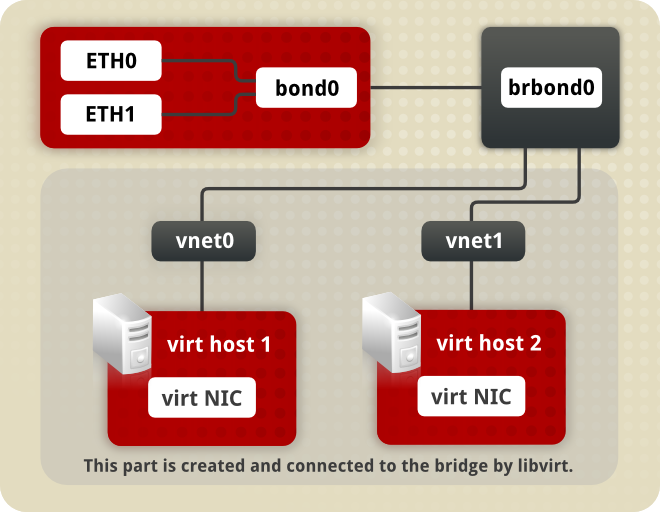
Figure 11.1. A network bridge consisting of two bonded Ethernet interfaces.
We now have two or more interface configuration files with the
MASTER=bond0 directive. These point to the configuration file named /etc/sysconfig/network-scripts/ifcfg-bond0, which contains the DEVICE=bond0 directive. This ifcfg-bond0 in turn points to the /etc/sysconfig/network-scripts/ifcfg-br0 configuration file, which contains the IP address, and acts as an interface to the virtual networks inside the host.
To bring up the new or recently configured interfaces, issue a command as
root in the following format: ifup device
Alternatively, restart the networking service, in order for the changes to take effect, as follows:
~]# service network restart11.2.6.2. Network Bridge with Bonded VLAN
Copier lienLien copié sur presse-papiers!
Virtualization servers that intend to have distinct subnets for its guests while still ensuring availability in the event of a NIC failure will often combine bonds, VLANs, and bridges. An example of this configuration will now be given. By creating a bridge on the VLAN instead of the underlying device we allow VLAN tagging to be handled entirely through the host with no need to configure the guests' interfaces.
- Ensure the bond and VLAN have been configured as outlined in Section 11.2.5, “Configuring a VLAN over a Bond”.
- Create the bridge's configuration file,
ifcfg-br0:~]# vi /etc/sysconfig/network-scripts/ifcfg-br0 DEVICE=br0 ONBOOT=yes TYPE=Bridge IPADDR=192.168.10.1 NETMASK=255.255.255.0 NM_CONTROLLED=no - Adjust the VLAN's configuration file,
ifcfg-bond0.192from the earlier example, to use the newly createdbr0as its master:~]# vi /etc/sysconfig/network-scripts/ifcfg-bond0.192 DEVICE=bond0.192 BOOTPROTO=none ONPARENT=yes #IPADDR=192.168.10.1 #NETMASK=255.255.255.0 VLAN=yes NM_CONTROLLED=no BRIDGE=br0 - To bring up the new or recently configured interfaces, issue a command as
rootin the following format:ifup deviceAlternatively, restart the networking service, in order for the changes to take effect, as follows:~]# service network restart

'%20d='M201.5%20305.5c-13.8%200-24.9-11.1-24.9-24.6%200-13.8%2011.1-24.9%2024.9-24.9%2013.6%200%2024.6%2011.1%2024.6%2024.9%200%2013.6-11.1%2024.6-24.6%2024.6zM504%20256c0%20137-111%20248-248%20248S8%20393%208%20256%20119%208%20256%208s248%20111%20248%20248zm-132.3-41.2c-9.4%200-17.7%203.9-23.8%2010-22.4-15.5-52.6-25.5-86.1-26.6l17.4-78.3%2055.4%2012.5c0%2013.6%2011.1%2024.6%2024.6%2024.6%2013.8%200%2024.9-11.3%2024.9-24.9s-11.1-24.9-24.9-24.9c-9.7%200-18%205.8-22.1%2013.8l-61.2-13.6c-3-.8-6.1%201.4-6.9%204.4l-19.1%2086.4c-33.2%201.4-63.1%2011.3-85.5%2026.8-6.1-6.4-14.7-10.2-24.1-10.2-34.9%200-46.3%2046.9-14.4%2062.8-1.1%205-1.7%2010.2-1.7%2015.5%200%2052.6%2059.2%2095.2%20132%2095.2%2073.1%200%20132.3-42.6%20132.3-95.2%200-5.3-.6-10.8-1.9-15.8%2031.3-16%2019.8-62.5-14.9-62.5zM302.8%20331c-18.2%2018.2-76.1%2017.9-93.6%200-2.2-2.2-6.1-2.2-8.3%200-2.5%202.5-2.5%206.4%200%208.6%2022.8%2022.8%2087.3%2022.8%20110.2%200%202.5-2.2%202.5-6.1%200-8.6-2.2-2.2-6.1-2.2-8.3%200zm7.7-75c-13.6%200-24.6%2011.1-24.6%2024.9%200%2013.6%2011.1%2024.6%2024.6%2024.6%2013.8%200%2024.9-11.1%2024.9-24.6%200-13.8-11-24.9-24.9-24.9z'/%3e%3c/svg%3e)