 Red Hat Summit
Ce contenu n'est pas disponible dans la langue sélectionnée.
9.5. Enabling and Disabling User Accounts
User accounts can be deactivated or disabled. A disabled user cannot log into IdM or its related services (like Kerberos) and he cannot perform any tasks. However, the user account still exists within Identity Management and all of the associated information remains unchanged.
Note
Any existing connections remain valid until the Kerberos TGT and other tickets expire. Once the ticket expires, the user cannot renew the ticket.
9.5.1. From the Web UI
Copier lienLien copié sur presse-papiers!
Multiple users can be disabled from the full users list by selecting the checkboxes by the desired users and then clicking the Disable link at the top of the list.
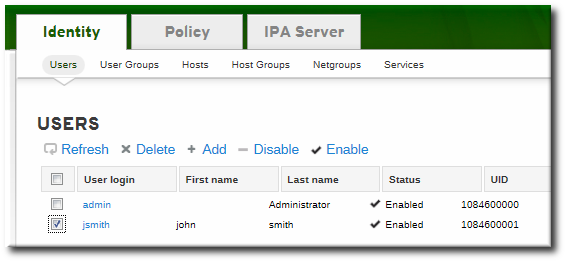
Figure 9.2. Disable/Enable Options at the Top of the Users List
A user account can also be disabled from the user's individual entry page.
- Open the Identity tab, and select the Users subtab.
- Click the name of the user to deactivate or activate.
- In the actions drop-down menu, select the Disable item.
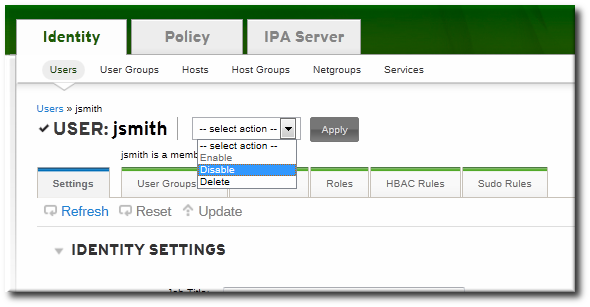
- Click the Accept button.
When a user account is disabled, it is signified by a minus (-) icon for the user status in the user list and by the username on the entry page. Additionally, the text for the user is gray (to show it is inactive) instead of black.
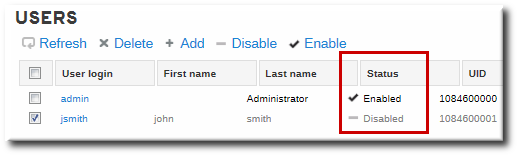
Figure 9.3. Disable Icon for User Status
9.5.2. From the Command Line
Copier lienLien copié sur presse-papiers!
Users are enabled and disabled using
user-enable and user-disable commands. All that is required is the user login. For example:
[bjensen@server ~]$ ipa user-disable jsmith
'%20d='M201.5%20305.5c-13.8%200-24.9-11.1-24.9-24.6%200-13.8%2011.1-24.9%2024.9-24.9%2013.6%200%2024.6%2011.1%2024.6%2024.9%200%2013.6-11.1%2024.6-24.6%2024.6zM504%20256c0%20137-111%20248-248%20248S8%20393%208%20256%20119%208%20256%208s248%20111%20248%20248zm-132.3-41.2c-9.4%200-17.7%203.9-23.8%2010-22.4-15.5-52.6-25.5-86.1-26.6l17.4-78.3%2055.4%2012.5c0%2013.6%2011.1%2024.6%2024.6%2024.6%2013.8%200%2024.9-11.3%2024.9-24.9s-11.1-24.9-24.9-24.9c-9.7%200-18%205.8-22.1%2013.8l-61.2-13.6c-3-.8-6.1%201.4-6.9%204.4l-19.1%2086.4c-33.2%201.4-63.1%2011.3-85.5%2026.8-6.1-6.4-14.7-10.2-24.1-10.2-34.9%200-46.3%2046.9-14.4%2062.8-1.1%205-1.7%2010.2-1.7%2015.5%200%2052.6%2059.2%2095.2%20132%2095.2%2073.1%200%20132.3-42.6%20132.3-95.2%200-5.3-.6-10.8-1.9-15.8%2031.3-16%2019.8-62.5-14.9-62.5zM302.8%20331c-18.2%2018.2-76.1%2017.9-93.6%200-2.2-2.2-6.1-2.2-8.3%200-2.5%202.5-2.5%206.4%200%208.6%2022.8%2022.8%2087.3%2022.8%20110.2%200%202.5-2.2%202.5-6.1%200-8.6-2.2-2.2-6.1-2.2-8.3%200zm7.7-75c-13.6%200-24.6%2011.1-24.6%2024.9%200%2013.6%2011.1%2024.6%2024.6%2024.6%2013.8%200%2024.9-11.1%2024.9-24.6%200-13.8-11-24.9-24.9-24.9z'/%3e%3c/svg%3e)