 Red Hat Summit
Ce contenu n'est pas disponible dans la langue sélectionnée.
Developer Portal
A good developer portal is a must have to assure adoption of your API. Create yours in no time.
Abstract
Chapter 1. Developer Portal Authentication
Follow these steps to configure access to your developer portal.
This article shows how to enable and disable the different types of authentication that can be made available on your developer portal to allow your developers to sign up or sign in.
At the moment, 3scale supports three different ways of authenticating to the developer portal, which are covered in the following sections:
By default, only one type of authentication will be enabled on your developer portal, two if you signed up on 3scale.net:
- Username/email and password
- Authentication via GitHub (using the 3scale GitHub application) - only enabled by default if you signed up on 3scale.net
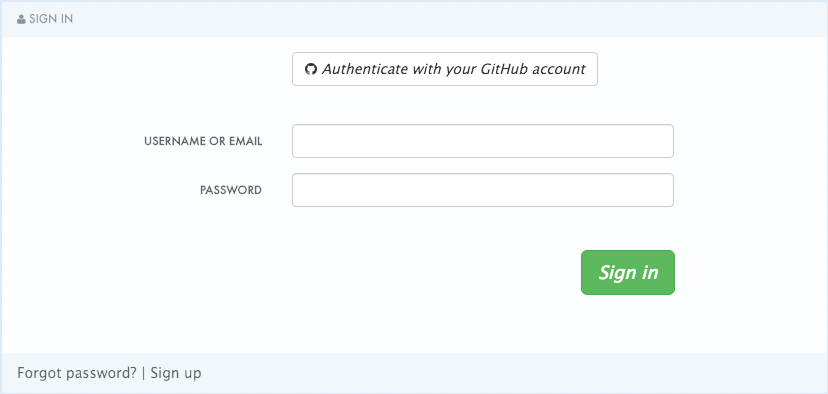
Older 3scale accounts (created prior to December 14th, 2015) might need to follow an extra step in order to enable GitHub and Auth0 authentication.
If this applies to you, you will need to add the following code snippet to the login and signup templates in order to enable this feature in both forms.
{% include 'login/sso' %}
{% include 'login/sso' %}1.1. Enabling and disabling username/email and password
By default, the username/email and password authentication is enabled on your developer portal. Usually there is no change to be made here, as this is a standard way for your developers to create an account and to login.
However, in some rare cases you might want to remove this authentication type. To do so, edit the Login > New template as in the screenshot below:
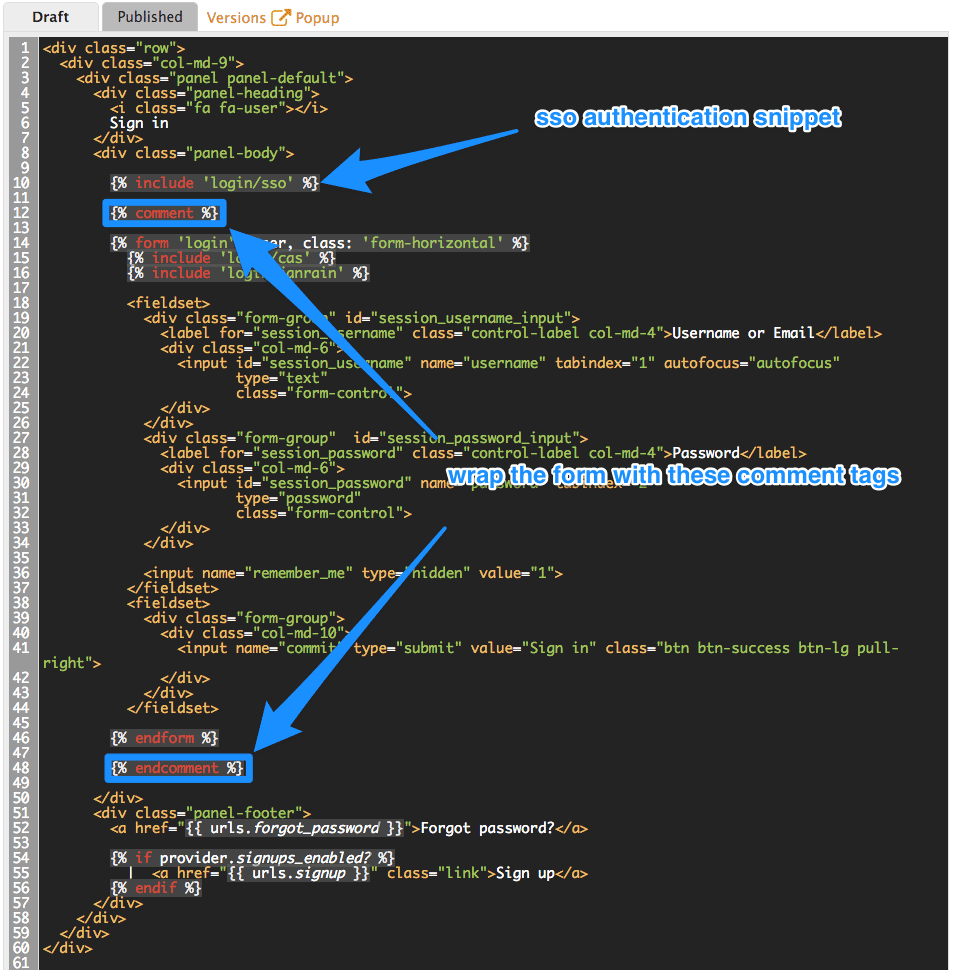
If you need to add back the username/email and password authentication to your developer portal, just remove the liquid comment tags added in the previous step.
1.2. Enabling and disabling authentication via GitHub
In order to enable your own GitHub application, first you will need to create one and retrieve the corresponding credentials.
There are two different ways you can configure authentication via GitHub:
- Using the 3scale GitHub application (enabled by default for hosted 3scale accounts)
- Using your own GitHub application (for on-premises installations)
To make changes to this default configuration, you can go to your 3scale Admin Portal, in Settings > Developer Portal > SSO Integrations you will see the following screen:
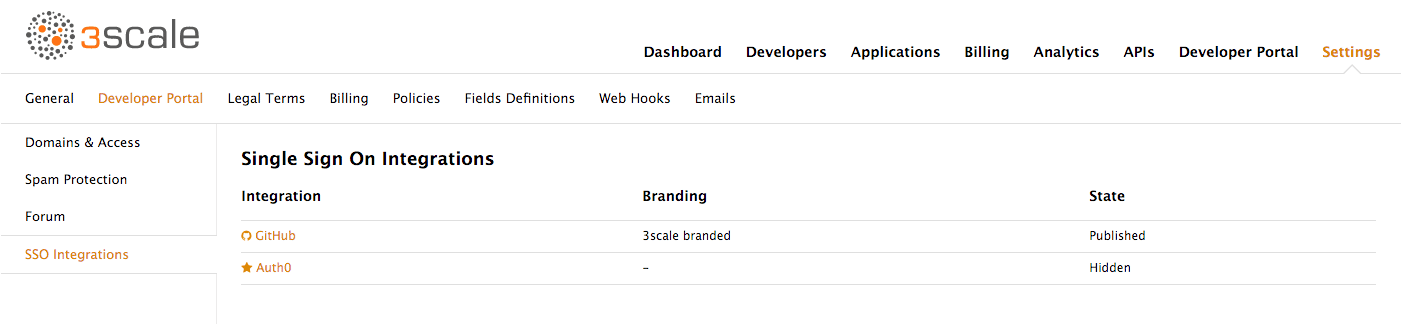
Click on GitHub to access the configuration screen:
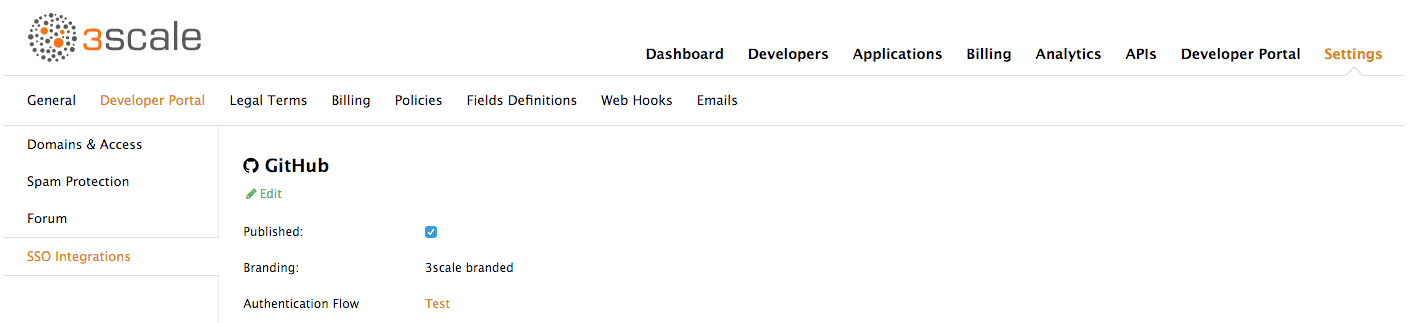
From this screen you can:
- Make the GitHub authentication available or unavailable on your developer portal – to do so, simply check or uncheck the "Published" box.
-
Choose the 3scale branded GitHub application or add your own GitHub application – the 3scale GitHub application is enabled (published) by default. You can configure your own GitHub application by clicking on Edit and entering the details of the OAuth application created in GitHub ("Client" and "Client secret"). Please note that in order to make the integration work properly with your own GitHub application, you should configure the authorization callback URL of your GitHub application using the "Callback URL" that you should see after switching to the "custom branded" option (e.g.
https://yourdomain.3scale.net/auth/github/callback). - Test that the configured authentication flow works as expected.
1.3. Enabling and disabling authentication via Auth0
1.3.1. Note
This feature is only available on the Enterprise plans.
In order to have your developers authenticate using Auth0, you first need to have a valid Auth0 subscription.
Authentication via Auth0 won’t be enabled by default. If you want to use your Auth0 account in conjunction with 3scale to manage the access to your developer portal, you can follow these steps to configure it:
Go to your 3scale Admin Portal, in Settings > Developer Portal > SSO Integrations click on Auth0.
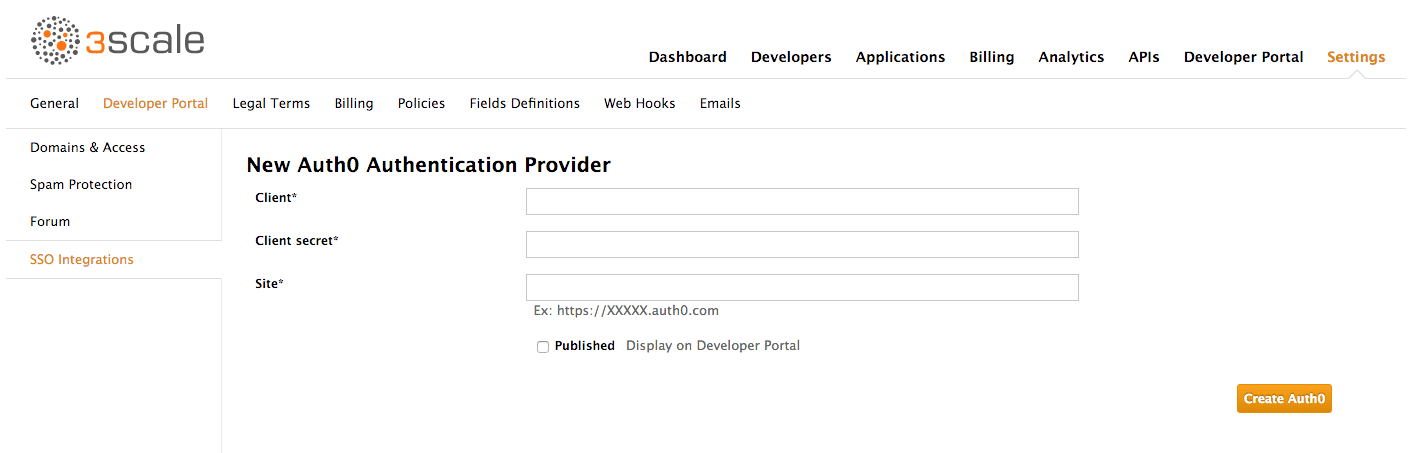
On this configuration screen, you’ll need to add the details of your Auth0 account. Once you’ve entered the client ID, client secret, and site, check the "Published" box and click on Create Auth0 to make it available on your developer portal.
1.4. Enabling and disabling authentication via Red Hat Single Sign-On
This feature is only available on enterprise plans.
Red Hat Single Sign-On (RH-SSO) is an integrated Sign-On solution (SSO) that, when used in conjunction with 3scale, allows you to authenticate your developers using any of the available Red Hat Single Sign-On identity brokering and user federation options.
Refer to the supported configurations page for information on which versions of Red Hat Single Sign-On are compatible with 3scale.
1.4.1. Before You Begin
Before you can integrate Red Hat Single Sign-On with 3scale, you must have a working Red Hat Single Sign-On instance. Refer to the Red Hat Single Sign-On documentation for installation instructions: Installing RH-SSO 7.0
1.4.2. Configuring Red Hat Single Sign-On
Perform the following steps to configure Red Hat Single Sign-On:
- Create a realm as described in the Red Hat Single Sign-On documentation.
- Add a client by going to Clients and clicking on Create. Fill the form as indicated in the image below:
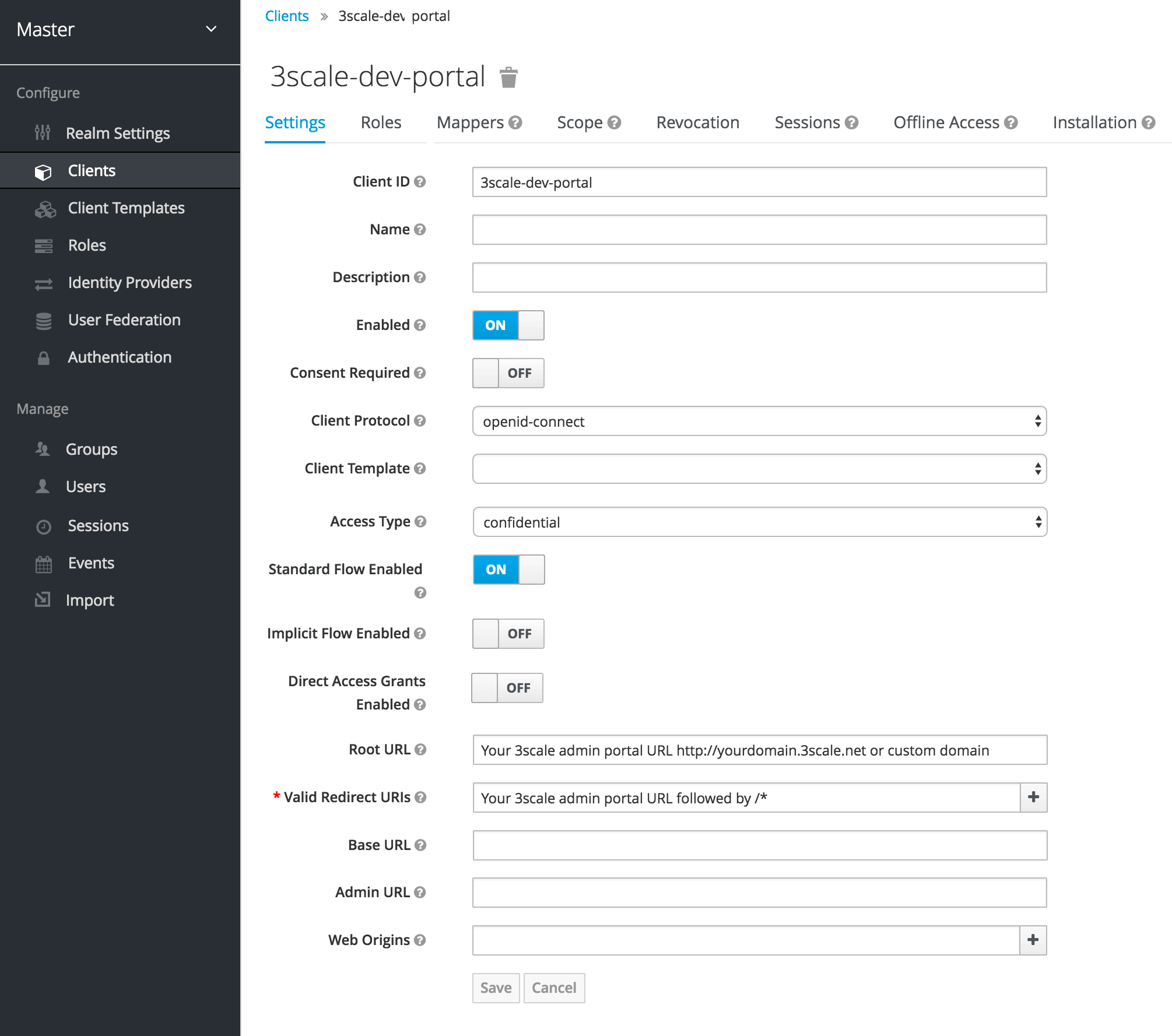
- In the Client ID field, choose a name for your client.
- The Direct Grants Only field must be disabled.
- In the Client Protocol field choose openid-connect.
- In Access Type choose confidential.
-
In the Root URL field, add your 3scale admin portal URL. This should be the URL address that you use to log in into your developer portal, e.g.:
https://yourdomain.3scale.netor your custom URL. In the Valid Redirect URLs, add your domain again followed by
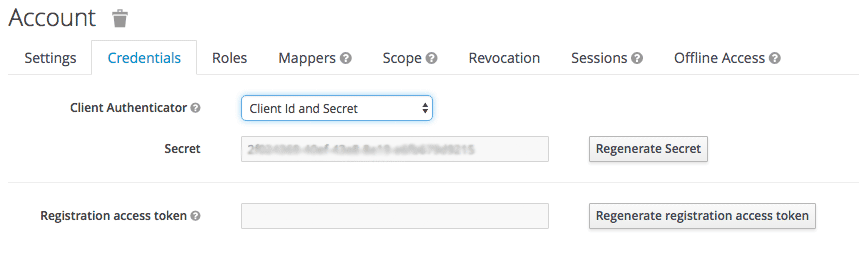
/*like this:https://yourdomain.3scale.net/*.- Get the client secret by going to the Client you just created and then clicking on Credentials. Choose Client Id and Secret.
- In order to configure a seamless integration and make the signup on 3scale transparent for the user, you need to configure a couple of mappers. To do so go to Clients > select your client > Mappers. For the fist mapper, verified email, click on Add Builtin.
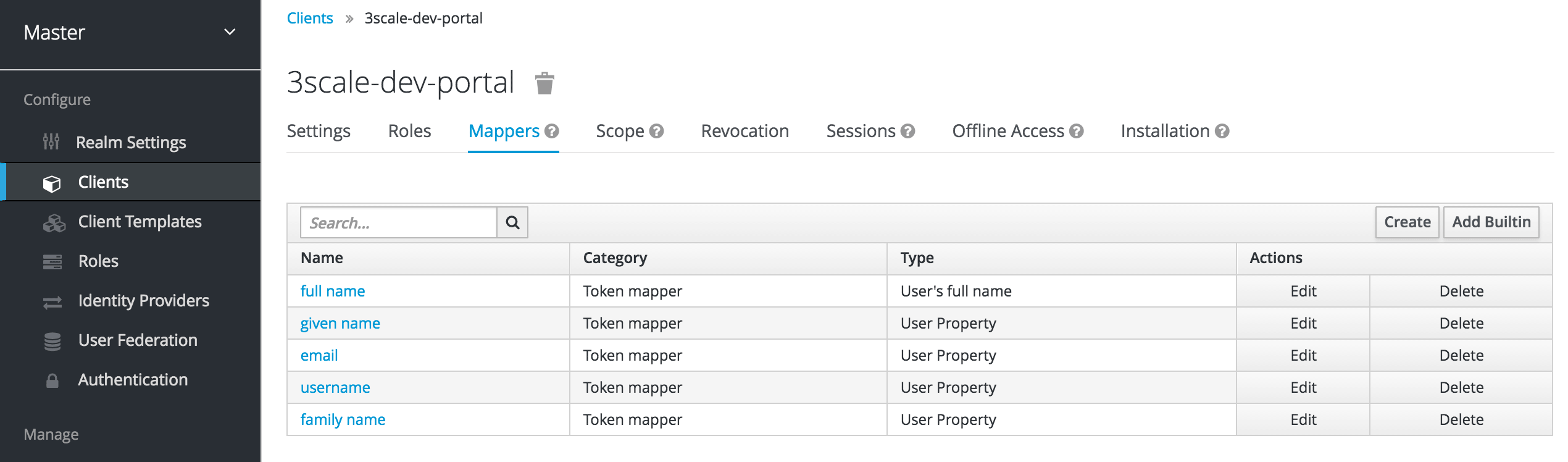
+ Then select the email verified option, and click on Add selected to save the changes.
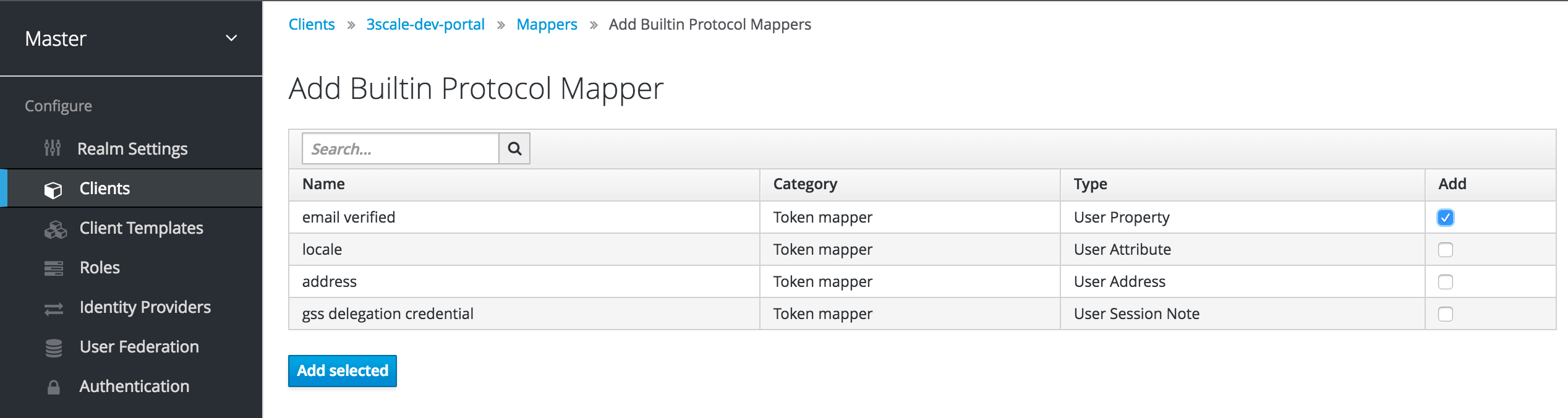
+ For the second mapper, click on Create and in Mapper Type choose User Attribute. Fill in the form as shown in the screenshot below:
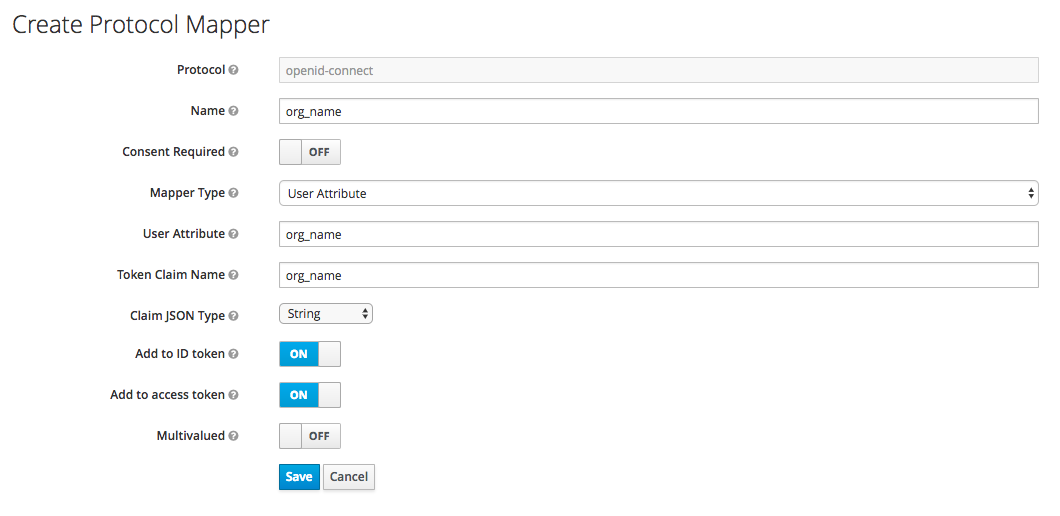
- The User Attribute field should be org_name.
- The Token Claim Name field should be org_name as well.
- In Claim JSON Type choose String.
Turn on the Add to ID token and Add to access token switches.
Finally, click on Save. By doing this we’re adding organization name as an attribute to our users on RH-SSO. If a value is attached, 3scale will be able to create an account automatically. If not, then the user will be asked to indicate one before the account can be created.
- Add a user so you can test the integration. To do so, go to Users and then click on Add user and make you provide information for all the fields required.
Alternatively, you could use RH-SSO as an identity broker or configure it to federate external databases. For more information about how to configure these, please see the RH-SSO documentation for identity brokering and user federation.
If you decide to go this way, and in order for your developers to be able to skip both the RH-SSO and 3scale account creation steps, we recommend the following configuration. In the example provided, we’re using GitHub as our IdP.
- On RH-SSO, after configuring GitHub in Identity providers, go to the tab called Mappers and click on Create
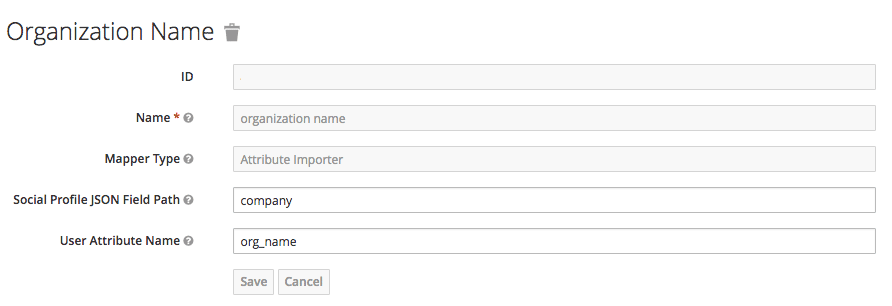
- Give it a name so you can identify it.
- In Mapper Type select Attribute Importer.
- In Social Profile JSON Field Path add company, which is the name of the attribute on GitHub.
In User Attribute Name add org_name, that is how we called the attribute in RH-SSO.
NoteRH-SSO requires first and last name as well as email as mandatory fields. 3scale requires email address, username, and organization name. So in addition to configuring a mapper for the organization name, and for your users to be able to skip both sign up forms, make sure that:
- In the IdP account, they have their first name and last name set.
- In the IdP account, their email address is accessible. E.g. In GitHub, if you set up your email address as private, it won’t be shared.
1.4.3. Configuring 3scale
Authentication via RH-SSO won’t be enabled by default. If you want to use your RH-SSO account in conjunction with 3scale to manage access to your developer portal, you can follow the steps below to configure it.
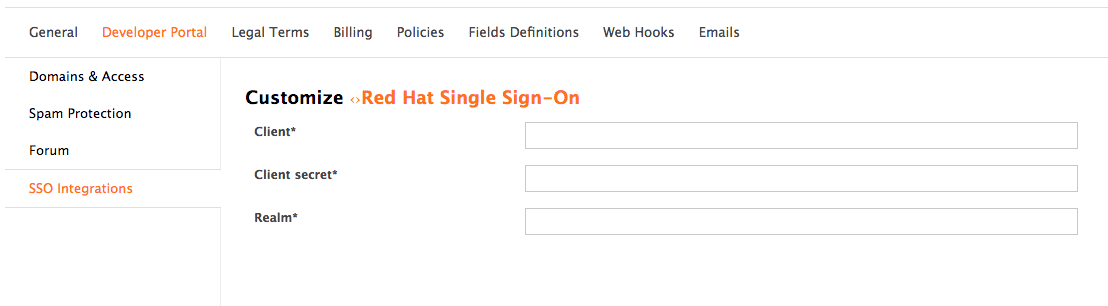
Go to your 3scale Admin Portal, in Settings > Developer Portal > SSO Integrations click on Red Hat Single Sign-On. (Remember: this is an enterprise only feature so you may have to ask your account manager to enable this for you).
On this configuration screen, you’ll need to add the details of your RH-SSO client that you have configured in the previous step:
- Client: Name of your client on RH-SSO
- Client Secret: Client secret on RH-SSO
- Realm: Realm name and URL address to your RH-SSO
Once you’ve entered those, check the "Published" box and click on Create RH-SSO to make it available on your developer portal.
Chapter 2. Change Built-in Pages
By the end of this section, you’ll be able to modify and/or hide any elements on the system-generated pages.
There are some elements generated by the system that are not possible to change from the CMS: the Signup, Dashboard, and Account pages. This guide shows how to customize the content on these pages with some simple CSS and JavaScript scripts.
The 3scale system-generated pages are subject to change (although infrequently). These changes may break any customizations that you implement following this guide. If you can avoid using these hacks, please do so. Before you continue, please be sure that you’ll be able to monitor for any disruptive changes and do the necessary maintenance work to keep your portal functioning correctly.
2.1. Identify the elements
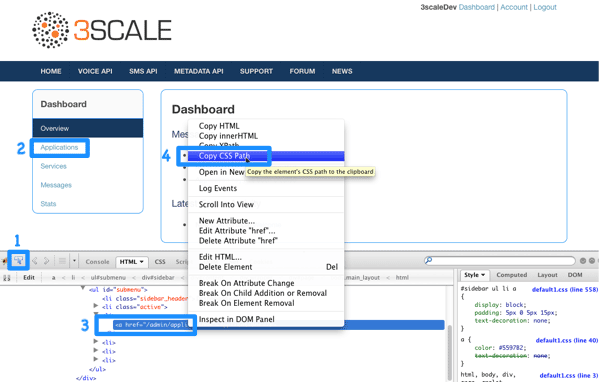
The first and most important thing to do is identify what you want to hide. To do that, use Firebug (or any other developer tools such as Chrome Developer tools or Opera Dragonfly). Choose the desired element, and in the console, right click on it and select Copy CSS path. This way you save the exact CSS path to make it easy to manipulate. Remember, if the element is a part of the sidebar navigation widget, you’ll also have to specify which position in the list. For this, you can use either the "+" selector (for example, to choose 3rd li element: ul + li + li + li) or the :nth-child(n) CSS3 pseudoclass.
2.2. Modify or hide the elements
Now, having identified the elements, you can change their display settings. Depending on the type of element, you can choose from two possible methods: CSS manipulation or jQuery script. CSS manipulation is more lightweight and reliable, but doesn’t work well for some kinds of elements that exist on a number of pages (for example, the 3rd element in the Dashboard’s sidebar also exists in the Account section but has a different value). Some trickier implementations require use of CSS3 which is not supported by old browsers. In the next two steps, you’ll see both of these approaches.
2.3. Option A: CSS
As an example, try to hide the latest forum posts box from the Dashboard page. Following the first step, you have identified its CSS path as:
#three-scale .dashboard_bubble
#three-scale .dashboard_bubbleKeep in mind that it’s the second box with the same path, so you’ll use the "+" selector. Your path will now look like this:
.main_layout #three-scale .dashboard_bubble + .dashboard_bubble
/* or */
.main_layout #three-scale .dashboard_bubble:nth-child(1)
.main_layout #three-scale .dashboard_bubble + .dashboard_bubble
/* or */
.main_layout #three-scale .dashboard_bubble:nth-child(1)Changing display property to none makes that box invisible:
.main_layout #three-scale .dashboard_bubble:nth-child(1) {
  display: none;
}
.main_layout #three-scale .dashboard_bubble:nth-child(1) {
  display: none;
}2.4. Option B: jQuery
If you have a trickier element to hide such as a sidebar menu element, it’s better to use some jQuery. The CSS path of these elements is identical on the Dashboard and Account sections, and you don’t want to hide elements in both sections. So choose the element based on the CSS path and the content. In this example, assume you want to hide the messages section from the Dashboard’s sidebar. Your CSS path is:
#three-scale #submenu li a
#three-scale #submenu li aIn order to match the content, you’ll use the .text() function. You’ll also include the code inside the document’s head and inside the ready function so it’s executed after all the content has been generated.
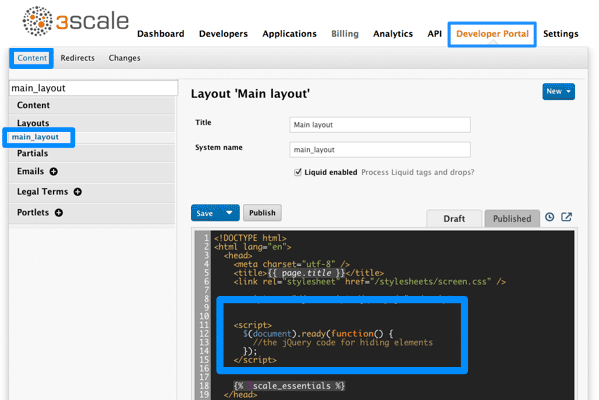
The resulting code snippet will look like this:
This is not the only solution. It just shows one possible way of doing it. The same example could be done using pure CSS with CSS3 selectors basing on the attributes values. For the complete CSS3 selectors specification, take a look here.
Chapter 3. Change CSS
You can customize the look and feel of the entire Developer Portal to match your own branding. A standard CSS stylesheet is available to provide an easy starting point for your customizations.
In this tutorial, you’ll add your own CSS customizations to your Developer Portal and reload it to put your new styling changes live.
3.1. Step 1: Create a new CSS file
There is a default stylesheet, default.css. It is quite large and complex, so rather than extend it, it’s better to create your own stylesheet for any of your own customizations to overwrite the defaults. You create a new stylesheet the same way you create a page (just remember to choose an appropriate MIME content type in the advanced page settings).
It’s important that the selected layout is blank. Otherwise the page layout HTML will obscure the CSS rules.
3.2. Step 2: Link the stylesheet into your page layout
Add the link to your custom CSS in each of your layout templates (or in a partial if you have a common HEAD section) after the link to bootstrap.css. For example:
<link rel="stylesheet" href="/stylesheets/custom.css">
<link rel="stylesheet" href="/stylesheets/custom.css">Now enjoy the beauty of your own unique branding!
Chapter 4. Custom Signup Form Fields
Learn how to add custom signup fields and the different options around this feature.
By default, 3scale provides commonly used fields at user/account/application signup. You may need to add your own custom fields to these common defaults.
4.1. Custom fields
In your Admin Portal, go to Settings > Field Definitions where you can see the default form fields and define new ones.
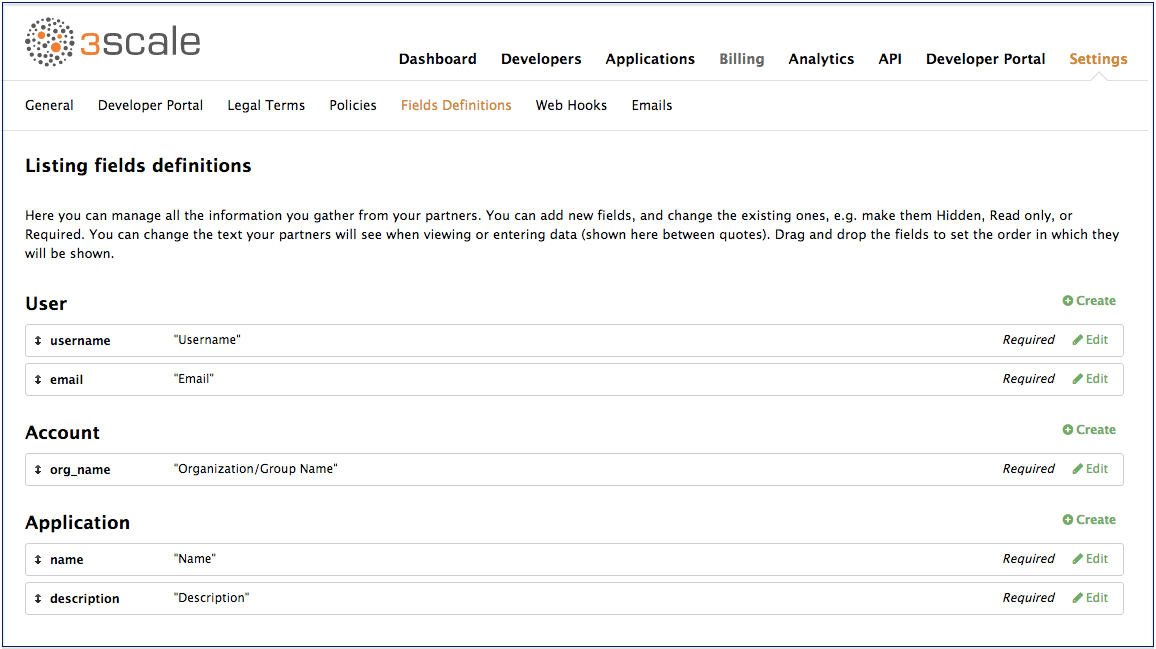
The new account/user signup page is actually an amalgamation of the first two sections. The account fields appear at the top, followed by the user fields, followed by the password fields which don’t need to be configured.
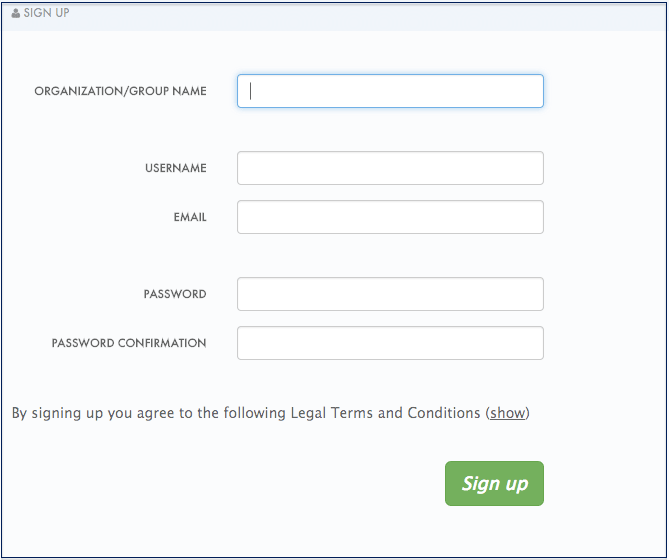
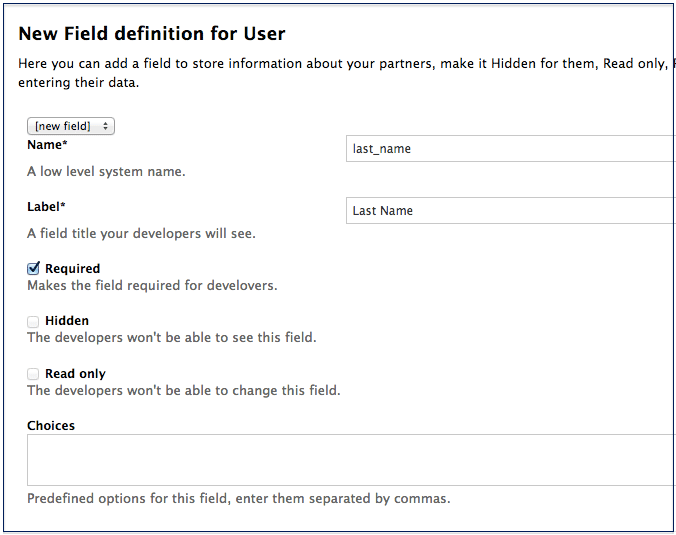
Try adding 3 extra fields, 2 to the user signup section and 1 to the account section. Click create, add the following new field definition and then create it. The required checkbox will, of course, make it mandatory on the signup form. There are also options to make things hidden and read only. A hidden field may be added, for example, when you want new signups to have fields set that you don’t necessarily want to highlight to them, such as access_restricted_areas which would be empty by default. As an admin, you can update this to true later on a per-user basis. Your page logic could read it in to determine what to display. A read-only field might be, for example, browser location, which you could use JavaScript on page load to set.
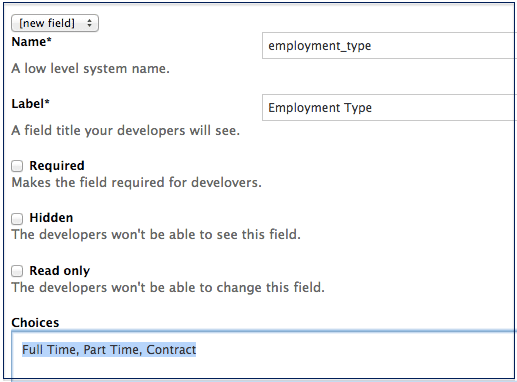
Now try adding a drop-down to the user signup form. Call it "employment type". Add these comma-separated values into the choices field: full time, part time, contract. The drop-down will be populated with these values.
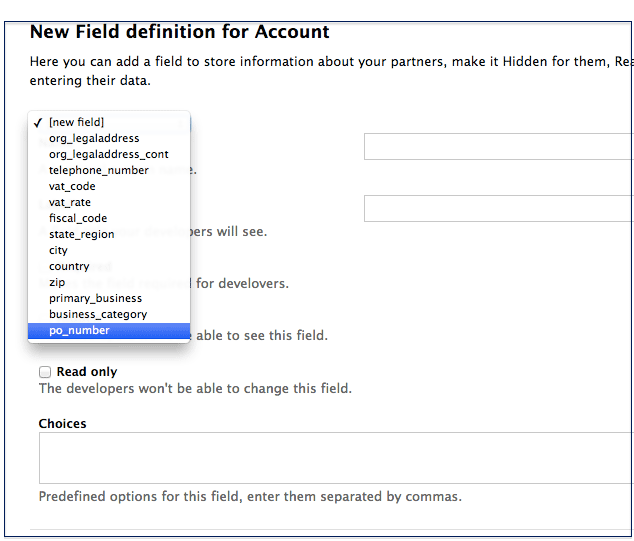
Now add a pre-defined field to the account. Usually the fields you add have no system functionality – they simply hold data that you can access later. (See restricted content.)
Create a field as normal. Then on the drop-down above "name", choose po_number. With this field, a PO number will appear on 3scale-generated invoices sent to this developer account. System-generated fields can be overridden by your admins at any time. Give the field a name – something like "PO number" – and create it.
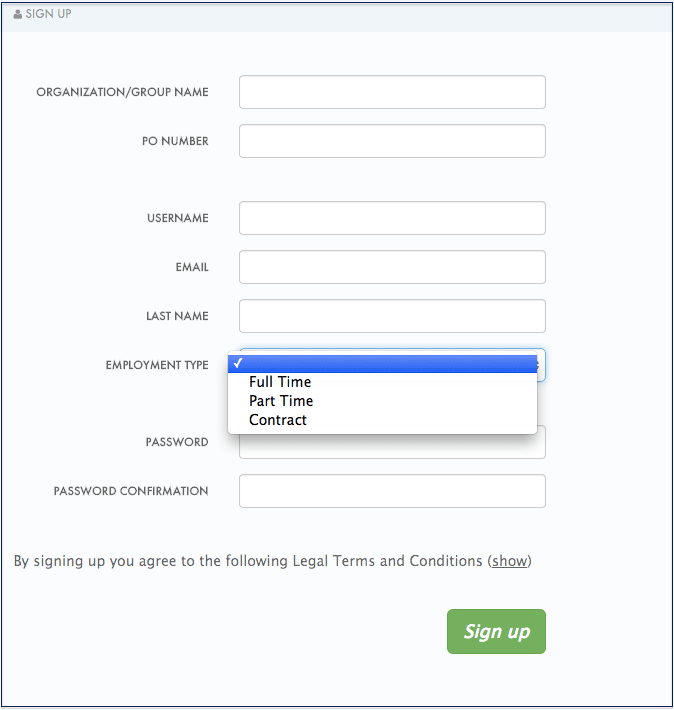
Now take a look at your work. You can see the free text last name and the employment type drop-down have been added to the User section. The PO number system field, also free text, has been added to the Account section.
Finally, these custom fields can be set using the 3scale API. For example, "application create" on 3scale API.
Chapter 5. Change Email Templates
By the end of this section, you will have edited and saved a custom email template.
You can completely customize the content of all standard email communication with developers, allowing you to closely match the workflows you’ve set up for your Developer Portal.
5.1. Step 1: Define your workflows before email configuration
There are a lot of email template options, only a subset of which will be relevant for your workflows. Save yourself time by making sure you’re happy with your workflows before beginning to edit the email templates. This way, you’ll only edit the templates that you’ll actually use.
5.2. Step 2: Test your workflow and identify active email templates
Perform a dry run of your finalized workflows, making sure to test all the possible branches (such as approval and rejection). Then, identify each email notification that your test developer account receives to determine what to edit in the next step.
5.3. Step 3: Edit and save your custom template
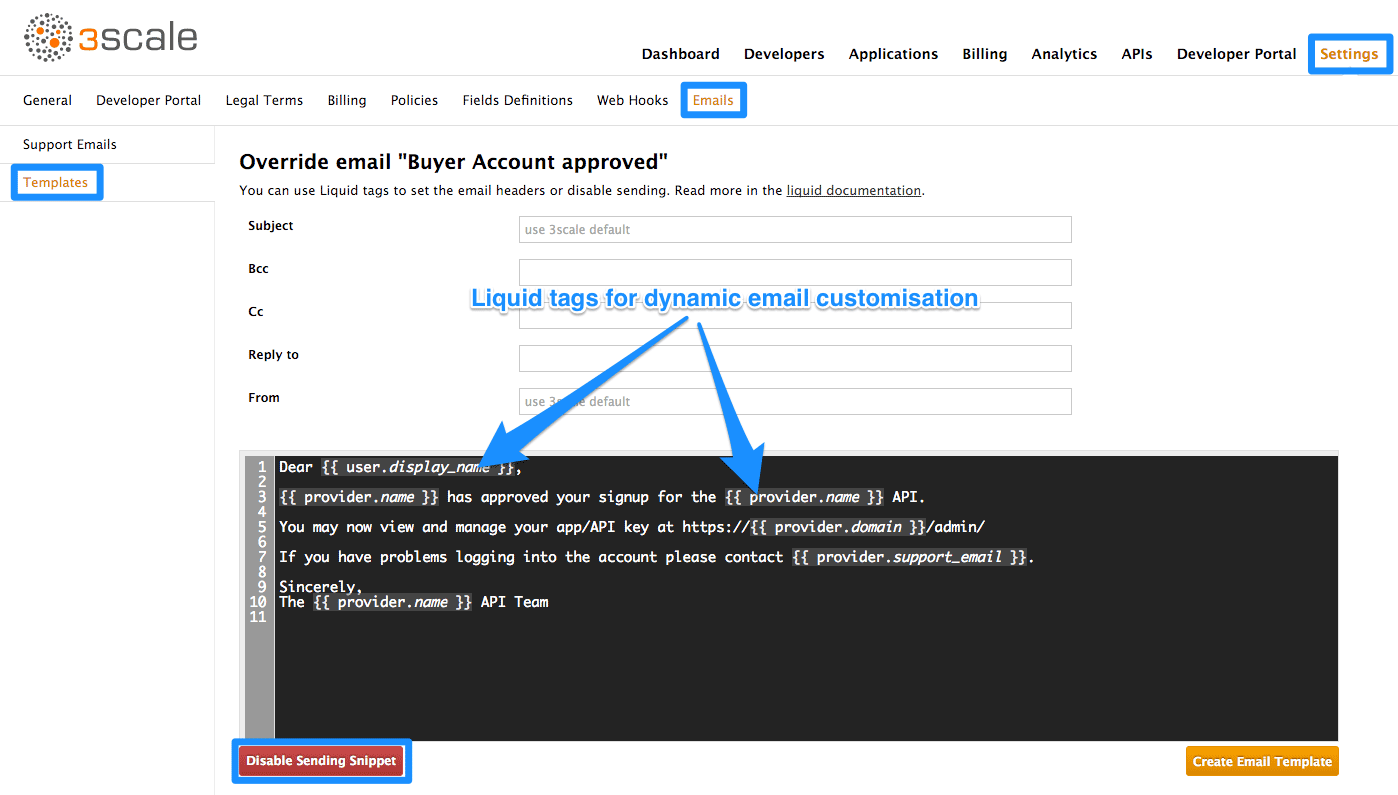
The first time you edit a template, you’ll actually “create” a custom template. Then in subsequent edits, you’ll save your changes. Warning: there is no version control. We recommend you make a local copy if you want to be able to revert changes.
You can use liquid tags for dynamic content in your email. We especially recommend you make backups when you make changes to the liquid tags.
5.4. Step 4: Repeat for all templates in your workflows
Complete these same steps until you’ve covered all possible branches for your workflows.
5.4.1. More information
- Before customizing your email templates, it’s best to have the signup flows fully finalized and tested.
- If you intend to change any of the liquid tags within the email templates, be sure to read up on the liquid reference documentation.
Chapter 6. Liquids: Email Templates
You’ll probably want to customize the email templates with your organization’s own messaging and terminology. You can also take advantage of liquid drops to display personalized information for each of your customers.
Similar to how liquid drops are used in the CMS, every email template has its own context. This means that liquid drops available in one email template may not necessarily be available for other email templates.
This reference outlines which liquid drops are available where, with email templates grouped together by subject matter and the set of liquid drops that they support.
6.1. Account management
The following email templates fall under this category:
- Buyer Account confirmed
- Buyer Account approved
- Buyer account rejected
For these, you can use the following liquid drops:
-
user ⇒ User -
domain ⇒ String -
account ⇒ Account -
provider ⇒ Provider -
support_email ⇒ String
Additionally, the following template:
Password recovery for buyer
have access to the following liquid drops:
-
user ⇒ User -
provider ⇒ Provider -
url ⇒ url
The email to invite additional users to an account:
Invitation
has access to:
-
account ⇒ Account -
provider ⇒ Provider -
url ⇒ url
6.2. Credit card notifications
- Credit card expired notification for provider
- Credit Card expired notification for buyer
You can use the following liquid drops:
-
user_account ⇒ Account -
account ⇒ Account -
provider_account ⇒ Provider -
provider ⇒ Provider
6.3. Limit alerts
- Alert notification for provider (>= 100%)
- Alert notification for buyer (>= 100%)
- Alert notification for provider (< 100%)
- Alert notification for buyer (< 100%)
have access to:
-
application ⇒ Application -
account ⇒ Account -
provider ⇒ Provider -
service ⇒ Service -
alert ⇒ Alert
6.4. Applications
The following email templates all deal with application and application plan notifications.
- Application created for provider
They have access to:
-
url ⇒ url
Application plan change request notification email templates:
- Plan change request for buyer
- Plan change request for provider
They have access to:
-
application ⇒ Application -
provider ⇒ Provider -
account ⇒ Account -
user ⇒ User -
plan ⇒ Plan -
credit_card_url ⇒ credit_card_url
Finally, the following email templates have an increasing number of available liquid drops, starting with the base for…
- Application plan changed for buyer
- Application plan changed for provider
- Application trial period expired for buyer
They have access to:
-
provider ⇒ Provider -
account ⇒ Account -
user ⇒ User -
plan ⇒ Plan
As well as all of the above liquid drops, the following application plan messages…
- Application suspended for buyer
- Application accepted for buyer
- Application rejected for buyer
- Application contract cancelled for provider
have the additional liquid drops listed
-
application ⇒ Application -
service ⇒ Service
More liquid drops accumulate for the following email templates for application keys:
- Application key created for buyer
- Application key deleted for buyer
-
key ⇒ key
6.5. Invoicing
The following email template…
- Review invoices prior to charging for provider
has access to:
-
provider ⇒ Provider -
url ⇒ String>
Additionally, the following templates…
- Invoice charge failure for provider without retry
- Invoice upcoming charge for buyer
- Invoice charge failure for provider with retry
- Invoice charge failure for buyer without retry
- Invoice charged successfully for buyer
- Invoice charge failure for buyer with retry
share the following liquids:
-
account ⇒ Account -
provider ⇒ Provider -
cost ⇒ cost -
invoice_url ⇒ invoice_url -
payment_url ⇒ payment_url
6.6. Services
The following email templates:
- Service contract cancelled for provider
- Service trial period expired for buyer
- Service plan changed for provider
- Service contract suspended for buyer
have access to:
-
provider ⇒ Provider -
account ⇒ Account -
user ⇒ User -
plan ⇒ Plan
As well as the above liquid drops, the following service templates…
- Service created for provider
- Service accepted for buyer
- Service rejected for buyer
have the additional liquid drops listed:
-
service ⇒ Service -
service_contract ⇒ Contract -
subscription ⇒ Contract
6.7. Signup
The following email templates…
- Sign-up notification for provider
- Sign-up notification for buyer
have access to:
-
user ⇒ User -
provider ⇒ Provider -
url ⇒ activate_url
Chapter 7. Liquid Reference
The following variables are available in every Liquid template:
- provider - all your services, plans and settings under one hood
- urls - routes to built-in pages of the developers portal (login, signup etc.)
- current_user - username, address and rights of the currently logged-in user
- current_account - messages, applications and plans of the currently logged-in user
- today - current date
Builtin pages can also have other variables available (they are mentioned in the CMS editor). For example, an edit user form edit will have a user variable assigned or while displaying an application detail, you can expect to have a variable application accessible.
The type of a variable (an important thing to know to use this reference) can be determined by putting a {% debug:help %} tag into the page which will list all the available variables and it’s types in an HTML comment for you. However, usually they can be guessed quite easily from the method or variable name.
7.1. Drops
- Account drop
- AccountPlan drop
- Alert drop
- Application drop
- ApplicationKey drop
- ApplicationPlan drop
- Base drop
- Base drop
- BillingAddressField drop
- Can drop
- Can drop
- Cas drop
- Contract drop
- Country drop
- CountryField drop
- CurrentUser drop
- Error drop
- Errors drop
- Feature drop
- Field drop
- Flash drop
- Forum drop
- I18n drop
- Invitation drop
- Invoice drop
- LineItem drop
- Message drop
- Message drop
- Metric drop
- Page drop
- Page drop
- Pagination drop
- Part drop
- PaymentGateway drop
- PaymentTransaction drop
- PlanFeature drop
- Post drop
- Post drop
- PricingRule drop
- Provider drop
- ReferrerFilter drop
- Request drop
- Role drop
- Search drop
- Service drop
- ServiceContract drop
- ServicePlan drop
- TimeZone drop
- Today drop
- Topic drop
- Topic drop
- URL drop
- URLs drop
- UsageLimit drop
- User drop
7.2. Tags
- Tag 'braintree_customer_form'
- Tag 'csrf'
- Tag 'content'
- Tag 'content_for'
- Tag 'debug'
- Tag 'email'
- Tag 'flash'
- Tag 'footer'
- Tag 'form'
- Tag 'latest_forum_posts'
- Tag 'latest_messages'
- Tag 'logo'
- Tag 'menu'
- Tag 'oldfooter'
- Tag 'plan_widget'
- Tag 'portlet'
- Tag 'submenu'
- Tag '3scale_essentials'
- Tag 'user_widget'
7.3. Filters
7.4. Drops (up)
7.4.1. Account drop (up)
A developer account. See User drop if you are looking for the email addresses or similar information.
7.4.1.1. Methods
7.4.1.1.1. errors
If a form of this model is rendered after unsuccesfull submit, this returns" errors that occured.
{{ account.errors.name | inline_errors }}
{{ account.errors.name | inline_errors }}7.4.1.1.2. id
Returns the id of the account
7.4.1.1.3. name
Returns the organization name of the developer’s account
7.4.1.1.4. vat_zero_text
Return a text about a vat zero
7.4.1.1.5. vat_rate
Return the vat rate
7.4.1.1.6. unread_messages
Unread messages
7.4.1.1.7. latest_messages
Return the latest messages
7.4.1.1.8. bought_account_plan
Returns the plan the account has contracted
7.4.1.1.9. bought_account_contract
Returns the contract account
7.4.1.1.10. credit_card_display_number
7.4.1.1.11. credit_card_expiration_date
7.4.1.1.12. credit_card_required?
Returns whether the account is required to enter credit card details
7.4.1.1.13. credit_card_stored?
Returns whether the account has credit card details stored
7.4.1.1.14. credit_card_missing?
Returns whether the account has no credit card details stored
7.4.1.1.15. timezone
Returns timezone of this account
7.4.1.1.16. paid?
Returns whether the account has at least a paid contract
7.4.1.1.17. on_trial?
Returns whether the account is on trial period, i.e. all his paid contracts has to be in trial period
7.4.1.1.18. telephone_number
Returns the telephone number of the account
7.4.1.1.19. approval_required?
Returns whether the account requires approval?
7.4.1.1.20. created_at
Returns UNIX timestamp of account creation (signup) Example: Converting timestamp to JavaScript Date
<script>
  var data = new Date({{ account.created_at }} * 1000);
</script>
<script>
  var data = new Date({{ account.created_at }} * 1000);
</script>7.4.1.1.21. full_address
Can be composed by legal address, city and state
7.4.1.1.22. applications
Returns the applications of the account
7.4.1.1.23. subscribed_services
Returns a array with ServiceContract drops
7.4.1.1.24. admin
Returns the admin user of this account
7.4.1.1.25. extra_fields_plain_text
Returns the extra fields defined for the account as plain text
7.4.1.1.26. fields_plain_text
Returns the fields defined for the account as plain text
7.4.1.1.27. extra_fields
Returns only extra fields with values of this account Example: Print all extra fields
{% for field in account.extra_fields %}
  {{ field.label }}: {{ field.value }}
{% endfor %}
{% for field in account.extra_fields %}
  {{ field.label }}: {{ field.value }}
{% endfor %}7.4.1.1.28. fields
Returns all fields with values of this account Example: Print all fields
{% for field in account.fields %}
  {{ field.label }}: {{ field.value }}
{% endfor %}
{% for field in account.fields %}
  {{ field.label }}: {{ field.value }}
{% endfor %}7.4.1.1.29. builtin_fields
7.4.1.1.30. multiple_applications_allowed?
7.4.1.1.31. billing_address
Returns the billing address of this account
7.4.1.1.32. has_billing_address?
Returns whether this account has a billing address or not
7.4.1.1.33. can
Give access to permission methods
{% if account.can.be_deleted? %}
  <!-- do something -->
{% endif %}
{% if account.can.be_deleted? %}
  <!-- do something -->
{% endif %}7.4.1.1.34. edit_url
7.4.1.1.35. edit_ogone_billing_address_url
7.4.1.1.36. edit_payment_express_billing_address_url
7.4.1.1.37. edit_braintree_blue_credit_card_details_url
7.4.1.1.38. domain
7.4.1.1.39. upgraded?
7.4.1.1.40. requires_credit_card?
7.4.1.1.41. support_email
7.4.1.1.42. finance_support_email
7.4.2. AccountPlan drop (up)
Example: Using account plan drop in liquid
<p class="notice">The examples for plan drop apply here</p>
<p class="notice">The examples for plan drop apply here</p>7.4.2.1. Methods
7.4.2.1.1. selected?
Returns whether the plan is selected
{% if plan.selected? %}
  <p>You will signup to {{ plan.name }}</p>
{% endif %}
{% if plan.selected? %}
  <p>You will signup to {{ plan.name }}</p>
{% endif %}7.4.2.1.2. bought?
Returns whether the plan is bought
{% if plan.bought? %}
   <p>You are  on this plan already!</p>
{% endif %}
{% if plan.bought? %}
   <p>You are  on this plan already!</p>
{% endif %}7.4.2.1.3. features
Returns an array of available features
7.4.2.1.4. setup_fee
Returns the setup fee
7.4.2.1.5. name
Returns the name of the plan
<h2>We offer you a new {{ plan.name }} plan!</h2>
<h2>We offer you a new {{ plan.name }} plan!</h2>7.4.2.1.6. system_name
Returns the system name of the plan
7.4.2.1.7. id
Returns the plan id
7.4.2.1.8. free?
The plan is free if it is not 'paid' (see the 'paid?' method)
7.4.2.1.9. paid?
The plan is 'paid' when it has non-zero fixed or setup fee or there are some pricing rules present
{% if plan.paid? %}
   <p>this plan is a paid one.</p>
{% else %}
   <p>this plan is a free one.</p>
{% endif %}
{% if plan.paid? %}
   <p>this plan is a paid one.</p>
{% else %}
   <p>this plan is a free one.</p>
{% endif %}7.4.2.1.10. approval_required?
Returns whether the plan requires approval?
{% if plan.approval_required? %}
   <p>This plan requires approval.</p>
{% endif %}
{% if plan.approval_required? %}
   <p>This plan requires approval.</p>
{% endif %}7.4.2.1.11. flat_cost
Returns the monthly fixed fee of the plan
7.4.3. Alert drop (up)
Example: Using alert drop in liquid
<h2>Alert details</h2>
Level {{ alert.level }}
Message {{ alert.message }}
Utilization {{ alert.utilization }}
<h2>Alert details</h2>
Level {{ alert.level }}
Message {{ alert.message }}
Utilization {{ alert.utilization }}7.4.3.1. Methods
7.4.3.1.1. level
The alert level can be one of 50, 80, 90, 100, 120, 150, 200, 300.
7.4.3.1.2. message
Text message describing the alert, for example 'hits per minute: 5 of 5'
7.4.3.1.3. utilization
Decimal number marking the actual utilization that triggered the alert (1.0 is equal to 100%).
Used by {{ alert.utilization | times: 100 }} percent.
Used by {{ alert.utilization | times: 100 }} percent.7.4.4. Application drop (up)
Example: Using application drop in liquid
<h2>Application {{ application.name }} ({{ application.application_id }})</h2>
<p>{{ application.description }}</p>
<h2>Application {{ application.name }} ({{ application.application_id }})</h2>
<p>{{ application.description }}</p>7.4.4.1. Methods
7.4.4.1.1. errors
If a form of this model is rendered after unsuccesfull submit, this returns" errors that occured.
{{ application.errors.name | inline_errors }}
{{ application.errors.name | inline_errors }}7.4.4.1.2. id
Returns the id of the application
7.4.4.1.3. can_change_plan?
Returns 'true' if changing of the application is allowed either directly or by request.
7.4.4.1.4. trial?
Returns true if the contract is still in the trial period.
Note: If you change the trial period length of a plan, it does not affect the existing contracts.
7.4.4.1.5. live?
7.4.4.1.6. state
There are three possible states:
    - pending
    - live
    - suspended
    - pending
    - live
- suspended7.4.4.1.7. remaining_trial_period_days
Number of day still left in the trial period.
7.4.4.1.8. plan
Returns a plan drop with the plan of the application
7.4.4.1.9. plan_change_permission_name
Returns name of the allowed action
7.4.4.1.10. plan_change_permission_warning
Returns a warning messenger of the allowed action
7.4.4.1.11. contract
7.4.4.1.12. admin_url
Returns the admin_url of the application
7.4.4.1.13. name
Returns the name of the application
7.4.4.1.14. can
7.4.4.1.15. oauth
7.4.4.1.16. pending?
Returns 'true' if application state is pending
7.4.4.1.17. buyer_alerts_enabled?
7.4.4.1.18. description
Returns the description of the application
7.4.4.1.19. redirect_url
Returns the redirect url for the OAuth of the application
7.4.4.1.20. filters_limit
Returns the amount of referrer filters allowed for this application
7.4.4.1.21. keys_limit
Returns the amount of application keys allowed for this application
7.4.4.1.22. referrer_filters
Returns the referrer filters associated with this application
7.4.4.1.23. rejection_reason
Returns the reason for rejecting an application
7.4.4.1.24. user_key
Returns the user_key of application
7.4.4.1.25. application_id
Returns the application_id of an application
7.4.4.1.26. key
Returns the application id or the user key
7.4.4.1.27. url
Returns URL of the builtin detail view for this application.
7.4.4.1.28. edit_url
Returns URL of the builtin edit view for this application.
7.4.4.1.29. update_user_key_url
7.4.4.1.30. log_requests_url
7.4.4.1.31. alerts_url
7.4.4.1.32. application_keys_url
7.4.4.1.33. service
Service to which that application belongs to.
7.4.4.1.34. keys
Returns the keys of an application
7.4.4.1.35. oauth_mode?
7.4.4.1.36. user_key_mode?
7.4.4.1.37. app_id_mode?
7.4.4.1.38. change_plan_url
7.4.4.1.39. log_requests?
7.4.4.1.40. application_keys
7.4.4.1.41. extra_fields
Returns non-hidden extra fields with values for this application Example: Print all extra fields
{% for field in application.extra_fields %}
  {{ field.label }}: {{ field.value }}
{% endfor %}
{% for field in application.extra_fields %}
  {{ field.label }}: {{ field.value }}
{% endfor %}7.4.4.1.42. fields
Returns all builtin and extra fields with values for this application Example: Print all fields
{% for field in application.fields %}
  {{ field.label }}: {{ field.value }}
{% endfor %}
{% for field in application.fields %}
  {{ field.label }}: {{ field.value }}
{% endfor %}7.4.4.1.43. builtin_fields
Returns only builtin fields of the application
7.4.4.1.44. cinstance
7.4.5. ApplicationKey drop (up)
7.4.5.1. Methods
7.4.5.1.1. id
7.4.5.1.2. value
7.4.5.1.3. url
7.4.5.1.4. application
7.4.6. ApplicationPlan drop (up)
7.4.6.1. Methods
7.4.6.1.1. selected?
Returns whether the plan is selected
{% if plan.selected? %}
  <p>You will signup to {{ plan.name }}</p>
{% endif %}
{% if plan.selected? %}
  <p>You will signup to {{ plan.name }}</p>
{% endif %}7.4.6.1.2. bought?
Returns whether the plan is bought
{% if plan.bought? %}
   <p>You are  on this plan already!</p>
{% endif %}
{% if plan.bought? %}
   <p>You are  on this plan already!</p>
{% endif %}7.4.6.1.3. features
Returns the visible features of the plan
{% if plan == my_free_plan %}
   <p>These plans are the same.</p>
{% else %}
   <p>These plans are not the same.</p>
{% endif %}
{% if plan == my_free_plan %}
   <p>These plans are the same.</p>
{% else %}
   <p>These plans are not the same.</p>
{% endif %}7.4.6.1.4. setup_fee
Returns the setup fee of the plan
7.4.6.1.5. name
Returns the name of the plan
<h2>We offer you a new {{ plan.name }} plan!</h2>
<h2>We offer you a new {{ plan.name }} plan!</h2>7.4.6.1.6. system_name
Returns the system name of the plan
7.4.6.1.7. id
Returns the plan id
7.4.6.1.8. free?
The plan is free if it is not 'paid' (see the 'paid?' method)
7.4.6.1.9. paid?
The plan is 'paid' when it has non-zero fixed or setup fee or there are some pricing rules present
{% if plan.paid? %}
   <p>this plan is a paid one.</p>
{% else %}
   <p>this plan is a free one.</p>
{% endif %}
{% if plan.paid? %}
   <p>this plan is a paid one.</p>
{% else %}
   <p>this plan is a free one.</p>
{% endif %}7.4.6.1.10. approval_required?
Returns whether the plan requires approval?
{% if plan.approval_required? %}
   <p>This plan requires approval.</p>
{% endif %}
{% if plan.approval_required? %}
   <p>This plan requires approval.</p>
{% endif %}7.4.6.1.11. flat_cost
Returns the monthly fixed fee of the plan
7.4.6.1.12. metrics
Returns the metrics of the plan
7.4.6.1.13. usage_limits
Returns the usage limits of the plan
7.4.6.1.14. service
Returns the service of the plan
7.4.7. Base drop (up)
7.4.7.1. Methods
7.4.7.1.1. login_url
7.4.7.1.2. user_identified?
7.4.8. Base drop (up)
7.4.8.1. Methods
7.4.8.1.1. errors
If a form of this model is rendered after unsuccesfull submit, this returns" errors that occured.
{{ base.errors.name | inline_errors }}
{{ base.errors.name | inline_errors }}7.4.8.1.2. title
Returns the title result
7.4.8.1.3. kind
Returns the kind of result, can be 'topic' or 'page'
7.4.8.1.4. url
Returns the resource url of the result
7.4.8.1.5. description
Returns a descriptive string for the result
7.4.9. BillingAddressField drop (up)
7.4.9.1. Methods
7.4.9.1.1. input_name
7.4.9.1.2. label
7.4.9.1.3. choices
7.4.9.1.4. errors
7.4.9.1.5. html_id
7.4.9.1.7. visible?
7.4.9.1.8. read_only?
7.4.9.1.9. name
7.4.9.1.10. value
7.4.9.1.11. required
7.4.10. Can drop (up)
7.4.10.1. Methods
7.4.10.1.1. be_updated?
7.4.10.1.2. add_referrer_filters?
7.4.10.1.3. add_application_keys?
7.4.10.1.4. regenerate_user_key?
7.4.10.1.5. regenerate_oauth_secret?
7.4.10.1.6. manage_keys?
7.4.10.1.7. delete_key?
7.4.11. Can drop (up)
7.4.11.1. Methods
7.4.11.1.1. change_plan?
7.4.12. Cas drop (up)
7.4.12.1. Methods
7.4.12.1.1. login_url
7.4.12.1.2. user_identified?
7.4.13. Contract drop (up)
Plan of the contract {{ contract.plan.name }}
Plan of the contract {{ contract.plan.name }}7.4.13.1. Methods
7.4.13.1.1. errors
If a form of this model is rendered after unsuccesfull submit, this returns" errors that occured.
{{ contract.errors.name | inline_errors }}
{{ contract.errors.name | inline_errors }}7.4.13.1.2. id
Returns the id
7.4.13.1.3. can_change_plan?
Returns true if any form of change is possible
7.4.13.1.4. trial?
Returns true if the contract is still in the trial period.
Note: If you change the trial period length of a plan, it does not affect the existing contracts.
7.4.13.1.5. live?
7.4.13.1.6. state
There are three possible states:
    - pending
    - live
    - suspended
    - pending
    - live
- suspended7.4.13.1.7. remaining_trial_period_days
Number of day still left in the trial period.
7.4.13.1.8. plan
Returns the plan of the contract
7.4.13.1.9. plan_change_permission_name
Returns name of the allowed action
7.4.13.1.10. plan_change_permission_warning
Returns a warning messenger of the allowed action
7.4.13.1.11. contract
7.4.14. Country drop (up)
7.4.14.1. Methods
7.4.14.1.1. errors
If a form of this model is rendered after unsuccesfull submit, this returns" errors that occured.
{{ country.errors.name | inline_errors }}
{{ country.errors.name | inline_errors }}7.4.14.1.2. to_str
7.4.14.1.3. code
7.4.14.1.4. label
7.4.15. CountryField drop (up)
7.4.15.1. Methods
7.4.15.1.1. value
Returns ID of the country
{{ account.fields.country.value }} => 42

compare with:

{{ account.fields.country }} => 'United States'
{{ account.fields.country.value }} => 42

compare with:

{{ account.fields.country }} => 'United States'7.4.15.1.2. name
Returns system name of the field
7.4.15.1.3. required
7.4.15.1.6. visible?
7.4.15.1.7. visible
7.4.15.1.8. read_only
7.4.15.1.9. errors
7.4.15.1.10. input_name
7.4.15.1.11. html_id
7.4.15.1.12. label
Returns label of the field
{{ account.fields.country.label }}
<!-- => 'Country' -->
{{ account.fields.country.label }}
<!-- => 'Country' -->7.4.15.1.13. to_str
Returns name of the country
{{ account.fields.country }} => 'United States'
{{ account.fields.country }} => 'United States'7.4.15.1.14. choices
7.4.16. CurrentUser drop (up)
7.4.16.1. Methods
7.4.16.1.1. errors
If a form of this model is rendered after unsuccesfull submit, this returns" errors that occured.
{{ current_user.errors.name | inline_errors }}
{{ current_user.errors.name | inline_errors }}7.4.16.1.2. admin?
Returns whether the user is an admin.
{% if user.admin? %}
  <p>You are an admin of your account.</p>
{% endif %}
{% if user.admin? %}
  <p>You are an admin of your account.</p>
{% endif %}7.4.16.1.3. username
Returns the username of the user, html escaped.
7.4.16.1.4. account
Returns the account of the user.
7.4.16.1.5. name
Returns the first and surname of the user.
7.4.16.1.6. email
Returns the email of the user.
7.4.16.1.7. password_required?
This method will return true for users using the builtin Developer Portal authentication mechanisms and false for those that are authenticated via Janrain, CAS or other single-sign-on method.
{{ if user.password_required? }}


{{ endif }}
{{ if user.password_required? }}


{{ endif }}7.4.16.1.8. sections
Returns the list of sections the user has access to.
7.4.16.1.9. role
Returns the role of the user
7.4.16.1.10. roles_collection
Retuns a list of available roles for the user
7.4.16.1.11. url
Return the resource url of the user
{{ 'Delete' | delete_button: user.url }}
{{ 'Delete' | delete_button: user.url }}7.4.16.1.12. edit_url
Return the url to edit the user
{{ 'Edit' | link_to: user.edit_url, title: 'Edit', class: 'action edit' }}
{{ 'Edit' | link_to: user.edit_url, title: 'Edit', class: 'action edit' }}7.4.16.1.13. can
Exposes rights of current user which are dependent on your settings and user’s role. You can call these methods on the returned object:
- invite_user?
- create_application?
- see_log_requests?
{% if current_user.can.see_log_requests? and application.log_requests? %}
   (<a href="{{ application.log_requests_url }}" class="action edit">App Request Log</a>)
{% endif %}
{% if current_user.can.see_log_requests? and application.log_requests? %}
   (<a href="{{ application.log_requests_url }}" class="action edit">App Request Log</a>)
{% endif %}7.4.16.1.14. extra_fields
Returns non-hidden extra fields with values for this user Example: Print all extra fields
{% for field in user.extra_fields %}
  {{ field.label }}: {{ field.value }}
{% endfor %}
{% for field in user.extra_fields %}
  {{ field.label }}: {{ field.value }}
{% endfor %}7.4.16.1.15. fields
Returns all fields with values for this user Example: Print all fields
{% for field in user.fields %}
  {{ field.label }}: {{ field.value }}
{% endfor %}
{% for field in user.fields %}
  {{ field.label }}: {{ field.value }}
{% endfor %}7.4.16.1.16. builtin_fields
Returns all builtin fields with values for this user
7.4.17. Error drop (up)
When a form fails to submit because of invalid data, the errors array will be available on the related model.
7.4.17.1. Methods
7.4.17.1.1. attribute
Returns attribute of the model to this error is related
{{ account.errors.org_name.first.attribute }}
<!-- org_name -->
{{ account.errors.org_name.first.attribute }}
<!-- org_name -->7.4.17.1.2. message
Returns description of the error
{{ account.errors.first.message }}
<!-- can't be blank -->
{{ account.errors.first.message }}
<!-- can't be blank -->7.4.17.1.3. value
Returns value of the attribute to which the error is related
{{ account.errors.org_name.first.value }}
 <!-- => "ACME Co." -->
{{ account.errors.org_name.first.value }}
<!-- => "ACME Co." -->7.4.17.1.4. to_str
Returns full description of the error (includes the attribute name)
{{ model.errors.first }}
<!-- => "Attribute can't be blank" -->
{{ model.errors.first }}
<!-- => "Attribute can't be blank" -->7.4.18. Errors drop (up)
Example: get all errors
{% for error in form.errors %}
  attribute: {{ error.attribute }}
  ...
{% endfor %}
{% for error in form.errors %}
  attribute: {{ error.attribute }}
  ...
{% endfor %}7.4.18.1. Methods
7.4.18.1.1. empty?
Returns true if there are no errors
{% if form.errors == empty %}
  Congratulations! You have no errors!
{% endif %}
{% if form.errors == empty %}
  Congratulations! You have no errors!
{% endif %}7.4.18.1.2. present?
Returns true if there are some errors
{% if form.errors == present %}
  Sorry, there were some errors.
{% endif %}
{% if form.errors == present %}
  Sorry, there were some errors.
{% endif %}7.4.19. Feature drop (up)
7.4.19.1. Methods
7.4.19.1.1. errors
If a form of this model is rendered after unsuccesfull submit, this returns" errors that occured.
{{ feature.errors.name | inline_errors }}
{{ feature.errors.name | inline_errors }}7.4.19.1.2. name
Returns the name of the feature
<h2>Feature {{ feature.name }}</h2>
<h2>Feature {{ feature.name }}</h2>7.4.19.1.3. description
Returns the description of the feature
7.4.19.1.4. has_description?
Returns whether the feature has description
{% if feature.has_description? %}
  {{ feature.description }}
{% else %}
   This feature has no description.
{% endif %}
{% if feature.has_description? %}
  {{ feature.description }}
{% else %}
   This feature has no description.
{% endif %}7.4.20. Field drop (up)
7.4.20.1. Methods
7.4.20.1.1. value
Returns value if the field
Name: {{ account.fields.first_name.value }}
Name: {{ account.fields.first_name.value }}7.4.20.1.2. name
Returns system name of the field
7.4.20.1.3. required
7.4.20.1.6. visible?
7.4.20.1.7. visible
7.4.20.1.8. read_only
7.4.20.1.9. errors
7.4.20.1.10. input_name
Returns name for the HTML input that is expected when the form is submitted.
<!-- the 'name' attribute will be 'account[country]' -->
<!-- the 'name' attribute will be 'account[country]' -->7.4.20.1.11. html_id
Returns a unique field identifier that is commonly used as HTML ID attribute.
{{ account.fields.country.html_id }}
<!--  => 'account_country' -->
{{ account.fields.country.html_id }}
<!-- => 'account_country' -->7.4.20.1.12. label
Returns label of the field
{{ account.fields.country.label }}
<!-- => 'Country' -->
{{ account.fields.country.label }}
<!-- => 'Country' -->7.4.20.1.13. to_str
Returns value of the field if used as variable
{{ account.fields.first_name }} => 'Tom'
{{ account.fields.first_name }} => 'Tom'7.4.20.1.14. choices
Returns array of choices available for that field, if any. For example for a field called fruit it may respond with ['apple', 'bannana', 'orange'].
You can define the choices in your /admin/fields_definitions[admin dashboard]. Each of the array elements responds to id and label which are usually just the same unless the field is a special builtin one (like country) It is recommended to use those methods rather that output the choice 'as is' for future compatibility.
7.4.21. Flash drop (up)
7.4.21.1. Methods
7.4.21.1.1. messages
Return an array of messages
{% for message in flash.messages %}
   <p id="flash-{{ message.type }}">
     {{ message.text }}
   </p>
{% endfor %}
{% for message in flash.messages %}
   <p id="flash-{{ message.type }}">
     {{ message.text }}
   </p>
{% endfor %}7.4.22. Forum drop (up)
7.4.22.1. Methods
7.4.22.1.1. enabled?
Returns true if you have forum functionality enabled.
{% if forum.enabled? %}
  <a href="/forum">Check out our forum!</a>
{% endif %}
{% if forum.enabled? %}
  <a href="/forum">Check out our forum!</a>
{% endif %}7.4.22.1.2. latest_posts
7.4.23. I18n drop (up)
Provide useful strings for i18n support.

{{ object.some_date | date: i18n.long_date }}
Provide useful strings for i18n support.

{{ object.some_date | date: i18n.long_date }}7.4.23.1. Methods
7.4.23.1.1. short_date
Alias for %b %d
Dec 11
Dec 117.4.23.1.2. long_date
Alias for %B %d, %Y
December 11, 2013
December 11, 20137.4.23.1.3. default_date
Alias for %Y-%m-%d
2013-12-11
2013-12-117.4.24. Invitation drop (up)
7.4.24.1. Methods
7.4.24.1.1. errors
If a form of this model is rendered after unsuccesfull submit, this returns" errors that occured.
{{ invitation.errors.name | inline_errors }}
{{ invitation.errors.name | inline_errors }}7.4.24.1.2. email
Returns email address
7.4.24.1.3. accepted?
Returns true if the invitation was accepted
7.4.24.1.4. accepted_at
Returns a date if the invitations was accepted
{{ invitation.accepted_at | date: i18n.short_date }}
{{ invitation.accepted_at | date: i18n.short_date }}7.4.24.1.5. sent_at
Returns the creation date
{{ invitation.sent_at | date: i18n.short_date }}
{{ invitation.sent_at | date: i18n.short_date }}7.4.24.1.6. resend_url
Returns the url for resend the invitation
{{ "Resend" | update_button: invitation.resend_url}}
{{ "Resend" | update_button: invitation.resend_url}}7.4.24.1.7. url
Returns the resource url
{{ "Delete" | delete_button: invitation.url }}
{{ "Delete" | delete_button: invitation.url }}7.4.25. Invoice drop (up)
7.4.25.1. Methods
7.4.25.1.1. errors
If a form of this model is rendered after unsuccesfull submit, this returns" errors that occured.
{{ invoice.errors.name | inline_errors }}
{{ invoice.errors.name | inline_errors }}7.4.25.1.2. friendly_id
Returns a friendly id
<td> {{ invoice.id }} </td>
<td> {{ invoice.name }} </td>
<td> {{ invoice.state }} </td>
<td> {{ invoice.cost }} {{ invoice.currency }} </td>
<td> {{ invoice.id }} </td>
<td> {{ invoice.name }} </td>
<td> {{ invoice.state }} </td>
<td> {{ invoice.cost }} {{ invoice.currency }} </td>7.4.25.1.3. name
String composed by month and year
7.4.25.1.4. state
7.4.25.1.5. cost
Returns a number with two decimals
23.00
23.007.4.25.1.6. currency
7.4.25.1.7. cost_without_vat
Returns cost withot VAT
7.4.25.1.8. vat_amount
Returns vat ammount
7.4.25.1.9. exists_pdf?
Return true if the pdf was generated
7.4.25.1.10. period_begin
{{ invoice.period_begin | date: i18n.short_date }}
{{ invoice.period_begin | date: i18n.short_date }}7.4.25.1.11. period_end
{{ invoice.period_end | date: i18n.long_date }}
{{ invoice.period_end | date: i18n.long_date }}7.4.25.1.12. issued_on
{{ invoice.issued_on | date: i18n.long_date }}
{{ invoice.issued_on | date: i18n.long_date }}7.4.25.1.13. due_on
{{ invoice.due_on | date: i18n.long_date }}
{{ invoice.due_on | date: i18n.long_date }}7.4.25.1.14. paid_on
{{ invoice.paid_on | date: i18n.long_date }}
{{ invoice.paid_on | date: i18n.long_date }}7.4.25.1.15. vat_code
7.4.25.1.16. fiscal_code
7.4.25.1.17. account
Return a AccountDrop
7.4.25.1.18. buyer_account
7.4.25.1.19. line_items
Returns a array of LineItemDrop
7.4.25.1.20. payment_transactions
Returns a array of PaymentTransactionDrop
7.4.25.1.21. url
Return the resource url of the invoice
{{ "Show" | link_to: invoice.url }}
{{ "Show" | link_to: invoice.url }}7.4.25.1.22. pdf_url
Return the resource url of the invoice pdf
{{ "PDF" | link_to: invoice.pdf_url }}
{{ "PDF" | link_to: invoice.pdf_url }}7.4.26. Janrain drop (up)
7.4.26.1. Methods
7.4.26.1.1. login_url
7.4.26.1.2. user_identified?
7.4.26.1.3. session_url
7.4.26.1.4. relying_party
7.4.27. LineItem drop (up)
7.4.27.1. Methods
7.4.27.1.1. errors
If a form of this model is rendered after unsuccesfull submit, this returns" errors that occured.
{{ line_item.errors.name | inline_errors }}
{{ line_item.errors.name | inline_errors }}7.4.27.1.2. name
7.4.27.1.3. description
7.4.27.1.4. quantity
7.4.27.1.5. cost
7.4.28. Message drop (up)
7.4.28.1. Methods
7.4.28.1.1. errors
If a form of this model is rendered after unsuccesfull submit, this returns" errors that occured.
{{ message.errors.name | inline_errors }}
{{ message.errors.name | inline_errors }}7.4.28.1.2. id
Returns the id of the message
7.4.28.1.3. subject
If subject is not present then either a truncated body or (no subject) string is returned.
7.4.28.1.4. body
Body of the message
7.4.28.1.5. created_at
Returns the creation date
{{ message.created_at | date: i18n.short_date }}
{{ message.created_at | date: i18n.short_date }}7.4.28.1.6. url
URL of the message detail, points either to inbox or outbox.
7.4.28.1.7. state
Either 'read' or 'unread'
7.4.28.1.8. sender
Returns the name of the sender
7.4.28.1.9. to
Returns the name of the receiver
7.4.28.1.10. recipients
7.4.29. Message drop (up)
7.4.29.1. Methods
7.4.29.1.1. type
The possible types of the messages are:
- success (not used by now)
- info
- warning
- danger
7.4.29.1.2. text
7.4.30. Metric drop (up)
7.4.30.1. Methods
7.4.30.1.1. errors
If a form of this model is rendered after unsuccesfull submit, this returns" errors that occured.
{{ metric.errors.name | inline_errors }}
{{ metric.errors.name | inline_errors }}7.4.30.1.2. unit
Returns the unit of the metric
This metric is measured in {{ metric.unit | pluralize }}
This metric is measured in {{ metric.unit | pluralize }}7.4.30.1.3. description
Returns the description of the metric
7.4.30.1.4. name
Returns the name of the metric
<h4>Metric {{ metric.name }}</h4>
<p>{{ metric.description }}</p>
<h4>Metric {{ metric.name }}</h4>
<p>{{ metric.description }}</p>7.4.30.1.5. system_name
Returns the system name of this metric
<h4>Metric {{ metric.name }}</h4>
<p>{{ metric.system_name }}</p>
<h4>Metric {{ metric.name }}</h4>
<p>{{ metric.system_name }}</p>7.4.30.1.6. usage_limits
Returns the usage limits of the metric
7.4.30.1.7. pricing_rules
Returns the pricing rules of the metric
7.4.30.1.8. has_parent
7.4.31. Page drop (up)
7.4.31.1. Methods
7.4.31.1.1. errors
If a form of this model is rendered after unsuccesfull submit, this returns" errors that occured.
{{ page.errors.name | inline_errors }}
{{ page.errors.name | inline_errors }}7.4.31.1.2. title
Returns the title of the page
<title>{{ page.title }}</title>
<title>{{ page.title }}</title>7.4.31.1.3. system_name
Returns system name of the page
{% if page.system_name == 'my_page' %}
  {% include 'custom_header' %}
{% endif %}
{% if page.system_name == 'my_page' %}
  {% include 'custom_header' %}
{% endif %}7.4.32. Page drop (up)
7.4.32.1. Methods
7.4.32.1.1. errors
If a form of this model is rendered after unsuccesfull submit, this returns" errors that occured.
{{ page.errors.name | inline_errors }}
{{ page.errors.name | inline_errors }}7.4.32.1.2. title
7.4.32.1.3. kind
7.4.32.1.4. url
7.4.32.1.5. description
7.4.33. Pagination drop (up)
7.4.33.1. Methods
7.4.33.1.1. page_size
Number of items on one full page.
7.4.33.1.2. current_page
Number of the currently selected page.
7.4.33.1.3. current_offset
Items skipped so far.
7.4.33.1.4. pages
Total number of pages.
7.4.33.1.5. items
Total number of items in all pages together.
7.4.33.1.6. previous
Number of the previous page or empty.
7.4.33.1.7. next
Number of the next page or empty.
7.4.33.1.8. parts
Elements that help to render a user-friendly pagination. See the [[part-drop[part drop] for more information.
7.4.34. Part drop (up)
7.4.34.1. Methods
7.4.34.1.1. url
7.4.34.1.2. rel
7.4.34.1.3. current?
7.4.34.1.4. is_link
7.4.34.1.5. title
7.4.34.1.6. to_s
7.4.35. PaymentGateway drop (up)
7.4.35.1. Methods
7.4.35.1.1. braintree_blue?
Returns whether current payment gateway is authorize.Net
7.4.35.1.2. authorize_net?
Returns whether current payment gateway is authorize.Net
7.4.35.1.3. type
Returns the type of this payment gateway.
7.4.36. PaymentTransaction drop (up)
7.4.36.1. Methods
7.4.36.1.1. errors
If a form of this model is rendered after unsuccesfull submit, this returns" errors that occured.
{{ payment_transaction.errors.name | inline_errors }}
{{ payment_transaction.errors.name | inline_errors }}7.4.36.1.2. currency
Returns the currency
7.4.36.1.3. amount
Returns the amount
7.4.36.1.4. created_at
Returns the creation date
7.4.36.1.5. success?
Returns true if was success
7.4.36.1.6. message
Returns the message of the transaction
7.4.36.1.7. reference
Returns the reference
7.4.37. PlanFeature drop (up)
7.4.37.1. Methods
7.4.37.1.1. errors
If a form of this model is rendered after unsuccesfull submit, this returns" errors that occured.
{{ plan_feature.errors.name | inline_errors }}
{{ plan_feature.errors.name | inline_errors }}7.4.37.1.2. name
Returns the name of the feature
<h2>Feature {{ feature.name }}</h2>
<h2>Feature {{ feature.name }}</h2>7.4.37.1.3. description
Returns the description of the feature
7.4.37.1.4. has_description?
Returns whether the feature has description
{% if feature.has_description? %}
  {{ feature.description }}
{% else %}
   This feature has no description.
{% endif %}
{% if feature.has_description? %}
  {{ feature.description }}
{% else %}
   This feature has no description.
{% endif %}7.4.37.1.5. enabled?
7.4.38. Post drop (up)
7.4.38.1. Methods
7.4.38.1.1. errors
If a form of this model is rendered after unsuccesfull submit, this returns" errors that occured.
{{ post.errors.name | inline_errors }}
{{ post.errors.name | inline_errors }}7.4.38.1.2. body
Text of the post.
7.4.38.1.3. topic
Every post belongs to a [[topic-drop[topic]
7.4.38.1.4. created_at
Date when this post created
{{ post.created_at | date: i18n.short_date }}
{{ post.created_at | date: i18n.short_date }}7.4.38.1.5. url
The url of this post within its topic
7.4.39. Post drop (up)
7.4.39.1. Methods
7.4.39.1.1. errors
If a form of this model is rendered after unsuccesfull submit, this returns" errors that occured.
{{ post.errors.name | inline_errors }}
{{ post.errors.name | inline_errors }}7.4.39.1.2. title
7.4.39.1.3. kind
7.4.39.1.4. url
7.4.39.1.5. description
7.4.40. PricingRule drop (up)
7.4.40.1. Methods
7.4.40.1.1. cost_per_unit
Returns the cost per unit of the pricing rule Example: Using pricing rule drop in liquid
<h2>Pricing rule</h2>
Min value {{ pricing_rule.min }}
Max value {{ pricing_rule.max }}
Cost per unit {{ pricing_rule.cost_per_unit }}
<h2>Pricing rule</h2>
Min value {{ pricing_rule.min }}
Max value {{ pricing_rule.max }}
Cost per unit {{ pricing_rule.cost_per_unit }}7.4.40.1.2. min
Returns the minimum value of the pricing rule
7.4.40.1.3. max
Returns the maximum value of the pricing rule
7.4.40.1.4. plan
Returns plan of pricing rule
7.4.41. Provider drop (up)
7.4.41.1. Methods
7.4.41.1.1. name
Returns the name of your organization.
7.4.41.1.2. payment_gateway
Returns the payment gateway associated with your organization
7.4.41.1.3. domain
Domain of your developer portal
7.4.41.1.4. timezone
Returns timezone that you use. Can be changed in your /p/admin/account/edit[administration dashboard].
7.4.41.1.5. support_email
Support email of the account
7.4.41.1.6. finance_support_email
Finance support email of the account
7.4.41.1.7. telephone_number
Returns the telephone number of the account
7.4.41.1.8. multiple_applications_allowed?
True if developers can have more separate applications with their own keys, stats, etc. Depends on your 3scale plan.
7.4.41.1.9. logo_url
Return the logo url
7.4.41.1.10. multiple_services_allowed?
True if your 3scale plan allows you to manage multiple APIs as separate [service[services.
{% if provider.multiple_services_allowed? %}
  {% for service in provider.services %}
     Service {{ service.name }} is available.
  {% endfor %}
{% endif %}
{% if provider.multiple_services_allowed? %}
  {% for service in provider.services %}
     Service {{ service.name }} is available.
  {% endfor %}
{% endif %}7.4.41.1.11. finance_allowed?
7.4.41.1.12. multiple_users_allowed?
True if the developer accounts can have multiple logins associated with them (depends on your 3scale plan) and its visibility has been turned on for your develoeper portal in the /p/admin/cms/switches[settings].
7.4.41.1.13. account_plans
Returns all published account plans.
7.4.41.1.14. services
Returns all defined services.
<p>You can signup to any of our services!</p>
<ul>
{% for service in provider.services %}
  <li>{{ service.name }} <a href="/signup/service/{{ service.system_name }}">Signup!</a></li>
{% endfor %}
<p>You can signup to any of our services!</p>
<ul>
{% for service in provider.services %}
  <li>{{ service.name }} <a href="/signup/service/{{ service.system_name }}">Signup!</a></li>
{% endfor %}7.4.41.1.15. signups_enabled?
You can enable or disable signups in the Usage rules section of your Admin Portal.
7.4.41.1.16. account_management_enabled?
You can enable or disable account management in the Usage rules section.
7.4.42. ReferrerFilter drop (up)
7.4.42.1. Methods
7.4.42.1.1. id
7.4.42.1.2. value
7.4.42.1.3. delete_url
7.4.42.1.4. application
7.4.43. Request drop (up)
Example: Using request drop in liquid
<h2>Request details</h2>
URI {{ request.request_uri }}
Host {{ request.host }}
Host and port {{ request.host_with_port }}
<h2>Request details</h2>
URI {{ request.request_uri }}
Host {{ request.host }}
Host and port {{ request.host_with_port }}7.4.43.1. Methods
7.4.43.1.1. request_uri
Returns the URI of the request
7.4.43.1.2. host_with_port
Returns the host with port of the request
7.4.43.1.3. host
Returns the host part of the request URL
7.4.43.1.4. path
Returns the path part of the request URL
{% if request.path == '/' %}
  Welcome on a landing page!
{% else %}
  This just an ordinary page.
{% endif %}
{% if request.path == '/' %}
  Welcome on a landing page!
{% else %}
  This just an ordinary page.
{% endif %}7.4.44. Role drop (up)
7.4.44.1. Methods
7.4.44.1.1. name
Return internal name of the role, important for the system
7.4.44.1.2. description
Return a descriptiptive text for the role
7.4.45. Search drop (up)
7.4.45.1. Methods
7.4.45.1.1. errors
If a form of this model is rendered after unsuccesfull submit, this returns" errors that occured.
{{ search.errors.name | inline_errors }}
{{ search.errors.name | inline_errors }}7.4.45.1.2. query
Returns the searched string
7.4.45.1.3. total_found
Returns the number of matching elements
7.4.45.1.4. results
Returs an array of results for que search
7.4.46. Service drop (up)
7.4.46.1. Methods
7.4.46.1.1. errors
If a form of this model is rendered after unsuccesfull submit, this returns" errors that occured.
{{ service.errors.name | inline_errors }}
{{ service.errors.name | inline_errors }}7.4.46.1.2. name
Returns the name of the service
7.4.46.1.3. system_name
Returns the system name of the service
7.4.46.1.4. description
Returns the description of the service
7.4.46.1.5. subscribed?
Returns whether the service is subscribed
{% if service.subscribed? %}
   <p>You already subscribed this service.</p>
{% endif %}
{% if service.subscribed? %}
   <p>You already subscribed this service.</p>
{% endif %}7.4.46.1.6. subscription
Returns a subscription(ServiceContract drop) if the currently logged in user is subscribed to this service, Nil otherwise.
7.4.46.1.7. subscribable?
7.4.46.1.8. subscribe_url
7.4.46.1.9. application_plans
Returns the published application plans of the service
7.4.46.1.10. service_plans
Returns the published service plans of the service
7.4.46.1.11. plans
Returns the application plans of the service
7.4.46.1.12. features
Returns the visible features of the service
7.4.46.1.13. apps_identifier
Depending on the authentication mode set, returns either 'ID', 'API key' or 'Client ID' for OAuth authentication.
{{ service.application_key_name }}
{{ service.application_key_name }}7.4.46.1.14. backend_version
7.4.46.1.15. referrer_filters_required?
7.4.46.1.16. metrics
Returns the metrics of the service
7.4.46.1.17. support_email
Support email of the service
7.4.47. ServiceContract drop (up)
7.4.47.1. Methods
7.4.47.1.1. errors
If a form of this model is rendered after unsuccesfull submit, this returns" errors that occured.
{{ service_contract.errors.name | inline_errors }}
{{ service_contract.errors.name | inline_errors }}7.4.47.1.2. id
7.4.47.1.3. can_change_plan?
Returns true if any form of change is possible
7.4.47.1.4. trial?
Returns true if the contract is still in the trial period.
Note: If you change the trial period length of a plan, it does not affect the existing contracts.
7.4.47.1.5. live?
7.4.47.1.6. state
There are three possible states:
    - pending
    - live
    - suspended
    - pending
    - live
- suspended7.4.47.1.7. remaining_trial_period_days
Number of day still left in the trial period.
7.4.47.1.8. plan
Returns the plan of the contract
7.4.47.1.9. plan_change_permission_name
Returns name of the allowed action
7.4.47.1.10. plan_change_permission_warning
Returns a warning messenger of the allowed action
7.4.47.1.11. contract
7.4.47.1.12. name
7.4.47.1.13. system_name
7.4.47.1.14. change_plan_url
7.4.47.1.15. service
7.4.47.1.16. applications
7.4.47.1.17. can
Exposes specific rights of the current user for that subscription.
{% if subscription.can.change_plan? %}
  ...
{% endif %}
{% if subscription.can.change_plan? %}
  ...
{% endif %}7.4.48. ServicePlan drop (up)
7.4.48.1. Methods
7.4.48.1.1. selected?
Returns whether the plan is selected
{% if plan.selected? %}
  <p>You will signup to {{ plan.name }}</p>
{% endif %}
{% if plan.selected? %}
  <p>You will signup to {{ plan.name }}</p>
{% endif %}7.4.48.1.2. bought?
Returns whether the plan is bought
{% if plan.bought? %}
   <p>You are  on this plan already!</p>
{% endif %}
{% if plan.bought? %}
   <p>You are  on this plan already!</p>
{% endif %}7.4.48.1.3. features
Returns the visible features of the plan
{% if plan == my_free_plan %}
   <p>These plans are the same.</p>
{% else %}
   <p>These plans are not the same.</p>
{% endif %}
{% if plan == my_free_plan %}
   <p>These plans are the same.</p>
{% else %}
   <p>These plans are not the same.</p>
{% endif %}7.4.48.1.4. setup_fee
Returns the setup fee of the plan
7.4.48.1.5. name
Returns the name of the plan
<h2>We offer you a new {{ plan.name }} plan!</h2>
<h2>We offer you a new {{ plan.name }} plan!</h2>7.4.48.1.6. system_name
Returns the system name of the plan
7.4.48.1.7. id
Returns the plan id
7.4.48.1.8. free?
The plan is free if it is not 'paid' (see the 'paid?' method)
7.4.48.1.9. paid?
The plan is 'paid' when it has non-zero fixed or setup fee or there are some pricing rules present
{% if plan.paid? %}
   <p>this plan is a paid one.</p>
{% else %}
   <p>this plan is a free one.</p>
{% endif %}
{% if plan.paid? %}
   <p>this plan is a paid one.</p>
{% else %}
   <p>this plan is a free one.</p>
{% endif %}7.4.48.1.10. approval_required?
Returns whether the plan requires approval?
{% if plan.approval_required? %}
   <p>This plan requires approval.</p>
{% endif %}
{% if plan.approval_required? %}
   <p>This plan requires approval.</p>
{% endif %}7.4.48.1.11. flat_cost
Returns the monthly fixed fee of the plan
7.4.48.1.12. service
Example: Using service plan drop in liquid
<p class="notice">The examples for plan drop apply here</p>
Service of this plan {{ plan.service.name }}
<p class="notice">The examples for plan drop apply here</p>
Service of this plan {{ plan.service.name }}7.4.49. TimeZone drop (up)
7.4.49.1. Methods
7.4.49.1.1. full_name
7.4.49.1.2. to_str
7.4.50. Today drop (up)
7.4.50.1. Methods
7.4.50.1.1. month
Returns current month (1-12)
7.4.50.1.2. day
Returns current day of the month (1-31)
7.4.50.1.3. year
Returns current year Example: Create dynamic copyright
©{{ today.year }}
©{{ today.year }}7.4.50.1.4. beginning_of_month
Returns date of beginning of current month
This month began on {{ today.beginning_of_month | date: '%A' }}
This month began on {{ today.beginning_of_month | date: '%A' }}7.4.51. Topic drop (up)
7.4.51.1. Methods
7.4.51.1.1. errors
If a form of this model is rendered after unsuccesfull submit, this returns" errors that occured.
{{ topic.errors.name | inline_errors }}
{{ topic.errors.name | inline_errors }}7.4.51.1.2. title
7.4.51.1.3. kind
7.4.51.1.4. url
7.4.51.1.5. description
7.4.52. Topic drop (up)
7.4.52.1. Methods
7.4.52.1.1. errors
If a form of this model is rendered after unsuccesfull submit, this returns" errors that occured.
{{ topic.errors.name | inline_errors }}
{{ topic.errors.name | inline_errors }}7.4.52.1.2. title
Name of the topic. Submitted when first post to the thread is posted.
7.4.52.1.3. url
7.4.53. Url drop (up)
7.4.53.1. Methods
7.4.53.1.1. to_s
7.4.53.1.2. to_str
7.4.53.1.3. title
7.4.53.1.4. current_or_subpath?
True if the path of the current page is the same as this one or it’s a 'direct subpath' of it (i.e. extended by ID). For example with {{ urls.outbox }} these will return true:
- /admin/sent/messages/received
- /admin/sent/messages/received/42
But not these:
- /admin/sent/messsages/new
- /admin/sent/messsages/longer/subpath
See also '#active?', '#current?'.
7.4.53.1.5. current?
True if the URL’s path is the the same as of the current. Parameters and other components are not taken into account. See also '#active?'.
7.4.53.1.6. active?
True if the current page is in the same menu structure as this URL. See also '#current?'.
7.4.54. Urls drop (up)
7.4.54.1. Methods
7.4.54.1.1. provider
7.4.54.1.2. cas_login
<a href="{{ urls.signup }}">signup here</a>
<a href="{{ urls.service_subscription }}">subscribe to a service here</a>
<a href="{{ urls.signup }}">signup here</a>
<a href="{{ urls.service_subscription }}">subscribe to a service here</a>7.4.54.1.3. new_application
7.4.54.1.4. signup
URL of a signup page. Accessible for all.
<a href="{{ urls.signup }}?{{ service_plan | param_filter }}&{{ app_plan | param_filter }}" >Signup Now!</a>
<a href="{{ urls.signup }}?{{ service_plan | param_filter }}&{{ app_plan | param_filter }}" >Signup Now!</a>7.4.54.1.5. search
URL to which all the search requests should be sent
<form action="{{ urls.search }}" method="get">


</form>
<form action="{{ urls.search }}" method="get">


</form>7.4.54.1.6. login
7.4.54.1.7. logout
7.4.54.1.8. forgot_password
7.4.54.1.9. service_subscription
URL to a service subscription page. Only for logged in users.
<a href="{{ urls.service_subscription }}?{{ service_plan | param_filter }}" >
  Subscribe to service {{ service.name }}
</a>
<a href="{{ urls.service_subscription }}?{{ service_plan | param_filter }}" >
  Subscribe to service {{ service.name }}
</a>7.4.54.1.10. compose_message
URL to a page that allows the developer contact provider via the internal messaging system.
7.4.54.1.11. messages_outbox
URL to the list of messages sent by a developer.
7.4.54.1.12. messages_trash
7.4.54.1.13. empty_messages_trash
7.4.54.1.14. credit_card_terms
7.4.54.1.15. credit_card_privacy
7.4.54.1.16. credit_card_refunds
7.4.54.1.17. users
7.4.54.1.18. personal_details
URL or Nil if user account management is disabled (check your Usage rules).
7.4.54.1.19. access_details
A page with API key(s) and other authentication info. Differs depending on the authentication strategy.
7.4.54.1.20. payment_details
7.4.54.1.21. new_invitation
Page to invite new users
7.4.54.1.22. invitations
List of all the sent invitations
7.4.54.1.23. dashboard
7.4.54.1.24. applications
7.4.54.1.25. api_access_details
7.4.54.1.26. services
7.4.54.1.27. messages_inbox
URL to the list of received messages.
7.4.54.1.28. stats
7.4.54.1.29. account_overview
7.4.54.1.30. account_plans
7.4.54.1.31. invoices
7.4.55. UsageLimit drop (up)
Example: Using usage limit drop in liquid
You cannot do more than {{ limit.value }} {{ limit.metric.unit }}s per {{ limit.period }}
You cannot do more than {{ limit.value }} {{ limit.metric.unit }}s per {{ limit.period }}7.4.55.1. Methods
7.4.55.1.1. period
Returns the period of the usage limit
7.4.55.1.2. metric
Usually hits but can be any custom method.
7.4.55.1.3. value
Returns the value of the usage limit
7.4.56. User drop (up)
<h2>User {{ user.display_name }}</h2>
Account {{ user.account.name }}
Username {{ user.username }}
Email {{ user.email }}
Website {{ user.website }}
<h2>User {{ user.display_name }}</h2>
Account {{ user.account.name }}
Username {{ user.username }}
Email {{ user.email }}
Website {{ user.website }}7.4.56.1. Methods
7.4.56.1.1. errors
If a form of this model is rendered after unsuccesfull submit, this returns" errors that occured.
{{ user.errors.name | inline_errors }}
{{ user.errors.name | inline_errors }}7.4.56.1.2. admin?
Returns whether the user is an admin.
{% if user.admin? %}
  <p>You are an admin of your account.</p>
{% endif %}
{% if user.admin? %}
  <p>You are an admin of your account.</p>
{% endif %}7.4.56.1.3. username
Returns the username of the user, html escaped.
7.4.56.1.4. account
Returns the account of the user.
7.4.56.1.5. name
Returns the first and surname of the user.
7.4.56.1.6. email
Returns the email of the user.
7.4.56.1.7. password_required?
This method will return true for users using the builtin Developer Portal authentication mechanisms and false for those that are authenticated via Janrain, CAS or other single-sign-on method.
{% if user.password_required? %}


{% endif %}
{% if user.password_required? %}


{% endif %}7.4.56.1.8. sections
Returns the list of sections the user has access to.
7.4.56.1.9. role
Returns the role of the user
7.4.56.1.10. roles_collection
Retuns a list of available roles for the user
7.4.56.1.11. url
Return the resource url of the user
{{ 'Delete' | delete_button: user.url }}
{{ 'Delete' | delete_button: user.url }}7.4.56.1.12. edit_url
Return the url to edit the user
{{ 'Edit' | link_to: user.edit_url, title: 'Edit', class: 'action edit' }}
{{ 'Edit' | link_to: user.edit_url, title: 'Edit', class: 'action edit' }}7.4.56.1.13. can
Give access to permission methods
{% if user.can.be_managed? %}
<!-- do something -->
{% endif %}
{% if user.can.be_managed? %}
<!-- do something -->
{% endif %}7.4.56.1.14. extra_fields
Returns non-hidden extra fields with values for this user Example: Print all extra fields
{% for field in user.extra_fields %}
{{ field.label }}: {{ field.value }}
{% endfor %}
{% for field in user.extra_fields %}
{{ field.label }}: {{ field.value }}
{% endfor %}7.4.56.1.15. fields
Returns all fields with values for this user Example: Print all fields
{% for field in user.fields %}
{{ field.label }}: {{ field.value }}
{% endfor %}
{% for field in user.fields %}
{{ field.label }}: {{ field.value }}
{% endfor %}7.4.56.1.16. builtin_fields
Returns all builtin fields with values for this user
7.5. Tags (up)
7.5.1. Tag 'braintree_customer_form' (up)
Renders a form to enter data required for Braintree Blue payment gateway
7.5.2. Tag 'csrf' (up)
Renders the cross site request forgery meta tags.
Example: Using csrf tag in liquid
<head>
{% csrf %}
</head>
<head>
{% csrf %}
</head>7.5.3. Tag 'content' (up)
Renders body of a page. Use this only inside a layout.
7.5.4. Tag 'content_for' (up)
7.5.5. Tag 'debug' (up)
Prints all liquid variables available in a template into an HTML comment.' We recommend to remove this tag from public templates.
``{% debug:help %}``
``{% debug:help %}``7.5.6. Tag 'email' (up)
The email tag allows you to customize headers of your outgoing emails and is available only inside the email templates.
There are several convenience subtags such as cc or subject (see the table below) that simplify the job but you can also use a header subtag to set an arbitrary SMTP header for the message.
| Subtag | Description | Example |
| subject | dynamic subject | {% subject = 'Greetings from Example company!' %} |
| cc | carbon copy | {% cc = 'boss@example.com' %} |
| bcc | blind carbon copy | {% bcc = 'all@example.com' %} |
| from | the actual sender | {% from = 'system@example.com' %} |
| reply-to | {% reply-to = 'support@example.com' %} | |
| header | custom SMTP header | {% header 'X-SMTP-Group' = 'Important' %} |
| do_not_send | discard the email | {% do_not_send %} |
Example: Conditional blind carbon copy
{% email %}
{% if plan.system_name == 'enterprise' %}
{% bcc 'marketing@world-domination.org' %}
{% endif%}
{% endemail %}
{% email %}
{% if plan.system_name == 'enterprise' %}
{% bcc 'marketing@world-domination.org' %}
{% endif%}
{% endemail %}Example: Disabling emails at all
{% email %}
{% do_not_send %}
{% endemail %}
{% email %}
{% do_not_send %}
{% endemail %}Example: Signup email filter
7.5.7. Tag 'flash' (up)
Renders informational or error messages of the system.
DEPRECATED: This tag is deprecated, use FlashDrop instead.
Example: Using flash tag in liquid
{% flash %}
{% flash %}7.5.9. Tag 'form' (up)
Renders a form tag with an action and class attribute specified, depending on the name of the form. The supported forms are:
| Form | Allowed Field Names | Spam Protection | Notes |
| <ul> <li>application[name]</li> <li>application[description]</li> <li>application[<any-extra-field>]</li> </ul> | No | <ul> <li>application[name]</li> <li>application[description]</li> <li>application[<any-extra-field>]</li> </ul> | |
| No | <ul> <li>account[org_name]</li> <li>account[org_legaladdress]</li> <li>account[org_legaladdress_cont]</li> <li>account[city]</li> <li>account[state]</li> <li>account[zip]</li> <li>account[telephone_number]</li> <li>account[country_id]</li> <li>account[<any-extra-field>]</li> <li>account[user][username]</li> <li>account[user][email]</li> <li>account[user][first_name]</li> <li>account[user][last_name]</li> <li>account[user][password]</li> <li>account[user][password_confirmation]</li> <li>account[user][title]</li> <li>account[user][<any-extra-field>]</li> </ul> | Yes |
Example: A form to create an application
7.5.10. Tag 'latest_forum_posts' (up)
An HTML table with latest forum posts.
DEPRECATED: Use forum drop instead.
Example: Using latest_forum_posts tag liquid
{% latest_forum_posts %}
{% latest_forum_posts %}7.5.11. Tag 'latest_messages' (up)
Renders a html snippet with the latest messages for the user.
Example: Using latest_messages tag liquid
{% latest_messages %}
{% latest_messages %}7.5.12. Tag 'logo' (up)
Renders the logo.
DEPRECATED: This tag is deprecated, use {{ provider.logo_url }} instead.
Example: Using menu tag in liquid
{% logo %}
{% logo %}7.5.15. Tag 'plan_widget' (up)
Includes a widget to review or change application plan
7.5.16. Tag 'portlet' (up)
This tag includes portlet by system name.
7.5.18. Tag '3scale_essentials' (up)
7.5.19. Tag 'user_widget' (up)
Renders a user widget html snippet.
DEPRECATED: This tag is deprecated, use a CMS partial instead
Example: Using user_widget tag in liquid
{% user_widget %}
<p class="notice">If you are logged in you see profile related links above.</p>
<p class="notice">If you are not login you are invited to login or signup.</p>
{% user_widget %}
<p class="notice">If you are logged in you see profile related links above.</p>
<p class="notice">If you are not login you are invited to login or signup.</p>7.6. Filters (up)
7.6.1. FormHelpers filters (up)
7.6.1.1. error_class filter
Outputs error class if argument is not empty Example: Using error_class to show output an error class
7.6.1.2. inline_errors filter
Outputs error fields inline in paragraph Example: Using inline_errors to show errors inline
{{ form.errors.description | inline_errors }}
{{ form.errors.description | inline_errors }}7.6.2. ParamFilter filters (up)
7.6.2.1. to_param filter
Converts a supplied drop to URL parameter if possible. Example: Using to_param filter in liquid
<h2>Signup to a service</h2>
<a href="{{ urls.signup }}?{{ service | to_param }}">Signup to {{ service.name }}</a>
<h2>Signup to a service</h2>
<a href="{{ urls.signup }}?{{ service | to_param }}">Signup to {{ service.name }}</a>7.6.3. Common filters (up)
7.6.3.1. group_by filter
Group collection by some key Example: Group applications by service
7.6.3.2. any filter
True if any string in the collection equals to the parameter Example: Are there any pending apps of the current account?
{% assign has_pending_apps = current_account.applications | map: 'state' | any: 'live' %}
{% assign has_pending_apps = current_account.applications | map: 'state' | any: 'live' %}7.6.3.3. stylesheet_link_tag filter
Stylesheet link
7.6.3.4. javascript_include_tag filter
Javascript include tag
7.6.3.5. image_tag filter
Outputs an tag using the parameters as its src attribute.
{{ 'http://example.com/cool.gif' | image_tag }}
## =>
{{ 'http://example.com/cool.gif' | image_tag }}
## =>7.6.3.6. mail_to filter
Converts email address to a 'mailto' link.
{{ 'me@there.is' | mail_to }}
## => <a href="mailto:me@there.is">me@there.is</a>
{{ 'me@there.is' | mail_to }}
## => <a href="mailto:me@there.is">me@there.is</a>7.6.3.7. html_safe filter
Marks content as HTML safe so that it is not escaped.
7.6.3.8. pluralize filter
Convert word to plural form
7.6.3.9. delete_button filter
Generates a button to delete a resource present on the URL. First parameter is a URL, second is a title. You can also add more HTML tag attributes as a third parameter.
{{ 'Delete Message' | delete_button: message.url, class: 'my-button' }}
{{ 'Delete Message' | delete_button: message.url, class: 'my-button' }}7.6.3.10. delete_button_ajax filter
Generates a button to delete a resource present on the URL using AJAX. First parameter is a URL, second is a title.
{{ 'Delete Message' | delete_button_ajax: message.url }}
{{ 'Delete Message' | delete_button_ajax: message.url }}7.6.3.11. update_button filter
Generates a button to 'update' (HTTP PUT request) a resource present on the URL. First parameter is a URL, second is a title. You can also add more HTML tag attributes as a third parameter.
{{ 'Resend' | update_button: message.url, class: 'my-button' }}
{{ 'Resend' | update_button: message.url, class: 'my-button' }}7.6.3.12. create_button filter
Generates a button to create a resource present on the URL. First parameter is a URL, second is a title.
{{ 'Create Message' | create_button: message.url }}
{{ 'Create Message' | create_button: message.url }}7.6.3.13. create_button_ajax filter
7.6.3.14. regenerate_oauth_secret_button filter
7.6.3.15. link_to filter
Create link from given text
{{ "See your App keys" | link_to:'/my-app-keys' }}
{{ "See your App keys" | link_to:'/my-app-keys' }}Chapter 8. Liquids: Developer Portal
Learn what liquid formatting tags are and how they work in the 3scale system, including the different elements of the markup, the connections between them, and short examples of how to use them in your Developer Portal. Find the complete list of liquid tags, drops, and filters available here
8.1. What are liquids?
Liquid is a simple programming language used for displaying and processing most of the data from the 3scale system available for API providers. Liquid was originally developed by Shopify and is used in many other CMS engines throughout the web. In the 3scale platform, it is used to expose server-side data to your API developers, greatly extending the usefulness of the CMS while maintaining a high level of security.
8.1.1. Pros and cons
Liquids are mainly used to fetch and display server-side data on your Developer Portal pages. However there is much more power in liquids than just this. They serve very well for:
- Altering the DOM and content of a page based on server-side data
- Adding logic to pages, layouts, and partials
- Manipulating the email templates sent to developers
There are some use cases where liquids don’t provide the best solution to the problem, mostly situations where you need to use dynamic data such as input from the user or the page URL.
Some general advice is to use them as the primary way to add logic to the page, but then if you find it impossible or overly complicated, switch to JavaScript (or add them to it, as liquids also work well with JS).
8.2. How to use liquids
Liquid markup is divided into two types: logic tags and output tags. The logic tags, marked as MISSING, are conditional liquid statements that include standard programming language elements such as the "if" clause, loops, etc.
{% if current_user %} <!-- if the user is logged in -->
<a href="/logout">Logout</a> <!-- show the logout link -->
{% else %} <!-- if the user is not logged in -->
<a href="/login">Login</a> <!-- display the login link -->
{% endif %}
{% if current_user %} <!-- if the user is logged in -->
<a href="/logout">Logout</a> <!-- show the logout link -->
{% else %} <!-- if the user is not logged in -->
<a href="/login">Login</a> <!-- display the login link -->
{% endif %}Output tags, marked as '{{ }}', are used to display the value of the tag between the curly braces.
{{ current_user.username }} <!-- display the logged-in user's username value -->
{{ current_user.username }} <!-- display the logged-in user's username value -->For documentation on logic tags, please refer to the Shopify tutorial. The full reference of the 3scale liquid output tags can be found both on this page as well as in your Admin Portal under Help > Liquid Reference.
8.2.1. Liquid drops, tags, and their meanings
In the 3scale CMS, you will have access to three types of liquid markup:
-
liquid drops (e.g.
{{ current_account.name }}) -
liquid tags (e.g.
{% content %}) -
filters (e.g.
{{ form.errors.description | error_class }})
You can find a complete list of liquid tags, drops, and filters available here
As you can see, they’re almost the same as the logic and output tags, and they work very similarly. Liquid drops are the most basic structure, and you will be using them most of the time. They give access to certain values stored in the system such as the name of the user and the ID of the application. They’re handled by the interpreter in the same way as any other output tags.
On the other hand, liquid tags are a type of logic tag that renders or accesses certain parts of the system for further customization – for example, to render content in the layout or customize email templates.
Filters, as the name suggests, enable the option of filtering results from the drops, converting values, grouping by some key, etc. There is a group of standard liquids filters, which you can find on the Shopify website) and a group of special 3scale internal filters, which are listed on the reference page.
8.2.2. The context
The context describes which variables (drops) are available to use on the current page. The basic set includes the following variables:
- provider
- urls
- current_user
- current_account
- today
These variables are available on every page throughout the CMS (except for email templates). However, most of the built-in pages will have some additional variables available. For example, the edit user form will have a user variable exposed (instead of current user – on edit user page, the identity of the user is already known). To check which variables are available on the current page, there is a special tag: {% debug:help %}. It adds the list of all the top-level variables available to use as a comment in the source of the page.
8.2.3. Hierarchy
The direct consequence of the context is that the liquid drops are organized in a hierarchical structure. The available set of variables only gives you the list of the top level drops that are available. Using them, you can get access to elements much deeper inside the hierarchy. For example, if you would like to show the username of the logged-in user, you would write {{ current_user.username }}.
Displaying lower level drops is a little bit more complicated. Assume that you would like to display the name of the only application for a user. Looking at the reference guide, you can see that the method "applications" is a part of the account drop. This means that applications is an array of single-application tags. If your users are allowed to have more than one application, then you would have to iterate through them using the logic tags. Otherwise, you can refer to the first (and only) application on the account. The code to display this would look like this: {{ current_account.applications.first.name }}.
8.3. Usage of liquids in the CMS
8.3.1. Enabling Liquids
Liquid markup processing is enabled by default for all partials and email templates. Enabling them on layouts is done by simply checking the checkbox right under the system_name input field. However, to enable them on pages, you’ll have to go to the advanced options section of the page.
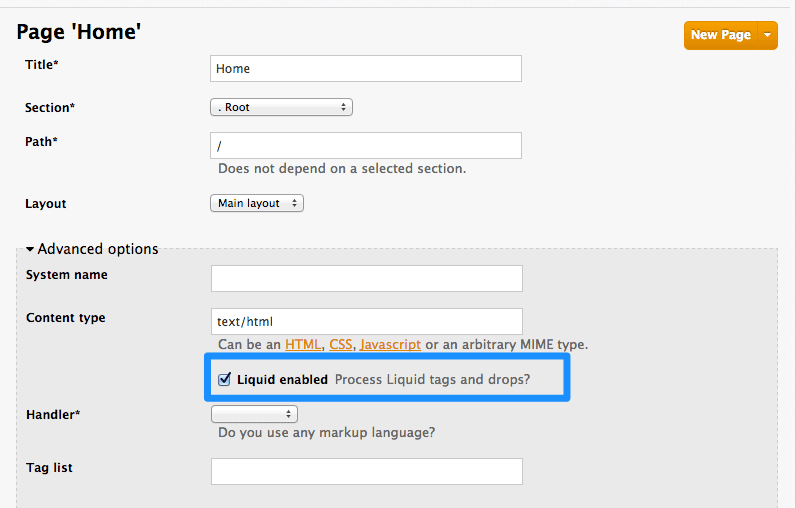
Just expand the Advanced options section and mark the Liquid enabled checkbox. From now on, all the liquid markup will be processed by the internal engine, and the CMS built-in editor will also add code highlighting for liquid.
8.3.2. Different use on pages, partials, and layouts
The use of liquids usually differs slightly between pages, which are single-use elements and partials/layouts, which are the reusable elements of your portal. This means that instead of using multiple layouts or partials with small changes for use on different pages, you can add some logic liquid tags inside and alter the layout depending on the page the user is on.
<!-- if we are inside '/documentation' URL -->
<li class="{% if request.request_uri contains "/documentation" %}active{% endif %}"><!-- add the active class to the menu item -->
<a href="/documentation">Documentation</a>
</li>
<!-- if we are inside '/documentation' URL -->
<li class="{% if request.request_uri contains "/documentation" %}active{% endif %}"><!-- add the active class to the menu item -->
<a href="/documentation">Documentation</a>
</li>8.3.3. Use with CSS/JS
Liquid markup doesn’t just work with HTML, you can easily combine it with CSS and/or JavaScript code for even more control. To enable liquid in a stylesheet or JS, create them as a page and follow the same steps as if you were enabling it for a normal page. Having done that, you’ll be able to add some conditional markup in CSS or use the server-side data in JavaScript. Just remember to set the content type of the page as CSS or JS.
8.4. Usage of liquids in email templates
8.4.1. Differences from CMS
As previously mentioned, liquid tags can also be used to customize the email templates sent to your users. All the general rules for writing liquid mentioned before also apply to the email templates, with some exceptions:
-
There is no commonly shared list of variables that are available on every template. Instead, you’ll have to do some testing using the previously mentioned
{% debug:help %}tag. Since emails are by nature different from web pages, you will have limited or no access to some tags. For example,
{{ request.request_uri }}will not make sense anymore, as an email does not have a URL.<!--samples-->
<!--samples-->Copy to Clipboard Copied! Toggle word wrap Toggle overflow
8.5. Troubleshooting
8.5.1. Debugging
If something is not working as intended (but saved correctly) check that:
- All the tags are closed correctly
- You’re referring to variables available on the current page
- You’re not trying to access an array – for example current_account.applications is an array of applications
- The logic is correct
8.5.2. Typical errors and ways to solve them
-
If the document cannot be saved due to a liquid error, it’s usually because some tags or drops were not closed correctly. Check that all your
{% %}and{{ }}tags were properly closed and that the logic expressions (if, for, etc.) are terminated correctly (with endif, enfor, etc.) Normally if this is the case, an error will be displayed at the top of the page above the editor with a descriptive error message. -
If everything saved correctly and you don’t see any effect, check that you’re not referring to an empty element and you’re not using a logic tag to display content. (
{% %}will never render any content, besides usage in tags which is already an alias of a more complex set of tags and drops.) - If instead of what you wanted to see only a # is displayed, it means that you’ve tried to display an element that is an array. Check the section on the liquid hierarchy in this article (link).
8.5.3. Answers on the forum
If you still have a problem, try looking for an answer on our forum or ask a question yourself.
Chapter 9. Multi-Service Signup
By the end of this section, you’ll be familiar with the procedure to create and customize a multiple-service signup page.
If you’re using the multiple services functionality, you’re able to customize the signup procedure to allow customers to subscribe to different services.
9.1. Prequisites
You should be familiar with layout and page creation procedures as well as with the basics of Liquid formatting tags. You can check our Liquid tags reference here. "Multiple Service" functionality must also be enabled on your account (available for Pro plan and up).
It’s strongly recommend that you read about signup workflows, so you’ll have the whole setup prepared and know how it works.
9.2. Introduction
Start the process by creating a new layout, which will serve as the template for your multi-service signup page. Go into the Layouts section of the CMS system, and create the new layout. You can call it multipleservicesignup to be able to easily distinguish it from the other layouts. In the editor, paste the general structure of your standard layout (such as home or main layout). Now delete everything you don’t need – all the containers, sidebars, additional boxes, etc.
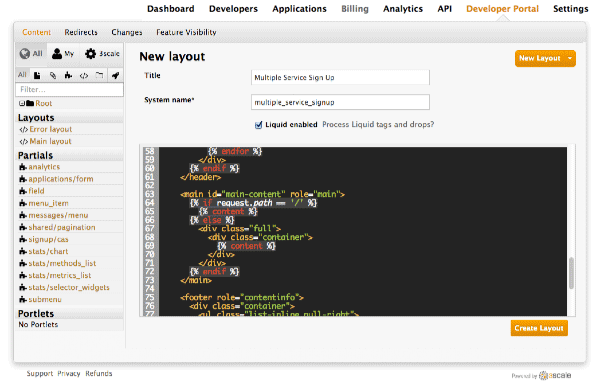
Having created the backbone of your layout, proceed to customizing the code for signup.
9.3. Step 1:The loop
In order to retrieve all the information about the services that you need to construct the proper signup link, you have to loop through the service objects. Services are a part of the model object.
{% for service in provider.services %}
.
.
.
{% endfor %}
{% for service in provider.services %}
.
.
.
{% endfor %}9.4. Step 2: Signup columns
You already have your layout and loop accessing the service objects. Now decide how you want to display information about the service and the signup link. For example, divide them into columns with a service description and a signup link at the bottom. Every column will be a div box with a service-column class to contain all the necessary information.
The container inside serves as a custom description field. service.name is the service name, which in this case will be the container’s name.
9.5. Step 3: Subscribe and links
Now the main part of your custom service signup – to create the signup link, extract the signup URL and the service ID. Take the signup URL from URL’s object and the service ID from your service object on which you iterate in the loop. The final link code will look like this:
<a href="{{ urls.signup }}?{{ service | toparam }}">Signup to {{ service.name }}</a>
<a href="{{ urls.signup }}?{{ service | toparam }}">Signup to {{ service.name }}</a>You also have to take into account that the user may already have signed up for some of your services. Create a conditional block to check.
{% unless service.subscribed? %}
<a href="{{ urls.signup }}?{{ service | toparam }}">Signup to {{ service.name }}</a>
{% endunless %}
{% unless service.subscribed? %}
<a href="{{ urls.signup }}?{{ service | toparam }}">Signup to {{ service.name }}</a>
{% endunless %}With this, you can generate the final code:
9.6. Step 4: Styling
Add some final touches to the generated markup, depending on the number of services you have. In the case of this example it’s two, so the CSS code for the service-column div will be:
In the example, we’ve used the percentage-based layout to dynamicaly assign the width of the column basic on the containing div’s dimensions.
Now you should have a properly working and good-looking multiple services subscripition page. Congratulations!
If you’d like to display the columns in a specific order, try using conditional expressions (if/else/case) conditioning the service name or another value you know.
Chapter 10. Developer Portal Overview
By the end of this section you should be familiar with the Developer Portal CMS, including its structure, use, and functionality.
You can customize the look and feel of the entire Developer Portal to match your own branding. You have complete control over every element of the portal, so you can make it as easy as possible for developers to learn how to use your API. A successful API Developer Portal will help your developers turn concepts into working apps in no time at all.
10.1. CMS overview
The CMS consists of a few elements:
- Horizontal menu in the Admin Portal with access to content, redirects, and changes
- The main area containing details of the sections above
- CMS mode, accessible through the preview option
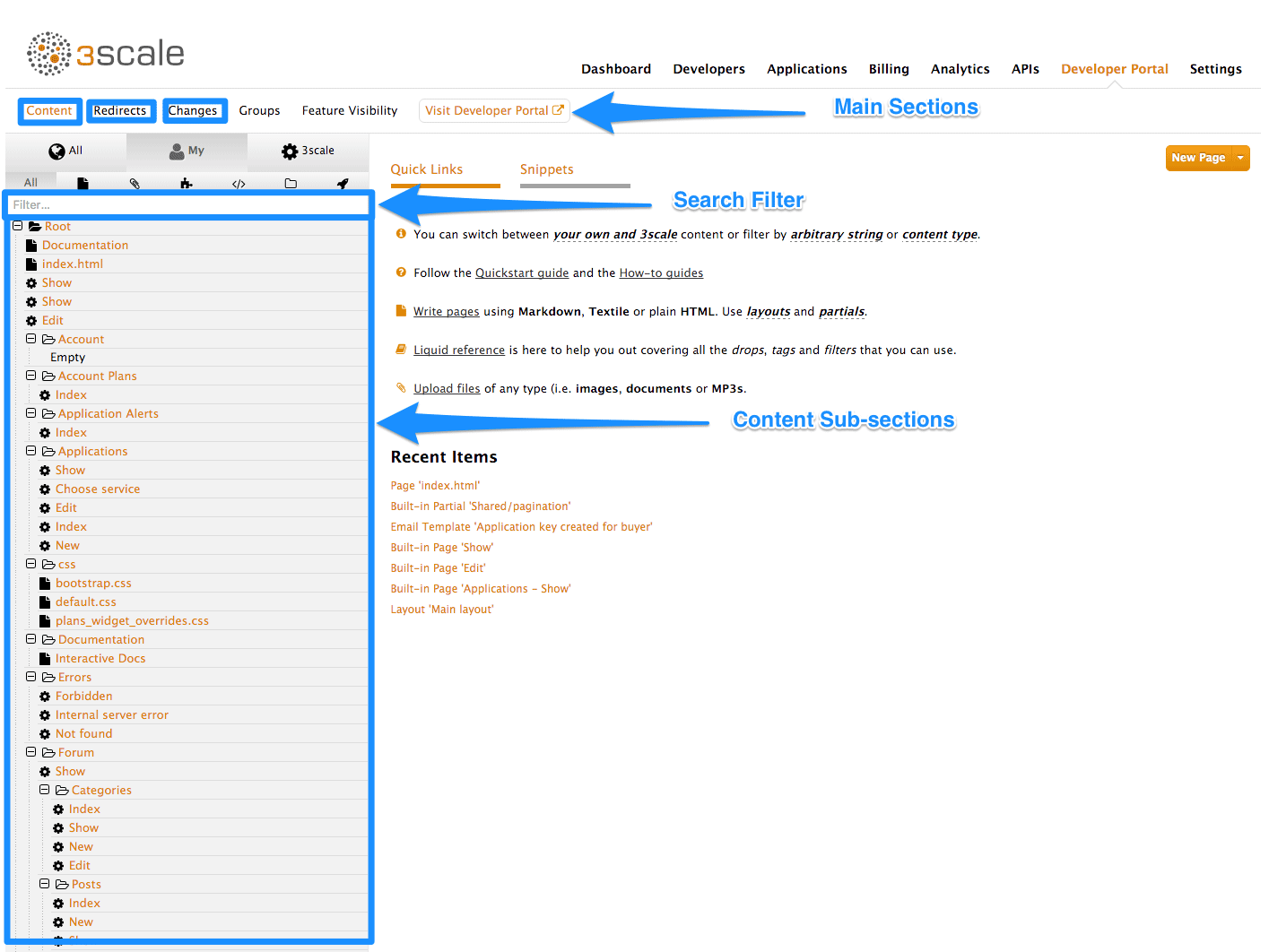
10.2. Content
This is the most important part of your view of the CMS system. The content section shows the site structure and hierarchy and provides editing functionality within the same page. This means you can manage the site structure, the pages, and other assets stored in it. The portal’s hierarchy is displayed in the form of a directory tree.
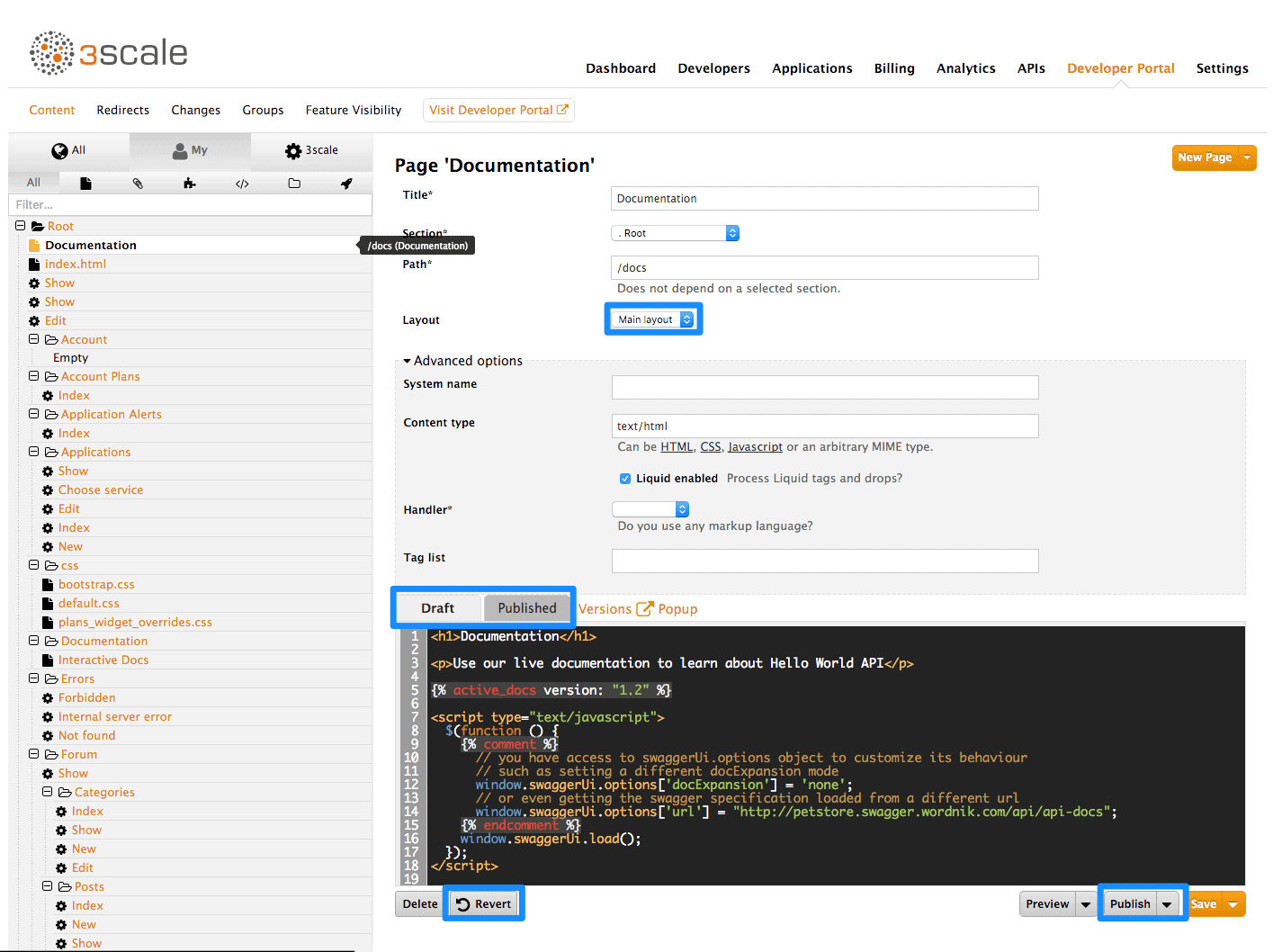
The image above shows a sample view of one of the pages inside the contents section. As you can see, it displays all the files (pages, images, stylesheets, JavaScript, etc.) preserving the site’s path hierarchy. As before, sections are functionally equal to directories.
On the right-hand side, you can see the edit page view. Here you can see the page name (which also indicates whether it’s a standard or built-in page) and a button to add a new element to the content (page, layout, partial, section, file, or portlet). Below, you can choose which layout the page will use and toggle the liquid tags functionality. The following part is the text editor, which supports code highlighting, tabulations, line numeration, and much more. The tab buttons Draft and Published switch between the draft and published versions of the edited document. The following two icons list the document’s versions and open a pop-up edit window, respectively.
To edit page content, simply choose the desired layout, set a few additional options such as content type and URL path, and then input the code in HTML, Markdown, or Textile.
Another important feature in this view is the Preview button. You can choose whether you want to preview the published or draft version of the page. Clicking the button redirects you to CMS mode, where you can see the live (or draft) rendered version of the page with a dark grey vertical bar on the right-hand side. This bar contains links to the page, layout, and partials edit views of the CMS. It allows you to swtich between draft and published views.
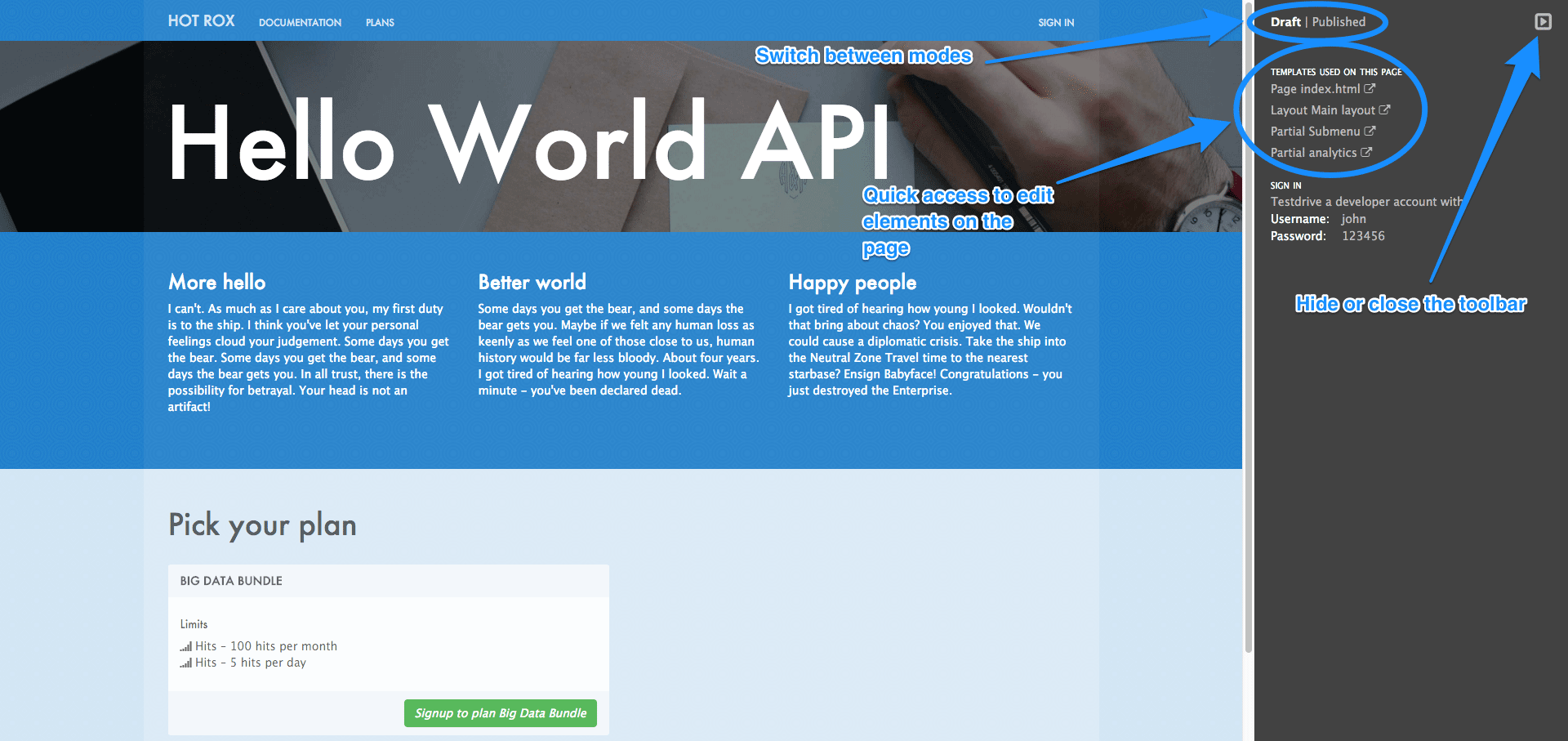
There’s also a filter feature, which serves not only as a search field but allows you to limit the elements shown to only stylesheets, JavaScript, or any other types specified.
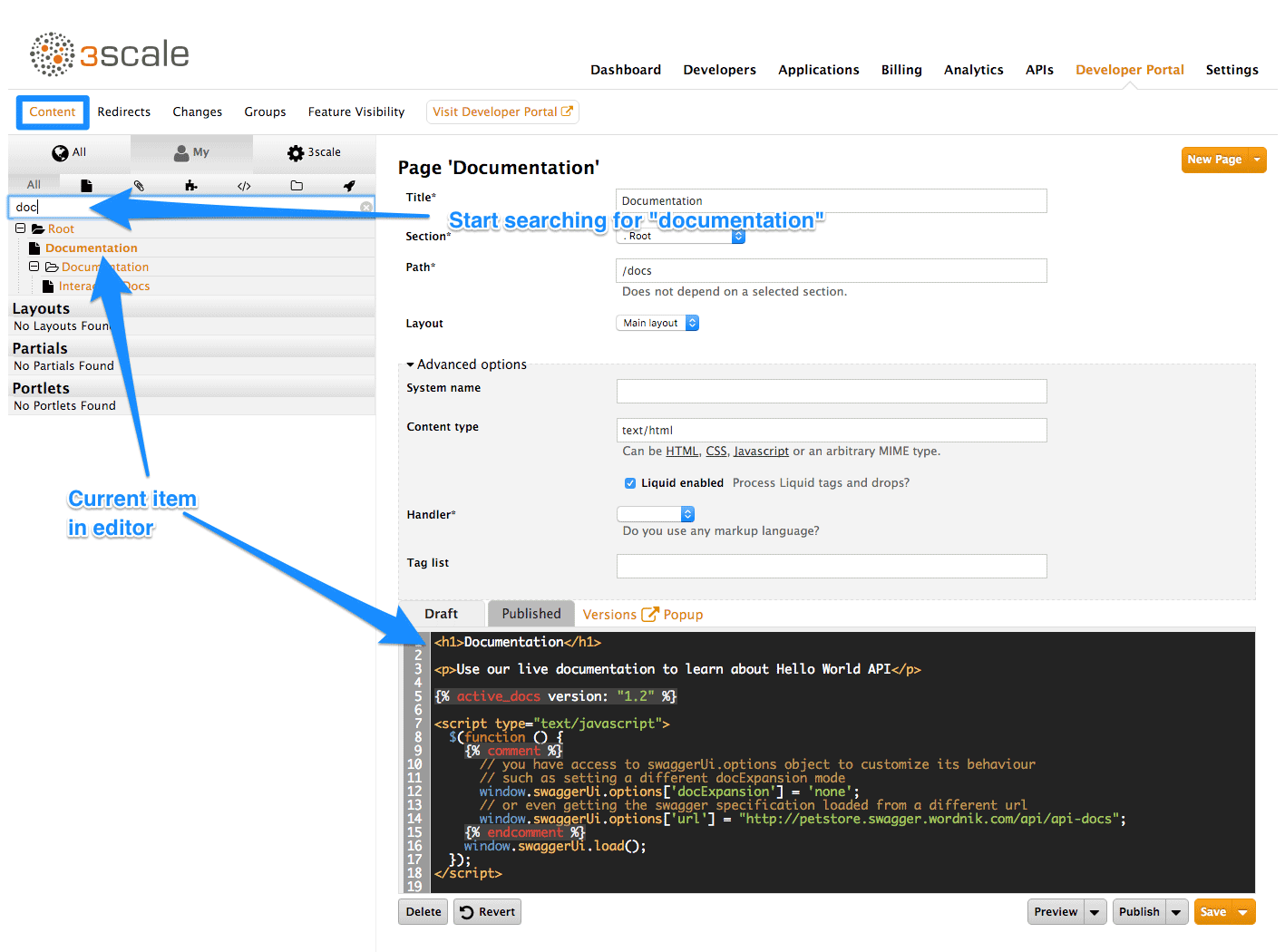
10.3. Layouts and partials
The layouts and partials sections manage the templates and the reusable parts of the page. Their functionality is similar to that of the content section.
The layouts section consists of definitions of the templates used by pages. Layout is the main structure of the page, and the contents of this template will be rendered on every page that uses it. The partials, portlets, and the actual content of the pages reside inside.
Partials are the reusable parts of code, which repeat in many places on different pages – for example, the footer is the same on every layout, and the sidebar is the same on a few pages with different layouts. To include a partial in a layout, partial, or email template or portlet, type: {% include "partial_name" %}. For full reference of liquid tags, check here.
As with the other parts of the portal, layouts and partials also have draft and published states and offer a full version history.
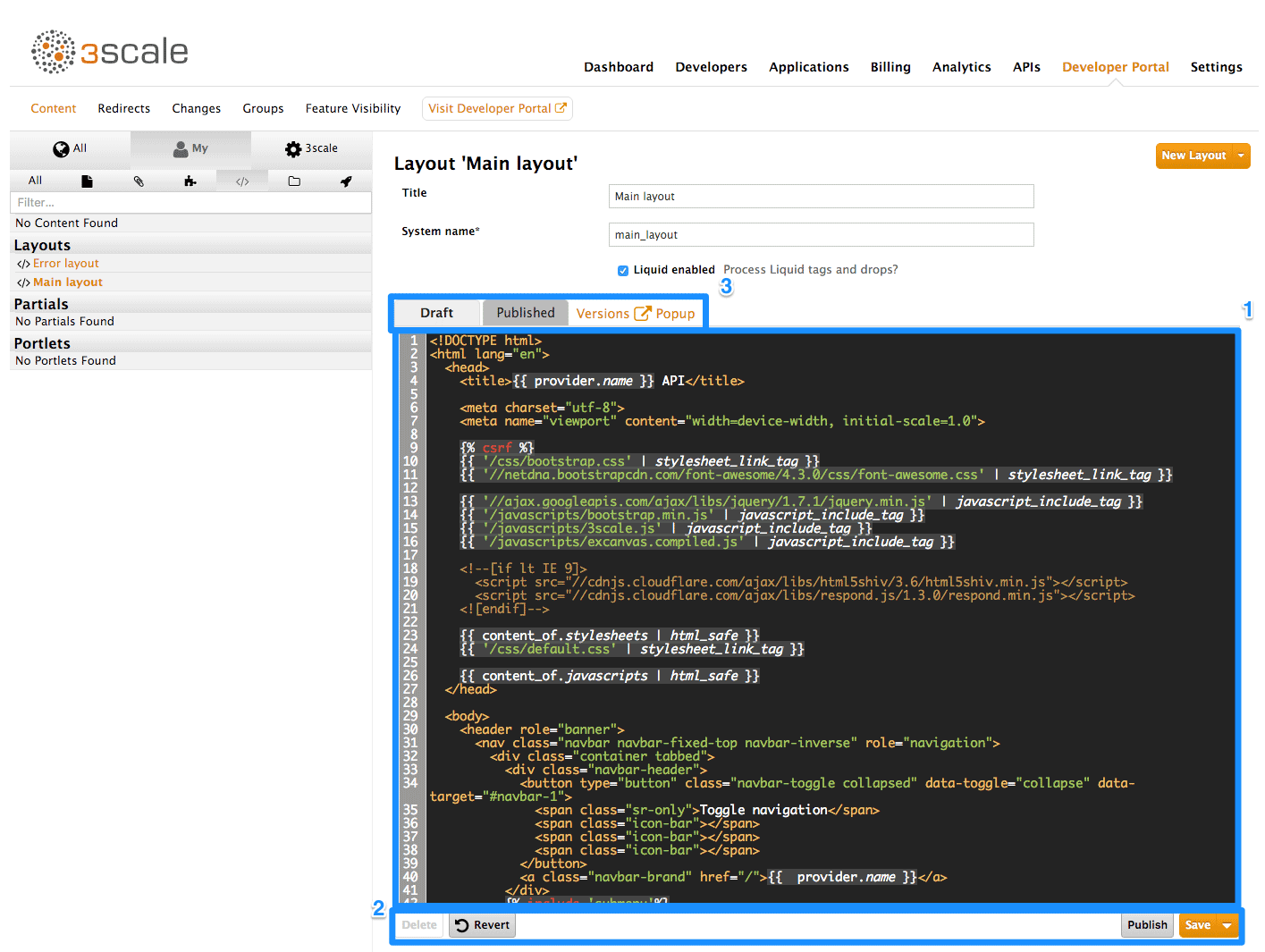
- Text editor for the layout template.
- Save draft, publish current version, and revert to the last published state.
- Switch the text editor between the draft and published versions, list the version history, and launch the pop-up editor.
10.4. Portlets
The last subsection of the content are the portlets. They give you some more advanced functionality without needing any advanced coding. Our CMS provides three different portlets:
- External RSS feed - fetches the RSS feed from a given source
- Table of contents - generates the links list for the pages in a given section
- Latest forum posts - generates the list of the n latest forum posts
While creating your desired portlet, you have to input the requested data in the setup page such as title, system name, and the URL feed for the external RSS feed portlet.
10.4.1. Note
The editor will come pre-filled with standard portlet code using some custom liquid tags. You can try editing the generated structure, but be careful. When in doubt, just leave the code as it is or refer to the portal formatting tags reference.
10.5. Redirects and changes
The last elements of the CMS are the redirects and changes sections. They are much less complicated than the content section but are still important and provide some custom functionality.
Redirects help you set up redirects from one portal URL to another. This is useful, for example, when you deprecate an old page and don’t want to change all the links. Redirects cannot be used for built-in CMS pages – they are only for pages created by you.
Last but not least is the changes section. It contains a list of all the newly edited and unpublished pages and gives you the choice to publish them individually or all at once.
Chapter 11. Restricted Content
Here you’ll learn how to have content in your Developer Portal that is only visible for some users.
You may need to have some pages of your Developer Portal that are only accessible for a specific group of developers, either part of a page or items in a certain menu. Both goals are achievable through the two techniques introduced below.
11.1. Restricted pages
When creating restricted sections, it’s useful to do it so that each section maps to a logical group of users. For this example, assume that there is a group of developers called "partners".
Create a new section in the CMS for every page or group of pages that you want to restrict access to. Uncheck the "public" status field. Then drag and drop any pages you want inside this section.
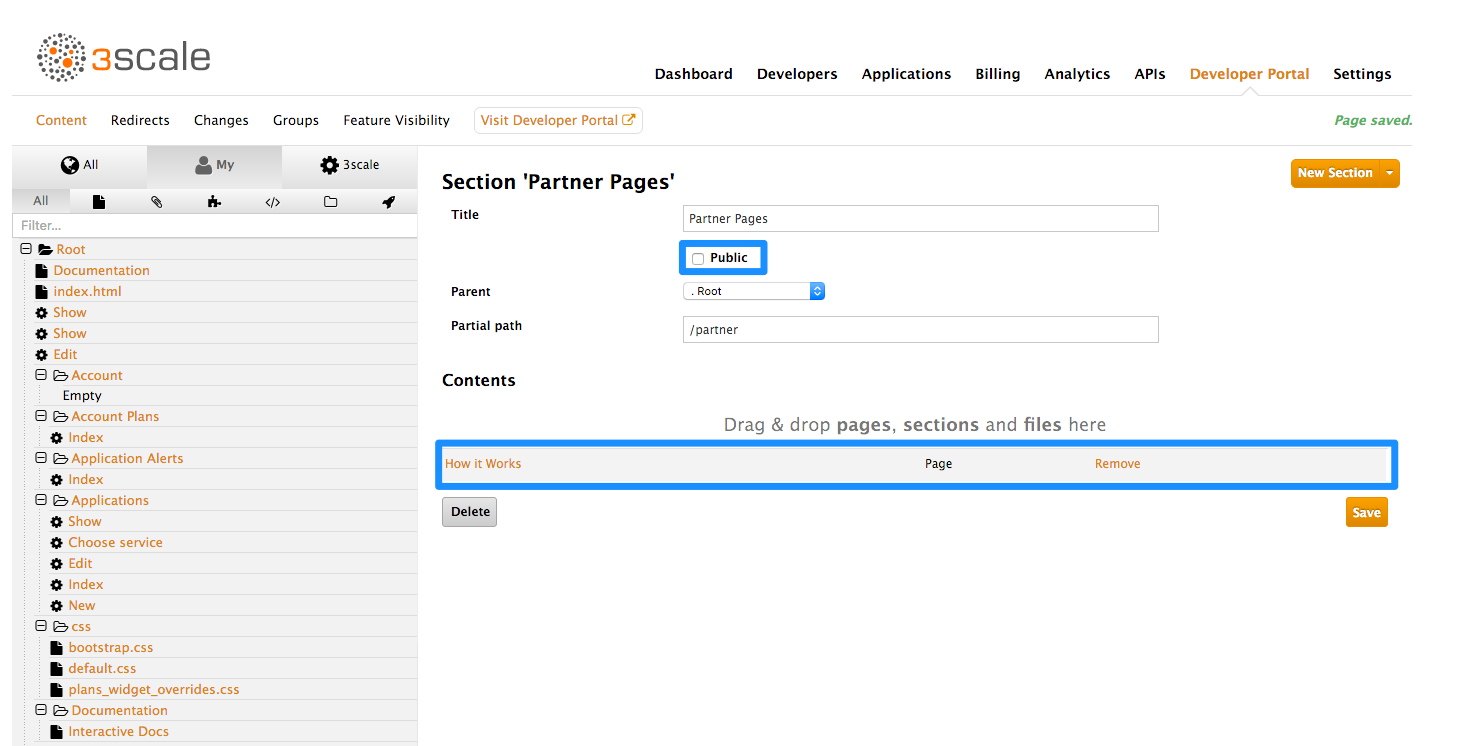
Create a group and give it access to the section you created.
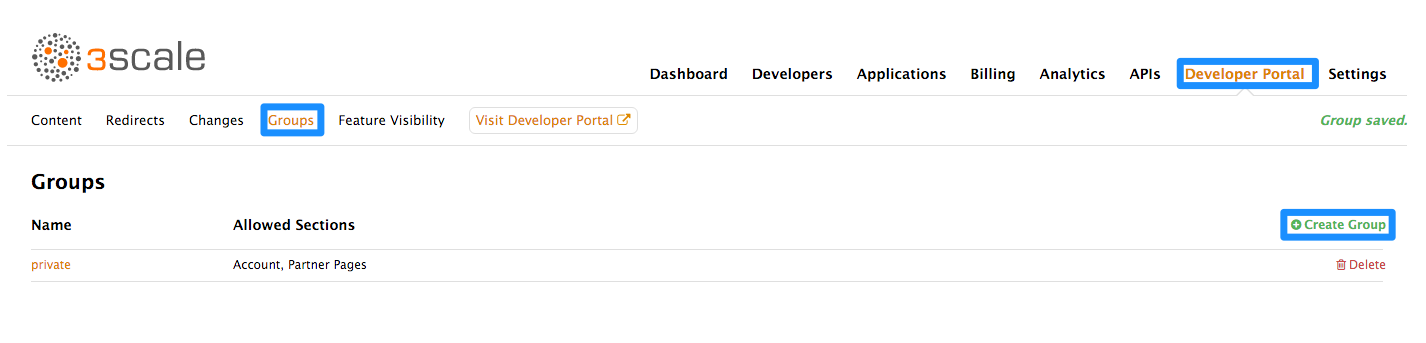
Now every time you have to grant one of your users access to this section, all you have to do is assign them to this group. To do this, go into the corresponding account detail page, then to "Group Permissions." Once there, check the boxes for the sections you want to allow.
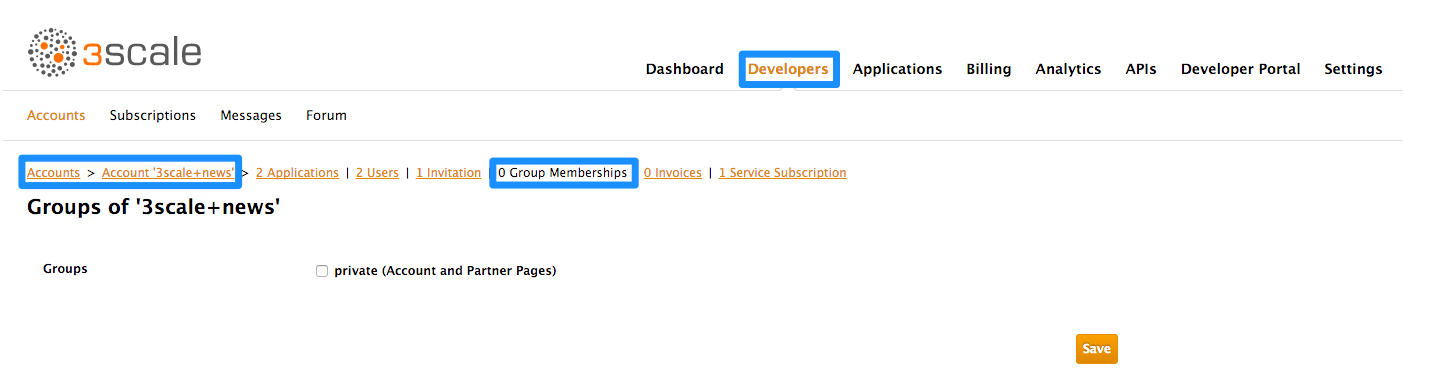
11.2. Restricted blocks of content
Liquid tags are a very powerful way to customize your Developer Portal. Use them here to hide or display parts of a page based on a condition. 3scale allows you to create custom fields for accounts, applications, and users. You can leverage this to store information that is useful for you as the API provider. Here you’ll create an custom field attached to all accounts and use it to indicate whether a given account is a partner or not. You can create this field by going to Settings > Field Definitions. Add a field to the Account section, and mark it as hidden so it will not be displayed on the signup page or anywhere else on the portal.
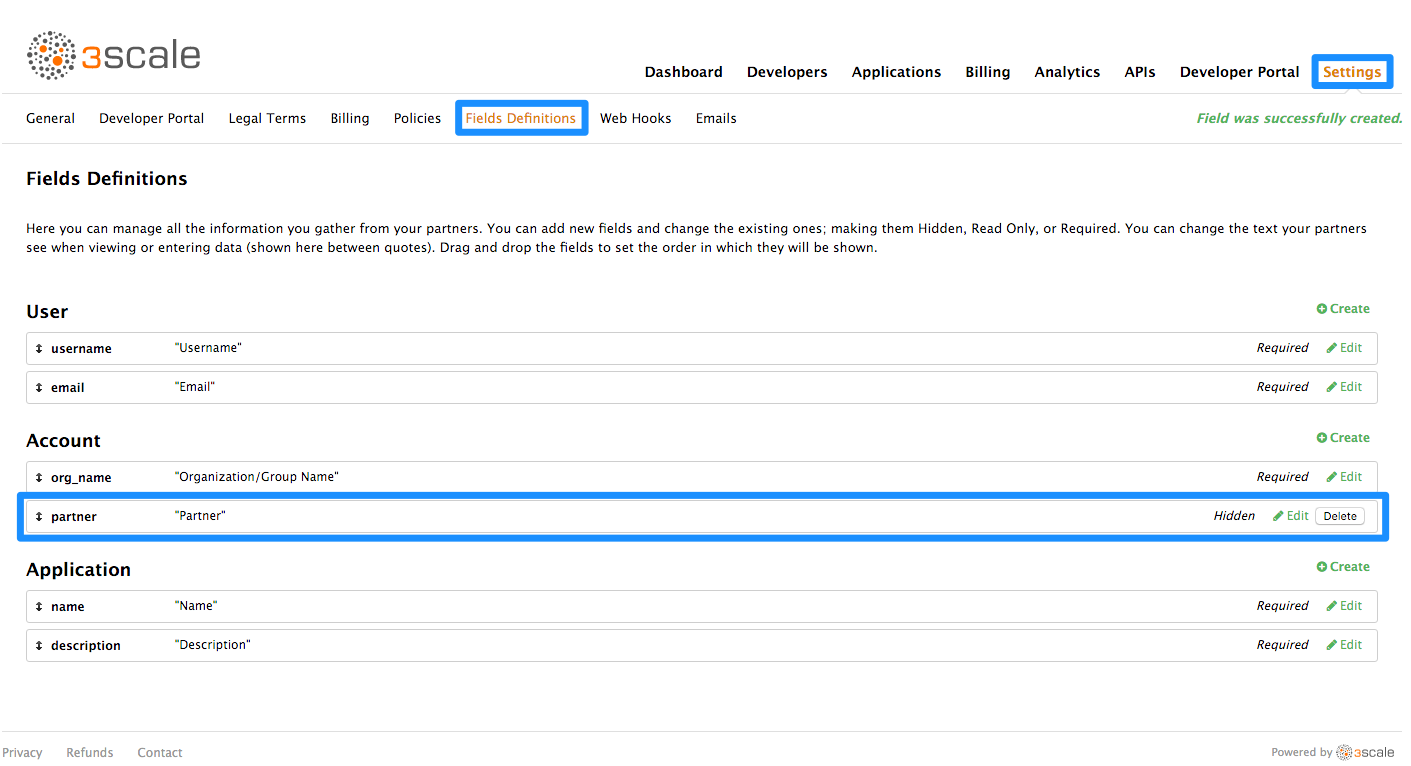
With the custom field in place, you are now able to show special content to partners by wrapping it in a conditional like in the following snippet:
{{ if current_account.extra_fields.partner == 'true' }}
// content only accessible to partners
{{ endif }}
{{ if current_account.extra_fields.partner == 'true' }}
// content only accessible to partners
{{ endif }}Or use the inverse logic if it suits your case better:
{{ unless current_account.extra_fields.partner == 'true' }}
// content forbidden for partners
{{ endunless }}
{{ unless current_account.extra_fields.partner == 'true' }}
// content forbidden for partners
{{ endunless }}From here on, whenever you want to show these pieces of hidden content to a user, all you need to do is type in 'true' in the partner field of their account detail page.
11.2.1. Pro tip: How to automate setting extra fields
In some cases, you’ll want to provide access to restricted content to developers based on a change in state. For instance, when they upgrade application plan.
You can streamline the process by using webhooks together with the Account Management API. Find the Account Management API in the 3scale ActiveDocs, available in your Admin Portal, under the Documentation → 3scale API Docs section. Based on the developer’s new plan – which you can know from the message sent by the webhook request – you can grant access to the private content by calling the API to update the "partner" field.
11.3. Requiring user login
In addition to the two ways to restrict access to content described above, there is another technique that can be useful: requiring a logged-in user.
This is very easy to achieve using Liquid tags. All you have to do is wrap the content that will be available only for logged-in users inside the following conditional:
{{ if current_user }}
// only visible if the user is logged in
{{ endif }}
{{ if current_user }}
// only visible if the user is logged in
{{ endif }}Chapter 12. Configure Signup Flows
In this section, you’ll see which settings to configure to adjust signup workflows.
Signup workflows are a critical aspect of the developer experience you provide through your Developer Portal. The process can range from being completely automatic and self-service to the other extreme of requiring total control over who gains access to what, with various levels of granularity.
The 3scale platform allows you to model your API with a combination of account (optional), service (optional), and application plans. For each of these plans, you can control whether there is an approval gate that you operate. For each one, you also determine whether there is a default, or the developer is required to take the next step and make a choice.
For the extreme of maximum automation and self-service, remove all approval steps and enable all possible default plans. This way, a key can be issued to provide access to your API immediately after signup.
12.1. Step 1: Remove all approval steps
To remove approvals, go to Settings > General and in the Signup section, make sure the option of Developers are allowed to sign up themselves is checked.
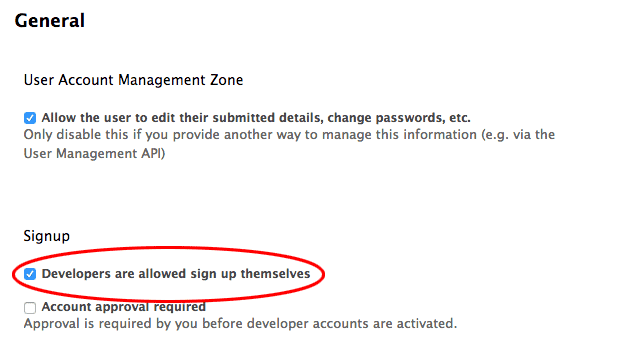
Optionally, if you have account and service plans enabled, scroll down the page and make sure the option Change plan directly is enabled in both cases:
12.2. Step 2: Enable all possible default plans
Application plans
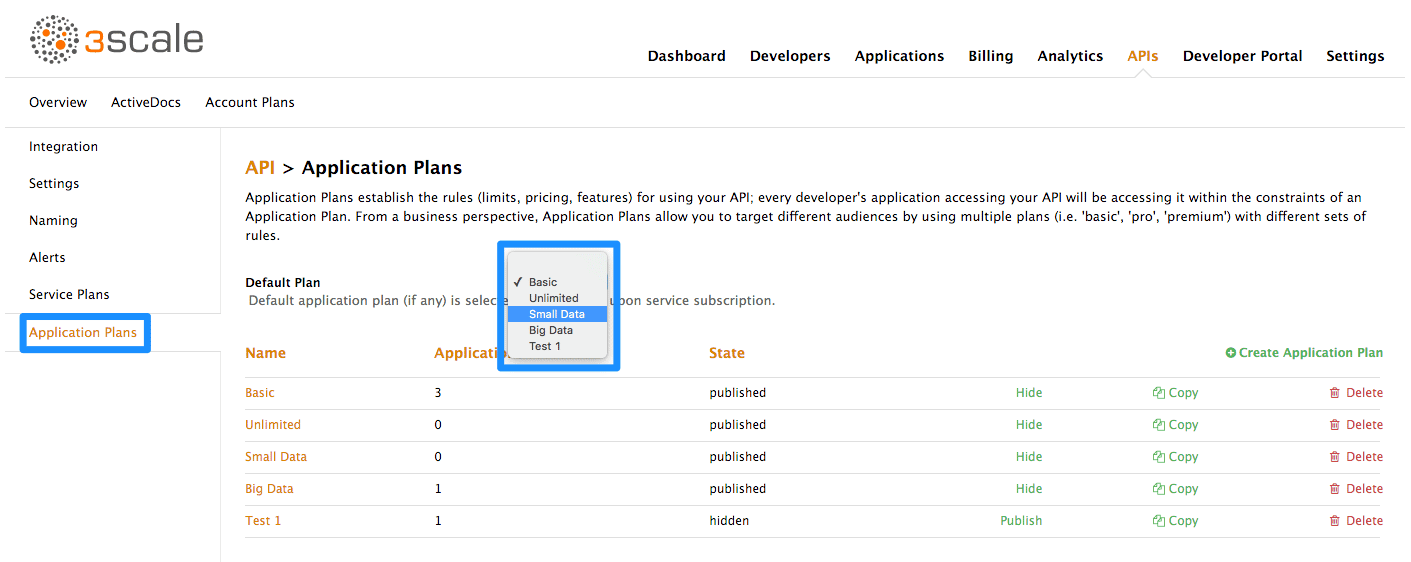
Optionally, if you have account and service plans enabled, choose default plans for those too
Account plans (optional)
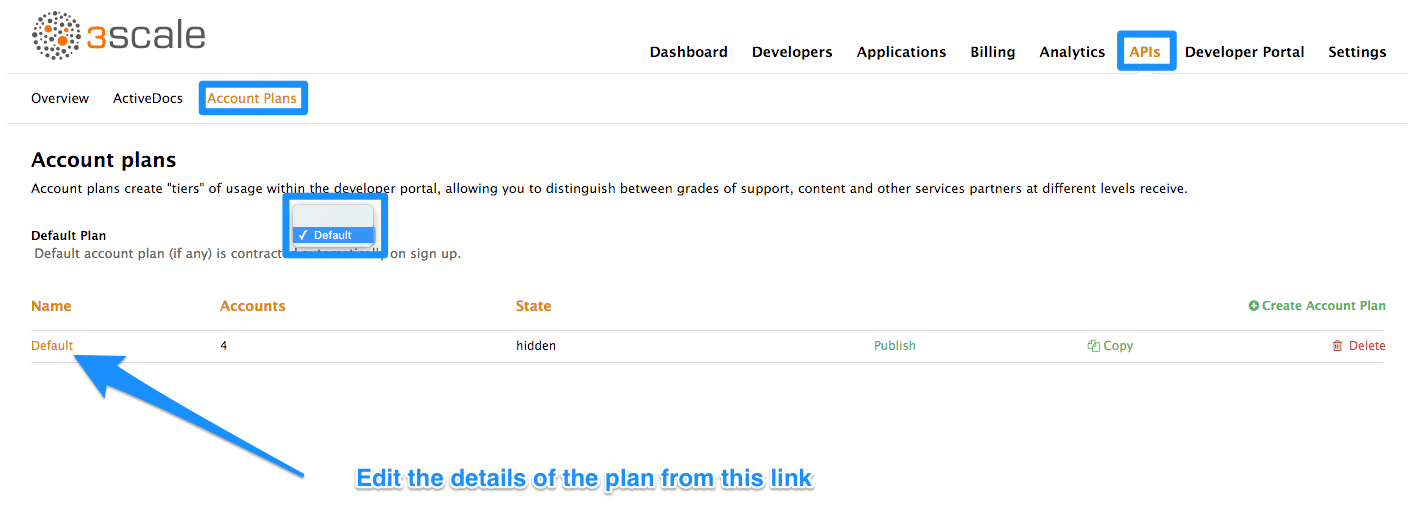
Service plans (optional)
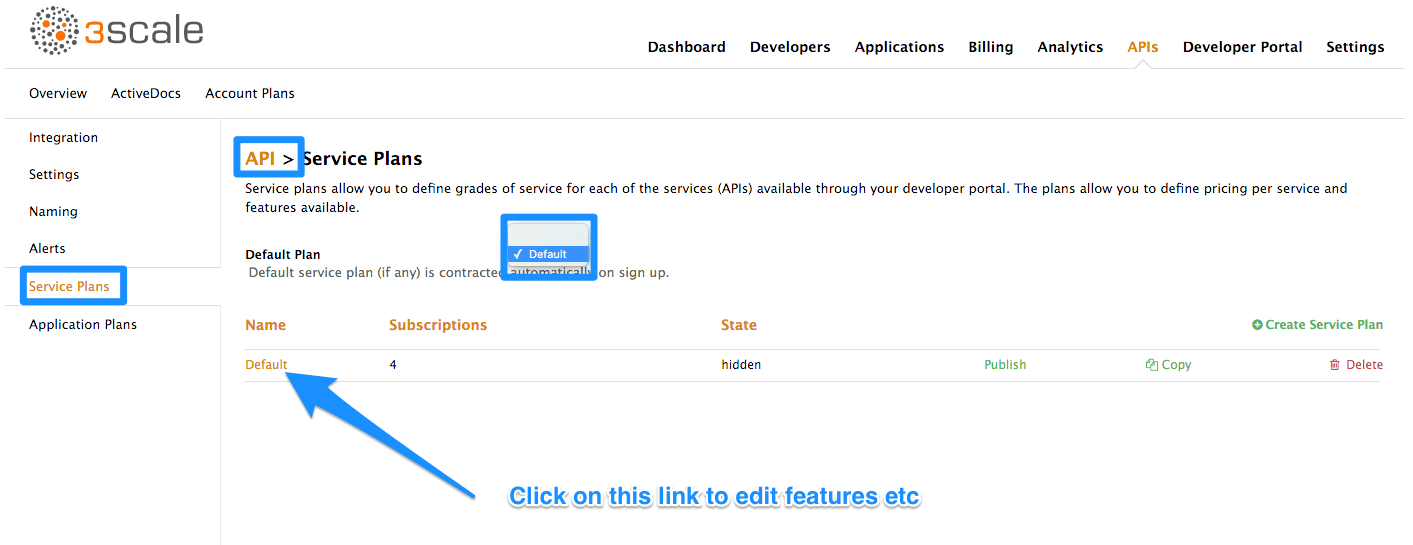
12.3. Step 3: Test the workflow
Once you’ve made your desired settings changes, test out the results by going to your Developer Portal and attempting to sign up as a new developer. Experiment and make any necessary adjustments to get exactly the right workflow for your API. When you’re happy with the workflow, it’s a good time to check your email notifications to make sure they provide the right information for your developers.
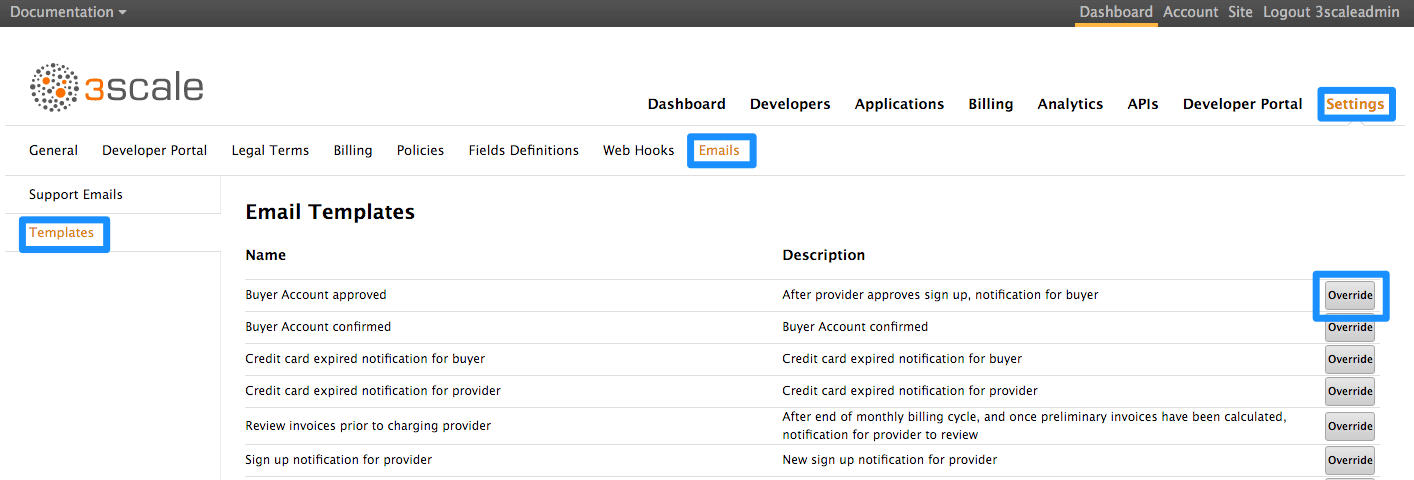
Chapter 13. SSO For Developer Portal
Single sign-on (SSO) allows you to manage access control of multiple independent systems. By following this guide, you’ll be able to allow users that are logged in to your system to log in automatically to your 3scale-powered Developer Portal without being prompted to log in again.
This article shows how existing user credentials of your website can be used to automatically log in to your 3scale-powered Developer Portal.
This feature is meant for API providers that already own the identity of their API consumers (username and password) – such as when the API provider is also the identity provider.
13.1. Step 1: Create your users in the 3scale platform
First of all, the API consumer must have an account in your Developer portal. You can import your users to 3scale using the Account Management API or create them manually. Find the Account Management API in the 3scale ActiveDocs, available in your Admin Portal, under the Documentation → 3scale API Docs section.
13.2. Step 2: Request a login link
Once the user exists, you can use an API request call to generate a URL with a built-in SSO token:
curl -X POST -d "provider_key=YOUR_PROVIDER_KEY&username=USERNAME&expires_in=60" https://YOUR_ADMIN_PORTAL.3scale.net/admin/api/sso_tokens.xml
curl -X POST -d "provider_key=YOUR_PROVIDER_KEY&username=USERNAME&expires_in=60" https://YOUR_ADMIN_PORTAL.3scale.net/admin/api/sso_tokens.xmlThere are 2 parameters in this call: username to specify who you are requesting the token for and expires_in which is the number of seconds that the token will be valid for (it defaults to 10 minutes).
You can also pass an additional parameter redirect_url with a location to redirect the user after a successful login. This parameter should be percent encoded. The XML response will contain a URL with a secret token included:
<?xml version="1.0" encoding="UTF-8"?> <sso_url> https://YOUR_DEVELOPER_PORTAL/session/create?expires_at=1365087501&token=Q0dNWGtjL2h2MnloR11yWmNwazVZY0NhenlabnBoRUNaNUlyWjZaVG8wMnBGdVNhT0VGN1NUb3FRc1pwSnRrclBZSTIwOUFwRkVTc3NuK1JTbjUrMEE9PS0tY1ZrOGFldzFJNkxna1hrQzQyZ0NGQT09--712f2990ac9248ab4b8962be6467fb149b346000 </sso_url>
<?xml version="1.0" encoding="UTF-8"?>
<sso_url>
https://YOUR_DEVELOPER_PORTAL/session/create?expires_at=1365087501&token=Q0dNWGtjL2h2MnloR11yWmNwazVZY0NhenlabnBoRUNaNUlyWjZaVG8wMnBGdVNhT0VGN1NUb3FRc1pwSnRrclBZSTIwOUFwRkVTc3NuK1JTbjUrMEE9PS0tY1ZrOGFldzFJNkxna1hrQzQyZ0NGQT09--712f2990ac9248ab4b8962be6467fb149b346000
</sso_url>You can pass either user_id or username to identify the 3scale user. Typically, the username will be the same for your system and 3scale portal. In that case, using the username should be easy since it does not require any additional information to be stored on your side. However, if you need to do some pairing and machine processes to the URLs anyway, you might be better off with user_id.
13.3. Step 3: Redirect user with automatic login
The response contains an SSO login URL with a token:
https://YOUR_DEVELOPER_PORTAL/session/create?expires_at=1365087501&token=Q0dNWGtjL2h2MnloR11yWmNwazVZY0NhenlabnBoRUNaNUlyWjZaVG8wMnBGdVNhT0VGN1NUb3FRc1pwSnRrclBZSTIwOUFwRkVTc3NuK1JTbjUrMEE9PS0tY1ZrOGFldzFJNkxna1hrQzQyZ0NGQT09--712f2990ac9248ab4b8962be6467fb149b346000
https://YOUR_DEVELOPER_PORTAL/session/create?expires_at=1365087501&token=Q0dNWGtjL2h2MnloR11yWmNwazVZY0NhenlabnBoRUNaNUlyWjZaVG8wMnBGdVNhT0VGN1NUb3FRc1pwSnRrclBZSTIwOUFwRkVTc3NuK1JTbjUrMEE9PS0tY1ZrOGFldzFJNkxna1hrQzQyZ0NGQT09--712f2990ac9248ab4b8962be6467fb149b346000The URL contains all the required information for the 3scale Developer Portal SSO to log you in. You can embed it directly into web. However bear in mind that the URL can expire before the user clicks it, so it’s recommended to have a generic link on your page that will dynamically request a fresh SSO URL and redirect to it. This way, the user will be seamlessly logged in to your 3scale-powered Developer Portal.
The URL needs to be unescaped. If you want to try it by hand in a browser or cut and paste, remember to replace the "&" for "&" in your browser. Also any "%" encodings in the token need to be replaced by their unescaped character.
Chapter 14. Setting Terms And Conditions
When you allow developers to sign up for your API, you will probably want to get them to agree to your Terms and Conditions to make some of your policies clear before you grant them access.
There may be different versions of your Terms and Conditions you want developers to abide by. These are easy to set up at different points throughout the registration process. For example:
- Signup Terms and Conditionss
- Application Terms and Conditions
- Service/subscription Terms and Conditions (only available when you have multiple services)
Additionally, if you are charging for use of your API, you may want to make your credit card policies explicit. 3scale provides an easy way to set up the following kinds of credit card policy URLs:
- Legal Terms
- Privacy
- Refunds
14.1. Terms and Conditions
This part of the workflow is easy to set up in the Admin Portal by following the steps below.
Go to Settings > Legal Terms, where you will be presented with a blank page to populate with your signup legal terms. You can use any combination of HTML, JavaScript, and CSS. There is also some toggling code provided by clicking Insert toggling code. The content you write in this box will appear just above the Sign Up button on the Signup page of your Developer Portal.
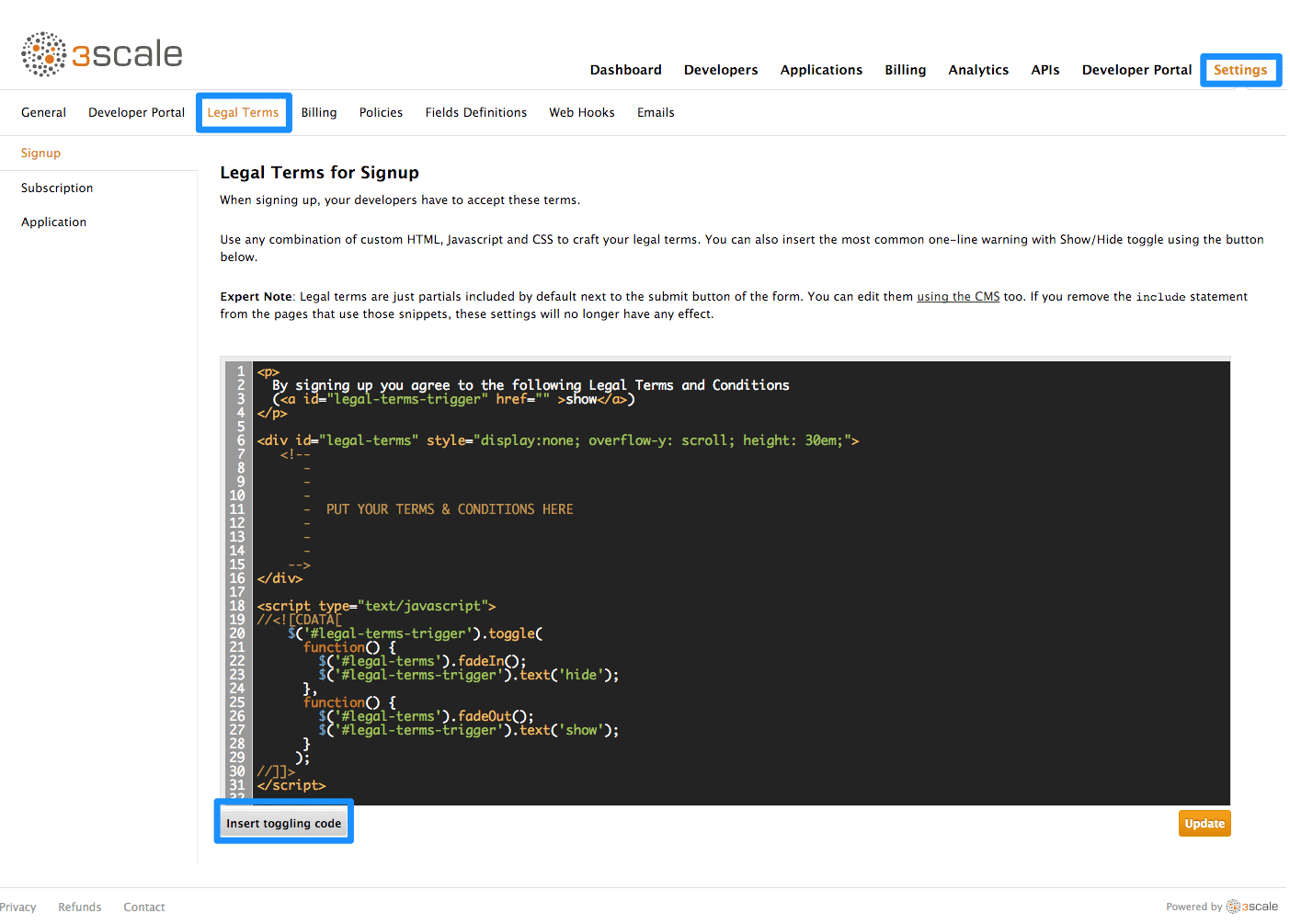
Once you’ve filled out your Terms and Conditions, save them by clicking Update.
If you’ve used the toggling code, it will display "By signing up you agree to the following Legal Terms and Conditions" followed by a link that toggles between showing and hiding the Terms and Conditions you specified.
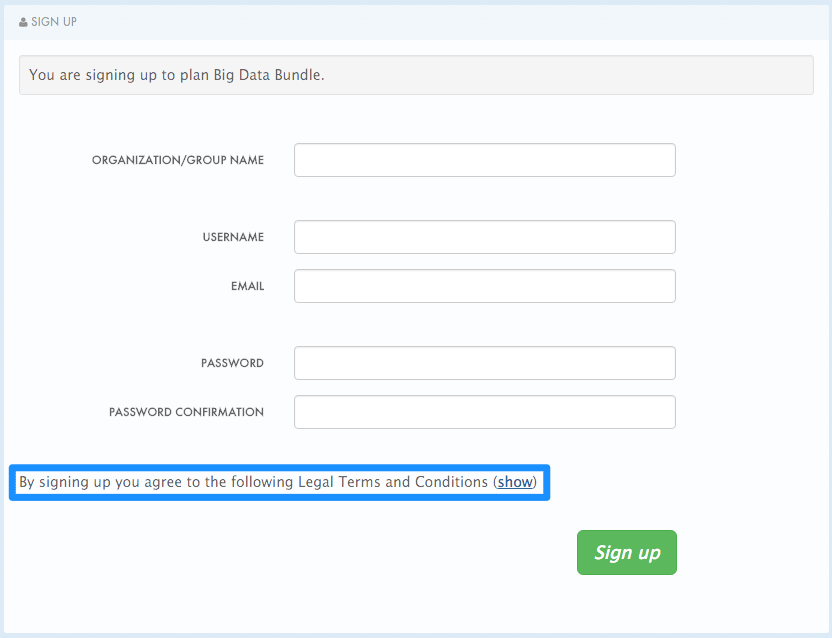
This is placed on the Signup page by default, but it’s a partial (signup_licence) that can be included anywhere on your CMS. To remove this from the Signup page, simply remove the {% include 'signup_licence' %} line from the page. Similarly, if you want to include it somewhere else, you can use the same partial by means of the snippet, which can be placed anywhere on your Developer Portal.
You might also want your users to accept another set of Terms and Conditions when they create a new application (new_application_licence partial) and/or when they subscribe to a new service (service_subscription_licence partial). To set these up, you can follow the same procedure outlined above.
14.2. Credit Card Policies
You can also define other URLs where different policies reside. Set them up by going to Dashboard > Settings > Policies and setting the path where your policy pages will be located.

In order for these links to work, you will then need to create new pages in the CMS.
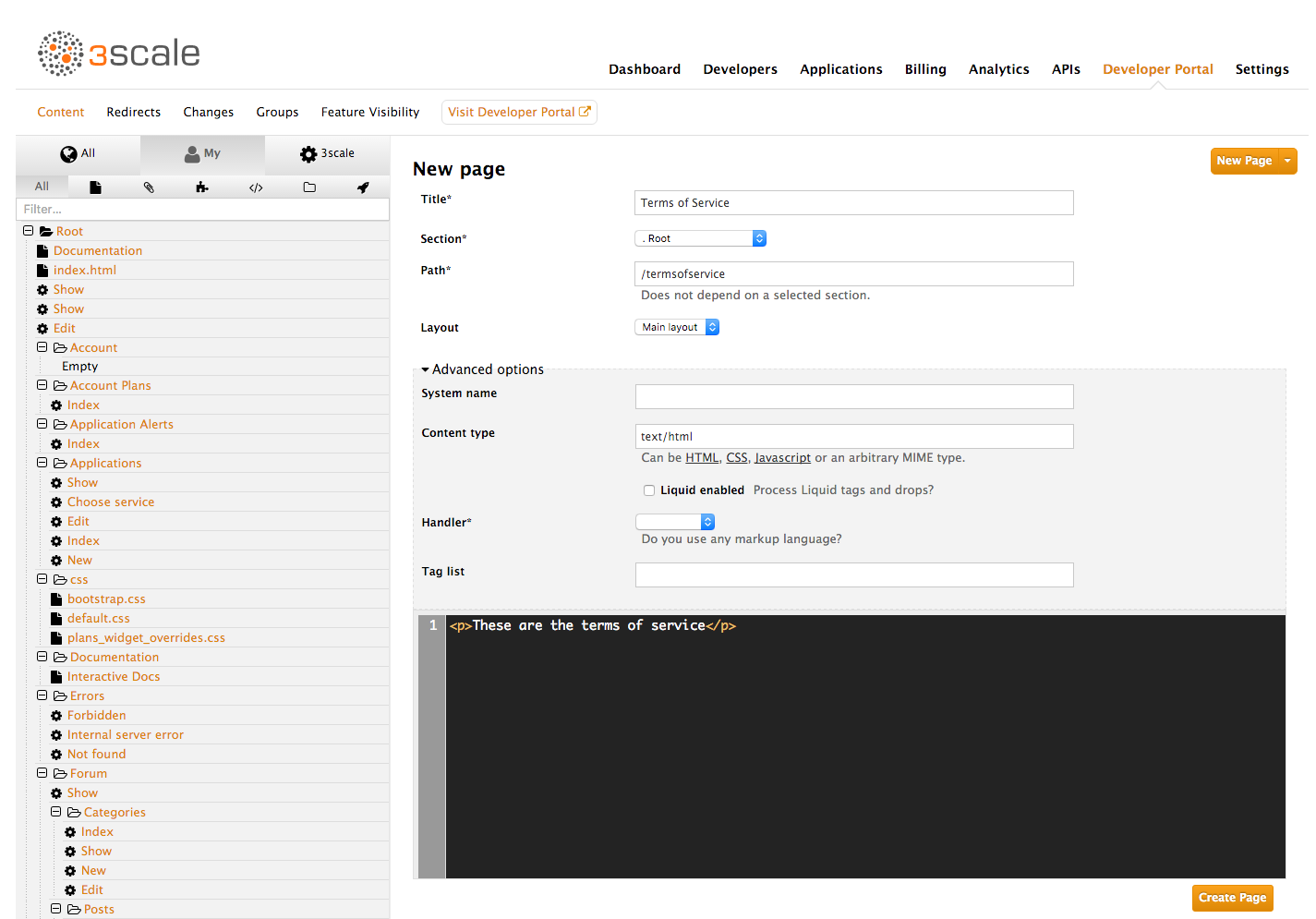
Once that is done, you can reference them using the URL’s liquid drop. For example:
<a href="{{ urls.credit_card_terms }}">Legal Terms</a>
<a href="{{ urls.credit_card_privacy }}">Privacy</a>
<a href="{{ urls.credit_card_refunds }}">Refunds</a>
<a href="{{ urls.credit_card_terms }}">Legal Terms</a>
<a href="{{ urls.credit_card_privacy }}">Privacy</a>
<a href="{{ urls.credit_card_refunds }}">Refunds</a>And that’s it!

'%20d='M201.5%20305.5c-13.8%200-24.9-11.1-24.9-24.6%200-13.8%2011.1-24.9%2024.9-24.9%2013.6%200%2024.6%2011.1%2024.6%2024.9%200%2013.6-11.1%2024.6-24.6%2024.6zM504%20256c0%20137-111%20248-248%20248S8%20393%208%20256%20119%208%20256%208s248%20111%20248%20248zm-132.3-41.2c-9.4%200-17.7%203.9-23.8%2010-22.4-15.5-52.6-25.5-86.1-26.6l17.4-78.3%2055.4%2012.5c0%2013.6%2011.1%2024.6%2024.6%2024.6%2013.8%200%2024.9-11.3%2024.9-24.9s-11.1-24.9-24.9-24.9c-9.7%200-18%205.8-22.1%2013.8l-61.2-13.6c-3-.8-6.1%201.4-6.9%204.4l-19.1%2086.4c-33.2%201.4-63.1%2011.3-85.5%2026.8-6.1-6.4-14.7-10.2-24.1-10.2-34.9%200-46.3%2046.9-14.4%2062.8-1.1%205-1.7%2010.2-1.7%2015.5%200%2052.6%2059.2%2095.2%20132%2095.2%2073.1%200%20132.3-42.6%20132.3-95.2%200-5.3-.6-10.8-1.9-15.8%2031.3-16%2019.8-62.5-14.9-62.5zM302.8%20331c-18.2%2018.2-76.1%2017.9-93.6%200-2.2-2.2-6.1-2.2-8.3%200-2.5%202.5-2.5%206.4%200%208.6%2022.8%2022.8%2087.3%2022.8%20110.2%200%202.5-2.2%202.5-6.1%200-8.6-2.2-2.2-6.1-2.2-8.3%200zm7.7-75c-13.6%200-24.6%2011.1-24.6%2024.9%200%2013.6%2011.1%2024.6%2024.6%2024.6%2013.8%200%2024.9-11.1%2024.9-24.6%200-13.8-11-24.9-24.9-24.9z'/%3e%3c/svg%3e)