 Red Hat Summit
Ce contenu n'est pas disponible dans la langue sélectionnée.
4.3. Creating a Virtual Machine with Virtual Machine Manager
The Virtual Machine Manager, also known as virt-manager, is a graphical tool for quick deployment of virtual machines in Red Hat Enterprise Linux. In this tutorial, you will become familiar with its basic functions and will be able to use Virtual Machine Manager to create a virtual machine.
4.3.1. Introduction to Virtual Machine Manager
Copier lienLien copié sur presse-papiers!
To open the , click
virt-manager command.
The following image shows the Virtual Machine Manager interface. This interface enables you to control all of your virtual machines from one central location.
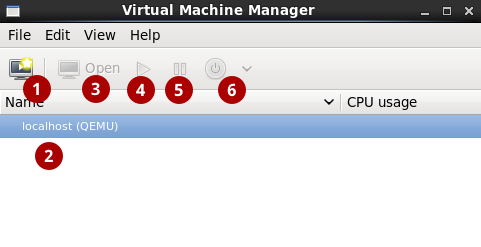
Figure 4.1. The Virtual Machine Manager interface
Commonly used interface elements include:
 Create new virtual machine: Click here to create a new virtual machine.
 Virtual machines: A list of configured connections and all guest virtual machines associated with them. When a virtual machine is created, it will be listed here. When a guest is running, an animated graph shows the guest's CPU usage in the CPU usage column.
After selecting a virtual machine from this list, use the following buttons to control the selected virtual machine's state:
Virtual machines: A list of configured connections and all guest virtual machines associated with them. When a virtual machine is created, it will be listed here. When a guest is running, an animated graph shows the guest's CPU usage in the CPU usage column.
After selecting a virtual machine from this list, use the following buttons to control the selected virtual machine's state: Open: Opens the guest virtual machine console and details in a new window.
 Run: Turns on the virtual machine.
 Pause: Pauses the virtual machine.
 Shut down: Shuts down the virtual machine. Clicking on the arrow displays a drop-down menu with several options for turning off the virtual machine, including Reboot, Shut Down, Force Reset, Force Off, and Save.
Right-clicking on a virtual machine shows a menu with more functions, including:
- Clone: Clones the virtual machine.
- Migrate: Migrates the virtual machine to another host.
- Delete: Deletes the virtual machine.

'%20d='M201.5%20305.5c-13.8%200-24.9-11.1-24.9-24.6%200-13.8%2011.1-24.9%2024.9-24.9%2013.6%200%2024.6%2011.1%2024.6%2024.9%200%2013.6-11.1%2024.6-24.6%2024.6zM504%20256c0%20137-111%20248-248%20248S8%20393%208%20256%20119%208%20256%208s248%20111%20248%20248zm-132.3-41.2c-9.4%200-17.7%203.9-23.8%2010-22.4-15.5-52.6-25.5-86.1-26.6l17.4-78.3%2055.4%2012.5c0%2013.6%2011.1%2024.6%2024.6%2024.6%2013.8%200%2024.9-11.3%2024.9-24.9s-11.1-24.9-24.9-24.9c-9.7%200-18%205.8-22.1%2013.8l-61.2-13.6c-3-.8-6.1%201.4-6.9%204.4l-19.1%2086.4c-33.2%201.4-63.1%2011.3-85.5%2026.8-6.1-6.4-14.7-10.2-24.1-10.2-34.9%200-46.3%2046.9-14.4%2062.8-1.1%205-1.7%2010.2-1.7%2015.5%200%2052.6%2059.2%2095.2%20132%2095.2%2073.1%200%20132.3-42.6%20132.3-95.2%200-5.3-.6-10.8-1.9-15.8%2031.3-16%2019.8-62.5-14.9-62.5zM302.8%20331c-18.2%2018.2-76.1%2017.9-93.6%200-2.2-2.2-6.1-2.2-8.3%200-2.5%202.5-2.5%206.4%200%208.6%2022.8%2022.8%2087.3%2022.8%20110.2%200%202.5-2.2%202.5-6.1%200-8.6-2.2-2.2-6.1-2.2-8.3%200zm7.7-75c-13.6%200-24.6%2011.1-24.6%2024.9%200%2013.6%2011.1%2024.6%2024.6%2024.6%2013.8%200%2024.9-11.1%2024.9-24.6%200-13.8-11-24.9-24.9-24.9z'/%3e%3c/svg%3e)