 Red Hat Summit
Ce contenu n'est pas disponible dans la langue sélectionnée.
Chapter 4. Control Group Application Examples
This chapter provides application examples that take advantage of the cgroup functionality.
4.1. Prioritizing Database I/O
Copier lienLien copié sur presse-papiers!
Running each instance of a database server inside its own dedicated virtual guest allows you to allocate resources per database based on their priority. Consider the following example: a system is running two database servers inside two KVM guests. One of the databases is a high priority database and the other one a low priority database. When both database servers are run simultaneously, the I/O throughput is decreased to accommodate requests from both databases equally; Figure 4.1, “I/O throughput without resource allocation” indicates this scenario — once the low priority database is started (around time 45), I/O throughput is the same for both database servers.
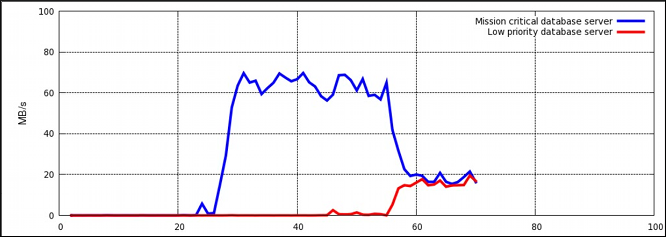
Figure 4.1. I/O throughput without resource allocation
To prioritize the high priority database server, it can be assigned to a cgroup with a high number of reserved I/O operations, whereas the low priority database server can be assigned to a cgroup with a low number of reserved I/O operations. To achieve this, follow the steps in Procedure 4.1, “I/O Throughput Prioritization”, all of which are performed on the host system.
Procedure 4.1. I/O Throughput Prioritization
- Make sure resource accounting is on for both services:
~]# systemctl set-property db1.service BlockIOAccounting=true ~]# systemctl set-property db2.service BlockIOAccounting=true - Set a ratio of 10:1 for the high and low priority services. Processes running in those service units will use only the resources made available to them
~]# systemctl set-property db1.service BlockIOWeight=1000
~]# systemctl set-property db2.service BlockIOWeight=100
Figure 4.2, “I/O throughput with resource allocation” illustrates the outcome of limiting the low priority database and prioritizing the high priority database. As soon as the database servers are moved to their appropriate cgroups (around time 75), I/O throughput is divided between both servers with the ratio of 10:1.
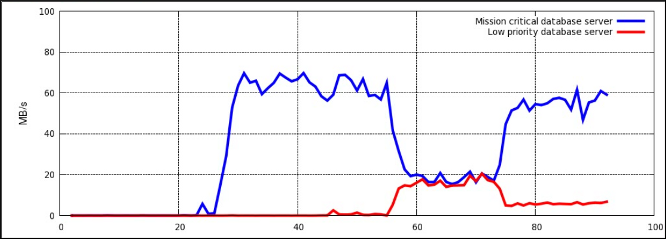
Figure 4.2. I/O throughput with resource allocation
Alternatively, block device I/O throttling can be used for the low priority database to limit its number of read and write operations. For more information, see the description of the
blkio controller in Controller-Specific Kernel Documentation.

'%20d='M201.5%20305.5c-13.8%200-24.9-11.1-24.9-24.6%200-13.8%2011.1-24.9%2024.9-24.9%2013.6%200%2024.6%2011.1%2024.6%2024.9%200%2013.6-11.1%2024.6-24.6%2024.6zM504%20256c0%20137-111%20248-248%20248S8%20393%208%20256%20119%208%20256%208s248%20111%20248%20248zm-132.3-41.2c-9.4%200-17.7%203.9-23.8%2010-22.4-15.5-52.6-25.5-86.1-26.6l17.4-78.3%2055.4%2012.5c0%2013.6%2011.1%2024.6%2024.6%2024.6%2013.8%200%2024.9-11.3%2024.9-24.9s-11.1-24.9-24.9-24.9c-9.7%200-18%205.8-22.1%2013.8l-61.2-13.6c-3-.8-6.1%201.4-6.9%204.4l-19.1%2086.4c-33.2%201.4-63.1%2011.3-85.5%2026.8-6.1-6.4-14.7-10.2-24.1-10.2-34.9%200-46.3%2046.9-14.4%2062.8-1.1%205-1.7%2010.2-1.7%2015.5%200%2052.6%2059.2%2095.2%20132%2095.2%2073.1%200%20132.3-42.6%20132.3-95.2%200-5.3-.6-10.8-1.9-15.8%2031.3-16%2019.8-62.5-14.9-62.5zM302.8%20331c-18.2%2018.2-76.1%2017.9-93.6%200-2.2-2.2-6.1-2.2-8.3%200-2.5%202.5-2.5%206.4%200%208.6%2022.8%2022.8%2087.3%2022.8%20110.2%200%202.5-2.2%202.5-6.1%200-8.6-2.2-2.2-6.1-2.2-8.3%200zm7.7-75c-13.6%200-24.6%2011.1-24.6%2024.9%200%2013.6%2011.1%2024.6%2024.6%2024.6%2013.8%200%2024.9-11.1%2024.9-24.6%200-13.8-11-24.9-24.9-24.9z'/%3e%3c/svg%3e)