Chapitre 3. Enregistrer le système pour les mises à jour à l'aide de GNOME
Vous devez enregistrer votre système pour obtenir des mises à jour logicielles. Cette section explique comment enregistrer votre système à l'aide de GNOME.
Conditions préalables
Un compte valide sur le portail client de Red Hat
Consultez la page Créer un login Red Hat pour l'enregistrement d'un nouvel utilisateur.
- Clé(s) d'activation, si vous enregistrez le système avec une clé d'activation
- Un serveur d'enregistrement, si vous enregistrez le système à l'aide du serveur d'enregistrement
3.1. Enregistrement d'un système à l'aide du compte Red Hat sur GNOME
Suivez les étapes de cette procédure pour inscrire votre système avec votre compte Red Hat.
Conditions préalables
Un compte valide sur le portail client de Red Hat.
Consultez la page Créer un login Red Hat pour l'enregistrement d'un nouvel utilisateur.
Procédure
Ouvrez le site system menu, accessible dans le coin supérieur droit de l'écran, et cliquez sur Settings.
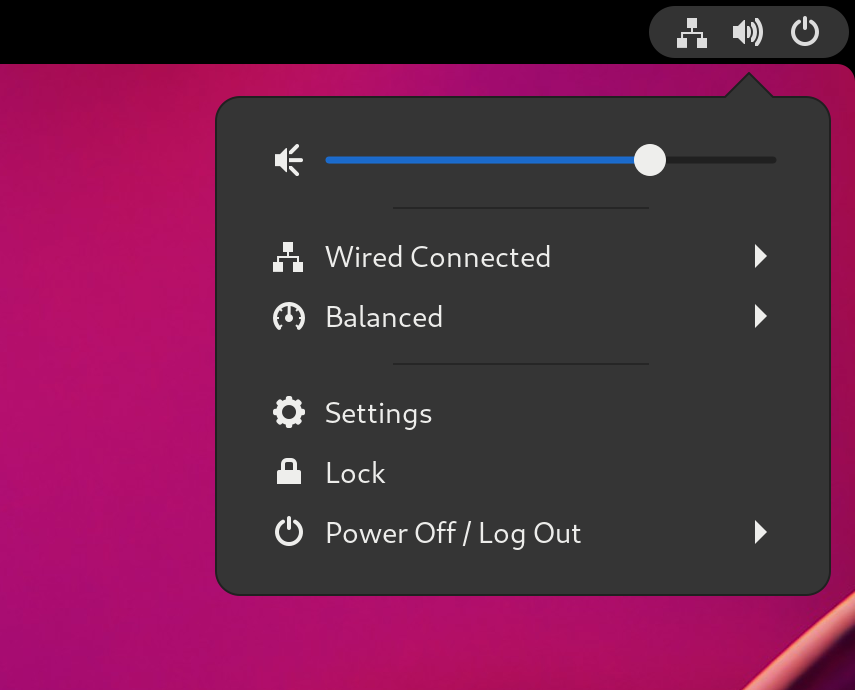
-
Aller à
. Si vous n'utilisez pas le serveur Red Hat :
- Dans la section Registration Server, sélectionnez Custom Address.
- Entrez l'adresse du serveur dans le champ URL.
- Dans la section Registration Type, sélectionnez Red Hat Account.
Dans la section Registration Details:
- Saisissez le nom d'utilisateur de votre compte Red Hat dans le champ Login.
- Saisissez le mot de passe de votre compte Red Hat dans le champ Password.
- Saisissez le nom de votre organisation dans le champ Organization.
- Cliquez sur .
