 Red Hat Summit
Ce contenu n'est pas disponible dans la langue sélectionnée.
Chapter 9. Enabling High Availability in Fuse Fabric
Abstract
When all of your servers and clients are deployed within the same fabric, you can use an alternative mechanism for implementing high availability cluster, which works by exploiting the fabric registry. Because all the parts of the application must be deployed on the same fabric, this mechanism is suitable for deployment on a LAN.
9.1. Load Balancing Cluster
Copier lienLien copié sur presse-papiers!
9.1.1. Introduction to Load Balancing
Copier lienLien copié sur presse-papiers!
Overview
Copier lienLien copié sur presse-papiers!
The fabric load balancing mechanism exploits the fact that fabric provides a distributed fabric registry, which is accessible to all of the container in the fabric. This makes it possible to use the fabric registry as a discovery mechanism for locating WS endpoints in the fabric. By storing all of the endpoint addresses belonging to a particular cluster under the same registry node, any WS clients in the fabric can easily discover the location of the endpoints in the cluster.
Fuse Fabric
Copier lienLien copié sur presse-papiers!
A fabric is a distributed collection of containers that share a common database of configuration settings (the fabric registry). Every container in the fabric has a fabric agent deployed in it, which manages the container and redeploys applications to the container whenever a new profile is assigned to the container (a profile is the basic deployment unit in a fabric).
Load-balancing cluster
Copier lienLien copié sur presse-papiers!
Figure 9.1, “Fabric Load Balancing for Apache CXF” gives an overview of the fabric load balancing mechanism for Apache CXF endpoints.
Figure 9.1. Fabric Load Balancing for Apache CXF
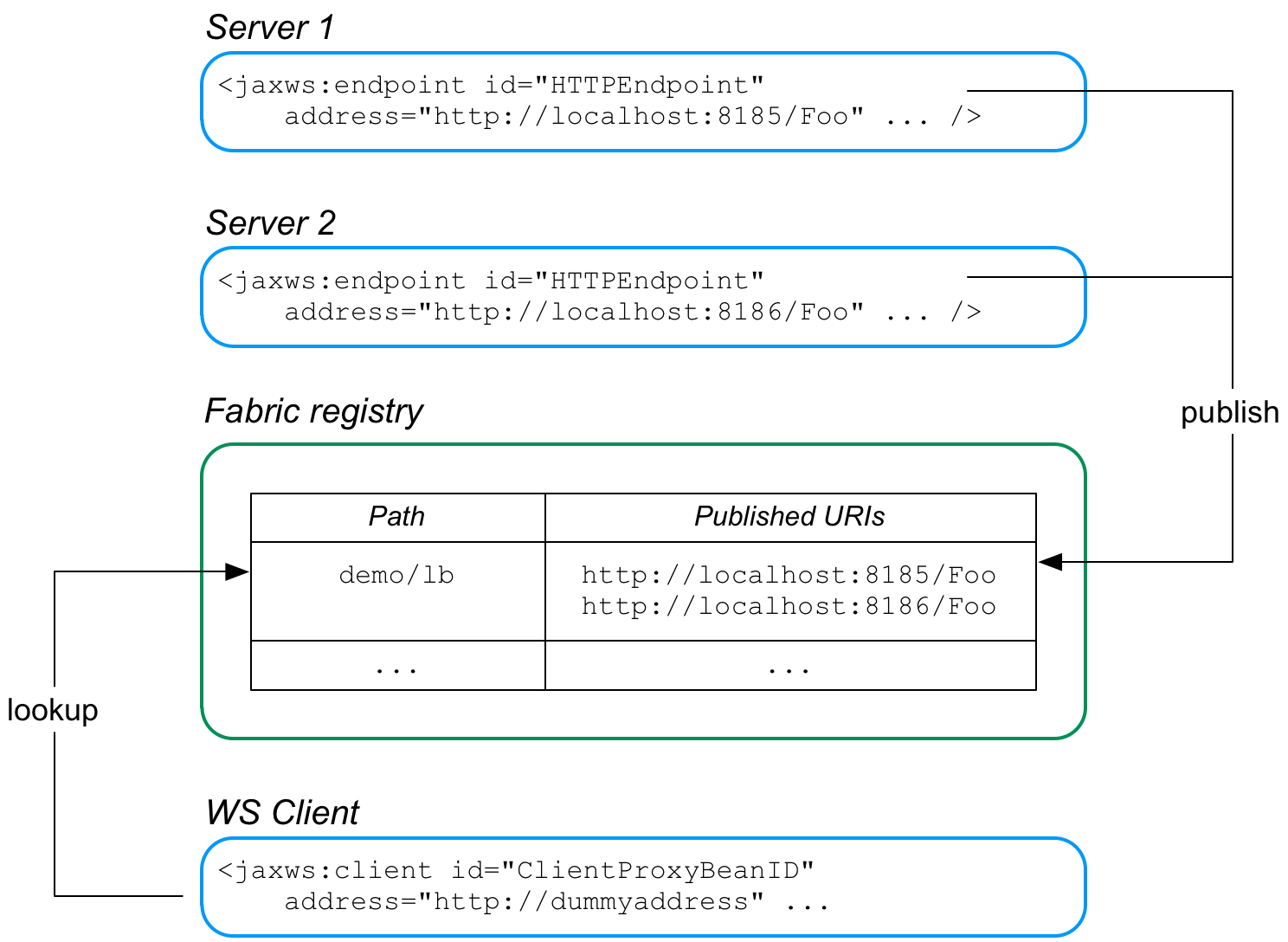
In this example, two WS servers are created, with the URIs,
http://localhost:8185/Foo and http://localhost:8186/Foo. For both of these servers, the load balancer feature is configured to store the cluster endpoints under the path, demo/lb, in the fabric registry.
Now, when the WS client starts, it is configured to look up the cluster path,
demo/lb, in the fabric registry. Because the demo/lb path is associated with multiple endpoint addresses, fabric implements a random load balancing algorithm to choose one of the available URIs to connect to.
FabricLoadBalancerFeature
Copier lienLien copié sur presse-papiers!
The fabric load balancer feature is implemented by the following class:
org.fusesource.fabric.cxf.FabricLoadBalancerFeature
The
FabricLoadBalancerFeature class exposes the following bean properties:
-
fabricPath - This property specifies a node in the fabric registry (specified relative to the base node,
/fabric/cxf/endpoints) that is used to store the data for a particular endpoint cluster. -
zkClient - A proxy reference to the OSGi service exposed by the fabric agent (of type,
org.linkedin.zookeeper.client.IZKClient). -
maximumConnectionTimeout - The maximum length of time to attempt to connect to the fabric agent, specified in milliseconds. The default is 10000 (10 seconds).
-
connectionRetryTime - How long to wait between connection attempts, specified in milliseconds. The default is 100.
-
loadBalanceStrategy - By implementing a bean of type
org.fusesource.fabric.cxf.LoadBalanceStrategyand setting this property, you can customise the load balancing algorithm used by the load balancing feature.
Prerequisites
Copier lienLien copié sur presse-papiers!
To use the fabric load balancer feature in your application, your project must satisfy the following prerequisites:
Maven dependency
Copier lienLien copié sur presse-papiers!
The fabric load balancer feature requires the
fabric-cxf Maven artifact. Add the following dependency to your project's POM file:
<dependency>
    <groupId>org.fusesource.fabric</groupId>
    <artifactId>fabric-cxf</artifactId>
    <version>6.0.0.redhat-024</version>
</dependency>
OSGi package import
Copier lienLien copié sur presse-papiers!
If you are packaging your project as an OSGi bundle, you must add
org.fusesource.fabric.cxf to the list of imported packages. For example, using the Maven bundle plug-in, you can specify this package import by adding org.fusesource.fabric.cxf to the comma-separated list in the Import-Package element, as follows:
<plugin>
    <groupId>org.apache.felix</groupId>
    <artifactId>maven-bundle-plugin</artifactId>
    <version>2.2.0</version>
    <extensions>true</extensions>
    <configuration>
        <instructions>
            <Bundle-SymbolicName>${project.artifactId}</Bundle-SymbolicName>
            <Import-Package>
                ...
 org.fusesource.fabric.cxf,
                *
            </Import-Package>
            ...
        </instructions>
    </configuration>
</plugin>
Fabric deployment
Copier lienLien copié sur presse-papiers!
When you come to deploy your application into a Red Hat JBoss Fuse container, you must deploy it into a fabric. The fabric load balancer feature is not supported in a standalone container.
Required feature
Copier lienLien copié sur presse-papiers!
The fabric load balancer requires the
fabric-cxf Apache Karaf feature to be installed in the container. In the context of a fabric, this means you must add the fabric-cxf feature to the relevant deployment profile. For example, if you are using the cxf-lb-server profile to deploy a load-balancing WS server, you can add the fabric-cxf feature by entering the following console command:
JBossFuse:karaf@root> profile-edit -f fabric-cxf cxf-lb-server9.1.2. Configure the Server
Copier lienLien copié sur presse-papiers!
Overview
Copier lienLien copié sur presse-papiers!
To configure a WS server to use fabric load balancing, you must configure a fabric load balancer feature and install it in the default Apache CXF bus instance. This section describes how to configure the load balancer feature in Spring XML and in blueprint XML.
Prerequisites
Copier lienLien copié sur presse-papiers!
For the basic prerequisites to build a fabric load-balancing WS server, see the section called “Prerequisites”.
Spring XML
Copier lienLien copié sur presse-papiers!
The following fragment from a Spring XML file shows how to add the fabric load balancer feature,
FabricLoadBalancerFeature, to an Apache CXF bus. Any Apache CXF endpoints subsequently created on this bus will automatically have the load-balancer feature enabled.
<?xml version="1.0" encoding="UTF-8"?>
<beans xmlns="http://www.springframework.org/schema/beans"
    ...
    xmlns:osgi="http://www.springframework.org/schema/osgi"
    ...
    xmlns:cxfcore="http://cxf.apache.org/core"
>
    ...
    <!-- Reference the fabric agent -->
    <osgi:reference id="IZKClient"
        interface="org.linkedin.zookeeper.client.IZKClient" />

    <!-- Configure the Fabric load balancer feature -->
    <bean id="fabricLoadBalancerFeature"
          class="org.fusesource.fabric.cxf.FabricLoadBalancerFeature">
        <property name="zkClient" ref="IZKClient" />
        <property name="fabricPath" value="ZKPath" />
    </bean>

    <!-- Add the feature to the bus -->
    <cxfcore:bus>
      <cxfcore:features>
        <ref bean="fabricLoadBalancerFeature" />
      </cxfcore:features>
    </cxfcore:bus>
    ...
</beans>
The following beans are used to install the fabric load-balancer feature:
IZKClientOSGi service reference- The
IZKClientreference is a proxy of the local fabric agent, which it accesses through theorg.linkedin.zookeeper.client.IZKClientinterface. This reference is needed in order to integrate the load balancer feature with the underlying fabric. FabricLoadBalancerFeaturebean- The
FabricLoadBalancerFeaturebean is initialised with the following properties:-
zkClient - A reference to the fabric agent proxy,
IZKClient. -
fabricPath - The path of a node in the fabric registry, where the cluster data is stored (for example, the addresses of the endpoints in the load-balancing cluster). The node path is specified relative to the base node,
/fabric/cxf/endpoints.
-
- Apache CXF bus
- The
cxfcore:buselement installs the fabric load balancer feature in the default bus instance.
Blueprint XML
Copier lienLien copié sur presse-papiers!
The following fragment from a blueprint XML file shows how to add the fabric load balancer feature,
FabricLoadBalancerFeature, to an Apache CXF bus. Any Apache CXF endpoints subsequently created on this bus will automatically have the load-balancer feature enabled.
<blueprint xmlns="http://www.osgi.org/xmlns/blueprint/v1.0.0"
           ...
           xmlns:cxf="http://cxf.apache.org/blueprint/core"
           ...
>
    ...
    <!-- Reference the fabric agent -->
    <reference id="org.linkedin.zookeeper.client.IZKClient"
               interface="org.linkedin.zookeeper.client.IZKClient" />

    <!-- Create the Fabric load balancer feature -->
    <bean id="fabricLoadBalancerFeature"
          class="org.fusesource.fabric.cxf.FabricLoadBalancerFeature">
        <property name="zkClient" ref="org.linkedin.zookeeper.client.IZKClient" />
        <property name="fabricPath" value="ZKPath" />
    </bean>

    <!-- setup the feature on the bus to help publish the services to the fabric-->
    <cxf:bus bus="cxf">
        <cxf:features>
            <ref component-id="fabricLoadBalancerFeature"/>
        </cxf:features>
    </cxf:bus>
    ...
</blueprint>
The following beans are used to install the fabric load-balancer feature:
IZKClientreference- The
IZKClientreference is a proxy of the local fabric agent, which it accesses through theorg.linkedin.zookeeper.client.IZKClientinterface. This reference is needed in order to integrate the load balancer feature with the underlying fabric. FabricLoadBalancerFeaturebean- The
FabricLoadBalancerFeaturebean is initialised with the following properties:-
zkClient - A reference to the fabric agent proxy,
IZKClient. -
fabricPath - The path of a node in the fabric registry, where the cluster data is stored (for example, the addresses of the endpoints in the load-balancing cluster). The node path is specified relative to the base node,
/fabric/cxf/endpoints.
-
- Apache CXF bus
- The
cxf:buselement installs the fabric load balancer feature in the default bus instance.
Example using Spring XML
Copier lienLien copié sur presse-papiers!
Example 9.1, “WS Server with Fabric Load Balancer Feature” shows a complete Spring XML example of a WS endpoint configured to use the fabric load balancing feature.
Example 9.1. WS Server with Fabric Load Balancer Feature
<?xml version="1.0" encoding="UTF-8"?>
<beans xmlns="http://www.springframework.org/schema/beans"
    xmlns:xsi="http://www.w3.org/2001/XMLSchema-instance"
    xmlns:jaxws="http://cxf.apache.org/jaxws"
    xmlns:osgi="http://www.springframework.org/schema/osgi"
    xmlns:osgix="http://www.springframework.org/schema/osgi-compendium"
    xmlns:ctx="http://www.springframework.org/schema/context"
    xmlns:cxfcore="http://cxf.apache.org/core"
    xsi:schemaLocation="
        http://www.springframework.org/schema/beans
            http://www.springframework.org/schema/beans/spring-beans.xsd
        http://cxf.apache.org/jaxws
            http://cxf.apache.org/schemas/jaxws.xsd
        http://www.springframework.org/schema/osgi
            http://www.springframework.org/schema/osgi/spring-osgi.xsd
        http://www.springframework.org/schema/context
            http://www.springframework.org/schema/context/spring-context.xsd
        http://www.springframework.org/schema/osgi
            http://www.springframework.org/schema/osgi/spring-osgi.xsd
        http://www.springframework.org/schema/osgi-compendium
            http://www.springframework.org/schema/osgi-compendium/spring-osgi-compendium.xsd
        http://cxf.apache.org/core
            http://cxf.apache.org/schemas/core.xsd
">

    <!-- Configuration Admin entry -->
    <osgix:cm-properties id="cmProps"
        persistent-id="org.fusesource.example.fabric.lb">
      <prop key="portNumber">8191</prop>
    </osgix:cm-properties>

    <!-- placeholder configurer -->
    <ctx:property-placeholder properties-ref="cmProps" />


    <!-- Create the WS endpoint -->
    <jaxws:endpoint id="HTTPEndpoint"
        implementor="org.fusesource.example.PersonImpl"
        address="http://localhost:${portNumber}/PersonServiceCF"/>


    <!-- Reference the fabric agent -->
    <osgi:reference id="IZKClient"
        interface="org.linkedin.zookeeper.client.IZKClient" />

    <!-- Configure the Fabric load balancer feature -->
    <bean id="fabricLoadBalancerFeature"
          class="org.fusesource.fabric.cxf.FabricLoadBalancerFeature">
        <property name="zkClient" ref="IZKClient" />
        <property name="fabricPath" value="demo/lb" />
    </bean>

    <!-- Add the feature to the bus -->
    <cxfcore:bus>
      <cxfcore:features>
        <ref bean="fabricLoadBalancerFeature" />
      </cxfcore:features>
    </cxfcore:bus>

</beans>
The preceding Spring XML configuration consists of the following main sections:
- Setting up OSGi Configuration Admin—the
osgix:cm-propertieselement and thectx:property-placeholderelement set up the OSGi Configuration Admin service, enabling you to substitute the WS endpoint's IP port number using the placeholder,${portNumber}.Use of the OSGi Configuration Admin service is optional, but it provides a convenient way of creating a cluster of WS servers listening on different ports. With the configuration shown here, you can deploy the same server bundle into different container instances, using the OSGi Configuration Admin service to customise the IP port of each deployed server instance. - Creating the WS endpoint—create the WS endpoint in the usual way, using the
jaxws:endpointelement. By default, this endpoint is automatically associated with the default bus instance, which has load balancing enabled. The only unusual aspect of this endpoint definition is that the OSGi Configuration Admin service is used to define the port number in the endpoint's address (through the${portNumber}placeholder). - Enabling the fabric load balancing feature—the fabric load balancing feature is installed in the default bus instance, as previously described. In this example, the
fabricPathproperty is set to the value,demo/lb.
Creating fabric profiles for the example
Copier lienLien copié sur presse-papiers!
To deploy the WS endpoint in a fabric, you need to create the appropriate profiles. Because you want to create a cluster of WS endpoints, it makes sense to define multiple profiles, where each WS endpoint gets its own profile. For example, you could define the following set of profiles for deployment:
-
cxf-lb-server - A base profile, containing details common to all of the cluster endpoints.
-
cxf-lb-server-8185 - A profile that inherits from
cxf-lb-serverand sets theportNumberproperty to 8185. -
cxf-lb-server-8186 - A profile that inherits from
cxf-lb-serverand sets theportNumberproperty to 8186.
Assuming that the example server bundle (containing the WS endpoint implementation) is stored in the local Maven repository and has the Maven coordinates,
org.fusesource.example/cxf-lb-server/1.0-SNAPSHOT, you can create the cxf-lb-server base profile by entering the following console commands:
JBossFuse:karaf@root> profile-create --parents cxf cxf-lb-server
JBossFuse:karaf@root> profile-edit -f fabric-cxf cxf-lb-server
JBossFuse:karaf@root> profile-edit -b mvn:org.fusesource.example/cxf-lb-server/1.0-SNAPSHOT cxf-lb-server
You can then create the
cxf-lb-server-8185 profile and the cxf-lb-server-8186 profile as follows:
JBossFuse:karaf@root> profile-create --parents cxf-lb-server cxf-lb-server-8185
JBossFuse:karaf@root> profile-create --parents cxf-lb-server cxf-lb-server-8186
JBossFuse:karaf@root> profile-edit -p org.fusesource.example.fabric.lb/portNumber=8185 cxf-lb-server-8185
JBossFuse:karaf@root> profile-edit -p org.fusesource.example.fabric.lb/portNumber=8186 cxf-lb-server-8186
The
cxf-lb-server-8185 profile and the cxf-lb-server-8186 profile are now ready to be deployed to the container of your choice, using the fabric:container-change-profile command.
9.1.3. Configure the Client
Copier lienLien copié sur presse-papiers!
Overview
Copier lienLien copié sur presse-papiers!
To configure a WS client to use fabric load balancing, you must install the fabric load balancer feature directly in the client proxy instance. This section describes how to configure the load balancer feature in Spring XML, blueprint XML, and by programming in Java.
Prerequisites
Copier lienLien copié sur presse-papiers!
For the basic prerequisites to build a fabric load-balancing WS client, see the section called “Prerequisites”.
Spring XML
Copier lienLien copié sur presse-papiers!
The following fragment from a Spring XML file shows how to add the fabric load balancer feature,
FabricLoadBalancerFeature, directly into a WS client proxy instance.
<?xml version="1.0" encoding="UTF-8"?>
<beans xmlns="http://www.springframework.org/schema/beans"
    ...
    xmlns:jaxws="http://cxf.apache.org/jaxws"
    xmlns:osgi="http://www.springframework.org/schema/osgi"
    ...
>
    <!-- Create a client proxy, with load balancing enabled -->
    <jaxws:client id="ClientProxyBeanID"
        address="http://dummyaddress"
        serviceClass="SEI">
        <jaxws:features>
            <ref bean="fabricLoadBalancerFeature" />
        </jaxws:features>
    </jaxws:client>
    ...
    <!-- Reference the fabric agent -->
    <osgi:reference id="IZKClient"
        interface="org.linkedin.zookeeper.client.IZKClient" />

    <!-- Configure the Fabric load balancer feature -->
    <bean id="fabricLoadBalancerFeature"
          class="org.fusesource.fabric.cxf.FabricLoadBalancerFeature">
        <property name="zkClient" ref="IZKClient" />
        <property name="fabricPath" value="ZKPath" />
    </bean>
    ...
</beans>
The fabric load balancer feature is installed directly into the WS client proxy by inserting it as a child of the
jaxws:features element (or, as in this case, by inserting a bean reference to the actual instance). The following beans are used to initialise the fabric load-balancer feature:
IZKClientOSGi service reference- The
IZKClientreference is a proxy of the local fabric agent, which it accesses through theorg.linkedin.zookeeper.client.IZKClientinterface. This reference is needed in order to integrate the load balancer feature with the underlying fabric. FabricLoadBalancerFeaturebean- The
FabricLoadBalancerFeaturebean is initialised with the following properties:-
zkClient - A reference to the fabric agent proxy,
IZKClient. -
fabricPath - The path of a node in the fabric registry, where the cluster data is stored (for example, the addresses of the endpoints in the load-balancing cluster). The node path is specified relative to the base node,
/fabric/cxf/endpoints.
-
Blueprint XML
Copier lienLien copié sur presse-papiers!
The following fragment from a blueprint XML file shows how to add the fabric load balancer feature,
FabricLoadBalancerFeature, directly into a WS client proxy instance.
<blueprint xmlns="http://www.osgi.org/xmlns/blueprint/v1.0.0"
           ...
           xmlns:jaxws="http://cxf.apache.org/blueprint/jaxws"
           xmlns:cxf="http://cxf.apache.org/blueprint/core"
           ...
>
    <!-- Create a client proxy, with load balancing enabled -->
    <jaxws:client id="ClientProxyBeanID"
        address="http://dummyaddress"
        serviceClass="SEI">
        <jaxws:features>
            <ref component-id="fabricLoadBalancerFeature" />
        </jaxws:features>
    </jaxws:client>
    ...
    <reference id="org.linkedin.zookeeper.client.IZKClient"
               interface="org.linkedin.zookeeper.client.IZKClient" />

    <!-- Create the Fabric load balancer feature -->
    <bean id="fabricLoadBalancerFeature"
          class="org.fusesource.fabric.cxf.FabricLoadBalancerFeature">
        <property name="zkClient" ref="org.linkedin.zookeeper.client.IZKClient" />
        <property name="fabricPath" value="ZKPath" />
    </bean>
    ...
</blueprint>
The fabric load balancer feature is installed directly into the WS client proxy by inserting it as a child of the
jaxws:features element (or, as in this case, by inserting a bean reference to the actual instance). The following beans are used to initialise the fabric load-balancer feature:
IZKClientreference- The
IZKClientreference is a proxy of the local fabric agent, which it accesses through theorg.linkedin.zookeeper.client.IZKClientinterface. This reference is needed in order to integrate the load balancer feature with the underlying fabric. FabricLoadBalancerFeaturebean- The
FabricLoadBalancerFeaturebean is initialised with the following properties:-
zkClient - A reference to the fabric agent proxy,
IZKClient. -
fabricPath - The path of a node in the fabric registry, where the cluster data is stored (for example, the addresses of the endpoints in the load-balancing cluster). The node path is specified relative to the base node,
/fabric/cxf/endpoints.
-
Java
Copier lienLien copié sur presse-papiers!
As an alternative to using XML configuration, you can enable the fabric load balancing feature on the client side by programming directly in Java. The following example shows how to enable fabric load balancing on a proxy for the
Hello Web service.
// Java
package org.fusesource.fabric.demo.cxf.client;

import org.apache.cxf.feature.AbstractFeature;
import org.apache.cxf.frontend.ClientProxyFactoryBean;
import org.apache.cxf.jaxws.JaxWsProxyFactoryBean;
import org.fusesource.fabric.cxf.FabricLoadBalancerFeature;
import org.fusesource.fabric.demo.cxf.Hello;

import java.util.ArrayList;
import java.util.List;

public class Client {

    private Hello hello;

    public void initializeHelloProxy() {
        // The feature will try to create a zookeeper client itself
        // by checking the system property of zookeeper.url
        FabricLoadBalancerFeature feature = new FabricLoadBalancerFeature();
        // Feature will use this path to locate the service
        feature.setFabricPath("demo/lb");

        ClientProxyFactoryBean clientFactory = new JaxWsProxyFactoryBean();
        clientFactory.setServiceClass(ClientProxyFactoryBean.class);
        // The address is not the actual address that the client will access
        clientFactory.setAddress("http://dummyaddress");

        List<AbstractFeature> features = new ArrayList<AbstractFeature>();
        features.add(feature);
        // we need to setup the feature on the client factory
        clientFactory.setFeatures(features);

        // Create the proxy of Hello
        hello = clientFactory.create(Hello.class);
    }

    public static void main(String args[]) {
        initializeHelloProxy();
        ...
    }
}
In this example, the
fabricPath property is set to the value, demo/lb (which matches the example value used by the server in Example 9.1, “WS Server with Fabric Load Balancer Feature”).
The address that the client proxy accesses is set to a dummy value,
http://dummyaddress, because this value is not used. When the client is initialized, the load balancer feature substitutes the address value retrieved from the demo/lb node of the fabric registry.
Example using Spring XML
Copier lienLien copié sur presse-papiers!
Example 9.2, “Client Proxy with Fabric Load Balancer Feature” shows a detailed Spring XML example of how to configure a WS client proxy with the fabric load balancer feature.
Example 9.2. Client Proxy with Fabric Load Balancer Feature
<?xml version="1.0" encoding="UTF-8"?>
<beans xmlns="http://www.springframework.org/schema/beans"
    xmlns:xsi="http://www.w3.org/2001/XMLSchema-instance"
    xmlns:jaxws="http://cxf.apache.org/jaxws"
    xmlns:osgi="http://www.springframework.org/schema/osgi"
    xmlns:cxfcore="http://cxf.apache.org/core"
    xsi:schemaLocation="
        http://www.springframework.org/schema/beans
            http://www.springframework.org/schema/beans/spring-beans.xsd
        http://cxf.apache.org/jaxws
            http://cxf.apache.org/schemas/jaxws.xsd
        http://www.springframework.org/schema/osgi
            http://www.springframework.org/schema/osgi/spring-osgi.xsd
        http://www.springframework.org/schema/osgi
            http://www.springframework.org/schema/osgi/spring-osgi.xsd
        http://cxf.apache.org/core
            http://cxf.apache.org/schemas/core.xsd
">

    <!-- Create a client proxy, with load balancing enabled -->
    <jaxws:client id="personServiceProxy"
        address="http://dummyaddress"
        serviceClass="org.fusesource.example.Person">
        <jaxws:features>
            <ref bean="fabricLoadBalancerFeature" />
        </jaxws:features>
    </jaxws:client>

    <!-- Inject the client proxy into a bean... -->
    <!-- (not shown) -->


    <!-- Reference the fabric agent -->
    <osgi:reference id="IZKClient"
        interface="org.linkedin.zookeeper.client.IZKClient" />

    <!-- Configure the Fabric load balancer feature -->
    <bean id="fabricLoadBalancerFeature"
          class="org.fusesource.fabric.cxf.FabricLoadBalancerFeature">
        <property name="zkClient" ref="IZKClient" />
        <property name="fabricPath" value="demo/lb" />
    </bean>

</beans>
Creating a fabric profile for the client
Copier lienLien copié sur presse-papiers!
To deploy the WS client in a fabric, you need to create a profile for it. Assuming that the example client bundle is stored in the local Maven repository and has the Maven coordinates,
org.fusesource.example/cxf-lb-client/1.0-SNAPSHOT, you can create the cxf-lb-client profile by entering the following console commands:
JBossFuse:karaf@root> profile-create --parents cxf cxf-lb-client
JBossFuse:karaf@root> profile-edit -f fabric-cxf cxf-lb-client
JBossFuse:karaf@root> profile-edit -b mvn:org.fusesource.example/cxf-lb-client/1.0-SNAPSHOT cxf-lb-client
The
cxf-lb-client profile is now ready to be deployed to the container of your choice, using the fabric:container-change-profile command.

'%20d='M201.5%20305.5c-13.8%200-24.9-11.1-24.9-24.6%200-13.8%2011.1-24.9%2024.9-24.9%2013.6%200%2024.6%2011.1%2024.6%2024.9%200%2013.6-11.1%2024.6-24.6%2024.6zM504%20256c0%20137-111%20248-248%20248S8%20393%208%20256%20119%208%20256%208s248%20111%20248%20248zm-132.3-41.2c-9.4%200-17.7%203.9-23.8%2010-22.4-15.5-52.6-25.5-86.1-26.6l17.4-78.3%2055.4%2012.5c0%2013.6%2011.1%2024.6%2024.6%2024.6%2013.8%200%2024.9-11.3%2024.9-24.9s-11.1-24.9-24.9-24.9c-9.7%200-18%205.8-22.1%2013.8l-61.2-13.6c-3-.8-6.1%201.4-6.9%204.4l-19.1%2086.4c-33.2%201.4-63.1%2011.3-85.5%2026.8-6.1-6.4-14.7-10.2-24.1-10.2-34.9%200-46.3%2046.9-14.4%2062.8-1.1%205-1.7%2010.2-1.7%2015.5%200%2052.6%2059.2%2095.2%20132%2095.2%2073.1%200%20132.3-42.6%20132.3-95.2%200-5.3-.6-10.8-1.9-15.8%2031.3-16%2019.8-62.5-14.9-62.5zM302.8%20331c-18.2%2018.2-76.1%2017.9-93.6%200-2.2-2.2-6.1-2.2-8.3%200-2.5%202.5-2.5%206.4%200%208.6%2022.8%2022.8%2087.3%2022.8%20110.2%200%202.5-2.2%202.5-6.1%200-8.6-2.2-2.2-6.1-2.2-8.3%200zm7.7-75c-13.6%200-24.6%2011.1-24.6%2024.9%200%2013.6%2011.1%2024.6%2024.6%2024.6%2013.8%200%2024.9-11.1%2024.9-24.6%200-13.8-11-24.9-24.9-24.9z'/%3e%3c/svg%3e)