 Red Hat Summit
Ce contenu n'est pas disponible dans la langue sélectionnée.
6.2. SOAP Message Protection
6.2.1. Introduction to SOAP Message Protection
Copier lienLien copié sur presse-papiers!
Overview
Copier lienLien copié sur presse-papiers!
By applying message protection at the SOAP encoding layer, instead of at the transport layer, you have access to a more flexible range of protection policies. In particular, because the SOAP layer is aware of the message structure, you can apply protection at a finer level of granularity—for example, by encrypting and signing only those headers that actually require protection. This feature enables you to support more sophisticated multi-tier architectures. For example, one plaintext header might be aimed at an intermediate tier (located within a secure intranet), while an encrypted header might be aimed at the final destination (reached through an insecure public network).
Security bindings
Copier lienLien copié sur presse-papiers!
As described in the WS-SecurityPolicy specification, one of the following binding types can be used to protect SOAP messages:
sp:TransportBinding—the transport binding refers to message protection provided at the transport level (for example, through HTTPS). This binding can be used to secure any message type, not just SOAP, and it is described in detail in the preceding section, Section 6.1, “Transport Layer Message Protection”.sp:AsymmetricBinding—the asymmetric binding refers to message protection provided at the SOAP message encoding layer, where the protection features are implemented using asymmetric cryptography (also known as public key cryptography).sp:SymmetricBinding—the symmetric binding refers to message protection provided at the SOAP message encoding layer, where the protection features are implemented using symmetric cryptography. Examples of symmetric cryptography are the tokens provided by WS-SecureConversation and Kerberos tokens.
Message protection
Copier lienLien copié sur presse-papiers!
The following qualities of protection can be applied to part or all of a message:
- Encryption.
- Signing.
- Signing+encryption (sign before encrypting).
- Encryption+signing (encrypt before signing).
These qualities of protection can be arbitrarily combined in a single message. Thus, some parts of a message can be just encrypted, while other parts of the message are just signed, and other parts of the message can be both signed and encrypted. It is also possible to leave parts of the message unprotected.
The most flexible options for applying message protection are available at the SOAP layer (
sp:AsymmetricBinding or sp:SymmetricBinding). The transport layer (sp:TransportBinding) only gives you the option of applying protection to the whole message.
Specifying parts of the message to protect
Copier lienLien copié sur presse-papiers!
Currently, Apache CXF enables you to sign or encrypt the following parts of a SOAP message:
- Body—sign and/or encrypt the whole of the
soap:BODYelement in a SOAP message. - Header(s)—sign and/or encrypt one or more SOAP message headers. You can specify the quality of protection for each header individually.
- Attachments—sign and/or encrypt all of the attachments in a SOAP message.
The WS-SecurityPolicy specification also defines policies for applying protection to individual XML elements, but this is currently not supported in Apache CXF.
Role of configuration
Copier lienLien copié sur presse-papiers!
Not all of the details required for message protection are specified using policies. The policies are primarily intended to provide a way of specifying the quality of protection required for a service. Supporting details, such as security tokens, passwords, and so on, must be provided using a separate, product-specific mechanism. In practice, this means that in Apache CXF, some supporting configuration details must be provided in Spring XML configuration files. For details, see Section 6.2.6, “Providing Encryption Keys and Signing Keys”.
6.2.2. Basic Signing and Encryption Scenario
Copier lienLien copié sur presse-papiers!
Overview
Copier lienLien copié sur presse-papiers!
The scenario described here is a client-server application, where an asymmetric binding policy is set up to encrypt and sign the SOAP body of messages that pass back and forth between the client and the server.
Example scenario
Copier lienLien copié sur presse-papiers!
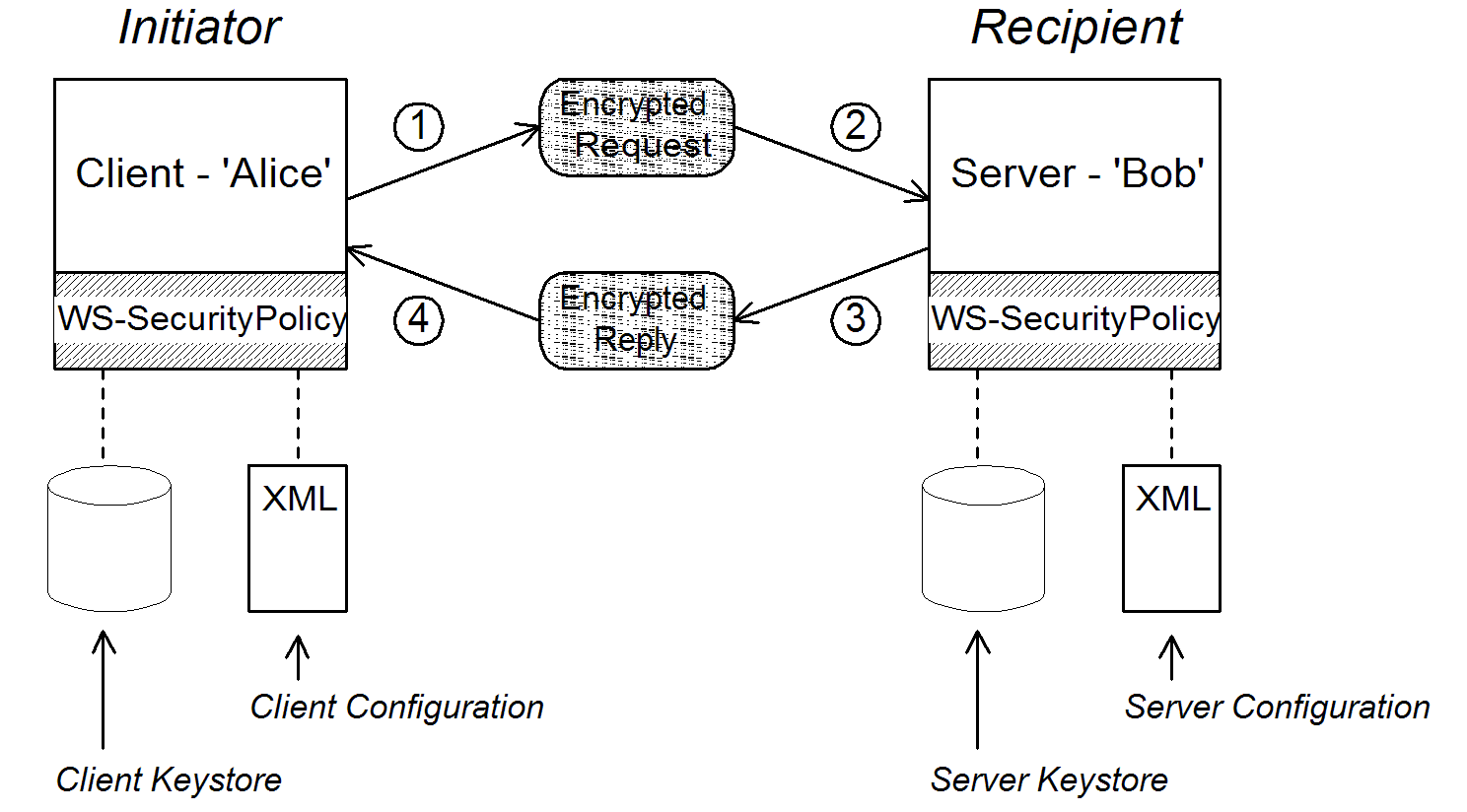
Figure 6.1, “Basic Signing and Encryption Scenario” shows an overview of the basic signing and encryption scenario, which is specified by associating an asymmetric binding policy with an endpoint in the WSDL contract.
Figure 6.1. Basic Signing and Encryption Scenario
Scenario steps
Copier lienLien copié sur presse-papiers!
When the client in Figure 6.1, “Basic Signing and Encryption Scenario” invokes a synchronous operation on the recipient's endpoint, the request and reply message are processed as follows:
- As the outgoing request message passes through the WS-SecurityPolicy handler, the handler processes the message in accordance with the policies specified in the client’s asymmetric binding policy. In this example, the handler performs the following processing:
- Encrypt the SOAP body of the message using Bob’s public key.
- Sign the encrypted SOAP body using Alice’s private key.
- As the incoming request message passes through the server's WS-SecurityPolicy handler, the handler processes the message in accordance with the policies specified in the server’s asymmetric binding policy. In this example, the handler performs the following processing:
- Verify the signature using Alice’s public key.
- Decrypt the SOAP body using Bob’s private key.
- As the outgoing reply message passes back through the server's WS-SecurityPolicy handler, the handler performs the following processing:
- Encrypt the SOAP body of the message using Alice’s public key.
- Sign the encrypted SOAP body using Bob’s private key.
- As the incoming reply message passes back through the client's WS-SecurityPolicy handler, the handler performs the following processing:
- Verify the signature using Bob’s public key.
- Decrypt the SOAP body using Alice’s private key.
6.2.3. Specifying an AsymmetricBinding Policy
Copier lienLien copié sur presse-papiers!
Overview
Copier lienLien copié sur presse-papiers!
The asymmetric binding policy implements SOAP message protection using asymmetric key algorithms (public/private key combinations) and does so at the SOAP layer. The encryption and signing algorithms used by the asymmetric binding are similar to the encryption and signing algorithms used by SSL/TLS. A crucial difference, however, is that SOAP message protection enables you to select particular parts of a message to protect (for example, individual headers, body, or attachments), whereas transport layer security can operate only on the whole message.
Policy subject
Copier lienLien copié sur presse-papiers!
An asymmetric binding policy must be applied to an endpoint policy subject (see the section called “Endpoint policy subject”). For example, given the asymmetric binding policy with ID,
MutualCertificate10SignEncrypt_IPingService_policy, you could apply the policy to an endpoint binding as follows:
<wsdl:binding name="MutualCertificate10SignEncrypt_IPingService" type="i0:IPingService">
  <wsp:PolicyReference URI="#MutualCertificate10SignEncrypt_IPingService_policy"/>
  ...
</wsdl:binding>
Syntax
Copier lienLien copié sur presse-papiers!
The
AsymmetricBinding element has the following syntax:
<sp:AsymmetricBinding xmlns:sp="..." ... >
  <wsp:Policy xmlns:wsp="...">
  (
   <sp:InitiatorToken>
     <wsp:Policy> ... </wsp:Policy>
   </sp:InitiatorToken>
  ) | (
   <sp:InitiatorSignatureToken>
     <wsp:Policy> ... </wsp:Policy>
   </sp:InitiatorSignatureToken>
   <sp:InitiatorEncryptionToken>
     <wsp:Policy> ... </wsp:Policy>
   </sp:InitiatorEncryptionToken>
  )
  (
   <sp:RecipientToken>
     <wsp:Policy> ... </wsp:Policy>
   </sp:RecipientToken>
  ) | (
   <sp:RecipientSignatureToken>
     <wsp:Policy> ... </wsp:Policy>
   </sp:RecipientSignatureToken>
   <sp:RecipientEncryptionToken>
     <wsp:Policy> ... </wsp:Policy>
   </sp:RecipientEncryptionToken>
  )
   <sp:AlgorithmSuite ... > ... </sp:AlgorithmSuite>
   <sp:Layout ... > ... </sp:Layout> ?
   <sp:IncludeTimestamp ... /> ?
   <sp:EncryptBeforeSigning ... /> ?
   <sp:EncryptSignature ... /> ?
   <sp:ProtectTokens ... /> ?
   <sp:OnlySignEntireHeadersAndBody ... /> ?
   ...
  </wsp:Policy>
  ...
</sp:AsymmetricBinding>
Sample policy
Copier lienLien copié sur presse-papiers!
Example 6.4, “Example of an Asymmetric Binding” shows an example of an asymmetric binding that supports message protection with signatures and encryption, where the signing and encryption is done using pairs of public/private keys (that is, using asymmetric cryptography). This example does not specify which parts of the message should be signed and encrypted, however. For details of how to do that, see Section 6.2.5, “Specifying Parts of Message to Encrypt and Sign”.
Example 6.4. Example of an Asymmetric Binding
<wsp:Policy wsu:Id="MutualCertificate10SignEncrypt_IPingService_policy">
  <wsp:ExactlyOne>
    <wsp:All>
      <sp:AsymmetricBinding
          xmlns:sp="http://schemas.xmlsoap.org/ws/2005/07/securitypolicy">
        <wsp:Policy>
          <sp:InitiatorToken>
            <wsp:Policy>
              <sp:X509Token
                  sp:IncludeToken="http://schemas.xmlsoap.org/ws/2005/07/securitypolicy/IncludeToken/AlwaysToRecipient">
                <wsp:Policy>
                  <sp:WssX509V3Token10/>
                </wsp:Policy>
              </sp:X509Token>
            </wsp:Policy>
          </sp:InitiatorToken>
          <sp:RecipientToken>
            <wsp:Policy>
              <sp:X509Token
                  sp:IncludeToken="http://schemas.xmlsoap.org/ws/2005/07/securitypolicy/IncludeToken/Never">
                <wsp:Policy>
                  <sp:WssX509V3Token10/>
                </wsp:Policy>
              </sp:X509Token>
            </wsp:Policy>
          </sp:RecipientToken>
          <sp:AlgorithmSuite>
            <wsp:Policy>
              <sp:Basic256/>
            </wsp:Policy>
          </sp:AlgorithmSuite>
          <sp:Layout>
            <wsp:Policy>
              <sp:Lax/>
            </wsp:Policy>
          </sp:Layout>
          <sp:IncludeTimestamp/>
          <sp:EncryptSignature/>
          <sp:OnlySignEntireHeadersAndBody/>
        </wsp:Policy>
      </sp:AsymmetricBinding>
      <sp:Wss10 xmlns:sp="http://schemas.xmlsoap.org/ws/2005/07/securitypolicy">
        <wsp:Policy>
          <sp:MustSupportRefKeyIdentifier/>
          <sp:MustSupportRefIssuerSerial/>
        </wsp:Policy>
      </sp:Wss10>
    </wsp:All>
  </wsp:ExactlyOne>
</wsp:Policy>
sp:InitiatorToken
Copier lienLien copié sur presse-papiers!
The initiator token refers to the public/private key-pair owned by the initiator. This token is used as follows:
- The token's private key signs messages sent from initiator to recipient.
- The token's public key verifies signatures received by the recipient.
- The token's public key encrypts messages sent from recipient to initiator.
- The token's private key decrypts messages received by the initiator.
Confusingly, this token is used both by the initiator and by the recipient. However, only the initiator has access to the private key so, in this sense, the token can be said to belong to the initiator. In Section 6.2.2, “Basic Signing and Encryption Scenario”, the initiator token is the certificate, Alice.
This element should contain a nested
wsp:Policy element and sp:X509Token element as shown. The sp:IncludeToken attribute is set to AlwaysToRecipient, which instructs the runtime to include Alice's public key with every message sent to the recipient. This option is useful, in case the recipient wants to use the initiator's certificate to perform authentication. The most deeply nested element, WssX509V3Token10 is optional. It specifies what specification version the X.509 certificate should conform to. The following alternatives (or none) can be specified here:
- sp:WssX509V3Token10
- This optional element is a policy assertion that indicates that an X509 Version 3 token should be used.
- sp:WssX509Pkcs7Token10
- This optional element is a policy assertion that indicates that an X509 PKCS7 token should be used.
- sp:WssX509PkiPathV1Token10
- This optional element is a policy assertion that indicates that an X509 PKI Path Version 1 token should be used.
- sp:WssX509V1Token11
- This optional element is a policy assertion that indicates that an X509 Version 1 token should be used.
- sp:WssX509V3Token11
- This optional element is a policy assertion that indicates that an X509 Version 3 token should be used.
- sp:WssX509Pkcs7Token11
- This optional element is a policy assertion that indicates that an X509 PKCS7 token should be used.
- sp:WssX509PkiPathV1Token11
- This optional element is a policy assertion that indicates that an X509 PKI Path Version 1 token should be used.
sp:RecipientToken
Copier lienLien copié sur presse-papiers!
The recipient token refers to the public/private key-pair owned by the recipient. This token is used as follows:
- The token's public key encrypts messages sent from initiator to recipient.
- The token's private key decrypts messages received by the recipient.
- The token's private key signs messages sent from recipient to initiator.
- The token's public key verifies signatures received by the initiator.
Confusingly, this token is used both by the recipient and by the initiator. However, only the recipient has access to the private key so, in this sense, the token can be said to belong to the recipient. In Section 6.2.2, “Basic Signing and Encryption Scenario”, the recipient token is the certificate, Bob.
This element should contain a nested
wsp:Policy element and sp:X509Token element as shown. The sp:IncludeToken attribute is set to Never, because there is no need to include Bob's public key in the reply messages.
Note
In Apache CXF, there is never a need to send Bob's or Alice's token in a message, because both Bob's certificate and Alice's certificate are provided at both ends of the connection—see Section 6.2.6, “Providing Encryption Keys and Signing Keys”.
sp:AlgorithmSuite
Copier lienLien copié sur presse-papiers!
This element specifies the suite of cryptographic algorithms to use for signing and encryption. For details of the available algorithm suites, see Section 6.2.7, “Specifying the Algorithm Suite”.
sp:Layout
Copier lienLien copié sur presse-papiers!
This element specifies whether to impose any conditions on the order in which security headers are added to the SOAP message. The
sp:Lax element specifies that no conditions are imposed on the order of security headers. The alternatives to sp:Lax are sp:Strict, sp:LaxTimestampFirst, or sp:LaxTimestampLast.
sp:IncludeTimestamp
Copier lienLien copié sur presse-papiers!
If this element is included in the policy, the runtime adds a
wsu:Timestamp element to the wsse:Security header. By default, the timestamp is not included.
sp:EncryptBeforeSigning
Copier lienLien copié sur presse-papiers!
If a message part is subject to both encryption and signing, it is necessary to specify the order in which these operations are performed. The default order is to sign before encrypting. But if you include this element in your asymmetric policy, the order is changed to encrypt before signing.
Note
Implicitly, this element also affects the order of the decryption and signature verification operations. For example, if the sender of a message signs before encrypting, the receiver of the message must decrypt before verifying the signature.
sp:EncryptSignature
Copier lienLien copié sur presse-papiers!
This element specifies that the message signature must be encrypted (by the encryption token, specified as described in Section 6.2.6, “Providing Encryption Keys and Signing Keys”). Default is false.
Note
The message signature is the signature obtained directly by signing various parts of the message, such as message body, message headers, or individual elements (see Section 6.2.5, “Specifying Parts of Message to Encrypt and Sign”). Sometimes the message signature is referred to as the primary signature, because the WS-SecurityPolicy specification also supports the concept of an endorsing supporting token, which is used to sign the primary signature. Hence, if an
sp:EndorsingSupportingTokens element is applied to an endpoint, you can have a chain of signatures: the primary signature, which signs the message itself, and the secondary signature, which signs the primary signature.
For more details about the various kinds of endorsing supporting token, see the section called “SupportingTokens assertions”.
sp:ProtectTokens
Copier lienLien copié sur presse-papiers!
This element specifies that signatures must cover the token used to generate that signature. Default is false.
sp:OnlySignEntireHeadersAndBody
Copier lienLien copié sur presse-papiers!
This element specifies that signatures can be applied only to an entire body or to entire headers, not to sub-elements of the body or sub-elements of a header. When this option is enabled, you are effectively prevented from using the
sp:SignedElements assertion (see Section 6.2.5, “Specifying Parts of Message to Encrypt and Sign”).
6.2.4. Specifying a SymmetricBinding Policy
Copier lienLien copié sur presse-papiers!
Overview
Copier lienLien copié sur presse-papiers!
The symmetric binding policy implements SOAP message protection using symmetric key algorithms (shared secret key) and does so at the SOAP layer. Examples of a symmetric binding are the Kerberos protocol and the WS-SecureConversation protocol.
Note
Currently, Apache CXF supports only WS-SecureConversation tokens in a symmetric binding.
Policy subject
Copier lienLien copié sur presse-papiers!
A symmetric binding policy must be applied to an endpoint policy subject (see the section called “Endpoint policy subject”). For example, given the symmetric binding policy with ID,
SecureConversation_MutualCertificate10SignEncrypt_IPingService_policy, you could apply the policy to an endpoint binding as follows:
<wsdl:binding name="SecureConversation_MutualCertificate10SignEncrypt_IPingService" type="i0:IPingService">
  <wsp:PolicyReference URI="#SecureConversation_MutualCertificate10SignEncrypt_IPingService_policy"/>
  ...
</wsdl:binding>
Syntax
Copier lienLien copié sur presse-papiers!
The
SymmetricBinding element has the following syntax:
<sp:SymmetricBinding xmlns:sp="..." ... >
  <wsp:Policy xmlns:wsp="...">
  (
   <sp:EncryptionToken ... >
     <wsp:Policy> ... </wsp:Policy>
   </sp:EncryptionToken>
   <sp:SignatureToken ... >
     <wsp:Policy> ... </wsp:Policy>
   </sp:SignatureToken>
  ) | (
   <sp:ProtectionToken ... >
     <wsp:Policy> ... </wsp:Policy>
   </sp:ProtectionToken>
  )
   <sp:AlgorithmSuite ... > ... </sp:AlgorithmSuite>
   <sp:Layout ... > ... </sp:Layout> ?
   <sp:IncludeTimestamp ... /> ?
   <sp:EncryptBeforeSigning ... /> ?
   <sp:EncryptSignature ... /> ?
   <sp:ProtectTokens ... /> ?
   <sp:OnlySignEntireHeadersAndBody ... /> ?
   ...
  </wsp:Policy>
  ...
</sp:SymmetricBinding>
Sample policy
Copier lienLien copié sur presse-papiers!
Example 6.5, “Example of a Symmetric Binding” shows an example of a symmetric binding that supports message protection with signatures and encryption, where the signing and encryption is done using a single symmetric key (that is, using symmetric cryptography). This example does not specify which parts of the message should be signed and encrypted, however. For details of how to do that, see Section 6.2.5, “Specifying Parts of Message to Encrypt and Sign”.
Example 6.5. Example of a Symmetric Binding
<wsp:Policy wsu:Id="SecureConversation_MutualCertificate10SignEncrypt_IPingService_policy">
  <wsp:ExactlyOne>
    <wsp:All>
      <sp:SymmetricBinding xmlns:sp="http://schemas.xmlsoap.org/ws/2005/07/securitypolicy">
        <wsp:Policy>
          <sp:ProtectionToken>
            <wsp:Policy>
              <sp:SecureConversationToken>
                ...
              </sp:SecureConversationToken>
            </wsp:Policy>
          </sp:ProtectionToken>
          <sp:AlgorithmSuite>
            <wsp:Policy>
              <sp:Basic256/>
            </wsp:Policy>
          </sp:AlgorithmSuite>
          <sp:Layout>
            <wsp:Policy>
              <sp:Lax/>
            </wsp:Policy>
          </sp:Layout>
          <sp:IncludeTimestamp/>
          <sp:EncryptSignature/>
          <sp:OnlySignEntireHeadersAndBody/>
        </wsp:Policy>
      </sp:SymmetricBinding>
      <sp:Wss10 xmlns:sp="http://schemas.xmlsoap.org/ws/2005/07/securitypolicy">
        <wsp:Policy>
          <sp:MustSupportRefKeyIdentifier/>
          <sp:MustSupportRefIssuerSerial/>
        </wsp:Policy>
      </sp:Wss10>
      ...
    </wsp:All>
  </wsp:ExactlyOne>
</wsp:Policy>
sp:ProtectionToken
Copier lienLien copié sur presse-papiers!
This element specifies a symmetric token to use for both signing and encrypting messages. For example, you could specify a WS-SecureConversation token here.
If you want to use distinct tokens for signing and encrypting operations, use the
sp:SignatureToken element and the sp:EncryptionToken element in place of this element.
sp:SignatureToken
Copier lienLien copié sur presse-papiers!
This element specifies a symmetric token to use for signing messages. It should be used in combination with the
sp:EncryptionToken element.
sp:EncryptionToken
Copier lienLien copié sur presse-papiers!
This element specifies a symmetric token to use for encrypting messages. It should be used in combination with the
sp:SignatureToken element.
sp:AlgorithmSuite
Copier lienLien copié sur presse-papiers!
This element specifies the suite of cryptographic algorithms to use for signing and encryption. For details of the available algorithm suites, see Section 6.2.7, “Specifying the Algorithm Suite”.
sp:Layout
Copier lienLien copié sur presse-papiers!
This element specifies whether to impose any conditions on the order in which security headers are added to the SOAP message. The
sp:Lax element specifies that no conditions are imposed on the order of security headers. The alternatives to sp:Lax are sp:Strict, sp:LaxTimestampFirst, or sp:LaxTimestampLast.
sp:IncludeTimestamp
Copier lienLien copié sur presse-papiers!
If this element is included in the policy, the runtime adds a
wsu:Timestamp element to the wsse:Security header. By default, the timestamp is not included.
sp:EncryptBeforeSigning
Copier lienLien copié sur presse-papiers!
When a message part is subject to both encryption and signing, it is necessary to specify the order in which these operations are performed. The default order is to sign before encrypting. But if you include this element in your symmetric policy, the order is changed to encrypt before signing.
Note
Implicitly, this element also affects the order of the decryption and signature verification operations. For example, if the sender of a message signs before encrypting, the receiver of the message must decrypt before verifying the signature.
sp:EncryptSignature
Copier lienLien copié sur presse-papiers!
This element specifies that the message signature must be encrypted. Default is false.
sp:ProtectTokens
Copier lienLien copié sur presse-papiers!
This element specifies that signatures must cover the token used to generate that signature. Default is false.
sp:OnlySignEntireHeadersAndBody
Copier lienLien copié sur presse-papiers!
This element specifies that signatures can be applied only to an entire body or to entire headers, not to sub-elements of the body or sub-elements of a header. When this option is enabled, you are effectively prevented from using the
sp:SignedElements assertion (see Section 6.2.5, “Specifying Parts of Message to Encrypt and Sign”).
6.2.5. Specifying Parts of Message to Encrypt and Sign
Copier lienLien copié sur presse-papiers!
Overview
Copier lienLien copié sur presse-papiers!
Encryption and signing provide two kinds of protection: confidentiality and integrity, respectively. The WS-SecurityPolicy protection assertions are used to specify which parts of a message are subject to protection. Details of the protection mechanisms, on the other hand, are specified separately in the relevant binding policy (see xSection 6.2.3, “Specifying an AsymmetricBinding Policy”, Section 6.2.4, “Specifying a SymmetricBinding Policy”, and Section 6.1, “Transport Layer Message Protection”).
The protection assertions described here are really intended to be used in combination with SOAP security, because they apply to features of a SOAP message. Nonetheless, these policies can also be satisfied by a transport binding (such as HTTPS), which applies protection to the entire message, rather than to specific parts.
Policy subject
Copier lienLien copié sur presse-papiers!
A protection assertion must be applied to a message policy subject (see the section called “Message policy subject”). In other words, it must be placed inside a
wsdl:input, wsdl:output, or wsdl:fault element in a WSDL binding. For example, given the protection policy with ID, MutualCertificate10SignEncrypt_IPingService_header_Input_policy, you could apply the policy to a wsdl:input message part as follows:
<wsdl:operation name="header">
  <soap:operation soapAction="http://InteropBaseAddress/interop/header" style="document"/>
  <wsdl:input name="headerRequest">
    <wsp:PolicyReference
        URI="#MutualCertificate10SignEncrypt_IPingService_header_Input_policy"/>
      <soap:header message="i0:headerRequest_Headers" part="CustomHeader" use="literal"/>
      <soap:body use="literal"/>
    </wsdl:input>
    ...
</wsdl:operation>
Protection assertions
Copier lienLien copié sur presse-papiers!
The following WS-SecurityPolicy protection assertions are currently supported by Apache CXF:
SignedPartsEncryptedParts
The following WS-SecurityPolicy protection assertions are not supported by Apache CXF:
SignedElementsEncryptedElementsContentEncryptedElementsRequiredElementsRequiredParts
Syntax
Copier lienLien copié sur presse-papiers!
The
SignedParts element has the following syntax:
<sp:SignedParts xmlns:sp="..." ... >
  <sp:Body />?
  <sp:Header Name="xs:NCName"? Namespace="xs:anyURI" ... />*
  <sp:Attachments />?
  ...
</sp:SignedParts>
The
EncryptedParts element has the following syntax:
<sp:EncryptedParts xmlns:sp="..." ... >
  <sp:Body/>?
  <sp:Header Name="xs:NCName"? Namespace="xs:anyURI" ... />*
  <sp:Attachments />?
  ...
</sp:EncryptedParts>
Sample policy
Copier lienLien copié sur presse-papiers!
Example 6.6, “Integrity and Encryption Policy Assertions” shows a policy that combines two protection assertions: a signed parts assertion and an encrypted parts assertion. When this policy is applied to a message part, the affected message bodies are signed and encrypted. In addition, the message header named
CustomHeader is signed.
Example 6.6. Integrity and Encryption Policy Assertions
<wsp:Policy wsu:Id="MutualCertificate10SignEncrypt_IPingService_header_Input_policy">
    <wsp:ExactlyOne>
        <wsp:All>
            <sp:SignedParts xmlns:sp="http://schemas.xmlsoap.org/ws/2005/07/securitypolicy">
                <sp:Body/>
                <sp:Header Name="CustomHeader" Namespace="http://InteropBaseAddress/interop"/>
            </sp:SignedParts>
            <sp:EncryptedParts xmlns:sp="http://schemas.xmlsoap.org/ws/2005/07/securitypolicy">
                <sp:Body/>
            </sp:EncryptedParts>
        </wsp:All>
    </wsp:ExactlyOne>
</wsp:Policy>
sp:Body
Copier lienLien copié sur presse-papiers!
This element specifies that protection (encryption or signing) is applied to the body of the message. The protection is applied to the entire message body: that is, the
soap:Body element, its attributes, and its content.
sp:Header
Copier lienLien copié sur presse-papiers!
This element specifies that protection is applied to the SOAP header specified by the header's local name, using the
Name attribute, and namespace, using the Namespace attribute. The protection is applied to the entire message header, including its attributes and its content.
sp:Attachments
Copier lienLien copié sur presse-papiers!
This element specifies that all SOAP with Attachments (SwA) attachments are protected.
6.2.6. Providing Encryption Keys and Signing Keys
Copier lienLien copié sur presse-papiers!
Overview
Copier lienLien copié sur presse-papiers!
The standard WS-SecurityPolicy policies are designed to specify security requirements in some detail: for example, security protocols, security algorithms, token types, authentication requirements, and so on, are all described. But the standard policy assertions do not provide any mechanism for specifying associated security data, such as keys and credentials. WS-SecurityPolicy expects that the requisite security data is provided through a proprietary mechanism. In Apache CXF, the associated security data is provided through Spring XML configuration.
Configuring encryption keys and signing keys
Copier lienLien copié sur presse-papiers!
You can specify an application's encryption keys and signing keys by setting properties on a client's request context or on an endpoint context (see the section called “Add encryption and signing properties to Spring configuration”). The properties you can set are shown in Table 6.1, “Encryption and Signing Properties”.
| Property | Description |
|---|---|
ws-security.signature.properties | The WSS4J properties file/object that contains the WSS4J properties for configuring the signature keystore (which is also used for decrypting) and Crypto objects. |
ws-security.signature.username | (Optional) The username or alias of the key in the signature keystore to use. If not specified, the alias set in the properties file is used. If that is also not set, and the keystore only contains a single key, that key will be used. |
ws-security.encryption.properties | The WSS4J properties file/object that contains the WSS4J properties for configuring the encryption keystore (which is also used for validating signatures) and Crypto objects. |
ws-security.encryption.username | (Optional) The username or alias of the key in the encryption keystore to use. If not specified, the alias set in the properties file is used. If that is also not set, and the keystore only contains a single key, that key will be used. |
Tip
The names of the preceding properties are not so well chosen, because they do not accurately reflect what they are used for. The key specified by
ws-security.signature.properties is actually used both for signing and decrypting. The key specified by ws-security.encryption.properties is actually used both for encrypting and for validating signatures.
Add encryption and signing properties to Spring configuration
Copier lienLien copié sur presse-papiers!
Before you can use any WS-Policy policies in a Apache CXF application, you must add the policies feature to the default CXF bus. Add the
p:policies element to the CXF bus, as shown in the following Spring configuration fragment:
<beans xmlns="http://www.springframework.org/schema/beans"
       xmlns:jaxws="http://cxf.apache.org/jaxws"
       xmlns:cxf="http://cxf.apache.org/core"
       xmlns:p="http://cxf.apache.org/policy" ... >

    <cxf:bus>
        <cxf:features>
            <p:policies/>
            <cxf:logging/>
        </cxf:features>
    </cxf:bus>
    ...
</beans>
The following example shows how to add signature and encryption properties to proxies of the specified service type (where the service name is specified by the
name attribute of the jaxws:client element). The properties are stored in WSS4J property files, where alice.properties contains the properties for the signature key and bob.properties contains the properties for the encryption key.
<beans ... >
    <jaxws:client name="{http://InteropBaseAddress/interop}MutualCertificate10SignEncrypt_IPingService"
                  createdFromAPI="true">
        <jaxws:properties>
            <entry key="ws-security.signature.properties" value="etc/alice.properties"/>
            <entry key="ws-security.encryption.properties" value="etc/bob.properties"/>
        </jaxws:properties>
    </jaxws:client>
    ...
</beans>
In fact, although it is not obvious from the property names, each of these keys is used for two distinct purposes on the client side:
alice.properties(that is, the key specified byws-security.signature.properties) is used on the client side as follows:- For signing outgoing messages.
- For decrypting incoming messages.
bob.properties(that is, the key specified byws-security.encryption.properties) is used on the client side as follows:- For encrypting outgoing messages.
- For verifying signatures on incoming messages.
If you find this confusing, see Section 6.2.2, “Basic Signing and Encryption Scenario” for a more detailed explanation.
The following example shows how to add signature and encryption properties to a JAX-WS endpoint. The properties file,
bob.properties, contains the properties for the signature key and the properties file, alice.properties, contains the properties for the encryption key (this is the inverse of the client configuration).
<beans ... >
    <jaxws:endpoint
       name="{http://InteropBaseAddress/interop}MutualCertificate10SignEncrypt_IPingService"
       id="MutualCertificate10SignEncrypt"
       address="http://localhost:9002/MutualCertificate10SignEncrypt"
       serviceName="interop:PingService10"
       endpointName="interop:MutualCertificate10SignEncrypt_IPingService"
       implementor="interop.server.MutualCertificate10SignEncrypt">

        <jaxws:properties>
            <entry key="ws-security.signature.properties" value="etc/bob.properties"/>
            <entry key="ws-security.encryption.properties" value="etc/alice.properties"/>
        </jaxws:properties>

    </jaxws:endpoint>
    ...
</beans>
Each of these keys is used for two distinct purposes on the server side:
bob.properties(that is, the key specified byws-security.signature.properties) is used on the server side as follows:- For signing outgoing messages.
- For decrypting incoming messages.
alice.properties(that is, the key specified byws-security.encryption.properties) is used on the server side as follows:- For encrypting outgoing messages.
- For verifying signatures on incoming messages.
Define the WSS4J property files
Copier lienLien copié sur presse-papiers!
Apache CXF uses WSS4J property files to load the public keys and the private keys needed for encryption and signing. Table 6.2, “WSS4J Keystore Properties” describes the properties that you can set in these files.
| Property | Description |
|---|---|
org.apache.ws.security. crypto.provider
|
Specifies an implementation of the
Crypto interface (see the section called “WSS4J Crypto interface”). Normally, you specify the default WSS4J implementation of Crypto, org.apache.ws.security.components.crypto.Merlin.
The rest of the properties in this table are specific to the Merlin implementation of the
Crypto interface.
|
org.apache.ws.security. crypto.merlin.keystore.provider
|
(Optional) The name of the JSSE keystore provider to use. The default keystore provider is Bouncy Castle. You can switch provider to Sun's JSSE keystore provider by setting this property to
SunJSSE.
|
org.apache.ws.security. crypto.merlin.keystore.type
| The Bouncy Castle keystore provider supports the following types of keystore: JKS and PKCS12. In addition, Bouncy Castle supports the following proprietary keystore types: BKS and UBER. |
org.apache.ws.security. crypto.merlin.keystore.file
| Specifies the location of the keystore file to load, where the location is specified relative to the Classpath. |
org.apache.ws.security. crypto.merlin.keystore.alias
| (Optional) If the keystore type is JKS (Java keystore), you can select a specific key from the keystore by specifying its alias. If the keystore contains only one key, there is no need to specify an alias. |
org.apache.ws.security. crypto.merlin.keystore.password
| The password specified by this property is used for two purposes: to unlock the keystore (keystore password) and to decrypt a private key that is stored in the keystore (private key password). Hence, the keystore password must be same as the private key password. |
For example, the
etc/alice.properties file contains property settings to load the PKCS#12 file, certs/alice.pfx, as follows:
org.apache.ws.security.crypto.provider=org.apache.ws.security.components.crypto.Merlin

org.apache.ws.security.crypto.merlin.keystore.type=PKCS12
org.apache.ws.security.crypto.merlin.keystore.password=password
org.apache.ws.security.crypto.merlin.keystore.file=certs/alice.pfx
The
etc/bob.properties file contains property settings to load the PKCS#12 file, certs/bob.pfx, as follows:
org.apache.ws.security.crypto.provider=org.apache.ws.security.components.crypto.Merlin

org.apache.ws.security.crypto.merlin.keystore.password=password

# for some reason, bouncycastle has issues with bob.pfx
org.apache.ws.security.crypto.merlin.keystore.provider=SunJSSE
org.apache.ws.security.crypto.merlin.keystore.type=PKCS12
org.apache.ws.security.crypto.merlin.keystore.file=certs/bob.pfx
Programming encryption keys and signing keys
Copier lienLien copié sur presse-papiers!
An alternative approach to loading encryption keys and signing keys is to use the properties shown in Table 6.3, “Properties for Specifying Crypto Objects” to specify
Crypto objects that load the relevant keys. This requires you to provide your own implementation of the WSS4J Crypto interface, org.apache.ws.security.components.crypto.Crypto.
| Property | Description |
|---|---|
ws-security.signature.crypto | Specifies an instance of a Crypto object that is responsible for loading the keys for signing and decrypting messages. |
ws-security.encryption.crypto | Specifies an instance of a Crypto object that is responsible for loading the keys for encrypting messages and verifying signatures. |
WSS4J Crypto interface
Copier lienLien copié sur presse-papiers!
Example 6.7, “WSS4J Crypto Interface” shows the definition of the
Crypto interface that you can implement, if you want to provide encryption keys and signing keys by programming. For more information, see the WSS4J home page.
Example 6.7. WSS4J Crypto Interface
// Java
package org.apache.ws.security.components.crypto;

import org.apache.ws.security.WSSecurityException;

import java.io.InputStream;
import java.math.BigInteger;
import java.security.KeyStore;
import java.security.PrivateKey;
import java.security.cert.Certificate;
import java.security.cert.CertificateFactory;
import java.security.cert.X509Certificate;

public interface Crypto {
    X509Certificate loadCertificate(InputStream in)
    throws WSSecurityException;

    X509Certificate[] getX509Certificates(byte[] data, boolean reverse)
    throws WSSecurityException;

    byte[] getCertificateData(boolean reverse, X509Certificate[] certs)
    throws WSSecurityException;

    public PrivateKey getPrivateKey(String alias, String password)
    throws Exception;

    public X509Certificate[] getCertificates(String alias)
    throws WSSecurityException;

    public String getAliasForX509Cert(Certificate cert)
    throws WSSecurityException;

    public String getAliasForX509Cert(String issuer)
    throws WSSecurityException;

    public String getAliasForX509Cert(String issuer, BigInteger serialNumber)
    throws WSSecurityException;

    public String getAliasForX509Cert(byte[] skiBytes)
    throws WSSecurityException;

    public String getDefaultX509Alias();

    public byte[] getSKIBytesFromCert(X509Certificate cert)
    throws WSSecurityException;

    public String getAliasForX509CertThumb(byte[] thumb)
    throws WSSecurityException;

    public KeyStore getKeyStore();

    public CertificateFactory getCertificateFactory()
    throws WSSecurityException;

    public boolean validateCertPath(X509Certificate[] certs)
    throws WSSecurityException;

    public String[] getAliasesForDN(String subjectDN)
    throws WSSecurityException;
}
6.2.7. Specifying the Algorithm Suite
Copier lienLien copié sur presse-papiers!
Overview
Copier lienLien copié sur presse-papiers!
An algorithm suite is a coherent collection of cryptographic algorithms for performing operations such as signing, encryption, generating message digests, and so on.
For reference purposes, this section describes the algorithm suites defined by the WS-SecurityPolicy specification. Whether or not a particular algorithm suite is available, however, depends on the underlying security provider. Apache CXF security is based on the pluggable Java Cryptography Extension (JCE) and Java Secure Socket Extension (JSSE) layers. By default, Apache CXF is configured with Sun's JSSE provider, which supports the cipher suites described in Appendix A of Sun's JSSE Reference Guide.
Syntax
Copier lienLien copié sur presse-papiers!
The
AlgorithmSuite element has the following syntax:
<sp:AlgorithmSuite xmlns:sp="..." ... >
  <wsp:Policy xmlns:wsp="...">
   (<sp:Basic256 ... /> |
    <sp:Basic192 ... /> |
    <sp:Basic128 ... /> |
    <sp:TripleDes ... /> |
    <sp:Basic256Rsa15 ... /> |
    <sp:Basic192Rsa15 ... /> |
    <sp:Basic128Rsa15 ... /> |
    <sp:TripleDesRsa15 ... /> |
    <sp:Basic256Sha256 ... /> |
    <sp:Basic192Sha256 ... /> |
    <sp:Basic128Sha256 ... /> |
    <sp:TripleDesSha256 ... /> |
    <sp:Basic256Sha256Rsa15 ... /> |
    <sp:Basic192Sha256Rsa15 ... /> |
    <sp:Basic128Sha256Rsa15 ... /> |
    <sp:TripleDesSha256Rsa15 ... /> |
    ...)
    <sp:InclusiveC14N ... /> ?
    <sp:SOAPNormalization10 ... /> ?
    <sp:STRTransform10 ... /> ?
   (<sp:XPath10 ... /> |
    <sp:XPathFilter20 ... /> |
    <sp:AbsXPath ... /> |
    ...)?
    ...
  </wsp:Policy>
  ...
</sp:AlgorithmSuite>
The algorithm suite assertion supports a large number of alternative algorithms (for example,
Basic256). For a detailed description of the algorithm suite alternatives, see Table 6.4, “Algorithm Suites”.
Algorithm suites
Copier lienLien copié sur presse-papiers!
Table 6.4, “Algorithm Suites” provides a summary of the algorithm suites supported by WS-SecurityPolicy. The column headings refer to different types of cryptographic algorithm, as follows: [Dig] is the digest algorithm; [Enc] is the encryption algorithm; [Sym KW] is the symmetric key-wrap algorithm; [Asym KW] is the asymmetric key-wrap algorithm; [Enc KD] is the encryption key derivation algorithm; [Sig KD] is the signature key derivation algorithm.
| Algorithm Suite | [Dig] | [Enc] | [Sym KW] | [Asym KW] | [Enc KD] | [Sig KD] |
|---|---|---|---|---|---|---|
Basic256 | Sha1 | Aes256 | KwAes256 | KwRsaOaep | PSha1L256 | PSha1L192 |
Basic192 | Sha1 | Aes192 | KwAes192 | KwRsaOaep | PSha1L192 | PSha1L192 |
Basic128 | Sha1 | Aes128 | KwAes128 | KwRsaOaep | PSha1L128 | PSha1L128 |
TripleDes | Sha1 | TripleDes | KwTripleDes | KwRsaOaep | PSha1L192 | PSha1L192 |
Basic256Rsa15 | Sha1 | Aes256 | KwAes256 | KwRsa15 | PSha1L256 | PSha1L192 |
Basic192Rsa15 | Sha1 | Aes192 | KwAes192 | KwRsa15 | PSha1L192 | PSha1L192 |
Basic128Rsa15 | Sha1 | Aes128 | KwAes128 | KwRsa15 | PSha1L128 | PSha1L128 |
TripleDesRsa15 | Sha1 | TripleDes | KwTripleDes | KwRsa15 | PSha1L192 | PSha1L192 |
Basic256Sha256 | Sha256 | Aes256 | KwAes256 | KwRsaOaep | PSha1L256 | PSha1L192 |
Basic192Sha256 | Sha256 | Aes192 | KwAes192 | KwRsaOaep | PSha1L192 | PSha1L192 |
Basic128Sha256 | Sha256 | Aes128 | KwAes128 | KwRsaOaep | PSha1L128 | PSha1L128 |
TripleDesSha256 | Sha256 | TripleDes | KwTripleDes | KwRsaOaep | PSha1L192 | PSha1L192 |
Basic256Sha256Rsa15 | Sha256 | Aes256 | KwAes256 | KwRsa15 | PSha1L256 | PSha1L192 |
Basic192Sha256Rsa15 | Sha256 | Aes192 | KwAes192 | KwRsa15 | PSha1L192 | PSha1L192 |
Basic128Sha256Rsa15 | Sha256 | Aes128 | KwAes128 | KwRsa15 | PSha1L128 | PSha1L128 |
TripleDesSha256Rsa15 | Sha256 | TripleDes | KwTripleDes | KwRsa15 | PSha1L192 | PSha1L192 |
Types of cryptographic algorithm
Copier lienLien copié sur presse-papiers!
The following types of cryptographic algorithm are supported by WS-SecurityPolicy:
Symmetric key signature
Copier lienLien copié sur presse-papiers!
The symmetric key signature property, [Sym Sig], specifies the algorithm for generating a signature using a symmetric key. WS-SecurityPolicy specifies that the
HmacSha1 algorithm is always used.
The
HmacSha1 algorithm is identified by the following URI:
http://www.w3.org/2000/09/xmldsig#hmac-sha1Asymmetric key signature
Copier lienLien copié sur presse-papiers!
The asymmetric key signature property, [Asym Sig], specifies the algorithm for generating a signature using an asymmetric key. WS-SecurityPolicy specifies that the
RsaSha1 algorithm is always used.
The
RsaSha1 algorithm is identified by the following URI:
http://www.w3.org/2000/09/xmldsig#rsa-sha1Digest
Copier lienLien copié sur presse-papiers!
The digest property, [Dig], specifies the algorithm used for generating a message digest value. WS-SecurityPolicy supports two alternative digest algorithms:
Sha1 and Sha256.
The
Sha1 algorithm is identified by the following URI:
http://www.w3.org/2000/09/xmldsig#sha1
The
Sha256 algorithm is identified by the following URI:
http://www.w3.org/2001/04/xmlenc#sha256Encryption
Copier lienLien copié sur presse-papiers!
The encryption property, [Enc], specifies the algorithm used for encrypting data. WS-SecurityPolicy supports the following encryption algorithms:
Aes256, Aes192, Aes128, TripleDes.
The
Aes256 algorithm is identified by the following URI:
http://www.w3.org/2001/04/xmlenc#aes256-cbc
The
Aes192 algorithm is identified by the following URI:
http://www.w3.org/2001/04/xmlenc#aes192-cbc
The
Aes128 algorithm is identified by the following URI:
http://www.w3.org/2001/04/xmlenc#aes128-cbc
The
TripleDes algorithm is identified by the following URI:
http://www.w3.org/2001/04/xmlenc#tripledes-cbcSymmetric key wrap
Copier lienLien copié sur presse-papiers!
The symmetric key wrap property, [Sym KW], specifies the algorithm used for signing and encrypting symmetric keys. WS-SecurityPolicy supports the following symmetric key wrap algorithms:
KwAes256, KwAes192, KwAes128, KwTripleDes.
The
KwAes256 algorithm is identified by the following URI:
http://www.w3.org/2001/04/xmlenc#kw-aes256
The
KwAes192 algorithm is identified by the following URI:
http://www.w3.org/2001/04/xmlenc#kw-aes192
The
KwAes128 algorithm is identified by the following URI:
http://www.w3.org/2001/04/xmlenc#kw-aes128
The
KwTripleDes algorithm is identified by the following URI:
http://www.w3.org/2001/04/xmlenc#tripledes-cbcAsymmetric key wrap
Copier lienLien copié sur presse-papiers!
The asymmetric key wrap property, [Asym KW], specifies the algorithm used for signing and encrypting asymmetric keys. WS-SecurityPolicy supports the following asymmetric key wrap algorithms:
KwRsaOaep, KwRsa15.
The
KwRsaOaep algorithm is identified by the following URI:
http://www.w3.org/2001/04/xmlenc#rsa-oaep-mgf1p
The
KwRsa15 algorithm is identified by the following URI:
http://www.w3.org/2001/04/xmlenc#rsa-1_5Computed key
Copier lienLien copié sur presse-papiers!
The computed key property, [Comp Key], specifies the algorithm used to compute a derived key. When secure parties communicate with the aid of a shared secret key (for example, when using WS-SecureConversation), it is recommended that a derived key is used instead of the original shared key, in order to avoid exposing too much data for analysis by hostile third parties. WS-SecurityPolicy specifies that the
PSha1 algorithm is always used.
The
PSha1 algorithm is identified by the following URI:
http://docs.oasis-open.org/ws-sx/ws-secureconversation/200512/dk/p_sha1Encryption key derivation
Copier lienLien copié sur presse-papiers!
The encryption key derivation property, [Enc KD], specifies the algorithm used to compute a derived encryption key. WS-SecurityPolicy supports the following encryption key derivation algorithms:
PSha1L256, PSha1L192, PSha1L128.
The
PSha1 algorithm is identified by the following URI (the same algorithm is used for PSha1L256, PSha1L192, and PSha1L128; just the key lengths differ):
http://docs.oasis-open.org/ws-sx/ws-secureconversation/200512/dk/p_sha1Signature key derivation
Copier lienLien copié sur presse-papiers!
The signature key derivation property, [Sig KD], specifies the algorithm used to compute a derived signature key. WS-SecurityPolicy supports the following signature key derivation algorithms:
PSha1L192, PSha1L128.
Key length properties
Copier lienLien copié sur presse-papiers!
Table 6.5, “Key Length Properties” shows the minimum and maximum key lengths supported in WS-SecurityPolicy.
| Property | Key Length |
|---|---|
| Minimum symmetric key length [Min SKL] | 128, 192, 256 |
| Maximum symmetric key length [Max SKL] | 256 |
| Minimum asymmetric key length [Min AKL] | 1024 |
| Maximum asymmetric key length [Max AKL] | 4096 |
The value of the minimum symmetric key length, [Min SKL], depends on which algorithm suite is selected.

'%20d='M201.5%20305.5c-13.8%200-24.9-11.1-24.9-24.6%200-13.8%2011.1-24.9%2024.9-24.9%2013.6%200%2024.6%2011.1%2024.6%2024.9%200%2013.6-11.1%2024.6-24.6%2024.6zM504%20256c0%20137-111%20248-248%20248S8%20393%208%20256%20119%208%20256%208s248%20111%20248%20248zm-132.3-41.2c-9.4%200-17.7%203.9-23.8%2010-22.4-15.5-52.6-25.5-86.1-26.6l17.4-78.3%2055.4%2012.5c0%2013.6%2011.1%2024.6%2024.6%2024.6%2013.8%200%2024.9-11.3%2024.9-24.9s-11.1-24.9-24.9-24.9c-9.7%200-18%205.8-22.1%2013.8l-61.2-13.6c-3-.8-6.1%201.4-6.9%204.4l-19.1%2086.4c-33.2%201.4-63.1%2011.3-85.5%2026.8-6.1-6.4-14.7-10.2-24.1-10.2-34.9%200-46.3%2046.9-14.4%2062.8-1.1%205-1.7%2010.2-1.7%2015.5%200%2052.6%2059.2%2095.2%20132%2095.2%2073.1%200%20132.3-42.6%20132.3-95.2%200-5.3-.6-10.8-1.9-15.8%2031.3-16%2019.8-62.5-14.9-62.5zM302.8%20331c-18.2%2018.2-76.1%2017.9-93.6%200-2.2-2.2-6.1-2.2-8.3%200-2.5%202.5-2.5%206.4%200%208.6%2022.8%2022.8%2087.3%2022.8%20110.2%200%202.5-2.2%202.5-6.1%200-8.6-2.2-2.2-6.1-2.2-8.3%200zm7.7-75c-13.6%200-24.6%2011.1-24.6%2024.9%200%2013.6%2011.1%2024.6%2024.6%2024.6%2013.8%200%2024.9-11.1%2024.9-24.6%200-13.8-11-24.9-24.9-24.9z'/%3e%3c/svg%3e)