 Red Hat Summit
Ce contenu n'est pas disponible dans la langue sélectionnée.
Chapter 47. Fabric Component
Abstract
The Fabric component implements a location discovery mechanism for Apache Camel endpoints. This mechanism can also be used to provide load-balancing over a cluster of endpoints. On the client side (producer endpoints), endpoints are represented by an abstract ID and at run time, the ID is resolved to a specific endpoint URI. Because the URI is stored in a distributed registry (provided by Fuse Fabric), this enables you to create flexible applications whose topology can be specified at deploy time and updated dynamically.
Dependencies
Copier lienLien copié sur presse-papiers!
The Fabric component can only be used in the context of a fabric-enabled Red Hat JBoss Fuse container. You must ensure that the
fabric-camel feature is installed. In the context of Fabric, you install a feature by adding it to the relevant profile. For example, if you are using a profile called my-master-profile, you would add the fabric-camel feature by entering the following console command:
karaf@root> fabric:profile-edit --features fabric-camel my-master-profileNote
To use the fabric component properly, make sure to add profiles like
fabric-zookeeper and fabric-commands. However, If you are using jetty end-point, then include the camel-jetty feature.
URI format
Copier lienLien copié sur presse-papiers!
A fabric endpoint has the following URI format:
fabric:ClusterID[:PublishedURI[?Options]]
The format of the URI depends on whether it is used to specify a consumer endpoint or a producer endpoint.
For a Fabric consumer endpoint, the URI format is:
fabric:ClusterID:PublishedURI[?Options]
Where the specified URI,
PublishedURI, is published in the fabric registry and associated with the ClusterId cluster. The options, Options, are used when creating the consumer endpoint instance, but the options are not published with the PublishedURI in the fabric registry.
For a Fabric producer endpoint, the URI format is:
fabric:ClusterID
Where the client looks up the ID,
ClusterId, in the fabric registry to discover the URI to connect to.
URI options
Copier lienLien copié sur presse-papiers!
The Fabric component itself does not support any URI options. It is possible, however, to specify options for the published URI. These options are stored in the fabric registry as part of the URI and are used as follows:
- Server-only options—options that are applicable only to the server are applied to the server endpoint (consumer endpoint) at run time.
- Client-only options—options that are applicable only to the client are applied to the client endpoint (producer endpoint) at run time.
- Common options—options common to the client and the server are applied to both.
Use cases for fabric endpoints
Copier lienLien copié sur presse-papiers!
Fabric endpoints essentially provide a discovery mechanism for Apache Camel endpoints. For example, they support the following basic use cases:
Location discovery
Copier lienLien copié sur presse-papiers!
Figure 47.1, “Location Discovery through Fabric” gives an overview of how Fabric endpoints enable location discovery at run time.
Figure 47.1. Location Discovery through Fabric
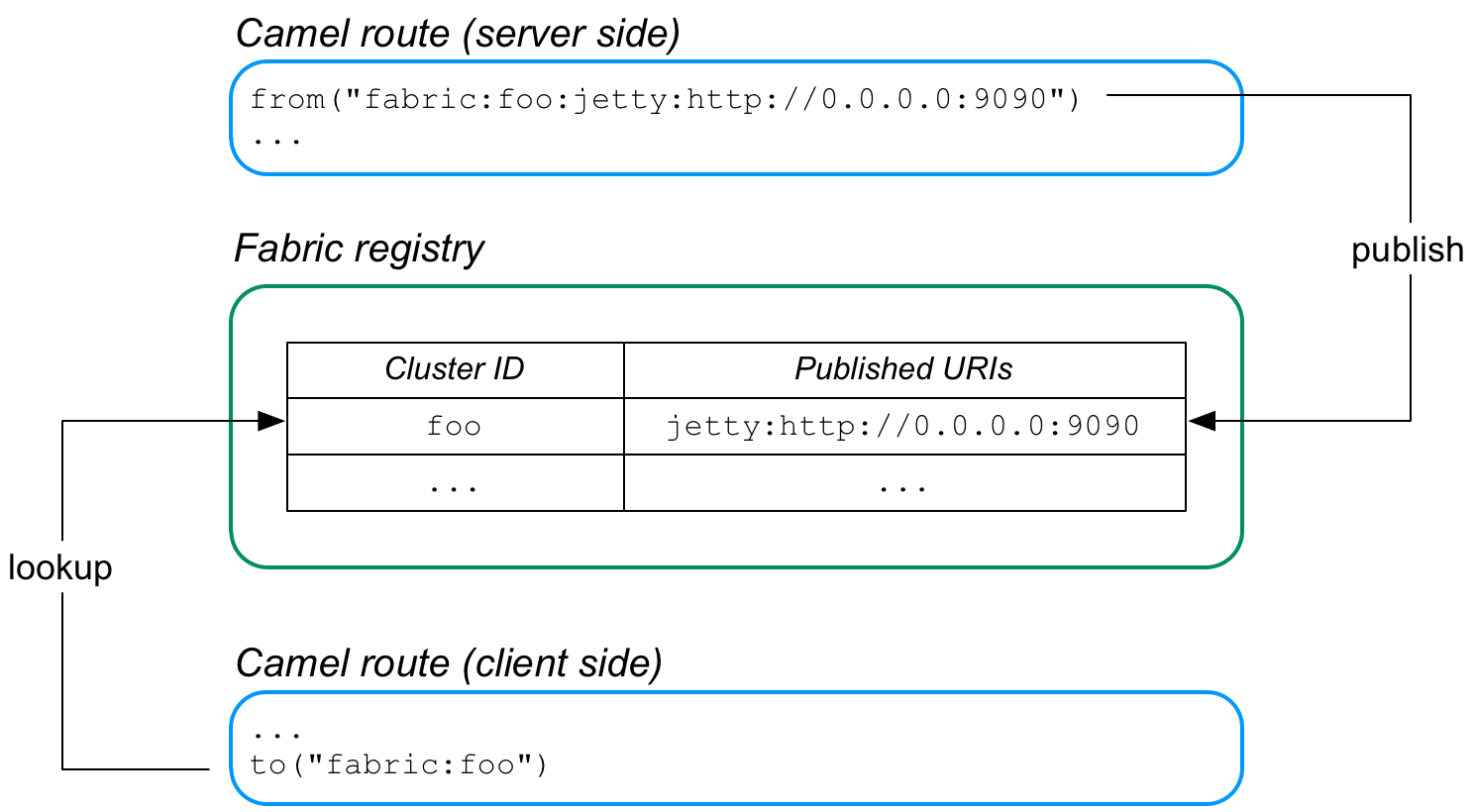
The server side of this application is defined by a route that starts with a Fabric endpoint, where the Fabric endpoint publishes the URI,
jetty:http://0.0.0.0:9090. When this route is started, it automatically registers the Jetty URI in the fabric registry, under the cluster ID, foo.
The client side of the application is defined by a route that ends with the Fabric endpoint,
fabric:foo. Now, when the client route starts, it automatically looks up the ID, foo, in the fabric registry and retrieves the associated Jetty endpoint URI. The client then creates a producer endpoint using the discovered Jetty URI and connects to the corresponding server port.
Load-balancing cluster
Copier lienLien copié sur presse-papiers!
Figure 47.2, “Load Balancing through Fabric” gives an overview of how Fabric endpoints enable you to create a load-balancing cluster.
Figure 47.2. Load Balancing through Fabric
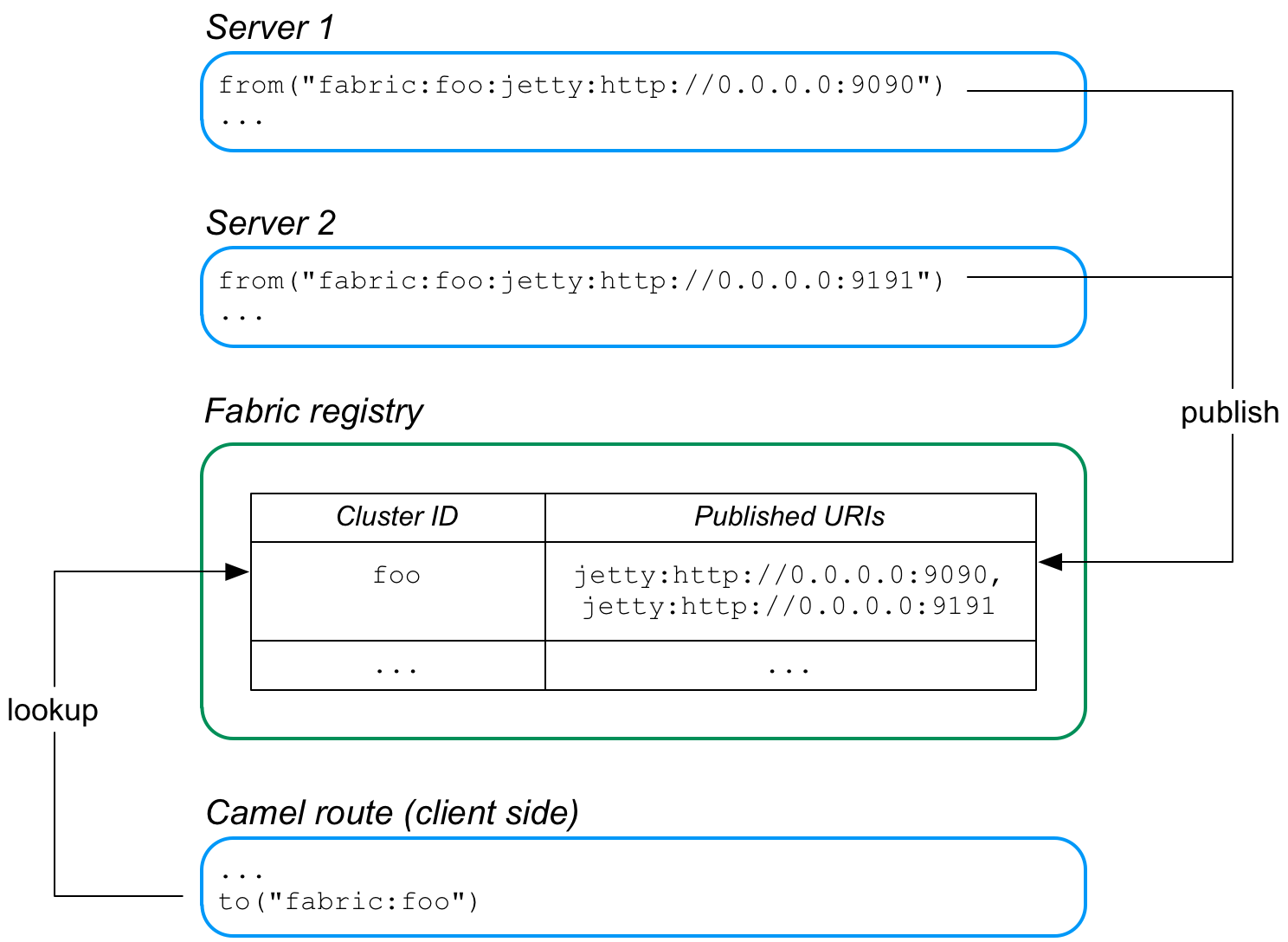
In this case, two Jetty servers are created, with the URIs,
jetty:http://0.0.0.0:9090 and jetty:http://0.0.0.0:9191. Because these published URIs are both prefixed by fabric:foo:, both of the Jetty URIs are registered under the same cluster ID, foo, in the fabric registry.
Now, when the client routes starts, it automatically looks up the ID,
foo, in the fabric registry. Because the foo ID is associated with multiple endpoint URIs, fabric implements a random load balancing algorithm to choose one of the available URIs. The client then creates a producer endpoint, using the chosen URI.
Auto-reconnect feature
Copier lienLien copié sur presse-papiers!
Fabric endpoints support auto-reconnection. So, if a client endpoint (producer endpoint) loses its connection to a server endpoint, it will automatically go back to the fabric registry, ask for another URI, and then connect to the new URI.
Publishing an endpoint URI
Copier lienLien copié sur presse-papiers!
To publish an endpoint URI,
PublishedURI, in the fabric registry, define a fabric endpoint with the publisher syntax, FabricScheme:ClusterID:PublishedURI. Note that this syntax can only be used in a consumer endpoint (that is, an endpoint that appears in a from DSL command).
Example 47.1, “Publishing a URI ” shows a route that implements a Jetty HTTP server, where the Jetty URI is published to the fabric registry under the ID,
cluster. The route is a simply HTTP server that returns the constant message, Response from Zookeeper agent, in the body of the HTTP response.
Example 47.1. Publishing a URI
<?xml version="1.0" encoding="UTF-8"?>
<blueprint xmlns="http://www.osgi.org/xmlns/blueprint/v1.0.0"
           xmlns:xsi="http://www.w3.org/2001/XMLSchema-instance"
           xsi:schemaLocation="
           http://www.osgi.org/xmlns/blueprint/v1.0.0
           https://www.osgi.org/xmlns/blueprint/v1.0.0/blueprint.xsd">

 <bean id="fabric-camel" class="io.fabric8.camel.FabricComponent"/>

    <camelContext id="camel" trace="false" xmlns="http://camel.apache.org/schema/blueprint">
        <route id="fabric-server">
            <from uri="fabric-camel:cluster:jetty:http://0.0.0.0:9090/fabric"/>
            <log message="Request received : ${body}"/>
            <setHeader headerName="karaf.name">
                <simple>${sys.karaf.name}</simple>
            </setHeader>
            <transform>
                <simple>Response from Zookeeper agent</simple>
            </transform>
        </route>
    </camelContext>

</blueprint>
Note the following points about the preceding sample:
- The Fabric component uses the
CuratorFrameworkobject to connect to the ZooKeeper server (Fabric registry), where the reference to theCuratorFrameworkobject is provided automatically. - The
fromDSL command defines the fabric URI,fabric-camel:cluster:jetty:http://0.0.0.0:9090/fabric. At run time, this causes two things to happen:- The specified
jettyURI is published to the fabric registry under the cluster ID,cluster. - The Jetty endpoint is activated and used as the consumer endpoint of the route (just as if it had been specified without the
fabric-camel:cluster:prefix).
Because the route is implemented in blueprint XML, you would normally add the file containing this code to the
src/main/resources/OSGI-INF/blueprint directory of a Maven project.
Looking up an endpoint URI
Copier lienLien copié sur presse-papiers!
To look up a URI in the fabric registry, simply specify the fabric endpoint URI with an ID, in the format,
FabricScheme:ClusterID. This syntax is used in a producer endpoint (for example, an endpoint that appears in a to DSL command).
Example 47.2, “Looking up a URI” shows a route that implements a HTTP client, where the HTTP endpoint is discovered dynamically at run time, by looking up the specified ID,
cluster, in the fabric registry.
Example 47.2. Looking up a URI
<?xml version="1.0" encoding="UTF-8"?>
<blueprint xmlns="http://www.osgi.org/xmlns/blueprint/v1.0.0"
xmlns:xsi="http://www.w3.org/2001/XMLSchema-instance"
xsi:schemaLocation="
http://www.osgi.org/xmlns/blueprint/v1.0.0
https://www.osgi.org/xmlns/blueprint/v1.0.0/blueprint.xsd">
<bean id="fabric-camel" class="io.fabric8.camel.FabricComponent"/>
<camelContext id="camel" trace="false" xmlns="http://camel.apache.org/schema/blueprint">
<route id="fabric-client">
<from uri="timer://foo?fixedRate=true&period=10000"/>
<setBody>
<simple>Hello from Zookeeper server</simple>
</setBody>
<to uri="fabric-camel:cluster"/>
<log message=">>> ${body} : ${header.karaf.name}"/>
</route>
</camelContext>
<reference interface="org.apache.camel.spi.ComponentResolver"
filter="(component=jetty)"/>
</blueprint>
Because the route is implemented in blueprint XML, you would normally add the file containing this code to the
src/main/resources/OSGI-INF/blueprint directory of a Maven project.
Load-balancing example
Copier lienLien copié sur presse-papiers!
In principle, implementing load balancing is easy using fabric endpoints. All that you have to do is to publish more than one endpoint URI under the same cluster ID. Now, when a client looks up that cluster ID, it gets a random selection out of the list of available endpoint URIs.
The servers in the load-balancing cluster have almost the same configuration. Essentially, the only difference between them is that they publish an endpoint URI with a different hostname and/or IP port. Instead of creating a separate OSGi bundle for every single server in the load-balancing cluster, however, it is better to define a template that enables you to specify the host or port using a configuration variable.
Example 47.3, “Server Template for a Load-Balancing Cluster” illustrates the template approach to defining servers in a load-balancing cluster.
Example 47.3. Server Template for a Load-Balancing Cluster
<?xml version="1.0" encoding="UTF-8"?>
<blueprint xmlns="http://www.osgi.org/xmlns/blueprint/v1.0.0"
           xmlns:xsi="http://www.w3.org/2001/XMLSchema-instance"
           xmlns:cm="http://aries.apache.org/blueprint/xmlns/blueprint-cm/v1.0.0"
           xsi:schemaLocation="
           http://www.osgi.org/xmlns/blueprint/v1.0.0
           https://www.osgi.org/xmlns/blueprint/v1.0.0/blueprint.xsd">

    <!-- osgi blueprint property placeholder -->
    <cm:property-placeholder
        id="myConfig"
        persistent-id="io.fabric8.examples.camel.loadbalancing.server"/>

    <bean id="fabric-camel" class="io.fabric8.camel.FabricComponent"/>

    <camelContext id="camel" trace="false" xmlns="http://camel.apache.org/schema/blueprint">
        <!-- using Camel properties component and refer
             to the blueprint property placeholder by its id -->
        <propertyPlaceholder id="properties"
                             location="blueprint:myConfig"
                             prefixToken="[[" suffixToken="]]"/>

        <route id="fabric-server">
            <from uri="fabric-camel:cluster:jetty:http://0.0.0.0:[[portNumber]]/fabric"/>
            <log message="Request received : ${body}"/>
            <setHeader headerName="karaf.name">
                <simple>${sys.karaf.name}</simple>
            </setHeader>
            <transform>
                <simple>Response from Zookeeper agent</simple>
            </transform>
        </route>
    </camelContext>

</blueprint>
First of all, you need to initialize the OSGi blueprint property placeholder. The property placeholder mechanism enables you to read property settings from the OSGi Config Admin service and substitute the properties in the blueprint configuration file. In this example, the property placeholder accesses properties from the
io.fabric8.examples.camel.loadbalancing.server persistent ID. A persistent ID in the OSGi Config Admin service identifies a collection of related property settings. After initializing the property placeholder, you can access any property values from the persistent ID using the syntax, [[PropName]].
The Fabric endpont URI exploits the property placeholder mechanism to substitute the value of the Jetty port,
[[portNumber]], at run time. At deploy time, you can specify the value of the portName property. For example, if using a custom feature, you could specify the property in the feature definition (see Add OSGi configurations to the feature). Alternatively, you can specify configuration properties when defining deployment profiles in the Fuse Management Console.
OSGi bundle plug-in configuration
Copier lienLien copié sur presse-papiers!
When defining an OSGi bundle that uses Fabric endpoints, the
Import-Package bundle header must be configured to import the following Java packages:
io.fabric8.zookeeper
For example, assuming that you use Maven to build your application, Example 47.4, “Maven Bundle Plug-In Configuration” shows how you can configure the Maven bundle plug-in to import the required packages.
Example 47.4. Maven Bundle Plug-In Configuration
<project ... >
  ...
  <build>
    <defaultGoal>install</defaultGoal>
    <plugins>
      ...
      <plugin>
        <groupId>org.apache.felix</groupId>
        <artifactId>maven-bundle-plugin</artifactId>
        <extensions>true</extensions>
        <configuration>
          <instructions>
            <Bundle-SymbolicName>${project.groupId}.${project.artifactId}</Bundle-SymbolicName>
            <Import-Package>
              io.fabric8.zookeeper,
              *
            </Import-Package>
          </instructions>
        </configuration>
      </plugin>
    </plugins>
  </build>
  ...
</project>
'%20d='M201.5%20305.5c-13.8%200-24.9-11.1-24.9-24.6%200-13.8%2011.1-24.9%2024.9-24.9%2013.6%200%2024.6%2011.1%2024.6%2024.9%200%2013.6-11.1%2024.6-24.6%2024.6zM504%20256c0%20137-111%20248-248%20248S8%20393%208%20256%20119%208%20256%208s248%20111%20248%20248zm-132.3-41.2c-9.4%200-17.7%203.9-23.8%2010-22.4-15.5-52.6-25.5-86.1-26.6l17.4-78.3%2055.4%2012.5c0%2013.6%2011.1%2024.6%2024.6%2024.6%2013.8%200%2024.9-11.3%2024.9-24.9s-11.1-24.9-24.9-24.9c-9.7%200-18%205.8-22.1%2013.8l-61.2-13.6c-3-.8-6.1%201.4-6.9%204.4l-19.1%2086.4c-33.2%201.4-63.1%2011.3-85.5%2026.8-6.1-6.4-14.7-10.2-24.1-10.2-34.9%200-46.3%2046.9-14.4%2062.8-1.1%205-1.7%2010.2-1.7%2015.5%200%2052.6%2059.2%2095.2%20132%2095.2%2073.1%200%20132.3-42.6%20132.3-95.2%200-5.3-.6-10.8-1.9-15.8%2031.3-16%2019.8-62.5-14.9-62.5zM302.8%20331c-18.2%2018.2-76.1%2017.9-93.6%200-2.2-2.2-6.1-2.2-8.3%200-2.5%202.5-2.5%206.4%200%208.6%2022.8%2022.8%2087.3%2022.8%20110.2%200%202.5-2.2%202.5-6.1%200-8.6-2.2-2.2-6.1-2.2-8.3%200zm7.7-75c-13.6%200-24.6%2011.1-24.6%2024.9%200%2013.6%2011.1%2024.6%2024.6%2024.6%2013.8%200%2024.9-11.1%2024.9-24.6%200-13.8-11-24.9-24.9-24.9z'/%3e%3c/svg%3e)