 Red Hat Summit
Ce contenu n'est pas disponible dans la langue sélectionnée.
Chapter 1. Upgrading the Red Hat Quay Operator Overview
The Red Hat Quay Operator uses synchronized versioning: each Operator version deploys a single, matching version of Red Hat Quay and its components. You can use this scheme to plan upgrades and keep components compatible.
There is no field on the QuayRegistry custom resource which sets the version of Red Hat Quay to deploy; the Operator can only deploy a single version of all components. This scheme was chosen to ensure that all components work well together and to reduce the complexity of the Operator needing to know how to manage the lifecycles of many different versions of Red Hat Quay on Kubernetes.
1.1. Operator Lifecycle Manager
Operator Lifecycle Manager (OLM) installs and upgrades the Red Hat Quay Operator. You can use automatic or manual approval in the Subscription to control when new Operator versions are applied.
When the Red Hat Quay Operator is installed by Operator Lifecycle Manager, it might be configured to support automatic or manual upgrades. This option is shown on the OperatorHub page for the Red Hat Quay Operator during installation. It can also be found in the Red Hat Quay Operator Subscription object by the approvalStrategy field. Choosing Automatic means that your Red Hat Quay Operator will automatically be upgraded whenever a new Operator version is released. If this is not desirable, then the Manual approval strategy should be selected.
1.2. Upgrading the Red Hat Quay Operator
To upgrade the Red Hat Quay Operator, use the standard OpenShift Container Platform process for installed Operators and follow N-1 minor version paths.
In general, Red Hat Quay supports upgrades from a prior (N-1) minor version only. For example, upgrading directly from Red Hat Quay 3.9 to the latest version of 3.16 is not supported. Instead, users would have to upgrade as follows:
-
3.9.z
3.10.z -
3.10.z
3.11.z -
3.11.z
3.14.z -
3.14.z
3.16.z
This is required to ensure that any necessary database migrations are done correctly and in the right order during the upgrade.
In some cases, Red Hat Quay supports direct, single-step upgrades from prior (N-2, N-3) minor versions. This simplifies the upgrade procedure for customers on older releases. The following upgrade paths are supported for Red Hat Quay 3.16.1:
-
3.13.z
3.16.1 -
3.14.z
3.16.1 -
3.15.z
3.16.1
1.3. Upgrading Red Hat Quay to version 3.16.1
To upgrade Red Hat Quay to the next version, change the Operator update channel in the OpenShift Container Platform Web Console and wait for the upgrade pods to complete. You can then verify the database images and access your registry.
Procedure
-
In the OpenShift Container Platform Web Console, navigate to Operators
Installed Operators. - Click on the Red Hat Quay Operator.
- Navigate to the Subscription tab.
- Under Subscription details click Update channel.
-
Select stable-3.16
Save. - Check the progress of the new installation under Upgrade status. Wait until the upgrade status changes to 1 installed before proceeding.
-
In your OpenShift Container Platform cluster, navigate to Workloads
Pods. Existing pods should be terminated, or in the process of being terminated. -
Wait for the following pods, which are responsible for upgrading the database and alembic migration of existing data, to spin up:
clair-postgres-upgrade,quay-postgres-upgrade, andquay-app-upgrade. -
After the
clair-postgres-upgrade,quay-postgres-upgrade, andquay-app-upgradepods are marked as Completed, the remaining pods for your Red Hat Quay deployment spin up. This takes approximately ten minutes. -
Verify that the
quay-databaseuses thepostgresql-13image, andclair-postgrespods now uses thepostgresql-15image. -
After the
quay-apppod is marked as Running, you can reach your Red Hat Quay registry.
1.4. Upgrading to the next minor release version
Z-stream upgrades, for example, 3.13.1 Automatic approval, the Operator applies new z-stream updates with little or no downtime; with Manual approval, you approve each update first.
1.5. Manually approving a pending Operator upgrade
To approve a pending Red Hat Quay Operator upgrade when using Manual approval, open the Subscription tab, review the install plan and resources, and click Approve. You can then monitor the upgrade progress on the Installed Operators page.
The following image shows the Subscription tab in the UI, including the update Channel, the Approval strategy, the Upgrade status and the InstallPlan:
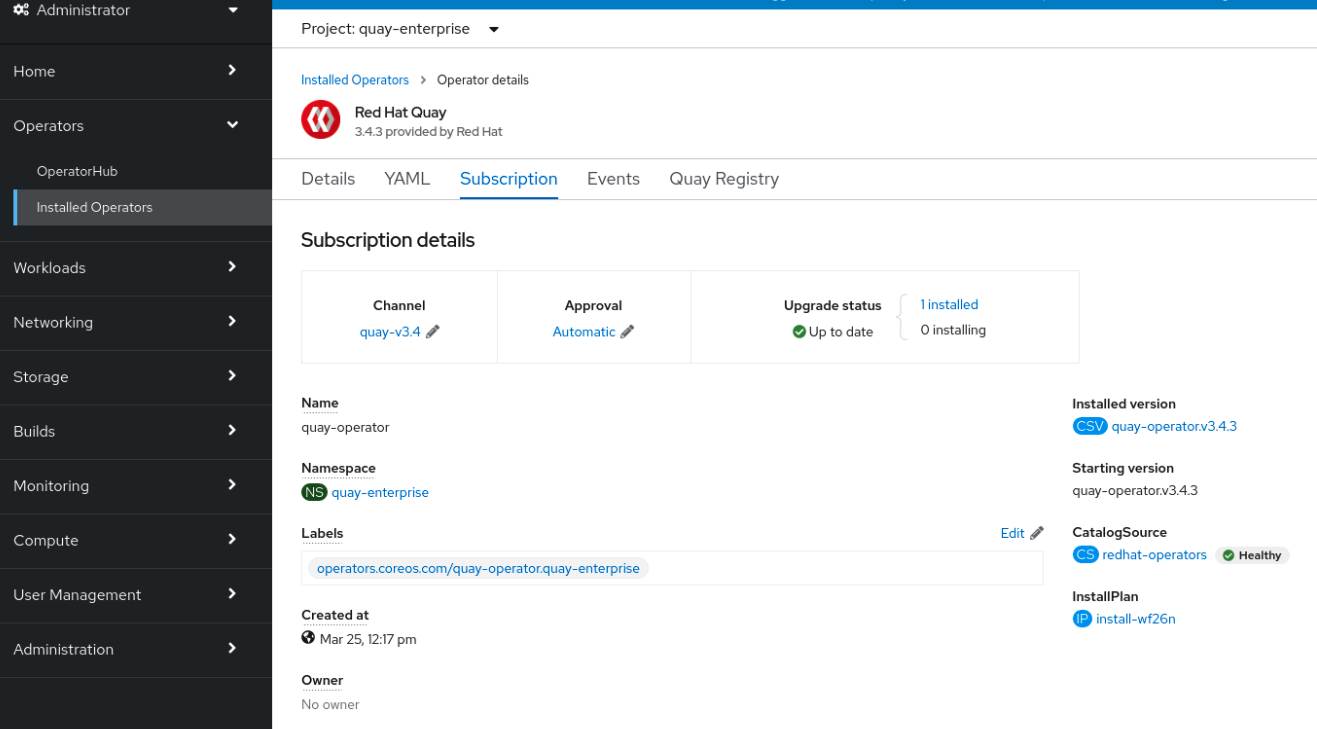
The list of Installed Operators provides a high-level summary of the current Quay installation:

1.6. Upgrading a QuayRegistry resource
The Red Hat Quay Operator reconciles QuayRegistry resources and upgrades them when the Operator version differs from the current version. When an upgrade is supported, the Operator applies it and updates status; when not, it returns an error and leaves the QuayRegistry unchanged.
The following logic is used:
-
If
status.currentVersionis unset, reconcile as normal. -
If
status.currentVersionequals the Operator version, reconcile as normal. -
If
status.currentVersiondoes not equal the Operator version, check if it can be upgraded. If it can, perform upgrade tasks and set thestatus.currentVersionto the Operator’s version once complete. If it cannot be upgraded, return an error and leave theQuayRegistryand its deployed Kubernetes objects alone.
1.7. Upgrading a QuayEcosystem
To migrate an existing QuayEcosystem to a QuayRegistry managed by the Red Hat Quay Operator, add the migration label to the QuayEcosystem custom resource and wait for the new QuayRegistry to start. You can then verify the migration and delete the old QuayEcosystem.
Procedure
Add
"quay-operator/migrate": "true"to themetadata.labelsof theQuayEcosystem.oc edit quayecosystem <quayecosystem_name>
$ oc edit quayecosystem <quayecosystem_name>Copy to Clipboard Copied! Toggle word wrap Toggle overflow metadata: labels: quay-operator/migrate: "true"metadata: labels: quay-operator/migrate: "true"Copy to Clipboard Copied! Toggle word wrap Toggle overflow -
Wait for a
QuayRegistryCR to be created with the samemetadata.nameas yourQuayEcosystem. TheQuayEcosystemCR is marked with the label"quay-operator/migration-complete": "true". -
After the
status.registryEndpointof the newQuayRegistryis set, access Red Hat Quay and confirm that all data and settings were migrated successfully. -
If everything works correctly, you can delete the
QuayEcosystem. Kubernetes garbage collection cleans up all old resources.
1.8. Reverting QuayEcosystem Upgrade
To revert to the QuayEcosystem when an upgrade to QuayRegistry fails or causes issues, delete the QuayRegistry and restore the Route to the original Service. You can then use the Red Hat Quay deployment managed by the QuayEcosystem.
If your QuayEcosystem was managing the PostgreSQL database, the upgrade process migrates your data to a new PostgreSQL database managed by the upgraded Operator. Your old database is not changed or removed but Red Hat Quay will no longer use it once the migration is complete. If there are issues during the data migration, the upgrade process exits and it is recommended that you continue with your database as an unmanaged component.
Procedure
Delete the
QuayRegistryusing either the UI orkubectl:kubectl delete -n <namespace> quayregistry <quayecosystem-name>
$ kubectl delete -n <namespace> quayregistry <quayecosystem-name>Copy to Clipboard Copied! Toggle word wrap Toggle overflow -
If external access was provided using a
Route, change theRouteto point back to the originalServiceusing the UI orkubectl.
1.9. Supported QuayEcosystem Configurations for Upgrades
The Red Hat Quay Operator reports errors in its logs and in status.conditions if migrating a QuayEcosystem component fails or is unsupported.
All unmanaged components should migrate successfully because no Kubernetes resources need to be adopted and all the necessary values are already provided in Red Hat Quay’s config.yaml file.
- Database
-
Ephemeral database not supported (
volumeSizefield must be set). - Redis
- Nothing special needed.
- External Access
Only passthrough
Routeaccess is supported for automatic migration. Manual migration required for other methods.-
LoadBalancerwithout custom hostname: After theQuayEcosystemis marked with label"quay-operator/migration-complete": "true", delete themetadata.ownerReferencesfield from existingServicebefore deleting theQuayEcosystemto prevent Kubernetes from garbage collecting theServiceand removing the load balancer. A newServicewill be created withmetadata.nameformat<QuayEcosystem-name>-quay-app. Edit thespec.selectorof the existingServiceto match thespec.selectorof the newServiceso traffic to the old load balancer endpoint will now be directed to the new pods. You are now responsible for the oldService; the Quay Operator will not manage it. -
LoadBalancer/NodePort/Ingresswith custom hostname: A newServiceof typeLoadBalancerwill be created withmetadata.nameformat<QuayEcosystem-name>-quay-app. Change your DNS settings to point to thestatus.loadBalancerendpoint provided by the newService.
-
- Clair
- Nothing special needed.
- Object Storage
-
QuayEcosystemdid not have a managed object storage component, so object storage will always be marked as unmanaged. Local storage is not supported. - Repository Mirroring
- Nothing special needed.

'%20d='M201.5%20305.5c-13.8%200-24.9-11.1-24.9-24.6%200-13.8%2011.1-24.9%2024.9-24.9%2013.6%200%2024.6%2011.1%2024.6%2024.9%200%2013.6-11.1%2024.6-24.6%2024.6zM504%20256c0%20137-111%20248-248%20248S8%20393%208%20256%20119%208%20256%208s248%20111%20248%20248zm-132.3-41.2c-9.4%200-17.7%203.9-23.8%2010-22.4-15.5-52.6-25.5-86.1-26.6l17.4-78.3%2055.4%2012.5c0%2013.6%2011.1%2024.6%2024.6%2024.6%2013.8%200%2024.9-11.3%2024.9-24.9s-11.1-24.9-24.9-24.9c-9.7%200-18%205.8-22.1%2013.8l-61.2-13.6c-3-.8-6.1%201.4-6.9%204.4l-19.1%2086.4c-33.2%201.4-63.1%2011.3-85.5%2026.8-6.1-6.4-14.7-10.2-24.1-10.2-34.9%200-46.3%2046.9-14.4%2062.8-1.1%205-1.7%2010.2-1.7%2015.5%200%2052.6%2059.2%2095.2%20132%2095.2%2073.1%200%20132.3-42.6%20132.3-95.2%200-5.3-.6-10.8-1.9-15.8%2031.3-16%2019.8-62.5-14.9-62.5zM302.8%20331c-18.2%2018.2-76.1%2017.9-93.6%200-2.2-2.2-6.1-2.2-8.3%200-2.5%202.5-2.5%206.4%200%208.6%2022.8%2022.8%2087.3%2022.8%20110.2%200%202.5-2.2%202.5-6.1%200-8.6-2.2-2.2-6.1-2.2-8.3%200zm7.7-75c-13.6%200-24.6%2011.1-24.6%2024.9%200%2013.6%2011.1%2024.6%2024.6%2024.6%2013.8%200%2024.9-11.1%2024.9-24.6%200-13.8-11-24.9-24.9-24.9z'/%3e%3c/svg%3e)