 Red Hat Summit
Ce contenu n'est pas disponible dans la langue sélectionnée.
Chapter 1. Customizing sample software templates
Learn how to customize ready-to-use software templates for your on-prem environment. As a cluster administrators, you have full control over modifying metadata and specifications to align with your deployment needs.
Prerequisites
Before making changes, ensure that following:
- You have used the forked repository URL from tssc-sample-templates during RHTAP installation.
- You have forked and cloned the tssc-sample-jenkins pipeline template.
- You forked repository is up to date and synced with the upstream repository.
Procedure
-
Clone your forked
tssc-sample-templatesrepository, and then open it in your preferred text editor, such as Visual Studio Code. Locate the properties file within your project directory. This file stores the default values that you can customize. Open it for editing and update the following key-value pairs according to your environment.
Expand Key Description export GITHUB_DEFAULT_HOST
Set this to your on-prem GitHub host fully qualified domain name. That is, the URL without the
HTTPprotocol and without the.gitextension. For example github-github.apps.cluster-ljg9z.sandbox219.opentlc.com. Default isgithub.com.export GITLAB_DEFAULT_HOST
Set this to your on-prem GitLab host host fully qualified domain name. That is, the URL without the
HTTPprotocol and without the.gitextension. For example gitlab-gitlab.apps.cluster-ljg9z.sandbox219.opentlc.com. Default isgitlab.com.export QUAY_DEFAULT_HOST
The default Quay URL corresponds to your specific on-prem image registry URL without the
HTTPprotocol. For example, quay-tv2pb.apps.cluster-tv2pb.sandbox1194.opentlc.com. The default quay host isquay.io.export DEFAULT_DEPLOYMENT_NAMESPACE_PREFIX
The namespace prefix for deployments within RHTAP. Default is
rhtap-app.NoteUpdate this if you have modified the default
trusted-application-pipeline: namespaceduring the RHTAP installation process.export PIPELINE_REPO_URL
The URL of the forked pipeline repository. For example, https://github.com/redhat-appstudio/tssc-sample-pipelines.
export PIPELINE_REPO_BRANCH
The branch of the forked pipeline repository to which you want to point. For example,
main.export GITHUB_DEFAULT_ORG
The name of your GitHub organization that you want to set as default.
export QUAY_DEFAULT_ORG
The name of your Quay organization that you want to set as default.
Figure 1.1. The properties file

Run the generate.sh script in your terminal. This action adjusts the software templates, replacing default host values with your specified inputs.
./generate.shFigure 1.2. The generate.sh script
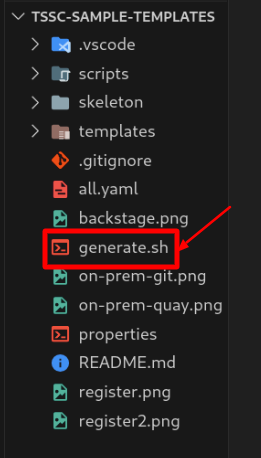
For Jenkins only: To customize your Jenkins library, navigate to skeleton > ci > gitops-template > jenkins, and open Jenkinsfile. Replace the
remoteURL with the URL of your forked repository. For example, remote: 'https://github.com/<username>/tssc-sample-jenkins.git'.Additionally, if your Jenkins is on a non-local OpenShift instance, and your Rekor and TUF services are on different clusters, update the
REKOR_HOSTandTUF_MIRRORenvironment variables. You can configure these variables in the env.sh file within the component repository or set them as environment variables or secrets in Jenkins. This configuration ensures that your external Jenkins server can communicate with Rekor and TUF installed with RHTAP. Without this, RHTAP might not sign container images correctly in the Jenkins pipeline.To update the
REKOR_HOSTandTUF_MIRRORvariables:Open the env.sh file via skeleton > ci > gitops-template > jenkins > rhtap.
The second env.sh file is located at skeleton > ci > source-repo > jenkins > rhtap. Pick the one that suits your needs or update both.
In env.sh, review the default values for
REKOR_HOSTandTUF_MIRROR:REKOR_HOST=http://rekor-server.rhtap-tas.svc TUF_MIRROR=http://tuf.rhtap-tas.svcReplace
.svcwith your OpenShift cluster URL. The.svcdomain refers to the local cluster, and internal services can access other services with.svcin their routes, but an external Jenkins cannot.The correct routes of the Rekor and TUF services are printed as part of the installation process of RHTAP. If these data aren’t available to you, run this command in your CLI and select the Rekor and TUF routes in the output:
$ oc get routes -n rhtap-tasAn example of a Rekor server URL: http://rekor-server.rhtap-tas.apps.rosa.j6ufg-t3htv-ts6.z797.p3.openshiftapps.com.
Note- To configure environment variables or secrets in Jenkins see, Adding secrets to Jenkins for secure integration with external tools.
- By default, RHTAP uses dynamically loaded Jenkins libraries. If you need to configure RHTAP to use built-in Jenkins libraries instead of dynamic loading, you must modify the Jenkins provisioning setup. This change can improve traceability and Red Hat Enterprise Contract (Enterprise Contract) attestations. For detailed instructions, see Configuring RHTAP to use built-in Jenkins libraries.
-
For RHACS only: To enable RHACS scans, set the
export DISABLE_ACStofalsein the env.sh file. Commit and push the changes to your repository. This automatically updates the template in RHDH. Alternatively, you can import and refresh a single or all customized templates directly in RHDH.
- Go to your forked sample template repository on your Git provider.
-
For a single template, from the
templatesdirectory, selecttemplate.yaml. Copy its URL from the browser address bar. For example, https://github.com/<username>/tssc-sample-templates/blob/main/templates/devfile-sample-code-with-quarkus-dance/template.yaml. Otherwise, for all the templates, selectall.yamland copy its URL from the browser address bar. For example, https://github.com/<username>/tssc-sample-templates/blob/main/all.yaml. - Switch back to RHDH platform.
- Select Create > Register Existing Component.
- In the Select URL field, paste the appropriate URL that you copied in Step 4b.
- Select Analyze and then select Import to update the templates in RHDH.
Verification
- Consider creating an application to explore the impact of your template customization.

'%20d='M201.5%20305.5c-13.8%200-24.9-11.1-24.9-24.6%200-13.8%2011.1-24.9%2024.9-24.9%2013.6%200%2024.6%2011.1%2024.6%2024.9%200%2013.6-11.1%2024.6-24.6%2024.6zM504%20256c0%20137-111%20248-248%20248S8%20393%208%20256%20119%208%20256%208s248%20111%20248%20248zm-132.3-41.2c-9.4%200-17.7%203.9-23.8%2010-22.4-15.5-52.6-25.5-86.1-26.6l17.4-78.3%2055.4%2012.5c0%2013.6%2011.1%2024.6%2024.6%2024.6%2013.8%200%2024.9-11.3%2024.9-24.9s-11.1-24.9-24.9-24.9c-9.7%200-18%205.8-22.1%2013.8l-61.2-13.6c-3-.8-6.1%201.4-6.9%204.4l-19.1%2086.4c-33.2%201.4-63.1%2011.3-85.5%2026.8-6.1-6.4-14.7-10.2-24.1-10.2-34.9%200-46.3%2046.9-14.4%2062.8-1.1%205-1.7%2010.2-1.7%2015.5%200%2052.6%2059.2%2095.2%20132%2095.2%2073.1%200%20132.3-42.6%20132.3-95.2%200-5.3-.6-10.8-1.9-15.8%2031.3-16%2019.8-62.5-14.9-62.5zM302.8%20331c-18.2%2018.2-76.1%2017.9-93.6%200-2.2-2.2-6.1-2.2-8.3%200-2.5%202.5-2.5%206.4%200%208.6%2022.8%2022.8%2087.3%2022.8%20110.2%200%202.5-2.2%202.5-6.1%200-8.6-2.2-2.2-6.1-2.2-8.3%200zm7.7-75c-13.6%200-24.6%2011.1-24.6%2024.9%200%2013.6%2011.1%2024.6%2024.6%2024.6%2013.8%200%2024.9-11.1%2024.9-24.6%200-13.8-11-24.9-24.9-24.9z'/%3e%3c/svg%3e)