 Red Hat Summit
27.4. Virtual Machine graphical console
This window displays a virtual machine's graphical console. Para-virtualized and fully virtualized guests use different techniques to export their local virtual framebuffers, but both technologies use VNC to make them available to the Virtual Machine Manager's console window. If your virtual machine is set to require authentication, the Virtual Machine Graphical console prompts you for a password before the display appears.
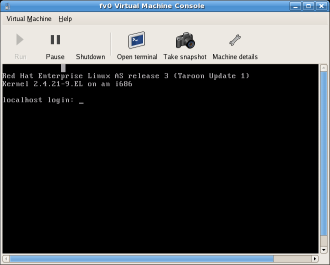
Figure 27.4. Graphical console window
Note
VNC is considered insecure by many security experts, however, several changes have been made to enable the secure usage of VNC for virtualization on Red Hat enterprise Linux. The guest machines only listen to the local host (
dom0)'s loopback address (127.0.0.1). This ensures only those with shell privileges on the host can access virt-manager and the virtual machine through VNC.
Remote administration can be performed following the instructions in Chapter 23, Remote management of guests. TLS can provide enterprise level security for managing guest and host systems.
Your local desktop can intercept key combinations (for example, Ctrl+Alt+F11) to prevent them from being sent to the guest machine. You can use the
virt-manager sticky key capability to send these sequences. To use this capability, you must press any modifier key (Ctrl or Alt) 3 times and the key you specify gets treated as active until the next non-modifier key is pressed. You can then send Ctrl-Alt-F11 to the guest by entering the key sequence 'Ctrl Ctrl Ctrl Alt+F1'.
Note
Due to a limitation of
virt-manager, it is not possible to use this sticky key feature to send a Sysrq key combination to a guest.

'%20d='M201.5%20305.5c-13.8%200-24.9-11.1-24.9-24.6%200-13.8%2011.1-24.9%2024.9-24.9%2013.6%200%2024.6%2011.1%2024.6%2024.9%200%2013.6-11.1%2024.6-24.6%2024.6zM504%20256c0%20137-111%20248-248%20248S8%20393%208%20256%20119%208%20256%208s248%20111%20248%20248zm-132.3-41.2c-9.4%200-17.7%203.9-23.8%2010-22.4-15.5-52.6-25.5-86.1-26.6l17.4-78.3%2055.4%2012.5c0%2013.6%2011.1%2024.6%2024.6%2024.6%2013.8%200%2024.9-11.3%2024.9-24.9s-11.1-24.9-24.9-24.9c-9.7%200-18%205.8-22.1%2013.8l-61.2-13.6c-3-.8-6.1%201.4-6.9%204.4l-19.1%2086.4c-33.2%201.4-63.1%2011.3-85.5%2026.8-6.1-6.4-14.7-10.2-24.1-10.2-34.9%200-46.3%2046.9-14.4%2062.8-1.1%205-1.7%2010.2-1.7%2015.5%200%2052.6%2059.2%2095.2%20132%2095.2%2073.1%200%20132.3-42.6%20132.3-95.2%200-5.3-.6-10.8-1.9-15.8%2031.3-16%2019.8-62.5-14.9-62.5zM302.8%20331c-18.2%2018.2-76.1%2017.9-93.6%200-2.2-2.2-6.1-2.2-8.3%200-2.5%202.5-2.5%206.4%200%208.6%2022.8%2022.8%2087.3%2022.8%20110.2%200%202.5-2.2%202.5-6.1%200-8.6-2.2-2.2-6.1-2.2-8.3%200zm7.7-75c-13.6%200-24.6%2011.1-24.6%2024.9%200%2013.6%2011.1%2024.6%2024.6%2024.6%2013.8%200%2024.9-11.1%2024.9-24.6%200-13.8-11-24.9-24.9-24.9z'/%3e%3c/svg%3e)