 Red Hat Summit
Questo contenuto non è disponibile nella lingua selezionata.
2.3. Certificate System Architecture Overview
Although each provides a different service, all RHCS subsystems (CA, KRA, OCSP, TKS, TPS) share a common architecture.
2.3.1. Java Application Server
Copia collegamentoCollegamento copiato negli appunti!
Java application server is a Java framework to run server applications. The Certificate System is designed to run within a Java application server. Currently the only Java application server supported is Tomcat 8. Support for other application servers may be added in the future. More information can be found at http://tomcat.apache.org/.
Each Certificate System instance is a Tomcat server instance. The Tomcat configuration is stored in
server.xml. The following link provides more information about Tomcat configuration: https://tomcat.apache.org/tomcat-8.0-doc/config/.
Each Certificate System subsystem (such as CA or KRA) is deployed as a web application in Tomcat. The web application configuration is stored in a
web.xml file, which is defined in Java Servlet 3.1 specification. See https://www.jcp.org/en/jsr/detail?id=340 for details.
The Certificate System configuration itself is stored in
CS.cfg.
See Section 2.3.16, “Instance Layout” for the actual locations of these files.
2.3.2. Java Security Manager
Copia collegamentoCollegamento copiato negli appunti!

Java services have the option of having a Security Manager which defines unsafe and safe operations for applications to perform. When the subsystems are installed, they have the Security Manager enabled automatically, meaning each Tomcat instance starts with the Security Manager running.
The Security Manager is disabled if the instance is created by running pkispawn and using an override configuration file which specifies the
pki_security_manager=false option under its own Tomcat section.
The Security Manager can be disabled from an installed instance using the following procedure:
# systemctl stop pki-tomcatd@instance_name.serviceor# systemctl stop pki-tomcatd-nuxwdog@instance_name.service(if using thenuxwdogwatchdog)- Open the
/etc/sysconfig/instance_namefile, and setSECURITY_MANAGER="false" # systemctl start pki-tomcatd@instance_name.serviceor# systemctl start pki-tomcatd-nuxwdog@instance_name.service(if using thenuxwdogwatchdog)
When an instance is started or restarted, a Java security policy is constructed or reconstructed by
pkidaemon from the following files:
/usr/share/pki/server/conf/catalina.policy
/usr/share/tomcat/conf/catalina.policy
/var/lib/pki/$PKI_INSTANCE_NAME/conf/pki.policy
/var/lib/pki/$PKI_INSTANCE_NAME/conf/custom.policy
Then, it is saved into
/var/lib/pki/instance_name/conf/catalina.policy.
2.3.2.1. Running Subsystems under a Java Security Manager
Copia collegamentoCollegamento copiato negli appunti!
Java services have the option of having a Security Manager which defines unsafe and safe operations for applications to perform. When the subsystems are installed, they have the Security Manager enabled automatically, meaning each Tomcat instance starts with the Security Manager running.
2.3.2.1.1. About the Security Manager Policy Files
Copia collegamentoCollegamento copiato negli appunti!
When the five Java subsystems (the CA, OCSP, KRA, TKS, and TPS) run within the Java Security Manager, they use a combination of three sets of policies:
- The
catalina.policyfile from the default Tomcat policy located in the/usr/share/tomcat/confdirectory; this is updated whenever the general Tomcat files are updated. - A
pki.policyfile, in the/var/lib/pki/instance_name/confdirectory, that is supplied with the subsystem instance. - A
custom.policyfile, in the/var/lib/pki/instance_name/confdirectory, that contains user-defined security policies.
These three files are concatenated together whenever the Tomcat service starts to create a revised
catalina.policy file, also in the /var/lib/pki/instance_name/conf directory, which is used for the instance.
The default
pki.policy file contains permissions that grant unrestricted access to the Tomcat, LDAP, and symkey services used by the PKI subsystems. For example:
   // These permissions apply to Tomcat java as utilized by PKI instances
	 grant codeBase "file:/usr/share/java/tomcat/-" {
       permission java.security.AllPermission;
   };
The
custom.policy file is empty by default; administrators can write policies in that file which will be used in addition to the given PKI policies and Tomcat policies.
2.3.2.1.2. Starting a Subsystem Instance without the Java Security Manager
Copia collegamentoCollegamento copiato negli appunti!
All Java subsystems configured under a PKI Tomcat instance are automatically run under a Java Security Manager (unless the instance was created by overriding
pki_security_manager=true under the [Tomcat] section in the /etc/pki/default.cfg file). However, it is possible to start or restart an instance and run it without starting the Java Security Manager, as shown below.
Procedure 2.1. Starting an Instance Without the Java Security Manager
- Stop the instance.
# systemctl stop pki-tomcatd@instance_name.serviceOR# systemctl stop pki-tomcatd-nuxwdog@instance_name.service (if using the nuxwdog watchdog) - Edit the
/etc/sysconfig/instance_namefile and turn off the security manager:SECURITY_MANAGER="false" - Start the instance.
# systemctl start pki-tomcatd@instance_name.serviceORsystemctl start pki-tomcatd-nuxwdog@instance_name.service (if using the nuxwdog watchdog)
2.3.3. Interfaces
Copia collegamentoCollegamento copiato negli appunti!
2.3.3.1. Servlet Interface
Copia collegamentoCollegamento copiato negli appunti!
Each subsystem contains interfaces allowing interaction with various portions of the subsystem. All subsystems share a common administrative interface and have an agent interface that allows for agents to perform the tasks assigned to them. A CA Subsystem has an end-entity interface that allows end-entities to enroll in the PKI. An OCSP Responder subsystem has an end-entity interface allowing end-entities and applications to check for current certificate revocation status. Finally, a TPS has an operator interface.
While the application server provides the connection entry points, Certificate System completes the interfaces by providing the servlets specific to each interface.
The servlets for each subsystem are defined in the corresponding
web.xml file, that is, /usr/share/pki/ca/webapps/ca/WEB-INF/web.xml. The same file also defines the URL of each servlet and the security requirements to access the servlets. See Section 2.3.1, “Java Application Server” for more information.
2.3.3.2. Administrative Interface
Copia collegamentoCollegamento copiato negli appunti!

The agent interface provides Java servlets to process HTML form submissions coming from the agent entry point. Based on the information given in each form submission, the agent servlets allow agents to perform agent tasks, such as editing and approving requests for certificate approval, certificate renewal, and certificate revocation, approving certificate profiles. The agent interfaces for a KRA subsystem, or a TKS subsystem, or an OCSP Responder, or a TPS subsystem are specific to the subsystems.
In the non-TMS setup, the agent interface is also used for inter-CIMC boundary communication for the CA-to-KRA trusted connection. This connection is protected by TLS client-authentication and differentiated by separate trusted roles called Trusted Managers. Like the agent role, the Trusted Managers (pseudo-users created for inter-CIMC boundary connection only) are required to be TLS client-authenticated. However, unlike the agent role, they are not offered any agent capability.
In the TMS setup, inter-CIMC boundary communication goes from TPS-to-CA, TPS-to-KRA, and TPS-to-TKS.
2.3.3.3. End-Entity Interface
Copia collegamentoCollegamento copiato negli appunti!
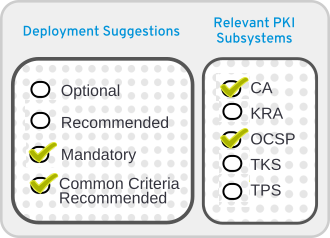
For the CA subsystem, the end-entity interface provides Java servlets to process HTML form submissions coming from the end-entity entry point. Based on the information received from the form submissions, the end-entity servlets allow end-entities to pick up issued certificates, import CA certificate chain, or download a certificate revocation list (CRL) . The OCSP Responder subsystem's End-Entity interface provides Java servlets to accept and process OCSP requests. The KRA, TKS, and TPS subsystems do not offer any End-Entity services.
2.3.3.4. Operator Interface
Copia collegamentoCollegamento copiato negli appunti!

The operator interface is only found in the TPS subsystem.
2.3.4. REST Interface
Copia collegamentoCollegamento copiato negli appunti!
Representational state transfer (REST) is a way to use HTTP to define and organize web services which will simplify interoperability with other applications. Red Hat Certificate System provides a REST interface to access various services on the server.
The REST services in Red Hat Certificate System are implemented using the RESTEasy framework. RESTEasy is actually running as a servlet in the web application, so the RESTEasy configuration can also be found in the
web.xml of the corresponding subsystem. More information about RESTEasy can be found at http://resteasy.jboss.org/.
Each REST service is defined as a separate URL. For example:
- CA certificate service:
http://<host_name>:<port>/ca/rest/certs/ - KRA key service:
http://<host_name>:<port>/kra/rest/agent/keys/ - TKS user service:
http://<host_name>:<port>/tks/rest/admin/users/ - TPS group service:
http://<host_name>:<port>/tps/rest/admin/groups/
Some services can be accessed using plain HTTP connection, but some others may require HTTPS connection for security.
The REST operation is specified as HTTP method (for example, GET, PUT, POST, DELETE). For example, to get the CA users the client will send a GET /ca/rest/users request.
The REST request and response messages can be sent in XML or JSON format. For example:
{
	"id":"admin",
	"UserID":"admin",
	"FullName":"Administrator",
	"Email":"admin@example.com",
	...
}
The REST interface can be accessed using tools such as CLI, Web UI, or generic REST client. Certificate System also provides Java, Python, and JavaScript libraries to access the services programmatically.
The REST interface supports two types of authentication methods:
- user name and password
- client certificate
The authentication method required by each service is defined in
/usr/share/pki/ca/conf/auth-method.properties.
The REST interface may require certain permissions to access the service. The permissions are defined in the ACL resources in LDAP. The REST interface are mapped to the ACL resources in the
/usr/share/pki/<subsystem>/conf/acl.properties.
For more information about the REST interface, see http://www.dogtagpki.org/wiki/REST.
2.3.5. NSS
Copia collegamentoCollegamento copiato negli appunti!
Network Security Services (NSS) is a set of libraries designed to support cross-platform development of security-enabled communications applications. Applications built with the NSS libraries support the TLS protocol for authentication, tamper detection, and encryption as well as the PKCS #11 interface for cryptographic token interfaces. Red Hat uses NSS to support these features in a wide range of products, including Certificate System. For further details about NSS, see http://www.mozilla.org/projects/security/pki/nss/overview.html.
2.3.6. JSS
Copia collegamentoCollegamento copiato negli appunti!
Java Security Services (JSS) provides a Java interface for cryptographic operations performed by NSS. JSS and higher levels of the Certificate System architecture are built with Java Native Interface (JNI), which provides access to native system libraries from within the Java Virtual Machine (JVM). This design allows us to use FIPS approved cryptographic providers such as NSS which are distributed as part of the system. JSS supports most of the security standards and encryption technologies supported by NSS. JSS also provides a pure Java interface for ASN.1 types and BER-DER encoding.
2.3.7. Tomcatjss
Copia collegamentoCollegamento copiato negli appunti!
Java-based subsystems in Red Hat Certificate System use a single JAR file called
tomcatjss as a bridge between the Tomcat Server HTTP engine and JSS, the Java interface for security operations performed by NSS. Tomcatjss is a Java Secure Socket Extension (JSSE) implementation using Java Security Services (JSS) for Tomcat.
Tomcatjss implements the interfaces needed to use TLS and to create TLS sockets. The socket factory, which tomcatjss implements, makes use of the various properties listed below to create a TLS server listening socket and return it to tomcat. Tomcatjss itself, makes use of our java JSS system to ultimately communicate with the native NSS cryptographic services on the machine.
Tomcatjss is loaded when the Tomcat server and the Certificate System classes are loaded. The load process is described below:
- The server is started.
- Tomcat gets to the point where it needs to create the listening sockets for the Certificate System installation.
- The
server.xmlfile is processed. Configuration in this file tells the system to use a socket factory implemented by Tomcatjss. - For each requested socket, Tomcajss reads and processes the included attributes when it creates the socket. The resulting socket will behave as it has been asked to by those parameters.
- Once the server is running, we have the required set of listening sockets waiting for incoming connections to the Tomcat-based Certificate System.
Note that when the sockets are created at startup, Tomcatjss is the first entity in Certificate System that actually deals with the underlying JSS security services. Once the first listening socket is processed, an instance of JSS is created for use going forward.
For further details about the
server.xml file, see Section 9.4, “Configuration Files for the Tomcat Engine and Web Services”.
2.3.8. PKCS #11
Copia collegamentoCollegamento copiato negli appunti!
Public-Key Cryptography Standard (PKCS) #11 specifies an API used to communicate with devices that hold cryptographic information and perform cryptographic operations. Because it supports PKCS #11, Certificate System is compatible with a wide range of hardware and software devices.
At least one PKCS #11 module must be available to any Certificate System subsystem instance. A PKCS #11 module (also called a cryptographic module or cryptographic service provider) manages cryptographic services such as encryption and decryption. PKCS #11 modules are analogous to drivers for cryptographic devices that can be implemented in either hardware or software. Certificate System contains a built-in PKCS #11 module and can support third-party modules.
A PKCS #11 module always has one or more slots which can be implemented as physical hardware slots in a physical reader such as smart cards or as conceptual slots in software. Each slot for a PKCS #11 module can in turn contain a token, which is a hardware or software device that actually provides cryptographic services and optionally stores certificates and keys.

The Certificate System defines two types of tokens, the internal and the external. The internal token is used for storing certificate trust anchors. The external token is used for storing key pairs and certificates that belong to the Certificate System subsystems.
2.3.8.1. NSS Soft Token (internal token)
Copia collegamentoCollegamento copiato negli appunti!
Note
Certificate System uses an NSS soft token for storing certificate trust anchors.
NSS Soft Token is also called an internal token or a software token. The software token consists of two files, which are usually called the certificate database (cert8.db) and key database (key3.db). The files are created during the Certificate System subsystem configuration. These security databases are located in the
/var/lib/pki/instance_name/alias/ directory.
Two cryptographic modules provided by the NSS soft token are included in the Certificate System:
- The default internal PKCS #11 module, which comes with two tokens:
- The internal crypto services token, which performs all cryptographic operations such as encryption, decryption, and hashing.
- The internal key storage token ("Certificate DB token"), which handles all communication with the certificate and key database files that store certificates and keys.
- The FIPS 140 module. This module complies with the FIPS 140 government standard for cryptographic module implementations. The FIPS 140 module includes a single, built-in FIPS 140 certificate database token, which handles both cryptographic operations and communication with the certificate and key database files.
Specific instructions on how to import certificates onto the NSS soft token are in Chapter 10, Managing Certificate/Key Crypto Token.
For more information on the Network Security Services (NSS), see Mozilla Developer web pages of the same name.
2.3.8.2. Hardware Security Module (HSM, external token)
Copia collegamentoCollegamento copiato negli appunti!
Note
Certificate System uses an HSM for storing key pairs and certificates that belong to the Certificate System subsystems.
Any PKCS #11 module can be used with the Certificate System. To use an external hardware token with a subsystem, load its PKCS #11 module before the subsystem is configured, and the new token is available to the subsystem.
Available PKCS #11 modules are tracked in the
secmod.db database for the subsystem. The modutil utility is used to modify this file when there are changes to the system, such as installing a hardware accelerator to use for signing operations. For more information on modutil, see Network Security Services (NSS) at Mozilla Developer webpage.
PKCS #11 hardware devices also provide key backup and recovery features for the information stored on hardware tokens. Refer to the PKCS #11 vendor documentation for information on retrieving keys from the tokens.
Specific instructions on how to import certificates and to manage the HSM are in Chapter 10, Managing Certificate/Key Crypto Token.
Supported Hardware Security Modules are located in Section 4.3, “Supported Hardware Security Modules”.
2.3.9. Certificate System Serial Number Management
Copia collegamentoCollegamento copiato negli appunti!
2.3.9.1. Serial Number Ranges
Copia collegamentoCollegamento copiato negli appunti!
Certificate request and serial numbers are represented by Java's big integers
By default, due to their efficiency, certificate request numbers, certificate serial numbers, and replica IDs are assigned sequentially for CA subsystems.
Serial number ranges are specifiable for requests, certificates, and replica IDs:
- Current serial number management is based on assigning ranges of sequential serial numbers.
- Instances request new ranges when crossing below a defined threshold.
- Instances store information about a newly acquired range once it is assigned to the instance.
- Instances continue using old ranges until all numbers are exhausted from it, and then it moves to the new range.
- Cloned subsystems synchronize their range assignment through replication conflicts.
For new clones:
- Part of the current range of the master is transferred to a new clone in the process of cloning.
- New clones may request a new range if the transferred range is below the defined threshold.
All ranges are configurable at CA instance installation time by adding a
[CA] section to the PKI instance override configuration file, and adding the following name=value pairs under that section as needed. Default values which already exist in /etc/pki/default.cfg are shown in the following example:
[CA]
pki_serial_number_range_start=1
pki_serial_number_range_end=10000000
pki_request_number_range_start=1
pki_request_number_range_end=10000000
pki_replica_number_range_start=1
pki_replica_number_range_end=100
2.3.9.2. Random Serial Number Management
Copia collegamentoCollegamento copiato negli appunti!
In addition to sequential serial number management, Red Hat Certificate System provides optional random serial number management. Using random serial numbers is selectable at CA instance installation time by adding a
[CA] section to the PKI instance override file and adding the following name=value pair under that section:
[CA]
pki_random_serial_numbers_enable=True
If selected, certificate request numbers and certificate serial numbers will be selected randomly within the specified ranges.
2.3.10. Security Domain
Copia collegamentoCollegamento copiato negli appunti!
A security domain is a registry of PKI services. Services such as CAs register information about themselves in these domains so users of PKI services can find other services by inspecting the registry. The security domain service in RHCS manages both the registration of PKI services for Certificate System subsystems and a set of shared trust policies.
See Section 5.3, “Planning Security Domains” for further details.
2.3.11. Passwords and Watchdog (nuxwdog)
Copia collegamentoCollegamento copiato negli appunti!
In the default setup, an RHCS subsystem instance needs to act as a client and authenticate to some other services, such as an LDAP internal database (unless TLS client authentication is set up, where a certificate will be used for authentication instead), the NSS token database, or sometimes an HSM with a password. The administrator is prompted to set up this password at the time of installation configuration. This password is then written to the file
<instance_dir>/conf/password.conf. At the same time, an identifying string is stored in the main configuration file CS.cfg as part of the parameter cms.passwordlist.
The configuration file,
CS.cfg, is protected by Red Hat Enterprise Linux, and only accessible by the PKI administrators. No passwords are stored in CS.cfg.
During installation, the installer will select and log into either the internal software token or a hardware cryptographic token. The login passphrase to these tokens is also written to
password.conf.
Configuration at a later time can also place passwords into
password.conf. LDAP publishing is one example where the newly configured Directory Manager password for the publishing directory is entered into password.conf.
Nuxwdog (watchdog) is a lightweight auxiliary daemon process that is used to start, stop, monitor the status of, and reconfigure server programs. It is most useful when users need to be prompted for passwords to start a server, because it caches these passwords securely in the kernel keyring, so that restarts can be done automatically in the case of a server crash.
Note
Nuxwdog is the only allowed watchdog service.
Once installation is complete, it is possible to remove the
password.conf file altogether. On restart, the nuxwdog watchdog program will prompt the administrator for the required passwords, using the parameter cms.passwordlist (and cms.tokenList if an HSM is used) as a list of passwords for which to prompt. The passwords are then cached by nuxwdog in the kernel keyring to allow automated recovery from a server crash. This automated recovery (automatic subsystem restart) happens in case of uncontrolled shutdown (crash). In case of a controlled shutdown by the administrator, administrators are prompted for passwords again.
When using the watchdog service, starting and stopping an RHCS instance are done differently. For details, see Section 9.3.2, “Using the Certificate System Watchdog Service”.
For further information, see Section 9.3, “Managing System Passwords”.
2.3.12. Internal LDAP Database
Copia collegamentoCollegamento copiato negli appunti!
Red Hat Certificate System employs Red Hat Directory Server (RHDS) as its internal database for storing information such as certificates, requests, users, roles, ACLs, as well as other miscellaneous internal information. TLS client-authentication is required between a Certificate System instance and Directory Server. It is therefore important to follow instruction to set up trust between these two entities.
Proper
pkispawn options will also be needed for installing such Certificate System instance.
For details, see Section 6.5, “Installing Red Hat Directory Server”.
2.3.13. Security-Enhanced Linux (SELinux)
Copia collegamentoCollegamento copiato negli appunti!
SELinux is a collection of mandatory access control rules which are enforced across a system to restrict unauthorized access and tampering. SELinux is described in more detail in Red Hat Enterprise Linux 7 SELinux User's and Administrator's Guide.
Basically, SELinux identifies objects on a system, which can be files, directories, users, processes, sockets, or any other resource on a Linux host. These objects correspond to the Linux API objects. Each object is then mapped to a security context, which defines the type of object and how it is allowed to function on the Linux server.
Objects can be grouped into domains, and then each domain is assigned the proper rules. Each security context has rules which set restrictions on what operations it can perform, what resources it can access, and what permissions it has.
SELinux policies for the Certificate System are incorporated into the standard system SELinux policies. These SELinux policies apply to every subsystem and service used by Certificate System. By running Certificate System with SELinux in enforcing mode, the security of the information created and maintained by Certificate System is enhanced.
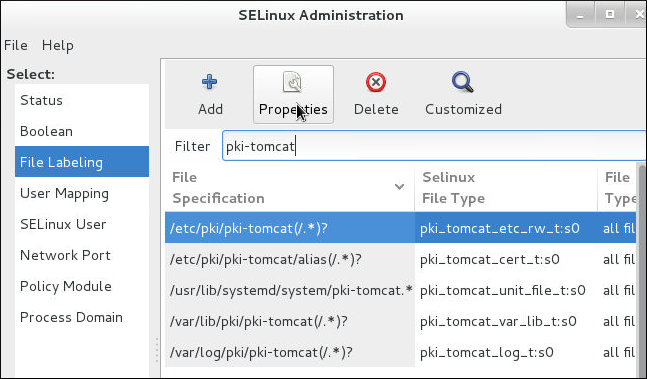
Figure 2.1. CA SELinux Port Policy
The Certificate System SELinux policies define the SELinux configuration for every subsystem instance:
- Files and directories for each subsystem instance are labeled with a specific SELinux context.
- The ports for each subsystem instance are labeled with a specific SELinux context.
- All Certificate System processes are constrained within a subsystem-specific domain.
- Each domain has specific rules that define what actions that are authorized for the domain.
- Any access not specified in the SELinux policy is denied to the Certificate System instance.
For Certificate System, each subsystem is treated as an SELinux object, and each subsystem has unique rules assigned to it. The defined SELinux policies allow Certificate System objects run with SELinux set in enforcing mode.
Every time
pkispawn is run to configure a Certificate System subsystem, files and ports associated with that subsystem are labeled with the required SELinux contexts. These contexts are removed when the particular subsystems are removed using pkidestroy.
The central definition in an SELinux policy is the
pki_tomcat_t domain. Certificate System instances are Tomcat servers, and the pki_tomcat_t domain extends the policies for a standard tomcat_t Tomcat domain. All Certificate System instances on a server share the same domain.
When each Certificate System process is started, it initially runs in an unconfined domain (
unconfined_t) and then transitions into the pki_tomcat_t domain. This process then has certain access permissions, such as write access to log files labeled pki_tomcat_log_t, read and write access to configuration files labeled pki_tomcat_etc_rw_t, or the ability to open and write to http_port_t ports.
The SELinux mode can be changed from enforcing to permissive, or even off, though this is not recommended.
2.3.14. Self-tests
Copia collegamentoCollegamento copiato negli appunti!
Red Hat Certificate System provides a Self-Test framework which allows the PKI system integrity to be checked during startup or on demand or both. In the event of a non-critical self test failure, the message will be stored in the log file, while in the event of a critical self test failure, the message will be stored in the log file, while the Certificate System subsystem will properly shut down. The administrator is expected to watch the self-test log during the startup of the subsystem if they wish to see the self-test report during startup. They can also view the log after startup.
When a subsystem is shut down due to a self-test failure, it will also be automatically disabled. This is done to ensure that the subsystem does not partially run and produce misleading responses. Once the issue is resolved, the subsystem can be re-enabled by running the following command on the server:
# pki-server subsystem-enable <subsystem>
For detail on how to configure self-tests, see Section 13.3.2, “Configuring Self-Tests”.
2.3.15. Logs
Copia collegamentoCollegamento copiato negli appunti!
The Certificate System subsystems create log files that record events related to activities, such as administration, communications using any of the protocols the server supports, and various other processes employed by the subsystems. While a subsystem instance is running, it keeps a log of information and error messages on all the components it manages. Additionally, the Apache and Tomcat web servers generate error and access logs.
Each subsystem instance maintains its own log files for installation, audit, and other logged functions.
Log plug-in modules are listeners which are implemented as Java™ classes and are registered in the configuration framework.
All the log files and rotated log files, except for audit logs, are located in whatever directory was specified in
pki_subsystem_log_path when the instance was created with pkispawn. Regular audit logs are located in the log directory with other types of logs, while signed audit logs are written to /var/log/pki/instance_name/subsystem_name/signedAudit. The default location for logs can be changed by modifying the configuration.
For details about log configuration during the installation and additional information, see Chapter 13, Configuring Logs.
For details about log administration after the installation, see the Configuring Subsystem Logs section in the Red Hat Certificate System Administration Guide (Common Criteria Edition).
2.3.15.1. Audit Log
Copia collegamentoCollegamento copiato negli appunti!
The audit log contains records for selectable events that have been set up as recordable events. You can configure audit logs also to be signed for integrity-checking purposes.
Note
Audit records should be kept according to the audit retention rules specified in Section 13.4, “Audit Retention”
2.3.15.2. System Log
Copia collegamentoCollegamento copiato negli appunti!
This log,
system, records information about requests to the server (all HTTP and HTTPS requests) and the responses from the server. Information recorded in this log includes the IP address (both IPv4 and IPv6) of the client machine that accessed the server; operations performed, such as search, add, and edit; and the result of the access, such as the number of entries returned:
id_number processor - [date:time] [number_of_operations] [result] servlet: messageExample 2.1. TKS System Log
10439.http-13443-Processor25 - [19/May/2021:14:16:51 CDT] [11] [3] UGSubsystem: Get User Error User not found
This log is on by default.
2.3.15.3. Transactions Log
Copia collegamentoCollegamento copiato negli appunti!
This log,
transactions, records any kind of operation performed or submitted to the subsystem.
id_number.processor - [date:time] [number_of_operations] [result] servlet: message
These messages are specific to the certificate service, such as the CA receiving certificate requests, the KRA archiving or retrieving keys, and the TKS registering a new TPS. This log can also be used to detect any unauthorized access or activity.
Example 2.2. Transactions Log
11438.http-8443-Processor25 - [27/May/2021:07:56:18 CDT] [1] [1] archival reqID 4 fromAgent agentID: CA-server.example.com-8443 authenticated by noAuthManager is completed DN requested: UID=recoverykey,E=recoverykey@email.com,CN=recover key serial number: 0x3
This log is on by default.
2.3.15.4. Debug Logs
Copia collegamentoCollegamento copiato negli appunti!
Debug logs, which are enabled by default, are maintained for all subsystems, with varying degrees and types of information.
Debug logs for each subsystem record much more detailed information than system, transaction, and access logs. Debug logs contain very specific information for every operation performed by the subsystem, including plug-ins and servlets which are run, connection information, and server request and response messages.
Services which are recorded to the debug log include authorization requests, processing certificate requests, certificate status checks, and archiving and recovering keys, and access to web services.
The debug logs record detailed information about the processes for the subsystem. Each log entry has the following format:
[date:time] [processor]: servlet: message
The message can be a return message from the subsystem or contain values submitted to the subsystem.
For example, the TKS records this message for connecting to an LDAP server:
[10/Jun/2021:05:14:51][main]: Established LDAP connection using basic authentication to host localhost port 389 as cn=Directory Manager
The processor is
main, and the message is the message from the server about the LDAP connection, and there is no servlet.
The CA, on the other hand, records information about certificate operations as well as subsystem connections:
[06/Jun/2021:14:59:38][http-8443;-Processor24]: ProfileSubmitServlet: key=$request.requestowner$ value=KRA-server.example.com-8443
In this case, the processor is the HTTP protocol over the CA's agent port, while it specifies the servlet for handling profiles and contains a message giving a profile parameter (the subsystem owner of a request) and its value (that the KRA initiated the request).
Example 2.3. CA Certificate Request Log Messages
[06/Jun/2021:14:59:38][http-8443;-Processor24]: ProfileSubmitServlet: key=$request.profileapprovedby$ value=admin
[06/Jun/2021:14:59:38][http-8443;-Processor24]: ProfileSubmitServlet: key=$request.cert_request$ value=MIIBozCCAZ8wggEFAgQqTfoHMIHHgAECpQ4wDDEKMAgGA1UEAxMBeKaBnzANBgkqhkiG9w0BAQEFAAOB...
[06/Jun/2021:14:59:38][http-8443;-Processor24]: ProfileSubmitServlet: key=$request.profile$ value=true
[06/Jun/2021:14:59:38][http-8443;-Processor24]: ProfileSubmitServlet: key=$request.cert_request_type$ value=crmf
[06/Jun/2021:14:59:38][http-8443;-Processor24]: ProfileSubmitServlet: key=$request.requestversion$ value=1.0.0
[06/Jun/2021:14:59:38][http-8443;-Processor24]: ProfileSubmitServlet: key=$request.req_locale$ value=en
[06/Jun/2021:14:59:38][http-8443;-Processor24]: ProfileSubmitServlet: key=$request.requestowner$ value=KRA-server.example.com-8443
[06/Jun/2021:14:59:38][http-8443;-Processor24]: ProfileSubmitServlet: key=$request.dbstatus$ value=NOT_UPDATED
[06/Jun/2021:14:59:38][http-8443;-Processor24]: ProfileSubmitServlet: key=$request.subject$ value=uid=jsmith, e=jsmith@example.com
[06/Jun/2021:14:59:38][http-8443;-Processor24]: ProfileSubmitServlet: key=$request.requeststatus$ value=begin
[06/Jun/2021:14:59:38][http-8443;-Processor24]: ProfileSubmitServlet: key=$request.auth_token.user$ value=uid=KRA-server.example.com-8443,ou=People,dc=example,dc=com
[06/Jun/2021:14:59:38][http-8443;-Processor24]: ProfileSubmitServlet: key=$request.req_key$ value=MIGfMA0GCSqGSIb3DQEBAQUAA4GNADCBiQKBgQDreuEsBWq9WuZ2MaBwtNYxvkLP^M
HcN0cusY7gxLzB+XwQ/VsWEoObGldg6WwJPOcBdvLiKKfC605wFdynbEgKs0fChV^M
k9HYDhmJ8hX6+PaquiHJSVNhsv5tOshZkCfMBbyxwrKd8yZ5G5I+2gE9PUznxJaM^M
HTmlOqm4HwFxzy0RRQIDAQAB
[06/Jun/2021:14:59:38][http-8443;-Processor24]: ProfileSubmitServlet: key=$request.auth_token.authmgrinstname$ value=raCertAuth
[06/Jun/2021:14:59:38][http-8443;-Processor24]: ProfileSubmitServlet: key=$request.auth_token.uid$ value=KRA-server.example.com-8443
[06/Jun/2021:14:59:38][http-8443;-Processor24]: ProfileSubmitServlet: key=$request.auth_token.userid$ value=KRA-server.example.com-8443
[06/Jun/2021:14:59:38][http-8443;-Processor24]: ProfileSubmitServlet: key=$request.requestor_name$ value=
[06/Jun/2021:14:59:38][http-8443;-Processor24]: ProfileSubmitServlet: key=$request.profileid$ value=caUserCert
[06/Jun/2021:14:59:38][http-8443;-Processor24]: ProfileSubmitServlet: key=$request.auth_token.userdn$ value=uid=KRA-server.example.com-4747,ou=People,dc=example,dc=com
[06/Jun/2021:14:59:38][http-8443;-Processor24]: ProfileSubmitServlet: key=$request.requestid$ value=20
[06/Jun/2021:14:59:38][http-8443;-Processor24]: ProfileSubmitServlet: key=$request.auth_token.authtime$ value=1212782378071
[06/Jun/2021:14:59:38][http-8443;-Processor24]: ProfileSubmitServlet: key=$request.req_x509info$ value=MIICIKADAgECAgEAMA0GCSqGSIb3DQEBBQUAMEAxHjAcBgNVBAoTFVJlZGJ1ZGNv^M
bXB1dGVyIERvbWFpbjEeMBwGA1UEAxMVQ2VydGlmaWNhdGUgQXV0aG9yaXR5MB4X^M
DTA4MDYwNjE5NTkzOFoXDTA4MTIwMzE5NTkzOFowOzEhMB8GCSqGSIb3DQEJARYS^M
anNtaXRoQGV4YW1wbGUuY29tMRYwFAYKCZImiZPyLGQBARMGanNtaXRoMIGfMA0G^M
CSqGSIb3DQEBAQUAA4GNADCBiQKBgQDreuEsBWq9WuZ2MaBwtNYxvkLPHcN0cusY^M
7gxLzB+XwQ/VsWEoObGldg6WwJPOcBdvLiKKfC605wFdynbEgKs0fChVk9HYDhmJ^M
8hX6+PaquiHJSVNhsv5tOshZkCfMBbyxwrKd8yZ5G5I+2gE9PUznxJaMHTmlOqm4^M
HwFxzy0RRQIDAQABo4HFMIHCMB8GA1UdIwQYMBaAFG8gWeOJIMt+aO8VuQTMzPBU^M
78k8MEoGCCsGAQUFBwEBBD4wPDA6BggrBgEFBQcwAYYuaHR0cDovL3Rlc3Q0LnJl^M
ZGJ1ZGNvbXB1dGVyLmxvY2FsOjkwODAvY2Evb2NzcDAOBgNVHQ8BAf8EBAMCBeAw^M
HQYDVR0lBBYwFAYIKwYBBQUHAwIGCCsGAQUFBwMEMCQGA1UdEQQdMBuBGSRyZXF1^M
ZXN0LnJlcXVlc3Rvcl9lbWFpbCQ=
Likewise, the OCSP shows OCSP request information:
[07/Jul/2021:06:25:40][http-11180-Processor25]: OCSPServlet: OCSP Request:
[07/Jul/2021:06:25:40][http-11180-Processor25]: OCSPServlet:
MEUwQwIBADA+MDwwOjAJBgUrDgMCGgUABBSEWjCarLE6/BiSiENSsV9kHjqB3QQU
2.3.15.5. Installation Logs
Copia collegamentoCollegamento copiato negli appunti!
All subsystems keep an install log.
Every time a subsystem is created either through the initial installation or creating additional instances with
pkispawn, an installation file with the complete debug output from the installation, including any errors and, if the installation is successful, the URL and PIN to the configuration interface for the instance. The file is created in the /var/log/pki/ directory for the instance with a name in the form pki-subsystem_name-spawn.timestamp.log.
Each line in the install log follows a step in the installation process.
Example 2.4. CA Install Log
...
2015-07-22 20:43:13 pkispawn    : INFO     ... finalizing 'pki.server.deployment.scriptlets.finalization'
2015-07-22 20:43:13 pkispawn    : INFO     ....... cp -p /etc/sysconfig/pki/tomcat/pki-tomcat/ca/deployment.cfg /var/log/pki/pki-tomcat/ca/archive/spawn_deployment.cfg.20150722204136
2015-07-22 20:43:13 pkispawn    : DEBUG    ........... chmod 660 /var/log/pki/pki-tomcat/ca/archive/spawn_deployment.cfg.20150722204136
2015-07-22 20:43:13 pkispawn    : DEBUG    ........... chown 26445:26445 /var/log/pki/pki-tomcat/ca/archive/spawn_deployment.cfg.20150722204136
2015-07-22 20:43:13 pkispawn    : INFO     ....... generating manifest file called '/etc/sysconfig/pki/tomcat/pki-tomcat/ca/manifest'
2015-07-22 20:43:13 pkispawn    : INFO     ....... cp -p /etc/sysconfig/pki/tomcat/pki-tomcat/ca/manifest /var/log/pki/pki-tomcat/ca/archive/spawn_manifest.20150722204136
2015-07-22 20:43:13 pkispawn    : DEBUG    ........... chmod 660 /var/log/pki/pki-tomcat/ca/archive/spawn_manifest.20150722204136
2015-07-22 20:43:13 pkispawn    : DEBUG    ........... chown 26445:26445 /var/log/pki/pki-tomcat/ca/archive/spawn_manifest.20150722204136
2015-07-22 20:43:13 pkispawn    : INFO     ....... executing 'systemctl enable pki-tomcatd.target'
2015-07-22 20:43:13 pkispawn    : INFO     ....... executing 'systemctl daemon-reload'
2015-07-22 20:43:13 pkispawn    : INFO     ....... executing 'systemctl restart pki-tomcatd@pki-tomcat.service'
2015-07-22 20:43:14 pkispawn    : INFO     END spawning subsystem 'CA' of instance 'pki-tomcat'
2015-07-22 20:43:14 pkispawn    : DEBUG
2.3.15.6. Tomcat Error and Access Logs
Copia collegamentoCollegamento copiato negli appunti!
The CA, KRA, OCSP, TKS, and TPS subsystems use a Tomcat web server instance for their agent and end-entities' interfaces.
Error and access logs are created by the Tomcat web server, which are installed with the Certificate System and provide HTTP services. The error log contains the HTTP error messages the server has encountered. The access log lists access activity through the HTTP interface.
Logs created by Tomcat:
- admin.timestamp
- catalina.timestamp
- catalina.out
- host-manager.timestamp
- localhost.timestamp
- localhost_access_log.timestamp
- manager.timestamp
These logs are not available or configurable within the Certificate System; they are only configurable within Apache or Tomcat. See the Apache documentation for information about configuring these logs.
2.3.15.7. Self-Tests Log
Copia collegamentoCollegamento copiato negli appunti!
The self-tests log records information obtained during the self-tests run when the server starts or when the self-tests are manually run. The tests can be viewed by opening this log. This log is not configurable through the Console. This log can only be configured by changing settings in the
CS.cfg file. The information about logs in this section does not pertain to this log. See Section 2.6.5, “Self-Tests” for more information about self-tests.
2.3.15.8. journalctl Logs
Copia collegamentoCollegamento copiato negli appunti!
When starting a Certificate System instance, there is a short period of time before the logging subsystem is set up and enabled. During this time, log contents are written to standard out, which is captured by
systemd and exposed via the journalctl utility.
To view these logs, run the following command:
# journalctl -u pki-tomcatd@instance_name.service
If using the
nuxwdog service:
# journalctl -u pki-tomcatd-nuxwdog@instance_name.service
Often it is helpful to watch these logs as the instance is starting (for example, in the event of a self-test failure on startup). To do this, run these commands in a separate console prior to starting the instance:
# journalctl -f -u pki-tomcatd@instance_name.service
If using the
nuxwdog service:
# journalctl -f -u pki-tomcatd-nuxwdog@instance_name.service2.3.16. Instance Layout
Copia collegamentoCollegamento copiato negli appunti!
Each Certificate System instance depends on a number of files. Some of them are located in instance-specific folders, while some others are located in a common folder which is shared with other server instances.
For example, the server configuration files are stored in
/etc/pki/instance_name/server.xml, which is instance-specific, but the CA servlets are defined in /usr/share/pki/ca/webapps/ca/WEB-INF/web.xml, which is shared by all server instances on the system.
2.3.16.1. File and Directory Locations for Certificate System
Copia collegamentoCollegamento copiato negli appunti!
Certificate System servers are Tomcat instances which consist of one or more Certificate System subsystems. Certificate System subsystems are web applications that provide specific type of PKI functions. General, shared subsystem information is contained in non-relocatable, RPM-defined shared libraries, Java archive files, binaries, and templates. These are stored in a fixed location.
The directories are instance specific, tied to the instance name. In these examples, the instance name is
pki-tomcat; the true value is whatever is specified at the time the subsystem is created with pkispawn.
The directories contain customized configuration files and templates, profiles, certificate databases, and other files for the subsystem.
| Setting | Value |
|---|---|
| Main Directory | /var/lib/pki/pki-tomcat |
| Configuration Directory | /etc/pki/pki-tomcat |
| Configuration File |
/etc/pki/pki-tomcat/server.xml
/etc/pki/pki-tomcat/password.conf
|
| Security Databases | /var/lib/pki/pki-tomcat/alias |
| Subsystem Certificates |
TLS server certificate
Subsystem certificate [a]
|
| Log Files | /var/log/pki/pki-tomcat |
| Web Services Files |
/usr/share/pki/server/webapps/ROOT - Main page
/usr/share/pki/server/webapps/pki/admin - Admin templates
/usr/share/pki/server/webapps/pki/js - JavaScript libraries
|
[a]
The subsystem certificate is always issued by the security domain so that domain-level operations that require client authentication are based on this subsystem certificate.
| |
Note
The
/var/lib/pki/instance_name/conf/ directory is a symbolic link to the /etc/pki/instance_name/ directory.
2.3.16.2. CA Subsystem Information
Copia collegamentoCollegamento copiato negli appunti!
The directories are instance specific, tied to the instance name. In these examples, the instance name is
pki-tomcat; the true value is whatever is specified at the time the subsystem is created with pkispawn.
| Setting | Value |
|---|---|
| Main Directory | /var/lib/pki/pki-tomcat/ca |
| Configuration Directory | /etc/pki/pki-tomcat/ca |
| Configuration File | /etc/pki/pki-tomcat/ca/CS.cfg |
| Subsystem Certificates |
CA signing certificate
OCSP signing certificate (for the CA's internal OCSP service)
Audit log signing certificate
|
| Log Files | /var/log/pki/pki-tomcat/ca |
| Install Logs | /var/log/pki/pki-ca-spawn.YYYYMMDDhhmmss.log |
| Profile Files | /var/lib/pki/pki-tomcat/ca/profiles/ca |
| Email Notification Templates | /var/lib/pki/pki-tomcat/ca/emails |
| Web Services Files |
/usr/share/pki/ca/webapps/ca/agent - Agent services
/usr/share/pki/ca/webapps/ca/admin - Admin services
/usr/share/pki/ca/webapps/ca/ee - End user services
|
2.3.16.3. KRA Subsystem Information
Copia collegamentoCollegamento copiato negli appunti!
The directories are instance specific, tied to the instance name. In these examples, the instance name is
pki-tomcat; the true value is whatever is specified at the time the subsystem is created with pkispawn.
| Setting | Value |
|---|---|
| Main Directory | /var/lib/pki/pki-tomcat/kra |
| Configuration Directory | /etc/pki/pki-tomcat/kra |
| Configuration File | /etc/pki/pki-tomcat/kra/CS.cfg |
| Subsystem Certificates |
Transport certificate
Storage certificate
Audit log signing certificate
|
| Log Files | /var/log/pki/pki-tomcat/kra |
| Install Logs | /var/log/pki/pki-kra-spawn.YYYYMMDDhhmmss.log |
| Web Services Files |
/usr/share/pki/kra/webapps/kra/agent - Agent services
/usr/share/pki/kra/webapps/kra/admin - Admin services
|
2.3.16.4. OCSP Subsystem Information
Copia collegamentoCollegamento copiato negli appunti!
The directories are instance specific, tied to the instance name. In these examples, the instance name is
pki-tomcat; the true value is whatever is specified at the time the subsystem is created with pkispawn.
| Setting | Value |
|---|---|
| Main Directory | /var/lib/pki/pki-tomcat/ocsp |
| Configuration Directory | /etc/pki/pki-tomcat/ocsp |
| Configuration File | /etc/pki/pki-tomcat/ocsp/CS.cfg |
| Subsystem Certificates |
OCSP signing certificate
Audit log signing certificate
|
| Log Files | /var/log/pki/pki-tomcat/ocsp |
| Install Logs | /var/log/pki/pki-ocsp-spawn.YYYYMMDDhhmmss.log |
| Web Services Files |
/usr/share/pki/ocsp/webapps/ocsp/agent - Agent services
/usr/share/pki/ocsp/webapps/ocsp/admin - Admin services
|
2.3.16.5. TKS Subsystem Information
Copia collegamentoCollegamento copiato negli appunti!
The directories are instance specific, tied to the instance name. In these examples, the instance name is
pki-tomcat; the true value is whatever is specified at the time the subsystem is created with pkispawn.
| Setting | Value |
|---|---|
| Main Directory | /var/lib/pki/pki-tomcat/tks |
| Configuration Directory | /etc/pki/pki-tomcat/tks |
| Configuration File | /etc/pki/pki-tomcat/tks/CS.cfg |
| Subsystem Certificates | Audit log signing certificate |
| Log Files | /var/log/pki/pki-tomcat/tks |
| Install Logs | /var/log/pki/pki-tomcat/pki-tks-spawn.YYYYMMDDhhmmss.log |
2.3.16.6. TPS Subsystem Information
Copia collegamentoCollegamento copiato negli appunti!
The directories are instance specific, tied to the instance name. In these examples, the instance name is
pki-tomcat; the true value is whatever is specified at the time the subsystem is created with pkispawn.
| Setting | Value |
|---|---|
| Main Directory | /var/lib/pki/pki-tomcat/tps |
| Configuration Directory | /etc/pki/pki-tomcat/tps |
| Configuration File | /etc/pki/pki-tomcat/tps/CS.cfg |
| Subsystem Certificates | Audit log signing certificate |
| Log Files | /var/log/pki/pki-tomcat/tps |
| Install Logs | /var/log/pki/pki-tps-spawn.YYYYMMDDhhhmmss.log |
| Web Services Files | /usr/share/pki/tps/webapps/tps - TPS services |
2.3.16.7. Shared Certificate System Subsystem File Locations
Copia collegamentoCollegamento copiato negli appunti!
There are some directories used by or common to all Certificate System subsystem instances for general server operations, listed in Table 2.8, “Subsystem File Locations”.
| Directory Location | Contents |
|---|---|
| /usr/share/pki | Contains common files and templates used to create Certificate System instances. Along with shared files for all subsystems, there are subsystem-specific files in subfolders:
|
| /usr/bin | Contains the pkispawn and pkidestroy instance configuration scripts and tools (Java, native, and security) shared by the Certificate System subsystems. |
| /usr/share/java/pki | Contains Java archive files shared by local Tomcat web applications and shared by the Certificate System subsystems. |

'%20d='M201.5%20305.5c-13.8%200-24.9-11.1-24.9-24.6%200-13.8%2011.1-24.9%2024.9-24.9%2013.6%200%2024.6%2011.1%2024.6%2024.9%200%2013.6-11.1%2024.6-24.6%2024.6zM504%20256c0%20137-111%20248-248%20248S8%20393%208%20256%20119%208%20256%208s248%20111%20248%20248zm-132.3-41.2c-9.4%200-17.7%203.9-23.8%2010-22.4-15.5-52.6-25.5-86.1-26.6l17.4-78.3%2055.4%2012.5c0%2013.6%2011.1%2024.6%2024.6%2024.6%2013.8%200%2024.9-11.3%2024.9-24.9s-11.1-24.9-24.9-24.9c-9.7%200-18%205.8-22.1%2013.8l-61.2-13.6c-3-.8-6.1%201.4-6.9%204.4l-19.1%2086.4c-33.2%201.4-63.1%2011.3-85.5%2026.8-6.1-6.4-14.7-10.2-24.1-10.2-34.9%200-46.3%2046.9-14.4%2062.8-1.1%205-1.7%2010.2-1.7%2015.5%200%2052.6%2059.2%2095.2%20132%2095.2%2073.1%200%20132.3-42.6%20132.3-95.2%200-5.3-.6-10.8-1.9-15.8%2031.3-16%2019.8-62.5-14.9-62.5zM302.8%20331c-18.2%2018.2-76.1%2017.9-93.6%200-2.2-2.2-6.1-2.2-8.3%200-2.5%202.5-2.5%206.4%200%208.6%2022.8%2022.8%2087.3%2022.8%20110.2%200%202.5-2.2%202.5-6.1%200-8.6-2.2-2.2-6.1-2.2-8.3%200zm7.7-75c-13.6%200-24.6%2011.1-24.6%2024.9%200%2013.6%2011.1%2024.6%2024.6%2024.6%2013.8%200%2024.9-11.1%2024.9-24.6%200-13.8-11-24.9-24.9-24.9z'/%3e%3c/svg%3e)