 Red Hat Summit
Questo contenuto non è disponibile nella lingua selezionata.
Chapter 3. Supported configurations for Red Hat Developer Hub
This section describes the configurations that are required to access the Red Hat Developer Hub, including:
- Custom applications configuration
- Source control configuration for Developer Hub Catalog
3.1. Adding a custom application configuration file to Red Hat OpenShift
To access the Red Hat Developer Hub, you must add a custom application configuration file to OpenShift. In OpenShift, you can use the following content as a base template to create a ConfigMap named app-config-rhdh:
kind: ConfigMap
apiVersion: v1
metadata:
  name: app-config-rhdh
data:
  app-config-rhdh.yaml: |
    app:
      title: Red Hat Developer Hub
Prerequisites
- You have created an account in Red Hat OpenShift.
Procedure
- Navigate to OpenShift and select the ConfigMaps tab.
Click Create ConfigMap.
Create ConfigMap page appears.
- Select the YAML view option in Configure via and make the changes to the file, if needed.
- Click Create.
Go to the Helm tab.
The list of Helm Releases appears on the page.
- Click the three dots of a Helm release and select Upgrade.
Add the following values in Root Schema
Backstage Chart Schema Backstage Parameters Extra App Configuration files to inline into command arguments: -
ConfigMapRef:
app-config-rhdh -
filename:
app-config-rhdh.yaml
-
ConfigMapRef:
- Click Upgrade.
-
Alternatively, go to the YAML view for the helm values and set the value of
upstream.backstage.commandto[]. - Click Upgrade.
3.2. Adding source control for Catalog in Red Hat Developer Hub
To populate the Catalog in Red Hat Developer Hub, you need to add software templates, and to add the templates, you must enable a source control such as GitHub, GitLab, or BitBucket.
3.2.1. Setting GitHub integration and authentication
The GitHub integration and authentication is required to enable the GitHub plugins in Red Hat Developer Hub.
Prerequisites
- You have a GitHub account.
- You have an account in Red Hat OpenShift
Procedure
- In OpenShift, click ConfigMap.
Modify your
app-config-rhdhfile to include the GitHub configuration as follows:kind: ConfigMap apiVersion: v1 metadata: name: app-config-rhdh data: app-config-rhdh.yaml: | app: title: Red Hat Developer Hub integrations: github: - host: github.com apps: - appId: ${GITHUB_APP_APP_ID} clientId: ${GITHUB_APP_CLIENT_ID} clientSecret: ${GITHUB_APP_CLIENT_SECRET} webhookUrl: ${GITHUB_APP_WEBHOOK_URL} webhookSecret: ${GITHUB_APP_WEBHOOK_SECRET} privateKey: | ${GITHUB_APP_PRIVATE_KEY} auth: # see https://backstage.io/docs/auth/ to learn about auth providers environment: development providers: github: development: clientId: ${GITHUB_APP_CLIENT_ID} clientSecret: ${GITHUB_APP_CLIENT_SECRET}- Click Save.
Create a key or value Secret file named
rhdh-secretsusing the environment variables as keys from the previous code snippet by following the steps below:- In Red Hat OpenShift, go to the Secrets tab and click Create.
-
Enter Secret name as
rhdh-secrets. - Add environment variables as Key and Value and click Create.
To log in using your GitHub application, ensure that the Callback URL in your GitHub application is configured as follows:
https://developer-hub-<NAMESPACE_NAME>.<OPENSHIFT_ROUTE_HOST>/api/auth/github/handler/frameIn the previous example of Callback URL,
OPENSHIFT_ROUTE_HOSTis the API URL added into the Root Schemaglobal clusterRouteBase field. The following is an example of the Callback URL:
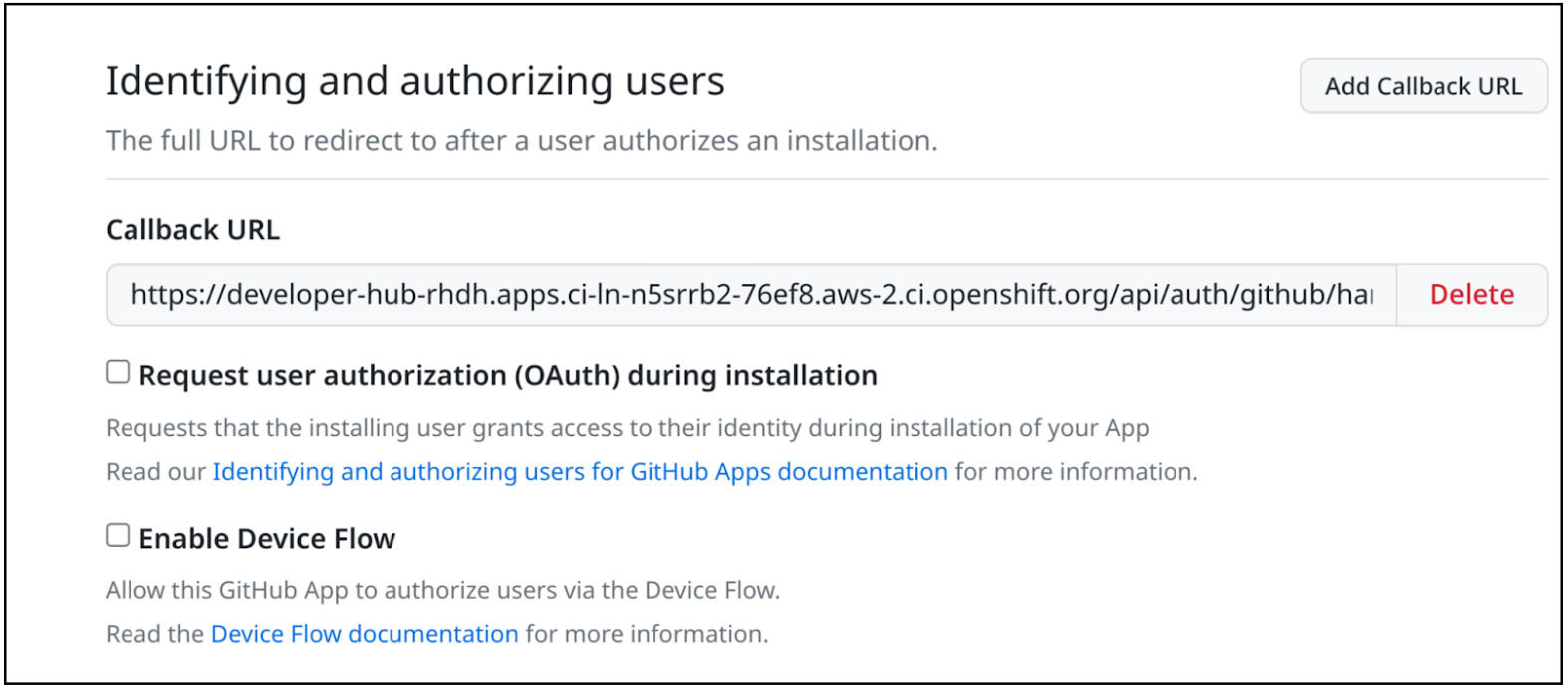 Note
NoteTo access the GitHub security insights widget on the Overview page in Developer Hub, ensure that your GitHub application has Read-only Dependabot Alerts permissions.
- Navigate to the Helm tab and select Upgrade.
-
Under Root Schema
Backstage Chart Schema Backstage Parameters Backstage container environment variables from existing Secrets, add rhdh-secretsas value. - Click Upgrade.
3.2.2. Enabling GitHub discovery in Red Hat Developer Hub
You can enable GitHub discoverability for your components in Developer Hub, such as any repositories that contain catalog-info.yaml file.
Prerequisites
- You have set up the GitHub integration. For more information, see Section 3.2.1, “Setting GitHub integration and authentication”.
Procedure
- In Red Hat Openshift, go to the Helm tab and upgrade the Developer Hub release.
Under global
Dynamic plugins configuration List of dynamic plugins that should be installed in the backstage application. Package specification of the dynamic plugin to install. It should be usable by the npm packcommand., add the following value:./dynamic-plugins/dist/backstage-plugin-catalog-backend-module-github-dynamic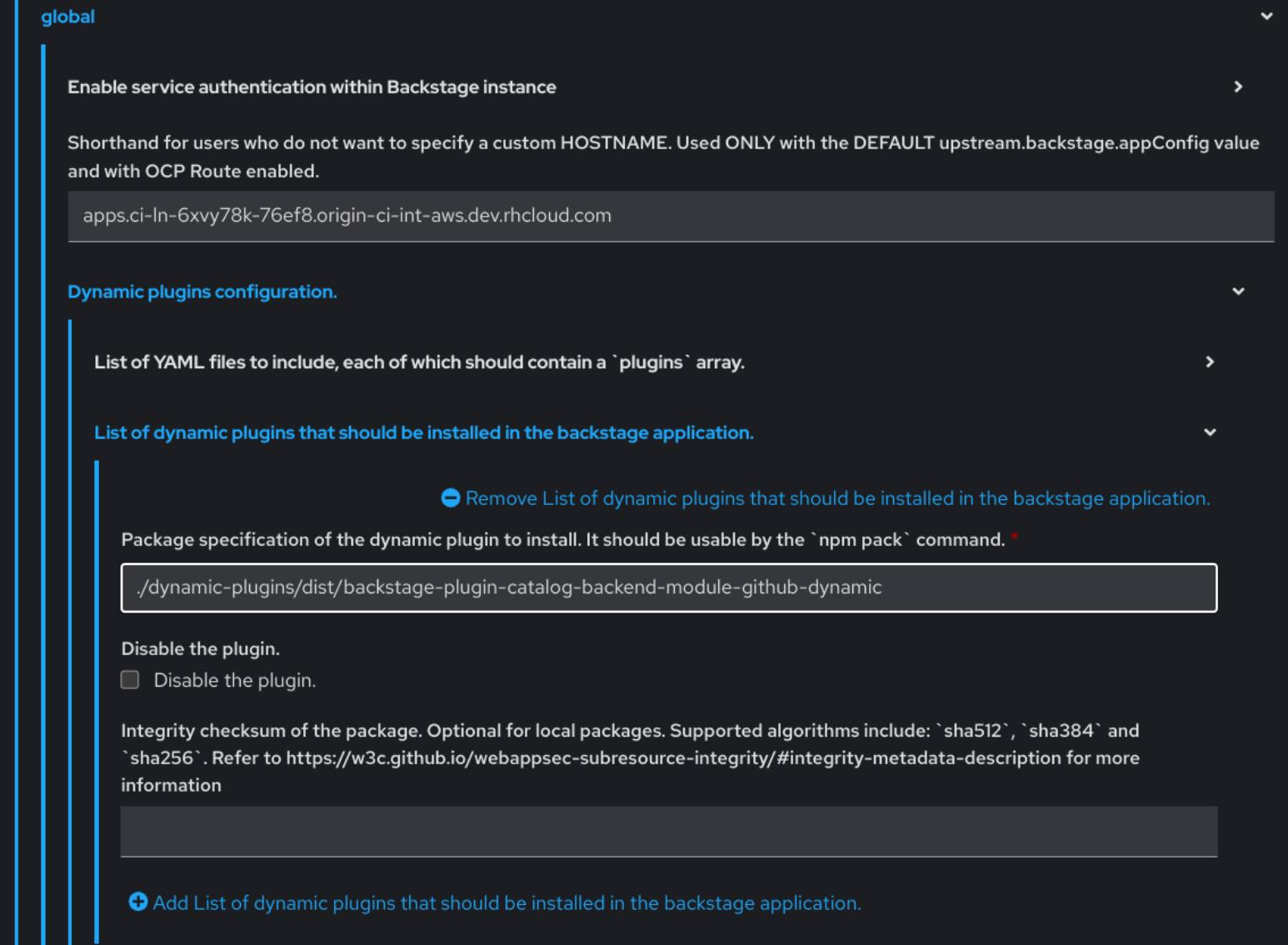
- Click Upgrade.
Add the following code in the ConfigMap:
kind: ConfigMap
apiVersion: v1
metadata:
  name: app-config-rhdh
data:
  app-config-rhdh.yaml: |
    ...
      catalog:
        providers:
          github:
            providerId:
              organization: '${GITHUB_ORG}'
              schedule:
                frequency:
                  minutes: 30
                initialDelay:
                  seconds: 15
                timeout:
                  minutes: 3
    ...
In the previous code, replace
${GITHUB_ORG}with the GitHub organization from where you want to discover the components. Also, if there is a single provider, then following code can be added in the ConfigMap:kind: ConfigMap apiVersion: v1 metadata: name: app-config-rhdh data: app-config-rhdh.yaml: | ... catalog: providers: github: organization: ${GITHUB_ORG} schedule: frequency: { minutes: 1 } timeout: { minutes: 1 } initialDelay: { seconds: 100 } ...The
providerIdin the previous code is required to identify the provider when there is a list of them.- Click Save.
3.2.3. Enabling GitHub organization member discovery in Red Hat Developer Hub
You can also enable GitHub discoverability for the members of your GitHub organization.
Prerequisites
- You have set up the GitHub integration. For more information, see Section 3.2.1, “Setting GitHub integration and authentication”.
Procedure
- In Red Hat Openshift, go to the Helm tab and upgrade the Developer Hub release.
Under global
Dynamic plugins configuration List of dynamic plugins that should be installed in the backstage application. Package specification of the dynamic plugin to install. It should be usable by the npm packcommand., add the following value:./dynamic-plugins/dist/backstage-plugin-catalog-backend-module-github-org-dynamic
- Click Upgrade.
Add the following code in the ConfigMap:
kind: ConfigMap
apiVersion: v1
metadata:
  name: app-config-rhdh
data:
  app-config-rhdh.yaml: |
    ...
    catalog:
      providers:
        githubOrg:
          default:
            id: production
            orgUrl: '${GITHUB_ORG_URL}'
    ...
In the previous code, replace
${GITHUB_ORG_URL}with the GitHub organization you want to ingest users from.- Click Save.

'%20d='M201.5%20305.5c-13.8%200-24.9-11.1-24.9-24.6%200-13.8%2011.1-24.9%2024.9-24.9%2013.6%200%2024.6%2011.1%2024.6%2024.9%200%2013.6-11.1%2024.6-24.6%2024.6zM504%20256c0%20137-111%20248-248%20248S8%20393%208%20256%20119%208%20256%208s248%20111%20248%20248zm-132.3-41.2c-9.4%200-17.7%203.9-23.8%2010-22.4-15.5-52.6-25.5-86.1-26.6l17.4-78.3%2055.4%2012.5c0%2013.6%2011.1%2024.6%2024.6%2024.6%2013.8%200%2024.9-11.3%2024.9-24.9s-11.1-24.9-24.9-24.9c-9.7%200-18%205.8-22.1%2013.8l-61.2-13.6c-3-.8-6.1%201.4-6.9%204.4l-19.1%2086.4c-33.2%201.4-63.1%2011.3-85.5%2026.8-6.1-6.4-14.7-10.2-24.1-10.2-34.9%200-46.3%2046.9-14.4%2062.8-1.1%205-1.7%2010.2-1.7%2015.5%200%2052.6%2059.2%2095.2%20132%2095.2%2073.1%200%20132.3-42.6%20132.3-95.2%200-5.3-.6-10.8-1.9-15.8%2031.3-16%2019.8-62.5-14.9-62.5zM302.8%20331c-18.2%2018.2-76.1%2017.9-93.6%200-2.2-2.2-6.1-2.2-8.3%200-2.5%202.5-2.5%206.4%200%208.6%2022.8%2022.8%2087.3%2022.8%20110.2%200%202.5-2.2%202.5-6.1%200-8.6-2.2-2.2-6.1-2.2-8.3%200zm7.7-75c-13.6%200-24.6%2011.1-24.6%2024.9%200%2013.6%2011.1%2024.6%2024.6%2024.6%2013.8%200%2024.9-11.1%2024.9-24.6%200-13.8-11-24.9-24.9-24.9z'/%3e%3c/svg%3e)