 Red Hat Summit
Questo contenuto non è disponibile nella lingua selezionata.
Chapter 6. Tuning resource limits
Directory Server provides several settings to tune the amount of resources an instance uses. You can change them using the command line or the web console.
6.1. Updating resource limit settings using the command line
This section provides a general procedure how to change resource limit settings. Adjust the settings according to your environment.
Procedure
Update the performance settings:
# dsconf -D "cn=Directory Manager" ldap://server.example.com config replace parameter_name=valueYou can set the following parameters:
-
nsslapd-threadnumber: Sets the number of worker threads. -
nsslapd-maxdescriptors: Sets the maximum number of file descriptors. -
nsslapd-timelimit: Sets the search time limit. -
nsslapd-sizelimit: Sets the search size limit. -
nsslapd-pagedsizelimit: Sets the paged search size limit. -
nsslapd-idletimeout: Sets the idle connection timeout. -
nsslapd-ioblocktimeout: Sets the input/output (I/O) block timeout. -
nsslapd-ndn-cache-enabled: Enables or disables the normalized DN cache. -
nsslapd-ndn-cache-max-size: Sets the normalized DN cache size, if nsslapd-ndn-cache-enabled is enabled. -
nsslapd-outbound-ldap-io-timeout: Sets the outbound I/O timeout. -
nsslapd-maxbersize: Sets the maximum Basic Encoding Rules (BER) size. -
nsslapd-maxsasliosize: Sets the maximum Simple Authentication and Security Layer (SASL) I/O size. -
nsslapd-listen-backlog-size: Sets the maximum number of sockets available to receive incoming connections. -
nsslapd-max-filter-nest-level: Sets the maximum nested filter level. -
nsslapd-ignore-virtual-attrs: Enables or disables virtual attribute lookups. -
nsslapd-connection-nocanon: Enables or disables reverse DNS lookups. nsslapd-enable-turbo-mode: Enables or disables the turbo mode feature.For further details, see the descriptions of the parameters in the Configuration and schema reference
-
Restart the instance:
# dsctl instance_name restart
6.2. Updating resource limit settings using the web console
This section provides a general procedure how to change resource limit settings. Adjust the settings according to your environment.
Prerequisites
- You are logged in to the instance in the web console.
Procedure
-
Navigate to
. Update the settings. Optionally, click
Show Advanced Settingsto display all settings.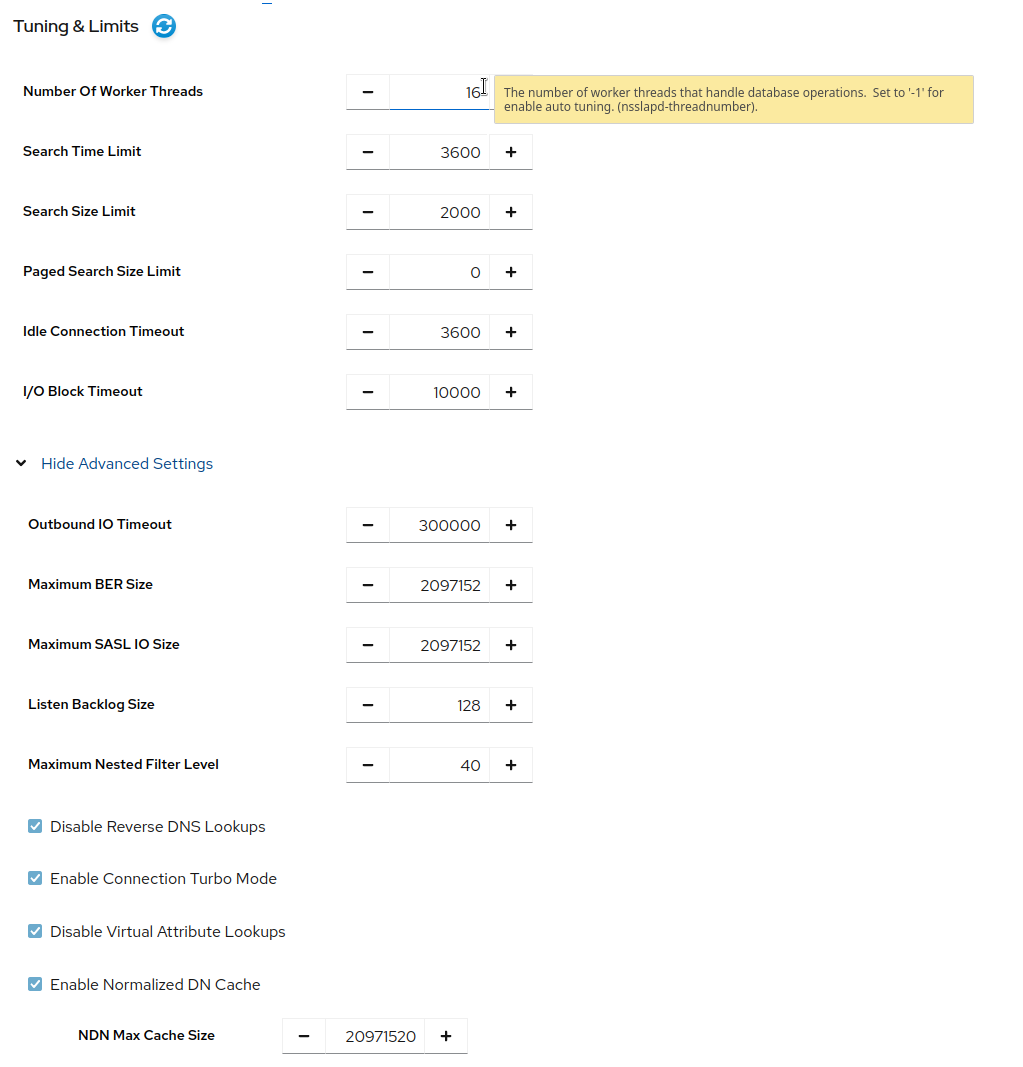
- Click .
-
Click
.
6.3. Disabling the Transparent Huge Pages feature
Transparent Huge Pages (THP) is the memory management feature in Linux that speeds up Translation Lookaside Buffer (TLB) checks on machines with large amounts of memory by using larger memory pages. The THP feature is enabled by default on RHEL systems and supports 2 MB memory pages.
The THP feature, however, works best when enabled on large, contiguous allocation patterns and can degrade performance on small, sparse allocation patterns that are typical to the Red Hat Directory Server. The resident memory size of the process might eventually exceed the limit and impact performance or get terminated by the out of memory (OOM) killer.
To avoid performance and memory consumption problems, disable THP on RHEL systems with Red Hat Directory Server installed.
Procedure
Check the current status of THP:
# cat /sys/kernel/mm/transparent_hugepage/enabledIf the transparent huge pages feature is active, disable it either at boot time or run time:
Disable the transparent huge pages at boot time by appending the following to the kernel command line in the
grub.conffile:transparent_hugepage=neverDisable transparent huge pages at run time by running the following commands:
# echo never > /sys/kernel/mm/transparent_hugepage/enabled
# echo never > /sys/kernel/mm/transparent_hugepage/defrag

'%20d='M201.5%20305.5c-13.8%200-24.9-11.1-24.9-24.6%200-13.8%2011.1-24.9%2024.9-24.9%2013.6%200%2024.6%2011.1%2024.6%2024.9%200%2013.6-11.1%2024.6-24.6%2024.6zM504%20256c0%20137-111%20248-248%20248S8%20393%208%20256%20119%208%20256%208s248%20111%20248%20248zm-132.3-41.2c-9.4%200-17.7%203.9-23.8%2010-22.4-15.5-52.6-25.5-86.1-26.6l17.4-78.3%2055.4%2012.5c0%2013.6%2011.1%2024.6%2024.6%2024.6%2013.8%200%2024.9-11.3%2024.9-24.9s-11.1-24.9-24.9-24.9c-9.7%200-18%205.8-22.1%2013.8l-61.2-13.6c-3-.8-6.1%201.4-6.9%204.4l-19.1%2086.4c-33.2%201.4-63.1%2011.3-85.5%2026.8-6.1-6.4-14.7-10.2-24.1-10.2-34.9%200-46.3%2046.9-14.4%2062.8-1.1%205-1.7%2010.2-1.7%2015.5%200%2052.6%2059.2%2095.2%20132%2095.2%2073.1%200%20132.3-42.6%20132.3-95.2%200-5.3-.6-10.8-1.9-15.8%2031.3-16%2019.8-62.5-14.9-62.5zM302.8%20331c-18.2%2018.2-76.1%2017.9-93.6%200-2.2-2.2-6.1-2.2-8.3%200-2.5%202.5-2.5%206.4%200%208.6%2022.8%2022.8%2087.3%2022.8%20110.2%200%202.5-2.2%202.5-6.1%200-8.6-2.2-2.2-6.1-2.2-8.3%200zm7.7-75c-13.6%200-24.6%2011.1-24.6%2024.9%200%2013.6%2011.1%2024.6%2024.6%2024.6%2013.8%200%2024.9-11.1%2024.9-24.6%200-13.8-11-24.9-24.9-24.9z'/%3e%3c/svg%3e)