 Red Hat Summit
Questo contenuto non è disponibile nella lingua selezionata.
Chapter 4. Configuring IPMI Management Boards as Fencing Devices
This chapter provides the procedures for configuring IPMI management boards as fencing devices in a Red Hat cluster using the Conga configuration tool.
Figure 4.1, “Using IPMI Management Boards as Fence Devices” shows the configuration this procedure yields. In this configuration each node of a three node cluster uses an IPMI management board as its fencing device.
Note
Note that in this configuration each system has redundant power and is hooked into two independent power sources. This ensures that the management board would still function as needed in a cluster even if you lose power from one of the sources.
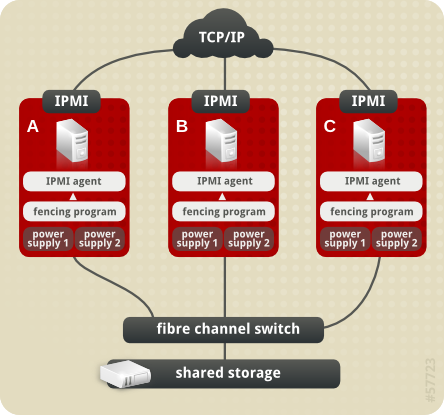
Figure 4.1. Using IPMI Management Boards as Fence Devices
4.1. IPMI Fence Device Prerequisite Configuration
Copia collegamentoCollegamento copiato negli appunti!
Table 4.1, “Configuration Prerequisities” summarizes the prequisite components that have been set up before this procedure begins.
| Component | Name | Comment |
|---|---|---|
| cluster | ipmiclust | three-node cluster |
| cluster node | clusternode1.example.com | node in cluster ipmiclust configured with IPMI management board and two power supplies |
| IP address | 10.15.86.96 | IP address for IPMI management board for clusternode1.example.com |
| login | ipmilogin | login name for IPMI management board for clusternode1.example.com |
| password | ipmipword | password IPMI management board for clusternode1.example.com |
| cluster node | clusternode2.example.com | node in cluster ipmiclust configured with IPMI management board and two power supplies |
| IP address | 10.15.86.97 | IP address for IPMI management board for clusternode2.example.com |
| login | ipmilogin | login name for IPMI management board for clusternode2.example.com |
| password | ipmipword | password for IPMI management board for clusternode2.example.com |
| cluster node | clusternode3.example.com | node in cluster ipmiclust configured with IPMI management board and two power supplies |
| IP address | 10.15.86.98 | IP address for IPMI management board for clusternode3.example.com |
| login | ipmilogin | login name for IPMI management board for clusternode3.example.com |
| password | ipmipword | password for IPMI management board for clusternode3.example.com |

'%20d='M201.5%20305.5c-13.8%200-24.9-11.1-24.9-24.6%200-13.8%2011.1-24.9%2024.9-24.9%2013.6%200%2024.6%2011.1%2024.6%2024.9%200%2013.6-11.1%2024.6-24.6%2024.6zM504%20256c0%20137-111%20248-248%20248S8%20393%208%20256%20119%208%20256%208s248%20111%20248%20248zm-132.3-41.2c-9.4%200-17.7%203.9-23.8%2010-22.4-15.5-52.6-25.5-86.1-26.6l17.4-78.3%2055.4%2012.5c0%2013.6%2011.1%2024.6%2024.6%2024.6%2013.8%200%2024.9-11.3%2024.9-24.9s-11.1-24.9-24.9-24.9c-9.7%200-18%205.8-22.1%2013.8l-61.2-13.6c-3-.8-6.1%201.4-6.9%204.4l-19.1%2086.4c-33.2%201.4-63.1%2011.3-85.5%2026.8-6.1-6.4-14.7-10.2-24.1-10.2-34.9%200-46.3%2046.9-14.4%2062.8-1.1%205-1.7%2010.2-1.7%2015.5%200%2052.6%2059.2%2095.2%20132%2095.2%2073.1%200%20132.3-42.6%20132.3-95.2%200-5.3-.6-10.8-1.9-15.8%2031.3-16%2019.8-62.5-14.9-62.5zM302.8%20331c-18.2%2018.2-76.1%2017.9-93.6%200-2.2-2.2-6.1-2.2-8.3%200-2.5%202.5-2.5%206.4%200%208.6%2022.8%2022.8%2087.3%2022.8%20110.2%200%202.5-2.2%202.5-6.1%200-8.6-2.2-2.2-6.1-2.2-8.3%200zm7.7-75c-13.6%200-24.6%2011.1-24.6%2024.9%200%2013.6%2011.1%2024.6%2024.6%2024.6%2013.8%200%2024.9-11.1%2024.9-24.6%200-13.8-11-24.9-24.9-24.9z'/%3e%3c/svg%3e)