 Red Hat Summit
Questo contenuto non è disponibile nella lingua selezionata.
8.3. How to write in Korean
- Start the application you wish to write in and press CTRL and SPACE keys simultaneously to start or stop SCIM. When started, the SCIM tool bar will be displayed on the right corner of your screen.
- Using your mouse, click on the displayed input method if 'Hangul' is not displayed and select Korean from the list of languages displayed. The scim toolbar will display 'Hangul' when Korean is selected as illustrated below. You can then start typing.

Figure 8.7. SCIM Toolbar - Hangul
- You can also switch between Latin (abc..) and Hangul input by clicking on the input mode button as illustrated below.
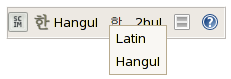
Figure 8.8. Hangul Input Mode
- The input layout button allows you to select your preferred input layout.
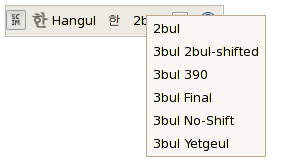
Figure 8.9. Hangul Input Layout
You can use the F9 key to convert input to Hanja characters. Pressing on the SCIM Help icon in the toolbar displays a summary of the shortcuts and their usage.

'%20d='M201.5%20305.5c-13.8%200-24.9-11.1-24.9-24.6%200-13.8%2011.1-24.9%2024.9-24.9%2013.6%200%2024.6%2011.1%2024.6%2024.9%200%2013.6-11.1%2024.6-24.6%2024.6zM504%20256c0%20137-111%20248-248%20248S8%20393%208%20256%20119%208%20256%208s248%20111%20248%20248zm-132.3-41.2c-9.4%200-17.7%203.9-23.8%2010-22.4-15.5-52.6-25.5-86.1-26.6l17.4-78.3%2055.4%2012.5c0%2013.6%2011.1%2024.6%2024.6%2024.6%2013.8%200%2024.9-11.3%2024.9-24.9s-11.1-24.9-24.9-24.9c-9.7%200-18%205.8-22.1%2013.8l-61.2-13.6c-3-.8-6.1%201.4-6.9%204.4l-19.1%2086.4c-33.2%201.4-63.1%2011.3-85.5%2026.8-6.1-6.4-14.7-10.2-24.1-10.2-34.9%200-46.3%2046.9-14.4%2062.8-1.1%205-1.7%2010.2-1.7%2015.5%200%2052.6%2059.2%2095.2%20132%2095.2%2073.1%200%20132.3-42.6%20132.3-95.2%200-5.3-.6-10.8-1.9-15.8%2031.3-16%2019.8-62.5-14.9-62.5zM302.8%20331c-18.2%2018.2-76.1%2017.9-93.6%200-2.2-2.2-6.1-2.2-8.3%200-2.5%202.5-2.5%206.4%200%208.6%2022.8%2022.8%2087.3%2022.8%20110.2%200%202.5-2.2%202.5-6.1%200-8.6-2.2-2.2-6.1-2.2-8.3%200zm7.7-75c-13.6%200-24.6%2011.1-24.6%2024.9%200%2013.6%2011.1%2024.6%2024.6%2024.6%2013.8%200%2024.9-11.1%2024.9-24.6%200-13.8-11-24.9-24.9-24.9z'/%3e%3c/svg%3e)