 Red Hat Summit
Questo contenuto non è disponibile nella lingua selezionata.
Chapter 5. Uninstalling CodeReady Studio
The following section describes how to uninstall CodeReady Studio using Eclipse or the Installer.
Note that you can have multiple versions of CodeReady Studio installed on your system, provided you have these versions located in different directories.
5.1. Uninstalling Red Hat CodeReady Studio using Eclipse
The following section describes how to uninstall CodeReady Studio installed with Eclipse Marketplace or the Update Site Zip.
Procedure
- Start the Eclipse IDE.
Click
. 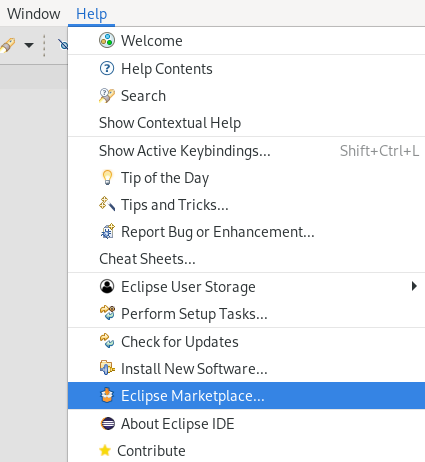
The Eclipse Marketplace window appears.
Navigate to the Installed section.
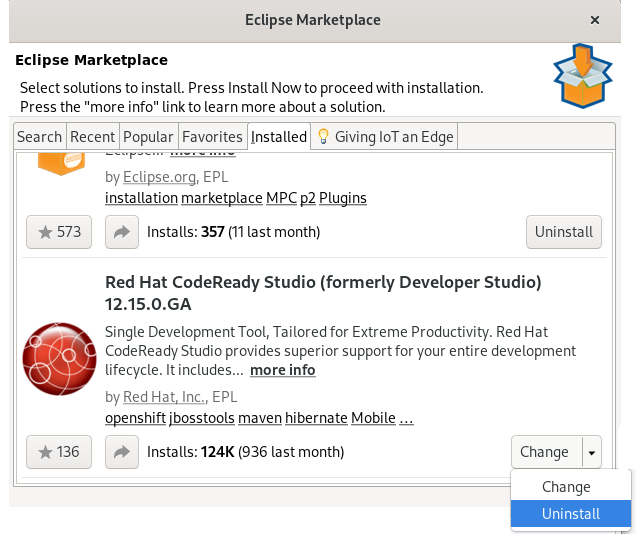
- Locate Red Hat CodeReady Studio.
- Click the down arrow near the button.
Click .
The Confirm Selected Features window appears.
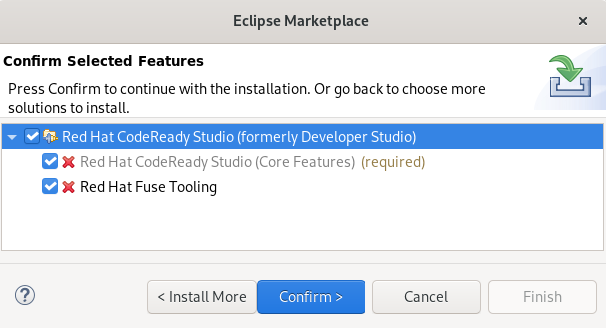
- Ensure that Red Hat CodeReady Studio is selected.
- Click .
Click .
The Software Updates dialog box appears prompting you to restart Eclipse.
Click .
Note that the changes do not take effect until you restart Eclipse.
5.2. Uninstalling CodeReady Studio using the Installer
The following section describes how to uninstall CodeReady Studio installed with the Installer.
Procedure
- Ensure that CodeReady Studio is not running.
Navigate to the
/Uninstallerdirectory:cd /path-to/codereadystudio/Uninstaller
$ cd /path-to/codereadystudio/UninstallerCopy to Clipboard Copied! Toggle word wrap Toggle overflow -
Replace path-to with the path to the CodeReady Studio
/codereadystudio/Uninstallerdirectory. Start the Uninstaller:
java -jar uninstaller.jar
$ java -jar uninstaller.jarCopy to Clipboard Copied! Toggle word wrap Toggle overflow The IzPack Uninstaller dialog box appears.
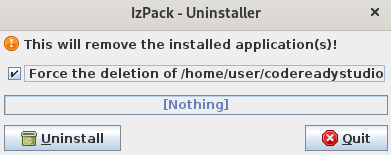
Select the Force the deletion check box.
If the check box is not selected, some files will be left behind in the installation directory.
- Click .

'%20d='M201.5%20305.5c-13.8%200-24.9-11.1-24.9-24.6%200-13.8%2011.1-24.9%2024.9-24.9%2013.6%200%2024.6%2011.1%2024.6%2024.9%200%2013.6-11.1%2024.6-24.6%2024.6zM504%20256c0%20137-111%20248-248%20248S8%20393%208%20256%20119%208%20256%208s248%20111%20248%20248zm-132.3-41.2c-9.4%200-17.7%203.9-23.8%2010-22.4-15.5-52.6-25.5-86.1-26.6l17.4-78.3%2055.4%2012.5c0%2013.6%2011.1%2024.6%2024.6%2024.6%2013.8%200%2024.9-11.3%2024.9-24.9s-11.1-24.9-24.9-24.9c-9.7%200-18%205.8-22.1%2013.8l-61.2-13.6c-3-.8-6.1%201.4-6.9%204.4l-19.1%2086.4c-33.2%201.4-63.1%2011.3-85.5%2026.8-6.1-6.4-14.7-10.2-24.1-10.2-34.9%200-46.3%2046.9-14.4%2062.8-1.1%205-1.7%2010.2-1.7%2015.5%200%2052.6%2059.2%2095.2%20132%2095.2%2073.1%200%20132.3-42.6%20132.3-95.2%200-5.3-.6-10.8-1.9-15.8%2031.3-16%2019.8-62.5-14.9-62.5zM302.8%20331c-18.2%2018.2-76.1%2017.9-93.6%200-2.2-2.2-6.1-2.2-8.3%200-2.5%202.5-2.5%206.4%200%208.6%2022.8%2022.8%2087.3%2022.8%20110.2%200%202.5-2.2%202.5-6.1%200-8.6-2.2-2.2-6.1-2.2-8.3%200zm7.7-75c-13.6%200-24.6%2011.1-24.6%2024.9%200%2013.6%2011.1%2024.6%2024.6%2024.6%2013.8%200%2024.9-11.1%2024.9-24.6%200-13.8-11-24.9-24.9-24.9z'/%3e%3c/svg%3e)