 Red Hat Summit
Questo contenuto non è disponibile nella lingua selezionata.
Chapter 29. Provider Endpoints
Abstract
A provider endpoint sends requests to external endpoints and waits for the response. It is configured using a single XML element that specifies the WSDL document defining the endpoint.
Important
The Java Business Integration components of Red Hat JBoss Fuse are considered deprecated. You should consider migrating any JBI applications to OSGi.
Overview
Copia collegamentoCollegamento copiato negli appunti!
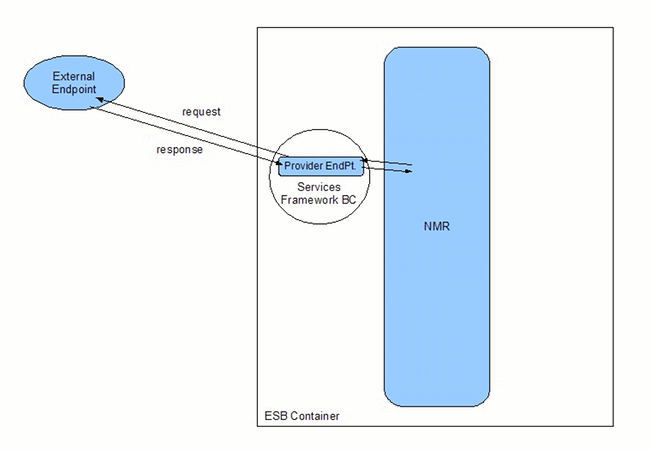
Provider endpoints play the role of service provider from the vantage point of other endpoints running inside of the ESB. However, from outside of the ESB a provider endpoint plays the role of a consumer. As shown in Figure 29.1, “Provider Endpoint”, provider endpoints make requests on external endpoints. When it receives the response, the provider endpoint returns it back to the NMR.
Figure 29.1. Provider Endpoint
Important
Because provider endpoint's behave like consumers to external endpoints, you configure the runtime behavior of the transport using the consumer-specific WSDL entries.
Procedure
Copia collegamentoCollegamento copiato negli appunti!
To configure a provider endpoint do the following:
- Add a
providerelement to yourxbean.xmlfile. - Add a
wsdlattribute to theproviderelement. - If your WSDL defines more than one service, you will need to specify a value for the
serviceattribute. - If the service you choose defines more than one endpoint, you will need to specify a value for the
endpointattribute. - If your endpoint is going to be receiving binary attachments set its
mtomEnabledattribute totrue. - If your endpoint does not need to process the JBI wrapper set its
useJbiWrapperattribute tofalse. - If you are using any of the advanced features, such as WS-Addressing or WS-Policy, specify a value for the
busCfgattribute.See ???.
Specifying the WSDL
Copia collegamentoCollegamento copiato negli appunti!
The
wsdl attribute is the only required attribute to configure a provider endpoint. It specifies the location of the WSDL document that defines the endpoint being exposed. The path used is relative to the top-level of the exploded service unit.
Tip
If the WSDL document defines a single service with a single endpoint, then you do not require any additional information to expose a provider endpoint.
Example 29.1, “Minimal Provider Endpoint Configuration” shows the minimal configuration for a provider endpoint.
Example 29.1. Minimal Provider Endpoint Configuration
For information on creating a WSDL document see ???.
Specifying the endpoint details
Copia collegamentoCollegamento copiato negli appunti!
If the endpoint's WSDL document defines a single service with a single endpoint, the ESB can easily determine which endpoint to use. It will use the values from the WSDL document to specify the service name, endpoint name and interface name for the instantiated endpoint.
However, if the endpoint's WSDL document defines multiple services or if it defines multiple endpoints for a service, you will need to provide the provider endpoint with additional information so that it can determine the proper definition to use. What information you need to provide depends on the complexity of the WSDL document. You may need to supply values for both the service name and the endpoint name, or you may only have to supply one of these values.
If the WSDL document contains more than one
service element you will need to specify a value for the provider's service attribute. The value of the provider's service attribute is the QName of the WSDL service element that defines the desired service in the WSDL document. For example, if you wanted your endpoint to use the WidgetInventoryService in the WSDL shown in Example 29.2, “WSDL with Two Services” you would use the configuration shown in Example 29.3, “Provider Endpoint with a Defined Service Name”.
Example 29.2. WSDL with Two Services
Example 29.3. Provider Endpoint with a Defined Service Name
If the WSDL document's service definition contains more than one endpoint, then you will need to provide a value for the provider's
endpoint attribute. The value of the endpoint attribute corresponds to the value of the WSDL port element's name attribute. For example, if you wanted your endpoint to use the WidgetWesternSalesPort in the WSDL shown in Example 29.4, “Service with Two Endpoints” you would use the configuration shown in Example 29.5, “Provider Endpoint with a Defined Endpoint Name”.
Example 29.4. Service with Two Endpoints
Example 29.5. Provider Endpoint with a Defined Endpoint Name

'%20d='M201.5%20305.5c-13.8%200-24.9-11.1-24.9-24.6%200-13.8%2011.1-24.9%2024.9-24.9%2013.6%200%2024.6%2011.1%2024.6%2024.9%200%2013.6-11.1%2024.6-24.6%2024.6zM504%20256c0%20137-111%20248-248%20248S8%20393%208%20256%20119%208%20256%208s248%20111%20248%20248zm-132.3-41.2c-9.4%200-17.7%203.9-23.8%2010-22.4-15.5-52.6-25.5-86.1-26.6l17.4-78.3%2055.4%2012.5c0%2013.6%2011.1%2024.6%2024.6%2024.6%2013.8%200%2024.9-11.3%2024.9-24.9s-11.1-24.9-24.9-24.9c-9.7%200-18%205.8-22.1%2013.8l-61.2-13.6c-3-.8-6.1%201.4-6.9%204.4l-19.1%2086.4c-33.2%201.4-63.1%2011.3-85.5%2026.8-6.1-6.4-14.7-10.2-24.1-10.2-34.9%200-46.3%2046.9-14.4%2062.8-1.1%205-1.7%2010.2-1.7%2015.5%200%2052.6%2059.2%2095.2%20132%2095.2%2073.1%200%20132.3-42.6%20132.3-95.2%200-5.3-.6-10.8-1.9-15.8%2031.3-16%2019.8-62.5-14.9-62.5zM302.8%20331c-18.2%2018.2-76.1%2017.9-93.6%200-2.2-2.2-6.1-2.2-8.3%200-2.5%202.5-2.5%206.4%200%208.6%2022.8%2022.8%2087.3%2022.8%20110.2%200%202.5-2.2%202.5-6.1%200-8.6-2.2-2.2-6.1-2.2-8.3%200zm7.7-75c-13.6%200-24.6%2011.1-24.6%2024.9%200%2013.6%2011.1%2024.6%2024.6%2024.6%2013.8%200%2024.9-11.1%2024.9-24.6%200-13.8-11-24.9-24.9-24.9z'/%3e%3c/svg%3e)