 Red Hat Summit
Questo contenuto non è disponibile nella lingua selezionata.
13.3. Updating Applications
After the EAR or WAR resource is created, changes are treated like updated content packages. Updating the EAR/WAR resource is the same as uploading and applying new packages to that EAR/WAR resource entry.
- Browse to the EAR or WAR resource in the JBoss ON UI.
- In the EAR or WAR resource details page, open the Content tab, and click the New subtab.

- Click the button.
- Click the button.

- In the pop-up window, click the Add button, and browse the local filesystem to the updated WAR or EAR file to be uploaded.

- Click the UPLOAD button to load the file and dismiss the window.
- In the main form, select the repository where the WAR or EAR file package should be stored. If one exists, select an existing repository or a subscribed repository for the resource. Otherwise, create a new repository.
- Optionally, set the version number for the EAR/WAR package.If this is set, then this value is displayed in the UI. If not, then a version number is calculated, based on the spec version and implementation version in
MANIFEST.MF, if any are given, or the calculated SHA-256 value for the package itself. Internally, the package is identified by the SHA value.SPEC(IMPLEMENTATION)[sha256=abcd1234]For more information on package versioning, see "Deploying Applications and Content". - Confirm the details for the new package, then click .

When the package is successfully uploaded, the UI redirects to the history page on the Content tab.
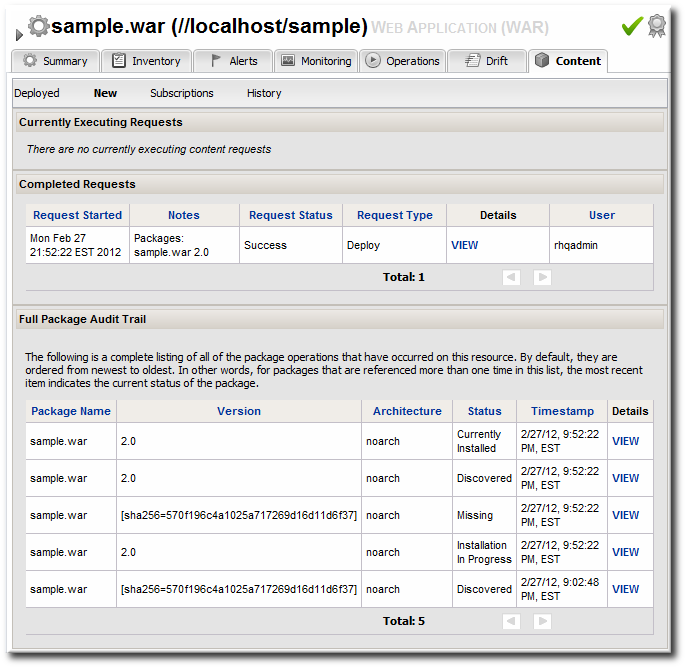
Figure 13.2. Deployment History for a Resource

'%20d='M201.5%20305.5c-13.8%200-24.9-11.1-24.9-24.6%200-13.8%2011.1-24.9%2024.9-24.9%2013.6%200%2024.6%2011.1%2024.6%2024.9%200%2013.6-11.1%2024.6-24.6%2024.6zM504%20256c0%20137-111%20248-248%20248S8%20393%208%20256%20119%208%20256%208s248%20111%20248%20248zm-132.3-41.2c-9.4%200-17.7%203.9-23.8%2010-22.4-15.5-52.6-25.5-86.1-26.6l17.4-78.3%2055.4%2012.5c0%2013.6%2011.1%2024.6%2024.6%2024.6%2013.8%200%2024.9-11.3%2024.9-24.9s-11.1-24.9-24.9-24.9c-9.7%200-18%205.8-22.1%2013.8l-61.2-13.6c-3-.8-6.1%201.4-6.9%204.4l-19.1%2086.4c-33.2%201.4-63.1%2011.3-85.5%2026.8-6.1-6.4-14.7-10.2-24.1-10.2-34.9%200-46.3%2046.9-14.4%2062.8-1.1%205-1.7%2010.2-1.7%2015.5%200%2052.6%2059.2%2095.2%20132%2095.2%2073.1%200%20132.3-42.6%20132.3-95.2%200-5.3-.6-10.8-1.9-15.8%2031.3-16%2019.8-62.5-14.9-62.5zM302.8%20331c-18.2%2018.2-76.1%2017.9-93.6%200-2.2-2.2-6.1-2.2-8.3%200-2.5%202.5-2.5%206.4%200%208.6%2022.8%2022.8%2087.3%2022.8%20110.2%200%202.5-2.2%202.5-6.1%200-8.6-2.2-2.2-6.1-2.2-8.3%200zm7.7-75c-13.6%200-24.6%2011.1-24.6%2024.9%200%2013.6%2011.1%2024.6%2024.6%2024.6%2013.8%200%2024.9-11.1%2024.9-24.6%200-13.8-11-24.9-24.9-24.9z'/%3e%3c/svg%3e)