 Red Hat Summit
Questo contenuto non è disponibile nella lingua selezionata.
5.4. Hot Plugging Virtual Memory
You can hot plug virtual memory. Hot plugging means enabling or disabling devices while a virtual machine is running. Each time memory is hot plugged, it appears as a new memory device in the Vm Devices tab in the details pane, up to a maximum of 16. When the virtual machine is shut down and restarted, these devices are cleared from the Vm Devices tab without reducing the virtual machine's memory, allowing you to hot plug more memory devices.
Important
Hot unplugging virtual memory is not currently supported in Red Hat Enterprise Virtualization.
Procedure 5.11. Hot Plugging Virtual Memory
- Click the Virtual Machines tab and select a running virtual machine.
- Click .
- Click the System tab.
- Edit the Memory Size as required. Memory can be added in multiples of 256 MB.
- Click .This action opens the Next Start Configuration window, as the MemSizeMb value will not change until the virtual machine is restarted. However, the hot plug action is triggered by the change to the memory value, which can be applied immediately.
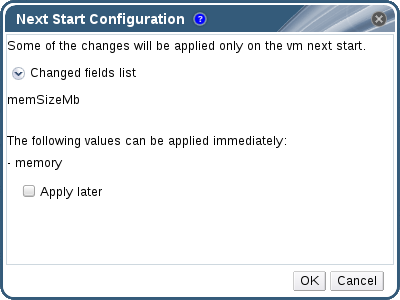
Figure 5.4. Hot Plug Virtual Memory
- Clear the Apply later check box to apply the change immediately.
- Click OK.
The virtual machine's Defined Memory is updated in the General tab in the details pane. You can see the newly added memory device in the Vm Devices tab in the details pane.

'%20d='M201.5%20305.5c-13.8%200-24.9-11.1-24.9-24.6%200-13.8%2011.1-24.9%2024.9-24.9%2013.6%200%2024.6%2011.1%2024.6%2024.9%200%2013.6-11.1%2024.6-24.6%2024.6zM504%20256c0%20137-111%20248-248%20248S8%20393%208%20256%20119%208%20256%208s248%20111%20248%20248zm-132.3-41.2c-9.4%200-17.7%203.9-23.8%2010-22.4-15.5-52.6-25.5-86.1-26.6l17.4-78.3%2055.4%2012.5c0%2013.6%2011.1%2024.6%2024.6%2024.6%2013.8%200%2024.9-11.3%2024.9-24.9s-11.1-24.9-24.9-24.9c-9.7%200-18%205.8-22.1%2013.8l-61.2-13.6c-3-.8-6.1%201.4-6.9%204.4l-19.1%2086.4c-33.2%201.4-63.1%2011.3-85.5%2026.8-6.1-6.4-14.7-10.2-24.1-10.2-34.9%200-46.3%2046.9-14.4%2062.8-1.1%205-1.7%2010.2-1.7%2015.5%200%2052.6%2059.2%2095.2%20132%2095.2%2073.1%200%20132.3-42.6%20132.3-95.2%200-5.3-.6-10.8-1.9-15.8%2031.3-16%2019.8-62.5-14.9-62.5zM302.8%20331c-18.2%2018.2-76.1%2017.9-93.6%200-2.2-2.2-6.1-2.2-8.3%200-2.5%202.5-2.5%206.4%200%208.6%2022.8%2022.8%2087.3%2022.8%20110.2%200%202.5-2.2%202.5-6.1%200-8.6-2.2-2.2-6.1-2.2-8.3%200zm7.7-75c-13.6%200-24.6%2011.1-24.6%2024.9%200%2013.6%2011.1%2024.6%2024.6%2024.6%2013.8%200%2024.9-11.1%2024.9-24.6%200-13.8-11-24.9-24.9-24.9z'/%3e%3c/svg%3e)