 Red Hat Summit
Questo contenuto non è disponibile nella lingua selezionata.
1.3. Tree Mode and Flat Mode
The Administration Portal provides two different modes for managing your resources: tree mode and flat mode. Tree mode displays resources in a hierarchical view per data center, from the highest level of the data center down to the individual virtual machine. Working in tree mode is highly recommended for most operations.
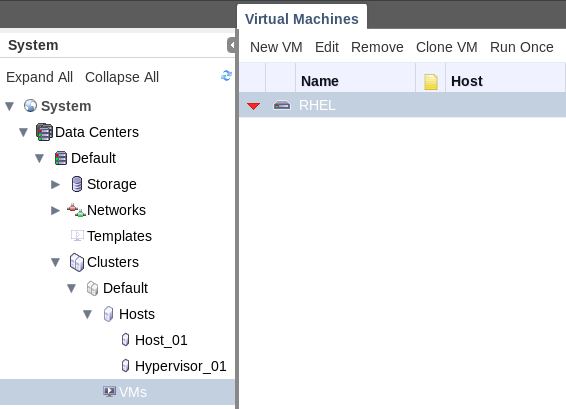
Figure 1.2. Tree Mode
Flat mode allows you to search across data centers, or storage domains. It does not limit you to viewing the resources of a single hierarchy. For example, flat mode makes it possible to find all virtual machines that are using more than 80% CPU across clusters and data centers, or locate all hosts that have the highest utilization. In addition, certain objects, such as Pools and Users are not in the data center hierarchy and can be accessed only in flat mode.
To access flat mode, click on the System item in the Tree pane on the left side of the screen. You are in flat mode if the Pools and Users resource tabs appear.
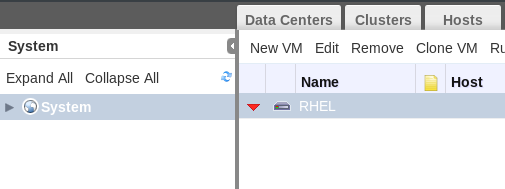
Figure 1.3. Flat Mode

'%20d='M201.5%20305.5c-13.8%200-24.9-11.1-24.9-24.6%200-13.8%2011.1-24.9%2024.9-24.9%2013.6%200%2024.6%2011.1%2024.6%2024.9%200%2013.6-11.1%2024.6-24.6%2024.6zM504%20256c0%20137-111%20248-248%20248S8%20393%208%20256%20119%208%20256%208s248%20111%20248%20248zm-132.3-41.2c-9.4%200-17.7%203.9-23.8%2010-22.4-15.5-52.6-25.5-86.1-26.6l17.4-78.3%2055.4%2012.5c0%2013.6%2011.1%2024.6%2024.6%2024.6%2013.8%200%2024.9-11.3%2024.9-24.9s-11.1-24.9-24.9-24.9c-9.7%200-18%205.8-22.1%2013.8l-61.2-13.6c-3-.8-6.1%201.4-6.9%204.4l-19.1%2086.4c-33.2%201.4-63.1%2011.3-85.5%2026.8-6.1-6.4-14.7-10.2-24.1-10.2-34.9%200-46.3%2046.9-14.4%2062.8-1.1%205-1.7%2010.2-1.7%2015.5%200%2052.6%2059.2%2095.2%20132%2095.2%2073.1%200%20132.3-42.6%20132.3-95.2%200-5.3-.6-10.8-1.9-15.8%2031.3-16%2019.8-62.5-14.9-62.5zM302.8%20331c-18.2%2018.2-76.1%2017.9-93.6%200-2.2-2.2-6.1-2.2-8.3%200-2.5%202.5-2.5%206.4%200%208.6%2022.8%2022.8%2087.3%2022.8%20110.2%200%202.5-2.2%202.5-6.1%200-8.6-2.2-2.2-6.1-2.2-8.3%200zm7.7-75c-13.6%200-24.6%2011.1-24.6%2024.9%200%2013.6%2011.1%2024.6%2024.6%2024.6%2013.8%200%2024.9-11.1%2024.9-24.6%200-13.8-11-24.9-24.9-24.9z'/%3e%3c/svg%3e)