 Red Hat Summit
How to build and upload a Red Hat Enterprise Linux (RHEL) image with Image Builder
Learn how to build a Red Hat® Enterprise Linux® (RHEL) image using the Red Hat Image Builder, then upload it to your chosen cloud service.
This learning path is for operations teams or system administrators
Developers might want to check out developers.redhat.com.
Uploading an image to a cloud service
10 mins
Now that your image is built, you can easily push it to a cloud service of your choosing.
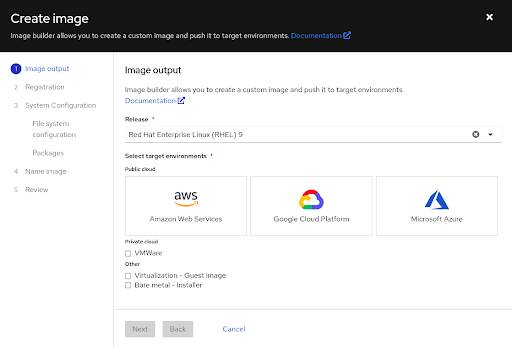
You can select options for uploading images directly from the Image Builder workflow.
What will you learn?
- Uploading RHEL images to a cloud service
What do you need before starting?
- Cloud service provider account credentials
Steps to upload your image
There are two methods to completing an image build for a cloud service. One is performed within the Image Builder workflow during image creation.
- During the new image build process, select your cloud service provider as the target environment.
- Enter your credentials for the cloud service account.
- Proceed through validation steps to register and connect the instances.
- (Optional) Configure your file system, add any additional packages, and name the image.
Once created, the image will be available in the associated cloud service specified. You can then sign in to your cloud account to launch the instance.
- For Microsoft Azure, follow the instructions to access your image and create a virtual machine (VM).
- For Google Cloud Services, follow the instructions to create a VM instance or copy the image to your project group.
- For AWS, follow the instructions to access and launch your image.
Once finished, you will have a fully created instance on your cloud service provider of choice.
Get more support
- Troubleshoot with Red Hat support
- Troubleshoot with Microsoft Azure, Google Cloud Services, or AWS

'%20d='M201.5%20305.5c-13.8%200-24.9-11.1-24.9-24.6%200-13.8%2011.1-24.9%2024.9-24.9%2013.6%200%2024.6%2011.1%2024.6%2024.9%200%2013.6-11.1%2024.6-24.6%2024.6zM504%20256c0%20137-111%20248-248%20248S8%20393%208%20256%20119%208%20256%208s248%20111%20248%20248zm-132.3-41.2c-9.4%200-17.7%203.9-23.8%2010-22.4-15.5-52.6-25.5-86.1-26.6l17.4-78.3%2055.4%2012.5c0%2013.6%2011.1%2024.6%2024.6%2024.6%2013.8%200%2024.9-11.3%2024.9-24.9s-11.1-24.9-24.9-24.9c-9.7%200-18%205.8-22.1%2013.8l-61.2-13.6c-3-.8-6.1%201.4-6.9%204.4l-19.1%2086.4c-33.2%201.4-63.1%2011.3-85.5%2026.8-6.1-6.4-14.7-10.2-24.1-10.2-34.9%200-46.3%2046.9-14.4%2062.8-1.1%205-1.7%2010.2-1.7%2015.5%200%2052.6%2059.2%2095.2%20132%2095.2%2073.1%200%20132.3-42.6%20132.3-95.2%200-5.3-.6-10.8-1.9-15.8%2031.3-16%2019.8-62.5-14.9-62.5zM302.8%20331c-18.2%2018.2-76.1%2017.9-93.6%200-2.2-2.2-6.1-2.2-8.3%200-2.5%202.5-2.5%206.4%200%208.6%2022.8%2022.8%2087.3%2022.8%20110.2%200%202.5-2.2%202.5-6.1%200-8.6-2.2-2.2-6.1-2.2-8.3%200zm7.7-75c-13.6%200-24.6%2011.1-24.6%2024.9%200%2013.6%2011.1%2024.6%2024.6%2024.6%2013.8%200%2024.9-11.1%2024.9-24.6%200-13.8-11-24.9-24.9-24.9z'/%3e%3c/svg%3e)