 Red Hat Summit
このコンテンツは選択した言語では利用できません。
Chapter 1. Defining Your API (Methods And Metrics)
To define your API on 3scale, navigate to [Your_API_service] > Integration > Methods & Metrics and add your methods and metrics.
Metrics lets you track the usage of your API in 3scale. Hits is the built-in metric, it exists in each API service and is used to track the hits made to your API. You can achieve finer granularity for the API usage tracking by defining Methods under the Hits metric. Reporting traffic to a method will increase counters for the method and for the Hits metric automatically. You can define separate methods for each endpoint of you API, or a combination of endpoint and HTTP method. See Mapping rules section to learn how to map the endpoints of your API to the methods defined here.
For measuring other, not hit-based usage of your API, you can define new Metrics and report the usage in different units. A unit can be anything meaningful: megabytes, CPU time, number of elements returned by the API etc.
Methods and metrics are also the scaffolding to package your API: each application plan lets you define different usage limits and pricing rules for each method and metric.
You will be able to see the the usage reported to metrics and methods in the Analytics section.
1.1. Manually add methods and metrics
Navigate to [Your_API_name] > Integration > Methods & Metrics.
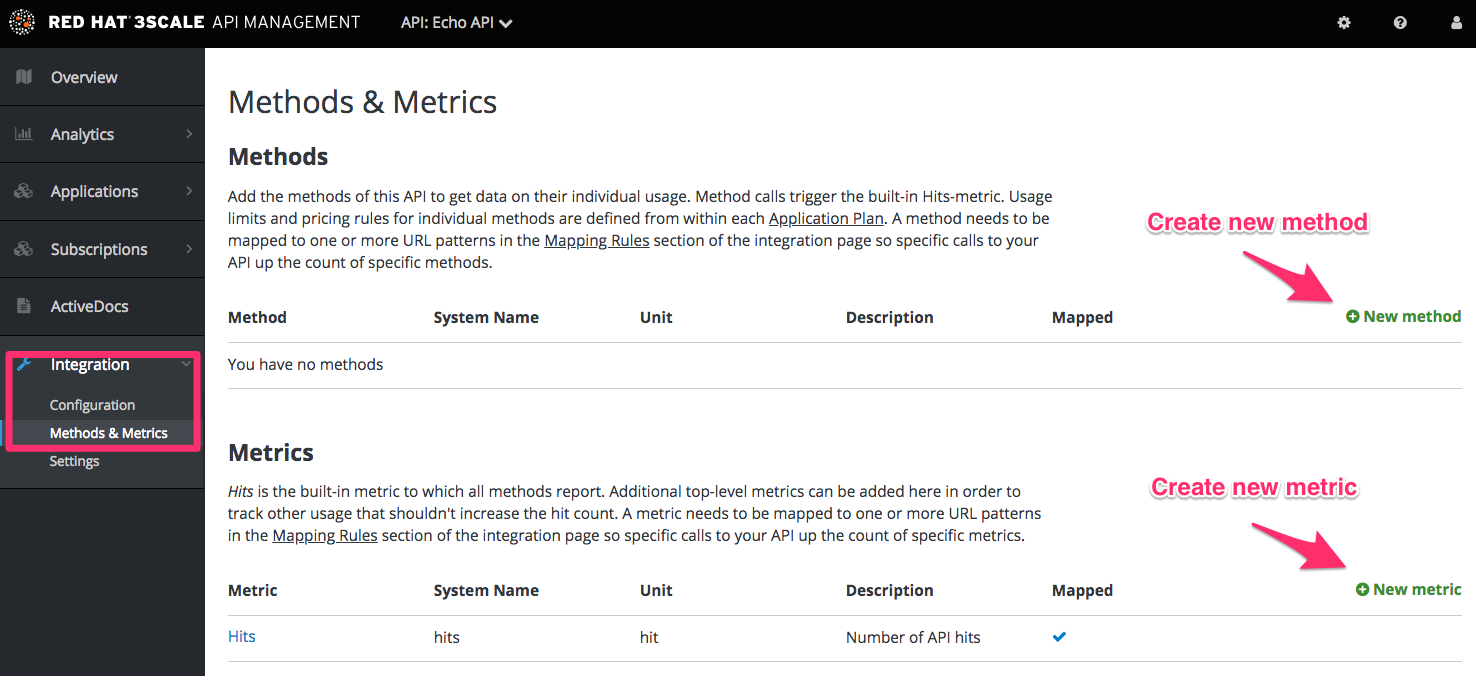
- Click on New method.
Specify the parameters:
- Friendly name is a short description of the method, it appears in different sections of the 3scale admin portal. This name must be unique for the service.
-
System name is the name of the method which will be used to report the usage through 3scale Service Management API. It also must be unique, and it should only contain alphanumeric characters, underscore
_, hyphen-and forward slash/without spaces. Other than that, you are free to decide how the system name will look like, it can be exactly the same as the endpoint ("/status"), or for example can include the method and the path ("GET_/status"). The Description field can be used for a more detailed description of the method, it is optional.
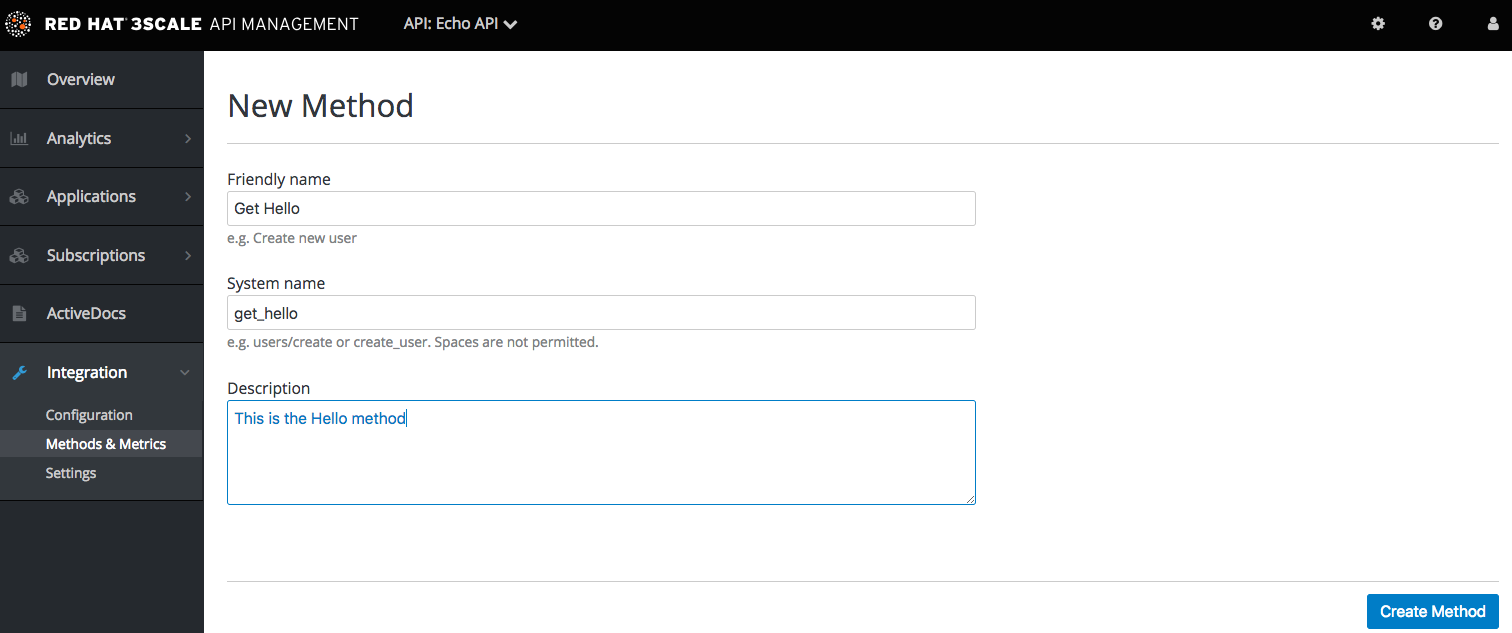
- Finally, click on Create Method button.
You can later change the definition of the method. Just click on the method name (in the column Method), update the fields and click on Update Method.
Be very careful with changing the system name of the methods and metrics or deleting them! It may break your already deployed 3scale integration, if there are mapping rules poining to the previous system name of the method.
For creating a new metric, click on New metric and provide the required parameters. When specifying the unit, use singular noun (e.g. "hit"), as it will be pluralized automatically in the Analytics charts.
These new methods and metrics will be available in all your current and future plans. You can now edit limits and pricing rules for them on each plan going to [Your_API_service] > Applications > Application Plans > [plan_you_want_to_edit].
1.2. Import your methods and metrics automatically
If your API has a lot of endpoints, we offer two additional ways of automatically creating your methods and metrics on 3scale:

'%20d='M201.5%20305.5c-13.8%200-24.9-11.1-24.9-24.6%200-13.8%2011.1-24.9%2024.9-24.9%2013.6%200%2024.6%2011.1%2024.6%2024.9%200%2013.6-11.1%2024.6-24.6%2024.6zM504%20256c0%20137-111%20248-248%20248S8%20393%208%20256%20119%208%20256%208s248%20111%20248%20248zm-132.3-41.2c-9.4%200-17.7%203.9-23.8%2010-22.4-15.5-52.6-25.5-86.1-26.6l17.4-78.3%2055.4%2012.5c0%2013.6%2011.1%2024.6%2024.6%2024.6%2013.8%200%2024.9-11.3%2024.9-24.9s-11.1-24.9-24.9-24.9c-9.7%200-18%205.8-22.1%2013.8l-61.2-13.6c-3-.8-6.1%201.4-6.9%204.4l-19.1%2086.4c-33.2%201.4-63.1%2011.3-85.5%2026.8-6.1-6.4-14.7-10.2-24.1-10.2-34.9%200-46.3%2046.9-14.4%2062.8-1.1%205-1.7%2010.2-1.7%2015.5%200%2052.6%2059.2%2095.2%20132%2095.2%2073.1%200%20132.3-42.6%20132.3-95.2%200-5.3-.6-10.8-1.9-15.8%2031.3-16%2019.8-62.5-14.9-62.5zM302.8%20331c-18.2%2018.2-76.1%2017.9-93.6%200-2.2-2.2-6.1-2.2-8.3%200-2.5%202.5-2.5%206.4%200%208.6%2022.8%2022.8%2087.3%2022.8%20110.2%200%202.5-2.2%202.5-6.1%200-8.6-2.2-2.2-6.1-2.2-8.3%200zm7.7-75c-13.6%200-24.6%2011.1-24.6%2024.9%200%2013.6%2011.1%2024.6%2024.6%2024.6%2013.8%200%2024.9-11.1%2024.9-24.6%200-13.8-11-24.9-24.9-24.9z'/%3e%3c/svg%3e)