 Red Hat Summit
このコンテンツは選択した言語では利用できません。
Chapter 8. Viewing CodeReady Workspaces operation logs
After the CodeReady Workspaces pods are created, you can view the operation logs of the application in the terminal or through the OpenShift console.
8.1. Viewing CodeReady Workspaces operation logs in the terminal
To view the operation logs on the terminal, run the following commands:
To obtain the names of the pods you must switch to project where CodeReady Workspaces is installed:
$ oc get pods -n=<OpenShift-project-name>This command shows the pods that have been created:
NAME                                  READY   STATUS    RESTARTS  AGE
codeready-6b4876f56c-qdlll            1/1     Running   0         24m
codeready-operator-56bc9599cc-pkqkn   1/1     Running   0         25m
keycloak-666c5f9f4b-zz88z             1/1     Running   0         24m
postgres-96875bcbd-tfxr4              1/1     Running   0         25m
To view the operation log for a specific pod, run:
$ oc logs <log-name>The output of this command for the codeready-6b4876f56c-qdll pod (as an example) is as follows:
2019-03-29 12:22:17,710[ost-startStop-1]  [INFO ] [unknown.jul.logger 49]               - UndertowServer reused (pre-existing).
-------------------------------------------------------------------
GMS: address=codeready-6b4876f56c-qdlll-42917, cluster=WorkspaceStateCache, physical address=fe80:0:0:0:42:acff:fe11:c%eth0:7801
-------------------------------------------------------------------
2019-03-29 12:22:21,784[ost-startStop-1]  [INFO ] [unknown.jul.logger 49]               - namespace [workspaces] set; clustering enabled
2019-03-29 12:22:21,785[ost-startStop-1]  [INFO ] [unknown.jul.logger 49]               - Starting UndertowServer on port 8888 for channel address: codeready-6b4876f56c-qdlll-34344
2019-03-29 12:22:21,786[ost-startStop-1]  [INFO ] [unknown.jul.logger 49]               - UndertowServer reused (pre-existing).
-------------------------------------------------------------------
GMS: address=codeready-6b4876f56c-qdlll-34344, cluster=WorkspaceLocks, physical address=fe80:0:0:0:42:acff:fe11:c%eth0:7802
-------------------------------------------------------------------
2019-03-29 12:22:25,822[ost-startStop-1]  [INFO ] [o.e.c.a.w.s.WorkspaceRuntimes 166]   - Configured factories for environments: '[openshift, kubernetes, dockerimage,
For operation logs of the other pods, run:
-
For the codeready-operator-56bc9599cc-pkqkn pod:
oc logs codeready-operator-56bc9599cc-pkqkn -
For the keycloak-666c5f9f4b-zz88z pod:
oc logs keycloak-666c5f9f4b-zz88z -
For the postgres-96875bcbd-tfxr4 pod:
oc logs postgres-96875bcbd-tfxr4
-
For the codeready-operator-56bc9599cc-pkqkn pod:
8.2. Viewing CodeReady Workspaces operation logs in the OpenShift console
To view the operation logs in the OpenShift console, take the following steps:
- Navigate to the OpenShift web console.
- In the My Projects pane, click workspaces.
- In the Overview tab, click the application that you want to view the logs for (example: codeready-operator, #1).
- In the Deployments > <application-name> window, click the name of the pod.
- Scroll down to the Pods section and click the <pod-name>.
Click Logs
Figure 8.1. Clicking View Log
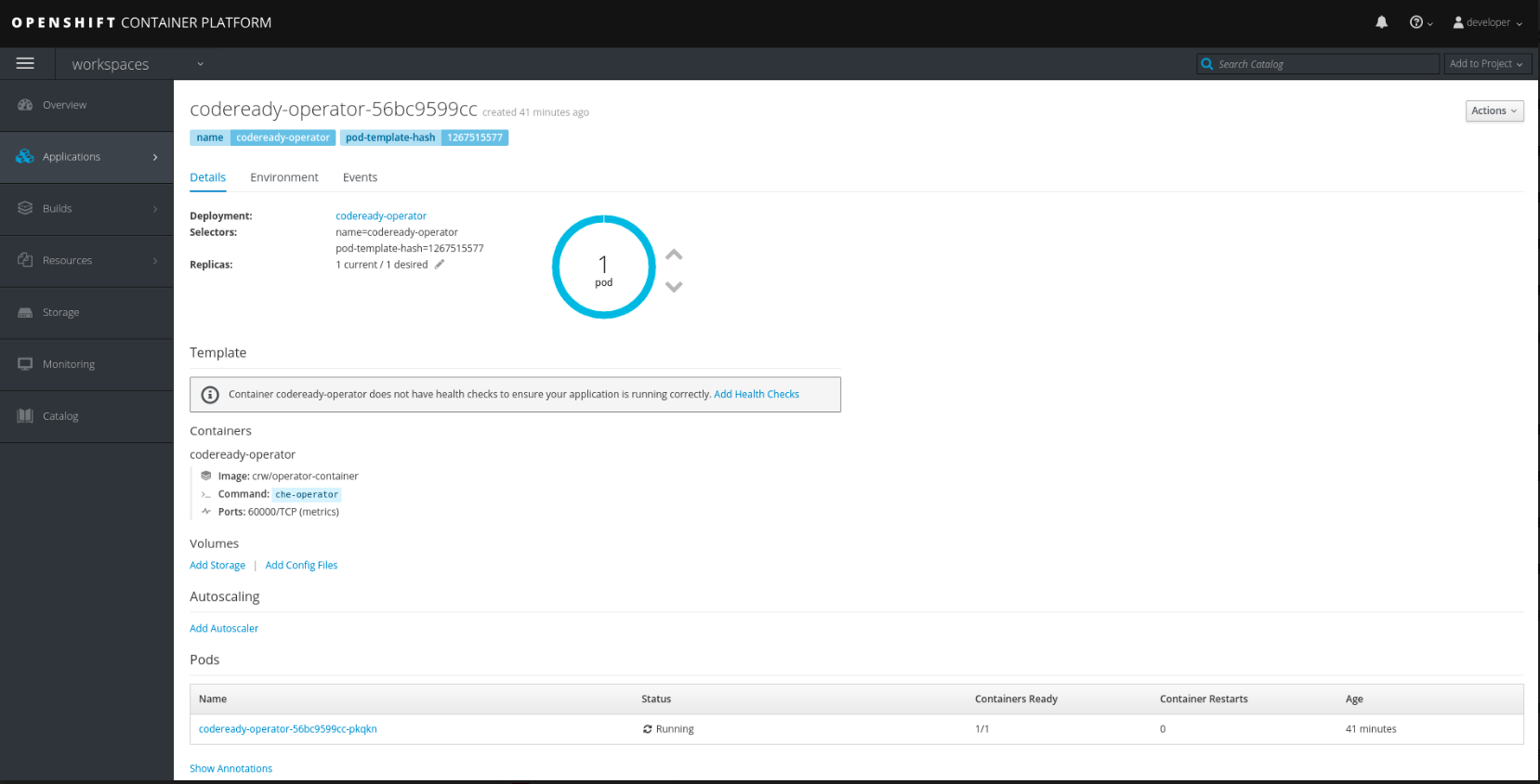
Click Follow to follow the log.
time="2019-03-29T12:22:00Z" level=info msg="Updating codeready CR with status: Che API: Unavailable"
time="2019-03-29T12:22:00Z" level=info msg="Custom resource codeready updated"
time="2019-03-29T12:22:00Z" level=info msg="Waiting for deployment codeready. Default timeout: 420 seconds"
time="2019-03-29T12:22:31Z" level=info msg="Deployment 'codeready' successfully scaled to 1"
time="2019-03-29T12:22:31Z" level=info msg="Updating codeready CR with Keycloak URL status: http://keycloak-workspaces.192.168.42.114.nip.io "
time="2019-03-29T12:22:31Z" level=info msg="Custom resource codeready updated"
time="2019-03-29T12:22:31Z" level=info msg="Updating codeready CR with status: CodeReady Workspaces server: Available"
time="2019-03-29T12:22:31Z" level=info msg="Custom resource codeready updated"
time="2019-03-29T12:22:31Z" level=info msg="Updating codeready CR with CodeReady Workspaces server URL: http://codeready-workspaces.192.168.42.114.nip.io "
time="2019-03-29T12:22:31Z" level=info msg="Custom resource codeready updated"
time="2019-03-29T12:22:31Z" level=info msg="CodeReady Workspaces is now available at: http://codeready-workspaces.192.168.42.114.nip.io "
time="2019-03-29T12:22:31Z" level=info msg="Updating codeready CR with version: 1.1-52"
time="2019-03-29T12:22:31Z" level=info msg="Custom resource codeready updated"

'%20d='M201.5%20305.5c-13.8%200-24.9-11.1-24.9-24.6%200-13.8%2011.1-24.9%2024.9-24.9%2013.6%200%2024.6%2011.1%2024.6%2024.9%200%2013.6-11.1%2024.6-24.6%2024.6zM504%20256c0%20137-111%20248-248%20248S8%20393%208%20256%20119%208%20256%208s248%20111%20248%20248zm-132.3-41.2c-9.4%200-17.7%203.9-23.8%2010-22.4-15.5-52.6-25.5-86.1-26.6l17.4-78.3%2055.4%2012.5c0%2013.6%2011.1%2024.6%2024.6%2024.6%2013.8%200%2024.9-11.3%2024.9-24.9s-11.1-24.9-24.9-24.9c-9.7%200-18%205.8-22.1%2013.8l-61.2-13.6c-3-.8-6.1%201.4-6.9%204.4l-19.1%2086.4c-33.2%201.4-63.1%2011.3-85.5%2026.8-6.1-6.4-14.7-10.2-24.1-10.2-34.9%200-46.3%2046.9-14.4%2062.8-1.1%205-1.7%2010.2-1.7%2015.5%200%2052.6%2059.2%2095.2%20132%2095.2%2073.1%200%20132.3-42.6%20132.3-95.2%200-5.3-.6-10.8-1.9-15.8%2031.3-16%2019.8-62.5-14.9-62.5zM302.8%20331c-18.2%2018.2-76.1%2017.9-93.6%200-2.2-2.2-6.1-2.2-8.3%200-2.5%202.5-2.5%206.4%200%208.6%2022.8%2022.8%2087.3%2022.8%20110.2%200%202.5-2.2%202.5-6.1%200-8.6-2.2-2.2-6.1-2.2-8.3%200zm7.7-75c-13.6%200-24.6%2011.1-24.6%2024.9%200%2013.6%2011.1%2024.6%2024.6%2024.6%2013.8%200%2024.9-11.1%2024.9-24.6%200-13.8-11-24.9-24.9-24.9z'/%3e%3c/svg%3e)