 Red Hat Summit
このコンテンツは選択した言語では利用できません。
Chapter 3. Upgrading Red Hat JBoss Fuse Tooling
Abstract
You can upgrade the JBoss Fuse Tooling through either JBoss Central or the standard Eclipse mechanism.
3.1. JBoss Central Upgrade Method
リンクのコピーリンクがクリップボードにコピーされました!
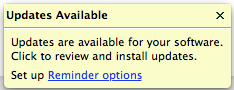
JBoss Central notifies you when it discovers that updates for installed software are available.
- Click in the center of the Updates Available notification window.
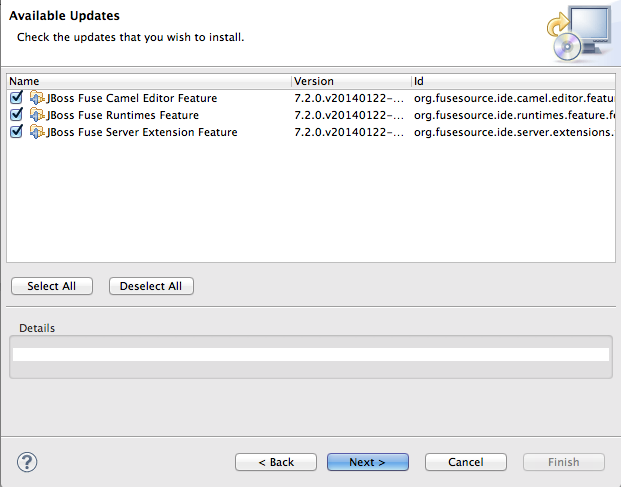
- Select the Fuse Tooling features (and other listed software, if any) you want to update.
- Click .Wait while the installer checks for dependencies and hardware requirements.
- In the Install Details window, review the items to be updated, and then click Next, if you are satisfied with your selection.
- Accept the terms of the license agreement, and then click Finish.
- If a Security Warning regarding unsigned content appears, disregard it and click OK.
- When prompted to restart JBoss Developer Studio, click .When JBoss Developer Studio restarts, the new version of the Red Hat JBoss Fuse Tooling will be available.

'%20d='M201.5%20305.5c-13.8%200-24.9-11.1-24.9-24.6%200-13.8%2011.1-24.9%2024.9-24.9%2013.6%200%2024.6%2011.1%2024.6%2024.9%200%2013.6-11.1%2024.6-24.6%2024.6zM504%20256c0%20137-111%20248-248%20248S8%20393%208%20256%20119%208%20256%208s248%20111%20248%20248zm-132.3-41.2c-9.4%200-17.7%203.9-23.8%2010-22.4-15.5-52.6-25.5-86.1-26.6l17.4-78.3%2055.4%2012.5c0%2013.6%2011.1%2024.6%2024.6%2024.6%2013.8%200%2024.9-11.3%2024.9-24.9s-11.1-24.9-24.9-24.9c-9.7%200-18%205.8-22.1%2013.8l-61.2-13.6c-3-.8-6.1%201.4-6.9%204.4l-19.1%2086.4c-33.2%201.4-63.1%2011.3-85.5%2026.8-6.1-6.4-14.7-10.2-24.1-10.2-34.9%200-46.3%2046.9-14.4%2062.8-1.1%205-1.7%2010.2-1.7%2015.5%200%2052.6%2059.2%2095.2%20132%2095.2%2073.1%200%20132.3-42.6%20132.3-95.2%200-5.3-.6-10.8-1.9-15.8%2031.3-16%2019.8-62.5-14.9-62.5zM302.8%20331c-18.2%2018.2-76.1%2017.9-93.6%200-2.2-2.2-6.1-2.2-8.3%200-2.5%202.5-2.5%206.4%200%208.6%2022.8%2022.8%2087.3%2022.8%20110.2%200%202.5-2.2%202.5-6.1%200-8.6-2.2-2.2-6.1-2.2-8.3%200zm7.7-75c-13.6%200-24.6%2011.1-24.6%2024.9%200%2013.6%2011.1%2024.6%2024.6%2024.6%2013.8%200%2024.9-11.1%2024.9-24.6%200-13.8-11-24.9-24.9-24.9z'/%3e%3c/svg%3e)