 Red Hat Summit
このコンテンツは選択した言語では利用できません。
13.2. Deploying EAR and WAR Files
Important
Newly-deployed content may not show up in the JBoss ON inventory for as long as 24 hours, even if it was successfully created. By default, discovery scans for services are only made every 24 hours.
To see it immediately, run an execute prompt command operation on the agent and enter the
discovery command. This runs a discovery scan.
- Search for the JBoss server instance to which to deploy the EAR or WAR.
- On the details page for the selected JBoss server instance, open the Inventory tab.
- In the Create New menu at the bottom, select the item for or , as appropriate.

- Enter the version number.
 This is not used for the resource. The actual version number is calculated based on the spec version and implementation version in
MANIFEST.MF, if any are given, or the calculated SHA-256 value for the package itself:SPEC(IMPLEMENTATION)[sha256=abcd1234]If no version numbers are defined inMANIFEST.MF, then the SHA value is used. The SHA value is always used to identify the package version internally.Note
When the EAR or WAR file is exploded after it is deployed, theMANIFEST.MFfile is updated to include the calculated SHA version number. For example:Manifest-Version: 1.0 Created-By: Apache Maven RHQ-Sha256: 570f196c4a1025a717269d16d11d6f37 ...For more information on package versioning, see "Deploying Applications and Content". - Upload the EAR/WAR file.

- Enter the information for the application to be deployed.

- Whether the file should be exploded (unzipped) when it is deployed.
- The path to the directory to which to deploy the EAR or WAR package. The destination directory is relative to the JBoss server instance installation directory; this cannot contain an absolute path or go up a parent directory.
- Whether to back up any existing file with the same name in the target directory.
Once the EAR/WAR file is confirmed, the new child resource is listed in the Child History subtab of the Inventory tab.
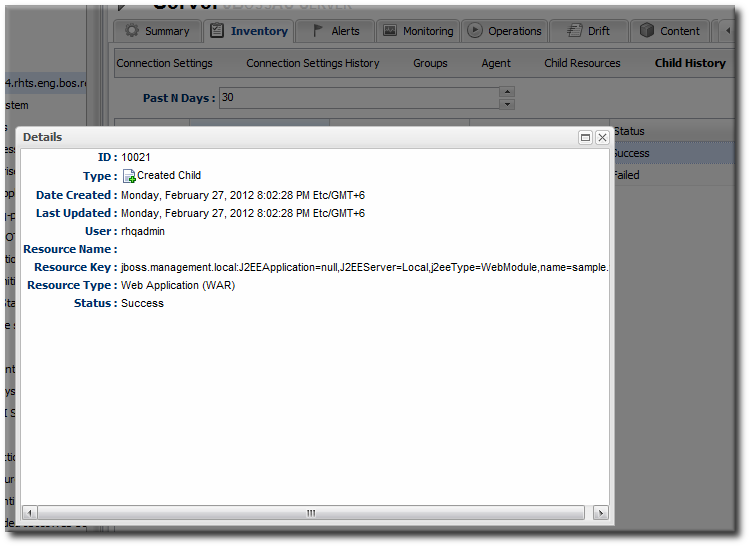
Figure 13.1. WAR Child Resource

'%20d='M201.5%20305.5c-13.8%200-24.9-11.1-24.9-24.6%200-13.8%2011.1-24.9%2024.9-24.9%2013.6%200%2024.6%2011.1%2024.6%2024.9%200%2013.6-11.1%2024.6-24.6%2024.6zM504%20256c0%20137-111%20248-248%20248S8%20393%208%20256%20119%208%20256%208s248%20111%20248%20248zm-132.3-41.2c-9.4%200-17.7%203.9-23.8%2010-22.4-15.5-52.6-25.5-86.1-26.6l17.4-78.3%2055.4%2012.5c0%2013.6%2011.1%2024.6%2024.6%2024.6%2013.8%200%2024.9-11.3%2024.9-24.9s-11.1-24.9-24.9-24.9c-9.7%200-18%205.8-22.1%2013.8l-61.2-13.6c-3-.8-6.1%201.4-6.9%204.4l-19.1%2086.4c-33.2%201.4-63.1%2011.3-85.5%2026.8-6.1-6.4-14.7-10.2-24.1-10.2-34.9%200-46.3%2046.9-14.4%2062.8-1.1%205-1.7%2010.2-1.7%2015.5%200%2052.6%2059.2%2095.2%20132%2095.2%2073.1%200%20132.3-42.6%20132.3-95.2%200-5.3-.6-10.8-1.9-15.8%2031.3-16%2019.8-62.5-14.9-62.5zM302.8%20331c-18.2%2018.2-76.1%2017.9-93.6%200-2.2-2.2-6.1-2.2-8.3%200-2.5%202.5-2.5%206.4%200%208.6%2022.8%2022.8%2087.3%2022.8%20110.2%200%202.5-2.2%202.5-6.1%200-8.6-2.2-2.2-6.1-2.2-8.3%200zm7.7-75c-13.6%200-24.6%2011.1-24.6%2024.9%200%2013.6%2011.1%2024.6%2024.6%2024.6%2013.8%200%2024.9-11.1%2024.9-24.6%200-13.8-11-24.9-24.9-24.9z'/%3e%3c/svg%3e)